
Nacos2.0配置灰度發(fā)布原理源碼解析
本文作者:寧與(包冬慶),目前在【阿里云云原生中間件】團(tuán)隊(duì)實(shí)習(xí)
今天分享的是我們組的一個(gè)實(shí)習(xí)生寫(xiě)的一篇源碼解析文章,小伙子實(shí)習(xí)期間在社區(qū)Nacos2.0的基礎(chǔ)上對(duì)灰度發(fā)布的能力進(jìn)行了增強(qiáng),并完成了MSE Nacos2.0上從管控到內(nèi)核的灰度發(fā)布能力的研發(fā)。以下是他對(duì)配置發(fā)布流程的代碼解析,相信看完之后你會(huì)感嘆:現(xiàn)在的實(shí)習(xí)生都有這個(gè)水平了嗎?
說(shuō)到灰度發(fā)布,就不得不提到阿里的安全生產(chǎn)三板斧:可監(jiān)控、可灰度、可回滾。在阿里內(nèi)部,對(duì)于安全生產(chǎn)是高度重視的,灰度可以說(shuō)是發(fā)布之前的必備流程。因此,作為阿里的配置中心,Nacos同樣支持了配置灰度的功能,可以通過(guò)控制臺(tái)進(jìn)行配置的灰度推送、回滾,從而實(shí)現(xiàn)安全的配置發(fā)布。一般來(lái)說(shuō),我們按照下圖所示流程進(jìn)行配置的安全修改。只有在小規(guī)模機(jī)器上驗(yàn)證配置按預(yù)期生效之后才會(huì)正式發(fā)布配置,否則就回滾灰度配置。
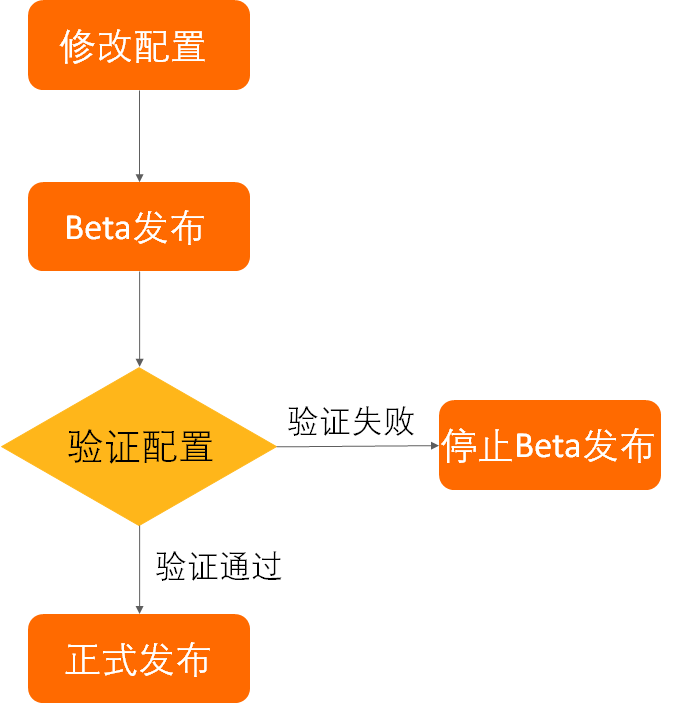
配置灰度發(fā)布流程
社區(qū)Nacos的灰度是基于IP的方式進(jìn)行的,用戶(hù)需要在控制臺(tái),選擇需要灰度的配置,然后新建灰度配置,選擇灰度機(jī)器的IP進(jìn)行配置推送。整個(gè)交互流程如下圖所示。
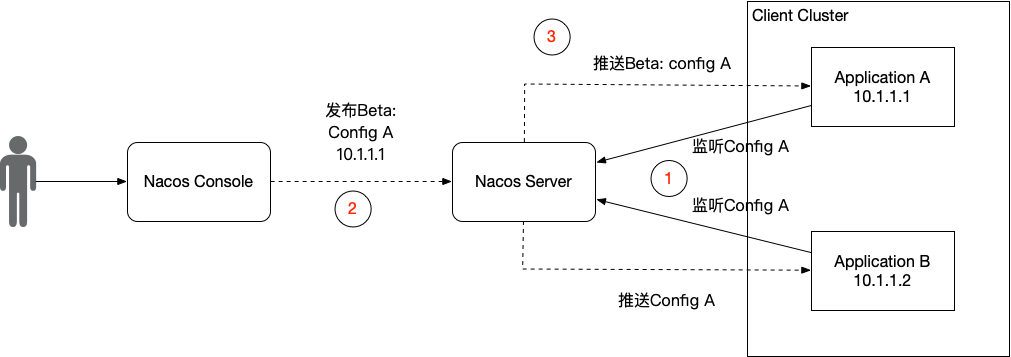
具體的使用方法,如果使用的是自建的社區(qū)Nacos,可以訪問(wèn)http://ip:port/nacos進(jìn)入控制臺(tái),在配置管理的編輯頁(yè)面進(jìn)行配置灰度發(fā)布,如下圖。
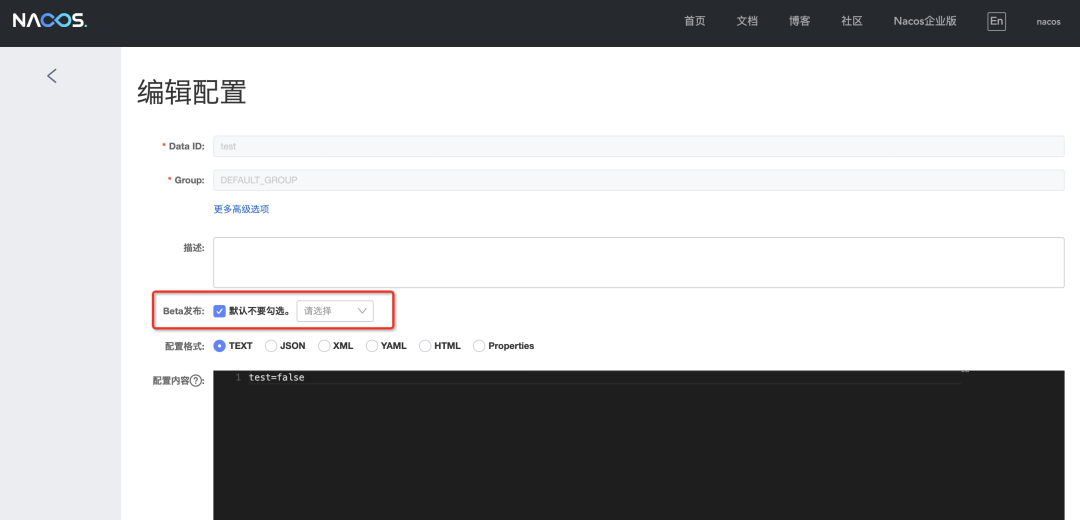
如果使用的是阿里云的MSE微服務(wù)引擎,可以查看MSE配置灰度發(fā)布幫助文檔了解使用方法,目前在Nacos2.0專(zhuān)業(yè)版上已經(jīng)支持灰度功能,在MSE控制臺(tái)打開(kāi)Beta按鈕即可,如下圖所示。
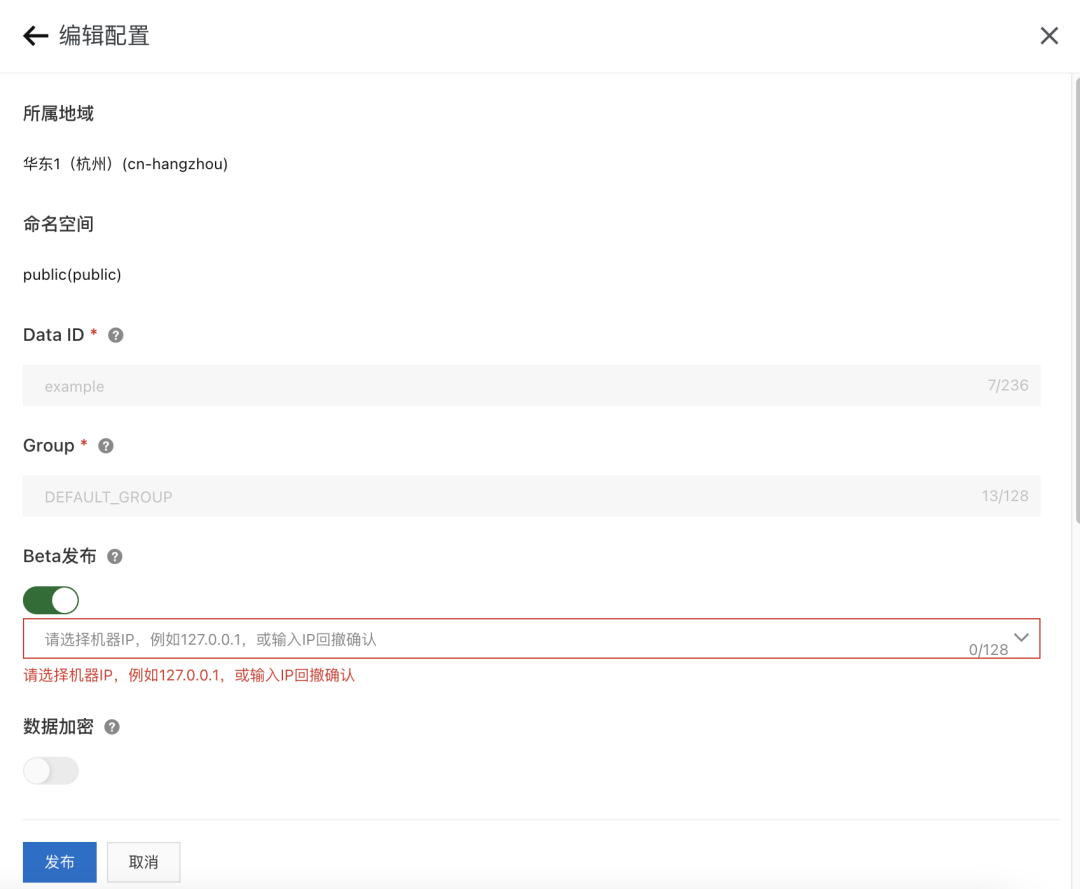
Nacos灰度原理
Nacos的灰度發(fā)布原理其實(shí)并不復(fù)雜,本質(zhì)就如同下面這張流程圖。

乍一看,這個(gè)流程好復(fù)雜,實(shí)際上定睛一看,好像也沒(méi)啥。整個(gè)過(guò)程就是Client、Server和Console之間的交互。Client端監(jiān)聽(tīng)Server上的配置,建立長(zhǎng)連接并上報(bào)自己的客戶(hù)端信息,例如IP地址。Console負(fù)責(zé)進(jìn)行配置灰度的調(diào)用,將用戶(hù)所需要的灰度配置請(qǐng)求發(fā)送到Server端。然后Server端根據(jù)用戶(hù)的灰度配置請(qǐng)求中的IP地址,過(guò)濾與客戶(hù)端的長(zhǎng)連接,然后將灰度配置定向推送到對(duì)應(yīng)IP的客戶(hù)端中即可。下面筆者從長(zhǎng)連接的建立到配置灰度,進(jìn)行詳細(xì)的源碼分析。
長(zhǎng)連接建立
在Nacos2.0版本之前,Nacos主要采用長(zhǎng)輪詢(xún)的方式在客戶(hù)端拉取服務(wù)端的配置信息。而在Nacos2.0版本中,引入了基于gRPC的長(zhǎng)連接模型來(lái)提升配置監(jiān)聽(tīng)的性能,客戶(hù)端和服務(wù)端會(huì)建立長(zhǎng)連接來(lái)監(jiān)聽(tīng)配置的變更,一旦服務(wù)端有配置變更,就會(huì)將配置信息推送到客戶(hù)端中。在Nacos源碼中,這一過(guò)程主要涉及到兩個(gè)組件之間的交互,即com.alibaba.nacos.common.remote.client.grpc包下的GrpcSdkClient類(lèi)和com.alibaba.nacos.core.remote.grpc包下的GrpcBiStreamRequestAcceptor類(lèi)。然而,GrpcSdkClient中沒(méi)有定義具體的連接邏輯,其主要邏輯在其父類(lèi)GrpcClient中。下面這段代碼就是客戶(hù)端連接服務(wù)端的核心代碼,位于GrpcClient的connectToServer方法。
    @Override
    public Connection connectToServer(ServerInfo serverInfo) {
        try {
            // ......
            int port = serverInfo.getServerPort() + rpcPortOffset();

            // 創(chuàng)建一個(gè)Grpc的Stub
            RequestGrpc.RequestFutureStub newChannelStubTemp = createNewChannelStub(serverInfo.getServerIp(), port);

            if (newChannelStubTemp != null) {

                // 檢查服務(wù)端是否可用
                Response response = serverCheck(serverInfo.getServerIp(), port, newChannelStubTemp);
                if (response == null || !(response instanceof ServerCheckResponse)) {
                    shuntDownChannel((ManagedChannel) newChannelStubTemp.getChannel());
                    return null;
                }

                // 創(chuàng)建一個(gè)Grpc的Stream
                BiRequestStreamGrpc.BiRequestStreamStub biRequestStreamStub = BiRequestStreamGrpc
                    .newStub(newChannelStubTemp.getChannel());

                // 創(chuàng)建連接信息,保存Grpc的連接信息,也就是長(zhǎng)連接的一個(gè)holder
                GrpcConnection grpcConn = new GrpcConnection(serverInfo, grpcExecutor);
                grpcConn.setConnectionId(((ServerCheckResponse) response).getConnectionId());

                // 創(chuàng)建stream請(qǐng)求同時(shí)綁定到當(dāng)前連接中
                StreamObserver<Payload> payloadStreamObserver = bindRequestStream(biRequestStreamStub, grpcConn);

                // 綁定Grpc相關(guān)連接信息
                grpcConn.setPayloadStreamObserver(payloadStreamObserver);
                grpcConn.setGrpcFutureServiceStub(newChannelStubTemp);
                grpcConn.setChannel((ManagedChannel) newChannelStubTemp.getChannel());

                // 發(fā)送一個(gè)初始化連接請(qǐng)求,用于上報(bào)客戶(hù)端的一些信息,例如標(biāo)簽、客戶(hù)端版本等
                ConnectionSetupRequest conSetupRequest = new ConnectionSetupRequest();
                conSetupRequest.setClientVersion(VersionUtils.getFullClientVersion());
                conSetupRequest.setLabels(super.getLabels());
                conSetupRequest.setAbilities(super.clientAbilities);
                conSetupRequest.setTenant(super.getTenant());
                grpcConn.sendRequest(conSetupRequest);

                // 等待連接建立成功
                Thread.sleep(100L);
                return grpcConn;
            }
            return null;
        } catch (Exception e) {
            LOGGER.error("[{}]Fail to connect to server!,error={}", GrpcClient.this.getName(), e);
        }
        return null;
    }
上面這段代碼主要功能有兩個(gè),一個(gè)是與服務(wù)端建立gRPC的長(zhǎng)連接,另一個(gè)功能主要是初始化連接,后者是實(shí)現(xiàn)配置灰度發(fā)布的前提。在上文中有提到,配置灰度發(fā)布的過(guò)程中,需要根據(jù)控制臺(tái)的灰度配置請(qǐng)求中的IP信息過(guò)濾長(zhǎng)連接,在服務(wù)端就是根據(jù)連接建立初始化時(shí)上報(bào)的信息實(shí)現(xiàn)的過(guò)濾。從上面的代碼中可以看到,ConnectionSetupRequest作為一個(gè)初始化請(qǐng)求,攜帶著客戶(hù)端版本、標(biāo)簽等信息,但是好像并沒(méi)有攜帶IP地址的信息。實(shí)際上,ConnectionSetupRequest也確實(shí)沒(méi)有攜帶IP地址信息。因?yàn)樵贜acos設(shè)計(jì)中,采用Request來(lái)表明客戶(hù)端的請(qǐng)求信息,而IP地址更像是屬于連接層的信息,應(yīng)該屬于連接的元信息,因此并沒(méi)有放在Request中進(jìn)行顯式的設(shè)置,而是在發(fā)送請(qǐng)求時(shí)自動(dòng)的作為Metadata信息發(fā)送到服務(wù)端中。可以看一下com.alibaba.nacos.common.remote.client.grpc包下的GrpcConnection的sendRequest方法,該方法接收一個(gè)Request請(qǐng)求作為參數(shù),將請(qǐng)求發(fā)送給服務(wù)端。
    public void sendRequest(Request request) {
        // 將request轉(zhuǎn)換為Grpc的Payload
        Payload convert = GrpcUtils.convert(request);
        // 通過(guò)Grpc的流發(fā)送請(qǐng)求
        payloadStreamObserver.onNext(convert);
    }
IP地址的設(shè)置,就在com.alibaba.nacos.common.remote.client.grpc包下的GrpcUtils的convert方法中,該方法主要將一個(gè)Request轉(zhuǎn)換為gRPC的Payload。
    /**
     * convert request to payload.
     *
     * @param request request.
     * @return payload.
     */
    public static Payload convert(Request request) {
        // 設(shè)置元信息
        Metadata newMeta = Metadata.newBuilder().setType(request.getClass().getSimpleName())
                .setClientIp(NetUtils.localIP()).putAllHeaders(request.getHeaders()).build();
        request.clearHeaders();

        // 轉(zhuǎn)換為json
        String jsonString = toJson(request);

        Payload.Builder builder = Payload.newBuilder();
     // 創(chuàng)建Payload
        return builder
                .setBody(Any.newBuilder().setValue(ByteString.copyFrom(jsonString, Charset.forName(Constants.ENCODE))))
                .setMetadata(newMeta).build();

    }
可以看到,這里通過(guò)NetUtils.localIP()方法獲取客戶(hù)端的IP信息,并存入到Metadata中,跟隨Payload一起上報(bào)給服務(wù)端。到這里,客戶(hù)端這里的連接過(guò)程就暫時(shí)完成了,下面介紹一下服務(wù)端接收到連接請(qǐng)求的響應(yīng)過(guò)程。
在服務(wù)端,主要通過(guò)GrpcBiStreamRequestAcceptor的requestBiStream方法接收客戶(hù)端請(qǐng)求,如下所示。
    @Override
    public StreamObserver<Payload> requestBiStream(StreamObserver<Payload> responseObserver) {

        StreamObserver<Payload> streamObserver = new StreamObserver<Payload>() {

            final String connectionId = CONTEXT_KEY_CONN_ID.get();

            final Integer localPort = CONTEXT_KEY_CONN_LOCAL_PORT.get();

            final int remotePort = CONTEXT_KEY_CONN_REMOTE_PORT.get();

            String remoteIp = CONTEXT_KEY_CONN_REMOTE_IP.get();

            String clientIp = "";

            @Override
            public void onNext(Payload payload) {
                // 獲取客戶(hù)端IP
                clientIp = payload.getMetadata().getClientIp();
                traceDetailIfNecessary(payload);

                Object parseObj;
                try {
                    parseObj = GrpcUtils.parse(payload);
                } catch (Throwable throwable) {
                    Loggers.REMOTE_DIGEST
                            .warn("[{}]Grpc request bi stream,payload parse error={}", connectionId, throwable);
                    return;
                }

                if (parseObj == null) {
                    Loggers.REMOTE_DIGEST
                            .warn("[{}]Grpc request bi stream,payload parse null ,body={},meta={}", connectionId,
                                    payload.getBody().getValue().toStringUtf8(), payload.getMetadata());
                    return;
                }

                // 處理初始化請(qǐng)求
                if (parseObj instanceof ConnectionSetupRequest) {
                    ConnectionSetupRequest setUpRequest = (ConnectionSetupRequest) parseObj;
                    Map<String, String> labels = setUpRequest.getLabels();
                    String appName = "-";
                    if (labels != null && labels.containsKey(Constants.APPNAME)) {
                        appName = labels.get(Constants.APPNAME);
                    }

                    ConnectionMeta metaInfo = new ConnectionMeta(connectionId, payload.getMetadata().getClientIp(),
                            remoteIp, remotePort, localPort, ConnectionType.GRPC.getType(),
                            setUpRequest.getClientVersion(), appName, setUpRequest.getLabels());
                    metaInfo.setTenant(setUpRequest.getTenant());

                    // 服務(wù)端的長(zhǎng)連接信息holder
                    Connection connection = new GrpcConnection(metaInfo, responseObserver, CONTEXT_KEY_CHANNEL.get());
                    connection.setAbilities(setUpRequest.getAbilities());
                    boolean rejectSdkOnStarting = metaInfo.isSdkSource() && !ApplicationUtils.isStarted();

                    // 注冊(cè)connection到connectionManager中
                    if (rejectSdkOnStarting || !connectionManager.register(connectionId, connection)) {
                        //Not register to the connection manager if current server is over limit or server is starting.
                        try {
                            Loggers.REMOTE_DIGEST.warn("[{}]Connection register fail,reason:{}", connectionId,
                                    rejectSdkOnStarting ? " server is not started" : " server is over limited.");
                            connection.request(new ConnectResetRequest(), 3000L);
                            connection.close();
                        } catch (Exception e) {
                            //Do nothing.
                            if (connectionManager.traced(clientIp)) {
                                Loggers.REMOTE_DIGEST
                                        .warn("[{}]Send connect reset request error,error={}", connectionId, e);
                            }
                        }
                    }

                } else if (parseObj instanceof Response) {
                    Response response = (Response) parseObj;
                    if (connectionManager.traced(clientIp)) {
                        Loggers.REMOTE_DIGEST
                                .warn("[{}]Receive response of server request  ,response={}", connectionId, response);
                    }
                    RpcAckCallbackSynchronizer.ackNotify(connectionId, response);
                    connectionManager.refreshActiveTime(connectionId);
                } else {
                    Loggers.REMOTE_DIGEST
                            .warn("[{}]Grpc request bi stream,unknown payload receive ,parseObj={}", connectionId,
                                    parseObj);
                }

            }

            // ......
        };

        return streamObserver;
    }
這里我們主要看onNext方法,其負(fù)責(zé)處理客戶(hù)端的請(qǐng)求信息,即Payload信息。如果是初始化連接的請(qǐng)求ConnectionSetupRequest,就會(huì)記錄與客戶(hù)端之間的長(zhǎng)連接信息,并注冊(cè)到ConnectionManager中。ConnectionManager是服務(wù)端維護(hù)所有客戶(hù)端連接信息的類(lèi),持有所有的長(zhǎng)連接信息,后續(xù)的配置推送等都需要通過(guò)ConnectionManager獲取長(zhǎng)連接信息。可以簡(jiǎn)單看一下ConnectionManager的源碼,在com.alibaba.nacos.core.remote包下,如下所示。
/**
 * connect manager.
 *
 * @author liuzunfei
 * @version $Id: ConnectionManager.java, v 0.1 2020年07月13日 7:07 PM liuzunfei Exp $
 */
@Service
public class ConnectionManager extends Subscriber<ConnectionLimitRuleChangeEvent> {

    // ......

    Map<String, Connection> connections = new ConcurrentHashMap<String, Connection>();

    // ......

    /**
     * register a new connect.
     *
     * @param connectionId connectionId
     * @param connection   connection
     */
    public synchronized boolean register(String connectionId, Connection connection) {

        if (connection.isConnected()) {
            if (connections.containsKey(connectionId)) {
                return true;
            }
            if (!checkLimit(connection)) {
                return false;
            }
            if (traced(connection.getMetaInfo().clientIp)) {
                connection.setTraced(true);
            }
            // 注冊(cè)connection
            connections.put(connectionId, connection);
            connectionForClientIp.get(connection.getMetaInfo().clientIp).getAndIncrement();

            clientConnectionEventListenerRegistry.notifyClientConnected(connection);
            Loggers.REMOTE_DIGEST
                    .info("new connection registered successfully, connectionId = {},connection={} ", connectionId,
                            connection);
            return true;

        }
        return false;

    }

    // ......

}
可以看到,在ConnectionManager中,維護(hù)了一個(gè)Map。在調(diào)用register方法時(shí),將Connection注冊(cè)到Map中,以供后續(xù)的邏輯使用。這里有一個(gè)細(xì)節(jié),注冊(cè)到ConnectionManager中的GrpcConnection與客戶(hù)端持有的GrpcConnection不是一個(gè)類(lèi)。這里的GrpcConnection位于com.alibaba.nacos.core.remote.grpc包,而客戶(hù)端的GrpcConnection位于com.alibaba.nacos.common.remote.client.grpc包。事實(shí)上與客戶(hù)端有關(guān)的gRPC相關(guān)的類(lèi)都在com.alibaba.nacos.common.remote.client.grpc。com.alibaba.nacos.core.remote.grpc則是服務(wù)端的相關(guān)實(shí)現(xiàn)。
到這里,長(zhǎng)連接建立的核心流程已經(jīng)介紹完了,接下來(lái)筆者將詳細(xì)介紹一下配置灰度的推送過(guò)程,由于Nacos在這里使用了發(fā)布訂閱模式以及異步的方法調(diào)用,理解起來(lái)可能稍微要麻煩一點(diǎn)。
灰度推送
在Nacos中,提供了一組OpenAPI進(jìn)行配置的管理,配置灰度發(fā)布也是其中一個(gè)功能,可以在com.alibaba.nacos.config.server.controller包下的ConfigController中查看,包括了BetaConfig的發(fā)布、停止和查詢(xún),接下來(lái)筆者將會(huì)一一介紹他們的原理。
創(chuàng)建BetaConfig
創(chuàng)建BetaConfig的API代碼如下,一個(gè)簡(jiǎn)單的Web的API。
    /**
     * Adds or updates non-aggregated data.
     *
     * @throws NacosException NacosException.
     */
    @PostMapping
    @Secured(action = ActionTypes.WRITE, parser = ConfigResourceParser.class)
    public Boolean publishConfig(HttpServletRequest request, HttpServletResponse response,
            @RequestParam(value = "dataId") String dataId, @RequestParam(value = "group") String group,
            @RequestParam(value = "tenant", required = false, defaultValue = StringUtils.EMPTY) String tenant,
            @RequestParam(value = "content") String content, @RequestParam(value = "tag", required = false) String tag,
            @RequestParam(value = "appName", required = false) String appName,
            @RequestParam(value = "src_user", required = false) String srcUser,
            @RequestParam(value = "config_tags", required = false) String configTags,
            @RequestParam(value = "desc", required = false) String desc,
            @RequestParam(value = "use", required = false) String use,
            @RequestParam(value = "effect", required = false) String effect,
            @RequestParam(value = "type", required = false) String type,
            @RequestParam(value = "schema", required = false) String schema) throws NacosException {

        final String srcIp = RequestUtil.getRemoteIp(request);
        final String requestIpApp = RequestUtil.getAppName(request);
        srcUser = RequestUtil.getSrcUserName(request);
        //check type
        if (!ConfigType.isValidType(type)) {
            type = ConfigType.getDefaultType().getType();
        }
        // check tenant
        ParamUtils.checkTenant(tenant);
        ParamUtils.checkParam(dataId, group, "datumId", content);
        ParamUtils.checkParam(tag);
        Map<String, Object> configAdvanceInfo = new HashMap<String, Object>(10);
        MapUtil.putIfValNoNull(configAdvanceInfo, "config_tags", configTags);
        MapUtil.putIfValNoNull(configAdvanceInfo, "desc", desc);
        MapUtil.putIfValNoNull(configAdvanceInfo, "use", use);
        MapUtil.putIfValNoNull(configAdvanceInfo, "effect", effect);
        MapUtil.putIfValNoNull(configAdvanceInfo, "type", type);
        MapUtil.putIfValNoNull(configAdvanceInfo, "schema", schema);
        ParamUtils.checkParam(configAdvanceInfo);

        if (AggrWhitelist.isAggrDataId(dataId)) {
            LOGGER.warn("[aggr-conflict] {} attempt to publish single data, {}, {}", RequestUtil.getRemoteIp(request),
                    dataId, group);
            throw new NacosException(NacosException.NO_RIGHT, "dataId:" + dataId + " is aggr");
        }

        final Timestamp time = TimeUtils.getCurrentTime();

        // 目標(biāo)灰度機(jī)器的IP地址。
        String betaIps = request.getHeader("betaIps");

        ConfigInfo configInfo = new ConfigInfo(dataId, group, tenant, appName, content);
        configInfo.setType(type);
        if (StringUtils.isBlank(betaIps)) {
            if (StringUtils.isBlank(tag)) {
                persistService.insertOrUpdate(srcIp, srcUser, configInfo, time, configAdvanceInfo, false);
                ConfigChangePublisher
                        .notifyConfigChange(new ConfigDataChangeEvent(false, dataId, group, tenant, time.getTime()));
            } else {
                persistService.insertOrUpdateTag(configInfo, tag, srcIp, srcUser, time, false);
                ConfigChangePublisher.notifyConfigChange(
                        new ConfigDataChangeEvent(false, dataId, group, tenant, tag, time.getTime()));
            }
        } else {
            // 發(fā)布Beta 配置
            persistService.insertOrUpdateBeta(configInfo, betaIps, srcIp, srcUser, time, false);

            // 通知配置變更
            ConfigChangePublisher
                    .notifyConfigChange(new ConfigDataChangeEvent(true, dataId, group, tenant, time.getTime()));
        }
        ConfigTraceService
                .logPersistenceEvent(dataId, group, tenant, requestIpApp, time.getTime(), InetUtils.getSelfIP(),
                        ConfigTraceService.PERSISTENCE_EVENT_PUB, content);
        return true;
    }
該方法接收一個(gè)創(chuàng)建配置的請(qǐng)求,包括配置的data-id、content等信息。從代碼中可以看出,該方法是通過(guò)判斷請(qǐng)求的Header中有無(wú)betaIps的值來(lái)確定是發(fā)布正式配置還是Beta配置的。如果betaIps的值不為空,則表明待發(fā)布的配置是一個(gè)Beta配置。而配置發(fā)布的過(guò)程,實(shí)際上就是把配置插入或者更新到數(shù)據(jù)庫(kù)中。在Nacos中,正式配置和灰度配置是分別存儲(chǔ)在不同的表中的,一旦發(fā)布就會(huì)通過(guò)ConfigChangePublisher發(fā)布一個(gè)ConfigDataChangeEvent事件,然后由訂閱了該事件的監(jiān)聽(tīng)者推送配置信息到客戶(hù)端。ConfigDataChangeEvent的監(jiān)聽(tīng)者是AsyncNotifyService類(lèi),位于com.alibaba.nacos.config.server.service.notify包下,該類(lèi)主要用作執(zhí)行集群之間的數(shù)據(jù)Dump操作。該類(lèi)在初始化的時(shí)候,會(huì)向事件中心NotifyCenter注冊(cè)一個(gè)監(jiān)聽(tīng)者,用以監(jiān)聽(tīng)數(shù)據(jù)變更事件并異步執(zhí)行數(shù)據(jù)的Dump操作,如下所示。
/**
 * Async notify service.
 *
 * @author Nacos
 */
@Service
public class AsyncNotifyService {

    private static final Logger LOGGER = LoggerFactory.getLogger(AsyncNotifyService.class);

    private final NacosAsyncRestTemplate nacosAsyncRestTemplate = HttpClientManager.getNacosAsyncRestTemplate();

    private static final int MIN_RETRY_INTERVAL = 500;

    private static final int INCREASE_STEPS = 1000;

    private static final int MAX_COUNT = 6;

    @Autowired
    private DumpService dumpService;

    @Autowired
    private ConfigClusterRpcClientProxy configClusterRpcClientProxy;

    private ServerMemberManager memberManager;

    @Autowired
    public AsyncNotifyService(ServerMemberManager memberManager) {
        this.memberManager = memberManager;

        // Register ConfigDataChangeEvent to NotifyCenter.
        NotifyCenter.registerToPublisher(ConfigDataChangeEvent.class, NotifyCenter.ringBufferSize);

        // Register A Subscriber to subscribe ConfigDataChangeEvent.
        NotifyCenter.registerSubscriber(new Subscriber() {

            @Override
            public void onEvent(Event event) {
                // Generate ConfigDataChangeEvent concurrently
                if (event instanceof ConfigDataChangeEvent) {
                    ConfigDataChangeEvent evt = (ConfigDataChangeEvent) event;
                    long dumpTs = evt.lastModifiedTs;
                    String dataId = evt.dataId;
                    String group = evt.group;
                    String tenant = evt.tenant;
                    String tag = evt.tag;
                    Collection<Member> ipList = memberManager.allMembers();

                    // In fact, any type of queue here can be
                    Queue<NotifySingleTask> httpQueue = new LinkedList<NotifySingleTask>();
                    Queue<NotifySingleRpcTask> rpcQueue = new LinkedList<NotifySingleRpcTask>();

                    for (Member member : ipList) {
                        // 判斷是否是長(zhǎng)輪詢(xún)
                        if (!MemberUtil.isSupportedLongCon(member)) {
                            // 添加一個(gè)長(zhǎng)輪詢(xún)的異步dump任務(wù)
                            httpQueue.add(new NotifySingleTask(dataId, group, tenant, tag, dumpTs, member.getAddress(),
                                    evt.isBeta));
                        } else {
                            // 添加一個(gè)長(zhǎng)連接的異步dump任務(wù)
                            rpcQueue.add(
                                    new NotifySingleRpcTask(dataId, group, tenant, tag, dumpTs, evt.isBeta, member));
                        }
                    }
                    // 判斷并執(zhí)行長(zhǎng)輪詢(xún)的異步dump任務(wù)
                    if (!httpQueue.isEmpty()) {
                        ConfigExecutor.executeAsyncNotify(new AsyncTask(nacosAsyncRestTemplate, httpQueue));
                    }
                    // 判斷并執(zhí)行長(zhǎng)連接的異步dump任務(wù)
                    if (!rpcQueue.isEmpty()) {
                        ConfigExecutor.executeAsyncNotify(new AsyncRpcTask(rpcQueue));
                    }

                }
            }

            @Override
            public Class<? extends Event> subscribeType() {
                return ConfigDataChangeEvent.class;
            }
        });
    }
}
在接收到ConfigDataChangeEvent之后,如果Nacos2.0以上的版本,會(huì)創(chuàng)建一個(gè)RpcTask用以執(zhí)行配置變更的通知,由內(nèi)部類(lèi)AsyncRpcTask執(zhí)行,AsyncRpcTask具體邏輯如下所示。
class AsyncRpcTask implements Runnable {

        private Queue<NotifySingleRpcTask> queue;

        public AsyncRpcTask(Queue<NotifySingleRpcTask> queue) {
            this.queue = queue;
        }

        @Override
        public void run() {
            while (!queue.isEmpty()) {
                NotifySingleRpcTask task = queue.poll();
                // 創(chuàng)建配置變更請(qǐng)求
                ConfigChangeClusterSyncRequest syncRequest = new ConfigChangeClusterSyncRequest();
                syncRequest.setDataId(task.getDataId());
                syncRequest.setGroup(task.getGroup());
                syncRequest.setBeta(task.isBeta);
                syncRequest.setLastModified(task.getLastModified());
                syncRequest.setTag(task.tag);
                syncRequest.setTenant(task.getTenant());

                Member member = task.member;
                // 如果是自身的數(shù)據(jù)變更,直接執(zhí)行dump操作
                if (memberManager.getSelf().equals(member)) {
                    if (syncRequest.isBeta()) {
                        // 同步Beta配置
                        dumpService.dump(syncRequest.getDataId(), syncRequest.getGroup(), syncRequest.getTenant(),
                                syncRequest.getLastModified(), NetUtils.localIP(), true);
                    } else {
                        // 同步正式配置
                        dumpService.dump(syncRequest.getDataId(), syncRequest.getGroup(), syncRequest.getTenant(),
                                syncRequest.getTag(), syncRequest.getLastModified(), NetUtils.localIP());
                    }
                    continue;
                }

                // 通知其他服務(wù)端進(jìn)行dump
                if (memberManager.hasMember(member.getAddress())) {
                    // start the health check and there are ips that are not monitored, put them directly in the notification queue, otherwise notify
                    boolean unHealthNeedDelay = memberManager.isUnHealth(member.getAddress());
                    if (unHealthNeedDelay) {
                        // target ip is unhealthy, then put it in the notification list
                        ConfigTraceService.logNotifyEvent(task.getDataId(), task.getGroup(), task.getTenant(), null,
                                task.getLastModified(), InetUtils.getSelfIP(), ConfigTraceService.NOTIFY_EVENT_UNHEALTH,
                                0, member.getAddress());
                        // get delay time and set fail count to the task
                        asyncTaskExecute(task);
                    } else {

                        if (!MemberUtil.isSupportedLongCon(member)) {
                            asyncTaskExecute(
                                    new NotifySingleTask(task.getDataId(), task.getGroup(), task.getTenant(), task.tag,
                                            task.getLastModified(), member.getAddress(), task.isBeta));
                        } else {
                            try {
                                configClusterRpcClientProxy
                                        .syncConfigChange(member, syncRequest, new AsyncRpcNotifyCallBack(task));
                            } catch (Exception e) {
                                MetricsMonitor.getConfigNotifyException().increment();
                                asyncTaskExecute(task);
                            }
                        }

                    }
                } else {
                    //No nothig if  member has offline.
                }

            }
        }
    }
這里首先創(chuàng)建了一個(gè)ConfigChangeClusterSyncRequest,并將配置信息寫(xiě)入。然后獲取集群信息,通知相應(yīng)的Server處理的數(shù)據(jù)同步請(qǐng)求。同步配置變更信息的核心邏輯由DumpService來(lái)執(zhí)行。我們主要查看同步Beta配置的操作,DumpService的dump方法如下所示。
    /**
     * Add DumpTask to TaskManager, it will execute asynchronously.
     */
    public void dump(String dataId, String group, String tenant, long lastModified, String handleIp, boolean isBeta) {
        String groupKey = GroupKey2.getKey(dataId, group, tenant);
        String taskKey = String.join("+", dataId, group, tenant, String.valueOf(isBeta));
        dumpTaskMgr.addTask(taskKey, new DumpTask(groupKey, lastModified, handleIp, isBeta));
        DUMP_LOG.info("[dump-task] add task. groupKey={}, taskKey={}", groupKey, taskKey);
    }
在該方法中,這里會(huì)根據(jù)配置變更信息,提交一個(gè)異步的DumpTask任務(wù),后續(xù)會(huì)由DumpProcessor類(lèi)的process方法進(jìn)行處理,該方法如下所示。
/**
 * dump processor.
 *
 * @author Nacos
 * @date 2020/7/5 12:19 PM
 */
public class DumpProcessor implements NacosTaskProcessor {

    final DumpService dumpService;

    public DumpProcessor(DumpService dumpService) {
        this.dumpService = dumpService;
    }

    @Override
    public boolean process(NacosTask task) {
        final PersistService persistService = dumpService.getPersistService();
        DumpTask dumpTask = (DumpTask) task;
        String[] pair = GroupKey2.parseKey(dumpTask.getGroupKey());
        String dataId = pair[0];
        String group = pair[1];
        String tenant = pair[2];
        long lastModified = dumpTask.getLastModified();
        String handleIp = dumpTask.getHandleIp();
        boolean isBeta = dumpTask.isBeta();
        String tag = dumpTask.getTag();

        ConfigDumpEvent.ConfigDumpEventBuilder build = ConfigDumpEvent.builder().namespaceId(tenant).dataId(dataId)
                .group(group).isBeta(isBeta).tag(tag).lastModifiedTs(lastModified).handleIp(handleIp);

        if (isBeta) {
            // 更新Beta配置的緩存
            ConfigInfo4Beta cf = persistService.findConfigInfo4Beta(dataId, group, tenant);

            build.remove(Objects.isNull(cf));
            build.betaIps(Objects.isNull(cf) ? null : cf.getBetaIps());
            build.content(Objects.isNull(cf) ? null : cf.getContent());

            return DumpConfigHandler.configDump(build.build());
        }
        if (StringUtils.isBlank(tag)) {
            ConfigInfo cf = persistService.findConfigInfo(dataId, group, tenant);

            build.remove(Objects.isNull(cf));
            build.content(Objects.isNull(cf) ? null : cf.getContent());
            build.type(Objects.isNull(cf) ? null : cf.getType());
        } else {
            ConfigInfo4Tag cf = persistService.findConfigInfo4Tag(dataId, group, tenant, tag);

            build.remove(Objects.isNull(cf));
            build.content(Objects.isNull(cf) ? null : cf.getContent());

        }
        return DumpConfigHandler.configDump(build.build());
    }
}
可以看到,如果是Beta配置,則獲取最新的Beta配置信息,然后觸發(fā)DumpConfigHandler的configDump方法。進(jìn)入configDump可以看到,該方法主要用來(lái)更新緩存的配置信息,調(diào)用ConfigCacheService的相關(guān)操作進(jìn)行配置的更新。
/**
 * Dump config subscriber.
 *
 * @author <a href="mailto:[email protected]">liaochuntao</a>
 */
public class DumpConfigHandler extends Subscriber<ConfigDumpEvent> {

    /**
     * trigger config dump event.
     *
     * @param event {@link ConfigDumpEvent}
     * @return {@code true} if the config dump task success , else {@code false}
     */
    public static boolean configDump(ConfigDumpEvent event) {
        final String dataId = event.getDataId();
        final String group = event.getGroup();
        final String namespaceId = event.getNamespaceId();
        final String content = event.getContent();
        final String type = event.getType();
        final long lastModified = event.getLastModifiedTs();
        if (event.isBeta()) {
            boolean result = false;
            // 刪除操作
            if (event.isRemove()) {
                result = ConfigCacheService.removeBeta(dataId, group, namespaceId);
                if (result) {
                    ConfigTraceService.logDumpEvent(dataId, group, namespaceId, null, lastModified, event.getHandleIp(),
                            ConfigTraceService.DUMP_EVENT_REMOVE_OK, System.currentTimeMillis() - lastModified, 0);
                }
                return result;
            } else {
                // 更新或者發(fā)布
                result = ConfigCacheService
                        .dumpBeta(dataId, group, namespaceId, content, lastModified, event.getBetaIps());
                if (result) {
                    ConfigTraceService.logDumpEvent(dataId, group, namespaceId, null, lastModified, event.getHandleIp(),
                            ConfigTraceService.DUMP_EVENT_OK, System.currentTimeMillis() - lastModified,
                            content.length());
                }
            }

            return result;
        }

        // ......

    }

    @Override
    public void onEvent(ConfigDumpEvent event) {
        configDump(event);
    }

    @Override
    public Class<? extends Event> subscribeType() {
        return ConfigDumpEvent.class;
    }
}
在ConfigCacheService中,會(huì)對(duì)比配置信息,如果配置有變化,則發(fā)布事件LocalDataChangeEvent,觸發(fā)RpcConfigChangeNotifier的configDataChanged方法來(lái)推送配置,configDataChanged方法代碼如下。
/**
 * ConfigChangeNotifier.
 *
 * @author liuzunfei
 * @version $Id: ConfigChangeNotifier.java, v 0.1 2020年07月20日 3:00 PM liuzunfei Exp $
 */
@Component(value = "rpcConfigChangeNotifier")
public class RpcConfigChangeNotifier extends Subscriber<LocalDataChangeEvent> {

    // ......

    @Autowired
    ConfigChangeListenContext configChangeListenContext;

    @Autowired
    private RpcPushService rpcPushService;

    @Autowired
    private ConnectionManager connectionManager;

    /**
     * adaptor to config module ,when server side config change ,invoke this method.
     *
     * @param groupKey groupKey
     */
    public void configDataChanged(String groupKey, String dataId, String group, String tenant, boolean isBeta,
            List<String> betaIps, String tag) {

        // 獲取配置的所有監(jiān)聽(tīng)者
        Set<String> listeners = configChangeListenContext.getListeners(groupKey);
        if (CollectionUtils.isEmpty(listeners)) {
            return;
        }
        int notifyClientCount = 0;
        // 遍歷所有監(jiān)聽(tīng)者
        for (final String client : listeners) {
            // 獲取長(zhǎng)連接信息
            Connection connection = connectionManager.getConnection(client);
            if (connection == null) {
                continue;
            }

            String clientIp = connection.getMetaInfo().getClientIp();
            String clientTag = connection.getMetaInfo().getTag();

            // 判斷是否是Beta的Ip
            if (isBeta && betaIps != null && !betaIps.contains(clientIp)) {
                continue;
            }
            // tag check
            if (StringUtils.isNotBlank(tag) && !tag.equals(clientTag)) {
                continue;
            }

            // 配置變更推送請(qǐng)求
            ConfigChangeNotifyRequest notifyRequest = ConfigChangeNotifyRequest.build(dataId, group, tenant);

            // 執(zhí)行推送任務(wù)
            RpcPushTask rpcPushRetryTask = new RpcPushTask(notifyRequest, 50, client, clientIp,
                    connection.getMetaInfo().getAppName());
            push(rpcPushRetryTask);
            notifyClientCount++;
        }
        Loggers.REMOTE_PUSH.info("push [{}] clients ,groupKey=[{}]", notifyClientCount, groupKey);
    }

    @Override
    public void onEvent(LocalDataChangeEvent event) {
        String groupKey = event.groupKey;
        boolean isBeta = event.isBeta;
        List<String> betaIps = event.betaIps;
        String[] strings = GroupKey.parseKey(groupKey);
        String dataId = strings[0];
        String group = strings[1];
        String tenant = strings.length > 2 ? strings[2] : "";
        String tag = event.tag;

        configDataChanged(groupKey, dataId, group, tenant, isBeta, betaIps, tag);

    }

    // ......
}
到這里,基本上就是配置變更推送的最后一個(gè)步驟了,如代碼中注釋所示,通過(guò)調(diào)用ConnectionManager的getConnection方法,遍歷所有監(jiān)聽(tīng)者的連接,根據(jù)其中的Meta信息判斷是否是Beta推送的目標(biāo),然后執(zhí)行推送任務(wù),也就是執(zhí)行push方法,如下所示。
 private void push(RpcPushTask retryTask) {
        ConfigChangeNotifyRequest notifyRequest = retryTask.notifyRequest;
        // 判斷是否重試次數(shù)達(dá)到限制
        if (retryTask.isOverTimes()) {
            Loggers.REMOTE_PUSH
                    .warn("push callback retry fail over times .dataId={},group={},tenant={},clientId={},will unregister client.",
                            notifyRequest.getDataId(), notifyRequest.getGroup(), notifyRequest.getTenant(),
                            retryTask.connectionId);
            // 主動(dòng)注銷(xiāo)連接
            connectionManager.unregister(retryTask.connectionId);
        } else if (connectionManager.getConnection(retryTask.connectionId) != null) {
            // first time :delay 0s; sencond time:delay 2s  ;third time :delay 4s
            // 嘗試執(zhí)行配置推送
            ConfigExecutor.getClientConfigNotifierServiceExecutor()
                    .schedule(retryTask, retryTask.tryTimes * 2, TimeUnit.SECONDS);
        } else {
            // client is already offline,ingnore task.
        }

    }
這里實(shí)際上也是一個(gè)異步執(zhí)行的過(guò)程,推送任務(wù)RpcPushTask會(huì)被提交到ClientConfigNotifierServiceExecutor來(lái)計(jì)劃執(zhí)行,第一次會(huì)立即推送配置,即調(diào)用RpcPushTask的run方法,如果失敗則延遲重試次數(shù)x2的秒數(shù)再次執(zhí)行,直到超過(guò)重試次數(shù),主動(dòng)注銷(xiāo)當(dāng)前連接。其中,RpcPushTask的定義如下。
    class RpcPushTask implements Runnable {

        ConfigChangeNotifyRequest notifyRequest;

        int maxRetryTimes = -1;

        int tryTimes = 0;

        String connectionId;

        String clientIp;

        String appName;

        public RpcPushTask(ConfigChangeNotifyRequest notifyRequest, int maxRetryTimes, String connectionId,
                String clientIp, String appName) {
            this.notifyRequest = notifyRequest;
            this.maxRetryTimes = maxRetryTimes;
            this.connectionId = connectionId;
            this.clientIp = clientIp;
            this.appName = appName;
        }

        public boolean isOverTimes() {
            return maxRetryTimes > 0 && this.tryTimes >= maxRetryTimes;
        }

        @Override
        public void run() {
            tryTimes++;
            if (!tpsMonitorManager.applyTpsForClientIp(POINT_CONFIG_PUSH, connectionId, clientIp)) {
                push(this);
            } else {
                // 推送配置
                rpcPushService.pushWithCallback(connectionId, notifyRequest, new AbstractPushCallBack(3000L) {
                    @Override
                    public void onSuccess() {
                        tpsMonitorManager.applyTpsForClientIp(POINT_CONFIG_PUSH_SUCCESS, connectionId, clientIp);
                    }

                    @Override
                    public void onFail(Throwable e) {
                        tpsMonitorManager.applyTpsForClientIp(POINT_CONFIG_PUSH_FAIL, connectionId, clientIp);
                        Loggers.REMOTE_PUSH.warn("Push fail", e);
                        push(RpcPushTask.this);
                    }

                }, ConfigExecutor.getClientConfigNotifierServiceExecutor());

            }

        }
    }
可以看到,在RpcPushTask的run方法中,調(diào)用了RpcPushService的pushWithCallback方法,如下所示。
/**
 * push response  to clients.
 *
 * @author liuzunfei
 * @version $Id: PushService.java, v 0.1 2020年07月20日 1:12 PM liuzunfei Exp $
 */
@Service
public class RpcPushService {

    @Autowired
    private ConnectionManager connectionManager;

    /**
     * push response with no ack.
     *
     * @param connectionId    connectionId.
     * @param request         request.
     * @param requestCallBack requestCallBack.
     */
    public void pushWithCallback(String connectionId, ServerRequest request, PushCallBack requestCallBack,
            Executor executor) {
        Connection connection = connectionManager.getConnection(connectionId);
        if (connection != null) {
            try {
                // 執(zhí)行配置推送
                connection.asyncRequest(request, new AbstractRequestCallBack(requestCallBack.getTimeout()) {

                    @Override
                    public Executor getExecutor() {
                        return executor;
                    }

                    @Override
                    public void onResponse(Response response) {
                        if (response.isSuccess()) {
                            requestCallBack.onSuccess();
                        } else {
                            requestCallBack.onFail(new NacosException(response.getErrorCode(), response.getMessage()));
                        }
                    }

                    @Override
                    public void onException(Throwable e) {
                        requestCallBack.onFail(e);
                    }
                });
            } catch (ConnectionAlreadyClosedException e) {
                connectionManager.unregister(connectionId);
                requestCallBack.onSuccess();
            } catch (Exception e) {
                Loggers.REMOTE_DIGEST
                        .error("error to send push response to connectionId ={},push response={}", connectionId,
                                request, e);
                requestCallBack.onFail(e);
            }
        } else {
            requestCallBack.onSuccess();
        }
    }

}
其持有ConnectionManager對(duì)象,當(dāng)需要推送配置到客戶(hù)端時(shí),會(huì)獲取相應(yīng)的Connection,然后執(zhí)行asyncRequest將配置推送到客戶(hù)端中。如果連接已經(jīng)關(guān)閉,則注銷(xiāo)連接。在asyncRequest底層即是調(diào)用Grpc建立的Stream的onNext方法,將配置推送給客戶(hù)端,如下。
/**
 * grpc connection.
 *
 * @author liuzunfei
 * @version $Id: GrpcConnection.java, v 0.1 2020年07月13日 7:26 PM liuzunfei Exp $
 */
public class GrpcConnection extends Connection {

    private StreamObserver streamObserver;

    private Channel channel;

    public GrpcConnection(ConnectionMeta metaInfo, StreamObserver streamObserver, Channel channel) {
        super(metaInfo);
        this.streamObserver = streamObserver;
        this.channel = channel;
    }

    @Override
    public void asyncRequest(Request request, RequestCallBack requestCallBack) throws NacosException {
        sendRequestInner(request, requestCallBack);
    }

    private DefaultRequestFuture sendRequestInner(Request request, RequestCallBack callBack) throws NacosException {
        final String requestId = String.valueOf(PushAckIdGenerator.getNextId());
        request.setRequestId(requestId);

        DefaultRequestFuture defaultPushFuture = new DefaultRequestFuture(getMetaInfo().getConnectionId(), requestId,
                callBack, () -> RpcAckCallbackSynchronizer.clearFuture(getMetaInfo().getConnectionId(), requestId));

        RpcAckCallbackSynchronizer.syncCallback(getMetaInfo().getConnectionId(), requestId, defaultPushFuture);
        sendRequestNoAck(request);
        return defaultPushFuture;
    }

    private void sendRequestNoAck(Request request) throws NacosException {
        try {
            //StreamObserver#onNext() is not thread-safe,synchronized is required to avoid direct memory leak.
            synchronized (streamObserver) {

                Payload payload = GrpcUtils.convert(request);
                traceIfNecessary(payload);
                streamObserver.onNext(payload);
            }
        } catch (Exception e) {
            if (e instanceof StatusRuntimeException) {
                throw new ConnectionAlreadyClosedException(e);
            }
            throw e;
        }
    }

}
主要推送邏輯的代碼如上所示,調(diào)用asyncRequest之后,會(huì)將請(qǐng)求交給sendRequestInner處理,sendRequestInner又會(huì)調(diào)用sendRequestNoAck將推送請(qǐng)求推入gRPC的流中,客戶(hù)端收到配置更新的請(qǐng)求,就會(huì)更新客戶(hù)端的配置了。至此,一個(gè)灰度配置就發(fā)布成功了。
刪除/查詢(xún)BetaConfig
刪除和查詢(xún)BetaConfig的方法都很簡(jiǎn)單,都是簡(jiǎn)單的操作數(shù)據(jù)庫(kù)即可。如果是刪除配置,則會(huì)觸發(fā)ConfigDataChangeEvent來(lái)告知客戶(hù)端更新配置,這里筆者就不多加贅述了。
    /**
     * Execute to remove beta operation.
     *
     * @param dataId dataId string value.
     * @param group  group string value.
     * @param tenant tenant string value.
     * @return Execute to operate result.
     */
    @DeleteMapping(params = "beta=true")
    @Secured(action = ActionTypes.WRITE, parser = ConfigResourceParser.class)
    public RestResult<Boolean> stopBeta(@RequestParam(value = "dataId") String dataId,
            @RequestParam(value = "group") String group,
            @RequestParam(value = "tenant", required = false, defaultValue = StringUtils.EMPTY) String tenant) {
        try {
            persistService.removeConfigInfo4Beta(dataId, group, tenant);
        } catch (Throwable e) {
            LOGGER.error("remove beta data error", e);
            return RestResultUtils.failed(500, false, "remove beta data error");
        }
        ConfigChangePublisher
                .notifyConfigChange(new ConfigDataChangeEvent(true, dataId, group, tenant, System.currentTimeMillis()));
        return RestResultUtils.success("stop beta ok", true);
    }

    /**
     * Execute to query beta operation.
     *
     * @param dataId dataId string value.
     * @param group  group string value.
     * @param tenant tenant string value.
     * @return RestResult for ConfigInfo4Beta.
     */
    @GetMapping(params = "beta=true")
    @Secured(action = ActionTypes.READ, parser = ConfigResourceParser.class)
    public RestResult<ConfigInfo4Beta> queryBeta(@RequestParam(value = "dataId") String dataId,
            @RequestParam(value = "group") String group,
            @RequestParam(value = "tenant", required = false, defaultValue = StringUtils.EMPTY) String tenant) {
        try {
            ConfigInfo4Beta ci = persistService.findConfigInfo4Beta(dataId, group, tenant);
            return RestResultUtils.success("stop beta ok", ci);
        } catch (Throwable e) {
            LOGGER.error("remove beta data error", e);
            return RestResultUtils.failed("remove beta data error");
        }
    }
總結(jié)
Nacos2.0使用長(zhǎng)連接代替了短連接的長(zhǎng)輪詢(xún),性能幾乎提升了10倍。在阿里內(nèi)部,也在逐漸推進(jìn)Nacos2作為統(tǒng)一的配置中心。目前在微服務(wù)引擎(Micro Service Engine,簡(jiǎn)稱(chēng) MSE),Nacos作為注冊(cè)配置中心,提供了純托管的服務(wù),只需要購(gòu)買(mǎi)Nacos專(zhuān)業(yè)版即可享受到10倍的性能提升。
此外,MSE微服務(wù)引擎顧名思義,是一個(gè)面向業(yè)界主流開(kāi)源微服務(wù)生態(tài)的一站式微服務(wù)平臺(tái), 幫助微服務(wù)用戶(hù)更穩(wěn)定、更便捷、更低成本的使用開(kāi)源微服務(wù)技術(shù)構(gòu)建微服務(wù)體系。不但提供注冊(cè)中心、配置中心全托管(兼容 Nacos/ZooKeeper/Eureka),而且提供網(wǎng)關(guān)(兼容 Ingress/Enovy)和無(wú)侵入的開(kāi)源增強(qiáng)服務(wù)治理能力。
在阿里,MSE微服務(wù)引擎已經(jīng)被大規(guī)模的接入使用,經(jīng)歷阿里內(nèi)部生產(chǎn)考驗(yàn)以及反復(fù)淬煉,其中微服務(wù)服務(wù)治理能力支撐了大量的微服務(wù)系統(tǒng),對(duì)包括Spring Cloud、Dubbo等微服務(wù)框架的治理功能增強(qiáng),提供了無(wú)損上下線、金絲雀發(fā)布、離群摘除以及無(wú)損滾動(dòng)升級(jí)的功能。
如果有快速搭建高性能微服務(wù)以及大規(guī)模服務(wù)治理的需求,相比于從零搭建和運(yùn)維,MSE微服務(wù)引擎是一個(gè)不錯(cuò)的選擇。