
天氣數(shù)據(jù)采集微服務(wù)的實現(xiàn):數(shù)據(jù)采集組件、數(shù)據(jù)存儲組件
天氣數(shù)據(jù)采集微服務(wù)的實現(xiàn)
天氣數(shù)據(jù)采集服務(wù)包含數(shù)據(jù)采集組件、數(shù)據(jù)存儲組件。其中,數(shù)據(jù)采集組件是通用的用于采集天氣數(shù)據(jù)的組件,而數(shù)據(jù)存儲組件是用于存儲天氣數(shù)據(jù)的組件。
在micro-weather-report應(yīng)用的基礎(chǔ)上,我們將對其進(jìn)行逐步的拆分,形成一個新的微服務(wù)
msa-weather-collection-server應(yīng)用。

所需環(huán)境
為了演示本例子,需要采用如下開發(fā)環(huán)境。
. JDK8。
. Gradle 4.0。
. Spring Boot Web Starter 2.0.0.M4。
.Apache HttpClient 4.5.3。
. Spring Boot Data Redis Starter 2.0.0.M4。
.Redis 3.2.100。
. Spring Boot Quartz Starter 2.0.0.M4。
. Quartz Scheduler 2.3.0。
新增天氣數(shù)據(jù)采集服務(wù)接口及實現(xiàn)
在
com.waylau.spring.cloud.weather.service包下,我們定義了該應(yīng)用的天氣數(shù)據(jù)采集服務(wù)接口WeatherDataCollectionService。
public interface WeatherDataCollectionService {
/**
*根據(jù)城市工D同步天氣數(shù)據(jù)
*
*@param cityId
*@return
*/
void syncDataByCityId(String cityId);
}
WeatherDataCollectionService只有一個同步天氣數(shù)據(jù)的方法。WeatherDataCollectionServicelmpl是對WeatherDataCollectionService接口的實現(xiàn)。
package com.waylau.spring.cloud.weather.service;
import java.util.concurrent.TimeUnit;
import org.slf4j.Logger;
import org.slf4j-LoggerFactory;
import org.springframework.beans.factory.annotation.Autowired;
import org.springframework.data.redis.core.StringRedisTemplate;
import org.springframework.data.redis.core.ValueOperations;
import org.springframework.http.ResponseEntity;
import org.springframework.stereotype.Service;
import org.springframework.web.client.RestTemplate;
/*★
*天氣數(shù)據(jù)采集服務(wù).
*
*@since 1.o.0 2017年10月29日
* @author Way Lau
*/
@service
public class WeatherDataCollectionServicelmpl implements WeatherData
CollectionService {
private final static Logger logger = LoggerFactory.getLogger(Weather
DatacollectionServicelmpl.class);
@Autowired
private RestTemplate restTemplate;
@Autowired
private stringRedisTemplate stringRedisTemplate;
private final String WEATHER_API = "http://wthrcdn.etouch.cn/weather_mini";
private final Long TIME_OUT = 1800L;//緩存超時時間
@override
public void syncDataByCityId(String cityId) {
logger.info ("Start同步天氣.cityId: "+cityId);
String uri = WEATHER_API +"?citykey=" +cityId;
this.saveweatherData (uri);
logger.info("End同步天氣");
private void saveWeatherData(String uri) {
ValueOperations ops= this.stringRedisTemplate.
opsForValue() ;
String key = uri;
String strBody = null;
ResponseEntity response = restTemplate.getForEntity(uri,
String.class);
if(response.getStatusCodeValue()=-200) f
strBody=response.getBody(;
ops.set(key,strBody,TIME_OUT,TimeUnit.SECONDS);
}
}
WeatherDataCollectionServiceImpl的實現(xiàn)過程,我們在之前的章節(jié)中也已經(jīng)詳細(xì)介紹過,大家也已經(jīng)非常熟悉了。無非就是通過REST客戶端去調(diào)用第三方的天氣數(shù)據(jù)接口,并將返回的數(shù)據(jù)直接放入Redis存儲中。
同時,我們需要設(shè)置Redis數(shù)據(jù)的過期時間。
修改天氣數(shù)據(jù)同步任務(wù)
對于天氣數(shù)據(jù)同步任務(wù)WeatherDataSyncJob,我們要做一些調(diào)整。把之前所依賴的CityData-Service、WeatherDataService改為
WeatherDataCollectionService。
import java.util.ArrayList;
import java.util.List;
import org.quartz.JobExecutionContext;
import org.quartz.JobExecutionException;
import org.slf4j-Logger;
import org.slf4j.LoggerFactory;
import org.springframework.beans.factory.annotation.Autowired;
import org.springframework.scheduling.quartz.QuartzJobBean;
import com.waylau.spring.cloud.weather.service.WeatherDataCollection
service;
import com.waylau.spring.cloud.weather.vo.City;
*★
天氣數(shù)據(jù)同步任務(wù).
*
*@since 1.0.0 2017年10月29日
* author "https://waylau.com">Way Lau
*/
public class WeatherDataSyncJob extends QuartzJobBean
private final static Logger logger = LoggerFactory.getLogger(Weather
DatasyncJob.class);
@Autowired
private WeatherDataCollectionService weatherDataCollectionService;
@override
protected void executeInternal (JobExecutionContext context) throws
JobExecutionException{
logger.info("'Start天氣數(shù)據(jù)同步任務(wù)");
/TODO改為由城市數(shù)據(jù)API微服務(wù)來提供數(shù)據(jù)
工istcityList =null;
trY {
//TODO 調(diào)用城市數(shù)據(jù)APT
cityList = new ArrayEist<>();
City city = new City();
city.setCityId("101280601");
cityList.add(city);
}catch(Exception e){
logger.error("獲取城市信息異常!",e);
throw new RuntimeException("獲取城市信息異常!",e);
}
for(City city : cityList){
String cityld = city.getCityld(;
logger.info("天氣數(shù)據(jù)同步任務(wù)中,cityId:" +cityId);
//根據(jù)城市ID同步天氣數(shù)據(jù)
weatherDataCollectionService.syncDataByCityId(cityId);
logger.info("End 天氣數(shù)據(jù)同步任務(wù)");
}
}
這里需要注意的是,定時器仍然對城市ID列表有依賴,只不過這個依賴最終會由其他應(yīng)用(城市數(shù)據(jù)API微服務(wù))來提供,所以這里暫時還沒有辦法完全寫完,先用“TODO”來標(biāo)識這個方法,后期還需要改進(jìn)。但為了能讓整個程序可以完整地走下去,我們在程序里面假設(shè)返回了一個城市ID為“101280601”的城市信息。
配置類
配置類仍然保留之前的RestConfiguration、QuartzConfiguration的代碼不變,如下所示。
1.RestConfiguration
RestConfiguration用于配置REST客戶端。
import org.springframework.beans.factory.annotation.Autowired;
import org.springframework.boot.web.client.RestTemplateBuilder;
import org.springframework.context.annotation.Bean;
import org.springframework.context.annotation.Configuration;
import org.springframework.web.client.RestTemplate;
/**
*REST 配置類.
*
*@since 1.0.0 2017年10月18日
* @author Way Lau
*/
@configuration
public class RestConfiguration {
@Autowired
private RestTemplateBuilder builder;
CBean
public RestTemplate restTemplate(){
return builder.build();
}
}
2.QuartzConfiguration
QuartzConfiguration類用于定時任務(wù)。
import org.quartz.JobBuilder;
import org.quartz.JobDetail;
import org.quartz.SimpleScheduleBuilder;
import org.quartz.Trigger;
import org.quartz.TriggerBuilder;
import org.springframework.context.annotation.Bean;
import org.springframework.context.annotation.Configuration;
import com.waylau.spring.cloud.weather.job.WeatherDataSyncJob;
/*★
*Quartz配置類.
*
*since 1.0.0 2017年10月23日
* author Way Lau
*/
@configuration
public class QuartzConfiguration
private final int TIME=1800;1/更新頻率
@Bean
public JobDetail weatherDataSyncJobJobDetail(){
return JobBuilder.newJob(WeatherDataSyncJob.class).withIdentity
("weatherDataSyncJob")
.storeDurably() .build(;
}
CBean
public Trigger sampleJobTrigger({
SimpleScheduleBuilder scheduleBuilder = SimpleScheduleBuilder.
simpleschedule()
.withIntervalInSeconds (TIME).repeatForever();
return TriggerBuilder.newTrigger().forJob(weatherDataSyncJob-
JobDetail())
.withIdentity("weatherDataSyncTrigger").withSchedule
(scheduleBuilder).build();
}
}
值對象
值對象我們只需要保留City即可,其他值對象都可以刪除了。需要注意的是,由于天氣數(shù)據(jù)采集微服務(wù)并未涉及對XML數(shù)據(jù)的解析,所以之前在City上添加的相關(guān)的JABX注解,都是可以一并刪除的。
以下是新的City類。
public class City {
private String cityId;
private string cityName;
private string cityCode;
private String province;
1/省略getter/setter方法}
工具類
工具類XmlBuilder的代碼都可以刪除了。
清理前端代碼、配置及測試用例
已經(jīng)刪除的服務(wù)接口的相關(guān)測試用例自然也是要一并刪除的。
同時,之前所編寫的頁面HTML、JS文件也要一并刪除。
最后,要清理Thymeleaf在 application.properties文件中的配置,以及build.gradle文件中的依賴。
測試和運(yùn)行
首先,在進(jìn)行測試前,需要將Redis服務(wù)器啟動起來。
而后再啟動應(yīng)用。啟動應(yīng)用之后,定時器就自動開始執(zhí)行。整個同步過程可以通過以下控制臺信息看到。
2017-10-29 22:26:41.748 INFO 13956---[eduler_Worker-1] c.w.s.c.weather.
job.WeatherDatasyncJob
:Start天氣數(shù)據(jù)同步任務(wù)
2017-10-29 22:26:41.749 INFO 13956---[eduler_Worker-1] c.w.s.c.weather.
job.weatherDataSyncJob:天氣數(shù)據(jù)同步任務(wù)中,cityId:101280601
2017-10-29 22:26:41.749 INFO 13956---[eduler_Worker-1] s.c.w.s.Weather
DataCollectionServiceImpl: Start同步天氣.cityId:101280601
2017-10-29 22:26:41.836 INFO 13956 ---[
main]o.s.b.w.embedded.
tomcat.TomcatwebServer: Tomcat started on port(s):8080 (http)
2017-10-29 22:26:41.840 INFO 13956 ---[
main]c.w.spring.
cloud.weather.Application:Started Application in 4.447 seconds
(JVM running for 4.788)
2017-10-29 22:26:41.919 INFO 13956---[eduler_Worker-1] S.c.w.s.eather
DatacollectionServiceImpl :End同步天氣
2017-10-29 22:26:41.920 INFO 13956---[eduler Worker-1] C.W.s.c.weather.
job.WeatherDataSyncJob:End 天氣數(shù)據(jù)同步任務(wù)
由于我們只是在代碼里面“硬編碼”了一個城市ID為“101280601”的城市信息,所以,只有一條同步記錄。
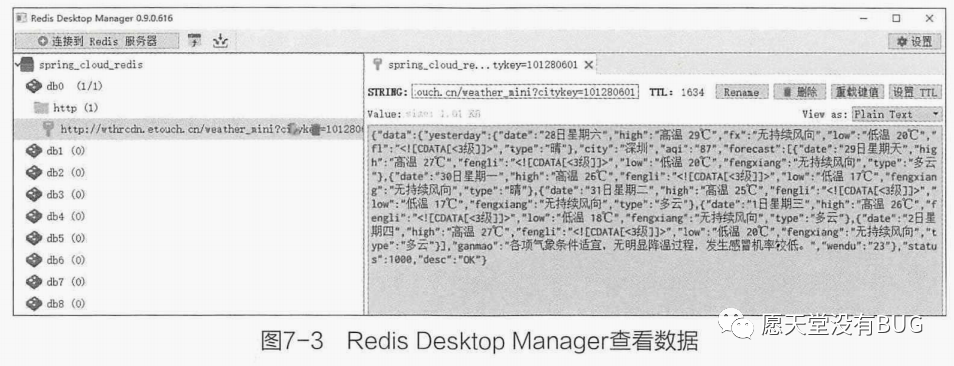
當(dāng)然,我們也能通過Redis Desktop Manager,來方便查看存儲到Redis里面的數(shù)據(jù),如圖7-3所示。
本篇內(nèi)容給大家講解的是天氣數(shù)據(jù)采集微服務(wù)的實現(xiàn)
下篇文章給大家講解天氣數(shù)據(jù)API微服務(wù)的實現(xiàn);
覺得文章不錯的朋友可以轉(zhuǎn)發(fā)此文關(guān)注小編;
感謝大家的支持!!
本文就是愿天堂沒有BUG給大家分享的內(nèi)容,大家有收獲的話可以分享下,想學(xué)習(xí)更多的話可以到微信公眾號里找我,我等你哦。