
鏡像搬運(yùn)工具 Skopeo 使用

一個(gè)好的鏡像傳輸工具能節(jié)省大量的人力和 CPU 算力,本文將為大家介紹一個(gè)能夠完全替代 docker-cli 的工具:Skopeo。
作者:木子(才云)
編輯:Sarah(K8sMeetup)
Clone repo
$ SKOPEO_VERSION=v1.3.0
$ git clone --branch ${SKOPEO_VERSION} https://github.com/containers/skopeo
$ cd skopeo
docker build
$ BUILD_IMAGE=nixos/nix:2.3.12
$ docker run --rm -t -v $PWD:/build ${BUILD_IMAGE} \
sh -c "cd /build && nix build -f nix && cp ./result/bin/skopeo skopeo"
使用
nixos/nix:2.3.12來構(gòu)建靜態(tài)鏈接的 Skopeo 二進(jìn)制文件需要完整構(gòu)建 Skopeo 所有的依賴,比如 glibc、systemd、golang 等,所以構(gòu)建十分耗時(shí)。在一臺(tái) 4c8G 的機(jī)器上構(gòu)建用了將近半個(gè)小時(shí),在 GitHub Action 的 runner 機(jī)器上構(gòu)建需要將近一個(gè)小時(shí)。
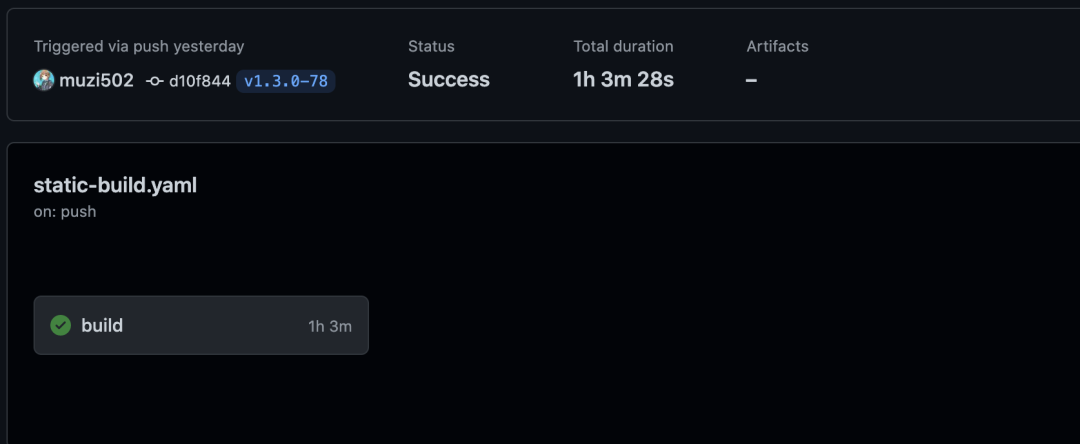
使用 GitHub Action 構(gòu)建:
---
name: build static binary
on: push
jobs:
  build:
    runs-on: ubuntu-latest
    env:
      BUILD_IMAGE: "nixos/nix:2.3.12"
    steps:
      - name: Checkout
        uses: actions/checkout@v2

      - name: Build static binary
        run: |
          docker run --rm -t -v $PWD:/build --name builder ${BUILD_IMAGE} \
          sh -c "cd /build && nix build -f nix && cp ./result/bin/skopeo skopeo-linux-amd64"

      - name: Release
        uses: softprops/action-gh-release@v1
        env:
          GITHUB_TOKEN: ${{ secrets.GITHUB_TOKEN }}
        with:
          files: skopeo-linux-amd64
Dockerfile:FROM golang:1.14-buster as skopeo-builder
ARG SKOPEO_VERSION=v1.2.0
RUN apt-get update \
&& apt-get install -y -qq libdevmapper-dev libgpgme11-dev
ENV GOPATH=/
WORKDIR /src/github.com/containers/skopeo
RUN git clone --branch ${SKOPEO_VERSION} https://github.com/containers/skopeo . \
&& CGO_ENABLE=0 GO111MODULE=on go build -mod=vendor "-buildmode=pie" -ldflags '-extldflags "-static"' -gcflags "" \
-tags "exclude_graphdriver_devicemapper exclude_graphdriver_btrfs containers_image_openpgp" -o /usr/bin/skopeo ./cmd/skopeo
FROM alpine:3.12
COPY --from=skopeo-builder /usr/bin/skopeo /usr/bin/skopeo
# FROM scratch
# COPY --from=skopeo-builder /usr/bin/skopeo /skopeo
# DOCKER_BUILDKIT=1 docker build -o type=local,dest=$PWD -f Dockerfile .
通過 GitHub Action 來編譯
copy:復(fù)制一個(gè)鏡像從 A 到 B,這里的 A 和 B 可以為本地 Docker 鏡像或者 Registry 上的鏡像; inspect:查看一個(gè)鏡像的 manifest 或者 image config 詳細(xì)信息; delete:刪除一個(gè)鏡像 tag,可以是本地 Docker 鏡像或者 Registry 上的鏡像; list-tags:列出一個(gè) Registry 上某個(gè)鏡像的所有 tag; login:登錄到某個(gè) Registry,和 docker login 類似; logout:退出已經(jīng)登錄到某個(gè) Registry 的 auth 信息,和 docker logout 類似; manifest-digest:幾圈一個(gè)文件的 sha256sum 值; standalone-sign、standalone-verify 這兩個(gè)是和鏡像加密相關(guān)的,使用的不是很多; sync:同步一個(gè)鏡像從 A 到 B,感覺和 copy 一樣,但 sync 支持的參數(shù)更多,功能更強(qiáng)大。
completion             generate the autocompletion script for the specified shell
  copy                   Copy an IMAGE-NAME from one location to another
  delete                 Delete image IMAGE-NAME
  help                   Help about any command
  inspect                Inspect image IMAGE-NAME
  list-tags              List tags in the transport/repository specified by the REPOSITORY-NAME
  login                  Login to a container registry
  logout                 Logout of a container registry
  manifest-digest        Compute a manifest digest of a file
  standalone-sign        Create a signature using local files
  standalone-verify      Verify a signature using local files
  sync                   Synchronize one or more images
command-timeout:命令超時(shí)時(shí)間; debug:開啟 debug 模式,輸出詳細(xì)的日志; insecure-policy:使用非安全的 policy,如果沒有配置 policy 的話,需要加上該參數(shù); override-arch:處理鏡像時(shí)覆蓋客戶端 CPU 體系架構(gòu),如在 AMD64 的機(jī)器上用 Skopeo 處理 ARM64 的鏡像; override-os:處理鏡像時(shí)覆蓋客戶端 OS。
Flags:
      --command-timeout duration   timeout for the command execution
      --debug                      enable debug output
  -h, --help                       help for skopeo
      --insecure-policy            run the tool without any policy check
      --override-arch ARCH         use ARCH instead of the architecture of the machine for choosing images
      --override-os OS             use OS instead of the running OS for choosing images
      --override-variant VARIANT   use VARIANT instead of the running architecture variant for choosing images
      --policy string              Path to a trust policy file
      --registries.d DIR           use registry configuration files in DIR (e.g. for container signature storage)
      --tmpdir string              directory used to store temporary files
  -v, --version                    Version for Skopeo
--insecure-policy --src-tls-verify=false --dest-tls-verify=false
IMAGE NAMES(鏡像格式) | example |
containers-storage: | containers-storage: |
dir: | dir:/PATH |
docker:// | docker://k8s.gcr.io/kube-apiserver:v1.17.5 |
docker-daemon: | docker-daemon:alpine:latest |
docker-archive: | docker-archive:alpine.tar (docker save) |
oci: | oci:alpine:latest |
docker:// 這種方式是存在 Registry 上的,docker-daemon: 是存在本地 docker pull 下來的,再比如 docker-archive 是通過 docker save 出來的鏡像。同一個(gè)鏡像有這幾種存在的方式就像水分子有氣體、液體、固體一樣。可以這樣去理解,他們表述的都是同一個(gè)鏡像,只不過是存在的方式不一樣而已。$ jq "." ~/.docker/config.json
{
"auths": {
"https://index.docker.io/v1/": {
"auth": "d2sdwdaqWMasss7bSVlJFpmQE43Sw=="
}
},
"HttpHeaders": {
"User-Agent": "Docker-Client/19.03.5 (linux)"
},
"experimental": "enabled"
}
Copy an IMAGE-NAME from one location to another
將一個(gè)鏡像從 A 復(fù)制到 B
skopeo copy src dest 可以有 6*6=36 種組合!比如我可以將一個(gè)鏡像從一個(gè) Registry 復(fù)制到另一個(gè) Registry:skopeo copy docker://IMAGE_NAME docker://IMAGE_NAME;或者將一個(gè)鏡像從 Registry 中復(fù)制到一個(gè)本地目錄 skopeo copy docker://k8s.gcr.io/pause:3.3 dir:pause:3.3。從 Regsitry A 到 Registry B 復(fù)制鏡像:
$ skopeo copy docker://k8s.gcr.io/kube-apiserver:v1.17.5 docker://hub.k8s.li/kube-apiserver:v1.17.5 --dest-authfile /root/.docker/config.json
Getting image source signatures
Copying blob 597de8ba0c30 done
Copying blob e13a88fa950c done
Copying config f640481f6d done
Writing manifest to image destination
Storing signatures
Skopeo 輸出的日志顯示是 Copying blob 597de8ba0c30 done.可以看到 Skopeo 是直接從 Registry 中 copy 鏡像 layer 的 blob 文件,傳輸是鏡像在 Registry 中存儲(chǔ)的原始格式。
將鏡像從 Registry 復(fù)制到本地目錄:
$ skopeo copy docker://k8s.gcr.io/pause:3.3 dir:pause:3.3
Getting image source signatures
Copying blob aeab776c4837 done
Copying config 0184c1613d done
Writing manifest to image destination
Storing signatures

$ tree pause:3.3
pause:3.3
├── 0184c1613d92931126feb4c548e5da11015513b9e4c104e7305ee8b53b50a9da
├── aeab776c48375e1a61810a0a5f59e982e34425ff505a01c2b57dcedc6799c17b
├── manifest.json
└── version

# 查看鏡像的 manifest 文件
$ jq '.' pause:3.3/manifest.json
{
  "schemaVersion": 2,
  "mediaType": "application/vnd.docker.distribution.manifest.v2+json",
  "config": {
    "mediaType": "application/vnd.docker.container.image.v1+json",
    "size": 743,
    "digest": "sha256:0184c1613d92931126feb4c548e5da11015513b9e4c104e7305ee8b53b50a9da"
  },
  "layers": [
    {
      "mediaType": "application/vnd.docker.image.rootfs.diff.tar.gzip",
      "size": 296517,
      "digest": "sha256:aeab776c48375e1a61810a0a5f59e982e34425ff505a01c2b57dcedc6799c17b"
    }
  ]
}

# 根據(jù) manifest 文件查看鏡像的 image config 文件
$ jq '.' pause:3.3/0184c1613d92931126feb4c548e5da11015513b9e4c104e7305ee8b53b50a9da
{
  "architecture": "amd64",
  "config": {
    "Env": [
      "PATH=/usr/local/sbin:/usr/local/bin:/usr/sbin:/usr/bin:/sbin:/bin"
    ],
    "Entrypoint": [
      "/pause"
    ],
    "WorkingDir": "/",
    "OnBuild": null
  },
  "created": "2020-05-02T09:46:29.068489061Z",
  "history": [
    {
      "created": "2020-05-02T09:46:29.068489061Z",
      "created_by": "ARG ARCH",
      "comment": "buildkit.dockerfile.v0",
      "empty_layer": true
    },
    {
      "created": "2020-05-02T09:46:29.068489061Z",
      "created_by": "ADD bin/pause-amd64 /pause # buildkit",
      "comment": "buildkit.dockerfile.v0"
    },
    {
      "created": "2020-05-02T09:46:29.068489061Z",
      "created_by": "ENTRYPOINT [\"/pause\"]",
      "comment": "buildkit.dockerfile.v0",
      "empty_layer": true
    }
  ],
  "os": "linux",
  "rootfs": {
    "type": "layers",
    "diff_ids": [
      "sha256:48a5e87615149095fad57d5db80f2cd9728b5562900eccb32842a45e8e8a61ae"
    ]
  }
}
將鏡像從 Registry 復(fù)制到本地目錄,以 OCI 格式保存:
$ skopeo copy docker://k8s.gcr.io/pause:3.3 oci:images
Getting image source signatures
Copying blob aeab776c4837 done
Copying config fa5df7713f done
Writing manifest to image destination
Storing signatures
$ tree images
images
├── blobs
│   └── sha256
│       ├── 3450ba84b8fbfd12cbf58710c0b5678f4311a888d4d5c42b053faefa1af4f8be
│       ├── aeab776c48375e1a61810a0a5f59e982e34425ff505a01c2b57dcedc6799c17b
│       └── fa5df7713fc78f96e377d236b353d33815073105bbacd381e50705e576ce4da5
├── index.json
└── oci-layout
替代 docker push 功能,將鏡像從 Docker 本地存儲(chǔ) push 到 Registry 中:
 skopeo copy docker-daemon:alpine:3.12 docker://hub.k8s.li/library/alpine:3.12
Getting image source signatures
Copying blob 32f366d666a5 done
Copying config 13621d1b12 done
Writing manifest to image destination
Storing signatures
Skopeo sync 鏡像同步文件:
registry.example.com:
    images:
        busybox: []
        redis:
            - "1.0"
            - "2.0"
            - "sha256:111111"
    images-by-tag-regex:
        nginx: ^1\.13\.[12]-alpine-perl$
    credentials:
        username: john
        password: this is a secret
    tls-verify: true
    cert-dir: /home/john/certs
quay.io:
    tls-verify: false
    images:
        coreos/etcd:
            - latest
Image-syncer 鏡像同步配置文件:
# registry 登錄配置
{
    "quay.io": {        // This "registry" or "registry/namespace" string should be the same as registry or registry/namespace used below in "images" field.
                            // The format of "registry/namespace" will be more prior matched than "registry"
        "username": "xxx",
        "password": "xxxxxxxxx",
        "insecure": true         // "insecure" field needs to be true if this registry is a http service, default value is false, version of image-syncer need to be later than v1.0.1 to support this field
    },
    "registry.cn-beijing.aliyuncs.com": {
        "username": "xxx",
        "password": "xxxxxxxxx"
    },
    "registry.hub.docker.com": {
        "username": "xxx",
        "password": "xxxxxxxxxx"
    },
    "quay.io/coreos": {     // "registry/namespace" format is supported after v1.0.3 of image-syncer
        "username": "abc",
        "password": "xxxxxxxxx",
        "insecure": true
    }
}

# 鏡像配置
{
    "quay.io/coreos/kube-rbac-proxy": "quay.io/ruohe/kube-rbac-proxy",
    "xxxx":"xxxxx",
    "xxx/xxx/xx:tag1,tag2,tag3":"xxx/xxx/xx"
}
將鏡從 Registry A 同步到 Registry B:
$ skopeo sync --src docker --dest docker k8s.gcr.io/pause:3.3 hub.k8s.li
INFO[0000] Tag presence check                            imagename="k8s.gcr.io/pause:3.3" tagged=true
INFO[0000] Copying image tag 1/1                         from="docker://k8s.gcr.io/pause:3.3" to="docker://hub.k8s.li/pause:3.3"
Getting image source signatures
Copying blob aeab776c4837 done
Copying config 0184c1613d done
Writing manifest to image destination
Storing signatures
INFO[0000] Synced 1 images from 1 sources
將一個(gè)鏡像從 Registry 中同步到本地目錄:
$ skopeo sync --src docker --dest dir k8s.gcr.io/pause:3.3 images
images
└── pause:3.3
    ├── 0184c1613d92931126feb4c548e5da11015513b9e4c104e7305ee8b53b50a9da
    ├── aeab776c48375e1a61810a0a5f59e982e34425ff505a01c2b57dcedc6799c17b
    ├── manifest.json
    └── version
將鏡像從本地目錄同步到 Registry 中:
$ skopeo sync --src dir --dest docker images hub.k8s.li
INFO[0000] Copying image ref 1/1                         from="dir:images/pause:3.3" to="docker://hub.k8s.li/pause:3.3"
Getting image source signatures
Copying blob aeab776c4837 [--------------------------------------] 0.0b / 0.0b
Copying config 0184c1613d done
Writing manifest to image destination
Storing signatures
INFO[0002] Synced 1 images from 1 sources
查看 Docker 本地存儲(chǔ)中的一個(gè)鏡像的 image config 文件:
$ skopeo inspect docker-daemon:alpine:latest
{
    "Name": "docker.io/library/alpine",
    "Digest": "sha256:ab84514e85b179ff569fd0042969b04f68812f23e187a927cb84664b417e0d3e",
    "RepoTags": [],
    "Created": "2021-04-14T19:19:49.594730611Z",
    "DockerVersion": "19.03.12",
    "Labels": null,
    "Architecture": "amd64",
    "Os": "linux",
    "Layers": [
        "sha256:32f366d666a541852cad754ee1cdb53a736110b550f0c2d5a46bc5ba519896b6"
    ],
    "Env": [
        "PATH=/usr/local/sbin:/usr/local/bin:/usr/sbin:/usr/bin:/sbin:/bin"
    ]
}
查看 Registry 中一個(gè)鏡像的 manifests 文件,可以通過這種方式來判斷鏡像是否存在:
skopeo inspect docker://alpine:latest --raw | jq '.'
{
  "manifests": [
    {
      "digest": "sha256:1775bebec23e1f3ce486989bfc9ff3c4e951690df84aa9f926497d82f2ffca9d",
      "mediaType": "application/vnd.docker.distribution.manifest.v2+json",
      "platform": {
        "architecture": "amd64",
        "os": "linux"
      },
      "size": 528
    },
    {
      "digest": "sha256:1f66b8f3041ef8575260056dedd437ed94e7bfeea142ee39ff0d795f94ff2287",
      "mediaType": "application/vnd.docker.distribution.manifest.v2+json",
      "platform": {
        "architecture": "arm",
        "os": "linux",
        "variant": "v6"
      },
      "size": 528
    },
    {
      "digest": "sha256:8d99168167baa6a6a0d7851b9684625df9c1455116a9601835c2127df2aaa2f5",
      "mediaType": "application/vnd.docker.distribution.manifest.v2+json",
      "platform": {
        "architecture": "arm",
        "os": "linux",
        "variant": "v7"
      },
      "size": 528
    },
    {
      "digest": "sha256:53b74ddfc6225e3c8cc84d7985d0f34666e4e8b0b6892a9b2ad1f7516bc21b54",
      "mediaType": "application/vnd.docker.distribution.manifest.v2+json",
      "platform": {
        "architecture": "arm64",
        "os": "linux",
        "variant": "v8"
      },
      "size": 528
    },
    {
      "digest": "sha256:52a197664c8ed0b4be6d3b8372f1d21f3204822ba432583644c9ce07f7d6448f",
      "mediaType": "application/vnd.docker.distribution.manifest.v2+json",
      "platform": {
        "architecture": "386",
        "os": "linux"
      },
      "size": 528
    },
    {
      "digest": "sha256:b421672fe4e74a3c7eff2775736e854d69e8d38b2c337063f8699de9c408ddd3",
      "mediaType": "application/vnd.docker.distribution.manifest.v2+json",
      "platform": {
        "architecture": "ppc64le",
        "os": "linux"
      },
      "size": 528
    },
    {
      "digest": "sha256:8a22269106a31264874cc3a719c1e280e76d42dff1fa57bd9c7fe68dab574023",
      "mediaType": "application/vnd.docker.distribution.manifest.v2+json",
      "platform": {
        "architecture": "s390x",
        "os": "linux"
      },
      "size": 528
    }
  ],
  "mediaType": "application/vnd.docker.distribution.manifest.list.v2+json",
  "schemaVersion": 2
}
$ skopeo delete docker://hub.k8s.li/library/pause:3.2 --debug
DEBU[0000] Returning credentials from /home/release/.docker/config.json
DEBU[0000] Using registries.d directory /etc/containers/registries.d for sigstore configuration
DEBU[0000]  No signature storage configuration found for hub.k8s.li/library/pause:3.2
DEBU[0000] Looking for TLS certificates and private keys in /etc/docker/certs.d/hub.k8s.li/library
DEBU[0000] Loading registries configuration "/etc/containers/registries.conf"
DEBU[0000] GET https://hub.k8s.li/library/v2/
DEBU[0000] Ping https://hub.k8s.li/library/v2/ status 401
DEBU[0000] GET https://hub.k8s.li/library/v2/library/pause/manifests/3.2
DEBU[0000] DELETE https://hub.k8s.li/library/v2/library/pause/manifests/sha256:4a1c4b21597c1b4415bdbecb28a3296c6b5e23ca4f9feeb599860a1dac6a0108
$ skopeo list-tags docker://k8s.gcr.io/pause
{
    "Repository": "k8s.gcr.io/pause",
    "Tags": [
        "0.8.0",
        "1.0",
        "2.0",
        "3.0",
        "3.1",
        "3.2",
        "3.3",
        "3.4.1",
        "3.5",
        "go",
        "latest",
        "test",
        "test2"
    ]
}images-list.txt
##k8s-images
kubesphere/kube-apiserver:v1.20.6
kubesphere/kube-scheduler:v1.20.6
kubesphere/kube-proxy:v1.20.6
kubesphere/kube-controller-manager:v1.20.6
kubesphere/kube-apiserver:v1.19.8
kubesphere/kube-scheduler:v1.19.8
kubesphere/kube-proxy:v1.19.8
kubesphere/kube-controller-manager:v1.19.8
kubesphere/kube-apiserver:v1.19.9
kubesphere/kube-scheduler:v1.19.9
kubesphere/kube-proxy:v1.19.9
kubesphere/kube-controller-manager:v1.19.9
kubesphere/kube-apiserver:v1.18.8
kubesphere/kube-scheduler:v1.18.8
kubesphere/kube-proxy:v1.18.8
kubesphere/kube-controller-manager:v1.18.8
kubesphere/kube-apiserver:v1.17.9
kubesphere/kube-scheduler:v1.17.9
kubesphere/kube-proxy:v1.17.9
kubesphere/kube-controller-manager:v1.17.9
kubesphere/pause:3.1
kubesphere/pause:3.2
kubesphere/etcd:v3.4.13
calico/cni:v3.16.3
calico/kube-controllers:v3.16.3
calico/node:v3.16.3
calico/pod2daemon-flexvol:v3.16.3
calico/typha:v3.16.3
kubesphere/flannel:v0.12.0
coredns/coredns:1.6.9
kubesphere/k8s-dns-node-cache:1.15.12
openebs/provisioner-localpv:2.10.1
openebs/linux-utils:2.10.0
kubesphere/nfs-client-provisioner:v3.1.0-k8s1.11
##csi-images
csiplugin/csi-neonsan:v1.2.0
csiplugin/csi-neonsan-ubuntu:v1.2.0
csiplugin/csi-neonsan-centos:v1.2.0
csiplugin/csi-provisioner:v1.5.0
csiplugin/csi-attacher:v2.1.1
csiplugin/csi-resizer:v0.4.0
csiplugin/csi-snapshotter:v2.0.1
csiplugin/csi-node-driver-registrar:v1.2.0
csiplugin/csi-qingcloud:v1.2.0
##kubesphere-images
kubesphere/ks-apiserver:v3.1.1
kubesphere/ks-console:v3.1.1
kubesphere/ks-controller-manager:v3.1.1
kubesphere/ks-installer:v3.1.1
kubesphere/kubectl:v1.20.0
kubesphere/kubectl:v1.19.0
redis:5.0.12-alpine
alpine:3.14
haproxy:2.0.22-alpine
nginx:1.14-alpine
minio/minio:RELEASE.2019-08-07T01-59-21Z
minio/mc:RELEASE.2019-08-07T23-14-43Z
mirrorgooglecontainers/defaultbackend-amd64:1.4
kubesphere/nginx-ingress-controller:v0.35.0
osixia/openldap:1.3.0
csiplugin/snapshot-controller:v3.0.3
kubesphere/kubefed:v0.7.0
kubesphere/tower:v0.2.0
kubesphere/prometheus-config-reloader:v0.42.1
kubesphere/prometheus-operator:v0.42.1
prom/alertmanager:v0.21.0
prom/prometheus:v2.26.0
prom/node-exporter:v0.18.1
kubesphere/ks-alerting-migration:v3.1.0
jimmidyson/configmap-reload:v0.3.0
kubesphere/notification-manager-operator:v1.0.0
kubesphere/notification-manager:v1.0.0
kubesphere/metrics-server:v0.4.2
kubesphere/kube-rbac-proxy:v0.8.0
kubesphere/kube-state-metrics:v1.9.7
openebs/provisioner-localpv:2.3.0
thanosio/thanos:v0.18.0
grafana/grafana:7.4.3
##kubesphere-logging-images
kubesphere/elasticsearch-oss:6.7.0-1
kubesphere/elasticsearch-curator:v5.7.6
kubesphere/fluentbit-operator:v0.5.0
kubesphere/fluentbit-operator:migrator
kubesphere/fluent-bit:v1.6.9
elastic/filebeat:6.7.0
kubesphere/kube-auditing-operator:v0.1.2
kubesphere/kube-auditing-webhook:v0.1.2
kubesphere/kube-events-exporter:v0.1.0
kubesphere/kube-events-operator:v0.1.0
kubesphere/kube-events-ruler:v0.2.0
kubesphere/log-sidecar-injector:1.1
docker:19.03
##istio-images
istio/pilot:1.6.10
istio/proxyv2:1.6.10
jaegertracing/jaeger-agent:1.17
jaegertracing/jaeger-collector:1.17
jaegertracing/jaeger-es-index-cleaner:1.17
jaegertracing/jaeger-operator:1.17.1
jaegertracing/jaeger-query:1.17
kubesphere/kiali:v1.26.1
kubesphere/kiali-operator:v1.26.1
##kubesphere-devops-images
kubesphere/ks-jenkins:2.249.1
jenkins/jnlp-slave:3.27-1
kubesphere/s2ioperator:v3.1.0
kubesphere/s2irun:v2.1.1
kubesphere/builder-base:v3.1.0
kubesphere/builder-nodejs:v3.1.0
kubesphere/builder-maven:v3.1.0
kubesphere/builder-go:v3.1.0
kubesphere/s2i-binary:v2.1.0
kubesphere/tomcat85-java11-centos7:v2.1.0
kubesphere/tomcat85-java11-runtime:v2.1.0
kubesphere/tomcat85-java8-centos7:v2.1.0
kubesphere/tomcat85-java8-runtime:v2.1.0
kubesphere/java-11-centos7:v2.1.0
kubesphere/java-8-centos7:v2.1.0
kubesphere/java-8-runtime:v2.1.0
kubesphere/java-11-runtime:v2.1.0
kubesphere/nodejs-8-centos7:v2.1.0
kubesphere/nodejs-6-centos7:v2.1.0
kubesphere/nodejs-4-centos7:v2.1.0
kubesphere/python-36-centos7:v2.1.0
kubesphere/python-35-centos7:v2.1.0
kubesphere/python-34-centos7:v2.1.0
kubesphere/python-27-centos7:v2.1.0
##openpitrix-images
kubespheredev/openpitrix-jobs:v3.1.1
##weave-scope-images
weaveworks/scope:1.13.0
##kubeedge-images
kubeedge/cloudcore:v1.6.2
kubesphere/edge-watcher:v0.1.0
kubesphere/kube-rbac-proxy:v0.5.0
kubesphere/edge-watcher-agent:v0.1.0
##example-images-images
kubesphere/examples-bookinfo-productpage-v1:1.16.2
kubesphere/examples-bookinfo-reviews-v1:1.16.2
kubesphere/examples-bookinfo-reviews-v2:1.16.2
kubesphere/examples-bookinfo-reviews-v3:1.16.2
kubesphere/examples-bookinfo-details-v1:1.16.2
kubesphere/examples-bookinfo-ratings-v1:1.16.3
busybox:1.31.1
joosthofman/wget:1.0
kubesphere/netshoot:v1.0
nginxdemos/hello:plain-text
wordpress:4.8-apache
mirrorgooglecontainers/hpa-example:latest
java:openjdk-8-jre-alpine
fluent/fluentd:v1.4.2-2.0
perl:latest
sync.sh
#!/bin/bash
GREEN_COL="\\033[32;1m"
RED_COL="\\033[1;31m"
NORMAL_COL="\\033[0;39m"

SOURCE_REGISTRY=$1
TARGET_REGISTRY=$2

: ${IMAGES_LIST_FILE:="images-list.txt"}
: ${TARGET_REGISTRY:="hub.k8s.li"}
: ${SOURCE_REGISTRY:="docker.io"}

BLOBS_PATH="docker/registry/v2/blobs/sha256"
REPO_PATH="docker/registry/v2/repositories"

set -eo pipefail

CURRENT_NUM=0
ALL_IMAGES="$(sed -n '/#/d;s/:/:/p' ${IMAGES_LIST_FILE} | sort -u)"
TOTAL_NUMS=$(echo "${ALL_IMAGES}" | wc -l)

skopeo_copy() {
 if skopeo copy --insecure-policy --src-tls-verify=false --dest-tls-verify=false \
 --override-arch amd64 --override-os linux -q docker://$1 docker://$2; then
 echo -e "$GREEN_COL Progress: ${CURRENT_NUM}/${TOTAL_NUMS} sync $1 to $2 successful $NORMAL_COL"
 else
 echo -e "$RED_COL Progress: ${CURRENT_NUM}/${TOTAL_NUMS} sync $1 to $2 failed $NORMAL_COL"
 exit 2
 fi
}

for image in ${ALL_IMAGES}; do
 let CURRENT_NUM=${CURRENT_NUM}+1
 skopeo_copy ${SOURCE_REGISTRY}/${image} ${TARGET_REGISTRY}/${image}
done
bash sync.sh docker.io localhost:5000
$ bash sync.sh docker.io localhost:5000
Progress: 1/143 sync docker.io/alpine:3.14 to localhost:5000/alpine:3.14 successful
Progress: 2/143 sync docker.io/busybox:1.31.1 to localhost:5000/busybox:1.31.1 successful
Progress: 3/143 sync docker.io/calico/cni:v3.16.3 to localhost:5000/calico/cni:v3.16.3 successful
Progress: 4/143 sync docker.io/calico/kube-controllers:v3.16.3 to localhost:5000/calico/kube-controllers:v3.16.3 successful
Progress: 141/143 sync docker.io/thanosio/thanos:v0.18.0 to localhost:5000/thanosio/thanos:v0.18.0 successful
 Progress: 142/143 sync docker.io/weaveworks/scope:1.13.0 to localhost:5000/weaveworks/scope:1.13.0 successful
 Progress: 143/143 sync docker.io/wordpress:4.8-apache to localhost:5000/wordpress:4.8-apache successful
sync.sh
#!/bin/bash
GREEN_COL="\\033[32;1m"
RED_COL="\\033[1;31m"
NORMAL_COL="\\033[0;39m"

SOURCE_REGISTRY=$1
TARGET_REGISTRY=$2
IMAGES_DIR=$2

: ${IMAGES_DIR:="images"}
: ${IMAGES_LIST_FILE:="images-list.txt"}
: ${TARGET_REGISTRY:="hub.k8s.li"}
: ${SOURCE_REGISTRY:="docker.io"}

BLOBS_PATH="docker/registry/v2/blobs/sha256"
REPO_PATH="docker/registry/v2/repositories"

set -eo pipefail

CURRENT_NUM=0
ALL_IMAGES="$(sed -n '/#/d;s/:/:/p' ${IMAGES_LIST_FILE} | sort -u)"
TOTAL_NUMS=$(echo "${ALL_IMAGES}" | wc -l)

skopeo_sync() {
 if skopeo sync --insecure-policy --src-tls-verify=false --dest-tls-verify=false \
 --override-arch amd64 --override-os linux --src docker --dest dir $1 $2 > /dev/null; then
 echo -e "$GREEN_COL Progress: ${CURRENT_NUM}/${TOTAL_NUMS} sync $1 to $2 successful $NORMAL_COL"
 else
 echo -e "$RED_COL Progress: ${CURRENT_NUM}/${TOTAL_NUMS} sync $1 to $2 failed $NORMAL_COL"
 exit 2
 fi
}

convert_images() {
 rm -rf ${IMAGES_DIR}; mkdir -p ${IMAGES_DIR}
 for image in ${ALL_IMAGES}; do
 let CURRENT_NUM=${CURRENT_NUM}+1
 image_name=${image%%:*}
 image_tag=${image##*:}
 image_repo=${image%%/*}
 skopeo_sync ${SOURCE_REGISTRY}/${image} ${IMAGES_DIR}/${image_repo}
 manifest="${IMAGES_DIR}/${image}/manifest.json"
 manifest_sha256=$(sha256sum ${manifest} | awk '{print $1}')
 mkdir -p ${BLOBS_PATH}/${manifest_sha256:0:2}/${manifest_sha256}
 ln -f ${manifest} ${BLOBS_PATH}/${manifest_sha256:0:2}/${manifest_sha256}/data

 # make image repositories dir
 mkdir -p ${REPO_PATH}/${image_name}/{_uploads,_layers,_manifests}
 mkdir -p ${REPO_PATH}/${image_name}/_manifests/revisions/sha256/${manifest_sha256}
 mkdir -p ${REPO_PATH}/${image_name}/_manifests/tags/${image_tag}/{current,index/sha256}
 mkdir -p ${REPO_PATH}/${image_name}/_manifests/tags/${image_tag}/index/sha256/${manifest_sha256}

 # create image tag manifest link file
 echo -n "sha256:${manifest_sha256}" > ${REPO_PATH}/${image_name}/_manifests/tags/${image_tag}/current/link
 echo -n "sha256:${manifest_sha256}" > ${REPO_PATH}/${image_name}/_manifests/revisions/sha256/${manifest_sha256}/link
 echo -n "sha256:${manifest_sha256}" > ${REPO_PATH}/${image_name}/_manifests/tags/${image_tag}/index/sha256/${manifest_sha256}/link

 # link image layers file to registry blobs dir
 for layer in $(sed '/v1Compatibility/d' ${manifest} | grep -Eo "\b[a-f0-9]{64}\b"); do
 mkdir -p ${BLOBS_PATH}/${layer:0:2}/${layer}
 mkdir -p ${REPO_PATH}/${image_name}/_layers/sha256/${layer}
 echo -n "sha256:${layer}" > ${REPO_PATH}/${image_name}/_layers/sha256/${layer}/link
 ln -f ${IMAGES_DIR}/${image}/${layer} ${BLOBS_PATH}/${layer:0:2}/${layer}/data
 done
 done
}

convert_images
install.sh
#!/bin/bash
REGISTRY_DOMAIN="harbor.k8s.li"
REGISTRY_PATH="/var/lib/registry"

# 切換到 registry 存儲(chǔ)主目錄下
cd ${REGISTRY_PATH}

gen_skopeo_dir() {
   # 定義 registry 存儲(chǔ)的 blob 目錄 和 repositories 目錄,方便后面使用
    BLOB_DIR="docker/registry/v2/blobs/sha256"
    REPO_DIR="docker/registry/v2/repositories"
    # 定義生成 skopeo 目錄
    SKOPEO_DIR="docker/skopeo"
    # 通過 find 出 current 文件夾可以得到所有帶 tag 的鏡像,因?yàn)橐粋€(gè) tag 對(duì)應(yīng)一個(gè) current 目錄
    for image in $(find ${REPO_DIR} -type d -name "current"); do
        # 根據(jù)鏡像的 tag 提取鏡像的名字
        name=$(echo ${image} | awk -F '/' '{print $5"/"$6":"$9}')
        link=$(cat ${image}/link | sed 's/sha256://')
        mfs="${BLOB_DIR}/${link:0:2}/${link}/data"
        # 創(chuàng)建鏡像的硬鏈接需要的目錄
        mkdir -p "${SKOPEO_DIR}/${name}"
        # 硬鏈接鏡像的 manifests 文件到目錄的 manifest 文件
        ln ${mfs} ${SKOPEO_DIR}/${name}/manifest.json
        # 使用正則匹配出所有的 sha256 值,然后排序去重
        layers=$(grep -Eo "\b[a-f0-9]{64}\b" ${mfs} | sort -n | uniq)
        for layer in ${layers}; do
          # 硬鏈接 registry 存儲(chǔ)目錄里的鏡像 layer 和 images config 到鏡像的 dir 目錄
            ln ${BLOB_DIR}/${layer:0:2}/${layer}/data ${SKOPEO_DIR}/${name}/${layer}
        done
    done
}

sync_image() {
    # 使用 skopeo sync 將 dir 格式的鏡像同步到 harbor
    for project in $(ls ${SKOPEO_DIR}); do
        skopeo sync --insecure-policy --src-tls-verify=false --dest-tls-verify=false \
        --src dir --dest docker ${SKOPEO_DIR}/${project} ${REGISTRY_DOMAIN}/${project}
    done
}

gen_skopeo_dir
sync_image
先將鏡像同步到一個(gè)固定的 Registry 中:
$ bash sync.sh docker.io localhost:5000
再使用該腳本將鏡像從 Registry 存儲(chǔ)中撈出來:
#!/bin/bash
set -eo pipefail

IMAGES_LIST="$1"
REGISTRY_PATH="$2"
OUTPUT_DIR="$3"
BLOB_DIR="docker/registry/v2/blobs/sha256"
REPO_DIR="docker/registry/v2/repositories"

rm -rf ${OUTPUT_DIR}; mkdir -p ${OUTPUT_DIR}
for image in $(find ${IMAGES_LIST} -type f -name "*.list" | xargs grep -Ev '^#|^/' | grep ':'); do
    image_tag=${image##*:}
    image_name=${image%%:*}
    tag_link=${REGISTRY_PATH}/${REPO_DIR}/${image_name}/_manifests/tags/${image_tag}/current/link
    manifest_sha256=$(sed 's/sha256://' ${tag_link})
    manifest=${REGISTRY_PATH}/${BLOB_DIR}/${manifest_sha256:0:2}/${manifest_sha256}/data
    mkdir -p ${OUTPUT_DIR}/${BLOB_DIR}/${manifest_sha256:0:2}/${manifest_sha256}
    ln -f ${manifest} ${OUTPUT_DIR}/${BLOB_DIR}/${manifest_sha256:0:2}/${manifest_sha256}/data

    # make image repositories dir
    mkdir -p ${OUTPUT_DIR}/${REPO_DIR}/${image_name}/{_uploads,_layers,_manifests}
    mkdir -p ${OUTPUT_DIR}/${REPO_DIR}/${image_name}/_manifests/revisions/sha256/${manifest_sha256}
    mkdir -p ${OUTPUT_DIR}/${REPO_DIR}/${image_name}/_manifests/tags/${image_tag}/{current,index/sha256}
    mkdir -p ${OUTPUT_DIR}/${REPO_DIR}/${image_name}/_manifests/tags/${image_tag}/index/sha256/${manifest_sha256}

    # create image tag manifest link file
    echo -n "sha256:${manifest_sha256}" > ${OUTPUT_DIR}/${REPO_DIR}/${image_name}/_manifests/tags/${image_tag}/current/link
    echo -n "sha256:${manifest_sha256}" > ${OUTPUT_DIR}/${REPO_DIR}/${image_name}/_manifests/revisions/sha256/${manifest_sha256}/link
    echo -n "sha256:${manifest_sha256}" > ${OUTPUT_DIR}/${REPO_DIR}/${image_name}/_manifests/tags/${image_tag}/index/sha256/${manifest_sha256}/link
    for layer in $(sed '/v1Compatibility/d' ${manifest} | grep -Eo '\b[a-f0-9]{64}\b' | sort -u); do
        mkdir -p ${OUTPUT_DIR}/${BLOB_DIR}/${layer:0:2}/${layer}
        mkdir -p ${OUTPUT_DIR}/${REPO_DIR}/${image_name}/_layers/sha256/${layer}
        ln -f ${BLOB_DIR}/${layer:0:2}/${layer}/data ${OUTPUT_DIR}/${BLOB_DIR}/${layer:0:2}/${layer}/data
        echo -n "sha256:${layer}" > ${OUTPUT_DIR}/${REPO_DIR}/${image_name}/_layers/sha256/${layer}/link
    done
done
更多閱讀:
1. 深入淺出容器鏡像的一生:https://blog.k8s.li/Exploring-container-image.html
2. 4 種方法將 Docker Registry 遷移至 Harbor
3. overlay2 + registry 在容器云產(chǎn)品打包發(fā)布流水線中的應(yīng)用
4. 如何使用 Registry 存儲(chǔ)特性:https://blog.k8s.li/skopeo-to-registry.html