
【程序源代碼】python像素貪吃蛇
關(guān)鍵字:python 游戲 貪吃蛇

正文 |?內(nèi)容
介紹
python像素貪吃蛇小游戲,可以通過上下左右鍵控制蛇頭轉(zhuǎn)向,點(diǎn)擊回車鍵開始游戲。簡(jiǎn)單好玩
軟件架構(gòu)
基于python3.0以上版本 基于pygame模塊開發(fā)
安裝教程
基于python3.0以上版本開發(fā).開發(fā)時(shí)使用的是python3.7版本。
使用說明
基于python3.0以上版本開發(fā),開發(fā)時(shí)使用的是python3.7版本。建議開發(fā)前本地安裝pygame/random/sys模塊
用pycharm打開源文件(一般pycharm會(huì)自動(dòng)提示需要安裝的插件或者模塊)
點(diǎn)擊retroSnaker.py,直接運(yùn)行即可
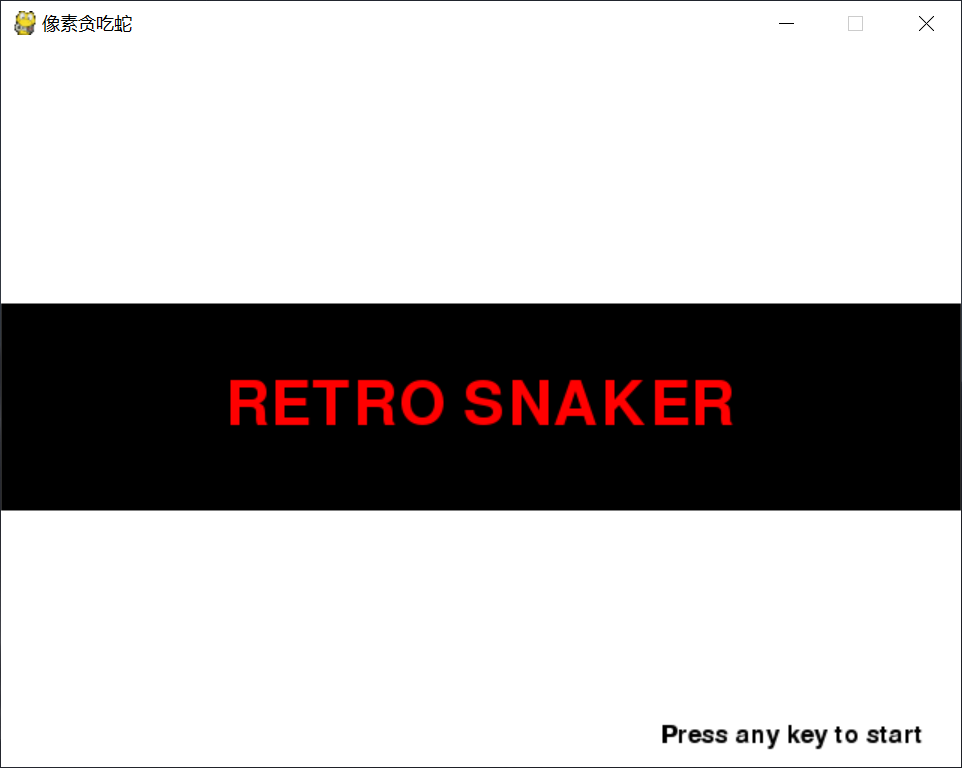
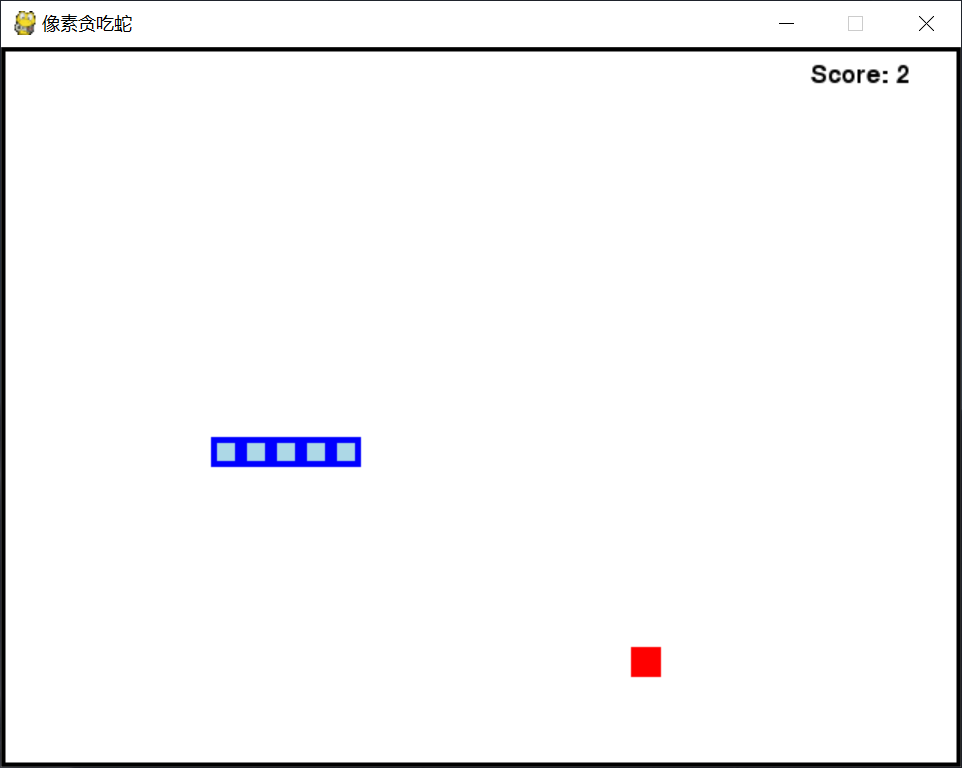
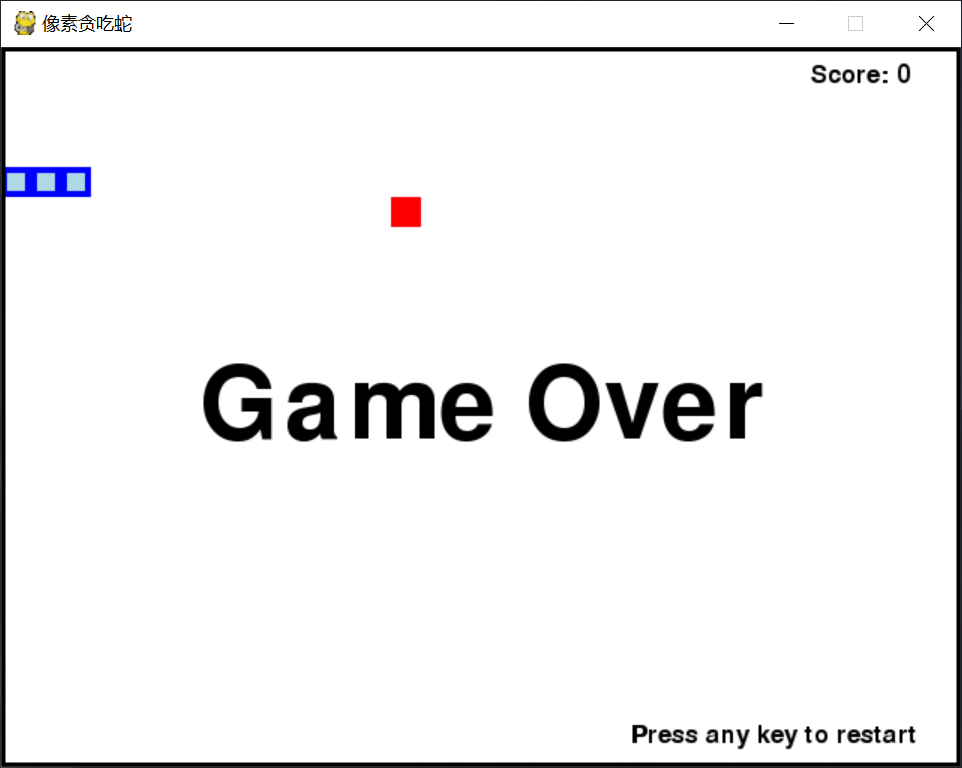
游戲截圖
游戲開始?
游戲中?
游戲結(jié)束
02
—
【一條蛇】
""" 功能:python像素貪吃蛇 作者:程序源代碼 時(shí)間:2020-07-15 """ # 導(dǎo)入相關(guān)模塊與函數(shù) import random import pygame import sys from pygame.locals import * # 初始化pygame pygame.init() # 表明四個(gè)全局變量 global Speed global Trackingtime global Displayobject global WindowTypeface Speed = 8 Trackingtime = pygame.time.Clock()? # 創(chuàng)建跟蹤時(shí)間對(duì)象 Displayobject = pygame.display.set_mode((640, 480))? # 設(shè)置窗口高寬640*480 WindowTypeface = pygame.font.SysFont('Calibri.ttf', 25)? # 創(chuàng)建Typeface對(duì)象并設(shè)置字體和字號(hào) pygame.display.set_caption('像素貪吃蛇')? # 設(shè)置窗口標(biāo)題 backgroundcolor = (255, 255, 255)? # 設(shè)置窗口底色為純白色 # 偵測(cè)鍵盤操作 def CheckKeyboardPress(): ? ? if len(pygame.event.get(QUIT)) > 0: ? ? ? ? pygame.quit() ? ? ? ? sys.exit() ? ? keyUpEvents = pygame.event.get(KEYUP) ? ? if len(keyUpEvents) == 0: ? ? ? ? return None ? ? return keyUpEvents[0].key # 游戲開始界面設(shè)計(jì) def DesignStartScreen(): ? ? global Speed ? ? titleTypeface1 = pygame.font.SysFont('Calibri.ttf', 200) ? ? titleTypeface2 = pygame.font.SysFont('Calibri.ttf', 60) ? ? titleContent1 = titleTypeface1.render('RETRO SNAKER', True, (0, 0, 0), (0, 0, 0))? # 設(shè)置主界面文字和大小 ? ? titleContent2 = titleTypeface2.render('RETRO SNAKER', True, (255, 0, 0)) ? ? KeyboardContent = WindowTypeface.render('Press any key to start', True, (0, 0, 0)) ? ? Displayobject.fill(backgroundcolor) ? ? revolveContent1 = pygame.transform.rotate(titleContent1, 0) ? ? revolveRect1 = revolveContent1.get_rect() ? ? revolveRect1.center = (640 / 2, 480 / 2) ? ? Displayobject.blit(revolveContent1, revolveRect1) ? ? revolveContent2 = pygame.transform.rotate(titleContent2, 0) ? ? revolveRect2 = revolveContent2.get_rect() ? ? revolveRect2.center = (640 / 2, 480 / 2) ? ? Displayobject.blit(revolveContent2, revolveRect2) ? ? # 獲得一個(gè)對(duì)象的rect,以便于設(shè)置其坐標(biāo)位置 ? ? KeyboardRect = KeyboardContent.get_rect() ? ? KeyboardRect.topleft = (640 - 200, 480 - 30) ? ? Displayobject.blit(KeyboardContent, KeyboardRect.topleft) ? ? pygame.display.update() ? ? Trackingtime.tick(Speed) ? ? while True: ? ? ? ? if CheckKeyboardPress(): ? ? ? ? ? ? pygame.event.get()? # 清除事件隊(duì)列 ? ? ? ? ? ? return # 游戲結(jié)束界面設(shè)計(jì) def DesignGameOverScreen(): ? ? gameOverTypeface = pygame.font.SysFont('Calibri.ttf', 100) ? ? gameoverContent = gameOverTypeface.render('Game Over', True, (0, 0, 0)) ? ? KeyboardContent = WindowTypeface.render('Press any key to restart', True, (0, 0, 0)) ? ? gameoverRect = gameoverContent.get_rect() ? ? gameoverRect.center = (640 / 2, 480 / 2) ? ? Displayobject.blit(gameoverContent, gameoverRect) ? ? # 獲得一個(gè)對(duì)象的rect,以便于設(shè)置其坐標(biāo)位置 ? ? KeyboardRect = KeyboardContent.get_rect() ? ? KeyboardRect.topleft = (640 - 220, 480 - 30) ? ? Displayobject.blit(KeyboardContent, KeyboardRect.topleft) ? ? pygame.display.update() ? ? pygame.time.wait(600) ? ? while True: ? ? ? ? if CheckKeyboardPress(): ? ? ? ? ? ? pygame.event.get()? # 清除事件隊(duì)列 ? ? ? ? ? ? return # 貪吃蛇蛇身設(shè)計(jì) def DesignRetroSnaker(RetroSnakerCoords): ? ? for coord in RetroSnakerCoords: ? ? ? ? x = coord['x'] * 20? # 規(guī)定每行單元格的大小為20 ? ? ? ? y = coord['y'] * 20 ? ? ? ? RetroSnakerSegmentRect = pygame.Rect(x, y, 20, 20) ? ? ? ? pygame.draw.rect(Displayobject, (0, 0, 255), RetroSnakerSegmentRect) ? ? ? ? RetroSnakerInnerSegmentRect = pygame.Rect(x + 4, y + 4, 20 - 8, 20 - 8) ? ? ? ? pygame.draw.rect(Displayobject, (173, 216, 230), RetroSnakerInnerSegmentRect) # 蘋果設(shè)計(jì) def DesignApple(coord): ? ? x = coord['x'] * 20? # 規(guī)定單元格的大小為20 ? ? y = coord['y'] * 20 ? ? appleRect = pygame.Rect(x, y, 20, 20) ? ? pygame.draw.rect(Displayobject, (255, 0, 0), appleRect) # 得分分?jǐn)?shù)設(shè)計(jì) def DesignScore(score): ? ? scoreContent = WindowTypeface.render('Score: %s' % (score), True, (0, 0, 0)) ? ? scoreRect = scoreContent.get_rect() ? ? scoreRect.topleft = (640 - 100, 10) ? ? Displayobject.blit(scoreContent, scoreRect) # 邊框線設(shè)計(jì) def DesignBorderline(): ? ? for x in range(0, 640, 640 - 1):? # 繪制垂直線 ? ? ? ? pygame.draw.line(Displayobject, (0, 0, 0), (x, 0), (x, 480), 5) ? ? for y in range(0, 480, 480 - 1):? # 繪制平行線 ? ? ? ? pygame.draw.line(Displayobject, (0, 0, 0), (0, y), (640, y), 5) # 設(shè)置游戲主要運(yùn)行機(jī)制 def GameRunning(): ? ? global Speed ? ? # 設(shè)置隨機(jī)起點(diǎn) ? ? startx = random.randint(5, 26)? # 初始單元格位置橫向在(5, 26)范圍中選一個(gè)隨機(jī)數(shù) ? ? starty = random.randint(5, 18)? # 初始單元格位置縱向在(5, 18)范圍中選一個(gè)隨機(jī)數(shù) ? ? RetroSnakerCoords = [{'x': startx, 'y': starty}, ? ? ? ? ? ? ? ? ? ? ? ? ?{'x': startx - 1, 'y': starty}, ? ? ? ? ? ? ? ? ? ? ? ? ?{'x': startx - 2, 'y': starty}]? # RetroSnakerCoords:列表,貪吃蛇坐標(biāo)位置 ? ? direction = 'right'? # 初始方向朝右 ? ? # 設(shè)置蘋果在一個(gè)隨機(jī)位置 ? ? apple = {'x': random.randint(0, 31), 'y': random.randint(0, 23)} ? ? while True:? # 游戲主循環(huán) ? ? ? ? # 判斷鍵盤事件 ? ? ? ? for event in pygame.event.get():? # 事件處理循環(huán) ? ? ? ? ? ? if event.type == KEYDOWN: ? ? ? ? ? ? ? ? if event.key == K_LEFT and direction != 'right': ? ? ? ? ? ? ? ? ? ? direction = 'left' ? ? ? ? ? ? ? ? elif event.key == K_RIGHT and direction != 'left': ? ? ? ? ? ? ? ? ? ? direction = 'right' ? ? ? ? ? ? ? ? elif event.key == K_UP and direction != 'down': ? ? ? ? ? ? ? ? ? ? direction = 'up' ? ? ? ? ? ? ? ? elif event.key == K_DOWN and direction != 'up': ? ? ? ? ? ? ? ? ? ? direction = 'down' ? ? ? ? # 根據(jù)方向改變蛇頭的坐標(biāo) ? ? ? ? if direction == 'up': ? ? ? ? ? ? m = {'x': RetroSnakerCoords[0]['x'], 'y': RetroSnakerCoords[0]['y'] - 1} ? ? ? ? elif direction == 'down': ? ? ? ? ? ? m = {'x': RetroSnakerCoords[0]['x'], 'y': RetroSnakerCoords[0]['y'] + 1} ? ? ? ? elif direction == 'left': ? ? ? ? ? ? m = {'x': RetroSnakerCoords[0]['x'] - 1, 'y': RetroSnakerCoords[0]['y']} ? ? ? ? elif direction == 'right': ? ? ? ? ? ? m = {'x': RetroSnakerCoords[0]['x'] + 1, 'y': RetroSnakerCoords[0]['y']} ? ? ? ? # 通過向貪吃蛇移動(dòng)的方向添加一個(gè)單元格來加長(zhǎng)貪吃蛇 ? ? ? ? RetroSnakerCoords.insert(0, m) ? ? ? ? # 偵測(cè)貪吃蛇是否吃到蘋果 ? ? ? ? if RetroSnakerCoords[0]['x'] == apple['x'] and RetroSnakerCoords[0]['y'] == apple['y']: ? ? ? ? ? ? apple = {'x': random.randint(0, 31), 'y': random.randint(0, 23)}? # 在隨機(jī)位置放置一個(gè)蘋果 ? ? ? ? ? ? Speed = Speed + 0.2 ? ? ? ? else: ? ? ? ? ? ? del RetroSnakerCoords[-1]? # 去除貪吃蛇的尾段 ? ? ? ? # 偵測(cè)貪吃蛇是否觸碰到窗口邊緣或自身 ? ? ? ? if RetroSnakerCoords[0]['x'] == -1 or RetroSnakerCoords[0]['x'] == 32 or RetroSnakerCoords[0]['y'] == -1 or \ ? ? ? ? ? ? ? ? RetroSnakerCoords[0]['y'] == 24: ? ? ? ? ? ? return? # 游戲結(jié)束 ? ? ? ? for RetroSnakerBody in RetroSnakerCoords[1:]: ? ? ? ? ? ? if RetroSnakerCoords[0]['x'] == RetroSnakerBody['x'] and RetroSnakerCoords[0]['y'] == RetroSnakerBody['y']: ? ? ? ? ? ? ? ? return? # 游戲結(jié)束 ? ? ? ? # 繪制相關(guān)角色在窗口中 ? ? ? ? Displayobject.fill(backgroundcolor) ? ? ? ? DesignRetroSnaker(RetroSnakerCoords) ? ? ? ? DesignApple(apple) ? ? ? ? DesignScore(len(RetroSnakerCoords) - 3) ? ? ? ? DesignBorderline() ? ? ? ? pygame.display.update()? # 讓繪制的東西顯示在屏幕上 ? ? ? ? Trackingtime.tick(Speed) # 主函數(shù) if __name__ == '__main__': ? ? DesignStartScreen()? # 初始化游戲開始界面 ? ? while True: ? ? ? ? GameRunning()? # 游戲開始 ? ? ? ? DesignGameOverScreen()? # 游戲結(jié)束 |
03
—
最近疫情期,自己憋在家里除了日常的活動(dòng)外,沒有其它事情要做,感覺時(shí)間都浪費(fèi)掉了。同時(shí)由于疫情經(jīng)濟(jì)和情感上壓力也有些大。為了排解壓力讓自己充實(shí)起來,我決定自己用一個(gè)月的時(shí)候自學(xué)一個(gè)新語言,選來選去決定學(xué)習(xí)python。在學(xué)習(xí)的過程中接有時(shí)感覺特別累,每天總體上也堅(jiān)持自學(xué)至少三個(gè)小時(shí)。學(xué)習(xí)中發(fā)現(xiàn)了一個(gè)比較好的軟件xmind,通過xmind這個(gè)思維導(dǎo)圖軟件制作了一些自學(xué)筆記,把每節(jié)的重點(diǎn)整理成圖形的方式,很容易直觀理解和掌握。最近整理出來一些圖例分享給大家一起學(xué)習(xí),希望大家能喜歡。自學(xué)確實(shí)不容易,貴在堅(jiān)持!
【程序源代碼】《零基礎(chǔ)學(xué)編程-python》源碼包1
【程序源代碼】《零基礎(chǔ)學(xué)編程-python》源碼包2
【程序源代碼】《零基礎(chǔ)學(xué)編程-python》源碼包3
【更多精彩內(nèi)容請(qǐng)關(guān)注公眾號(hào)后續(xù)發(fā)布文章】
聯(lián)
方
式
微信ID:??itcoder
【微信二維碼, 掃一掃吧】免
聲
明
【投稿郵箱】[email protected]【寫作說明】以上文章屬于此公眾號(hào)原創(chuàng)所有,如需轉(zhuǎn)載請(qǐng)注明出處。【免責(zé)申明】本公眾號(hào)不是廣告商,也沒有為其他三方網(wǎng)站或者個(gè)人做廣告宣傳。文章發(fā)布源代碼和文章均來源于各類開源網(wǎng)站社區(qū)或者是小編在項(xiàng)目中、學(xué)習(xí)中整理的一些實(shí)例項(xiàng)目。主要目的是將開源代碼分享給喜歡編程、有夢(mèng)想的程序員,希望能幫助到你們與他們共同成長(zhǎng)。其中用戶產(chǎn)生的一些自愿下載或者付費(fèi)行為,原則與平臺(tái)沒有直接關(guān)系。如果涉及開源程序侵犯到原作者相關(guān)權(quán)益,可聯(lián)系小編進(jìn)行相關(guān)處理。
目前已有100000+優(yōu)秀的程序員加入我們
 ?????
????? ?????
????? ?????
????? ?????
????? ?????
????? ?
? ?????
????? ?????
????? ?????
????? ?????
????? ?????
?????
——————— ————————