
Java必會的工具庫,讓你的代碼量減少90%
工作很多年后,才發(fā)現(xiàn)有很多工具類庫,可以大大簡化代碼量,提升開發(fā)效率,初級開發(fā)者卻不知道。而這些類庫早就成為了業(yè)界標準類庫,大公司的內(nèi)部也都在使用,如果剛工作的時候就有人告訴我使用這些工具類庫,該多好!
一塊看一下有哪些工具類庫你也用過。
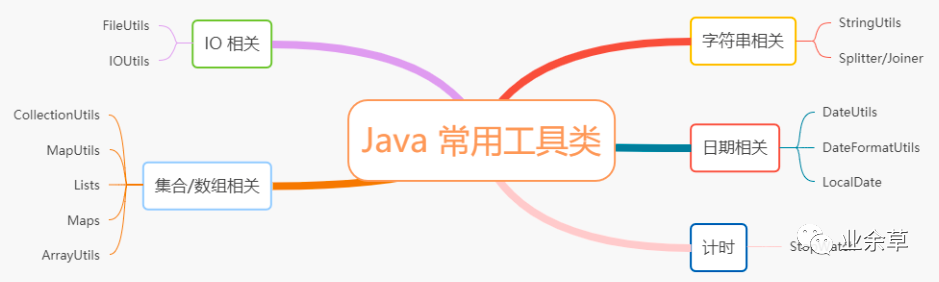
Java自帶工具方法
List集合拼接成以逗號分隔的字符串
// 如何把list集合拼接成以逗號分隔的字符串 a,b,c
List<String> list = Arrays.asList("a", "b", "c");
// 第一種方法,可以用stream流
String join = list.stream().collect(Collectors.joining(","));
System.out.println(join); // 輸出 a,b,c
// 第二種方法,其實String也有join方法可以實現(xiàn)這個功能
String join = String.join(",", list);
System.out.println(join); // 輸出 a,b,c
比較兩個字符串是否相等,忽略大小寫
if (strA.equalsIgnoreCase(strB)) {
  System.out.println("相等");
}
比較兩個對象是否相等
當我們用 equals 比較兩個對象是否相等的時候,還需要對左邊的對象進行判空,不然可能會報空指針異常,我們可以用 java.util 包下 Objects 封裝好的比較是否相等的方法。
Objects.equals(strA, strB);
源碼是這樣的
public static boolean equals(Object a, Object b) {
    return (a == b) || (a != null && a.equals(b));
}
兩個 List 集合取交集
List<String> list1 = new ArrayList<>();
list1.add("a");
list1.add("b");
list1.add("c");
List<String> list2 = new ArrayList<>();
list2.add("a");
list2.add("b");
list2.add("d");
list1.retainAll(list2);
System.out.println(list1);
// 輸出[a, b]
apache commons 工具類庫
apache commons 是最強大的,也是使用最廣泛的工具類庫,里面的子庫非常多,下面介紹幾個最常用的
commons-lang,java.lang 的增強版
建議使用 commons-lang3,優(yōu)化了一些 api,原來的 commons-lang 已停止更新。
Maven 依賴是:
<dependency>
    <groupId>org.apache.commons</groupId>
    <artifactId>commons-lang3</artifactId>
    <version>3.12.0</version>
</dependency>
字符串判空
傳參 CharSequence 類型是 String、StringBuilder、StringBuffer 的父類,都可以直接下面方法判空,以下是源碼:
public static boolean isEmpty(final CharSequence cs) {
    return cs == null || cs.length() == 0;
}

public static boolean isNotEmpty(final CharSequence cs) {
    return !isEmpty(cs);
}

// 判空的時候,會去除字符串中的空白字符,比如空格、換行、制表符
public static boolean isBlank(final CharSequence cs) {
    final int strLen = length(cs);
    if (strLen == 0) {
        return true;
    }
    for (int i = 0; i < strLen; i++) {
        if (!Character.isWhitespace(cs.charAt(i))) {
            return false;
        }
    }
    return true;
}

public static boolean isNotBlank(final CharSequence cs) {
    return !isBlank(cs);
}
首字母轉(zhuǎn)成大寫
String str = "yideng";
String capitalize = StringUtils.capitalize(str);
System.out.println(capitalize); // 輸出Yideng
重復拼接字符串
String str = StringUtils.repeat("ab", 2);
System.out.println(str); // 輸出abab
格式化日期
再也不用手寫 SimpleDateFormat 格式化了。
// Date類型轉(zhuǎn)String類型
String date = DateFormatUtils.format(new Date(), "yyyy-MM-dd HH:mm:ss");
System.out.println(date); // 輸出 2021-05-01 01:01:01

// String類型轉(zhuǎn)Date類型
Date date = DateUtils.parseDate("2021-05-01 01:01:01", "yyyy-MM-dd HH:mm:ss");

// 計算一個小時后的日期
Date date = DateUtils.addHours(new Date(), 1);
包裝臨時對象
當一個方法需要返回兩個及以上字段時,我們一般會封裝成一個臨時對象返回,現(xiàn)在有了 Pair 和 Triple 就不需要了。
// 返回兩個字段
ImmutablePair<Integer, String> pair = ImmutablePair.of(1, "yideng");
System.out.println(pair.getLeft() + "," + pair.getRight()); // 輸出 1,yideng
// 返回三個字段
ImmutableTriple<Integer, String, Date> triple = ImmutableTriple.of(1, "yideng", new Date());
System.out.println(triple.getLeft() + "," + triple.getMiddle() + "," + triple.getRight()); // 輸出 1,yideng,Wed Apr 07 23:30:00 CST 2021
ommons-collections 集合工具類
Maven依賴是:
<dependency>
    <groupId>org.apache.commons</groupId>
    <artifactId>commons-collections4</artifactId>
    <version>4.4</version>
</dependency>
集合判空
封裝了集合判空的方法,以下是源碼:
public static boolean isEmpty(final Collection<?> coll) {
    return coll == null || coll.isEmpty();
}

public static boolean isNotEmpty(final Collection<?> coll) {
    return !isEmpty(coll);
}
// 兩個集合取交集
Collection<String> collection = CollectionUtils.retainAll(listA, listB);
// 兩個集合取并集
Collection<String> collection = CollectionUtils.union(listA, listB);
// 兩個集合取差集
Collection<String> collection = CollectionUtils.subtract(listA, listB);
common-beanutils 操作對象
Maven 依賴:
<dependency>
    <groupId>commons-beanutils</groupId>
    <artifactId>commons-beanutils</artifactId>
    <version>1.9.4</version>
</dependency>
public class User {
    private Integer id;
    private String name;
}
設置對象屬性
User user = new User();
BeanUtils.setProperty(user, "id", 1);
BeanUtils.setProperty(user, "name", "yideng");
System.out.println(BeanUtils.getProperty(user, "name")); // 輸出 yideng
System.out.println(user); // 輸出 {"id":1,"name":"yideng"}
對象和 map 互轉(zhuǎn)
// 對象轉(zhuǎn)map
Map<String, String> map = BeanUtils.describe(user);
System.out.println(map); // 輸出 {"id":"1","name":"yideng"}
// map轉(zhuǎn)對象
User newUser = new User();
BeanUtils.populate(newUser, map);
System.out.println(newUser); // 輸出 {"id":1,"name":"yideng"}
commons-io 文件流處理
Maven 依賴:
<dependency>
    <groupId>commons-io</groupId>
    <artifactId>commons-io</artifactId>
    <version>2.8.0</version>
</dependency>
文件處理
File file = new File("demo1.txt");
// 讀取文件
List<String> lines = FileUtils.readLines(file, Charset.defaultCharset());
// 寫入文件
FileUtils.writeLines(new File("demo2.txt"), lines);
// 復制文件
FileUtils.copyFile(srcFile, destFile);
Google Guava 工具類庫
Maven 依賴:
<dependency>
    <groupId>com.google.guava</groupId>
    <artifactId>guava</artifactId>
    <version>30.1.1-jre</version>
</dependency>
創(chuàng)建集合
List<String> list = Lists.newArrayList();
List<Integer> list = Lists.newArrayList(1, 2, 3);
// 反轉(zhuǎn)list
List<Integer> reverse = Lists.reverse(list);
System.out.println(reverse); // 輸出 [3, 2, 1]
// list集合元素太多,可以分成若干個集合,每個集合10個元素
List<List<Integer>> partition = Lists.partition(list, 10);

Map<String, String> map = Maps.newHashMap();
Set<String> set = Sets.newHashSet();
Multimap 一個 key 可以映射多個 value 的 HashMap
Multimap<String, Integer> map = ArrayListMultimap.create();
map.put("key", 1);
map.put("key", 2);
Collection<Integer> values = map.get("key");
System.out.println(map); // 輸出 {"key":[1,2]}
// 還能返回你以前使用的臃腫的Map
Map<String, Collection<Integer>> collectionMap = map.asMap();
多省事,多簡潔,省得你再創(chuàng)建 Map<String, List>
BiMap 一種連 value 也不能重復的 HashMap
BiMap<String, String> biMap = HashBiMap.create();
// 如果value重復,put方法會拋異常,除非用forcePut方法
biMap.put("key","value");
System.out.println(biMap); // 輸出 {"key":"value"}
// 既然value不能重復,何不實現(xiàn)個翻轉(zhuǎn)key/value的方法,已經(jīng)有了
BiMap<String, String> inverse = biMap.inverse();
System.out.println(inverse); // 輸出 {"value":"key"}
這其實是雙向映射,在某些場景還是很實用的。

Table 一種有兩個 key 的 HashMap
// 一批用戶,同時按年齡和性別分組
Table<Integer, String, String> table = HashBasedTable.create();
table.put(18, "男", "yideng");
table.put(18, "女", "Lily");
System.out.println(table.get(18, "男")); // 輸出 yideng
// 這其實是一個二維的Map,可以查看行數(shù)據(jù)
Map<String, String> row = table.row(18);
System.out.println(row); // 輸出 {"男":"yideng","女":"Lily"}
// 查看列數(shù)據(jù)
Map<Integer, String> column = table.column("男");
System.out.println(column); // 輸出 {18:"yideng"}
Multiset 一種用來計數(shù)的 Set
Multiset<String> multiset = HashMultiset.create();
multiset.add("apple");
multiset.add("apple");
multiset.add("orange");
System.out.println(multiset.count("apple")); // 輸出 2
// 查看去重的元素
Set<String> set = multiset.elementSet();
System.out.println(set); // 輸出 ["orange","apple"]
// 還能查看沒有去重的元素
Iterator<String> iterator = multiset.iterator();
while (iterator.hasNext()) {
    System.out.println(iterator.next());
}
// 還能手動設置某個元素出現(xiàn)的次數(shù)
multiset.setCount("apple", 5);
以上為個人經(jīng)驗,希望能給大家一個參考,如有錯誤或未考慮完全的地方,輕噴。
評論
圖片
表情