可視化搭建移動端店鋪解決方案
點(diǎn)擊上方關(guān)注 前端技術(shù)江湖,一起學(xué)習(xí),天天進(jìn)步
原文地址:https://juejin.cn/post/6979410699453726727
前言
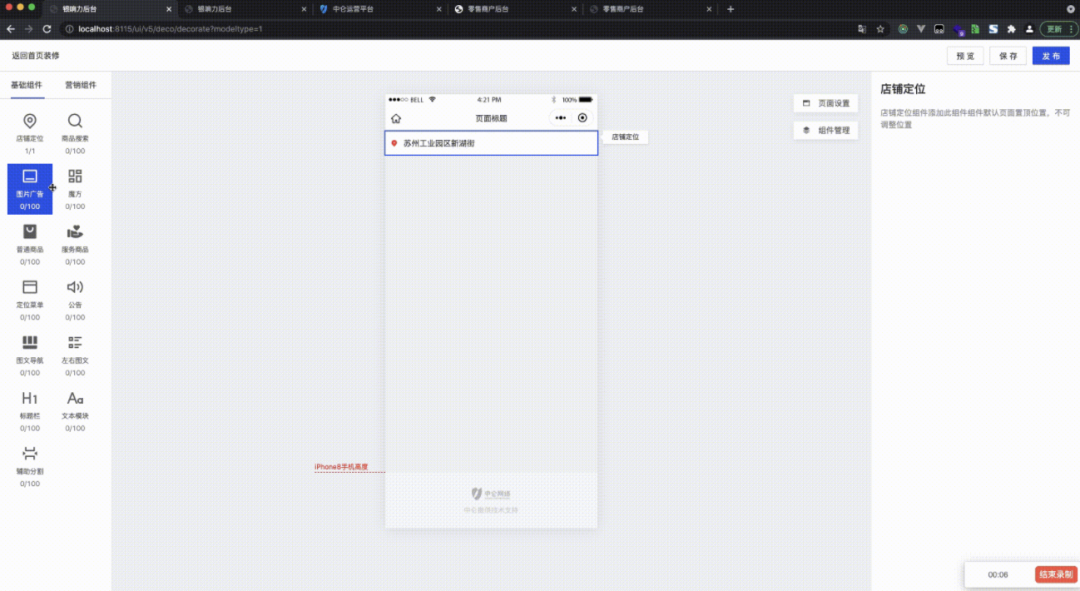
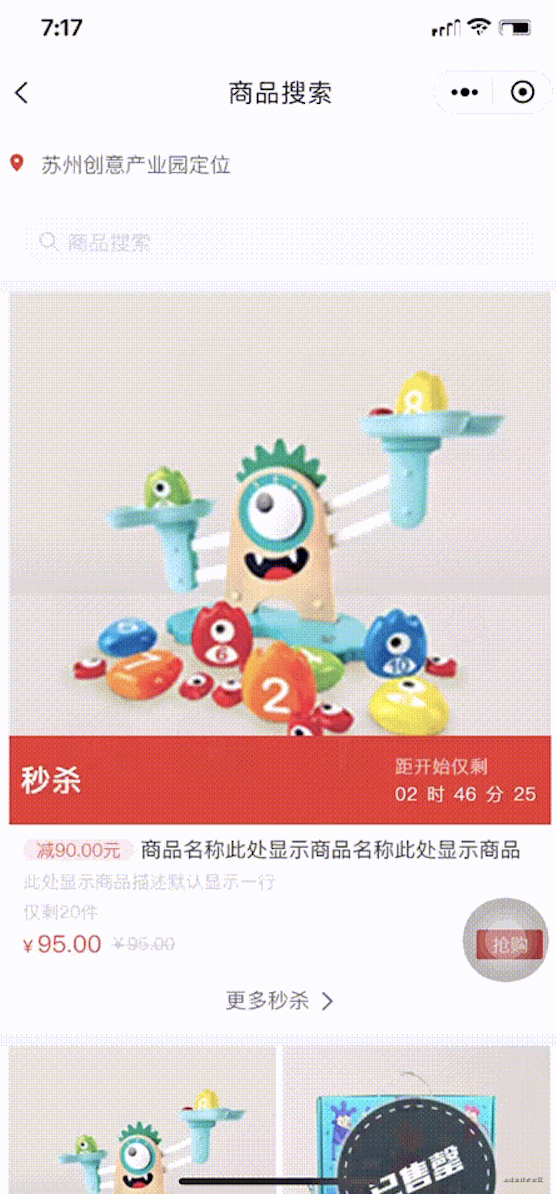
經(jīng)過許久的深思熟慮與探索,同時也借鑒了行業(yè)內(nèi)不錯的產(chǎn)品(如:有贊,H5-Dooring等),但跟列舉的產(chǎn)品還是有區(qū)別的(先賣個關(guān)子,后面再講有哪些區(qū)別)。其實(shí)這種功能在零售系統(tǒng)(目前我所在公司是零售行業(yè)的領(lǐng)頭羊)和電商系統(tǒng)應(yīng)該很常見,很多應(yīng)用場景都會用到,像產(chǎn)品營銷頁面、企業(yè)/個人微官網(wǎng)、H5活動頁面等移動端頁面,通過可視化配置快速搭建H5頁面,且提供豐富的頁面組件,更方便的為使用者搭建更強(qiáng)大的H5頁面。
PC端界面如下:
移動端(H5和小程序)界面如下:

技術(shù)方案
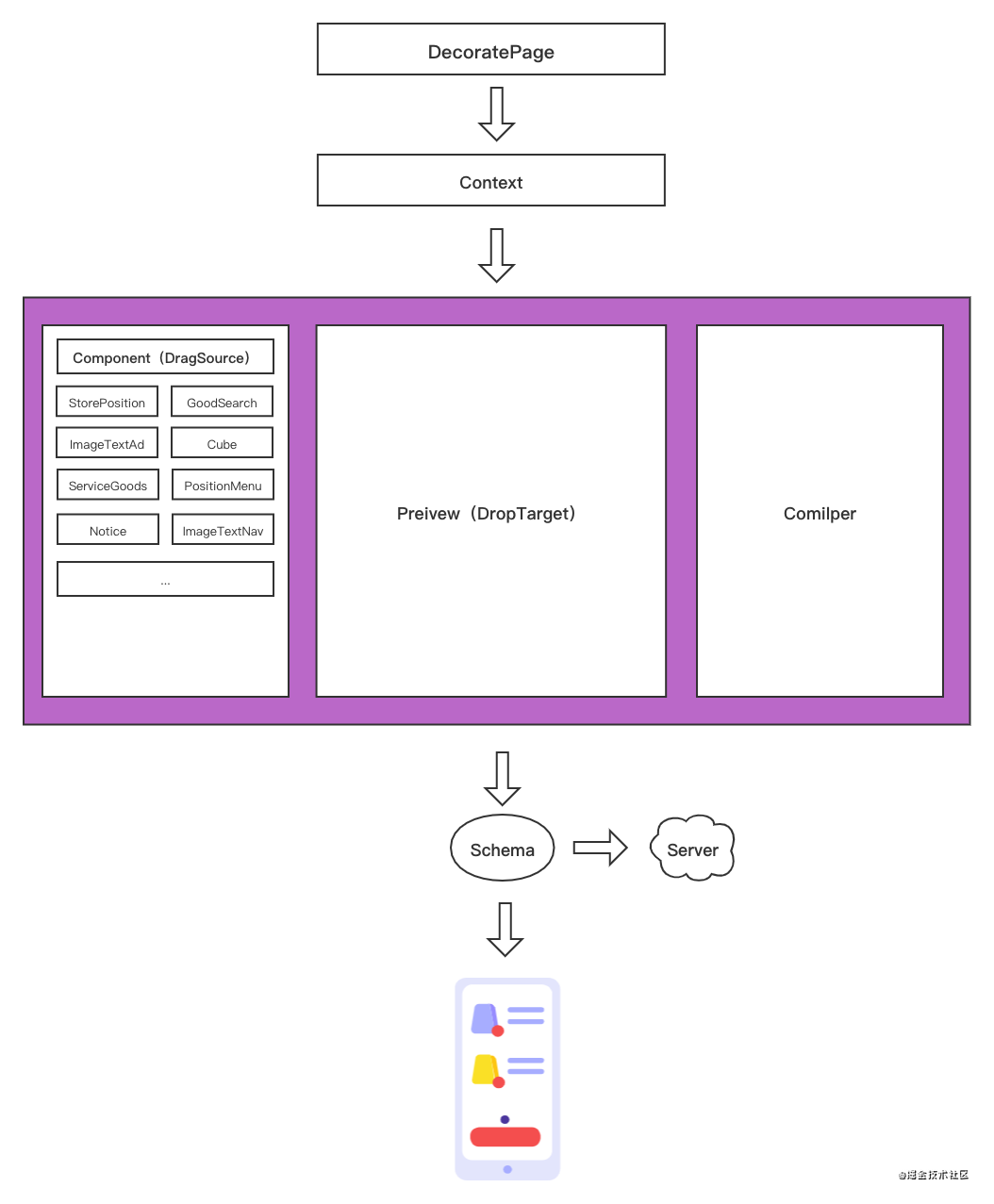
PC端 React 技術(shù)棧,移動端 UniApp 跨平臺框架,功能的設(shè)計(jì)結(jié)構(gòu)圖如下:
/*
 * @description: DecoratePage Context交互
 * @version: 分支號 20210629
 * @author: xuchao
 */
import React, { PureComponent } from 'react';
import { withRouter, router } from 'umi';
import { Layout, Modal, Button } from 'antd';
import { isEmpty, findIndex, isArray, find, every, cloneDeep } from 'lodash';
import { DndProvider } from 'react-dnd';
import { HTML5Backend } from 'react-dnd-html5-backend';
import { showMsg } from '@/global';
import Component from './components/Component';
import Preview from './components/Preview';
import Compiler from './components/Compiler';
import { DecorateContext, components } from './utilities';
import './style.less';

const { Header } = Layout;

export default class Decorate extends PureComponent {
    state = {
        compiler: 'PageSetting',
        pagename: '頁面標(biāo)題',
        selectIndex: 0,
        previewData: [],
    };

    getChildContext() {
        return {
            ...this.state,
            ...this.props,
            setState: state => this.setState(state),
        };
    }

    render() {
        return (
            <DecorateContext.Provider value={this.getChildContext()}>
                <Layout className="decorate">
                    <Header className="header">
                        <span className="hand">
                            返回首頁裝修
                        </span>
                        <Button type="primary" className="fr">
                            發(fā)布
                        </Button>
                        <Button type="primary" className="fr mr10">
                            保存
                        </Button>
                        <Button className="fr mr10">
                            預(yù)覽
                        </Button>
                    </Header>
                    <DndProvider backend={HTML5Backend}>
                        <Layout className="container">
                            <Component />
                            <Preview />
                            <Compiler />
                        </Layout>
                    </DndProvider>
                </Layout>
            </DecorateContext.Provider>
        );
    }
}
數(shù)據(jù)
前面說到與列舉的產(chǎn)品有哪些區(qū)別,區(qū)別在于PC端與移動端的數(shù)據(jù)交互,它們都是通過 iframe 嵌套 H5 的頁面,通過 postmessage API 來做數(shù)據(jù)交互,而是我沒有這樣做,原因是項(xiàng)目特別緊,加上人員分配問題,所以采用數(shù)據(jù)定義模式。
通過上面的設(shè)計(jì)結(jié)構(gòu)圖可以看出PC端最后會生成一份 schema 數(shù)據(jù)存儲服務(wù)端,移動端從服務(wù)端獲取到 schema 數(shù)據(jù)進(jìn)行解析。數(shù)據(jù)格式如下:
// 圖片廣告
{
    component: 'ImageTextAd',
    options: {
        template: 'image', // image:一行一個 carousel:輪播海報 slide:大圖橫向滑動 zone:繪制熱區(qū)
        image: [
            {
                id: '',
                url: '',
                title: '',
                linkCode: '',
                linkName: '',
                // 熱區(qū)
                zones: [
                    {
                        x: 178,
                        y: 91,
                        width: 158,
                        height: 132,
                        code: '123',
                        text: '測試鏈接2',
                    }
                ],
            },
            {
                id: '',
                url: '',
                title: '',
                linkCode: '',
                linkName: '',
                // 熱區(qū)
                zones: [
                    {
                        x: 436,
                        y: 97,
                        width: 170,
                        height: 168,
                        code: '',
                        text: '',
                    }
                ],
            },
        ],
        indicator: 'dotted', // 指示器
        style: {
            boxShadow: 'none',
            borderRadius: 'none',
            padding: '0',
        },
    },
},
// 公告
{
    component: 'Notice',
    options: {
        content: '公告內(nèi)容',
        style: {
            background: 'rgb(255, 248, 233)',
            color: 'rgb(100, 101, 102)',
        },
    },
},
// 圖文導(dǎo)航
{
    component: 'ImageTextNav',
    options: {
        template: 'image-nav', // image-nav:圖片導(dǎo)航 text-nav:文字導(dǎo)航
        images: [{
            url: '',
            title: '',
            link: '',
        }],
        style: {
            background: 'rgb(255, 248, 233)',
            color: 'rgb(100, 101, 102)',
        },
    },
},
// 標(biāo)題欄
{
    component: 'Title',
    options: {
        style: {
            textAlign: 'left',
            background: '#FFFFFF',
        },
        title: {
            text: '',
            style: {
                fontSize: '16px',
                fontWeight: 'bold',
                color: '#323233',
            },
        },
        content: {
            text: '',
            style: {
                fontSize: '12px',
                fontWeight: '400',
                color: '#969799',
            },
        },
    },
},
// 文本模塊
{
    component: 'RichText',
    options: {
        content: '<html></html>',
        style: {
            backgroundColor: '#F9F9F9',
            padding: '10px 10px 0',
        },
    },
},
// 輔助分割
{
    component: 'DivideLine',
    options: {
        template: 'block', // block:輔助空白 line:輔助線
        style: {
            height: 30,
            // borderTopWidth: '1px',
            // borderTopStyle: 'dashed',
            // borderTopColor: '#EBEDF0',
            // margin: '10px 0 0',
        },
    },
},
// 商品搜索
{
    component: 'GoodSearch',
    options: {
        style: {
            backgroundColor: '#FFFFFF',
        },
        box: {
            style: {
                borderRadius: 'none',
                textAlign: 'left',
                height: 28,
                backgroundColor: '#F7F8FA',
                color: '#c8c9cc',
            },
        },
    },
},
// 左右圖文
{
    component: 'LRImageText',
    options: {
        template: 'lr', // lr:左圖右文 rl:左文右圖
        content: '', // 內(nèi)容
        image: {
            url: '', // 圖片地址
            linkCode: '', // 跳轉(zhuǎn)頁面code
            linkName: '', // 跳轉(zhuǎn)頁面name
            style: {
                boxShadow: 'none',
                borderRadius: 'none',
            },
        },
    },
},
// 圖文導(dǎo)航
{
    component: 'ImageTextNav',
    options: {
        template: 'image', // image:圖片導(dǎo)航 text:文字導(dǎo)航
        image: [
            {
                url: '',
                title: '導(dǎo)航一',
                linkCode: '',
                linkName: '',
            },
            {
                url: '',
                title: '導(dǎo)航二',
                linkCode: '',
                linkName: '',
            },
            {
                url: '',
                title: '導(dǎo)航三',
                linkCode: '',
                linkName: '',
            },
            {
                url: '',
                title: '導(dǎo)航四',
                linkCode: '',
                linkName: '',
            },
            {
                id: uuid(),
                url: '',
                title: '導(dǎo)航五',
                linkCode: '',
                linkName: '',
            },
        ],
        style: {
            backgroundColor: '#FFFFFF',
            color: '#333333',
        },
    },
},
// 魔方
{
    component: 'Cube',
    options: {
        template: 'row-one', // row-one:一行一個 row-two:一行兩個 row-four:一行四個 row-col:一大兩小
        image: [
            {
                url: '',
                linkType: '',
                linkName: '',
            },
        ],
        imageMargin: 0,
        layoutMargin: 0,
    },
},
// 定位菜單
{
    component: 'PositionMenu',
    data: [], // 分組信息
    options: {
        template: 'tab-style-one', // tab-style-one:樣式1 tab-style-two:樣式2 tab-style-three:樣式3
        data: [
            {
                id: '9b1deb4d-3b7d-4bad-9bdd-2b0d7b3dcb6d',
                code: '',
                name: '',
                menuName: '',
                comsize: 6,
            },
            {
                id: '9b1deb4d-3b7d-4bad-9bdd-2b0d7b3dcb6c',
                code: '',
                name: '',
                menuName: '',
                comsize: 6,
            },
        ],
        style: {
            borderRadius: 'none',
            fontWeight: '400',
            paddingLeft: '5px',
            paddingRight: '5px',
        },
        listStyle: 'row-one', // row-one:大圖模式 row-two:一行兩個 row-three:一行三個 row-col:詳細(xì)列表
        commodityStyle: 'no-border', // no-border:無邊白底 shadow:卡片投影 stroke:描邊白底 transparent:無邊透明底
        commodityName: true, // 商品名稱
        commodityDesc: true, // 商品描述
        commodityPrice: true, // 商品價格
        originalPrice: true, // 劃線價格
        buyButton: true, // 購買按鈕
        buyButtonStyle: 'style-1', // 購買按鈕樣式
        buyButtonText: '馬上搶', // 購買按鈕文字
        commoditySubscript: true, // 商品角標(biāo)
        commoditySubscriptStyle: 'new', // 商品角標(biāo)樣式
    },
},
// 普通商品
{
    component: 'Goods',
    data: [], // 商品信息
    options: {
        template: 'large', // large:大圖模式 small:一行兩個 three:一行三個 list:詳細(xì)列表
        data: [], // 商品信息
        style: {
            borderRadius: 'none',
            fontWeight: '400',
            paddingLeft: '5px',
            paddingRight: '5px',
        },
        listStyle: 'row-one', // row-one:大圖模式 row-two:一行兩個 row-three:一行三個 row-col:詳細(xì)列表
        commodityStyle: 'no-border', // no-border:無邊白底 shadow:卡片投影 stroke:描邊白底 transparent:無邊透明底
        commodityName: true, // 商品名稱
        commodityDesc: true, // 商品描述
        commodityPrice: true, // 商品價格
        originalPrice: true, // 劃線價格
        buyButton: true, // 購買按鈕
        buyButtonStyle: 'style-1', // 購買按鈕樣式
        buyButtonText: '馬上搶', // 購買按鈕文字
        commoditySubscript: true, // 商品角標(biāo)
        commoditySubscriptStyle: 'new', // 商品角標(biāo)樣式
    },
},
// 限時折扣
{
    template: 'row-one',
    data: [],
    style: {
        borderRadius: 'none',
        fontWeight: '400',
        padding: '0',
        margin: '0',
    },
    comsize: 10,
    tag: '限時折扣',
    commodityStyle: 'no-border',
    commodityName: true,
    commodityDesc: false,
    commodityPrice: true,
    originalPrice: true,
    lastStock: true,
    countdown: true,
    progressBar: true,
    buyButton: true,
    buyButtonStyle: 'style-1',
    buyButtonText: '即將開搶',
}
拖拽
拖拽依賴第三方庫react-dnd,提供的Hooks Api特別方便,上面的設(shè)計(jì)結(jié)構(gòu)圖 Component組件(DragSource) 和 Preview組件(DropTarget) 用到了拖拽,Preview組件不僅要支持上下拖拽,而且需要配合Compiler組件聯(lián)動。
/*
 * @description: DragSource 拖動組件
 * @version: 分支號 20210629
 * @author: xuchao
 */
import React, { useContext } from 'react';
import { useDrag } from 'react-dnd';
import { findIndex, some, isUndefined, filter } from 'lodash';
import { v1 as uuid } from 'uuid';
import { DecorateContext } from '../../utilities';
import schema from '../Materials/schema';

export default ({ component, name, icon, max, componentType, fixedIndex }) => {
    const { previewData = [], setState } = useContext(DecorateContext);
    const number = filter(previewData, { component }).length;

    const [, drag] = useDrag(
        () => ({
            type: 'component',
            options: {
                dropEffect: 'copy',
            },
            item: {
                type: 'add',
                component,
                name,
                max,
                componentType,
                fixedIndex,
            },
            end: (item, monitor) => {
                const hasPh = some(previewData, { component: 'placeholder' });
                const phIndex = findIndex(previewData, { component: 'placeholder' });

                if (!hasPh) return;

                // 組件放置已達(dá)上限
                if (number === max) {
                    previewData.splice(phIndex, 1);

                    setState({ previewData: [...previewData] });

                    return;
                }

                if (monitor.didDrop()) {
                    // 判斷拖拽放入Preview組件中,占位元素替換成組件元素
                    previewData.splice(phIndex, 1, {
                        id: uuid(),
                        component: item.component,
                        options: schema[component].defaultOptions,
                    });
                } else {
                    // 判斷拖拽沒有放入Preview組件中,刪除占位元素
                    previewData.splice(phIndex, 1);
                }

                setState({
                    previewData: [...previewData],
                    selectIndex: phIndex,
                    compiler: item.component,
                });
            },
        }),
        [previewData],
    );

    /**
     * @description: 新增組件
     * @author: xuchao
     */
    const handleClick = () => {
        if (number === max) return;

        previewData.splice(!isUndefined(fixedIndex) ? fixedIndex : previewData.length, 0, {
            id: uuid(),
            component,
            options: schema[component].defaultOptions,
        });

        setState({
            previewData: [...previewData],
            selectIndex: !isUndefined(fixedIndex) ? fixedIndex : previewData.length - 1,
            compiler: component,
        });
    };

    return (
        <div ref={drag} className="item" onClick={handleClick}>
            <i className={icon}></i>
            <div className="name">{name}</div>
            <div className="number">
                {number}/{max}
            </div>
        </div>
    );
};

/*
 * @description: DropTarget 放置組件
 * @version: 分支號 20210629
 * @author: xuchao
 */
import React, { useContext, useCallback } from 'react';
import { useDrop } from 'react-dnd';
import { findIndex, some, isUndefined, filter } from 'lodash';
import update from 'immutability-helper';
import { DecorateContext } from '../../utilities';
import Item from './Item';

export default () => {
    const { previewData = [], selectIndex, setState } = useContext(DecorateContext);

    const [, drop] = useDrop(
        () => ({
            accept: 'component',
            hover: item => {
                const limit = filter(previewData, { component: item.component }).length;
                const hasPh = some(previewData, { component: 'placeholder' });
                const spliceIndex = !isUndefined(item.fixedIndex)
                    ? item.fixedIndex
                    : previewData.length;

                if (item.type === 'add' && !hasPh) {
                    // 判斷占位符是否已經(jīng)存在,若懸停空白處,插入占位符
                    previewData.splice(spliceIndex, 0, {
                        component: 'placeholder',
                        limit: item.max === limit ? true : false,
                    });

                    setState({ previewData: [...previewData] });
                }
            },
        }),
        [previewData],
    );

    /**
     * @description: move callback
     * @param {number} dragIndex
     * @param {number} hoverIndex
     * @param {object} item
     * @author: xuchao
     */
    const handleMove = useCallback(
        (dragIndex, hoverIndex, item) => {
            if (item.type === 'add' && !dragIndex) {
                // 判斷拖拽是 Component 的組件,則 dragIndex 為 undefined,修改占位符的位置即可
                const limit = filter(previewData, { component: item.component }).length;
                const hasPh = some(previewData, { component: 'placeholder' });
                const spliceIndex = !isUndefined(item.fixedIndex) ? item.fixedIndex : hoverIndex;

                // 判斷占位符是否已經(jīng)存在,不再重復(fù)插入
                if (hasPh) {
                    const phIndex = findIndex(previewData, {
                        component: 'placeholder',
                    });

                    setState({
                        previewData: update(previewData, {
                            $splice: [
                                [phIndex, 1],
                                [
                                    spliceIndex,
                                    0,
                                    {
                                        component: 'placeholder',
                                        limit: item.max === limit ? true : false,
                                    },
                                ],
                            ],
                        }),
                    });

                    return;
                }

                setState({
                    previewData: update(previewData, {
                        $splice: [
                            [
                                spliceIndex,
                                0,
                                {
                                    component: 'placeholder',
                                    limit: item.max === limit ? true : false,
                                },
                            ],
                        ],
                    }),
                });
            } else {
                // 判斷拖拽是 Preview 的組件,則 dragIndex 不為 undefined,替換 dragIndex 和 hoverIndex 位置的元素即可
                setState({
                    previewData: update(previewData, {
                        $splice: [
                            [dragIndex, 1],
                            [hoverIndex, 0, previewData[dragIndex]],
                        ],
                    }),
                    selectIndex: dragIndex === selectIndex ? hoverIndex : dragIndex,
                });
            }
        },
        // eslint-disable-next-line react-hooks/exhaustive-deps
        [previewData],
    );

    /**
     * description: delete callback
     * param {object} event
     * param {number} index
     * author: xuchao
     */
    const handleDelete = (event, index) => {
        event.stopPropagation();

        previewData.splice(index, 1);

        setState({
            previewData: [...previewData],
            compiler: selectIndex === previewData.length ? undefined : previewData[index].compiler,
        });
    };

    return (
        <div ref={drop} className="content">
            {previewData.map((item, index) => {
                return (
                    <Item
                        key={item.id}
                        index={index}
                        selectIndex={selectIndex}
                        {...item}
                        onClick={() => setState({ selectIndex: index, compiler: item.component })}
                        onMove={handleMove}
                        onDelete={handleDelete}
                    />
                );
            })}
        </div>
    );
};
總結(jié)
開發(fā)耗費(fèi)時間比較長的地方是怎么設(shè)計(jì)與移動端同步數(shù)據(jù)和拖拽功能,最后還是迎刃而解。如果大家有什么疑問可以交流一下??
The End
歡迎自薦投稿到《前端技術(shù)江湖》,如果你覺得這篇內(nèi)容對你挺有啟發(fā),記得點(diǎn)個 「在看」哦
點(diǎn)個『在看』支持下