
SpringCloud下基于Hystrix的服務(wù)實(shí)踐
Hystrix是Netflix開源的一款分布式容錯(cuò)框架,其為微服務(wù)提供了一整套服務(wù)保護(hù)、容錯(cuò)機(jī)制。從而避免由于個(gè)別服務(wù)故障而引起的級(jí)聯(lián)故障,即所謂的服務(wù)雪崩效應(yīng)

服務(wù)降級(jí)
所謂服務(wù)降級(jí)是指所調(diào)用服務(wù)發(fā)生意外時(shí),調(diào)用自己本地方法(即fallback降級(jí)方法)返回缺省值。而導(dǎo)致服務(wù)降級(jí)的原因包括但不限于服務(wù)超時(shí)、異常、宕機(jī)、熔斷、服務(wù)資源不足(例如線程、信號(hào)量等)等。實(shí)踐過(guò)程中,首先在payment服務(wù)的POM文件引入Hystrix依賴,如下所示
<dependencyManagement>
??<dependencies>

????
????<dependency>
??????<groupId>org.springframework.bootgroupId>
??????<artifactId>spring-boot-dependenciesartifactId>
??????<version>2.2.2.RELEASEversion>
??????<type>pomtype>
??????<scope>importscope>
????dependency>

????
????<dependency>
??????<groupId>org.springframework.cloudgroupId>
??????<artifactId>spring-cloud-dependenciesartifactId>
??????<version>Hoxton.SR1version>
??????<type>pomtype>
??????<scope>importscope>
????dependency>

??dependencies>
dependencyManagement>

<dependencies>
??
??
??<dependency>
????<groupId>org.springframework.cloudgroupId>
????<artifactId>spring-cloud-starter-netflix-hystrixartifactId>
??dependency>

dependencies>
可通過(guò)@HystrixCommand注解,配置該方法所對(duì)應(yīng)的降級(jí)方法。具體通過(guò)fallbackMethod屬性配置一個(gè)入?yún)ⅰ⒊鰠㈩愋鸵恢碌慕导?jí)方法。進(jìn)一步地,還可以通過(guò)commandProperties屬性設(shè)置相關(guān)降級(jí)配置。但如果需要對(duì)每個(gè)@HystrixCommand注解都添加重復(fù)的配置,顯然十分麻煩。故可以在類上添加@DefaultProperties注解設(shè)置該類默認(rèn)的降級(jí)屬性配置,其會(huì)對(duì)該類中添加了@HystrixCommand注解的方法,提供默認(rèn)的降級(jí)配置。特別地對(duì)于該類默認(rèn)的降級(jí)方法,一方面通過(guò)defaultFallback屬性設(shè)置;另一方面該降級(jí)方法是無(wú)入?yún)⒌模鰠㈩愋托枰c被降級(jí)的方法保持一致
@RestController
@RequestMapping("pay2")
//?該類默認(rèn)的降級(jí)配置
@DefaultProperties(defaultFallback?=?"defaultFallback")
public?class?PaymentController2?{

????@GetMapping("/test1")
????//?單獨(dú)配置該方法的降級(jí)方法,?并將方法的超時(shí)配置由默認(rèn)1s改為5s
????@HystrixCommand(fallbackMethod?=?"timeoutFallback",?commandProperties?=?{
????????@HystrixProperty(name?=?"execution.isolation.thread.timeoutInMilliseconds",?value?=?"5000")
????})
????public?String?test1(@RequestParam?Integer?time)?{
????????//?模擬業(yè)務(wù)耗時(shí)
????????try?{
????????????Thread.sleep(?time?);
????????}?catch?(Exception?e)?{
????????}

????????String?msg?=?"[Payment?Service?-?test1],?time:"?+?time;
????????return?msg;
????}

????@GetMapping("/test2")
????//?使用@DefaultProperties注解提供的默認(rèn)降級(jí)相關(guān)配置
????@HystrixCommand
????public?String?test2(@RequestParam?Integer?time)?{
????????//?模擬業(yè)務(wù)耗時(shí)
????????try?{
????????????Thread.sleep(?time?);
????????}?catch?(Exception?e)?{
????????}

????????String?msg?=?"[Payment?Service?-?test2],?time:"?+?time;
????????return?msg;
????}

????@GetMapping("/test3")
????//?使用@DefaultProperties注解提供的默認(rèn)降級(jí)相關(guān)配置
????@HystrixCommand
????public?String?test3(@RequestParam?Integer?num)?{
????????int?result?=?10/num;
????????String?msg?=?"[Payment?Service?-?test3],?num:"?+?num;
????????return?msg;
????}

????/**
?????*?超時(shí)降級(jí)方法
?????*?@param?time
?????*?@return
?????*/
????public?String?timeoutFallback(Integer?time)?{
????????return?"payment服務(wù)發(fā)生超時(shí),?param:?time:?"?+?time;
????}

????/**
?????*?默認(rèn)降級(jí)方法
?????*?@return
?????*/
????public?String?defaultFallback()?{
????????return?"payment服務(wù)暫不可用";
????}

}
最后,在啟動(dòng)類上添加@EnableHystrix注解以啟用Hystrix
@SpringBootApplication
@EnableDiscoveryClient?//?使用Consul作為注冊(cè)中心時(shí)使用
@EnableHystrix?//?啟用Hystrix
public?class?PaymentApplication?{
????public?static?void?main(String[]?args)?{
????????SpringApplication.run(PaymentApplication.class,?args);
????}
}
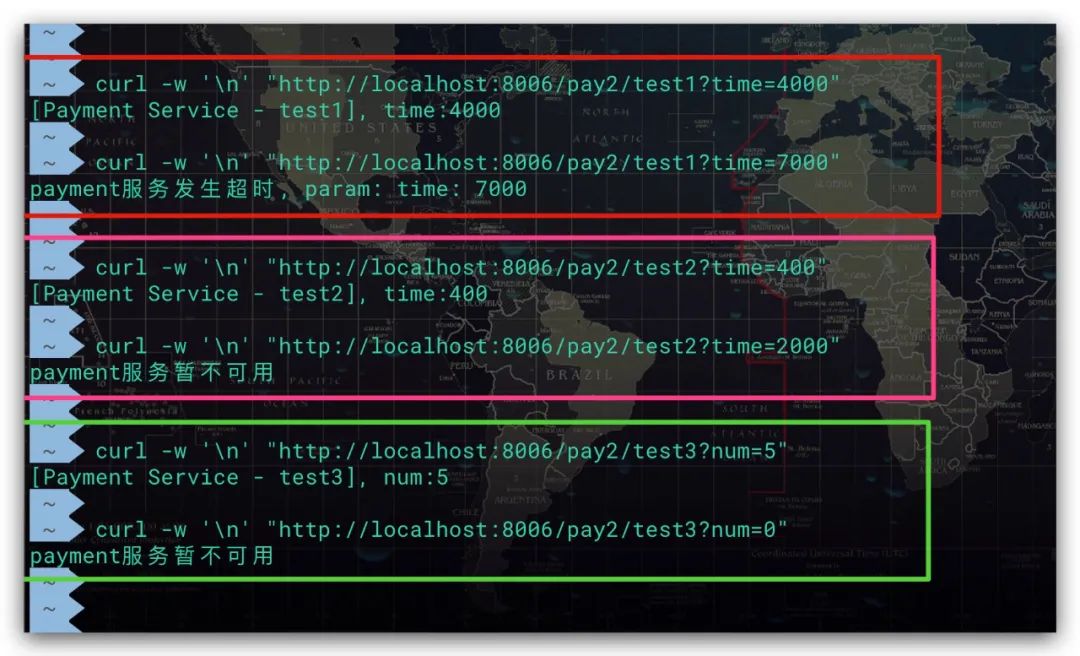
測(cè)試效果如下,符合預(yù)期
服務(wù)熔斷
Hystrix的服務(wù)熔斷采用斷路器模式的思想進(jìn)行設(shè)計(jì)。在該模式中存在如下三種狀態(tài)
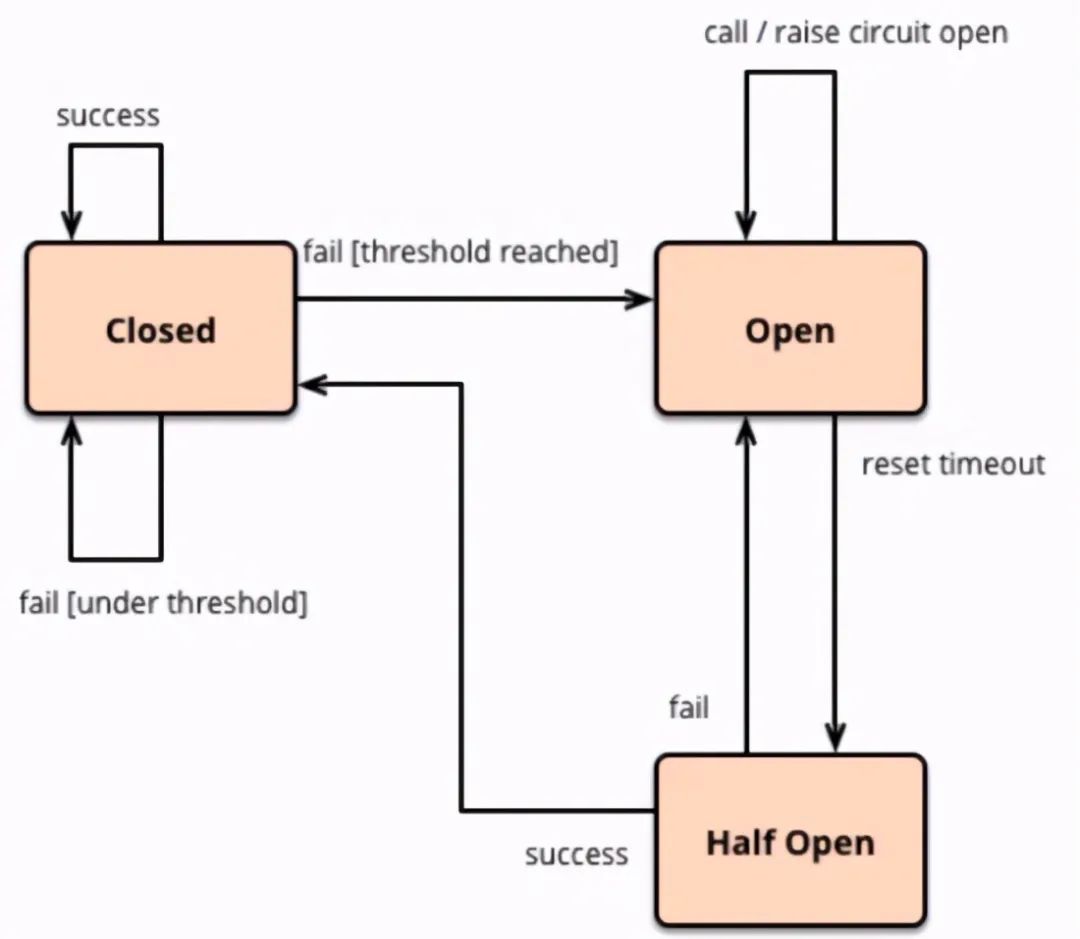
Closed:關(guān)閉狀態(tài)。接受請(qǐng)求,服務(wù)的主邏輯可以被訪問調(diào)用 Open:打開狀態(tài)。拒絕請(qǐng)求,服務(wù)的主邏輯無(wú)法執(zhí)行。該服務(wù)如果有相應(yīng)的降級(jí)方法則執(zhí)行降級(jí)方法,否則直接拋出錯(cuò)誤響應(yīng) Half-Open:半開狀態(tài)。處于該狀態(tài)時(shí),其會(huì)允許一部分請(qǐng)求流量通過(guò),嘗試執(zhí)行主邏輯。如果發(fā)現(xiàn)調(diào)用成功則說(shuō)明當(dāng)前服務(wù)可以被恢復(fù),進(jìn)而變?yōu)镃losed狀態(tài);否則調(diào)用失敗,繼續(xù)變?yōu)镺pen狀態(tài)
從上可以看到,正是由于Half-Open狀態(tài)的存在,為服務(wù)的自我恢復(fù)提供了一種思路。關(guān)于上述三種狀態(tài)的轉(zhuǎn)換邏輯,如下所示。在服務(wù)初始階段,斷路器肯定處于Closed狀態(tài)。在斷路器統(tǒng)計(jì)的滑動(dòng)時(shí)間窗口內(nèi),滿足一定的打開條件時(shí),斷路器才會(huì)進(jìn)入Open狀態(tài)。當(dāng)斷路器進(jìn)入Open狀態(tài)達(dá)到一定時(shí)間后會(huì)進(jìn)入Half-Open狀態(tài),讓一部分請(qǐng)求通過(guò)以驗(yàn)證服務(wù)是否可以被恢復(fù),并根據(jù)驗(yàn)證結(jié)果決定進(jìn)入Closed或Open狀態(tài)
這里需要補(bǔ)充說(shuō)明的是,斷路器統(tǒng)計(jì)的滑動(dòng)時(shí)間窗口可通過(guò) metrics.rollingStats.timeInMilliseconds 進(jìn)行配置。而斷路器的打開條件則是指在該時(shí)間窗口內(nèi),其接受的請(qǐng)求數(shù)、請(qǐng)求的失敗率均達(dá)到閾值。需要注意的是,這兩個(gè)閾值必須同時(shí)滿足。可分別通過(guò) circuitBreaker.requestVolumeThreshold、circuitBreaker.errorThresholdPercentage 進(jìn)行配置。最后,對(duì)于斷路器在進(jìn)入Open狀態(tài)后需要多長(zhǎng)時(shí)間才會(huì)進(jìn)入Half-Open狀態(tài),則可通過(guò) circuitBreaker.sleepWindowInMilliseconds 進(jìn)行配置
為了方便驗(yàn)證測(cè)試,我們?cè)赑aymentController2類繼續(xù)添加一個(gè)新的方法test4
@RestController
@RequestMapping("pay2")
//?該類默認(rèn)的降級(jí)配置
@DefaultProperties(defaultFallback?=?"defaultFallback")
public?class?PaymentController2?{

????...

????@GetMapping("/test4")
????@HystrixCommand(?commandProperties?=?{
????????//?打開斷路器
????????@HystrixProperty(name?=?"circuitBreaker.enabled",?value?=?"true"),
????????//?斷路器統(tǒng)計(jì)的滑動(dòng)時(shí)間窗口,?Unit:?ms
????????@HystrixProperty(name?=?"metrics.rollingStats.timeInMilliseconds",?value?=?"10000"),
????????//?斷路器的請(qǐng)求數(shù)閾值
????????@HystrixProperty(name?=?"circuitBreaker.requestVolumeThreshold",?value?=?"5"),
????????//?斷路器的請(qǐng)求失敗率閾值,?Unit:?%
????????@HystrixProperty(name?=?"circuitBreaker.errorThresholdPercentage",?value?=?"70"),
????????//?斷路器進(jìn)入Open打開狀態(tài)多長(zhǎng)時(shí)間后,?允許再次嘗試處理部分請(qǐng)求(即Half-Open半開狀態(tài)),?Unit:?ms
????????@HystrixProperty(name?=?"circuitBreaker.sleepWindowInMilliseconds",?value?=?"10000")
????})
????public?String?test4(@RequestParam?Integer?num)?{
????????if(num?50)?{
????????????throw?new?RuntimeException("非法參數(shù)異常");
????????}

????????String?msg?=?"[Payment?Service?-?test4],?num:"?+?num;
????????return?msg;
????}

????/**
?????*?默認(rèn)降級(jí)方法
?????*?@return
?????*/
????public?String?defaultFallback()?{
????????return?"payment服務(wù)暫不可用";
????}

}
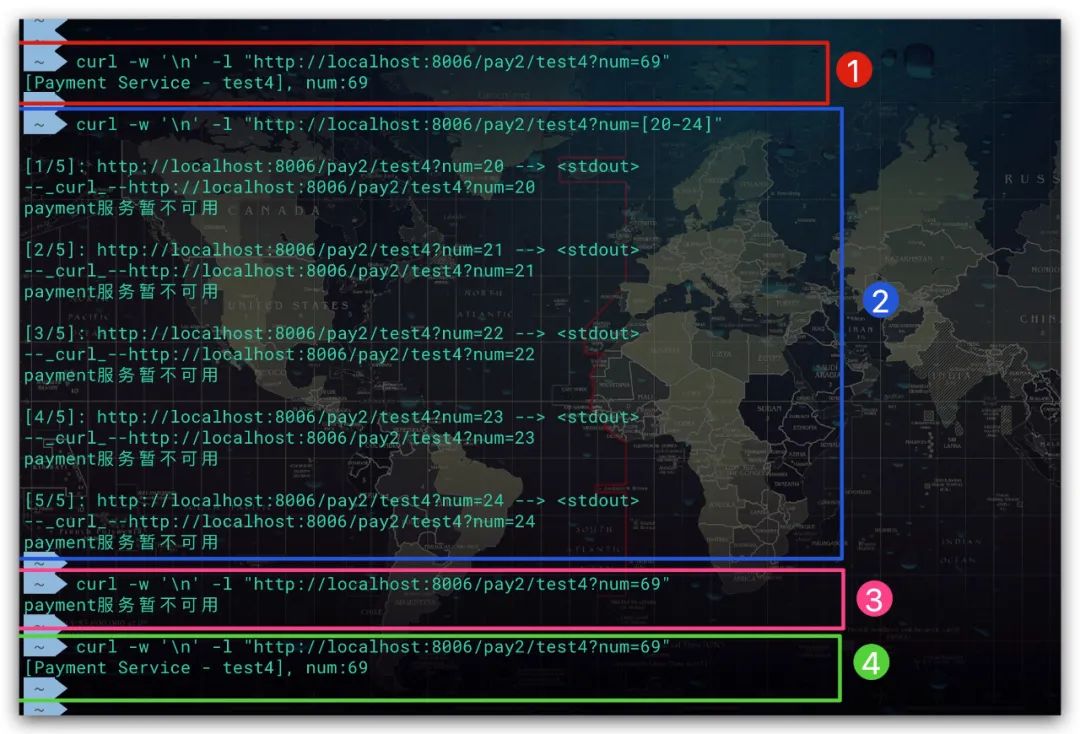
測(cè)試結(jié)果如下所示。第①次訪問時(shí),可以看到訪問正常,執(zhí)行了主流程;第②次訪問時(shí),發(fā)送了5個(gè)請(qǐng)求且訪問結(jié)果均失敗被降級(jí);然后馬上開始第③次訪問,從測(cè)試結(jié)果可以看出由于該服務(wù)已經(jīng)被熔斷了,直接走降級(jí)方法;等過(guò)了一段時(shí)間后,服務(wù)恢復(fù)第④次訪問成功
服務(wù)限流
Hystrix提供了兩種隔離策略:線程池隔離、信號(hào)量隔離。這里我們以前者為例介紹如何進(jìn)行限流,信號(hào)量隔離同理。在線程池隔離的場(chǎng)景下,可通過(guò)控制線程池相關(guān)參數(shù)實(shí)現(xiàn)流量控制。這樣當(dāng)線程池資源不足時(shí),對(duì)于新的請(qǐng)求就進(jìn)行降級(jí)。為了方便驗(yàn)證測(cè)試,我們?cè)赑aymentController2類繼續(xù)添加一個(gè)新的方法test5
@RestController
@RequestMapping("pay2")
//?該類默認(rèn)的降級(jí)配置
@DefaultProperties(defaultFallback?=?"defaultFallback")
public?class?PaymentController2?{

????...
????
????@GetMapping("/test5")
????@HystrixCommand(
????????commandProperties?=?{
????????????//?方法超時(shí)配置,?Unit:?ms
????????????@HystrixProperty(name?=?"execution.isolation.thread.timeoutInMilliseconds",?value?=?"15000"),
????????????//?資源隔離模式:?線程池隔離
????????????@HystrixProperty(name?=?"execution.isolation.strategy",?value?=?"THREAD")
????????},
????????threadPoolProperties?=?{
????????????//?核心線程數(shù)
????????????@HystrixProperty(name?=?"coreSize",?value?=?"2"),
????????????//?等待隊(duì)列容量,?-1表示不啟用
????????????@HystrixProperty(name?=?"maxQueueSize",?value?=?"-1")
????????}
????)
????public?String?test5(@RequestParam?Integer?num)?{
????????if(num?50)?{
????????????throw?new?RuntimeException("非法參數(shù)異常");
????????}

????????//?模擬業(yè)務(wù)耗時(shí)
????????try?{
????????????Thread.sleep(?10000?);
????????}?catch?(Exception?e)?{
????????}

????????String?msg?=?"[Payment?Service?-?test5],?num:"?+?num;
????????return?msg;
????}

????/**
?????*?默認(rèn)降級(jí)方法
?????*?@return
?????*/
????public?String?defaultFallback()?{
????????return?"payment服務(wù)暫不可用";
????}

}
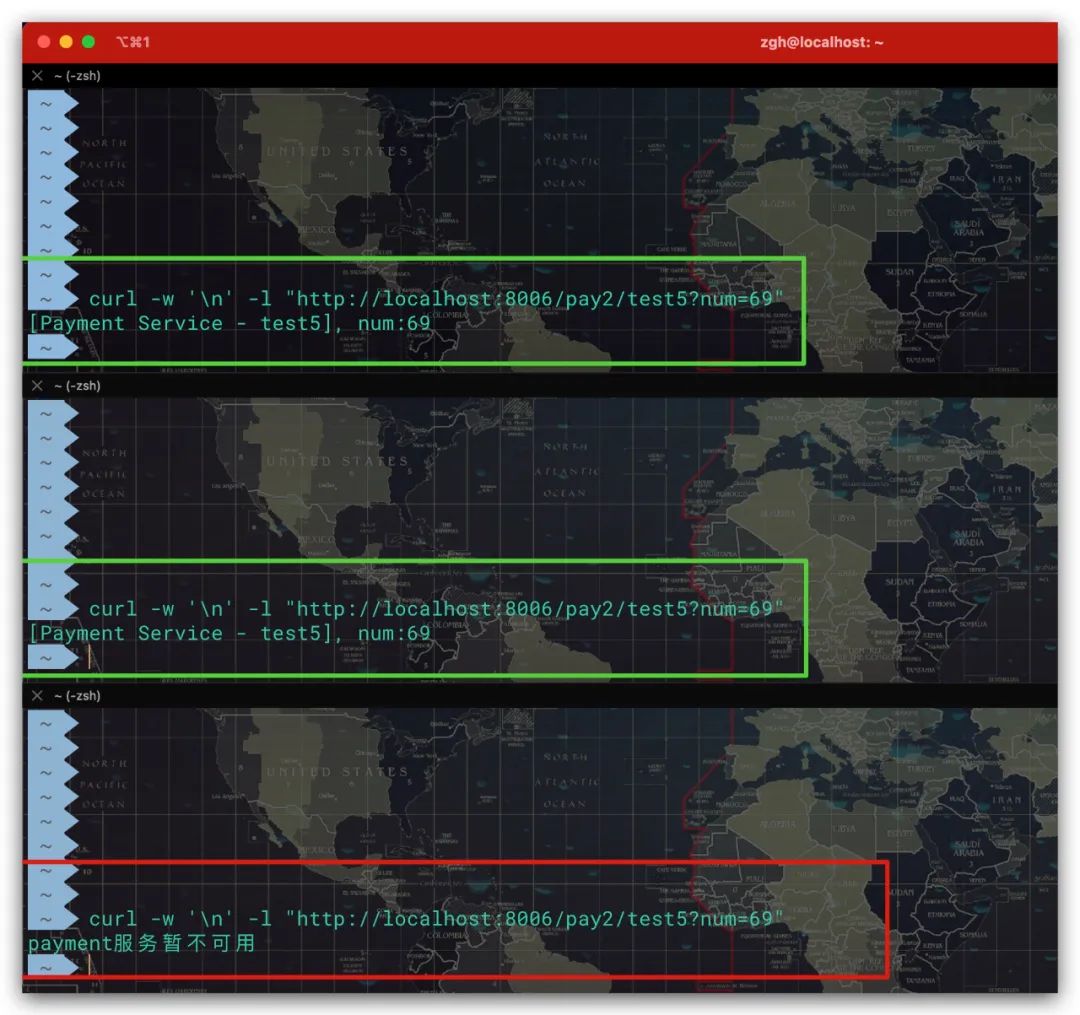
對(duì)于該服務(wù)接口其最大并發(fā)量為2。這樣同時(shí)發(fā)送3個(gè)請(qǐng)求時(shí),可以看到前2個(gè)請(qǐng)求正常處理。但第3個(gè)請(qǐng)求由于(線程池)資源不足被限流了,故進(jìn)行降級(jí)處理。測(cè)試結(jié)果符合預(yù)期
服務(wù)監(jiān)控
Hystrix還提供了Dashboard以便通過(guò)可視化的方式實(shí)現(xiàn)服務(wù)監(jiān)控。這里我們建立一個(gè)HystrixDashboard服務(wù)對(duì)目標(biāo)服務(wù)進(jìn)行監(jiān)控。首先在POM中我們引入 spring-cloud-starter-netflix-hystrix-dashboard 依賴,如下所示
<dependencyManagement>
??<dependencies>

????
????<dependency>
??????<groupId>org.springframework.bootgroupId>
??????<artifactId>spring-boot-dependenciesartifactId>
??????<version>2.2.2.RELEASEversion>
??????<type>pomtype>
??????<scope>importscope>
????dependency>

????
????<dependency>
??????<groupId>org.springframework.cloudgroupId>
??????<artifactId>spring-cloud-dependenciesartifactId>
??????<version>Hoxton.SR1version>
??????<type>pomtype>
??????<scope>importscope>
????dependency>

??dependencies>
dependencyManagement>

<dependencies>
??
??
??<dependency>
??????<groupId>org.springframework.cloudgroupId>
??????<artifactId>spring-cloud-starter-netflix-hystrix-dashboardartifactId>
??dependency>

??
??<dependency>
??????<groupId>org.springframework.bootgroupId>
??????<artifactId>spring-boot-starter-webartifactId>
??dependency>

dependencies>
然后為該服務(wù)添加一個(gè)啟動(dòng)類即可,并通過(guò)添加@EnableHystrixDashboard注解實(shí)現(xiàn)Hystrix Dashboard的啟用
@SpringBootApplication
//?啟用?Hystrix?Dashboard
@EnableHystrixDashboard
public?class?HystrixDashboardApplication?{
????public?static?void?main(String[]?args)?{
????????SpringApplication.run(HystrixDashboardApplication.class,?args);
????}
}
對(duì)于HystrixDashboard服務(wù)而言,其配置文件如下所示
spring:
??application:
????name:?HystrixDashboard

server:
??port:?9111
這里我們以監(jiān)控payment服務(wù)為例展開說(shuō)明,在此之前我們需要對(duì)被監(jiān)控服務(wù)payment進(jìn)行一些必要的配置。首先需要在POM文件中添加 spring-boot-starter-actuator 依賴
<dependencies>
??
??
??<dependency>
????<groupId>org.springframework.bootgroupId>
????<artifactId>spring-boot-starter-actuatorartifactId>
????<version>2.2.2.RELEASEversion>
??dependency>

dependencies>
與此同時(shí),需要配置Actuator以開啟 hystrix.stream 端點(diǎn),相關(guān)配置如下所示
#?Actuator配置:?開啟?hystrix.stream?端點(diǎn)
management:
??endpoints:
????web:
??????exposure:
????????include:?hystrix.stream
??????base-path:?/actuator
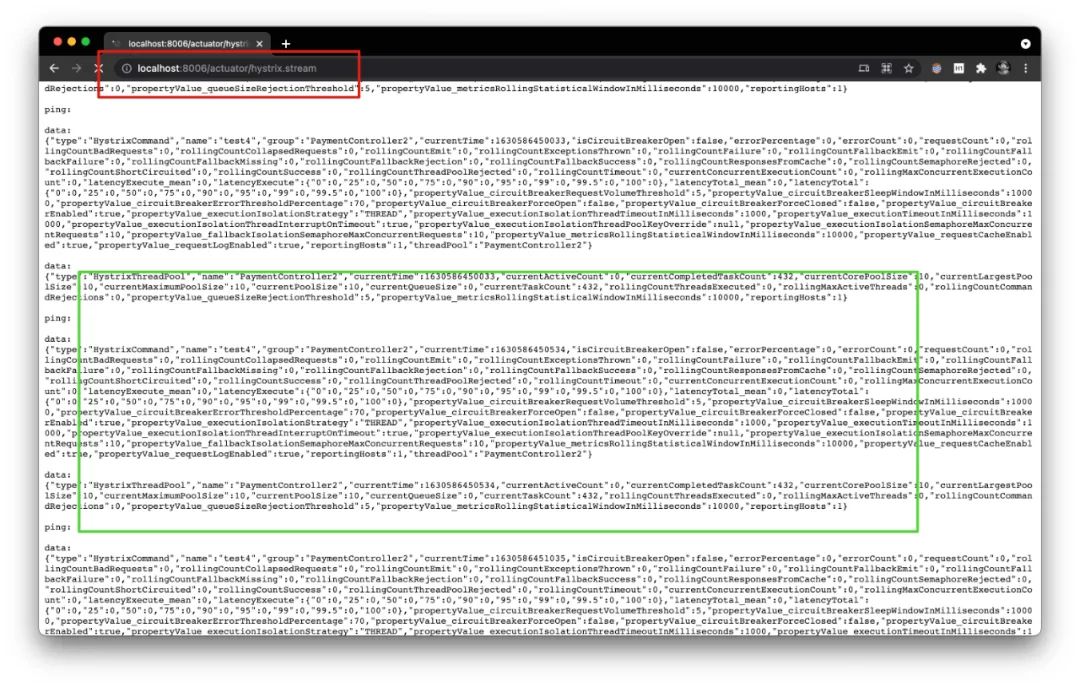
啟動(dòng)payment、HystrixDashboard服務(wù),分別使用8006、9111端口。首先訪問payment服務(wù)的 hystrix.stream 端點(diǎn)驗(yàn)證是否有相關(guān)監(jiān)控?cái)?shù)據(jù),打開 http://localhost:8006/actuator/hystrix.stream 頁(yè)面。效果如下,符合預(yù)期
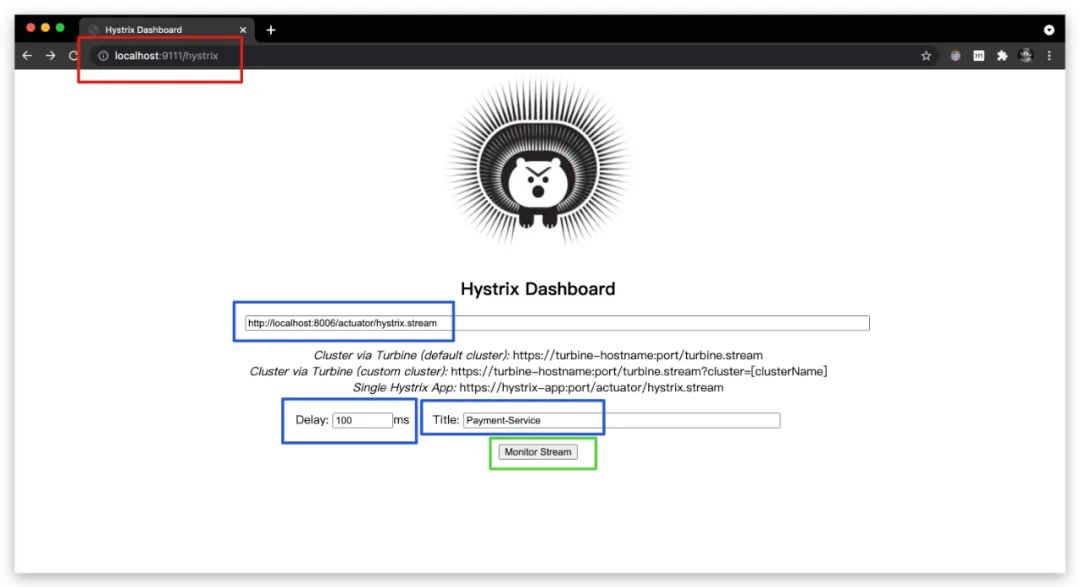
然后訪問HystrixDashboard服務(wù),打開 http://localhost:9111/hystrix 頁(yè)面。并在頁(yè)面上填寫被監(jiān)控服務(wù)的 hystrix.stream 端點(diǎn)地址、延遲時(shí)間、被監(jiān)控服務(wù)名稱
最后,點(diǎn)擊Monitor Stream開啟監(jiān)控,效果如下所示

參考文獻(xiàn)
Spring微服務(wù)實(shí)戰(zhàn) John Carnell著