
從代碼上看鴻蒙 APP 與安卓 APP 的關(guān)系
點(diǎn)擊上方“逆鋒起筆”,公眾號(hào)回復(fù)?pdf 領(lǐng)取大佬們推薦的學(xué)習(xí)資料

昨天跑通了鴻蒙的 Hello Word,蠻高興的,正準(zhǔn)備繼續(xù)深入的時(shí)候,在網(wǎng)上看到一篇文章,我按照文章的說法復(fù)盤了一下,貼出代碼,供大家交流。


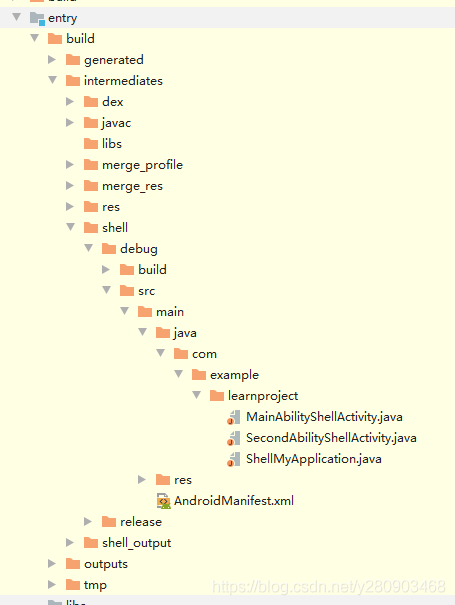
①當(dāng) Hello Word 跑起來后,在 build\intermediates\shell\debug\src\main 目錄下確實(shí)有 Android 代碼。
②打開 AndroidManifest.xml 文件,可以看到 Android 配置信息。
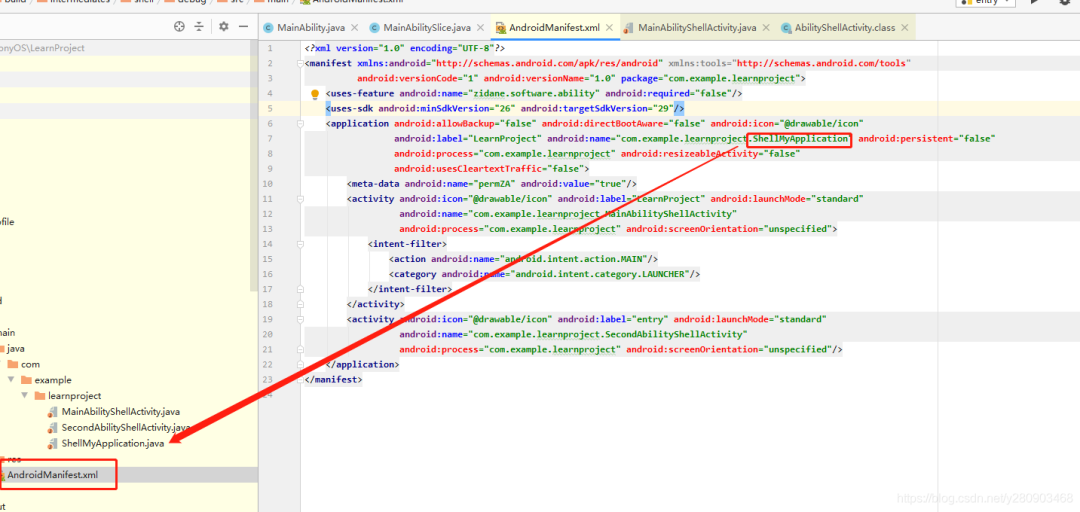
③打開配置文件指向的 ShellMyApplication.java 文件,發(fā)現(xiàn) ShellMyApplication 繼承了 HarmonyApplication。

④按住 Ctrl 點(diǎn)擊 HarmonyApplication,進(jìn)入 HarmonyApplication 類,并定位,發(fā)現(xiàn)依賴包。
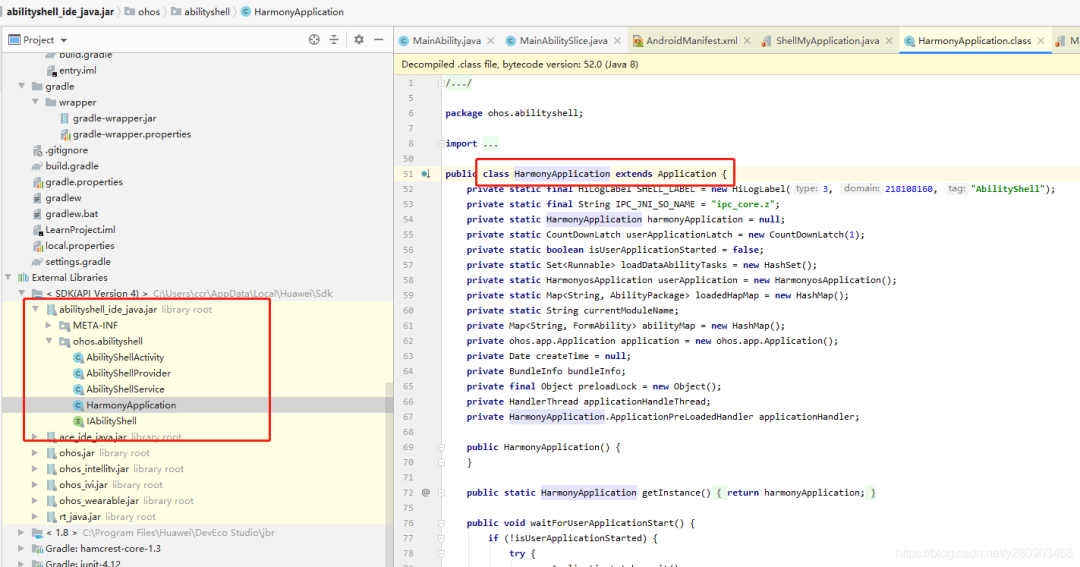
⑤進(jìn)入 AbilityShellActivity 類,可以看到對(duì) Android Activity 的代理。

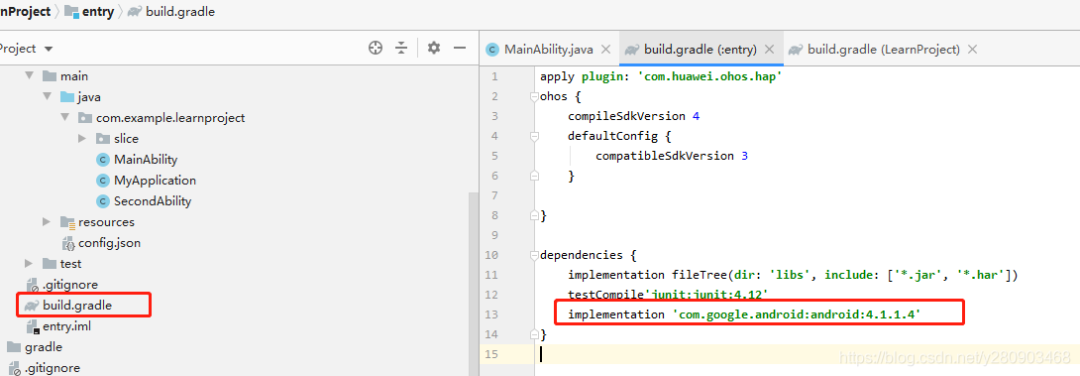
⑥根據(jù)這些情況,實(shí)際上,我們可以在鴻蒙的項(xiàng)目里寫 Android 代碼。
implementation 'com.google.android:android:4.1.1.4'
public class MyApplication extends AbilityPackage {
 ? ?@Override
 ? ?public void onInitialize() {
 ? ? ? ?super.onInitialize();
 ? ?}
 ? ?public static Application getApp(){
 ? ? ? ?try {
 ? ? ? ? ? ?return (Application)Class.forName("android.app.ActivityThread").getMethod("currentApplication").invoke(null,(Object[])null);
 ? ? ? ?}catch (Exception e){
 ? ? ? ? ? ?e.printStackTrace();
 ? ? ? ?}
 ? ? ? ?return null;
 ? ?}
}
關(guān)注公眾號(hào) 逆鋒起筆,回復(fù) pdf,下載你需要的各種學(xué)習(xí)資料。
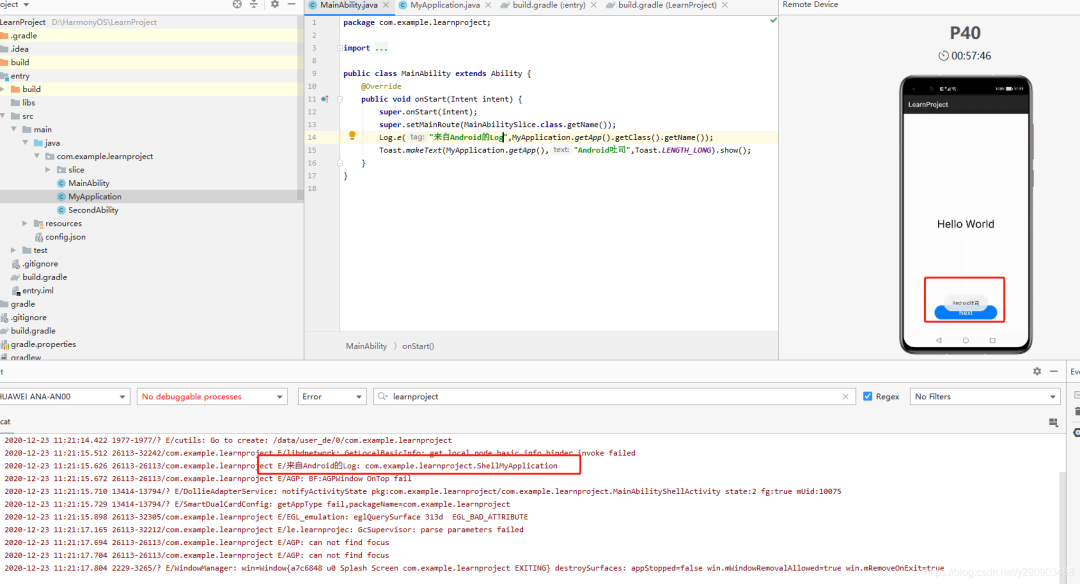
public class MainAbility extends Ability {
 ? ?private Application application;
 ? ?@Override
 ? ?public void onStart(Intent intent) {
 ? ? ? ?super.onStart(intent);
 ? ? ? ?super.setMainRoute(MainAbilitySlice.class.getName());
 ? ? ? ?application=MyApplication.getApp();
 ? ? ? ?Log.e("來自Android的Log",application.getClass().getName());
 ? ? ? ?Toast.makeText(application,"Android吐司",Toast.LENGTH_LONG).show();

 ? ?}
}
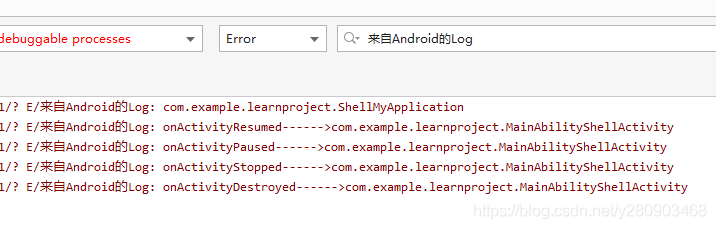
 ? ? ? MyApplication.getApp().registerActivityLifecycleCallbacks(new Application.ActivityLifecycleCallbacks() {
 ? ? ? ? ? ?@Override
 ? ? ? ? ? ?public void onActivityCreated(Activity activity, Bundle bundle) {
 ? ? ? ? ? ? ? ?Log.e("來自Android的Log","onActivityCreated------>"+activity.getClass().getName());
 ? ? ? ? ? ?}

 ? ? ? ? ? ?@Override
 ? ? ? ? ? ?public void onActivityStarted(Activity activity) {
 ? ? ? ? ? ? ? ?Log.e("來自Android的Log","onActivityStarted------>"+activity.getClass().getName());

 ? ? ? ? ? ?}

 ? ? ? ? ? ?@Override
 ? ? ? ? ? ?public void onActivityResumed(Activity activity) {
 ? ? ? ? ? ? ? ?Log.e("來自Android的Log","onActivityResumed------>"+activity.getClass().getName());
 ? ? ? ? ? ?}

 ? ? ? ? ? ?@Override
 ? ? ? ? ? ?public void onActivityPaused(Activity activity) {
 ? ? ? ? ? ? ? ?Log.e("來自Android的Log","onActivityPaused------>"+activity.getClass().getName());
 ? ? ? ? ? ?}

 ? ? ? ? ? ?@Override
 ? ? ? ? ? ?public void onActivityStopped(Activity activity) {
 ? ? ? ? ? ? ? ?Log.e("來自Android的Log","onActivityStopped------>"+activity.getClass().getName());
 ? ? ? ? ? ?}

 ? ? ? ? ? ?@Override
 ? ? ? ? ? ?public void onActivitySaveInstanceState(Activity activity, Bundle bundle) {
 ? ? ? ? ? ? ? ?Log.e("來自Android的Log","onActivitySaveInstanceState------>"+activity.getClass().getName());
 ? ? ? ? ? ?}

 ? ? ? ? ? ?@Override
 ? ? ? ? ? ?public void onActivityDestroyed(Activity activity) {
 ? ? ? ? ? ? ? ?Log.e("來自Android的Log","onActivityDestroyed------>"+activity.getClass().getName());
 ? ? ? ? ? ?}
 ? ? ? ?});
 ? ? ? ? ? ? ? ? ? ?android.content.Intent intent1=new android.content.Intent();
 ? ? ? ? ? ? ? ? ? ?intent1.addFlags(android.content.Intent.FLAG_ACTIVITY_NEW_TASK);
 ? ? ? ? ? ? ? ? ? ?intent1.setAction("android.settings.APPLICATION_DETAILS_SETTINGS");
 ? ? ? ? ? ? ? ? ? ?intent1.setData(Uri.fromParts("package", MyApplication.getApp().getPackageName(), null));
 ? ? ? ? ? ? ? ? ? ?MyApplication.getApp().startActivity(intent1);

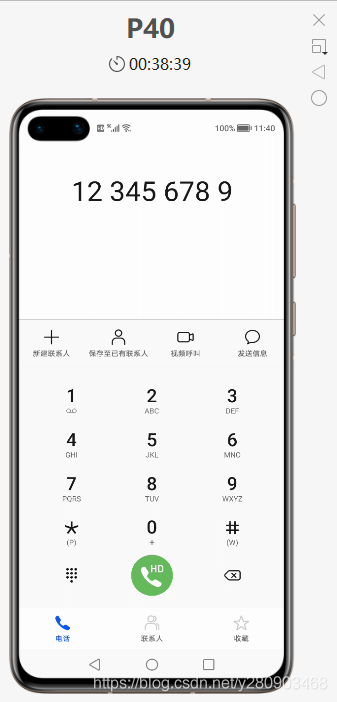
?用 Android 代碼調(diào)用 Android 系統(tǒng)撥號(hào)頁面:
 ? ? ? ? ? ? ? ? ? ?android.content.Intent intent1=new android.content.Intent(android.content.Intent.ACTION_DIAL,Uri.parse("tel:123456789"));
 ? ? ? ? ? ? ? ? ? ?intent1.addFlags(android.content.Intent.FLAG_ACTIVITY_NEW_TASK);
 ? ? ? ? ? ? ? ? ? ?MyApplication.getApp().startActivity(intent1);
MyApplication.getApp().registerActivityLifecycleCallbacks(new Application.ActivityLifecycleCallbacks() {
 ? ? ? ? ? ?@Override
 ? ? ? ? ? ?public void onActivityCreated(Activity activity, Bundle bundle) {
 ? ? ? ? ? ? ? ?Log.e("來自Android的Log","onActivityCreated------>"+activity.getClass().getName());
 ? ? ? ? ? ?}

 ? ? ? ? ? ?@Override
 ? ? ? ? ? ?public void onActivityStarted(Activity activity) {
 ? ? ? ? ? ? ? ?Log.e("來自Android的Log","onActivityStarted------>"+activity.getClass().getName());

 ? ? ? ? ? ?}

 ? ? ? ? ? ?@Override
 ? ? ? ? ? ?public void onActivityResumed(Activity activity) {
 ? ? ? ? ? ? ? ?Log.e("來自Android的Log","onActivityResumed------>"+activity.getClass().getName());
 ? ? ? ? ? ? ? ?FrameLayout frameLayout=(FrameLayout)activity.getWindow().getDecorView().findViewById(android.R.id.content);
 ? ? ? ? ? ? ? ?View view=frameLayout.findViewById(1);
 ? ? ? ? ? ? ? ?LinearLayout linearLayout;
 ? ? ? ? ? ? ? ?if (view instanceof LinearLayout){
 ? ? ? ? ? ? ? ? ? ?linearLayout=(LinearLayout)view;
 ? ? ? ? ? ? ? ?}
 ? ? ? ? ? ? ? ?else {
 ? ? ? ? ? ? ? ? ? ?linearLayout=new LinearLayout(activity);
 ? ? ? ? ? ? ? ? ? ?linearLayout.setLayoutParams(new ViewGroup.LayoutParams(ViewGroup.LayoutParams.MATCH_PARENT,ViewGroup.LayoutParams.MATCH_PARENT));
 ? ? ? ? ? ? ? ? ? ?linearLayout.setOrientation(LinearLayout.VERTICAL);
 ? ? ? ? ? ? ? ? ? ?frameLayout.addView(linearLayout);
 ? ? ? ? ? ? ? ?}
 ? ? ? ? ? ? ? ?TextView textView=new TextView(activity);
 ? ? ? ? ? ? ? ?textView.setText("來自Android的TextView");
 ? ? ? ? ? ? ? ?textView.setLayoutParams(new ViewGroup.LayoutParams(ViewGroup.LayoutParams.WRAP_CONTENT,ViewGroup.LayoutParams.WRAP_CONTENT));
 ? ? ? ? ? ? ? ?linearLayout.addView(textView);
 ? ? ? ? ? ? ? ?android.widget.Button button=new android.widget.Button(activity);
 ? ? ? ? ? ? ? ?button.setText("來自Android的button");
 ? ? ? ? ? ? ? ?button.setLayoutParams(new ViewGroup.LayoutParams(ViewGroup.LayoutParams.WRAP_CONTENT,ViewGroup.LayoutParams.WRAP_CONTENT));
 ? ? ? ? ? ? ? ?linearLayout.addView(button);
 ? ? ? ? ? ?}

 ? ? ? ? ? ?@Override
 ? ? ? ? ? ?public void onActivityPaused(Activity activity) {
 ? ? ? ? ? ? ? ?Log.e("來自Android的Log","onActivityPaused------>"+activity.getClass().getName());
 ? ? ? ? ? ?}

 ? ? ? ? ? ?@Override
 ? ? ? ? ? ?public void onActivityStopped(Activity activity) {
 ? ? ? ? ? ? ? ?Log.e("來自Android的Log","onActivityStopped------>"+activity.getClass().getName());
 ? ? ? ? ? ?}

 ? ? ? ? ? ?@Override
 ? ? ? ? ? ?public void onActivitySaveInstanceState(Activity activity, Bundle bundle) {
 ? ? ? ? ? ? ? ?Log.e("來自Android的Log","onActivitySaveInstanceState------>"+activity.getClass().getName());
 ? ? ? ? ? ?}

 ? ? ? ? ? ?@Override
 ? ? ? ? ? ?public void onActivityDestroyed(Activity activity) {
 ? ? ? ? ? ? ? ?Log.e("來自Android的Log","onActivityDestroyed------>"+activity.getClass().getName());
 ? ? ? ? ? ?}
 ? ? ? ?});

點(diǎn)“閱讀原文”了解更多
評(píng)論
圖片
表情