
鴻蒙OS制作小游戲:數(shù)字華容道(自定義組件踩坑記錄)

前兩天看到HarmonyOS開發(fā)者官網(wǎng)上發(fā)布的一個挑戰(zhàn)HarmonyOS分布式趣味應(yīng)用的帖子,然后有個想法想搞一個小游戲出來,結(jié)果三天的時間都卡在了自定義組件上,使用了各種方式方法去實現(xiàn)功能,但是還是沒有達(dá)到預(yù)期的效果,暫時先做個小總結(jié),其實坑有的時候真的很深......
1
效果演示
小應(yīng)用其實也挺簡單,以前也見到過,叫做數(shù)字華容道,當(dāng)你把所在的數(shù)字以順序放置完成后游戲結(jié)束。
其實屬于益智類的小游戲了;
最終實現(xiàn)效果:
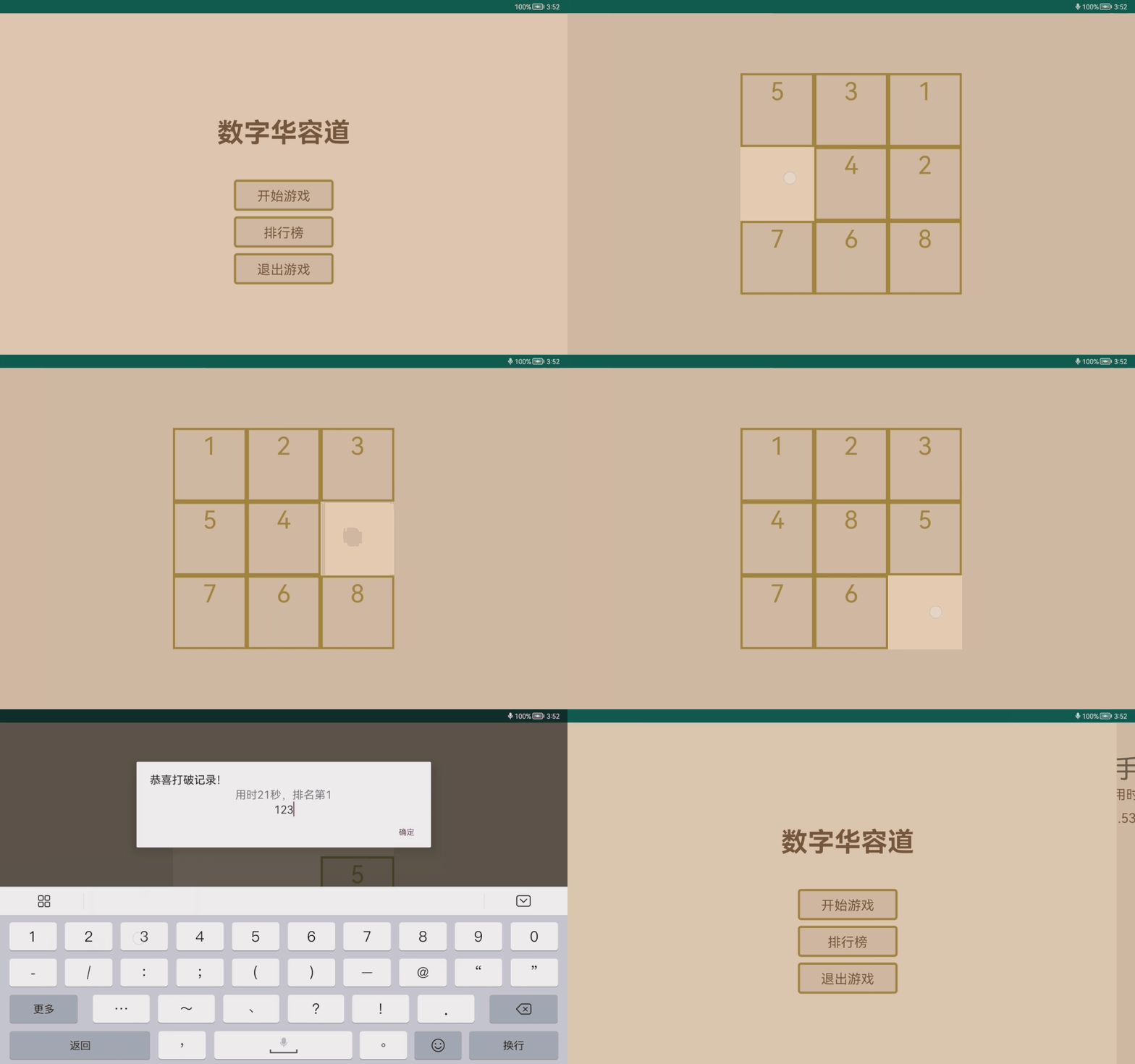
當(dāng)前實現(xiàn)效果: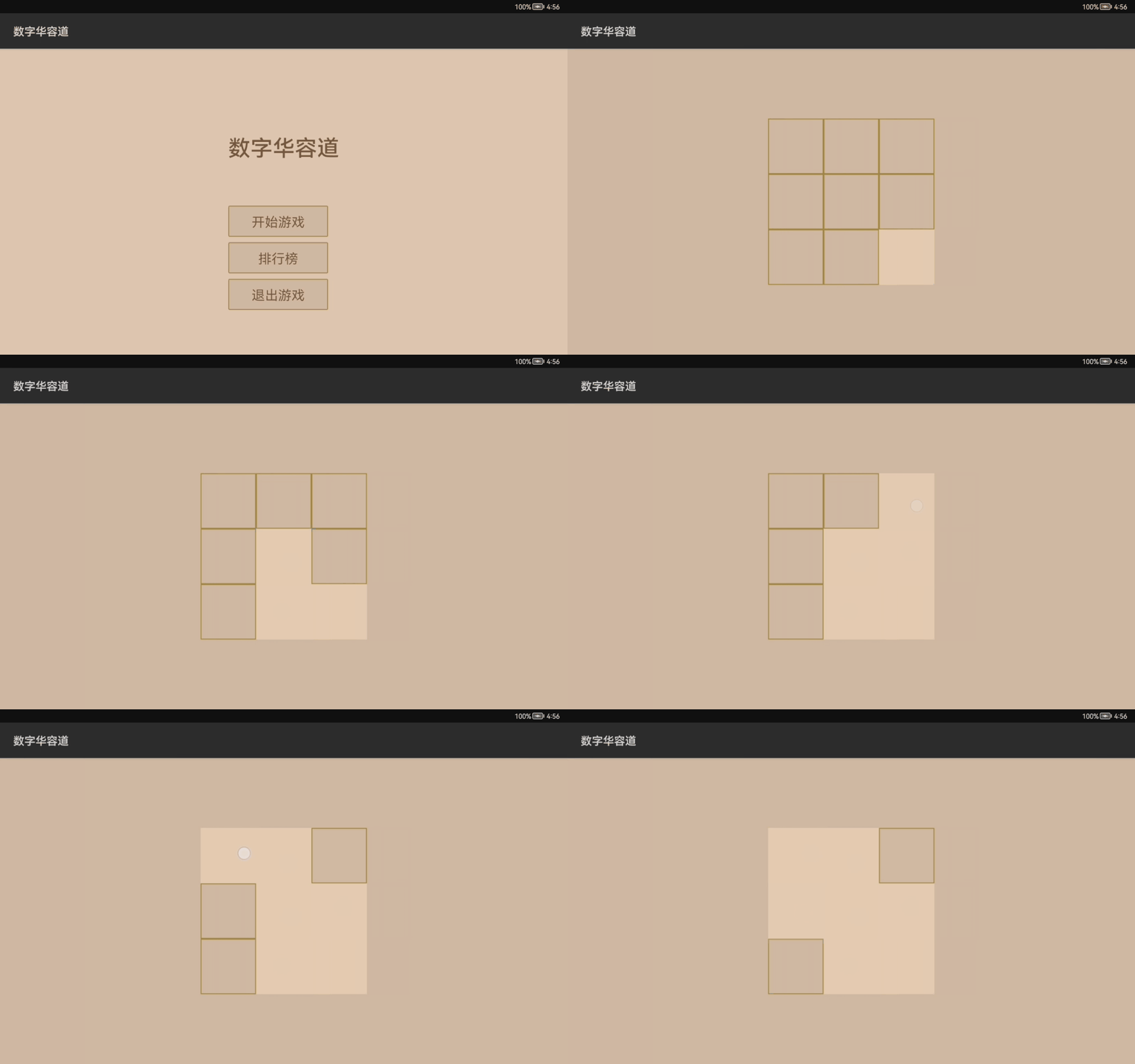
2
實現(xiàn)過程
暫時說一下現(xiàn)在的進(jìn)度,每一個方塊可以表示一個棋子,棋子的名稱也就是3*3的九宮格,1-9的數(shù)字,只是最后一個數(shù)字單獨設(shè)置為空白。點擊空白周圍的棋子可以與這個空白棋子做一次位置調(diào)換,直到將所有棋子順序排列完成為止。
這里先說一個這個棋子,棋子有兩個東西需要被記住,一個是棋子的坐標(biāo)就是在九宮格里面的位置,另一個就是棋子的名稱;所以選擇使用自定義組件的方式將坐標(biāo)和名稱進(jìn)行一個綁定。
Position.java
/**
?*?定義棋子的位置
?*/
public?class?Position?{
????public?int?sizeX;?//?總列數(shù)
????public?int?sizeY;?//?總行數(shù)
????public?int?x;?//?橫坐標(biāo)
????public?int?y;?//?縱坐標(biāo)

????public?Position()?{
????}

????public?Position(int?sizeX,?int?sizeY)?{
????????this.sizeX?=?sizeX;
????????this.sizeY?=?sizeY;
????}

????public?Position(int?sizeX,?int?sizeY,?int?x,?int?y)?{
????????this.sizeX?=?sizeX;
????????this.sizeY?=?sizeY;
????????this.x?=?x;
????????this.y?=?y;
????}

????public?Position(Position?orig)?{
????????this(orig.sizeX,?orig.sizeY,?orig.x,?orig.y);
????}

????/**
?????*?移動到下一個位置
?????*/
????public?boolean?moveToNextPosition()?{
????????if?(x?1)?{
????????????x++;
????????}?else?if?(y?1)?{
????????????x?=?0;
????????????y++;
????????}?else?{
????????????return?false;
????????}
????????return?true;
????}

????@Override
????public?String?toString()?{
????????return?"Position{"?+
????????????????"x="?+?x?+
????????????????",?y="?+?y?+
????????????????'}';
????}
}
CubeView.java
public?class?CubeView?extends?ComponentContainer?{

????private?Position?mPosition;
????private?int?mNumber;

????private?Text?mTextCub;
????private?int?mTextSize?=?20;

????public?CubeView(Context?context)?{
????????super(context);
????????init();
????}

????public?CubeView(Context?context,?AttrSet?attrSet)?{
????????super(context,?attrSet);
????????init();
????}

????private?void?init(){
????????Component?component?=?LayoutScatter.getInstance(getContext()).parse(ResourceTable.Layout_cube_view_item,?this,?false);
????????mTextCub?=?(Text)?component.findComponentById(ResourceTable.Id_tv_item);
????????mTextCub.setTextSize(mTextSize,?Text.TextSizeType.VP);
????}

????public?void?setNumber(int?n)?{
????????mNumber?=?n;
????????mTextCub.setText(String.valueOf(n));
????}


????public?int?getNumber()?{
????????return?mNumber;
????}

????public?Position?getPosition()?{
????????return?mPosition;
????}

????public?void?setPosition(Position?position)?{
????????this.mPosition?=?position;
????}

????@Override
????public?String?toString()?{
????????return?"CubeView{"?+
????????????????"mPosition="?+?mPosition?+
????????????????",?mNumber="?+?mNumber?+
????????????????'}';
????}
}
cube_view_item.xml
<DirectionalLayout
????xmlns:ohos="http://schemas.huawei.com/res/ohos"
????ohos:height="match_content"
????ohos:width="match_content">
????<Text
????????ohos:id="$+id:tv_item"
????????ohos:height="100vp"
????????ohos:width="100vp"
????????ohos:background_element="$graphic:cube_view_bg"
????????ohos:text="1"
????????ohos:text_alignment="center"
????????ohos:text_color="$color:cubeViewStroke"
????????ohos:text_size="20vp">
????????>Text>
DirectionalLayout>
到這問題就來了,因為在代碼中只是使用到了setText()方法,那么有人會問我為什么不直接繼承Text組件,多寫一個布局有點麻煩了不是?
第一個坑
這里就是第一個坑了,因為在以前寫Android自定義控件的時候,對于簡單的組件來說直接繼承它的組件名稱就可以了,不用去繼承公共類然后再去使用布局去定位到里面的組件。原本我也是這么寫的,CubeView直接繼承Text沒有毛病可以使用,可以看到兩者間并無差別。
public?class?CubeView?extends?Text?{

????private?Position?mPosition;
????private?int?mNumber;


????public?CubeView(Context?context)?{
????????super(context);
????????init();
????}

????public?CubeView(Context?context,?AttrSet?attrSet)?{
????????super(context,?attrSet);
????????init();
????}

????private?void?init(){
????????
????}

????public?void?setNumber(int?n)?{
????????mNumber?=?n;
????????setText(String.valueOf(n));
????}


????public?int?getNumber()?{
????????return?mNumber;
????}

????public?Position?getPosition()?{
????????return?mPosition;
????}

????public?void?setPosition(Position?position)?{
????????this.mPosition?=?position;
????}

????@Override
????public?String?toString()?{
????????return?"CubeView{"?+
????????????????"mPosition="?+?mPosition?+
????????????????",?mNumber="?+?mNumber?+
????????????????'}';
????}
}
但是在調(diào)用組件的時候出現(xiàn)了問題,因為我需要把這個棋子的組件添加到我的棋盤布局中,那么就需要先引入這個組件。引入組件后出問題了,布局報錯(在原來Android引入自定義組件的時候,單個組件也是可以直接引入的);報錯原因是,我最外層沒有放置布局導(dǎo)致不能直接識別單個組件,但是如果我加上一個布局的話,文件不會報錯,但是在我的棋盤上不能拿到這個棋子的組件;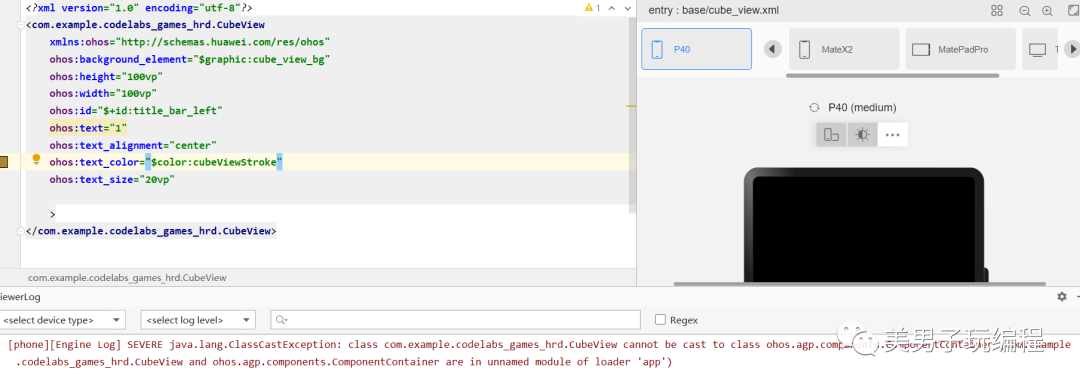
為此我只能將棋子的自定義組件寫成了布局引入方式。
到這里,棋子的開發(fā)工作也就基本做完了,下面要對棋盤進(jìn)行布局。還是選擇自定義組件的方式;
cube_view.xml
<com.example.codelabs_games_hrd.CubeView
????xmlns:ohos="http://schemas.huawei.com/res/ohos"
????ohos:background_element="$graphic:cube_view_bg"
????ohos:height="100vp"
????ohos:width="100vp"
????ohos:id="$+id:title_bar_left"
????ohos:text="1"
????ohos:text_alignment="center"
????ohos:text_color="$color:cubeViewStroke"
????ohos:text_size="20vp"

????>
com.example.codelabs_games_hrd.CubeView>
ability_game.xml
<StackLayout
????xmlns:ohos="http://schemas.huawei.com/res/ohos"
????ohos:height="match_parent"
????ohos:width="match_parent"
????ohos:background_element="$color:cubeViewBg">

????<com.example.codelabs_games_hrd.BoardView
????????ohos:id="$+id:board"
????????ohos:height="300vp"
????????ohos:width="300vp"
????????ohos:layout_alignment="center"
????????ohos:background_element="$color:boardViewBg">
????com.example.codelabs_games_hrd.BoardView>

????<Text
????????ohos:id="$+id:tvCheat"
????????ohos:height="10vp"
????????ohos:width="10vp">Text>

????<Text
????????ohos:id="$+id:mask"
????????ohos:height="match_parent"
????????ohos:width="match_parent"
????????ohos:background_element="$color:cubeViewBg"
????????ohos:text="123456789"
????????ohos:text_size="48vp">Text>

StackLayout>
BoardView.java
public?class?BoardView?extends?ComponentContainer?implements?ComponentContainer.EstimateSizeListener,?ComponentContainer.ArrangeListener?{
????private?static?final?String?TAG?=?"BoardView";
????/**
?????*?每一行有多少個棋子
?????*/
????private?int?mSizeX?=?3;
????/**
?????*?有多少行棋子
?????*/
????private?int?mSizeY?=?3;
????private?int?maxWidth?=?0;
????private?int?maxHeight?=?0;
????private?int?mChildSize;
????private?Position?mBlankPos;
????private?CubeView[]?mChildren;
????private?OnFinishListener?mFinishListener;
????private?int?xx?=?0;
????private?int?yy?=?0;
????private?int?lastHeight?=?0;
????//?子組件索引與其布局?jǐn)?shù)據(jù)的集合
????private?final?Map?axis?=?new?HashMap<>();
????//位置及大小
????private?static?class?Layout?{
????????int?positionX?=?0;
????????int?positionY?=?0;
????????int?width?=?0;
????????int?height?=?0;
????}
????private?void?invalidateValues()?{
????????xx?=?0;
????????yy?=?0;
????????maxWidth?=?0;
????????maxHeight?=?0;
????????axis.clear();
????}
????public?BoardView(Context?context)?{
????????super(context);
????}
????public?BoardView(Context?context,?AttrSet?attrs)?{
????????super(context,?attrs);
????????setEstimateSizeListener(this);
????????setArrangeListener(this);
????????init();
????}
????private?void?init()?{
????????mChildSize?=?mSizeX?*?mSizeY?-?1;
????????mChildren?=?new?CubeView[mChildSize];
????????Position?p?=?new?Position(mSizeX,?mSizeY);
????????for?(int?i?=?0;?i?????????//添加棋子
????????????CubeView?view?=?(CubeView)?LayoutScatter.getInstance(getContext()).parse(ResourceTable.Layout_cube_view,?this,?false);
????????????view.setPosition(new?Position(p));
????????????view.setClickedListener(component?->?moveChildToBlank(view));
????????????addComponent(view);
????????????p.moveToNextPosition();
????????????mChildren[i]?=?view;
????????}
????????//最后一個空白棋子
????????mBlankPos?=?new?Position(mSizeX,?mSizeY,?mSizeX?-?1,?mSizeY?-?1);
????}
????public?void?setData(List?data) ?{
????????for?(int?i?=?0;?i?????????????CubeView?view?=?(CubeView)?getComponentAt(i);
????????????view.setNumber(data.get(i));
????????}
????}
????//測量監(jiān)聽方法
????@Override
????public?boolean?onEstimateSize(int?widthEstimatedConfig,?int?heightEstimatedConfig)?{
????????invalidateValues();
????????//測量子組件的大小
????????measureChildren(?widthEstimatedConfig,??heightEstimatedConfig);
???????//關(guān)聯(lián)子組件的索引與其布局?jǐn)?shù)據(jù)
????????for?(int?idx?=?0;?idx?????????????CubeView?childView?=?(CubeView)?getComponentAt(idx);
????????????addChild(childView,?idx,?EstimateSpec.getSize(widthEstimatedConfig));
????????}
????????//測量本身大小
????????setEstimatedSize(?widthEstimatedConfig,??heightEstimatedConfig);
????????return?true;
????}
????private?void?measureChildren(int?widthEstimatedConfig,?int?heightEstimatedConfig)?{
????????for?(int?idx?=?0;?idx?????????????CubeView?childView?=?(CubeView)?getComponentAt(idx);
????????????if?(childView?!=?null)?{
????????????????LayoutConfig?lc?=?childView.getLayoutConfig();
????????????????int?childWidthMeasureSpec;
????????????????int?childHeightMeasureSpec;
????????????????if?(lc.width?==?LayoutConfig.MATCH_CONTENT)?{
????????????????????childWidthMeasureSpec?=?EstimateSpec.getSizeWithMode(lc.width,?EstimateSpec.NOT_EXCEED);
????????????????}?else?if?(lc.width?==?LayoutConfig.MATCH_PARENT)?{
????????????????????int?parentWidth?=?EstimateSpec.getSize(widthEstimatedConfig);
????????????????????int?childWidth?=?parentWidth?-?childView.getMarginLeft()?-?childView.getMarginRight();
????????????????????childWidthMeasureSpec?=?EstimateSpec.getSizeWithMode(childWidth,?EstimateSpec.PRECISE);
????????????????}?else?{
????????????????????childWidthMeasureSpec?=?EstimateSpec.getSizeWithMode(lc.width,?EstimateSpec.PRECISE);
????????????????}
????????????????if?(lc.height?==?LayoutConfig.MATCH_CONTENT)?{
????????????????????childHeightMeasureSpec?=?EstimateSpec.getSizeWithMode(lc.height,?EstimateSpec.NOT_EXCEED);
????????????????}?else?if?(lc.height?==?LayoutConfig.MATCH_PARENT)?{
????????????????????int?parentHeight?=?EstimateSpec.getSize(heightEstimatedConfig);
????????????????????int?childHeight?=?parentHeight?-?childView.getMarginTop()?-?childView.getMarginBottom();
????????????????????childHeightMeasureSpec?=?EstimateSpec.getSizeWithMode(childHeight,?EstimateSpec.PRECISE);
????????????????}?else?{
????????????????????childHeightMeasureSpec?=?EstimateSpec.getSizeWithMode(lc.height,?EstimateSpec.PRECISE);
????????????????}
????????????????childView.estimateSize(childWidthMeasureSpec,?childHeightMeasureSpec);
????????????}
????????}
????}
????private?void?measureSelf(int?widthEstimatedConfig,?int?heightEstimatedConfig)?{
????????int?widthSpce?=?EstimateSpec.getMode(widthEstimatedConfig);
????????int?heightSpce?=?EstimateSpec.getMode(heightEstimatedConfig);
????????int?widthConfig?=?0;
????????switch?(widthSpce)?{
????????????case?EstimateSpec.UNCONSTRAINT:
????????????case?EstimateSpec.PRECISE:
????????????????int?width?=?EstimateSpec.getSize(widthEstimatedConfig);
????????????????widthConfig?=?EstimateSpec.getSizeWithMode(width,?EstimateSpec.PRECISE);
????????????????break;
????????????case?EstimateSpec.NOT_EXCEED:
????????????????widthConfig?=?EstimateSpec.getSizeWithMode(maxWidth,?EstimateSpec.PRECISE);
????????????????break;
????????????default:
????????????????break;
????????}
????????int?heightConfig?=?0;
????????switch?(heightSpce)?{
????????????case?EstimateSpec.UNCONSTRAINT:
????????????case?EstimateSpec.PRECISE:
????????????????int?height?=?EstimateSpec.getSize(heightEstimatedConfig);
????????????????heightConfig?=?EstimateSpec.getSizeWithMode(height,?EstimateSpec.PRECISE);
????????????????break;
????????????case?EstimateSpec.NOT_EXCEED:
????????????????heightConfig?=?EstimateSpec.getSizeWithMode(maxHeight,?EstimateSpec.PRECISE);
????????????????break;
????????????default:
????????????????break;
????????}
????????setEstimatedSize(widthConfig,?heightConfig);
????}
????//每個棋子組件的位置及大小
????@Override
????public?boolean?onArrange(int?l,?int?t,?int?r,?int?b)?{
????????for?(int?idx?=?0;?idx?????????????Component?childView?=?getComponentAt(idx);
????????????Layout?layout?=?axis.get(idx);
????????????if?(layout?!=?null)?{
????????????????childView.arrange(layout.positionX,?layout.positionY,?layout.width,?layout.height);
????????????}
????????}
????????return?true;
????}
????private?void?addChild(CubeView?component,?int?id,?int?layoutWidth)?{
????????Layout?layout?=?new?Layout();
????????layout.positionX?=?xx?+?component.getMarginLeft();
????????layout.positionY?=?yy?+?component.getMarginTop();
????????layout.width?=?component.getEstimatedWidth();
????????layout.height?=?component.getEstimatedHeight();
????????if?((xx?+?layout.width)?>?layoutWidth)?{
????????????xx?=?0;
????????????yy?+=?lastHeight;
????????????lastHeight?=?0;
????????????layout.positionX?=?xx?+?component.getMarginLeft();
????????????layout.positionY?=?yy?+?component.getMarginTop();
????????}
????????axis.put(id,?layout);
????????lastHeight?=?Math.max(lastHeight,?layout.height?+?component.getMarginBottom());
????????xx?+=?layout.width?+?component.getMarginRight();
????????maxWidth?=?Math.max(maxWidth,?layout.positionX?+?layout.width?+?component.getMarginRight());
????????maxHeight?=?Math.max(maxHeight,?layout.positionY?+?layout.height?+?component.getMarginBottom());
????}
????
????//點擊棋子后進(jìn)行位置切換
????public?void?moveChildToBlank(@org.jetbrains.annotations.NotNull?CubeView?child)?{
????????Position?childPos?=?child.getPosition();
????????Position?dstPos?=?mBlankPos;
????????if?(childPos.x?==?dstPos.x?&&?Math.abs(childPos.y?-?dstPos.y)?==?1?||
????????????????childPos.y?==?dstPos.y?&&?Math.abs(childPos.x?-?dstPos.x)?==?1)?{
????????????child.setPosition(dstPos);
????????????//component中沒有對組件進(jìn)行物理平移的方法
????????????//setTranslationX(),setTranslationY()兩個方法沒有
????????????child.setTranslationX(dstPos.x?*?xx);
????????????child.setTranslationY(dstPos.y?*?yy);
????????????mBlankPos?=?childPos;
????????????mStepCounter.add();
????????}
????????checkPosition();
????}
????/**
?????*?檢查所有格子位置是否正確
?????*/
????private?void?checkPosition()?{
????????if?(mBlankPos.x?!=?mSizeX?-?1?||?mBlankPos.y?!=?mSizeY?-?1)?{
????????????return;
????????}
????????for?(CubeView?child?:?mChildren)?{
????????????int?num?=?child.getNumber();
????????????int?x?=?child.getPosition().x;
????????????int?y?=?child.getPosition().y;
????????????if?(y?*?mSizeX?+?x?+?1?!=?num)?{
????????????????return;
????????????}
????????}
????????if?(mFinishListener?!=?null)?{
????????????mFinishListener.onFinished(mStepCounter.step);
????????}
????????for?(CubeView?child?:?mChildren)?{
????????????child.setClickable(false);
????????}
????}
????public?void?setOnFinishedListener(OnFinishListener?l)?{
????????mFinishListener?=?l;
????}
????public?interface?OnFinishListener?{
????????void?onFinished(int?step);
????}
????public?int?getSizeX()?{
????????return?mSizeX;
????}
????public?int?getSizeY()?{
????????return?mSizeY;
????}
????/**
?????*?步數(shù)統(tǒng)計
?????*/
????class?StepCounter?{
????????private?int?step?=?0;
????????void?add()?{
????????????step++;
????????}
????????void?clear()?{
????????????step?=?0;
????????}
????}
????private?StepCounter?mStepCounter?=?new?StepCounter();
}
棋盤的自定義布局也完成了。棋盤的布局稍微復(fù)雜一點,因為需要根據(jù)棋盤的大小計算每一個棋子的大小,還需要對棋子進(jìn)行綁定,尤其是需要對最后一個棋子做空白處理。
然后點擊棋子進(jìn)行棋子的平移,平移后與其位置進(jìn)行互換。
第二個坑
 [外鏈圖片轉(zhuǎn)存失敗,源站可能有防盜鏈機制,建議將圖片保存下來直接上傳(img-PvmUPB0c-1634810943992)(C:\Users\HHCH\AppData\Roaming\Typora\typora-user-images\image-20211021175237912.png)]
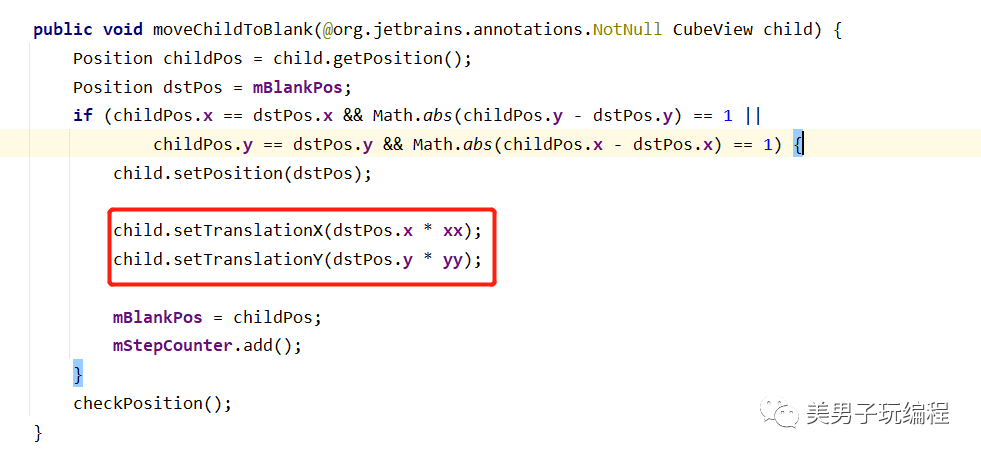
點擊棋子進(jìn)行位置平移,因為在API里面沒有找到component公共組件下的平移方法,setTranslationX()/setTranslationY()方法,沒有辦法做到組件的物理位置平移,導(dǎo)致大家看到開頭演示的效果,點擊后與空白位置做了切換但是重新對其進(jìn)行物理位置賦值的時候沒有辦法去賦值,這個問題困擾了我兩天。
現(xiàn)在還是沒有解決掉,試著想想是不是可以使用TouchEvent事件一個滑動處理,不做點擊事件做滑動事件。
最終現(xiàn)在項目的結(jié)構(gòu)如下: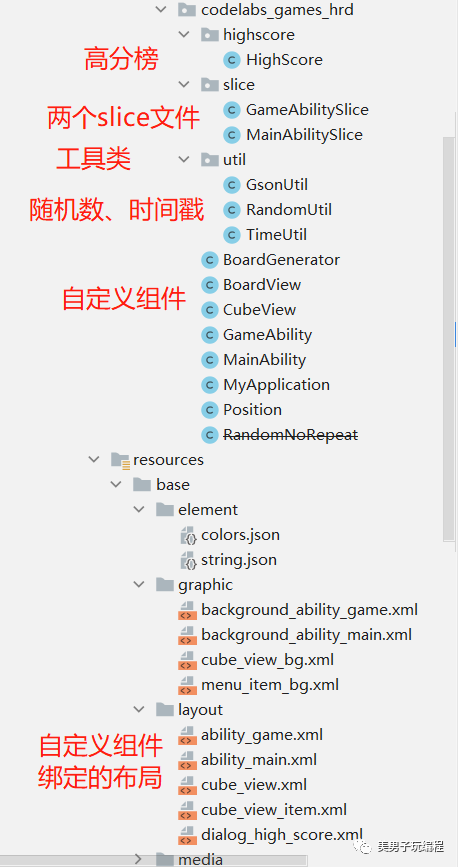
3
總結(jié)
后面還會繼續(xù)去完善,以至于到整個功能可以正常去使用,踩坑還是要踩的,總會有收獲的時候.....
 往期推薦
往期推薦
<b id="afajh"><abbr id="afajh"></abbr></b>