
超全面的前端工程化配置指南!
前端工程化配置指南
本文講解如何構(gòu)建一個(gè)工程化的前端庫,并結(jié)合 Github Actions,自動(dòng)發(fā)布到 Github 和 NPM 的整個(gè)詳細(xì)流程。
示例
我們經(jīng)常看到像 Vue、React 這些流行的開源項(xiàng)目有很多配置文件,他們是干什么用的?他們的 Commit、Release 記錄都那么規(guī)范,是否基于某種約定?
廢話少說,先上圖!
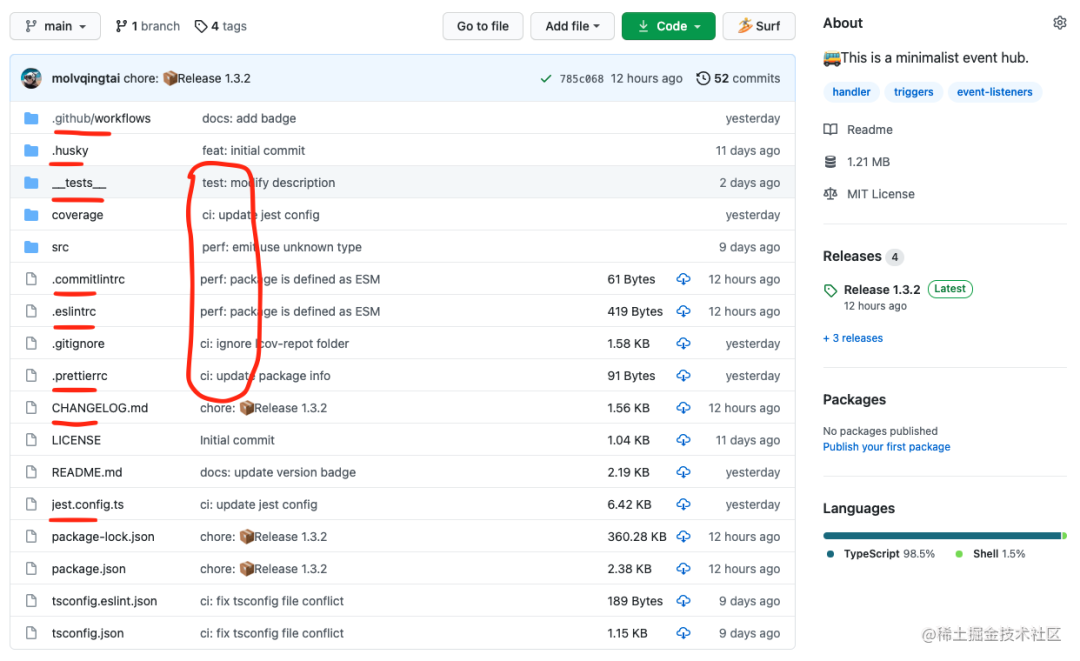 上圖標(biāo)紅就是相關(guān)的工程化配置,有 Linter、Tests,Github Actions 等,覆蓋開發(fā)、測試、發(fā)布的整個(gè)流程。
相關(guān)配置清單
Eslint Prettier Commitlint Husky Jest GitHub Actions Semantic Release
下面我們從創(chuàng)建一個(gè) TypeScript 項(xiàng)目開始,一步一步完成所有的工程化配置,并說明每個(gè)配置含義以及容易踩的坑。
初始化
為了避免兼容性問題,建議先將 node 升級到最新的長期支持版本。
首先在 Github 上創(chuàng)建一個(gè) repo,拉下來之后通過npm init -y初始化。然后創(chuàng)建src文件夾,寫入index.ts。
package.json 生成之后,我需要添加如下配置項(xiàng):
   "main": "index.js",
+  "type": "module",
   "scripts": {
     "test": "echo \"Error: no test specified\" && exit 1"
   },
+  "publishConfig": {
+    "access": "public"
+  }
我們將項(xiàng)目定義為ESM規(guī)范,前端社區(qū)正逐漸向ESM標(biāo)準(zhǔn)遷移,從Node v12.0.0開始,只要設(shè)置了 "type": "module", Node 會將整個(gè)項(xiàng)目視為ESM規(guī)范,我們就可以直接寫裸寫import/export。
publishConfig.access表示當(dāng)前項(xiàng)目發(fā)布到NPM的訪問級別,它有 restricted和public兩個(gè)選項(xiàng),restricted表示我們發(fā)布到NPM上的是私有包(收費(fèi)),訪問級別默認(rèn)為restricted,因?yàn)槲覀兪情_源項(xiàng)目所以標(biāo)記為public。
配置
創(chuàng)建項(xiàng)目之后,我們開始安裝工程化相關(guān)的依賴,因?yàn)槲覀兪?TypeScript 項(xiàng)目,所以也需要安裝 TypeScript 的依賴。
Typescript
先安裝 TypeScript,然后使用 tsc 命名生成 tsconfig.json。
npm i typescript -D
npx tsc --init
然后我們需要添加修改 tsconfig.json 的配置項(xiàng),如下:
{
  "compilerOptions": {
    /* Basic Options */
    "baseUrl": ".", // 模塊解析根路徑,默認(rèn)為 tsconfig.json 位于的目錄
    "rootDir": "src", // 編譯解析根路徑,默認(rèn)為 tsconfig.json 位于的目錄
    "target": "ESNEXT", // 指定輸出 ECMAScript 版本,默認(rèn)為 es5
    "module": "ESNext", // 指定輸出模塊規(guī)范,默認(rèn)為 Commonjs
    "lib": ["ESNext", "DOM"], // 編譯需要包含的 API,默認(rèn)為 target 的默認(rèn)值
    "outDir": "dist", // 編譯輸出文件夾路徑,默認(rèn)為源文件同級目錄
    "sourceMap": true, // 啟用 sourceMap,默認(rèn)為 false
    "declaration": true, // 生成 .d.ts 類型文件,默認(rèn)為 false
    "declarationDir": "dist/types", // .d.ts 類型文件的輸出目錄,默認(rèn)為 outDir 目錄
    /* Strict Type-Checking Options */
    "strict": true, // 啟用所有嚴(yán)格的類型檢查選項(xiàng),默認(rèn)為 true
    "esModuleInterop": true, // 通過為導(dǎo)入內(nèi)容創(chuàng)建命名空間,實(shí)現(xiàn) CommonJS 和 ES 模塊之間的互操作性,默認(rèn)為 true
    "skipLibCheck": true, // 跳過導(dǎo)入第三方 lib 聲明文件的類型檢查,默認(rèn)為 true
    "forceConsistentCasingInFileNames": true, // 強(qiáng)制在文件名中使用一致的大小寫,默認(rèn)為 true
    "moduleResolution": "Node", // 指定使用哪種模塊解析策略,默認(rèn)為 Classic
  },
  "include": ["src"] // 指定需要編譯文件,默認(rèn)當(dāng)前目錄下除了 exclude 之外的所有.ts, .d.ts,.tsx 文件
}
更多詳細(xì)配置參考:www.typescriptlang.org/tsconfig
注意的點(diǎn),如果你的項(xiàng)目涉及到WebWorker API,需要添加到 lib 字段中
"lib": ["ESNext", "DOM", "WebWorker"],
然后我們將編譯后的文件路徑添加到 package.json,并在 scripts 中添加編譯命令。
-  "main": "index.js",
+  "main": "dist/index.js",
+  "types": "dist/types/index.d.ts"
   "type": "module",
-   "scripts": {
-     "test": "echo \"Error: no test specified\" && exit 1"
-   },
+   "scripts": {
+     "dev": "tsc --watch",
+     "build": "npm run clean && tsc",
+     "clean": "rm -rf dist"
+  },
   "publishConfig": {
     "access": "public"
   }
types 配置項(xiàng)是指定編譯生成的類型文件,如果 compilerOptions.declarationDir 指定的是dist,也就是源碼和 .d.ts 同級,那么types可以省略。
驗(yàn)證配置是否生效,在 index.ts 寫入
const calc = (a: number, b: number) => {
  return a - b
}
console.log(calc(1024, 28))
在控制臺中執(zhí)行
npm run build && node dist/index.js
會在 dist 目錄中生成 types/index.d.ts、index.js、index.js.map,并打印 996。
Eslint & Prettier
代碼規(guī)范離不開各種 Linter, 之所以把這兩個(gè)放在一起講,借用 Prettier 官網(wǎng)的一句話:“使用 Prettier 解決代碼格式問題,使用 linters 解決代碼質(zhì)量問題”。雖然eslint也有格式化功能,但是prettier的格式化功能更強(qiáng)大。
大部分同學(xué)編輯器都裝了prettier-vscode和eslint-vscode這兩個(gè)插件,如果你項(xiàng)目只有其中一個(gè)的配置,因?yàn)檫@兩者部分格式化的功能有差異,那么就會造成一個(gè)的問題,代碼分別被兩個(gè)插件分別格式化一次,網(wǎng)上解決prettier+eslint沖突的方案五花八門,甚至還有把整個(gè)rules列表貼出來的。
那這里我們按照官方推薦,用最少的配置去解決prettier和eslint的集成問題。
Eslint
首先安裝 eslint,然后利用 eslint 的命令行工具生成基本配置。
npm i eslint -D
npx eslint --init
執(zhí)行上面命令后會提示一些選項(xiàng),我們依次選擇符合我們項(xiàng)目的配置。
注意,這里 eslint 推薦了三種社區(qū)主流的規(guī)范,Airbnb、Standard、Google,因個(gè)人愛好我選擇了不寫分號的 Standard規(guī)范。
生成的.eslintrc.cjs文件應(yīng)該長這樣
module.exports = {
  env: {
    browser: true,
    es2021: true,
    node: true
  },
  extends: [
    'standard'
  ],
  parser: '@typescript-eslint/parser',
  parserOptions: {
    ecmaVersion: 12,
    sourceType: 'module'
  },
  plugins: [
    '@typescript-eslint'
  ],
  rules: {
  }
}
有些同學(xué)可能就要問了,這里為什么生成的配置文件名稱是.eslintrc.cjs而不是.eslintrc.js?
因?yàn)槲覀儗㈨?xiàng)目定義為ESM,eslit --init會自動(dòng)識別type,并生成兼容的配置文件名稱,如果我們改回.js結(jié)尾,再運(yùn)行eslint將會報(bào)錯(cuò)。出現(xiàn)這個(gè)問題是eslint內(nèi)部使用了require()語法讀取配置。
同樣,這個(gè)問題也適用于其他功能的配置,比如后面會講到的Prettier、Commitlint等,配置文件都不能以xx.js結(jié)尾,而要改為當(dāng)前庫支持的其他配置文件格式,如:.xxrc、.xxrc.json、.xxrc.yml。
驗(yàn)證配置是否生效,修改index.ts
  const calc = (a: number, b: number) => {
    return a - b
  }
- console.log(calc(1024, 28))
+ // console.log(calc(1024, 28))
在package.json中添加lint命令
  "scripts": {
    "dev": "tsc --watch",
    "build": "npm run clean && tsc",
+   "lint": "eslint src --ext .js,.ts --cache --fix",
    "clean": "rm -rf dist"
  },
然后在控制臺執(zhí)行 lint,eslint將會提示 1 條錯(cuò)誤信息,說明校驗(yàn)生效。
npm run lint
# 1:7  error  'calc' is assigned a value but never used  no-unused-vars
因?yàn)槭?Typescript 項(xiàng)目所以我們還要添加Standard規(guī)范提供的 TypeScrip 擴(kuò)展配置(其他規(guī)范同理)
安裝eslint-config-standard-with-typescript
npm i eslint-config-standard-with-typescript -D添加修改 .eslintrc.cjs
    module.exports = {
      env: {
        browser: true,
        es2021: true,
        node: true
      },
-     extends: ['standard']
+     extends: ['standard', 'eslint-config-standard-with-typescript'],
      parser: '@typescript-eslint/parser',
      parserOptions: {
        ecmaVersion: 12,
        sourceType: 'module',
+       project: './tsconfig.json'
      },
      plugins: ['@typescript-eslint'],
      rules: {}
    }
驗(yàn)證配置是否生效
在控制臺執(zhí)行lint,eslint將會提示 2 條錯(cuò)誤信息,說明校驗(yàn)生效。
npm run lint
# 1:7  error  'calc' is assigned a value but never used  no-unused-vars
# 1:14 error  Missing return type on function
Prettier
現(xiàn)在我們按照官網(wǎng)的推薦方式,把 prettier 集成到 eslint 的校驗(yàn)中。
安裝 prettier 并初始化配置文件
npm i prettier -D
echo {}> .prettierrc.json
然后在.prettierrc.json添加配置,這里只需要添加和你所選規(guī)范沖突的部分。
{
  "semi": false, // 是否使用分號
  "singleQuote": true, // 使用單引號代替雙引號
  "trailingComma": "none" // 多行時(shí)盡可能使用逗號結(jié)尾
}
更多配置詳見:prettier.io/docs/en/opt…
安裝解決沖突需要用到的兩個(gè)依賴
eslint-config-prettier 關(guān)閉可能與 prettier沖突的規(guī)則eslint-plugin-prettier 使用 prettier代替eslint格式化
npm i eslint-config-prettier eslint-plugin-prettier -D
再添加修改 .eslintrc.cjs,如下:
  module.exports = {
  env: {
    browser: true,
    es2021: true,
    node: true,
  },
- extends: ['standard', 'eslint-config-standard-with-typescript'],
+ extends: ['standard', 'eslint-config-standard-with-typescript', 'prettier'],
  parser: '@typescript-eslint/parser',
  parserOptions: {
    ecmaVersion: 12,
    sourceType: 'module',
    project: './tsconfig.json',
  },
- plugins: ['@typescript-eslint'],
+ plugins: ['@typescript-eslint', 'prettier'],
- rules: {},
+ rules: {
+   'prettier/prettier': 'error'
+ },
}
然后驗(yàn)證配置是否生效,修改index.ts
-  const calc = (a: number, b: number) => {
+  const calc = (a: number, b: number): number => {
    return a - b
  }
- // console.log(calc(1024, 28))
+ console.log(calc(1024, 28))
然后在控制臺執(zhí)行lint,這里prettier和eslint的行為已保持一致,如果沒有報(bào)錯(cuò),那就成功了。
npm run lint
我們現(xiàn)在已經(jīng)完成了eslint和prettier的集成配置。和編輯器無關(guān),也就是說無論你使用什么編輯器,有沒有安裝相關(guān)插件,都不會影響代碼校驗(yàn)的效果。
Husky
因?yàn)橐粋€(gè)項(xiàng)目通常是團(tuán)隊(duì)合作,我們不能保證每個(gè)人在提交代碼之前執(zhí)行一遍lint校驗(yàn),所以需要git hooks 來自動(dòng)化校驗(yàn)的過程,否則禁止提交。
安裝Husky并生成.husky文件夾
npm i husky -D
npx husky install
然后我們需要在每次執(zhí)行npm install時(shí)自動(dòng)啟用husky
如果你的npm版本大于等于7.1.0
npm set-script prepare "husky install"
否則手動(dòng)在package.json中添加
 "scripts": {
    "dev": "tsc --watch",
    "build": "npm run clean && tsc",
    "lint": "eslint src --ext .js,.ts --cache --fix",
    "clean": "rm -rf dist",
+   "prepare": "husky install"
  },
然后添加一個(gè)lint鉤子
npx husky add .husky/pre-commit "npm run lint"相當(dāng)于手動(dòng)在.husky/pre-commit文件寫入以下內(nèi)容:
#!/bin/sh
. "$(dirname "$0")/_/husky.sh"
npm run lint
測試鉤子是否生效,修改index.ts
  const calc = (a: number, b: number): number => {
    return a - b
  }
- console.log(calc(1024, 28))
+ // console.log(calc(1024, 28))
然后提交一條commit,如果配置正確將會自動(dòng)執(zhí)行lint并提示 1 條錯(cuò)誤信息,commit提交將會失敗。
git add .
git commit -m 'test husky'
# 1:7  error  'calc' is assigned a value but never used
Commitlint
為什么需要 Commitlint,除了在后續(xù)的生成changelog文件和語義發(fā)版中需要提取commit中的信息,也利于其他同學(xué)分析你提交的代碼,所以我們要約定commit的規(guī)范。
安裝 Commitlint
@commitlint/cli Commitlint 命令行工具 @commitlint/config-conventional 基于 Angular 的約定規(guī)范
npm i @commitlint/config-conventional @commitlint/cli -D
最后將Commitlint添加到鉤子
npx husky add .husky/commit-msg 'npx --no-install commitlint --edit "$1"'
創(chuàng)建.commitlintrc,并寫入配置
{
  "extends": [
    "@commitlint/config-conventional"
  ]
}
注意,這里配置文件名使用的是.commitlintrc而不是默認(rèn)的.commitlintrc.js,詳見 Eslint 章節(jié)
測試鉤子是否生效,修改index.ts,讓代碼正確
  const calc = (a: number, b: number): void => {
    console.log(a - b)
  }
- // calc(1024, 28)
+ calc(1024, 28)
提交一條不符合規(guī)范的commit,提交將會失敗
git add .
git commit -m 'add eslint and commitlint'
修改為正確的commit,提交成功!
git commit -m 'ci: add eslint and commitlint'
Angular 規(guī)范說明:
feat:新功能 fix:修補(bǔ) BUG docs:修改文檔,比如 README, CHANGELOG, CONTRIBUTE 等等 style:不改變代碼邏輯 (僅僅修改了空格、格式縮進(jìn)、逗號等等) refactor:重構(gòu)(既不修復(fù)錯(cuò)誤也不添加功能) perf:優(yōu)化相關(guān),比如提升性能、體驗(yàn) test:增加測試,包括單元測試、集成測試等 build:構(gòu)建系統(tǒng)或外部依賴項(xiàng)的更改 ci:自動(dòng)化流程配置或腳本修改 chore:非 src 和 test 的修改,發(fā)布版本等 revert:恢復(fù)先前的提交
Jest
美好生活從測試覆蓋率 100% 開始。
安裝jest,和類型聲明@types/jest,它執(zhí)行需要ts-node和ts-jest
這里暫時(shí)固定了ts-node的版本為 v9.1.1,新版的[email protected]會導(dǎo)致jest報(bào)錯(cuò),等待官方修復(fù),詳見:issues
npm i jest @types/jest [email protected] ts-jest -D
初始化配置文件
npx jest --init然后修改jest.config.ts文件
   // A preset that is used as a base for Jest's configuration
-  // preset: undefined,
+  preset: 'ts-jest'
將測試命令添加到package.json中。
  "scripts": {
    "dev": "tsc --watch",
    "build": "npm run clean && tsc",
    "lint": "eslint src --ext .js,.ts --cache --fix",
    "clean": "rm -rf dist",
    "prepare": "husky install",
+   "test": "jest"
  },
創(chuàng)建測試文件夾__tests__和測試文件__tests__/calc.spec.ts
修改index.ts
  const calc = (a: number, b: number): number => {
    return a - b
  }
- // console.log(calc(1024, 28))
+ export default calc
然后在calc.spec.ts中寫入測試代碼
import calc from '../src'

test('The calculation result should be 996.', () => {
  expect(calc(1024, 28)).toBe(996)
})
驗(yàn)證配置是否生效
在控制臺執(zhí)行test,將會看到測試覆蓋率 100% 的結(jié)果。
npm run test
最后我們給__tests__目錄也加上lint校驗(yàn)
修改package.json
  "scripts": {
    "dev": "tsc --watch",
    "build": "npm run clean && tsc",
-   "lint": "eslint src --ext .js,.ts --cache --fix",
+   "lint": "eslint src __tests__ --ext .js,.ts --cache --fix",
    "clean": "rm -rf dist",
    "prepare": "husky install",
    "test": "jest"
  },
這里如果我們直接執(zhí)行npm run lint將會報(bào)錯(cuò),提示__tests__文件夾沒有包含在tsconfig.json的include中,當(dāng)我們添加到include之后,輸出的dist中就會包含測試相關(guān)的文件,這并不是我們想要的效果。
我們使用typescript-eslint官方給出的解決方案,如下操作:
新建一個(gè)tsconfig.eslint.json文件,寫入以下內(nèi)容:
{
  "extends": "./tsconfig.json",
  "include": ["**/*.ts", "**/*.js"]
}
在.eslintrc.cjs中修改
  parserOptions: {
    ecmaVersion: 12,
    sourceType: 'module',
-   project: './tsconfig.json'
+   project: './tsconfig.eslint.json'
  },
然后驗(yàn)證配置是否生效,直接提交我們添加的測試文件,能正確提交說明配置成功。
git add .
git commit -m 'test: add unit test'
Github Actions
我們通過Github Actions實(shí)現(xiàn)代碼合并或推送到主分支,dependabot機(jī)器人升級依賴等動(dòng)作,會自動(dòng)觸發(fā)測試和發(fā)布版本等一系列流程。
在項(xiàng)目根目錄創(chuàng)建.github/workflows文件夾,然后在里面新建ci.yml文件和cd.yml文件
在ci.yml文件中寫入:
name: CI

on:
  push:
    branches:
      - '**'
  pull_request:
    branches:
      - '**'
jobs:
  linter:
    runs-on: ubuntu-latest
    steps:
      - uses: actions/checkout@v2
      - uses: actions/setup-node@v2
        with:
          node-version: 16
      - run: npm ci
      - run: npm run lint
  tests:
    needs: linter
    runs-on: ubuntu-latest
    steps:
      - uses: actions/checkout@v2
      - uses: actions/setup-node@v2
        with:
          node-version: 16
      - run: npm ci
      - run: npm run test
上面配置大概意思就是,監(jiān)聽所有分支的push和pull_request動(dòng)作,自動(dòng)執(zhí)行linter和tests任務(wù)。
GithubActions 更多用法參考:github.com/features/ac…
然后推送代碼,驗(yàn)證配置是否生效
git add .
git commit -m 'ci: use github actions'
git push
此時(shí)打開當(dāng)前項(xiàng)目的 Github 頁面,然后點(diǎn)擊頂部 Actions 菜單就會看到正在進(jìn)行的兩個(gè)任務(wù),一個(gè)將會成功(測試),一個(gè)將會失敗(發(fā)布)。
上面只是實(shí)現(xiàn)了代碼自動(dòng)測試流程,下面實(shí)現(xiàn)自動(dòng)發(fā)布的流程。
在此之前需要到NPM網(wǎng)站上注冊一個(gè)賬號(已有可忽略),并創(chuàng)建一個(gè)package。
然后創(chuàng)建GH_TOKEN和NPM_TOKEN(注意,不要在代碼中包含任何的 TOKEN 信息):
如何創(chuàng)建 GITHUB\_TOKEN(創(chuàng)建時(shí)勾選 repo 和 workflow 權(quán)限) 如何創(chuàng)建 NPM\_TOKEN(創(chuàng)建時(shí)選中 Automation 權(quán)限)
將創(chuàng)建好的兩個(gè)TOKEN添加到項(xiàng)目的 Actions secrets 中:
Github 項(xiàng)目首頁 -> 頂部 Settings 菜單 -> 側(cè)邊欄 Secrets
然后修改package.json中的“name”,“name”就是你在NPM上創(chuàng)建的package的名稱。
在cd.yml文件中寫入:
name: CD

on:
  push:
    branches:
      - main
  pull_request:
    branches:
      - main
jobs:
  release:
    runs-on: ubuntu-latest
    steps:
      - uses: actions/checkout@v2
      - uses: actions/setup-node@v2
        with:
          node-version: 16
      # https://github.com/semantic-release/git/issues/209
      - run: npm ci --ignore-scripts
      - run: npm run build
      - run: npx semantic-release
        env:
          GH_TOKEN: ${{ secrets.GH_TOKEN }}
          NPM_TOKEN: ${{ secrets.NPM_TOKEN }}
由于“黑命貴”,Github 已將新項(xiàng)目的默認(rèn)分支名稱更改為 “main”,詳見:issues, 為了方便,后面統(tǒng)一稱為 主分支
所以如果你的主分支名稱是“main”,上面的branches需要修改為:
on:
  push:
    branches:
      - main
  pull_request:
    branches:
      - main
然后安裝語義發(fā)版依賴,需要用到semantic-release和它的插件:
semantic-release:語義發(fā)版核心庫 @semantic-release/changelog:用于自動(dòng)生成 changelog.md @semantic-release/git:用于將發(fā)布時(shí)產(chǎn)生的更改提交回遠(yuǎn)程倉庫
npm i semantic-release @semantic-release/changelog @semantic-release/git -D在項(xiàng)目根目錄新建配置文件.releaserc并寫入:
{
  "branches": ["master"],
  "plugins": [
    "@semantic-release/commit-analyzer",
    "@semantic-release/release-notes-generator",
    "@semantic-release/changelog",
    "@semantic-release/github",
    "@semantic-release/npm",
    "@semantic-release/git"
  ]
}
這里同樣,如果你的主分支名稱是“main”,上面的branches需要修改為:
"branches": ["+([0-9])?(.{+([0-9]),x}).x", "main"],
最后新建分支 develop 分支并提交工作內(nèi)容。
git checkout -b develop
git add .
git commit -m 'feat: complete the CI/CD workflow'
git push --set-upstream origin develop
git push
然后將 develop 分支合并到 主分支,并提交,注意:這個(gè)提交會觸發(fā)測試并 發(fā)布版本 (自動(dòng)創(chuàng)建tag和changelog)
git checkout master
git merge develop
git push
完成上面操作之后,打開 Github 項(xiàng)目主頁 和 NPM 項(xiàng)目主頁 可以看到一個(gè) Release 的更新記錄。
最后切回到 develop 分支,創(chuàng)建一個(gè)自動(dòng)更新依賴的workflow。
在.github文件夾中創(chuàng)建dependabot.yml文件,并寫入內(nèi)容:
version: 2
updates:
  # Enable version updates for npm
  - package-ecosystem: 'npm'
    # Look for `package.json` and `lock` files in the `root` directory
    directory: '/'
    # Check the npm registry for updates every day (weekdays)
    schedule:
      interval: 'weekly'
提交并查看 workflows 是否全部通過,再合并到 主分支 并提交,這個(gè)提交不會觸發(fā)版本發(fā)布。
git pull origin master
git add .
git commit -m 'ci: add dependabot'
git push

git checkout master
git merge develop
git push
觸發(fā)版本發(fā)布需要兩個(gè)條件:
只有當(dāng) push和pull_request到 主分支 上才會觸發(fā)版本發(fā)布只有 commit前綴為feat、fix、perf才會發(fā)布,否則跳過。
更多發(fā)布規(guī)則,詳見:github.com/semantic-re…
SemanticRelease 使用方式,詳見:semantic-release.gitbook.io
如果你能正確配置上面所有步驟,并成功發(fā)布,那么恭喜你!你擁有了一個(gè)完全自動(dòng)化的項(xiàng)目,它擁有:自動(dòng)依賴更新、測試、發(fā)布,和自動(dòng)生成版本信息等功能。
完整的項(xiàng)目示例:@resreq/event-hub
結(jié)語
本文未涉及到:組件庫、Monorepo、Jenkins CI 等配置,但能覆蓋絕大部前端項(xiàng)目 CI/CD 流程。
有些地方講得比較細(xì),甚至有些啰嗦,但還是希望能幫助到大家!撒花!??????
作者:molvqingtai
https://juejin.cn/post/6971812117993226248
前端 社群
下方加 Nealyang 好友回復(fù)「 加群」即可。
如果你覺得這篇內(nèi)容對你有幫助,我想請你幫我2個(gè)小忙:
1. 點(diǎn)個(gè)「在看」,讓更多人也能看到這篇文章
下方加 Nealyang 好友回復(fù)「 加群」即可。
如果你覺得這篇內(nèi)容對你有幫助,我想請你幫我2個(gè)小忙:
點(diǎn)贊和在看就是最大的支持