

<kbd id="afajh"><form id="afajh"></form></kbd>
<strong id="afajh"><dl id="afajh"></dl></strong>
    <del id="afajh"><form id="afajh"></form></del>
        1. <th id="afajh"><progress id="afajh"></progress></th>
          <b id="afajh"><abbr id="afajh"></abbr></b>
          <th id="afajh"><progress id="afajh"></progress></th>

          Spring Boot 的三種啟動方式

          共 1859字,需瀏覽 4分鐘

           ·

          2020-09-09 14:24

          13d29a9dc7f9389f76aaf68a72260235.webp??Java大聯(lián)盟

          ? 幫助萬千Java學習者持續(xù)成長

          關(guān)注


          ec87ddf1696bfea2dcce49f669fd8fd4.webp


          作者|專注著

          blog.csdn.net/u011425751/article/details/7950738


          B 站搜索:楠哥教你學Java

          獲取更多優(yōu)質(zhì)視頻教程


          Spring-Boot 的啟動方式主要有三種:


          1、運行帶有 main 方法類

          2、通過命令行 java -jar 的方式

          3、通過 spring-boot-plugin 的方式


          執(zhí)行帶有 main 方法類


          這種方式很簡單,我主要是通過 IDAE?的方式,進行執(zhí)行。這種方式在啟動的時候,會去自動加載 classpath 下的配置文件(這里只是單獨的強調(diào)了 classpath 下,其實 Spring-Boot 有自己的加載路徑和優(yōu)先級的,日后在發(fā)布)。

          @RestController@EnableAutoConfigurationpublic class Example {

          @RequestMapping("/") public String home() { return "Hello World";}

          public static void main(String[] args) {/*** SpringApplication會自動加載application.properties文件,具體的加載路徑包含以下:*

          * 1. A /config subdirectory of the current directory;*

          *

          * 2. The Current Directory*

          *

          * 3. A classpath /config package*

          *

          * 4. The classpath root.*

          */ SpringApplication.run(Example.class, args); }}


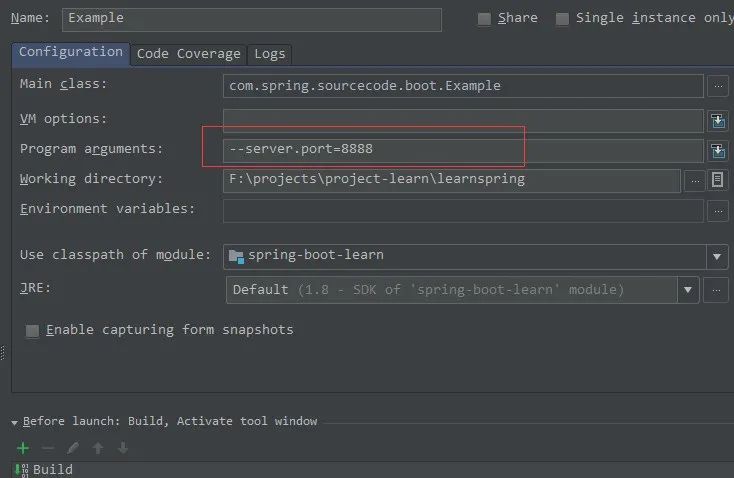
          在 IDEA 中,可以通過配置 application 的方式配置上自己請求參數(shù)。

          89eb842334a2f3480e4e05ab3038eea7.webp

          ?

          二、通過 java -jar 的方式

          java -jar jar_path --param
          jar_path: 指代將項目打包為jar打包之后的存儲路徑。

          --param: 為需要在命令行指定的參數(shù)。

          例如:

          java -jar emample.jar --server.port=8081
          該命令通過在啟動行指定了項目啟動后綁定的端口號,因為該命令行參數(shù),將會覆蓋 application.properties 中的端口配置

          ?

          三、通過 spring-boot-plugin 方式啟動


          如果需要正常使用該 Maven 插件,需要我們在 Maven 項目中增加以下插件配置:

          <plugin><groupId>org.springframework.bootgroupId><artifactId>spring-boot-maven-pluginartifactId>plugin>


          注: 因為我在項目中指定了父模塊 spring-boot-starter-parent。因此我不需要單獨指定插件版本,該父模塊會自動匹配與當前 spring-boot 版本相匹配的查件版本。

          <parent><groupId>org.springframework.bootgroupId><artifactId>spring-boot-starter-parentartifactId><version>1.5.10.RELEASEversion>
          parent>

          準備工作做好之后,我們需要進入項目的根目錄,執(zhí)行

          mvn spring-boot:run
          該命令能夠正常啟動項目,但是如何為其指定執(zhí)行參數(shù)呢?

          spring-boot:run 該 Maven 查件在插件首頁中指定了相關(guān)能夠使用的可選參數(shù):

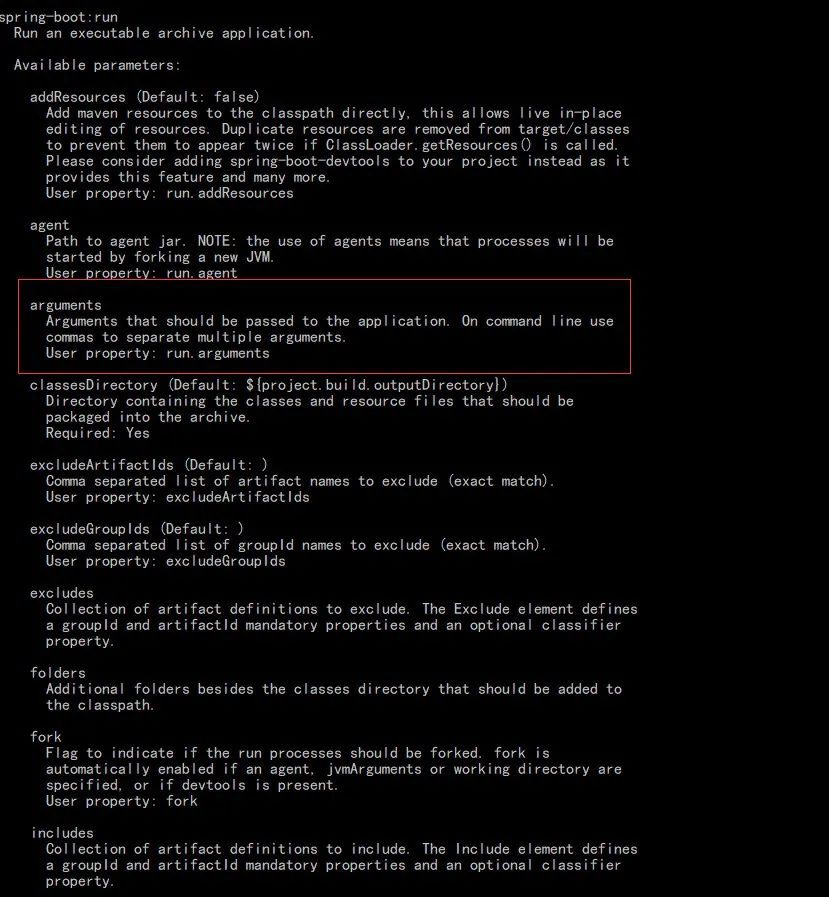
          通過查閱文檔,可以通過命令的方式查看具體選項的意義以及用法:

          mvn spring-boot:help -Ddetail
          e6178c2e0e2d13ac974fc08d014f9ceb.webp

          ?其中 arguments 的描述中,大意為:指定的參數(shù)會傳遞給具體應用,如果有多個參數(shù)需要指定,以","進行分割。具體用法通過 run.arguments 來指定:

          mvn spring-boot:run -Drun.arguments="--server.port=8888"

          以上就是三種啟動方式的描述。


          推薦閱讀

          1、Spring Boot+Vue項目實戰(zhàn)

          2、B站:4小時上手MyBatis Plus

          3、一文搞懂前后端分離

          4、快速上手Spring Boot+Vue前后端分離


          楠哥簡介

          資深 Java 工程師,微信號?southwindss

          《Java零基礎(chǔ)實戰(zhàn)》一書作者

          騰訊課程官方 Java 面試官今日頭條認證大V

          GitChat認證作者,B站認證UP主(楠哥教你學Java)

          致力于幫助萬千 Java 學習者持續(xù)成長。


          有收獲,就在看?5031a2f8457b36e1e7493dfef7209889.webp
          瀏覽 66
          點贊
          評論
          收藏
          分享

          手機掃一掃分享

          分享
          舉報
          評論
          圖片
          表情
          推薦
          點贊
          評論
          收藏
          分享

          手機掃一掃分享

          分享
          舉報
          <kbd id="afajh"><form id="afajh"></form></kbd>
          <strong id="afajh"><dl id="afajh"></dl></strong>
            <del id="afajh"><form id="afajh"></form></del>
                1. <th id="afajh"><progress id="afajh"></progress></th>
                  <b id="afajh"><abbr id="afajh"></abbr></b>
                  <th id="afajh"><progress id="afajh"></progress></th>
                  日本色视频一区二区 | 亚洲AV在线免费观看 | 91成人免费电影 | 日日艹自拍 | 手机看欧美A片 |