
Linux 運維必備的13款實用工具,趕緊收藏!

1、查看進程占用帶寬情況-Nethogs
[root@localhost ~]#yum -y install libpcap-devel ncurses-devel
[root@localhost ~]# tar zxvf nethogs-0.8.0.tar.gz
[root@localhost ~]# cd nethogs
[root@localhost nethogs]# make && make install
[root@localhost nethogs]# nethogs eth0
2、硬盤讀取性能測試-IOZone
[root@localhost current]# tar xvf iozone3_420.tar
[root@localhost ~]# cd iozone3_420/src/current/
[root@localhost current]# make linux
[root@localhost current]# ./iozone -a -n 512m -g 16g -i 0 -i 1 -i 5 -f /mnt/iozone -Rb ./iozone.xls
-a使用全自動模式 -n為自動模式設置最小文件大小(Kbytes)。 -g設置自動模式可使用的最大文件大小Kbytes。 -i用來指定運行哪個測試。 -f指定測試文件的名字完成后自動刪除 -R產(chǎn)生Excel到標準輸出 -b指定輸出到指定文件上
3、實時監(jiān)控磁盤IO-IOTop
[root@localhost ~]# yum -y install iotop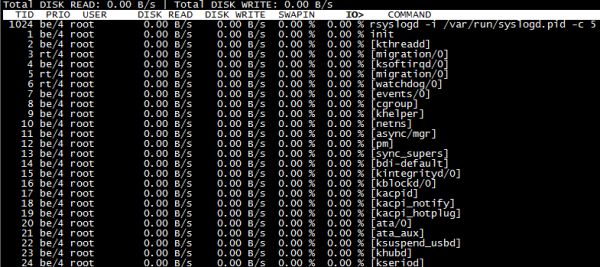
4、網(wǎng)絡流量監(jiān)控-IPtraf
[root@localhost ~]# yum -y install iptraf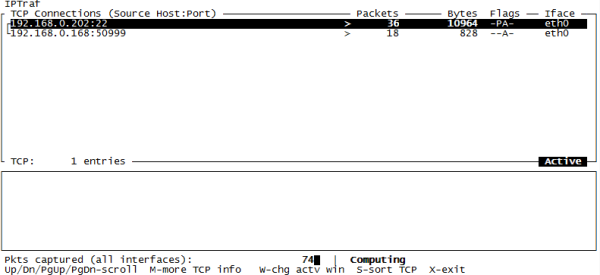
5、網(wǎng)絡流量監(jiān)控-IFTop
[root@localhost ~]# tar zxvf iftop-0.17.tar.gz
[root@localhost ~]# cd iftop-0.17 [root@localhost iftop-0.17]# ./configure
[root@localhost iftop-0.17]# make && make install
[root@localhost iftop-0.17]# iftop [root@localhost iftop-0.17]# iftop -i eth0 #指定監(jiān)控網(wǎng)卡接口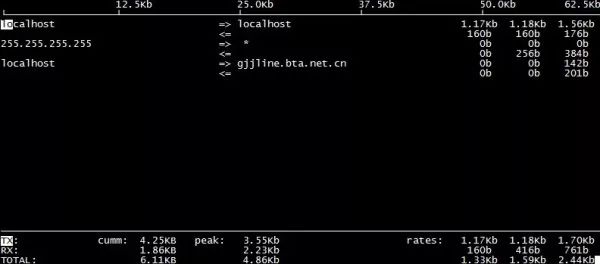
TX:發(fā)送流量 RX:接收流量 TOTAL:總流量 Cumm:運行iftop到目前時間的總流量 peak:流量峰值 rates:分別表示過去 2s 10s 40s 的平均流量
6、進程實時監(jiān)控-HTop
[root@localhost ~]# yum -y install htop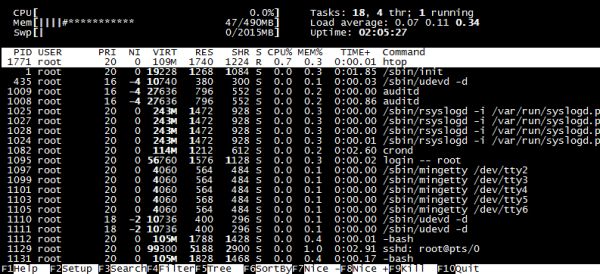
7、系統(tǒng)資源監(jiān)控-NMON
[root@localhost ~]# chmod +x nmon_x86_64_rhel6
[root@localhost ~]# mv nmon_x86_64_rhel6 /usr/sbin/nmon
[root@localhost ~]# nmon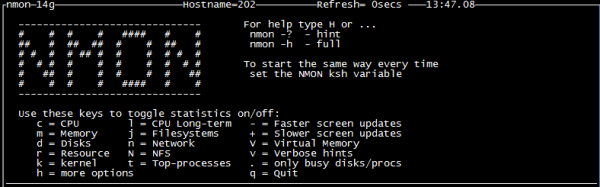
8、監(jiān)控多個日志-MultiTail
[root@localhost ~]# yum -y install multitail
[root@localhost ~]# multitail -e "fail" /var/log/secure #篩選關(guān)鍵字進行監(jiān)控
[root@localhost ~]# multitail -l "ping baidu.com" #監(jiān)控后面的命令-l將要執(zhí)行的命令
[root@localhost ~]# multitail -i /var/log/messages -i /var/log/secure #-i指定一個文件名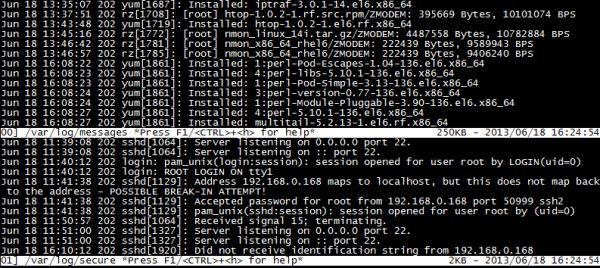
9、SSH暴力破解防護-Fail2ban
[root@localhost ~]# cd fail2ban-0.8.11
[root@localhost fail2ban-0.8.11]# python setup.py install
[root@localhost fail2ban-0.8.11]# cd files/
[root@localhost files]# cp ./redhat-initd /etc/init.d/fail2ban
[root@localhost files]# service fail2ban start
[root@localhost files]# chkconfig --add fail2ban
[root@localhost files]# chkconfig fail2ban on[root@localhost ~]# grep -v "^#"?/etc/fail2ban/jail.conf | grep -v "^$"?[DEFAULT]
ignoreip = 127.0.0.1/8#忽略本機IP
bantime = 600???#符合規(guī)則后封鎖時間
findtime = 600??#在多長時間內(nèi)符合規(guī)則執(zhí)行封鎖如600秒達到3次則執(zhí)行
maxretry = 3????#最大嘗試次數(shù)
backend = auto #日志修改檢測日志gamin、polling和auto這三種
usedns = warn [ssh-iptables]
enabled = true#默認是禁用
false?filter = sshd action = iptables[name=SSH, port=ssh, protocol=tcp] # sendmail-whois[name=SSH,dest=收件人郵箱, sender=發(fā)件人郵箱, sendername="Fail2Ban"] logpath = /var/log/sshd.log #響應的錯誤日志一般在/var/log/secure maxretry = 5 #嘗試錯誤次數(shù)覆蓋全局中的maxretry[root@localhost ~]# touch /var/log/sshd.log
[root@localhost ~]# service fail2ban restart
[root@localhost ~]# fail2ban-client status #查看監(jiān)控已經(jīng)開啟 Status |- Number of jail: 1 `- Jail list: ssh-iptables
[root@localhost ~]# iptables -L #iptables過濾表有fail2ban一條規(guī)則 fail2ban-SSH tcp -- anywhere anywhere tcp dpt:ssh11、頁面顯示磁盤空間使用情況-Agedu
[root@localhost ~]# tar zxvf agedu-r9723.tar.gz
[root@localhost ~]# cd agedu-r9723
[root@localhost ~]# ./configure
[root@localhost ~]# make && make install
[root@localhost ~]# agedu -s / #-s掃描
[root@localhost ~]# agedu -w --address 192.168.0.10:80 #-w輸入一個網(wǎng)頁鏈接
[root@localhost ~]# agedu -w --address 192.168.0.108080 --auth none #--auth關(guān)閉認證如果不加端口號會生成一個隨機的用瀏覽器訪問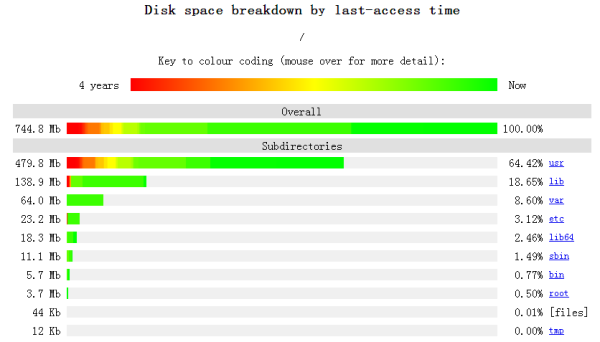
12、安全掃描工具-NMap
[root@localhost ~]# tar jxvf nmap-6.40.tar.bz2
[root@localhost nmap-6.40]# ./configure
[root@localhost nmap-6.40]# make && make install
[root@localhost ~]# nmap 192.168.0.10 #獲取基本信息
[root@localhost ~]# nmap -O 192.168.0.10 #獲取系統(tǒng)版本信息
[root@localhost ~]# nmap -A 192.168.0.10 #獲取系統(tǒng)綜合信息
[root@localhost ~]# nmap 192.168.0.0/24 #獲取一個網(wǎng)段工作設備基本信息
-sSTCP掃描 -sV系統(tǒng)版本檢測
13、Web壓力測試-Httperf
[root@localhost ~]# tar zxvf httperf-0.9.0.tar.gz
[root@localhost ~]# cd httperf-0.9.0
[root@localhost httperf-0.9.0]# ./configure
[root@localhost httperf-0.9.0]# make && make install
[root@localhost ~]# httperf --hog --server=192.168.0.202 --uri=/index.html --num-conns=10000 --wsess=10,10,0.1—hog:讓httperf盡可能多產(chǎn)生連接,httperf會根據(jù)硬件配置,有規(guī)律的產(chǎn)生訪問連接; —num-conns:連接數(shù)量,總發(fā)起10000請求; —wsess:?用戶打開網(wǎng)頁時間規(guī)律模擬,第一個10表示產(chǎn)生10個會話連接,第二個10表示每個會話連接進行10次請求,0.1表示每個會話連接請求之間的間隔時間/s。
- END -
?推薦閱讀? Kubernetes 企業(yè)容器云平臺運維實戰(zhàn)? Gitlab+Jenkins+k8s+Helm 的自動化部署實踐 面試官:你都監(jiān)控 Redis 哪些指標? Linux運維工程師的 6 類好習慣和 23 個教訓 一名運維小哥對運維規(guī)則的10個總結(jié),收藏起來 終于明白了 DevOps 與 SRE 的區(qū)別! Kubernetes上生產(chǎn)環(huán)境后,99%都會遇到這2個故障 K8s kubectl 常用命令總結(jié)(建議收藏) Kubernetes 的這些核心資源原理,你一定要了解 我在創(chuàng)業(yè)公司的 “云原生” 之旅 基于Nginx實現(xiàn)灰度發(fā)布與AB測試 編寫 Dockerfile 最佳實踐 12年資深運維老司機的成長感悟 搭建一套完整的企業(yè)級高可用 K8s 集群(kubeadm方式)
點亮,服務器三年不宕機


評論
圖片
表情