
C#中HashTable、Dictionary、ConcurrentDictionary區(qū)別

一、HashTable
HashTable表示鍵/值對的集合。在.NET Framework中,Hashtable是System.Collections命名空間提供的一個容器,用于處理和表現(xiàn)類似key-value的鍵值對,其中key通常可用來快速查找,同時key是區(qū)分大小寫;value用于存儲對應于key的值。Hashtable中key-value鍵值對均為object類型,所以Hashtable可以支持任何類型的keyvalue鍵值對,任何非 null 對象都可以用作鍵或值。
HashTable是一種散列表,他內(nèi)部維護很多對Key-Value鍵值對,其還有一個類似索引的值叫做散列值(HashCode),它是根據(jù)GetHashCode方法對Key通過一定算法獲取得到的,所有的查找操作定位操作都是基于散列值來實現(xiàn)找到對應的Key和Value值的。
散列函數(shù)(GetHashCode)讓散列值對應HashTable的空間地址盡量不重復。
當一個HashTable被占用一大半的時候我們通過計算散列值取得的地址值可能會重復指向同一地址,這就造成哈希沖突。
C#中鍵值對在HashTable中的位置Position= (HashCode& 0x7FFFFFFF) % HashTable.Length,C#是通過探測法解決哈希沖突的,當通過散列值取得的位置Postion以及被占用的時候,就會增加一個位移x值判斷下一個位置Postion+x是否被占用,如果仍然被占用就繼續(xù)往下位移x判斷Position+2*x位置是否被占用,如果沒有被占用則將值放入其中。當HashTable中的可用空間越來越小時,則獲取得到可用空間的難度越來越大,消耗的時間就越多。
使用方法如下:
using System;using System.Collections;namespace WebApp{class Program{static void Main(string[] args){Hashtable myHash=new Hashtable();//插入myHash.Add("1","joye.net");myHash.Add("2", "joye.net2");myHash.Add("3", "joye.net3");//key 存在try{myHash.Add("1", "1joye.net");}catch{Console.WriteLine("Key = \"1\" already exists.");}//取值Console.WriteLine("key = \"2\", value = {0}.", myHash["2"]);//修改myHash["2"] = "http://www.cnblogs.com/yinrq/";myHash["4"] = "joye.net4"; //修改的key不存在則新增Console.WriteLine("key = \"2\", value = {0}.", myHash["2"]);Console.WriteLine("key = \"4\", value = {0}.", myHash["4"]);//判斷key是否存在if (!myHash.ContainsKey("5")){myHash.Add("5", "joye.net5");Console.WriteLine("key = \"5\": {0}", myHash["5"]);}//移除myHash.Remove("1");if (!myHash.ContainsKey("1")){Console.WriteLine("Key \"1\" is not found.");}//foreach 取值foreach (DictionaryEntry item in myHash){Console.WriteLine("Key = {0}, Value = {1}", item.Key, item.Value);}//所有的值foreach (var item in myHash.Values){Console.WriteLine("Value = {0}",item);}//所有的keyforeach (var item in myHash.Keys){Console.WriteLine("Key = {0}", item);}Console.ReadKey();}}}
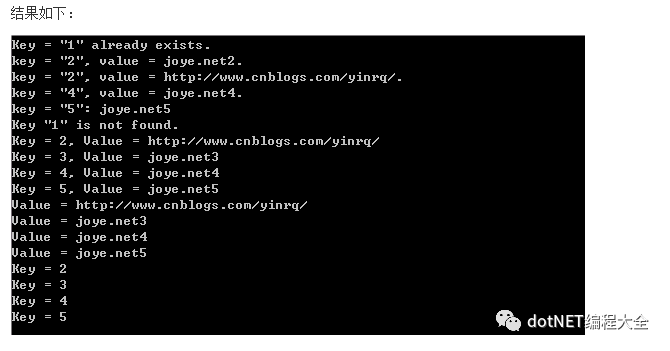
更多參考微軟官方文檔:Hashtable 類
二、Dictionary
Dictionary<TKey, TValue> 泛型類提供了從一組鍵到一組值的映射。通過鍵來檢索值的速度是非常快的,接近于 O(1),這是因為 Dictionary<TKey, TValue> 類是作為一個哈希表來實現(xiàn)的。檢索速度取決于為 TKey 指定的類型的哈希算法的質(zhì)量。TValue可以是值類型,數(shù)組,類或其他。
Dictionary是一種變種的HashTable,它采用一種分離鏈接散列表的數(shù)據(jù)結(jié)構(gòu)來解決哈希沖突的問題。
簡單使用代碼:
using System;using System.Collections;using System.Collections.Generic;namespace WebApp{class Program{static void Main(string[] args){Dictionary<string, string> myDic = new Dictionary<string, string>();//插入myDic.Add("1", "joye.net");myDic.Add("2", "joye.net2");myDic.Add("3", "joye.net3");//key 存在try{myDic.Add("1", "1joye.net");}catch{Console.WriteLine("Key = \"1\" already exists.");}//取值Console.WriteLine("key = \"2\", value = {0}.", myDic["2"]);//修改myDic["2"] = "http://www.cnblogs.com/yinrq/";myDic["4"] = "joye.net4"; //修改的key不存在則新增Console.WriteLine("key = \"2\", value = {0}.", myDic["2"]);Console.WriteLine("key = \"4\", value = {0}.", myDic["4"]);//判斷key是否存在if (!myDic.ContainsKey("5")){myDic.Add("5", "joye.net5");Console.WriteLine("key = \"5\": {0}", myDic["5"]);}//移除myDic.Remove("1");if (!myDic.ContainsKey("1")){Console.WriteLine("Key \"1\" is not found.");}//foreach 取值foreach (var item in myDic){Console.WriteLine("Key = {0}, Value = {1}", item.Key, item.Value);}//所有的值foreach (var item in myDic.Values){Console.WriteLine("Value = {0}",item);}//所有的keyforeach (var item in myDic.Keys){Console.WriteLine("Key = {0}", item);}Console.ReadKey();}}}
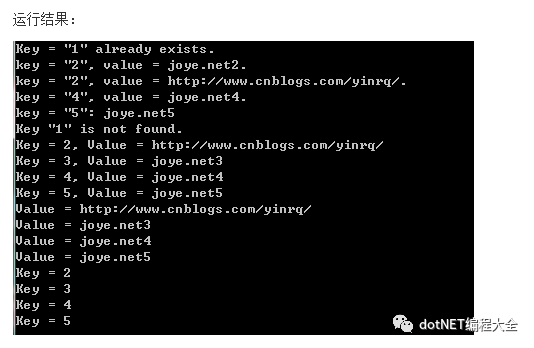
更多資料參考:Dictionary 類
三、ConcurrentDictionary
表示可由多個線程同時訪問的鍵/值對的線程安全集合。
ConcurrentDictionary<TKey, TValue> framework4出現(xiàn)的,可由多個線程同時訪問,且線程安全。用法同Dictionary很多相同,但是多了一些方法。ConcurrentDictionary 屬于System.Collections.Concurrent 命名空間按照MSDN上所說:
System.Collections.Concurrent 命名空間提供多個線程安全集合類。當有多個線程并發(fā)訪問集合時,應使用這些類代替 System.Collections 和 System.Collections.Generic 命名空間中的對應類型。
更多資料:ConcurrentDictionary<TKey,?TValue> 類
四、對比總結(jié)
分別插入500萬條數(shù)據(jù),然后遍歷,看看耗時。
using System;using System.Collections;using System.Collections.Concurrent;using System.Collections.Generic;using System.Diagnostics;namespace WebApp{class Program{static Hashtable _hashtable;static Dictionary<string, string> _dictionary;static ConcurrentDictionary<string, string> _conDictionary;static void Main(string[] args){Compare(5000000);Console.ReadLine();Console.Read();}public static void Compare(int dataCount){_hashtable = new Hashtable();_dictionary = new Dictionary<string, string>();_conDictionary=new ConcurrentDictionary<string, string>();Stopwatch stopWatch = new Stopwatch();// HashtablestopWatch.Start();for (int i = 0; i < dataCount; i++){_hashtable.Add("key" + i.ToString(), "Value" + i.ToString());}stopWatch.Stop();Console.WriteLine("HashTable插" + dataCount + "條耗時(毫秒):" + stopWatch.ElapsedMilliseconds);//DictionarystopWatch.Reset();stopWatch.Start();for (int i = 0; i < dataCount; i++){_dictionary.Add("key" + i.ToString(), "Value" +i.ToString());}stopWatch.Stop();Console.WriteLine("Dictionary插" + dataCount + "條耗時(毫秒):" + stopWatch.ElapsedMilliseconds);//ConcurrentDictionarystopWatch.Reset();stopWatch.Start();for (int i = 0; i < dataCount; i++){_conDictionary.TryAdd("key" + i.ToString(), "Value" + i.ToString());}stopWatch.Stop();Console.WriteLine("ConcurrentDictionary插" + dataCount + "條耗時(毫秒):" + stopWatch.ElapsedMilliseconds);// HashtablestopWatch.Reset();stopWatch.Start();for (int i = 0; i < _hashtable.Count; i++){var key = _hashtable[i];}stopWatch.Stop();Console.WriteLine("HashTable遍歷時間(毫秒):" + stopWatch.ElapsedMilliseconds);//DictionarystopWatch.Reset();stopWatch.Start();for (int i = 0; i < _hashtable.Count; i++){var key = _dictionary["key" + i.ToString()];}stopWatch.Stop();Console.WriteLine("Dictionary遍歷時間(毫秒):" + stopWatch.ElapsedMilliseconds);//ConcurrentDictionarystopWatch.Reset();stopWatch.Start();for (int i = 0; i < _hashtable.Count; i++){var key = _conDictionary["key"+i.ToString()];}stopWatch.Stop();Console.WriteLine("ConcurrentDictionary遍歷時間(毫秒):" + stopWatch.ElapsedMilliseconds);}}}
運行結(jié)果:
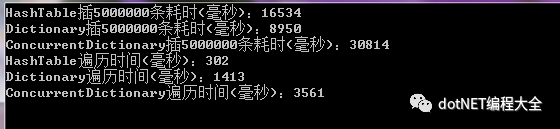
可以看出:
大數(shù)據(jù)插入Dictionary花費時間最少
遍歷HashTable最快是Dictionary的1/5,ConcurrentDictionary的1/10
單線程建議用Dictionary,多線程建議用ConcurrentDictionary或者HashTable(Hashtable tab = Hashtable.Synchronized(new Hashtable());獲得線程安全的對象)
【推薦】.NET Core開發(fā)實戰(zhàn)視頻課程 ★★★
.NET Core實戰(zhàn)項目之CMS 第一章 入門篇-開篇及總體規(guī)劃
【.NET Core微服務實戰(zhàn)-統(tǒng)一身份認證】開篇及目錄索引
Redis基本使用及百億數(shù)據(jù)量中的使用技巧分享(附視頻地址及觀看指南)
.NET Core中的一個接口多種實現(xiàn)的依賴注入與動態(tài)選擇看這篇就夠了
用abp vNext快速開發(fā)Quartz.NET定時任務管理界面
在ASP.NET Core中創(chuàng)建基于Quartz.NET托管服務輕松實現(xiàn)作業(yè)調(diào)度