<kbd id="afajh"><form id="afajh"></form></kbd>
<strong id="afajh"><dl id="afajh"></dl></strong>
    <del id="afajh"><form id="afajh"></form></del>
        1. <th id="afajh"><progress id="afajh"></progress></th>
          <b id="afajh"><abbr id="afajh"></abbr></b>
          <th id="afajh"><progress id="afajh"></progress></th>

          Java之定時任務全家桶

          共 10663字,需瀏覽 22分鐘

           ·

          2021-02-03 21:26

          定時任務應用非常廣泛,Java提供的現(xiàn)有解決方案有很多。
          本次主要講schedule、quartz、xxl-job、shedlock等相關的代碼實踐。

          一、SpringBoot使用Schedule

          核心代碼:

          1
          2
          3
          4
          5
          6
          7
          8
          9
          10
          11
          12
          13
          14
          15
          16
          17
          18
          19
          20
          21
          22
          23
          24
          @Component
          public class ScheduleTask {

          private Logger logger = LoggerFactory.getLogger(ScheduleTask.class);

          @Scheduled(cron = "0/1 * * * * ? ")
          public void one() {

          logger.info("one:" + new Date());
          }

          @Scheduled(cron = "0/1 * * * * ? ")
          public void two() {

          logger.info("two:" + new Date());
          }


          @Scheduled(cron = "0/1 * * * * ? ")
          public void three() {

          logger.info("three:" + new Date());
          }
          }

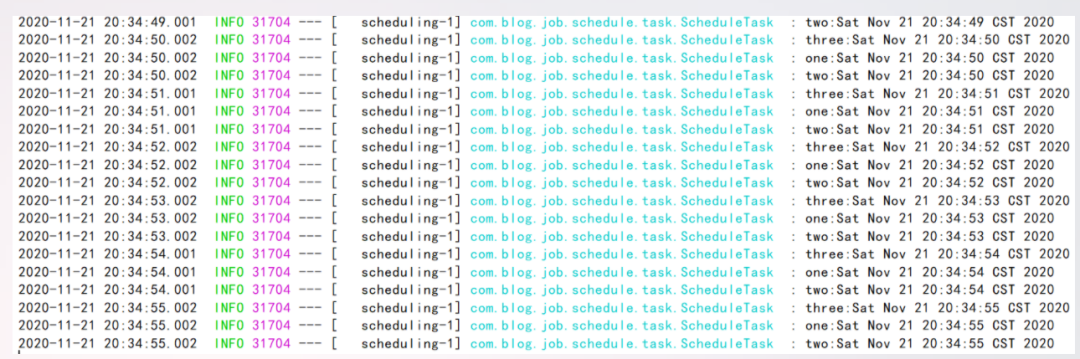
          運行效果如下:

          除此之外還可以這樣實現(xiàn),核心代碼:

          1
          2
          3
          4
          5
          6
          7
          8
          9
          10
          11
          12
          13
          14
          15
          16
          17
          18
          19
          20
          21
          22
          23
          24
          25
          26
          27
          28
          29
          30
          31
          32
          33
          34
          @PropertySource(value = {
          "classpath:task.properties",
          }, encoding = "utf-8")
          @Component("scheduleTask")
          public class ScheduleTask implements SchedulingConfigurer {


          @Value("${TEST_JOB_TASK_CRON}")
          private String cron;

          @Override
          public void configureTasks(ScheduledTaskRegistrar scheduledTaskRegistrar) {

          scheduledTaskRegistrar.addTriggerTask(new Runnable() {

          @Override
          public void run() {
          System.out.println("執(zhí)行任務:" + DateUtil.date());


          }

          }, new Trigger() {
          @Override
          public Date nextExecutionTime(TriggerContext triggerContext) {
          return new CronTrigger(cron).nextExecutionTime(triggerContext);
          }
          });
          }

          public void setCron(String cron) {
          this.cron = cron;
          }
          }

          有朋友或許很疑惑,為什么要寫這么一大堆,這個與前面的代碼又有何區(qū)別呢?

          區(qū)別是多線程并行。其實多線程并行也可以不用這么寫,只需寫一段核心配置類代碼即可。

          定時任務多線程配置類:

          1
          2
          3
          4
          5
          6
          7
          @Configuration
          public class ScheduleConfig implements SchedulingConfigurer {

          public void configureTasks(ScheduledTaskRegistrar scheduledTaskRegistrar) {
          scheduledTaskRegistrar.setScheduler(Executors.newScheduledThreadPool(5));
          }
          }

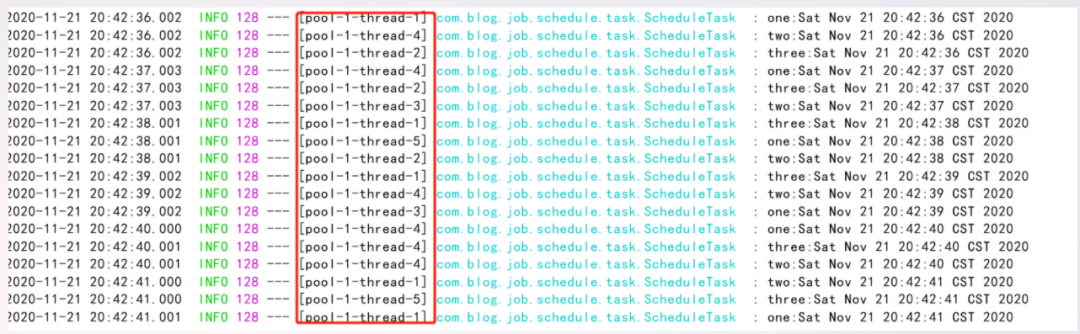
          再次啟動,查看效果,如下:

          由此看出走不同的線程執(zhí)行,不同的線程執(zhí)行的好處是,如果某一個線程掛掉后,并不會阻塞導致其它定時任務無法執(zhí)行。

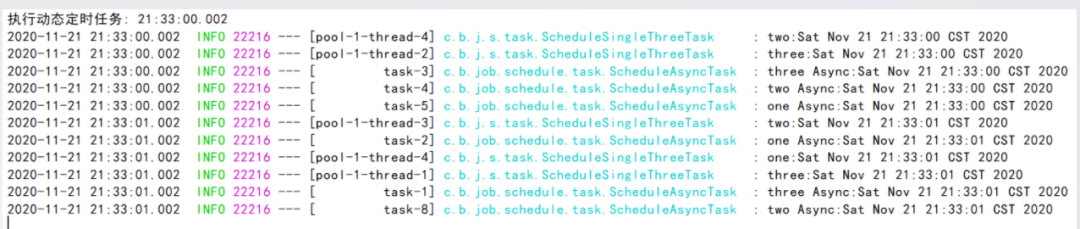
          另外如果要想并發(fā)執(zhí)行,前面的配置可以不要,直接用SpringBoot提供的現(xiàn)成注解即可,核心代碼如下:

          1
          2
          3
          4
          5
          6
          7
          8
          9
          10
          11
          12
          13
          14
          15
          16
          17
          18
          19
          20
          21
          22
          23
          24
          25
          26
          27
          28
          @Component
          @EnableAsync
          public class ScheduleAsyncTask {

          private Logger logger = LoggerFactory.getLogger(ScheduleAsyncTask.class);

          @Scheduled(cron = "0/1 * * * * ? ")
          @Async
          public void one() {

          logger.info("one Async:" + new Date());
          }

          @Scheduled(cron = "0/1 * * * * ? ")
          @Async
          public void two() {

          logger.info("two Async:" + new Date());
          }


          @Scheduled(cron = "0/1 * * * * ? ")
          @Async
          public void three() {

          logger.info("three Async:" + new Date());
          }
          }

          除此外,還有基于schedule動態(tài)定時任務(所謂動態(tài)只不過是指cron表達式放在對應的數(shù)據(jù)表里),簡單示例代碼:

          1
          2
          3
          4
          5
          6
          7
          8
          9
          10
          11
          12
          13
          14
          15
          16
          17
          18
          19
          20
          21
          22
          23
          24
          25
          26
          27
          28
          29
          30
          31
          32
          33
          34
          35
          36
          37
          38
          @Configuration
          public class DynamicScheduleTask implements SchedulingConfigurer {

          @Autowired
          @SuppressWarnings("all")
          CronMapper cronMapper;

          @Mapper
          public interface CronMapper {
          @Select("select cron from cron limit 1")
          public String getCron();
          }

          /**
          * 執(zhí)行定時任務.
          */
          public void configureTasks(ScheduledTaskRegistrar taskRegistrar) {

          taskRegistrar.addTriggerTask(
          //1.添加任務內(nèi)容(Runnable)
          () -> System.out.println("執(zhí)行動態(tài)定時任務: " + LocalDateTime.now().toLocalTime()),
          //2.設置執(zhí)行周期(Trigger)
          triggerContext -> {
          //2.1 從數(shù)據(jù)庫獲取執(zhí)行周期
          String cron = cronMapper.getCron();
          //2.2 合法性校驗.
          if (StringUtils.isEmpty(cron)) {
          // Omitted Code ..
          }
          //2.3 返回執(zhí)行周期(Date)
          return new CronTrigger(cron).nextExecutionTime(triggerContext);
          }
          );
          }


          }

          核心配置文件(application.yml):

          1
          2
          3
          4
          5
          spring:
          datasource:
          url: jdbc:mysql://127.0.0.1:3306/test
          username: root
          password: 1234


          SQL腳本:

          1
          2
          3
          4
          5
          6
          7
          8
          9
          DROP DATABASE IF EXISTS `test`;
          CREATE DATABASE `test`;
          USE `test`;
          DROP TABLE IF EXISTS `cron`;
          CREATE TABLE `cron` (
          `cron_id` varchar(30) NOT NULL PRIMARY KEY,
          `cron` varchar(30) NOT NULL
          );
          INSERT INTO `cron` VALUES ('1', '0/5 * * * * ?');

          運行效果如下:

          二、SpringBoot使用Quartz

          1.Maven依賴

          1
          2
          3
          4
          5


          org.springframework.boot
          spring-boot-starter-quartz

          2.配置文件

          1
          2
          3
          4
          5
          6
          7
          8
          9
          10
          11
          12
          13
          14
          15
          16
          17
          18
          19
          20
          21
          22
          23
          24
          25
          26
          27
          28
          29
          30
          spring:
          quartz:
          #相關屬性配置
          properties:
          org:
          quartz:
          scheduler:
          instanceName: clusteredScheduler
          instanceId: AUTO
          jobStore:
          class: org.quartz.impl.jdbcjobstore.JobStoreTX
          driverDelegateClass: org.quartz.impl.jdbcjobstore.StdJDBCDelegate
          tablePrefix: QRTZ_
          isClustered: true
          clusterCheckinInterval: 10000
          useProperties: false
          threadPool:
          class: org.quartz.simpl.SimpleThreadPool
          threadCount: 10
          threadPriority: 5
          threadsInheritContextClassLoaderOfInitializingThread: true
          #數(shù)據(jù)庫方式
          job-store-type: jdbc
          #初始化表結構
          jdbc:
          initialize-schema: always
          datasource:
          url: jdbc:mysql://127.0.0.1:3306/test
          username: root
          password: 1234

          3.啟動類

          1
          2
          3
          4
          5
          6
          7
          8
          9
          10
          @SpringBootApplication
          @EnableScheduling
          public class BlogQuartzApplication {

          public static void main(String[] args) {
          SpringApplication.run(BlogQuartzApplication.class, args);
          }


          }

          4.配置類

          1
          2
          3
          4
          5
          6
          7
          8
          9
          10
          11
          12
          13
          14
          15
          16
          17
          18
          19
          20
          @Configuration
          public class QuartzConfiguration {
          // 使用jobDetail包裝job
          @Bean
          public JobDetail myCronJobDetail() {
          return JobBuilder.newJob(CouponTimeOutJob.class).withIdentity("couponTimeOutJob").storeDurably().build();
          }

          // 把jobDetail注冊到Cron表達式的trigger上去
          @Bean
          public Trigger CronJobTrigger() {
          CronScheduleBuilder cronScheduleBuilder = CronScheduleBuilder.cronSchedule("0/1 * * * * ?");

          return TriggerBuilder.newTrigger()
          .forJob(myCronJobDetail())
          .withIdentity("CouponTimeOutJobTrigger")
          .withSchedule(cronScheduleBuilder)
          .build();
          }
          }

          5.定時任務類

          1
          2
          3
          4
          5
          6
          public class CouponTimeOutJob extends QuartzJobBean {
          @Override
          protected void executeInternal(JobExecutionContext jobExecutionContext) throws JobExecutionException {
          System.out.println("定時任務執(zhí)行");
          }
          }

          6.啟動成功不報錯

          (1)對應的數(shù)據(jù)庫會生成定時任務相關的數(shù)據(jù)表
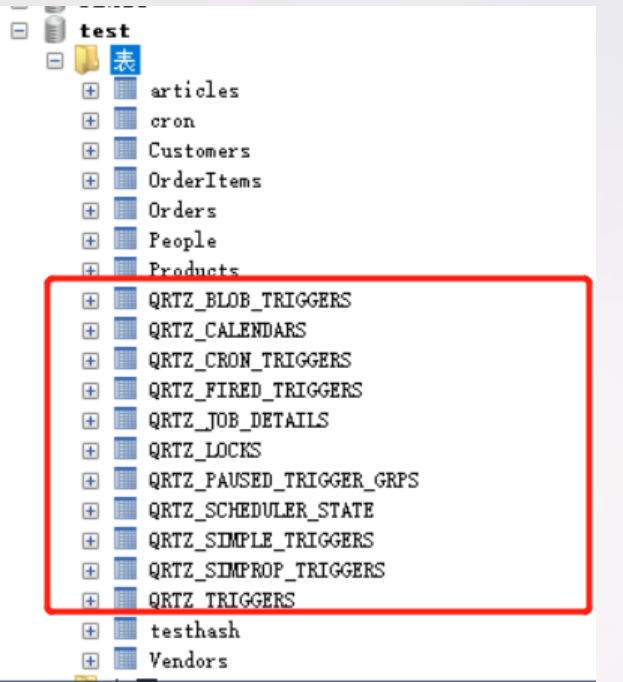
          (2)控制臺不斷輸出定時任務執(zhí)行日志

          三、SpringBoot使用xxl-job

          之前寫過一樣的例子,如今簡化了下。
          關于xxl-job使用詳情,可以參考我的這篇文章:
          SpringBoot整合Xxl-Job

          1.Maven依賴

          1
          2
          3
          4
          5

          com.xuxueli
          xxl-job-core
          2.2.0

          2.配置類

          1
          2
          3
          4
          5
          6
          7
          8
          9
          10
          11
          12
          13
          14
          15
          16
          17
          18
          19
          20
          21
          22
          23
          24
          25
          26
          27
          28
          29
          30
          31
          32
          33
          34
          35
          36
          37
          38
          39
          40
          41
          42
          @Configuration
          public class XxlJobConfig {
          private Logger logger = LoggerFactory.getLogger(XxlJobConfig.class);

          @Value("${xxl.job.admin.addresses}")
          private String adminAddresses;

          @Value("${xxl.job.executor.appname}")
          private String appName;

          @Value("${xxl.job.executor.ip}")
          private String ip;

          @Value("${xxl.job.executor.port}")
          private int port;

          @Value("${xxl.job.accessToken}")
          private String accessToken;

          @Value("${xxl.job.executor.logpath}")
          private String logPath;

          @Value("${xxl.job.executor.logretentiondays}")
          private int logRetentionDays;


          @Bean(initMethod = "start", destroyMethod = "destroy")
          public XxlJobSpringExecutor xxlJobExecutor() {
          logger.info(">>>>>>>>>>> xxl-job config init.");
          XxlJobSpringExecutor xxlJobSpringExecutor = new XxlJobSpringExecutor();
          xxlJobSpringExecutor.setAdminAddresses(adminAddresses);
          xxlJobSpringExecutor.setAppname(appName);
          xxlJobSpringExecutor.setIp(ip);
          xxlJobSpringExecutor.setPort(port);
          xxlJobSpringExecutor.setAccessToken(accessToken);
          xxlJobSpringExecutor.setLogPath(logPath);
          xxlJobSpringExecutor.setLogRetentionDays(logRetentionDays);

          return xxlJobSpringExecutor;
          }

          }

          3.配置文件內(nèi)容

          1
          2
          3
          4
          5
          6
          7
          8
          9
          10
          11
          12
          13
          14
          15
          16
          17
          18
          19
          # web port
          server.port=8081
          # no web
          #spring.main.web-environment=false
          ### xxl-job admin address list, such as "http://address" or "http://address01,http://address02"
          xxl.job.admin.addresses=http://127.0.0.1:8080/xxl-job-admin
          ### xxl-job, access token
          xxl.job.accessToken=
          ### xxl-job executor appname
          xxl.job.executor.appname=blog-job-xxl-job
          ### xxl-job executor registry-address: default use address to registry , otherwise use ip:port if address is null
          xxl.job.executor.address=
          ### xxl-job executor server-info
          xxl.job.executor.ip=
          xxl.job.executor.port=8888
          ### xxl-job executor log-path
          xxl.job.executor.logpath=/data/applogs/xxl-job/jobhandler
          ### xxl-job executor log-retention-days
          xxl.job.executor.logretentiondays=30

          4.定時任務類

          1
          2
          3
          4
          5
          6
          7
          8
          9
          10
          11
          12
          13
          14
          15
          16
          17
          @Component
          public class XxlJobTaskExample {


          @XxlJob("blogJobHandler")
          public ReturnT blogJobHandler(String param) throws Exception {
          System.out.println("執(zhí)行");
          XxlJobLogger.log("XXL-JOB, Hello World.");

          for (int i = 0; i < 5; i++) {
          XxlJobLogger.log("beat at:" + i);
          TimeUnit.SECONDS.sleep(2);
          }
          return ReturnT.SUCCESS;
          }

          }

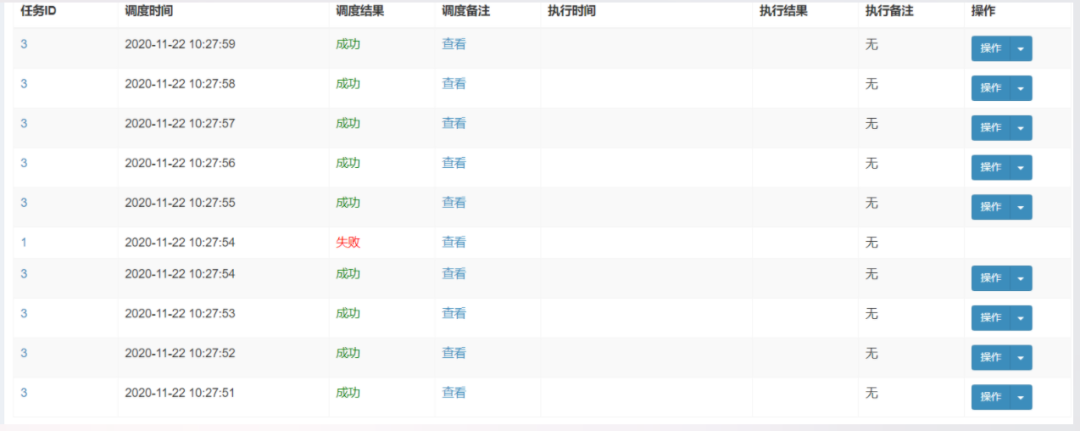
          5.執(zhí)行效果

          分別如下所示:


          四、SpringBoot使用ShedLock

          1.導入Maven依賴

          1
          2
          3
          4
          5
          6
          7
          8
          9
          10
          11
          12
          13
          14
          15
          16
          17
          18


          net.javacrumbs.shedlock
          shedlock-spring
          4.0.4


          net.javacrumbs.shedlock
          shedlock-provider-redis-spring
          2.5.0


          org.springframework.boot
          spring-boot-starter-data-redis

          2.編寫配置類

          1
          2
          3
          4
          5
          6
          7
          8
          9
          10
          11
          @Configuration
          @EnableSchedulerLock(defaultLockAtMostFor = "PT30M")
          public class ShedLockConfig {

          @Bean
          public LockProvider lockProvider(RedisTemplate redisTemplate) {
          return new RedisLockProvider(redisTemplate.getConnectionFactory());

          }

          }

          3.編寫具體的定時任務

          1
          2
          3
          4
          5
          6
          7
          8
          9
          10
          11
          12
          13
          14
          15
          @Component
          public class TaskSchedule {

          /**
          * 每分鐘執(zhí)行一次
          * [秒] [分] [小時] [日] [月] [周] [年]
          */
          @Scheduled(cron = "1 * * * * ?")
          @SchedulerLock(name = "synchronousSchedule")
          public void SynchronousSchedule() {

          System.out.println("Start run schedule to synchronous data:" + new Date());

          }
          }

          4.編寫啟動類

          1
          2
          3
          4
          5
          6
          7
          @SpringBootApplication
          @EnableScheduling
          public class ShedLockRedisApplication {
          public static void main(String[] args) {
          SpringApplication.run(ShedLockRedisApplication.class);
          }
          }

          5.配置文件

          1
          2
          3
          4
          5
          6
          7
          8
          9
          10
          11
          12
          13
          14
          15
          16
          17
          18
          19
          20
          server:
          tomcat:
          uri-encoding: UTF-8
          max-threads: 1000
          min-spare-threads: 30
          port: 8083

          spring:
          redis:
          database: 0
          host: localhost
          port: 6379
          password: # 密碼(默認為空)
          timeout: 6000ms # 連接超時時長(毫秒)
          jedis:
          pool:
          max-active: 1000 # 連接池最大連接數(shù)(使用負值表示沒有限制)
          max-wait: -1ms # 連接池最大阻塞等待時間(使用負值表示沒有限制)
          max-idle: 10 # 連接池中的最大空閑連接
          min-idle: 5 # 連接池中的最小空閑連接

          6.測試

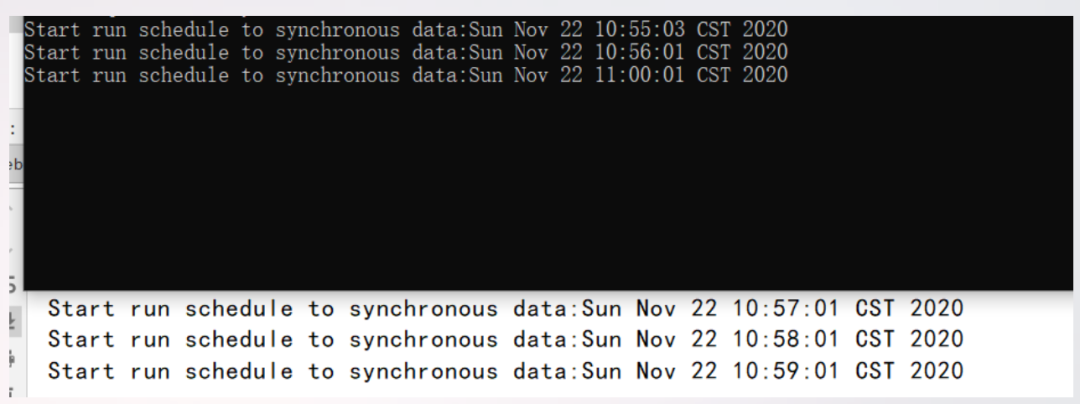
          我之所以用shedlock是因為確保在集群環(huán)境下各微服務的定時任務只執(zhí)行一個,而不是全部都運行相同的定時任務。

          本次測試效果如下:

          本次代碼例子已放至我的GitHub:

          https://github.com/developers-youcong/blog-job


          source:?https://developers-youcong.github.io/2020/11/21/Java之定時任務全家桶/

          喜歡,在看

          瀏覽 21
          點贊
          評論
          收藏
          分享

          手機掃一掃分享

          分享
          舉報
          評論
          圖片
          表情
          推薦
          點贊
          評論
          收藏
          分享

          手機掃一掃分享

          分享
          舉報
          <kbd id="afajh"><form id="afajh"></form></kbd>
          <strong id="afajh"><dl id="afajh"></dl></strong>
            <del id="afajh"><form id="afajh"></form></del>
                1. <th id="afajh"><progress id="afajh"></progress></th>
                  <b id="afajh"><abbr id="afajh"></abbr></b>
                  <th id="afajh"><progress id="afajh"></progress></th>
                  大色鬼在线天堂精品 | 国产精品人妻熟女毛片av | 亚洲欧洲欧美日韩中文字幕 | 成人做爰A片一区二区app | 欧美一级特黄A片免费看视频小说 |