
Vue 響應(yīng)式原理模擬

轉(zhuǎn)載自:昆蘭
https://juejin.cn/post/6946120511713705992
一、三個概念
1. 數(shù)據(jù)驅(qū)動
數(shù)據(jù)響應(yīng)式 數(shù)據(jù)模型僅僅是普通的 JavaScript 對象,而當(dāng)我們修改數(shù)據(jù)時,視圖會進(jìn)行更新,避免了繁瑣的 DOM 操作,提高開發(fā)效率 雙向綁定 數(shù)據(jù)改變,視圖改變;視圖改變,數(shù)據(jù)也隨之改變 我們可以使用 v-model 在表單元素上創(chuàng)建雙向數(shù)據(jù)綁定 數(shù)據(jù)驅(qū)動是 Vue 最獨(dú)特的特性之一 開發(fā)過程中僅需要關(guān)注數(shù)據(jù)本身,不需要關(guān)心數(shù)據(jù)是如何渲染到視圖
2. 數(shù)據(jù)響應(yīng)式核心原理
Vue 2.x
// 模擬 Vue 中的 data 選項(xiàng)
let data = {
    msg: 'hello'
}
// 模擬 Vue 的實(shí)例
let vm = {}
// 數(shù)據(jù)劫持:當(dāng)訪問或者設(shè)置 vm 中的成員的時候,做一些干預(yù)操作
Object.defineProperty(vm, 'msg', {
    // 可枚舉(可遍歷)
    enumerable: true,
    // 可配置(可以使用 delete 刪除,可以通過 defineProperty 重新定義)
    configurable: true,
    // 當(dāng)獲取值的時候執(zhí)行
    get () {
        console.log('get: ', data.msg)
        return data.msg
    },
    // 當(dāng)設(shè)置值的時候執(zhí)行
    set (newValue) {
        console.log('set: ', newValue)
        if (newValue === data.msg) {
            return
        }
        data.msg = newValue
        // 數(shù)據(jù)更改,更新 DOM 的值
        document.querySelector('#app').textContent = data.msg
    }
})
// 測試
vm.msg = 'Hello World'
console.log(vm.msg)
Vue 3.x
// 模擬 Vue 中的 data 選項(xiàng)
let data = {
    msg: 'hello',
    count: 0
}
// 模擬 Vue 實(shí)例
let vm = new Proxy(data, {
    // 當(dāng)訪問 vm 的成員會執(zhí)行
    get (target, key) {
        console.log('get, key: ', key, target[key])
        return target[key]
    },
    // 當(dāng)設(shè)置 vm 的成員會執(zhí)行
    set (target, key, newValue) {
        console.log('set, key: ', key, newValue)
        if (target[key] === newValue) {
            return
        }
        target[key] = newValue
        document.querySelector('#app').textContent = target[key]
    }
})
// 測試
vm.msg = 'Hello World'
console.log(vm.msg)
3. 發(fā)布訂閱模式和觀察者模式
Ⅰ. 發(fā)布訂閱模式
發(fā)布/訂閱模式 訂閱者 發(fā)布者 信號中心
我們假定,存在一個"信號中心",某個任務(wù)執(zhí)行完成,就向信號中心"發(fā)布"(publish)一個信號,其他任務(wù)可以向信號中心"訂閱"(subscribe)這個信號,從而知道什么時候自己可以開始執(zhí)行。這就叫做"發(fā)布/訂閱模式"(publish-subscribe pattern)
Vue 的自定義事件
let vm = new Vue()
vm.$on('dataChange', () => {
    console.log('dataChange')
})
vm.$on('dataChange', () => {
    console.log('dataChange1')
})
vm.$emit('dataChange')
兄弟組件通信過程
// eventBus.js
// 事件中心
let eventHub = new Vue()
// ComponentA.vue
// 發(fā)布者
addTodo: function () {
    // 發(fā)布消息(事件)
    eventHub.$emit('add-todo', { text: this.newTodoText })
    this.newTodoText = ''
}
// ComponentB.vue
// 訂閱者
created: function () {
    // 訂閱消息(事件)
    eventHub.$on('add-todo', this.addTodo)
}
模擬 Vue 自定義事件的實(shí)現(xiàn)
class EventEmitter {
    constructor () {
        // { eventType: [ handler1, handler2 ] }
        this.subs = {}
    }
    // 訂閱通知
    $on (eventType, handler) {
        this.subs[eventType] = this.subs[eventType] || []
        this.subs[eventType].push(handler)
    }
    // 發(fā)布通知
    $emit (eventType) {
        if (this.subs[eventType]) {
            this.subs[eventType].forEach(handler => {
                handler()
            })
        }
    }
}
// 測試
var bus = new EventEmitter()
// 注冊事件
bus.$on('click', function () {
    console.log('click')
})
bus.$on('click', function () {
    console.log('click1')
})
// 觸發(fā)事件
bus.$emit('click')
Ⅱ. 觀察者模式
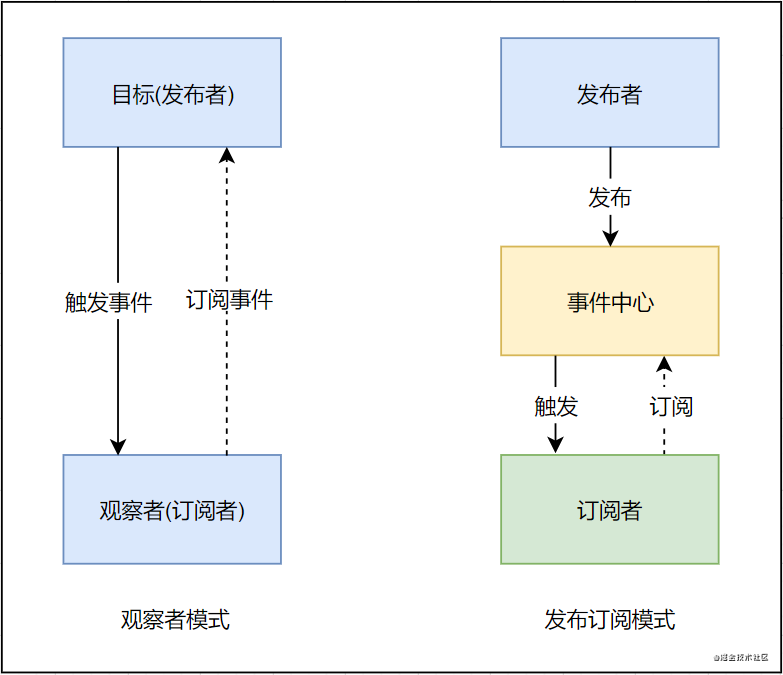
觀察者(訂閱者) -- Watcher update():當(dāng)事件發(fā)生時,具體要做的事情 目標(biāo)(發(fā)布者) -- Dep subs 數(shù)組:存儲所有的觀察者 addSub():添加觀察者 notify():當(dāng)事件發(fā)生,調(diào)用所有觀察者的 update() 方法 沒有事件中心
// 目標(biāo)(發(fā)布者)
// Dependency
class Dep {
    constructor () {
        // 存儲所有的觀察者
        this.subs = []
    }
    // 添加觀察者
    addSub (sub) {
        if (sub && sub.update) {
        this.subs.push(sub)
        }
    }
    // 通知所有觀察者
    notify () {
        this.subs.forEach(sub => {
            sub.update()
        })
    }
}
// 觀察者(訂閱者)
class Watcher {
    update () {
        console.log('update')
    }
}
// 測試
let dep = new Dep()
let watcher = new Watcher()
dep.addSub(watcher)
dep.notify()
Ⅲ. 總結(jié)
觀察者模式是由具體目標(biāo)調(diào)度,比如當(dāng)事件觸發(fā),Dep 就會去調(diào)用觀察者的方法,所以觀察者模式的訂閱者與發(fā)布者之間是存在依賴的。 發(fā)布/訂閱模式由統(tǒng)一調(diào)度中心調(diào)用,因此發(fā)布者和訂閱者不需要知道對方的存在。
二、Vue 響應(yīng)式原理模擬
1. Vue
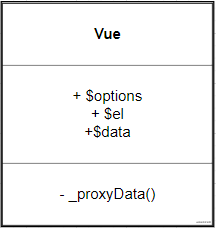
功能 負(fù)責(zé)接收初始化的參數(shù)(選項(xiàng)) 負(fù)責(zé)把 data 中的屬性注入到 Vue 實(shí)例,轉(zhuǎn)換成 getter/setter 負(fù)責(zé)調(diào)用 observer 監(jiān)聽 data 中所有屬性的變化 負(fù)責(zé)調(diào)用 compiler 解析指令/插值表達(dá)式 結(jié)構(gòu)
實(shí)現(xiàn)
class Vue {
    constructor (options) {
        // 1. 保存選項(xiàng)的數(shù)據(jù)
        this.$options = options || {}
        this.$data = options.data || {}
        const el = options.el
        this.$el = typeof options.el === 'string' ? document.querySelector(el) : el
        // 2. 負(fù)責(zé)把 data 注入到 Vue 實(shí)例
        this._proxyData(this.$data)
        // 3. 負(fù)責(zé)調(diào)用 Observer 實(shí)現(xiàn)數(shù)據(jù)劫持
        new Observer(this.$data)
        // 4. 負(fù)責(zé)調(diào)用 Compiler 解析指令/插值表達(dá)式等
        new Compiler(this)
    }
    _proxyData (data) {
        // 遍歷 data 的所有屬性
        Object.keys(data).forEach(key => {
            Object.defineProperty(this, key, {
                get () {
                    return data[key]
                },
                set (newValue) {
                    if (data[key] === newValue) {
                        return
                    }
                    data[key] = newValue
                }
            })
        })
    }
}
2. Observer
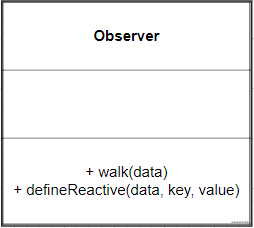
功能 負(fù)責(zé)把 data 選項(xiàng)中的屬性轉(zhuǎn)換成響應(yīng)式數(shù)據(jù) data 中的某個屬性也是對象,把該屬性轉(zhuǎn)換成響應(yīng)式數(shù)據(jù) 數(shù)據(jù)變化發(fā)送通知 結(jié)構(gòu)
實(shí)現(xiàn)
// 負(fù)責(zé)數(shù)據(jù)劫持
// 把 $data 中的成員轉(zhuǎn)換成 getter/setter
class Observer {
    constructor(data) {
        this.walk(data)
    }
    // 1. 判斷數(shù)據(jù)是否是對象,如果不是對象返回
    // 2. 如果是對象,遍歷對象的所有屬性,設(shè)置為 getter/setter
    walk(data) {
        if (!data || typeof data !== 'object') {
            return
        }
        // 遍歷 data 的所有成員
        Object.keys(data).forEach(key => {
            this.defineReactive(data, key, data[key])
        })
    }
    // 定義響應(yīng)式成員
    defineReactive(data, key, val) {
        const that = this
        // 如果 val 是對象,繼續(xù)設(shè)置它下面的成員為響應(yīng)式數(shù)據(jù)
        this.walk(val)
        Object.defineProperty(data, key, {
            configurable: true,
            enumerable: true,
            get() {
                return val
            },
            set(newValue) {
                if (newValue === val) {
                    return
                }
                // 如果 newValue 是對象,設(shè)置 newValue 的成員為響應(yīng)式
                that.walk(newValue)
                val = newValue
            }
        })
    }
}
3. Compiler
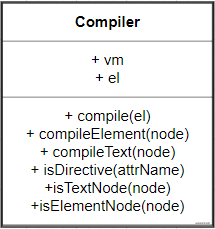
功能 負(fù)責(zé)編譯模板,解析指令/插值表達(dá)式 負(fù)責(zé)頁面的首次渲染 當(dāng)數(shù)據(jù)變化后重新渲染視圖 結(jié)構(gòu)
實(shí)現(xiàn)
① compile()
// 負(fù)責(zé)解析指令/插值表達(dá)式
class Compiler {
    constructor(vm) {
        this.vm = vm
        this.el = vm.$el
        // 編譯模板
        this.compile(this.el)
    }
    // 編譯模板
    // 處理文本節(jié)點(diǎn)和元素節(jié)點(diǎn)
    compile(el) {
        const nodes = el.childNodes
        Array.from(nodes).forEach(node => {
            // 判斷是文本節(jié)點(diǎn)還是元素節(jié)點(diǎn)
            if (this.isTextNode(node)) {
                this.compileText(node)
            } else if (this.isElementNode(node)) {
                this.compileElement(node)
            }
            if (node.childNodes && node.childNodes.length) {
                // 如果當(dāng)前節(jié)點(diǎn)中還有子節(jié)點(diǎn),遞歸編譯
                this.compile(node)
            }
        })
    }
    // 判斷是否是文本節(jié)點(diǎn)
    isTextNode(node) {
        return node.nodeType === 3
    }
    // 判斷是否是屬性節(jié)點(diǎn)
    isElementNode(node) {
        return node.nodeType === 1
    }
    // 判斷是否是以 v- 開頭的指令
    isDirective(attrName) {
        return attrName.startsWith('v-')
    }
    // 編譯文本節(jié)點(diǎn)
    compileText(node) {
    }
    // 編譯屬性節(jié)點(diǎn)
    compileElement(node) {
    }
}
② compileText()
// 編譯文本節(jié)點(diǎn)
compileText(node) {
    const reg = /\{\{(.+)\}\}/
    // 獲取文本節(jié)點(diǎn)的內(nèi)容
    const value = node.textContent
    if (reg.test(value)) {
        // 插值表達(dá)式中的值就是我們要的屬性名稱
        const key = RegExp.$1.trim()
        // 把插值表達(dá)式替換成具體的值
        node.textContent = value.replace(reg, this.vm[key])
    }
}
③ compileElement()
負(fù)責(zé)編譯元素的指令 處理 v-text 的首次渲染 處理 v-model 的首次渲染
// 編譯屬性節(jié)點(diǎn)
compileElement(node) {
    // 遍歷元素節(jié)點(diǎn)中的所有屬性,找到指令
    Array.from(node.attributes).forEach(attr => {
        // 獲取元素屬性的名稱
        let attrName = attr.name
        // 判斷當(dāng)前的屬性名稱是否是指令
        if (this.isDirective(attrName)) {
            // attrName 的形式 v-text v-model
            // 截取屬性的名稱,獲取 text model
            attrName = attrName.substr(2)
            // 獲取屬性的名稱,屬性的名稱就是我們數(shù)據(jù)對象的屬性 v-text="name",獲取的是name
            const key = attr.value
            // 處理不同的指令
            this.update(node, key, attrName)
        }
    })
}
// 負(fù)責(zé)更新 DOM
// 創(chuàng)建 Watcher
update(node, key, dir) {
    // node 節(jié)點(diǎn),key 數(shù)據(jù)的屬性名稱,dir 指令的后半部分
    const updaterFn = this[dir + 'Updater']
    updaterFn && updaterFn(node, this.vm[key])
}
// v-text 指令的更新方法
textUpdater(node, value) {
    node.textContent = value
}
// v-model 指令的更新方法
modelUpdater(node, value) {
    node.value = value
}
4. Dep
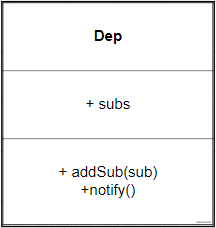
功能 收集依賴,添加觀察者(watcher) 通知所有觀察者 結(jié)構(gòu)
實(shí)現(xiàn)
class Dep {
    constructor() {
        // 存儲所有的觀察者
        this.subs = []
    }
    // 添加觀察者
    addSub(sub) {
        if (sub && sub.update) {
            this.subs.push(sub)
        }
    }
    // 通知所有觀察者
    notify() {
        this.subs.forEach(sub => {
            sub.update()
        })
    }
}
// 以下代碼在 Observer 類中 defineReactive 方法中添加
// 創(chuàng)建 dep 對象收集依賴
const dep = new Dep()
// getter 中
// get 的過程中收集依賴
Dep.target && dep.addSub(Dep.target)
// setter 中
// 當(dāng)數(shù)據(jù)變化之后,發(fā)送通知
dep.notify()
5. Watcher
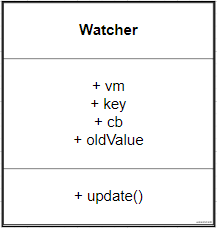
功能 當(dāng)數(shù)據(jù)變化觸發(fā)依賴, dep 通知所有的 Watcher 實(shí)例更新視圖 自身實(shí)例化的時候往 dep 對象中添加自己 結(jié)構(gòu)
實(shí)現(xiàn)
class Watcher {
    constructor(vm, key, cb) {
        this.vm = vm
        // data 中的屬性名稱
        this.key = key
        // 當(dāng)數(shù)據(jù)變化的時候,調(diào)用 cb 更新視圖
        this.cb = cb
        // 在 Dep 的靜態(tài)屬性上記錄當(dāng)前 watcher 對象,當(dāng)訪問數(shù)據(jù)的時候把 watcher 添加到dep 的 subs 中
        Dep.target = this
        // 觸發(fā)一次 getter,讓 dep 為當(dāng)前 key 記錄 watcher
        this.oldValue = vm[key]
        // 清空 target
        Dep.target = null
    }
    update() {
        const newValue = this.vm[this.key]
        if (this.oldValue === newValue) {
            return
        }
        this.cb(newValue)
    }
}

// 在 compiler.js(即Compiler類) 中為每一個指令/插值表達(dá)式創(chuàng)建 watcher 對象,監(jiān)視數(shù)據(jù)的變化
compileText(node) {
    const reg = /\{\{(.+?)\}\}/
    const value = node.textContent
    if (reg.test(value)) {
        const key = RegExp.$1.trim()
        node.textContent = value.replace(reg, this.vm[key])
        // 編譯差值表達(dá)式中創(chuàng)建一個 watcher,觀察數(shù)據(jù)的變化
        new Watcher(this.vm, key, newValue => {
            node.textContent = newValue
        })
    }
}
// 因?yàn)樵?nbsp;textUpdater等中要使用 this
updaterFn && updaterFn.call(this, node, this.vm[key], key)
// v-text 指令的更新方法
textUpdater(node, value, key) {
    node.textContent = value
    // 每一個指令中創(chuàng)建一個 watcher,觀察數(shù)據(jù)的變化
    new Watcher(this.vm, key, value => {
        node.textContent = value
    })
}

// 視圖變化更新數(shù)據(jù)
// v-model 指令的更新方法
modelUpdater(node, value, key) {
    node.value = value
    // 每一個指令中創(chuàng)建一個 watcher,觀察數(shù)據(jù)的變化
    new Watcher(this.vm, key, value => {
        node.value = value
    })
    // 監(jiān)聽視圖的變化
    node.addEventListener('input', () => {
        this.vm[key] = node.value
    })
}
三、總結(jié)
1. 兩個問題你會了嗎
給屬性重新賦值成對象,是否是響應(yīng)式的? 給 Vue 實(shí)例新增一個成員是否是響應(yīng)式的?
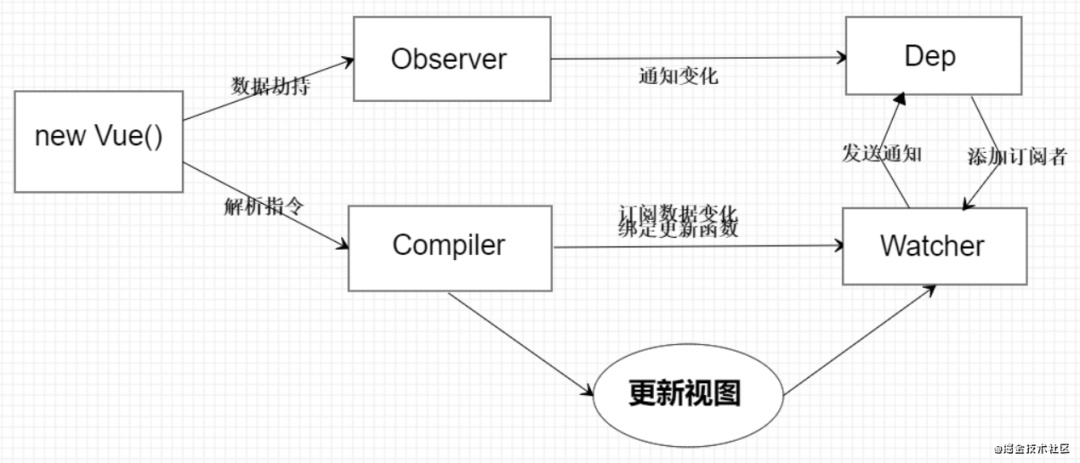
2. 通過下圖回顧整體流程
3. Vue
記錄傳入的選項(xiàng),設(shè)置 data/data/data/el 把 data 的成員注入到 Vue 實(shí)例 負(fù)責(zé)調(diào)用 Observer 實(shí)現(xiàn)數(shù)據(jù)響應(yīng)式處理(數(shù)據(jù)劫持) 負(fù)責(zé)調(diào)用 Compiler 編譯指令/插值表達(dá)式等
4. Observer
數(shù)據(jù)劫持 負(fù)責(zé)把 data 中的成員轉(zhuǎn)換成 getter/setter 負(fù)責(zé)把多層屬性轉(zhuǎn)換成 getter/setter 如果給屬性賦值為新對象,把新對象的成員設(shè)置為 getter/setter 添加 Dep 和 Watcher 的依賴關(guān)系 數(shù)據(jù)變化發(fā)送通知
5. Compiler
負(fù)責(zé)編譯模板,解析指令/插值表達(dá)式 負(fù)責(zé)頁面的首次渲染過程 當(dāng)數(shù)據(jù)變化后重新渲染
6. Dep
收集依賴,添加訂閱者(watcher) 通知所有訂閱者
7. Watcher
自身實(shí)例化的時候往dep對象中添加自己 當(dāng)數(shù)據(jù)變化dep通知所有的 Watcher 實(shí)例更新視圖
支持原創(chuàng),請勿抄襲
最后
評論
圖片
表情