
拋棄性能不佳的System.currentTimeMillis(),手擼一個低開銷獲取時間戳工具
你知道的越多,不知道的就越多,業(yè)余的像一棵小草!
你來,我們一起精進!你不來,我和你的競爭對手一起精進!
編輯:業(yè)余草
推薦:https://www.xttblog.com/?p=5277
大家好,我是業(yè)余草,這是我的第 447 篇原創(chuàng)!
你或許聽說過,在 Java 中調(diào)用 System.currentTimeMillis() 會有一些性能開銷,在某些場景下,System.nanoTime() 更具優(yōu)勢!
比如,測試方法的耗時時間:
public void save(){
    long start = System.currentTimeMillis();
    // doSomething() ...
    System.out.println(System.currentTimeMillis() - start);
}
這里建議你System.currentTimeMillis()改為System.nanoTime()。
public void save(){
    long start = System.nanoTime();
    // doSomething() ...
    System.out.println(System.nanoTime() - start);
}
原因我們下面慢慢展開。
昨天群里還有人說,可以使用 StopWatch。豈不知,StopWatch 背后也是System.currentTimeMillis()。
public void save(){
    StopWatch stopWatch = new StopWatch();
    stopWatch.start();
    // doSomething() ...
    stopWatch.stop();
    System.out.println(stopWatch.prettyPrint());
}
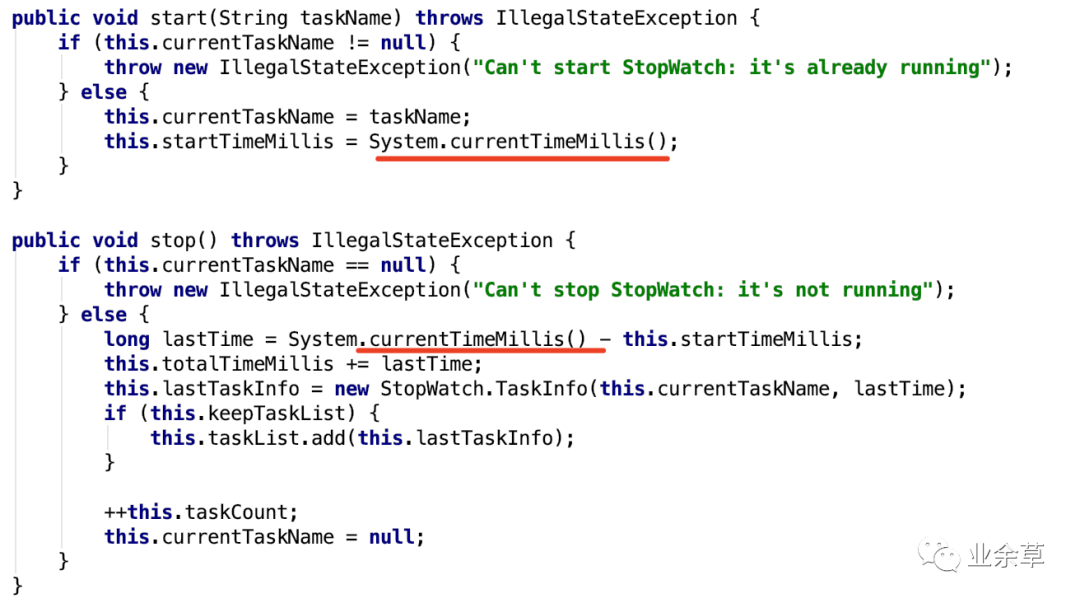
System.currentTimeMillis() 的缺點
System.currentTimeMillis()返回的是毫秒數(shù),System.nanoTime()返回的是納秒數(shù)。如果方法跑的比較快,毫秒的測試就更不準確了。
1000 皮秒 = 1納秒
1000000 皮秒 = 1微秒
1000000000 皮秒 = 1毫秒
1000000000000 皮秒 = 1秒

1s = 1000 ms 毫秒
1ms = 1000000 ns 納秒
更何況,currentTimeMillis依賴底層操作系統(tǒng),nanoTime則是有 JVM 維護。
展開來說就是,我們在 Java 中獲取時間戳的方法是System.currentTimeMillis()返回的是毫秒級的時間戳。查看源碼注釋,寫的比較清楚,雖然該方法返回的是毫秒級的時間戳,但精度取決于操作系統(tǒng),很多操作系統(tǒng)返回的精度是 10 毫秒。
/**
* Returns the current time in milliseconds.  Note that
* while the unit of time of the return value is a millisecond,
* the granularity of the value depends on the underlying
* operating system and may be larger.  For example, many
* operating systems measure time in units of tens of
* milliseconds.
*
* <p> See the description of the class <code>Date</code> for
* a discussion of slight discrepancies that may arise between
* "computer time" and coordinated universal time (UTC).
*
* @return  the difference, measured in milliseconds, between
*          the current time and midnight, January 1, 1970 UTC.
* @see     java.util.Date
*/
public static native long currentTimeMillis();
以 HotSpot 源碼為例,源碼在 hotspot/src/os/linux/vm/os_linux.cpp 文件中,有一個javaTimeMillis()方法,這就是System.currentTimeMillis()的 native 實現(xiàn)。
jlong os::javaTimeMillis() {
  timeval time;
  int status = gettimeofday(&time, NULL);
  assert(status != -1, "linux error");
  return jlong(time.tv_sec) * 1000  +  jlong(time.tv_usec / 1000);
}
這是 C++ 寫的,我也看不懂。我們直接拿老外的研究來學(xué)習(xí):http://pzemtsov.github.io/2017/07/23/the-slow-currenttimemillis.html。
總結(jié)起來原因是System.currentTimeMillis調(diào)用了gettimeofday()。
調(diào)用 gettimeofday()需要從用戶態(tài)切換到內(nèi)核態(tài);gettimeofday()的表現(xiàn)受Linux系統(tǒng)的計時器(時鐘源)影響,在 HPET 計時器下性能尤其差;系統(tǒng)只有一個全局時鐘源,高并發(fā)或頻繁訪問會造成嚴重的爭用。
我們測試一下System.currentTimeMillis()在不同線程下的性能,這里使用中間件常用的JHM來測試,測試 1 到 128 線程下獲取 1000 萬次時間戳需要的時間分別是多少,這里給出在我的電腦上的測試數(shù)據(jù):

還有一個問題就是,currentTimeMillis 獲取的是系統(tǒng)時間源。因此,系統(tǒng)時間變更,或者系統(tǒng)自動進行了時間同步,計算兩次獲取的差值,可能是負數(shù)。
另外System.currentTimeMillis()返回自紀元(即自 1970 年 1 月 1 日 UTC 午夜以來的毫秒數(shù))。如果你的系統(tǒng)設(shè)置的時間小于這個時間,那么 currentTimeMillis 的取值也可能是負數(shù)。當然幾乎沒人會這么設(shè)置時間,除非是黑客。
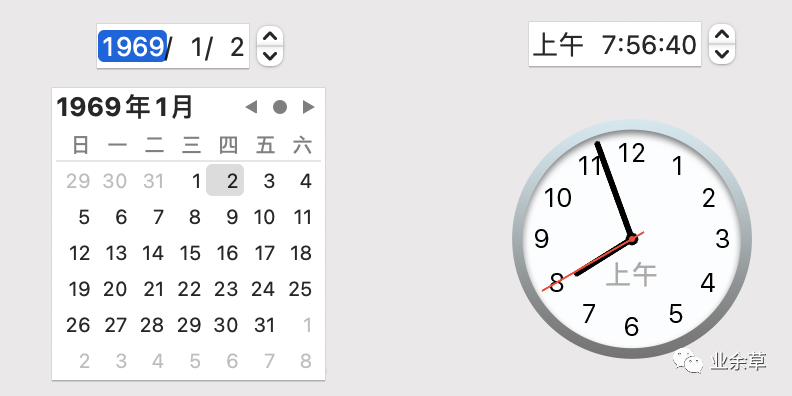
小總結(jié):使用System.currentTimeMillis()要注意精度、性能開銷、時間同步影響準確性、時間不安全可能是負數(shù)、高并發(fā)場景隨機數(shù)不均衡等問題。
System.nanoTime() 的缺點
System.nanoTime()是 JDK 1.5 才推出的,因此 1.5 之前的辦法無法使用。
第二,源碼注釋中描述它是安全的。但在老外的使用過程中發(fā)現(xiàn),它有時候也不安全,返回的也可能是負數(shù)。
另外官方建議,可以使用它來測量 elapsed time,不能用來當作 wall-clock time 或 system time。
?This method can only be used to measure elapsed time and is not related to any other notion of system or wall-clock time.
?
網(wǎng)上還暴露出,多核處理器不同核心的啟動時間可能不完全一致,這樣可能會造成System.nanoTime()計時錯誤。參考:https://stackoverflow.com/questions/510462/is-system-nanotime-completely-useless。
手擼一個 currentTimeMillis
先定義一個工具類:TimeUtil。
/**
 * 弱精度的計時器,考慮性能不使用同步策略。
 */
public class TimeUtil {
    private static long CURRENT_TIME = System.currentTimeMillis();

    public static final long currentTimeMillis() {
        return CURRENT_TIME;
    }

    public static final void update() {
        CURRENT_TIME = System.currentTimeMillis();
    }

}
然后起一個定時器,定時更新維護時間。
import java.util.Timer;
import java.util.TimerTask;

public class TimerServer {
    private static final TimerServer INSTANCE = new TimerServer();
    private final Timer timer;

    private TimerServer(){
        timer = new Timer("業(yè)余草Timer", true);
        timer.schedule(updateTime(), 0L, 20L);
    }

    // 系統(tǒng)時間定時更新任務(wù)
    private TimerTask updateTime() {
        return new TimerTask() {
            @Override
            public void run() {
                TimeUtil.update();
            }
        };
    }

    public static final TimerServer getInstance() {
        return INSTANCE;
    }
}
或者直接用一個 TimeUtil 類搞定。
public final class TimeUtil {

    private static volatile long currentTimeMillis;

    static {
        currentTimeMillis = System.currentTimeMillis();
        Thread daemon = new Thread(new Runnable() {
            @Override
            public void run() {
                while (true) {
                    currentTimeMillis = System.currentTimeMillis();
                    try {
                        TimeUnit.MILLISECONDS.sleep(1);
                    } catch (Throwable e) {

                    }
                }
            }
        });
        daemon.setDaemon(true);
        daemon.setName("業(yè)余草-time-tick-thread");
        daemon.start();
    }

    public static long currentTimeMillis() {
        return currentTimeMillis;
    }
}
這樣做的好處就是,在高并發(fā)場景下,對時間要求較高的場景,則可以自己維護系統(tǒng)時鐘。
經(jīng)過 JMH 測試對比(測試代碼可以加我微信:codedq,免費獲取),我們手擼的 TimeUtil 在 1-128 線程下的性能表現(xiàn)非常強勁,比系統(tǒng)自帶的System.currentTimeMillis()高出近 876 倍。

比如:阿里的 Sentinel,Cobar等。Twitter 的 Snowflake(很多人在實現(xiàn) Snowflake 時,采用了 System.currentTimeMillis())。
總結(jié)
雖然緩存時間戳性能能提升很多,但這也僅限于非常高的并發(fā)系統(tǒng)中,一般比較適用于高并發(fā)的中間件,如果一般的系統(tǒng)來做這個優(yōu)化,效果并不明顯。性能優(yōu)化還是要抓住主要矛盾,解決瓶頸,切忌不可過度優(yōu)化。
參考資料
https://en.wikipedia.org/wiki/High_Precision_Event_Timer https://en.wikipedia.org/wiki/Time_Stamp_Counter http://pzemtsov.github.io/2017/07/23/the-slow-currenttimemillis.html https://stackoverflow.com/questions/510462/is-system-nanotime-completely-useless