
「免費(fèi)開源」基于Vue和Quasar的前端SPA項(xiàng)目crudapi后臺(tái)管理系統(tǒng)實(shí)戰(zhàn)之?dāng)?shù)據(jù)庫(kù)逆向(十二)
基于Vue和Quasar的前端SPA項(xiàng)目實(shí)戰(zhàn)之?dāng)?shù)據(jù)庫(kù)逆向(十二)
回顧
通過(guò)之前文章 基于Vue和Quasar的前端SPA項(xiàng)目實(shí)戰(zhàn)之動(dòng)態(tài)表單(五) 的介紹,實(shí)現(xiàn)了動(dòng)態(tài)表單功能。如果是全新的項(xiàng)目,通過(guò)配置元數(shù)據(jù)并且創(chuàng)建物理表,從而自動(dòng)實(shí)現(xiàn)業(yè)務(wù)數(shù)據(jù)的CRUD增刪改查。但是如果數(shù)據(jù)庫(kù)表已經(jīng)存在的情況下,如何通過(guò)配置表單元數(shù)據(jù)進(jìn)行管理呢?這時(shí)候數(shù)據(jù)庫(kù)逆向功能就很有必要了。
簡(jiǎn)介
數(shù)據(jù)庫(kù)逆向就是通過(guò)讀取數(shù)據(jù)庫(kù)物理表schema信息,然后生成表單元數(shù)據(jù),可以看成“dbfirst”模式,即先有數(shù)據(jù)庫(kù)表,然后根據(jù)表生成元數(shù)據(jù),逆向表單后續(xù)操作和普通動(dòng)態(tài)表單類似。
UI界面
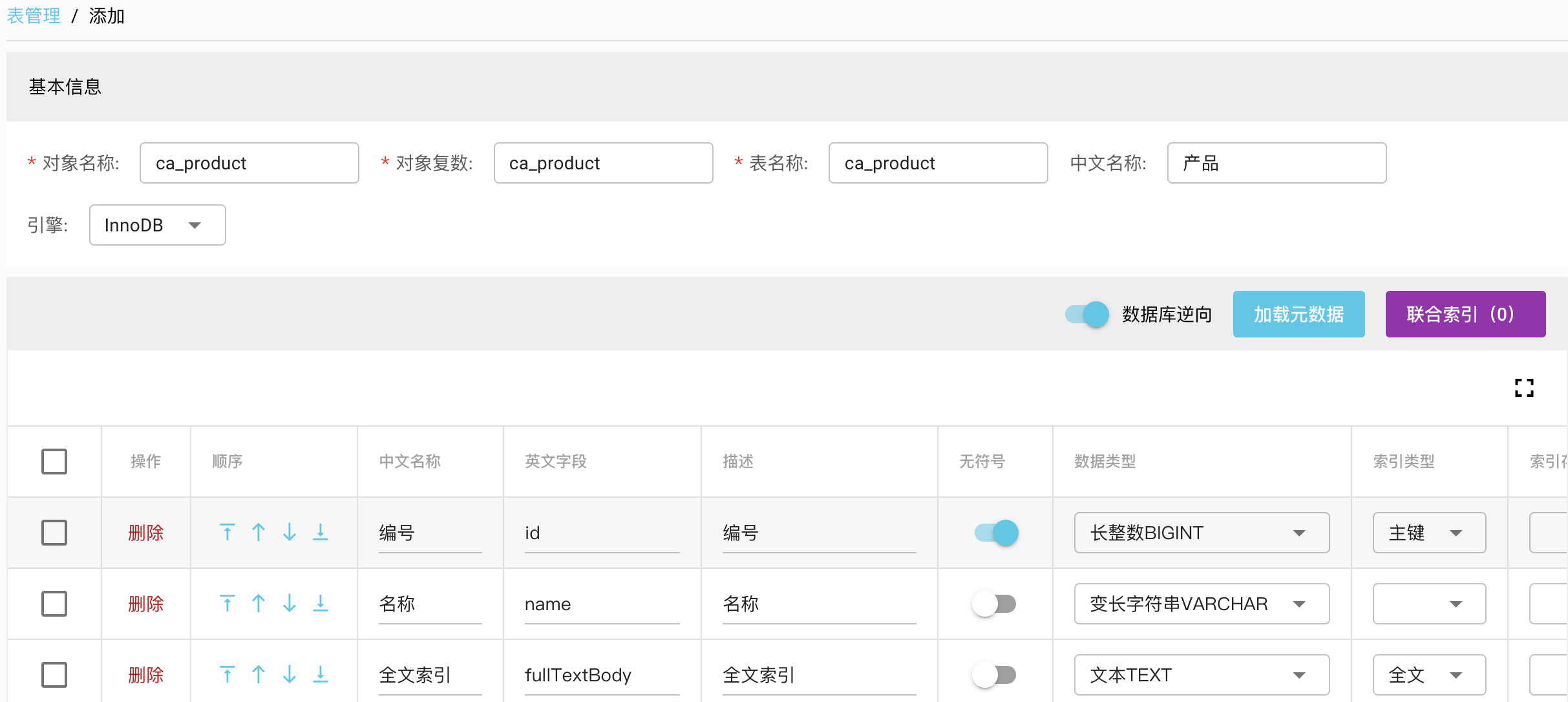
輸入物理表名稱,啟用“數(shù)據(jù)庫(kù)逆向”功能,然后點(diǎn)擊“加載元數(shù)據(jù)”,然后會(huì)自動(dòng)填充表單字段相關(guān)元數(shù)據(jù)信息。
數(shù)據(jù)表準(zhǔn)備
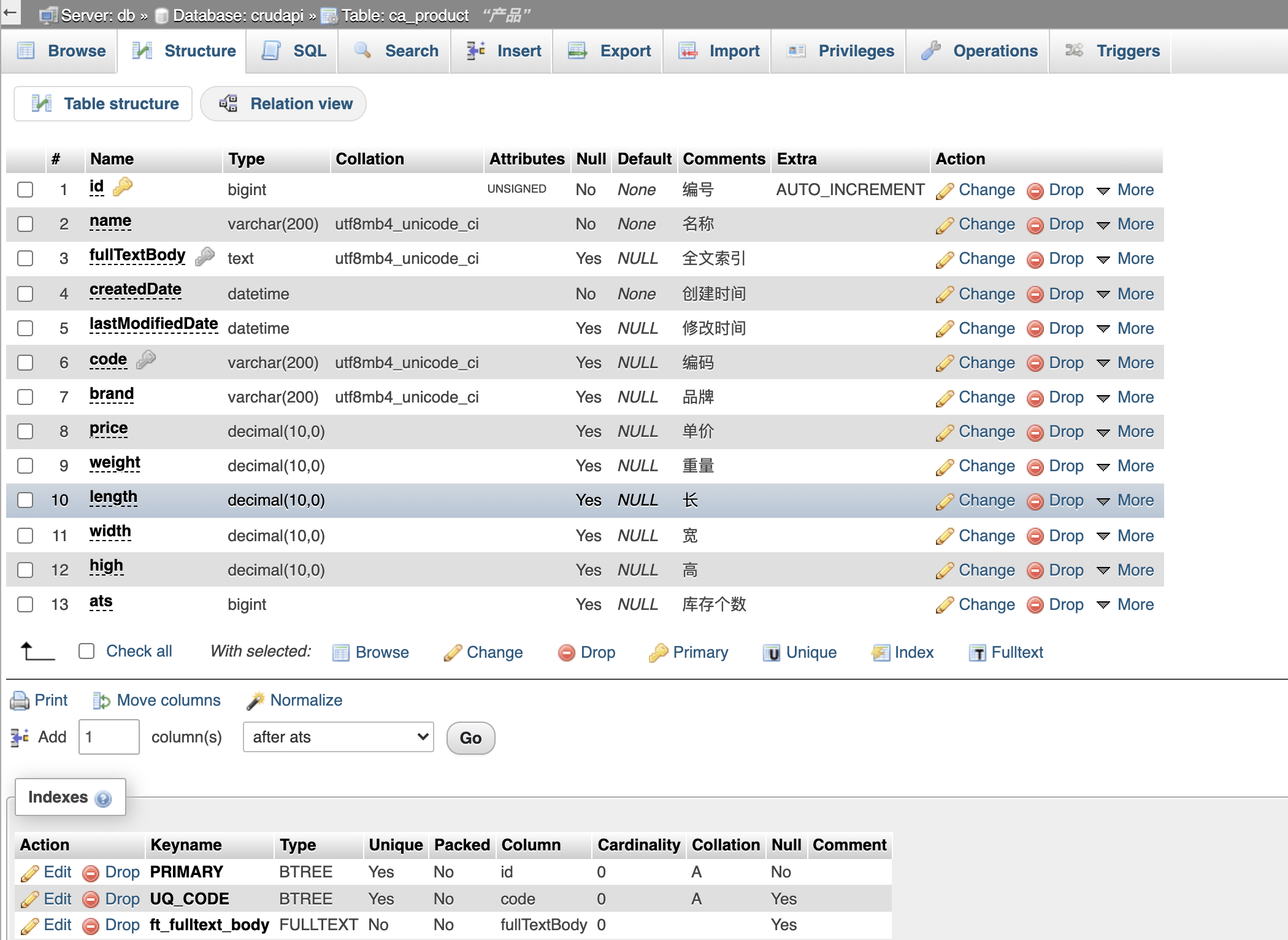
以ca_product產(chǎn)品為例,通過(guò)phpmyadmin創(chuàng)建表
創(chuàng)建產(chǎn)品表
CREATE TABLE `ca_product` (
  `id` bigint UNSIGNED NOT NULL COMMENT '編號(hào)',
  `name` varchar(200) COLLATE utf8mb4_unicode_ci NOT NULL COMMENT '名稱',
  `fullTextBody` text COLLATE utf8mb4_unicode_ci COMMENT '全文索引',
  `createdDate` datetime NOT NULL COMMENT '創(chuàng)建時(shí)間',
  `lastModifiedDate` datetime DEFAULT NULL COMMENT '修改時(shí)間',
  `code` varchar(200) COLLATE utf8mb4_unicode_ci DEFAULT NULL COMMENT '編碼',
  `brand` varchar(200) COLLATE utf8mb4_unicode_ci DEFAULT NULL COMMENT '品牌',
  `price` decimal(10,0) DEFAULT NULL COMMENT '單價(jià)',
  `weight` decimal(10,0) DEFAULT NULL COMMENT '重量',
  `length` decimal(10,0) DEFAULT NULL COMMENT '長(zhǎng)',
  `width` decimal(10,0) DEFAULT NULL COMMENT '寬',
  `high` decimal(10,0) DEFAULT NULL COMMENT '高',
  `ats` bigint DEFAULT NULL COMMENT '庫(kù)存?zhèn)€數(shù)'
) ENGINE=InnoDB DEFAULT CHARSET=utf8mb4 COLLATE=utf8mb4_unicode_ci COMMENT='產(chǎn)品';

ALTER TABLE `ca_product`
  ADD PRIMARY KEY (`id`),
  ADD UNIQUE KEY `UQ_CODE` (`code`) USING BTREE;
ALTER TABLE `ca_product` ADD FULLTEXT KEY `ft_fulltext_body` (`fullTextBody`);

ALTER TABLE `ca_product`
  MODIFY `id` bigint UNSIGNED NOT NULL AUTO_INCREMENT COMMENT '編號(hào)', AUTO_INCREMENT=1;
COMMIT;
查詢schema
mysql數(shù)據(jù)庫(kù)通過(guò)如下SQL語(yǔ)句可以查詢表單、字段、索引等信息
SHOW TABLE STATUS LIKE TABLE_NAME
SHOW FULL COLUMNS FROM TABLE_NAME
SHOW INDEX FROM TABLE_NAME
 ?表基本信息
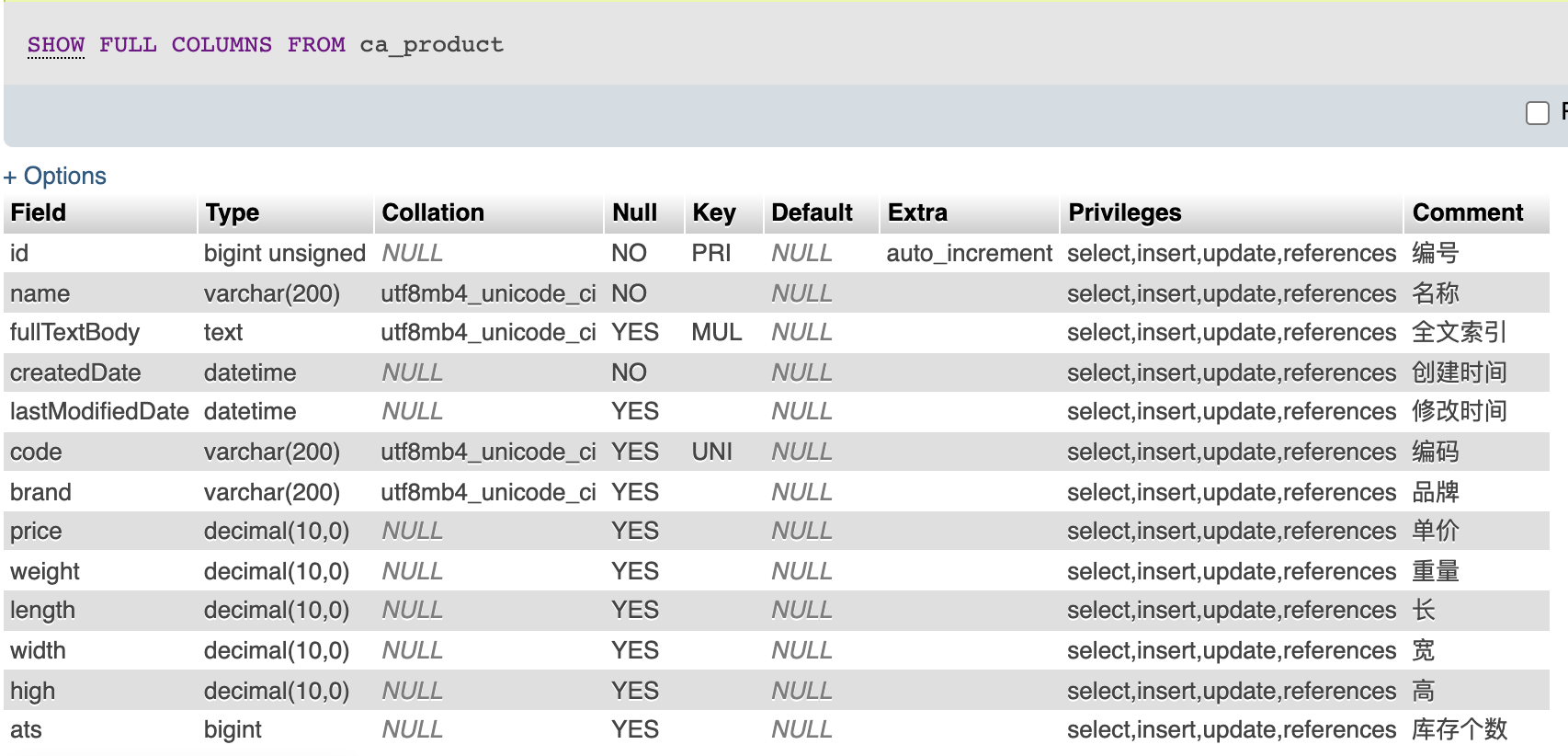 ?字段信息
?字段信息
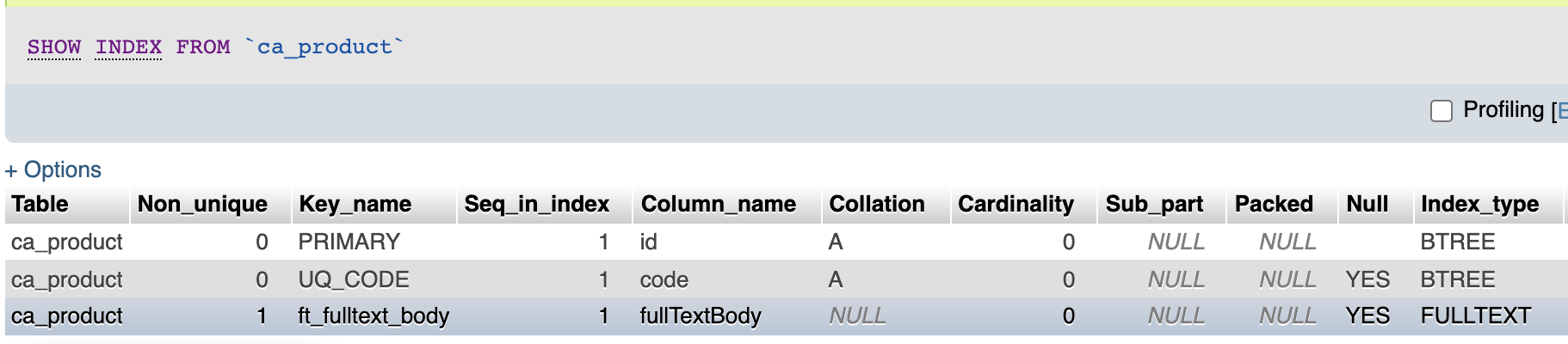 ?索引信息
?索引信息
API JSON
通過(guò)APIhttps://demo.crudapi.cn/api/metadata/tables/metadata/ca_product
查詢ca_product的schema信息, 格式如下:
{
  "Name": "ca_product",
  "Engine": "InnoDB",
  "Version": 10,
  "Row_format": "Dynamic",
  "Rows": 0,
  "Avg_row_length": 0,
  "Data_length": 16384,
  "Max_data_length": 0,
  "Index_length": 32768,
  "Data_free": 0,
  "Auto_increment": 2,
  "Create_time": 1628141282000,
  "Update_time": 1628141304000,
  "Collation": "utf8mb4_unicode_ci",
  "Create_options": "",
  "Comment": "產(chǎn)品",
  "columns": [{
    "Field": "id",
    "Type": "bigint unsigned",
    "Null": "NO",
    "Key": "PRI",
    "Extra": "auto_increment",
    "Privileges": "select,insert,update,references",
    "Comment": "編號(hào)"
  }, {
    "Field": "name",
    "Type": "varchar(200)",
    "Collation": "utf8mb4_unicode_ci",
    "Null": "NO",
    "Key": "",
    "Extra": "",
    "Privileges": "select,insert,update,references",
    "Comment": "名稱"
  }, {
    "Field": "fullTextBody",
    "Type": "text",
    "Collation": "utf8mb4_unicode_ci",
    "Null": "YES",
    "Key": "MUL",
    "Extra": "",
    "Privileges": "select,insert,update,references",
    "Comment": "全文索引"
  }, {
    "Field": "createdDate",
    "Type": "datetime",
    "Null": "NO",
    "Key": "",
    "Extra": "",
    "Privileges": "select,insert,update,references",
    "Comment": "創(chuàng)建時(shí)間"
  }, {
    "Field": "lastModifiedDate",
    "Type": "datetime",
    "Null": "YES",
    "Key": "",
    "Extra": "",
    "Privileges": "select,insert,update,references",
    "Comment": "修改時(shí)間"
  }, {
    "Field": "code",
    "Type": "varchar(200)",
    "Collation": "utf8mb4_unicode_ci",
    "Null": "YES",
    "Key": "UNI",
    "Extra": "",
    "Privileges": "select,insert,update,references",
    "Comment": "編碼"
  }, {
    "Field": "brand",
    "Type": "varchar(200)",
    "Collation": "utf8mb4_unicode_ci",
    "Null": "YES",
    "Key": "",
    "Extra": "",
    "Privileges": "select,insert,update,references",
    "Comment": "品牌"
  }, {
    "Field": "price",
    "Type": "decimal(10,0)",
    "Null": "YES",
    "Key": "",
    "Extra": "",
    "Privileges": "select,insert,update,references",
    "Comment": "單價(jià)"
  }, {
    "Field": "weight",
    "Type": "decimal(10,0)",
    "Null": "YES",
    "Key": "",
    "Extra": "",
    "Privileges": "select,insert,update,references",
    "Comment": "重量"
  }, {
    "Field": "length",
    "Type": "decimal(10,0)",
    "Null": "YES",
    "Key": "",
    "Extra": "",
    "Privileges": "select,insert,update,references",
    "Comment": "長(zhǎng)"
  }, {
    "Field": "width",
    "Type": "decimal(10,0)",
    "Null": "YES",
    "Key": "",
    "Extra": "",
    "Privileges": "select,insert,update,references",
    "Comment": "寬"
  }, {
    "Field": "high",
    "Type": "decimal(10,0)",
    "Null": "YES",
    "Key": "",
    "Extra": "",
    "Privileges": "select,insert,update,references",
    "Comment": "高"
  }, {
    "Field": "ats",
    "Type": "bigint",
    "Null": "YES",
    "Key": "",
    "Extra": "",
    "Privileges": "select,insert,update,references",
    "Comment": "庫(kù)存?zhèn)€數(shù)"
  }],
  "indexs": [{
    "Table": "ca_product",
    "Non_unique": 0,
    "Key_name": "PRIMARY",
    "Seq_in_index": 1,
    "Column_name": "id",
    "Collation": "A",
    "Cardinality": 0,
    "Null": "",
    "Index_type": "BTREE",
    "Comment": "",
    "Index_comment": "",
    "Visible": "YES"
  }, {
    "Table": "ca_product",
    "Non_unique": 0,
    "Key_name": "UQ_CODE",
    "Seq_in_index": 1,
    "Column_name": "code",
    "Collation": "A",
    "Cardinality": 0,
    "Null": "YES",
    "Index_type": "BTREE",
    "Comment": "",
    "Index_comment": "",
    "Visible": "YES"
  }, {
    "Table": "ca_product",
    "Non_unique": 1,
    "Key_name": "ft_fulltext_body",
    "Seq_in_index": 1,
    "Column_name": "fullTextBody",
    "Cardinality": 0,
    "Null": "YES",
    "Index_type": "FULLTEXT",
    "Comment": "",
    "Index_comment": "",
    "Visible": "YES"
  }]
}
核心代碼
前端根據(jù)API返回的schema信息,轉(zhuǎn)換成crudapi的元數(shù)據(jù)格式,并顯示在UI上, 主要代碼在文件metadata/table/new.vue中,通過(guò)addRowFromMetadata方法添加字段,addIndexFromMetadata添加聯(lián)合索引。
addRowFromMetadata(id, t, singleIndexColumns) {
  const columns = this.table.columns;
  const index = columns.length + 1;
  const type = t.Type.toUpperCase();
  const name = t.Field;

  let length = null;
  let precision = null;
  let scale = null;

  let typeArr = type.split("(");
  if (typeArr.length > 1) {
    const lengthOrprecisionScale = typeArr[1].split(")")[0];
    if (lengthOrprecisionScale.indexOf(",") > 0) {
      precision = lengthOrprecisionScale.split(",")[0];
      scale = lengthOrprecisionScale.split(",")[1];
    } else {
      length = lengthOrprecisionScale;
    }
  }

  let indexType = null;
  let indexStorage = null;
  let indexName = null;
  let indexColumn = singleIndexColumns[name];
  if (indexColumn) {
    if (indexColumn.Key_name === "PRIMARY") {
      indexType = "PRIMARY";
    } else if (indexColumn.Index_type === "FULLTEXT") {
      indexType = "FULLTEXT";
      indexName = indexColumn.Key_name;
    } else if (indexColumn.Non_unique === 0) {
      indexType = "UNIQUE";
      indexName = indexColumn.Key_name;
      indexStorage = indexColumn.Index_type;
    } else {
      indexType = "INDEX";
      indexName = indexColumn.Key_name;
      indexStorage = indexColumn.Index_type;
    }
  }
  const comment = t.Comment ? t.Comment : name;

  const newRow = {
    id: id,
    autoIncrement:  (t.Extra === "auto_increment"),
    displayOrder: columns.length,
    insertable: true,
    nullable: (t.Null === "YES"),
    queryable: true,
    displayable: false,
    unsigned: type.indexOf("UNSIGNED") >= 0,
    updatable: true,
    dataType : typeArr[0].replace("UNSIGNED", "").trim(),
    indexType: indexType,
    indexStorage: indexStorage,
    indexName: indexName,
    name: name,
    caption: comment,
    description: comment,
    length: length,
    precision: precision,
    scale: scale,
    systemable: false
  };
  this.table.columns  = [ ...columns.slice(0, index), newRow, ...columns.slice(index) ];
},

addIndexFromMetadata(union) {
  let baseId = (new Date()).valueOf();

  let newIndexs = [];
  const tableColumns = this.table.columns;
  console.dir(tableColumns);

  for (let key in union) {
    const unionLines = union[key];
    const newIndexLines = [];

    unionLines.forEach((item) => {
      const columnName = item.Column_name;
      const columnId = tableColumns.find(t => t.name === columnName).id;

      newIndexLines.push({
        column: {
          id: columnId,
          name: columnName
        }
      });
    });

    const unionLineFirst = unionLines[0];
    let indexType = null;
    let indexStorage = null;
    if (unionLineFirst.Key_name === "PRIMARY") {
      indexType = "PRIMARY";
    } else if (unionLineFirst.Non_unique === 0) {
      indexType = "UNIQUE";
      indexStorage = unionLineFirst.Index_type;
    } else {
      indexType = "INDEX";
      indexStorage = unionLineFirst.Index_type;
    }

    const indexComment = unionLineFirst.Index_comment ? unionLineFirst.Index_comment:  unionLineFirst.Key_name;

    const newIndex = {
      id: baseId++,
      isNewRow: true,
      caption: indexComment,
      description: indexComment,
      indexStorage: indexStorage,
      indexType: indexType,
      name: unionLineFirst.Key_name,
      indexLines: newIndexLines
    }

    newIndexs.push(newIndex);
  }

  this.table.indexs = newIndexs;
  if (this.table.indexs) {
    this.indexCount = this.table.indexs.length;
  } else {
    this.indexCount = 0;
  }
}
例子
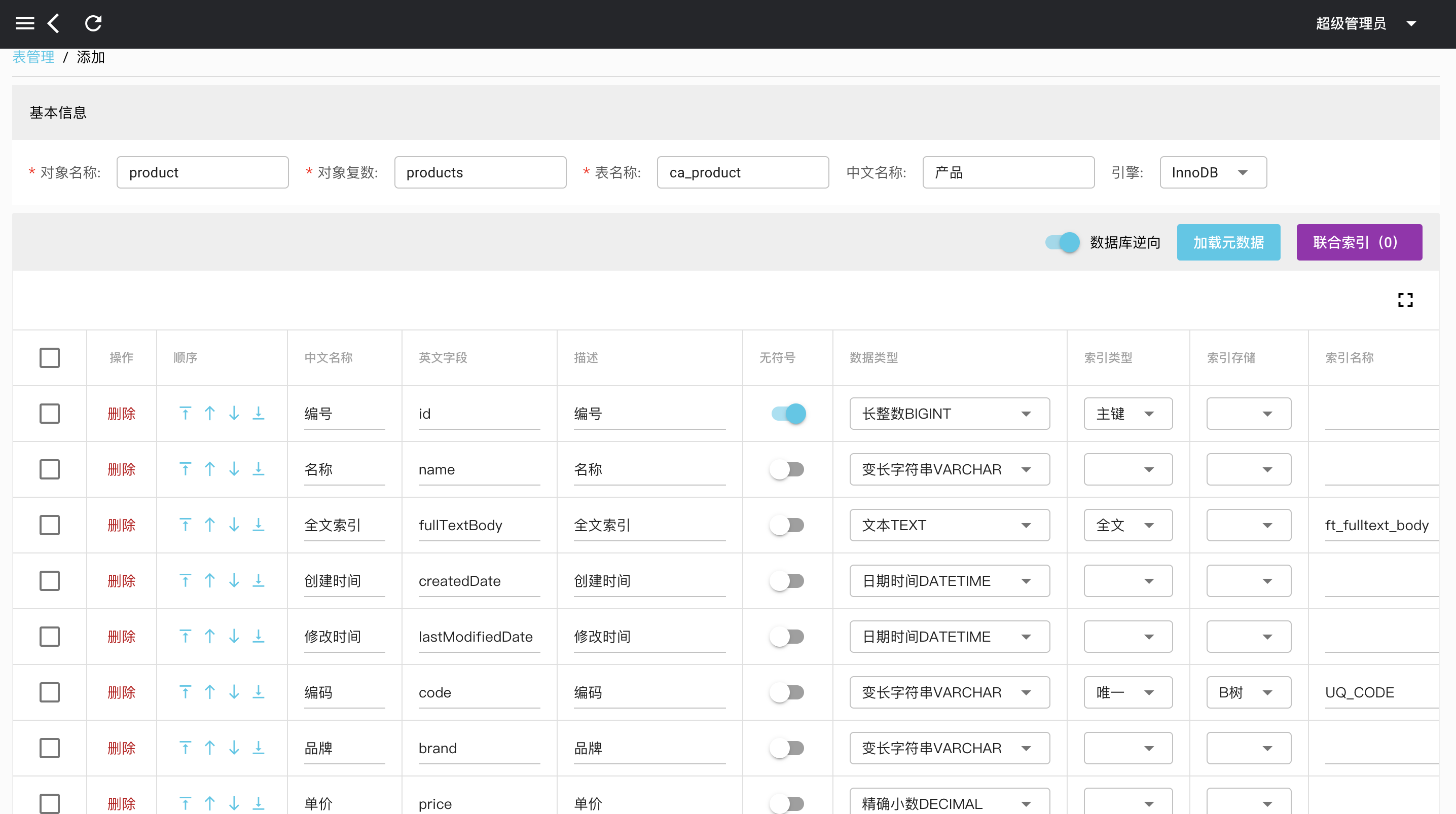
以ca_product為例子, 點(diǎn)擊“加載元數(shù)據(jù)之后”,表字段和索引都正確地顯示了。保存成功之后,已經(jīng)存在的物理表ca_product會(huì)自動(dòng)被元數(shù)據(jù)管理起來(lái),后續(xù)可以通過(guò)crudapi后臺(tái)繼續(xù)編輯,通過(guò)數(shù)據(jù)庫(kù)逆向功能,零代碼實(shí)現(xiàn)了物理表ca_product的CRUD增刪改查功能。
小結(jié)
本文主要介紹了數(shù)據(jù)庫(kù)逆向功能,在數(shù)據(jù)庫(kù)表單已經(jīng)存在的基礎(chǔ)上,通過(guò)數(shù)據(jù)庫(kù)逆向功能,快速生成元數(shù)據(jù),不需要一行代碼,我們就可以得到已有數(shù)據(jù)庫(kù)的基本crud功能,包括API和UI。類似于phpmyadmin等數(shù)據(jù)庫(kù)UI管理系統(tǒng),但是比數(shù)據(jù)庫(kù)UI管理系統(tǒng)更靈活,更友好。目前數(shù)據(jù)庫(kù)逆向一次只支持一個(gè)表,如果同時(shí)存在很多物理表,就需要批量操作了。后續(xù)會(huì)繼續(xù)優(yōu)化,實(shí)現(xiàn)批量數(shù)據(jù)庫(kù)逆向功能。
demo演示
官網(wǎng)地址:https://crudapi.cn
測(cè)試地址:https://demo.crudapi.cn/crudapi/login
附源碼地址
GitHub地址
https://github.com/crudapi/crudapi-admin-web
Gitee地址
https://gitee.com/crudapi/crudapi-admin-web
由于網(wǎng)絡(luò)原因,GitHub可能速度慢,改成訪問Gitee即可,代碼同步更新。