
ASP.NET 在線預(yù)覽 Word文檔的解決方案與思路
前言
前幾天有個(gè)老項(xiàng)目找到我,有多老呢?比我工作年限都長(zhǎng),見(jiàn)到這個(gè)項(xiàng)目我還得叫一聲前輩。
這個(gè)項(xiàng)目目前使用非常穩(wěn)定,十多年了沒(méi)怎么更新過(guò),現(xiàn)在客戶想加一個(gè)小功能:在線預(yù)覽Word文檔。
首先想到的是用第三方的服務(wù),例如WPS的開(kāi)放平臺(tái)。

剛看完文檔,客戶來(lái)了句,要一次性的哦,后續(xù)再付費(fèi)的通通不要。
得嘞,換其他方案吧。
項(xiàng)目特點(diǎn)
Asp.Net不帶Core,.NET Framework 4.0,部署在Windows平臺(tái)上。
解決方案
大致思路:先將Word文檔轉(zhuǎn)換Html,再預(yù)覽Html。
1、Word文檔轉(zhuǎn)Html
先引用Office的DLL,在COM里面,注意:電腦需要安裝Office哦。
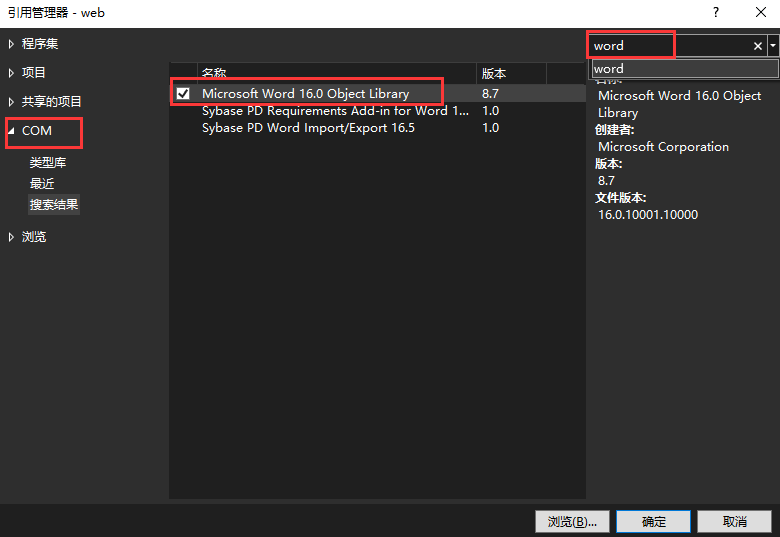

又注意:請(qǐng)?jiān)?/strong>DLL屬性里面將嵌入互操作類型改為False
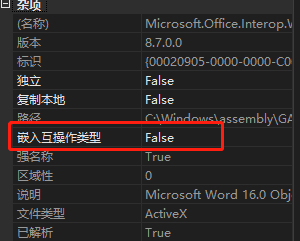
轉(zhuǎn)換過(guò)程一個(gè)方法搞定:
using?Microsoft.Office.Interop.Word;
public?static?string?WordToHtml(string?path)
{
?string?root?=?AppDomain.CurrentDomain.BaseDirectory;
?var?htmlName?=?$"{Guid.NewGuid().ToString("N")}.html";
?var?htmlPath?=?root?+?$"Resource/Temporary/";
?if?(!Directory.Exists(htmlPath))
?{
??Directory.CreateDirectory(htmlPath);
?}

?ApplicationClass?word?=?new?ApplicationClass();
?Type?wordType?=?word.GetType();
?Documents?docs?=?word.Documents;
?Type?docsType?=?docs.GetType();
?Document?doc?=?(Document)docsType.InvokeMember("Open",?BindingFlags.InvokeMethod,?null,?docs,?new?Object[]?{?(object)path,?true,?true?});
?Type?docType?=?doc.GetType();

?docType.InvokeMember("SaveAs",?BindingFlags.InvokeMethod,?null,?doc,?new?object[]?{?(htmlPath?+?htmlName),?WdSaveFormat.wdFormatFilteredHTML?});
?docType.InvokeMember("Close",?BindingFlags.InvokeMethod,?null,?doc,?null);
?wordType.InvokeMember("Quit",?BindingFlags.InvokeMethod,?null,?word,?null);

?return?htmlName;
}
2、預(yù)覽
上一步Word轉(zhuǎn)Html的方法已經(jīng)準(zhǔn)備就緒,我們?cè)贉?zhǔn)備這樣一個(gè)Word文檔。

簡(jiǎn)單寫(xiě)一下邏輯:
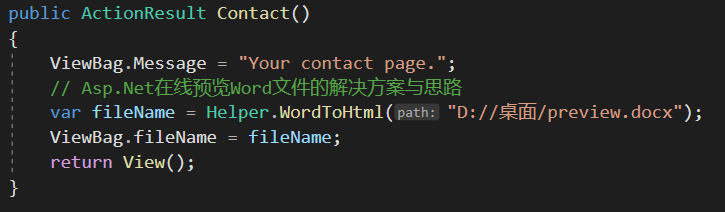

是不是特別簡(jiǎn)單,我們?cè)倏纯闯善沸Ч?/span>


這種方案局限性比較大,部署平臺(tái)必須安裝Office,剛好客戶能滿足。
放這里分享一下,拋磚引玉,如果大家有更好的方案請(qǐng)不吝賜教。
轉(zhuǎn)自:暢飲無(wú)緒
鏈接:cnblogs.com/cool-net/p/16191068.html
評(píng)論
圖片
表情