
前端常用圖片文件下載上傳方法
作者:JenK
來源:SegmentFault 思否社區(qū)
本文整理了前端常用的下載文件以及上傳文件的方法
例子均以vue+element ui+axios為例,不使用el封裝好的上傳組件,這里自行進行封裝實現(xiàn)
先附上demo
上傳文件
以圖片為例,文件上傳可以省略預(yù)覽圖片功能
圖片上傳可以使用2種方式:文件流和base64;
1.文件流上傳+預(yù)覽:
*  <input type="file" id='imgBlob' @change='changeImgBlob' />
  <el-image style="width: 100px; height: 100px" :src="imgBlobSrc"></el-image>*
// data
imgBlobSrc: ""
// methods
changeImgBlob() {
let file = document.querySelector("#imgBlob");
/**
*圖片預(yù)覽
*更適合PC端,兼容ie7+,主要功能點是window.URL.createObjectURL
*/
var ua = navigator.userAgent.toLowerCase();
if (/msie/.test(ua)) {
this.imgBlobSrc = file.value;
} else {
this.imgBlobSrc = window.URL.createObjectURL(file.files[0]);
}
//上傳后臺
const fd = new FormData();
fd.append("files", file.files[0]);
fd.append("xxxx", 11111); //其他字段,根據(jù)實際情況來
axios({
url: "/yoorUrl", //URL,根據(jù)實際情況來
method: "post",
headers: { "Content-Type": "multipart/form-data" },
data: fd
});
}
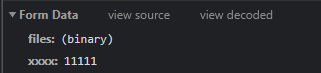
瀏覽器network查看

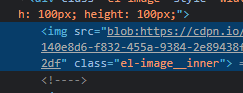
img元素查看src,為blob類型
2.Base64上傳+預(yù)覽:
<input type="file" id='imgBase' @change='changeImgBase' />
<el-image style="width: 100px; height: 100px" :src="imgBaseSrc"></el-image>
// data
imgBaseSrc : ""
// methods
changeImgBase() {
let that = this;
let file = document.querySelector("#imgBase");
/**
*圖片預(yù)覽
*更適合H5頁面,兼容ie10+,圖片base64顯示,主要功能點是FileReader和readAsDataURL
*/
if (window.FileReader) {
var fr = new FileReader();
fr.onloadend = function (e) {
that.imgBaseSrc = e.target.result;
//上傳后臺
axios({
url: "/yoorUrl", //URL,根據(jù)實際情況來
method: "post",
data: {
files: that.imgBaseSrc
}
});
};
fr.readAsDataURL(file.files[0]);
}
}
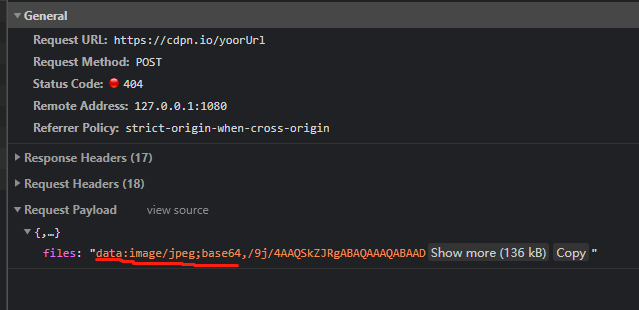
瀏覽器network查看
img元素查看src,為base64類型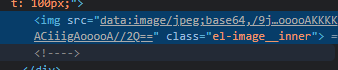
下載文件
圖片下載
url,文件流處理和這個一樣 <el-image style="width: 100px; height: 100px" :src="downloadImgSrc"></el-image>
<el-button type="warning" round plain size="mini" @click='downloadImg'>點擊下載</el-button>注意:這里需要指定 responseType為blob
//data
downloadImgSrc:'https://i.picsum.photos/id/452/400/300.jpg?hmac=0-o_NOka_K6sQ_sUD84nxkExoDk3Bc0Qi7Y541CQZEs'
//methods
downloadImg() {
axios({
url: this.downloadImgSrc, //URL,根據(jù)實際情況來
method: "get",
responseType: "blob"
}).then(function (response) {
const link = document.createElement("a");
let blob = new Blob([response.data], { type: response.data.type });
let url = URL.createObjectURL(blob);
link.href = url;
link.download = `實際需要的文件名.${response.data.type.split('/')[1]}`;
link.click();
document.body.removeChild(link);
});
}
文件下載(以pdf為例)
  <el-image style="width: 100px; height: 100px" :src="downloadImgSrc"></el-image>
  <el-button type="warning" round plain size="mini" @click='downloadImg'>點擊下載</el-button>
注意:這里需要指定 responseType為blob
//data
 downloadImgSrc:'https://i.picsum.photos/id/452/400/300.jpg?hmac=0-o_NOka_K6sQ_sUD84nxkExoDk3Bc0Qi7Y541CQZEs'
//methods
downloadImg() {
      axios({
        url: this.downloadImgSrc, //URL,根據(jù)實際情況來
        method: "get",
        responseType: "blob"
      }).then(function (response) {
        const link = document.createElement("a");
        let blob = new Blob([response.data], { type: response.data.type });
        let url = URL.createObjectURL(blob);
        link.href = url;
        link.download = `實際需要的文件名.${response.data.type.split('/')[1]}`;
        link.click();
        document.body.removeChild(link);
      });
    }
pdf預(yù)覽可以參考如何預(yù)覽以及下載pdf文件
小結(jié)
文件流和Base64圖片下載同理。

評論
圖片
表情