
Git 基本原理介紹
原文鏈接:https://www.escapelife.site/posts/da89563c.html

簡單地說,Git 究竟是怎樣的一個系統(tǒng)呢?請注意接下來的內(nèi)容非常重要,若你理解了 Git 的思想和基本工作原理,用起來就會知其所以然,游刃有余。在學習 Git 時,請盡量理清你對其它版本管理系統(tǒng)已有的認識,如 CVS、Subversion 或 Perforce, 這樣能幫助你使用工具時避免發(fā)生混淆。盡管 Git 用起來與其它的版本控制系統(tǒng)非常相似, 但它在對信息的存儲和認知方式上卻有很大差異,理解這些差異將有助于避免使用中的困惑。
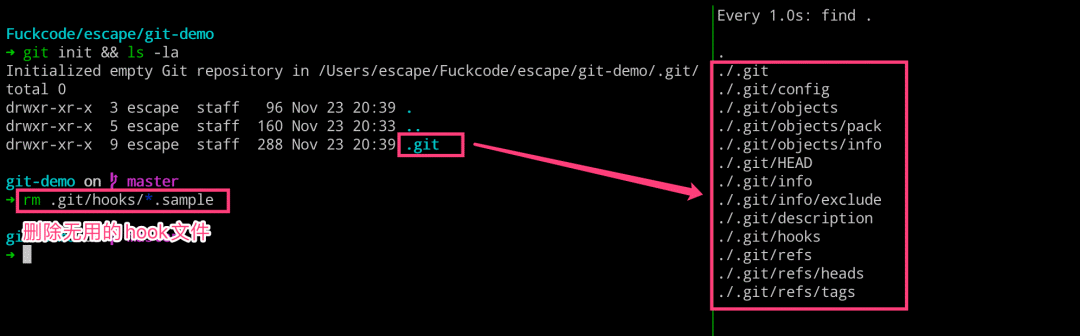
Git 初始化代碼倉庫
#?左邊執(zhí)行
$?mkdir?git-demo
$?cd?git-demo?&&?git?init
$?rm?-rf?.git/hooks/*.sample

#?右邊執(zhí)行
$?watch?-n?1?-d?find?.
??tree?.git
.git
├──?HEAD
├──?config
├──?description
├──?hooks
├──?info
│  ?└──?exclude
├──?objects
│  ?├──?info
│  ?└──?pack
└──?refs
????├──?heads
????└──?tags
本地配置文件(.git/config)和全局配置文件(~/.gitconfig)
通過執(zhí)行如下命令,可以將用戶配置記錄到本地代碼倉庫的配置文件中去
git config user.name "demo"
git config user.email "[email protected]"
??cat?.git/config
[core]
????repositoryformatversion?=?0
????filemode?=?true
????bare?=?false
????logallrefupdates?=?true
????ignorecase?=?true
????precomposeunicode?=?true

[user]
????name?=?demo
[email protected]
blob?類型
commit?類型
tree?類型
#?均無內(nèi)容
??ll?.git/objects
total?0
drwxr-xr-x??2?escape??staff????64B?Nov?23?20:39?info
drwxr-xr-x??2?escape??staff????64B?Nov?23?20:39?pack

??ll?.git/objects/info
??ll?.git/objects/pack
??cat?./.git/info/exclude
#?git?ls-files?--others?--exclude-from=.git/info/exclude
#?Lines?that?start?with?'#'?are?comments.
#?For?a?project?mostly?in?C,?the?following?would?be?a?good?set?of
#?exclude?patterns?(uncomment?them?if?you?want?to?use?them):
#?*.[oa]
#?*~
./.git/hooks/commit-msg.sample
./.git/hooks/pre-rebase.sample
./.git/hooks/pre-commit.sample
./.git/hooks/applypatch-msg.sample
./.git/hooks/fsmonitor-watchman.sample
./.git/hooks/pre-receive.sample
./.git/hooks/prepare-commit-msg.sample
./.git/hooks/post-update.sample
./.git/hooks/pre-merge-commit.sample
./.git/hooks/pre-applypatch.sample
./.git/hooks/pre-push.sample
./.git/hooks/update.sample
??cat?.git/HEAD
ref:?refs/heads/master
#?均無內(nèi)容
??ll?.git/refs
total?0
drwxr-xr-x??2?escape??staff????64B?Nov?23?20:39?heads
drwxr-xr-x??2?escape??staff????64B?Nov?23?20:39?tags

??ll?.git/refs/heads
??ll?.git/refs/tags
??cat?.git/description
Unnamed?repository;?edit?this?file?'description'?to?name?the?repository.
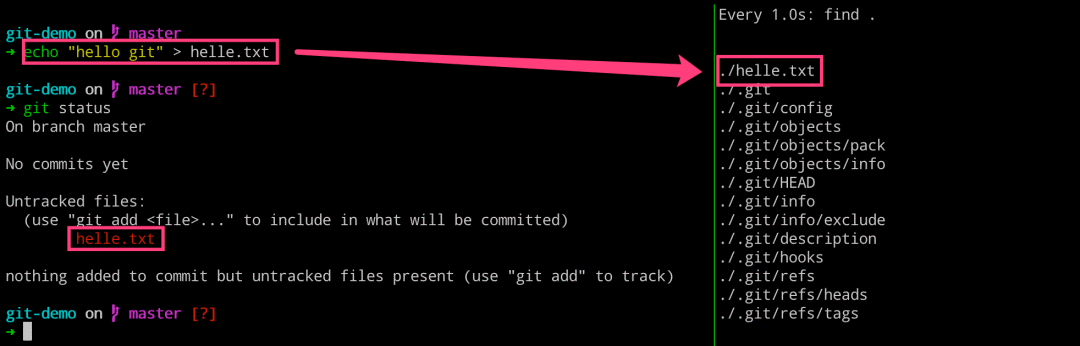
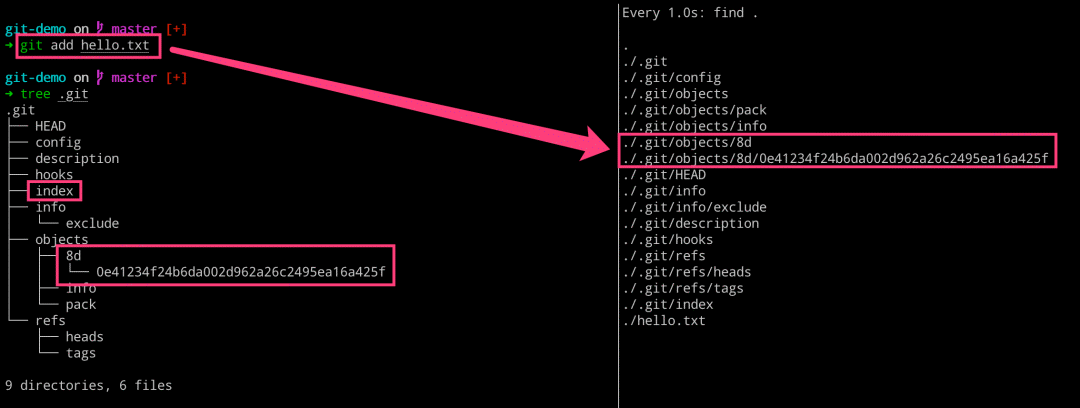
add 之后發(fā)生了什么
#?左邊執(zhí)行
$?echo?"hello?git"?>?helle.txt
$?git?status
$?git?add?hello.txt

#?右邊執(zhí)行
$?watch?-n?1?-d?find?.
#?查看?objects?的文件類型
$?git?cat-file?-t?8d0e41
blob

#?查看?objects?的文件內(nèi)容
$?git?cat-file?-p?8d0e41
hello?git

#?查看?objects?的文件大小
$?git?cat-file?-s?8d0e41
10

#?拼裝起來
blob?10\0hello?git
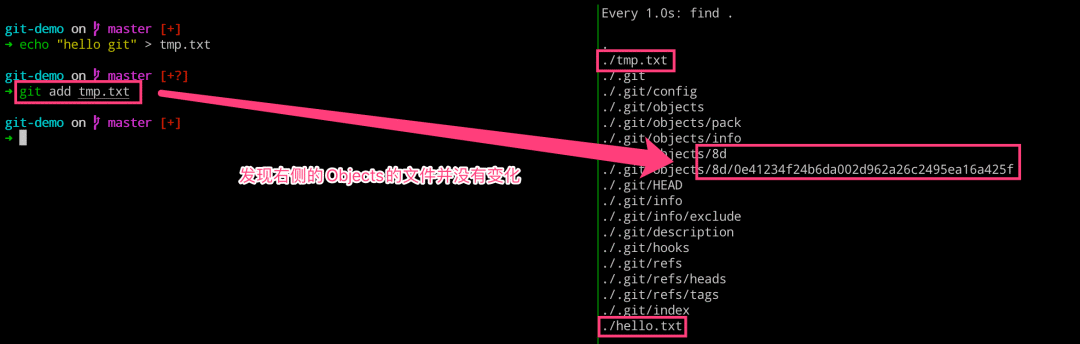
#?左邊執(zhí)行
$?echo?"hello?git"?>?tmp.txt
$?git?add?tmp.txt

#?右邊執(zhí)行
$?watch?-n?1?-d?find?.
理解 blob 對象和 SHA1
MD5?-?128bit?- 不安全 - 文件校驗
SHA1?-?160bit(40位)?- 不安全 -?Git?存儲
SHA256?-?256bit- 安全 -?Docker?鏡像
SHA512?-?512bit?- 安全
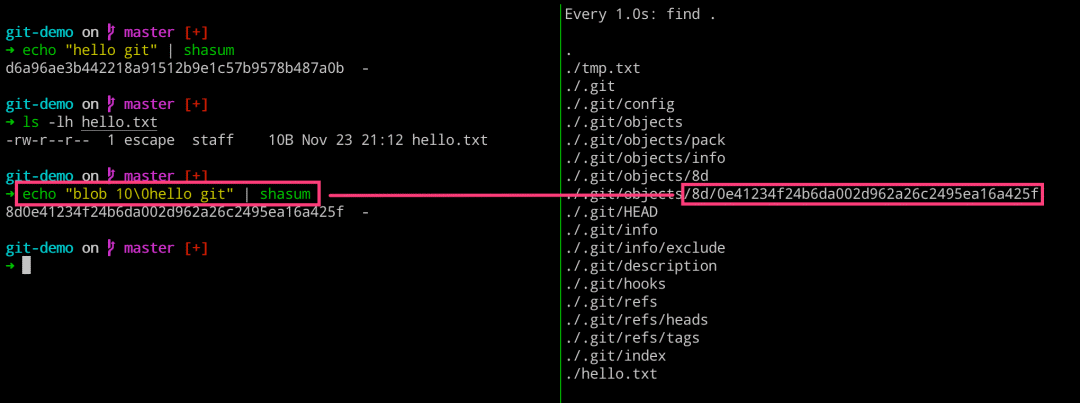
??echo?"hello?git"?|?shasum
d6a96ae3b442218a91512b9e1c57b9578b487a0b??-
??ls?-lh?hello.txt
-rw-r--r--??1?escape??staff????10B?Nov?23?21:12?hello.txt

??echo?"blob?10\0hello?git"?|?shasum
8d0e41234f24b6da002d962a26c2495ea16a425f??-

#?拼裝起來
blob?10\0hello?git
??cat?.git/objects/8d/0e41234f24b6da002d962a26c2495ea16a425f
xKOR04`HWH,6A%

??ls?-lh?.git/objects/8d/0e41234f24b6da002d962a26c2495ea16a425f
-r--r--r--??1?escape??staff????26B?Nov?23?21:36?.git/objects/8d/0e41234f24b6da002d962a26c2495ea16a425f

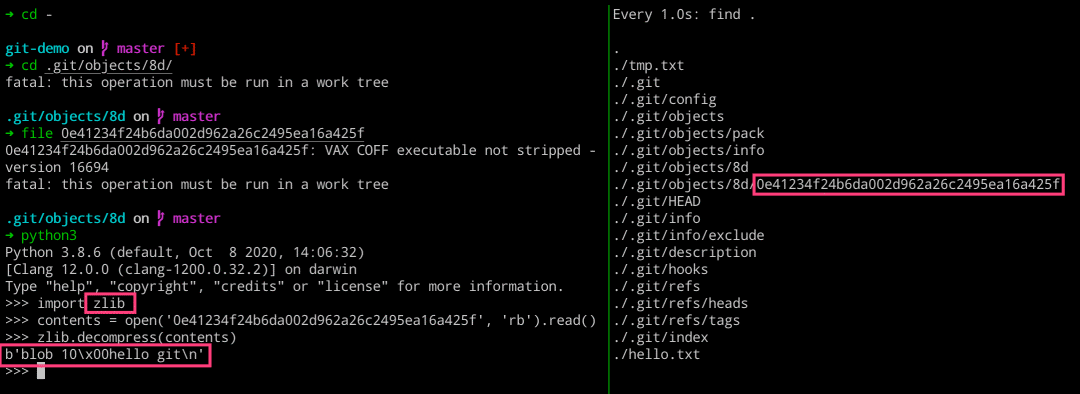
??file?.git/objects/8d/0e41234f24b6da002d962a26c2495ea16a425f
.git/objects/8d/0e41234f24b6da002d962a26c2495ea16a425f:?VAX?COFF?executable?not?stripped?-?version?16694
import?zlib

contents?=?open('0e41234f24b6da002d962a26c2495ea16a425f',?'rb').read()
zlib.decompress(contents)
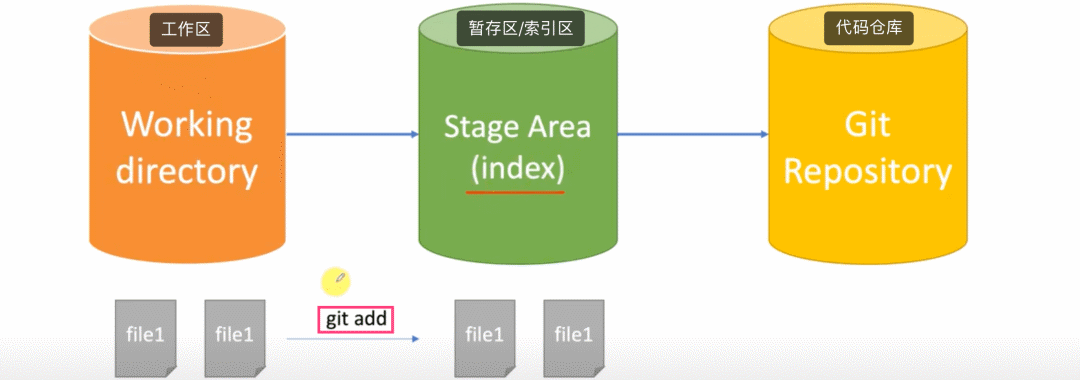
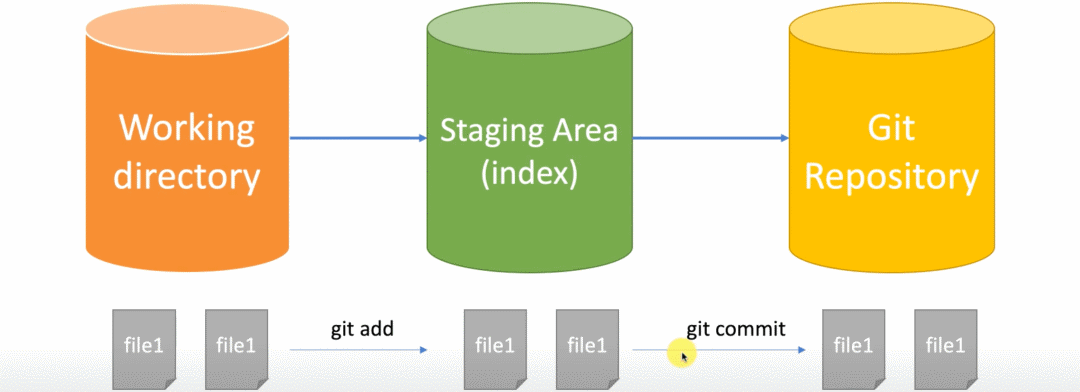
聊聊工作區(qū)和暫存區(qū)
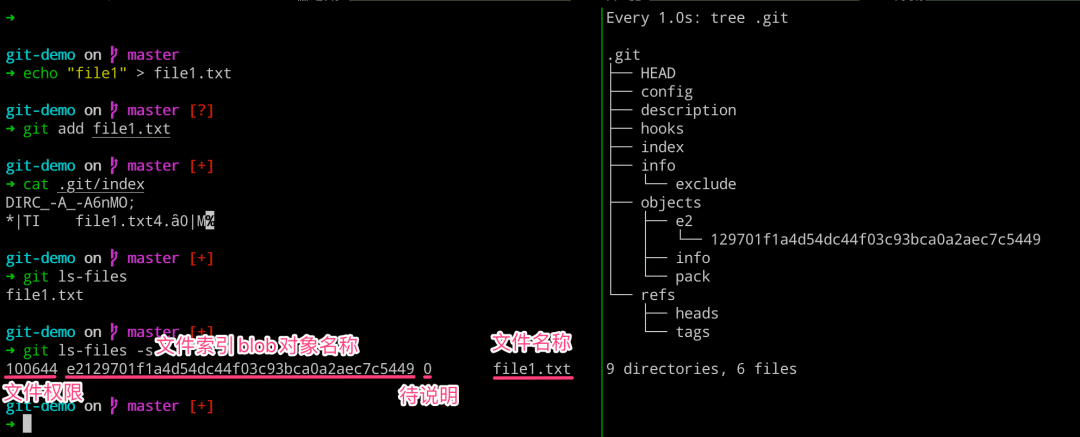
#?左邊執(zhí)行
$?echo?"file1"?>?file1.txt
$?git?add?file1.txt
$?cat?.git/index

$?git?ls-files?????#?列出當前暫存區(qū)的文件列表信息
$?git?ls-files?-s??#?列出當前暫存區(qū)文件的詳細信息

#?右邊執(zhí)行
$?watch?-n?1?-d?tree?.git
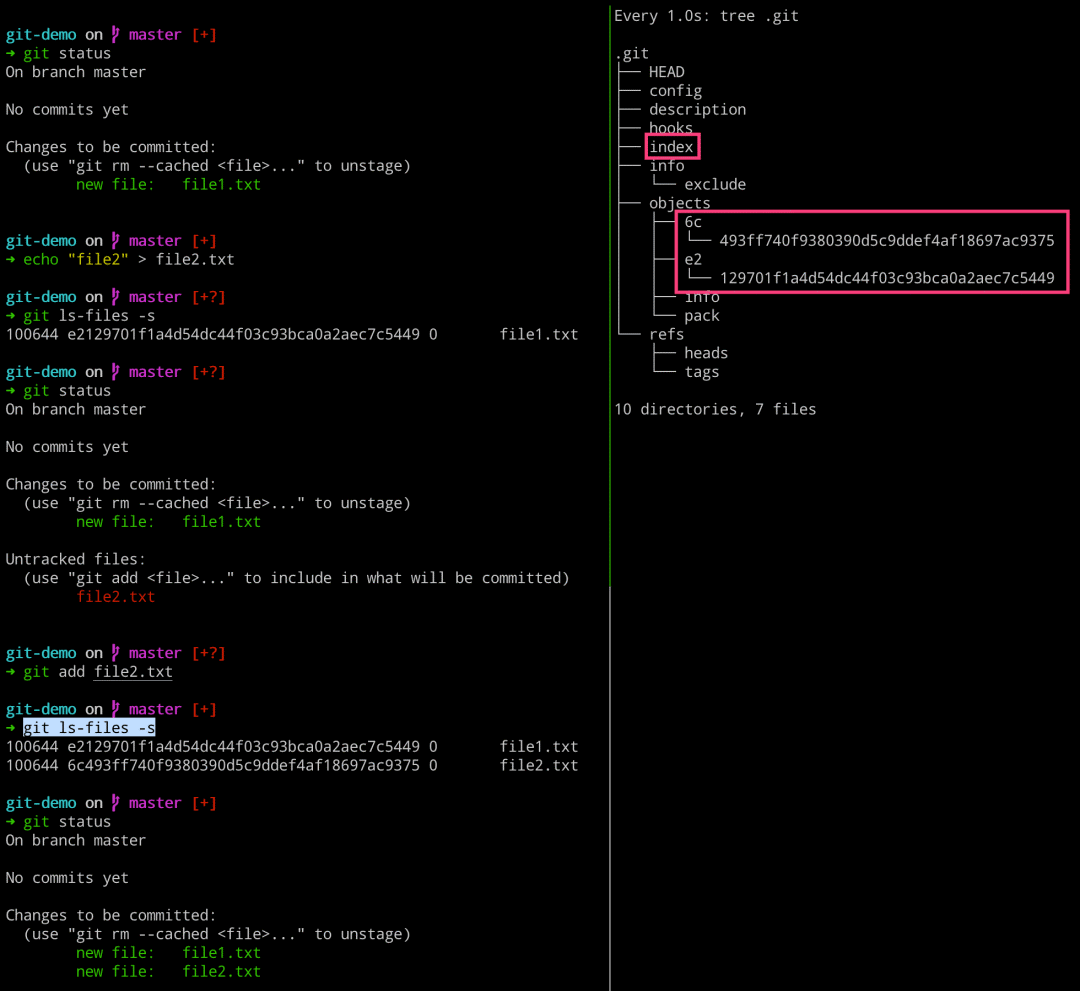
#?左邊執(zhí)行
$?git?status
$?echo?"file2"?>?file2.txt
$?git?ls-files?-s
$?git?status
$?git?add?file2.txt
$?git?ls-files?-s
$?git?status

#?右邊執(zhí)行
$?watch?-n?1?-d?tree?.git
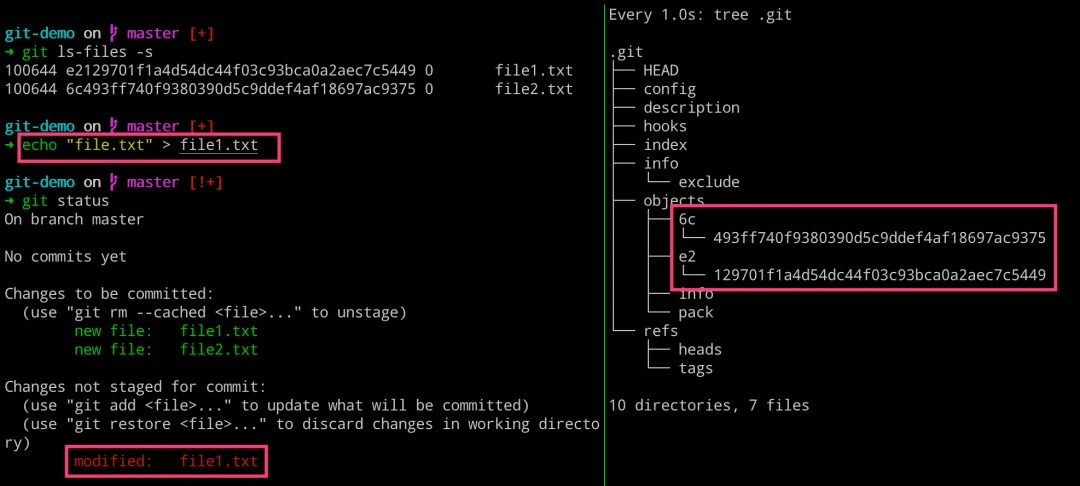
#?左邊執(zhí)行
$?git?ls-files?-s
$?echo?"file.txt"?>?file1.txt
$?git?status

#?右邊執(zhí)行
$?watch?-n?1?-d?tree?.git
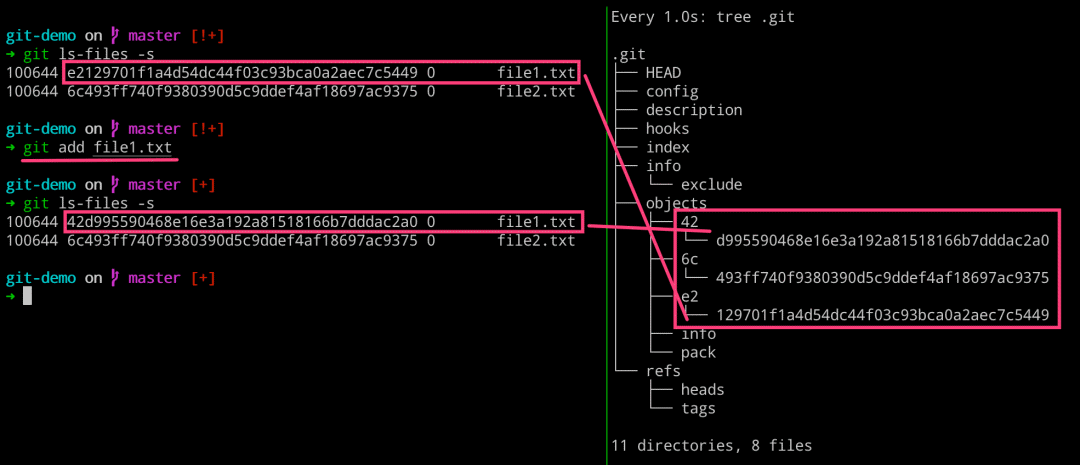
#?左邊執(zhí)行
$?git?ls-files?-s
$?git?add?file1.txt
$?git?ls-files?-s

#?右邊執(zhí)行
$?watch?-n?1?-d?tree?.git
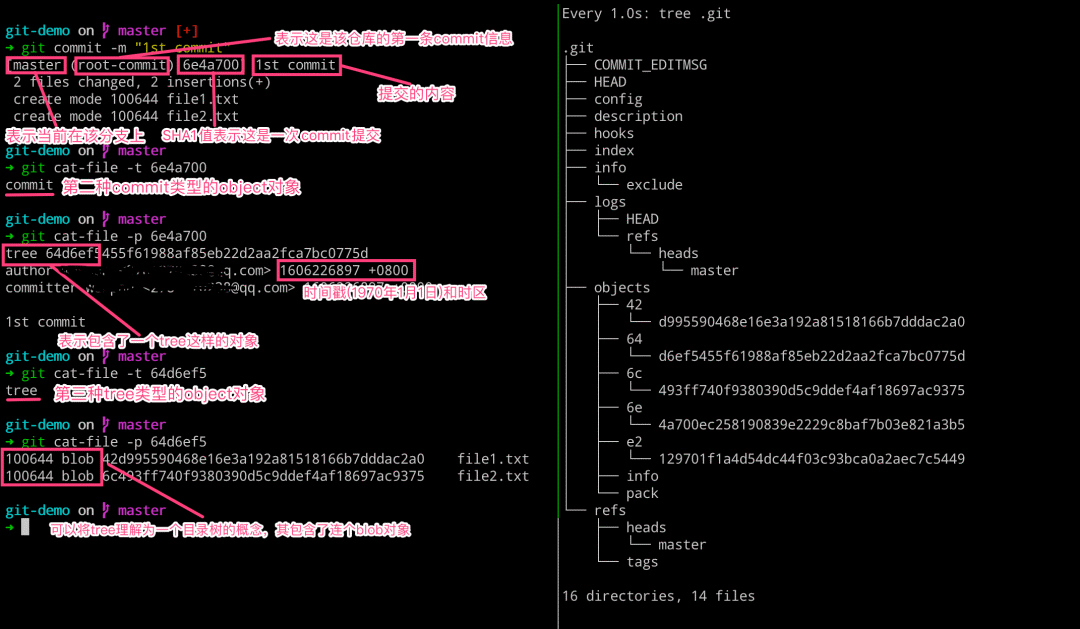
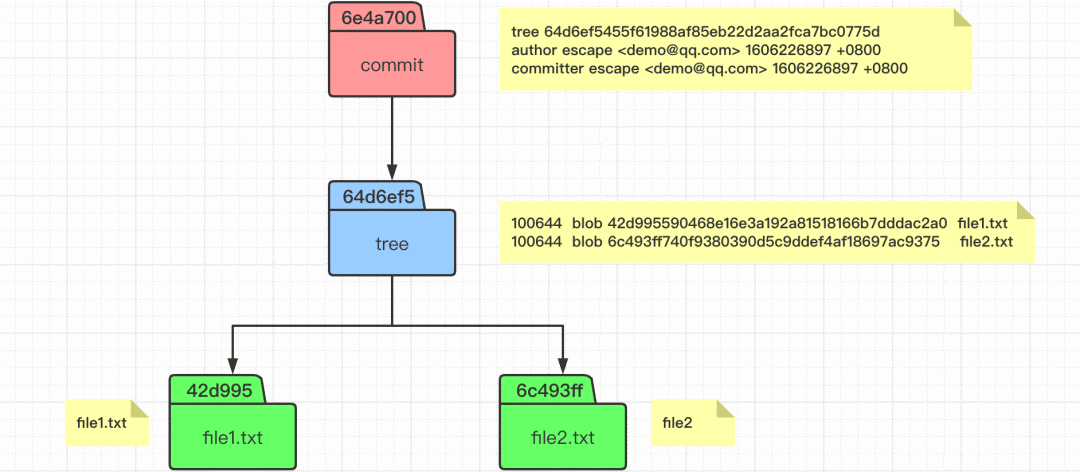
理解 commit 提交原理
#?左邊執(zhí)行
$?git?commit?-m?"1st?commit"

$?git?cat-file?-t?6e4a700??#?查看?commit?對象的類型
$?git?cat-file?-p?6e4a700??#?查看?commit?對象的內(nèi)容

$?git?cat-file?-t?64d6ef5??#?查看?tree?對象的類型
$?git?cat-file?-p?64d6ef5??#?查看?tree?對象的內(nèi)容

#?右邊執(zhí)行
$?watch?-n?1?-d?tree?.git
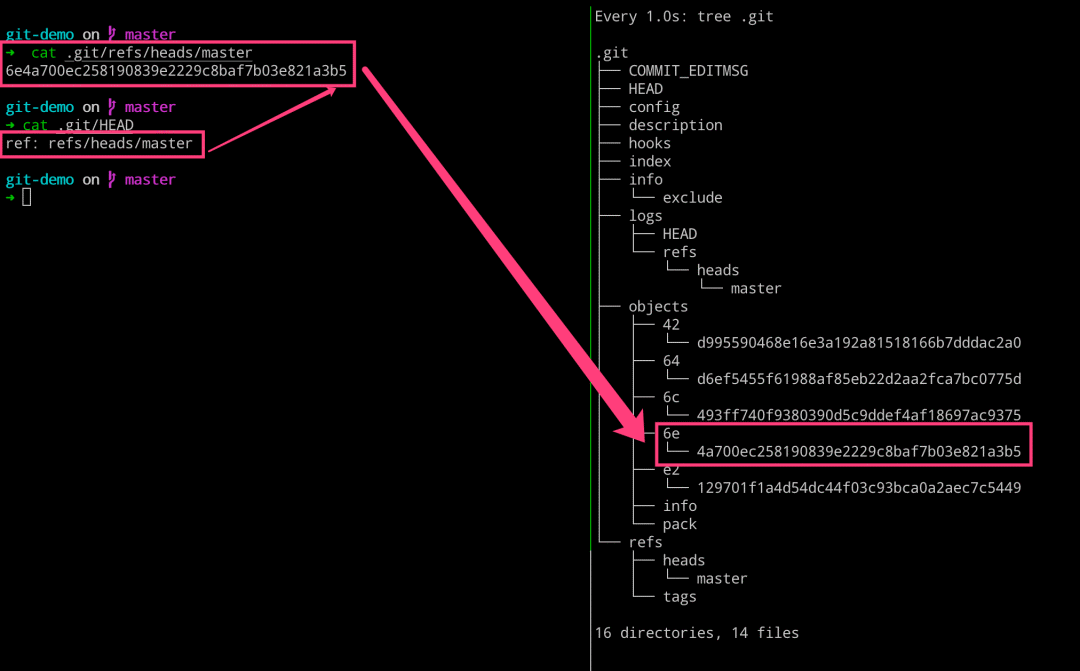
#?左邊執(zhí)行
$?cat?.git/refs/heads/master
$?cat?.git/HEAD

#?右邊執(zhí)行
$?watch?-n?1?-d?tree?.git
加深理解 commit 提交
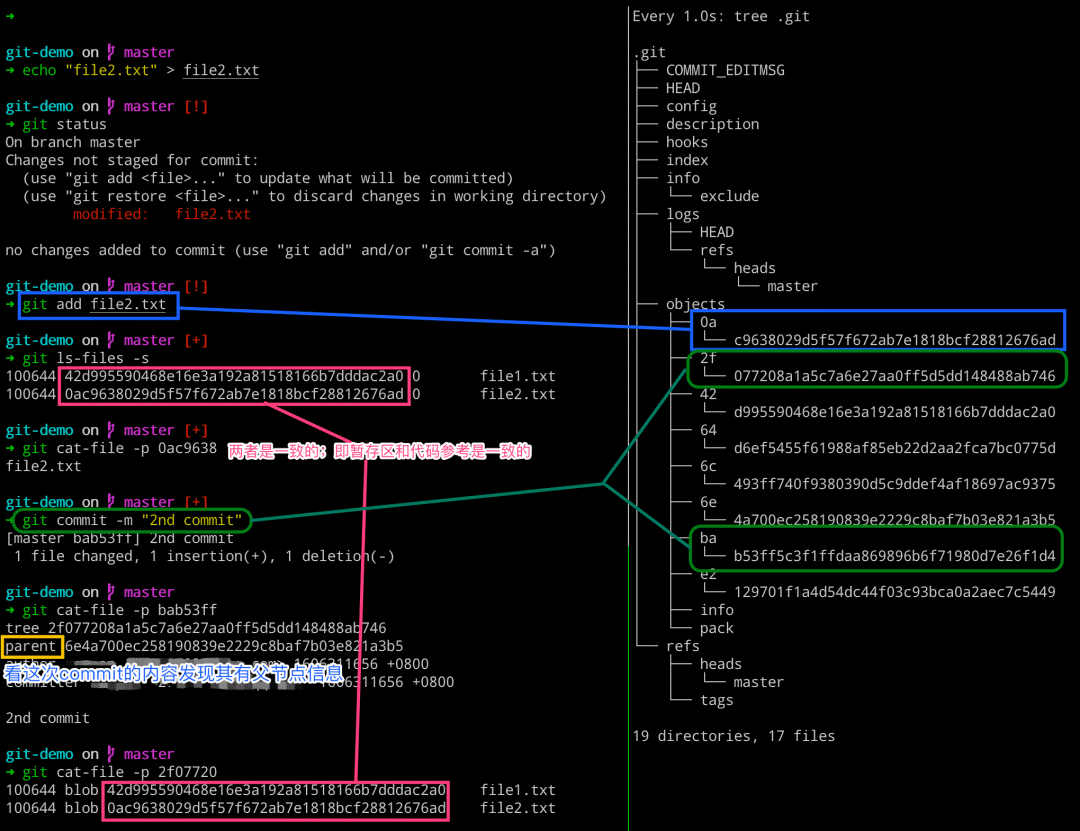
#?左邊執(zhí)行
$?echo?"file2.txt"?>?file2.txt
$?git?status
$?git?add?file2.txt
$?git?ls-files?-s
$?git?cat-file?-p?0ac9638
$?git?commit?-m?"2nd?commit"
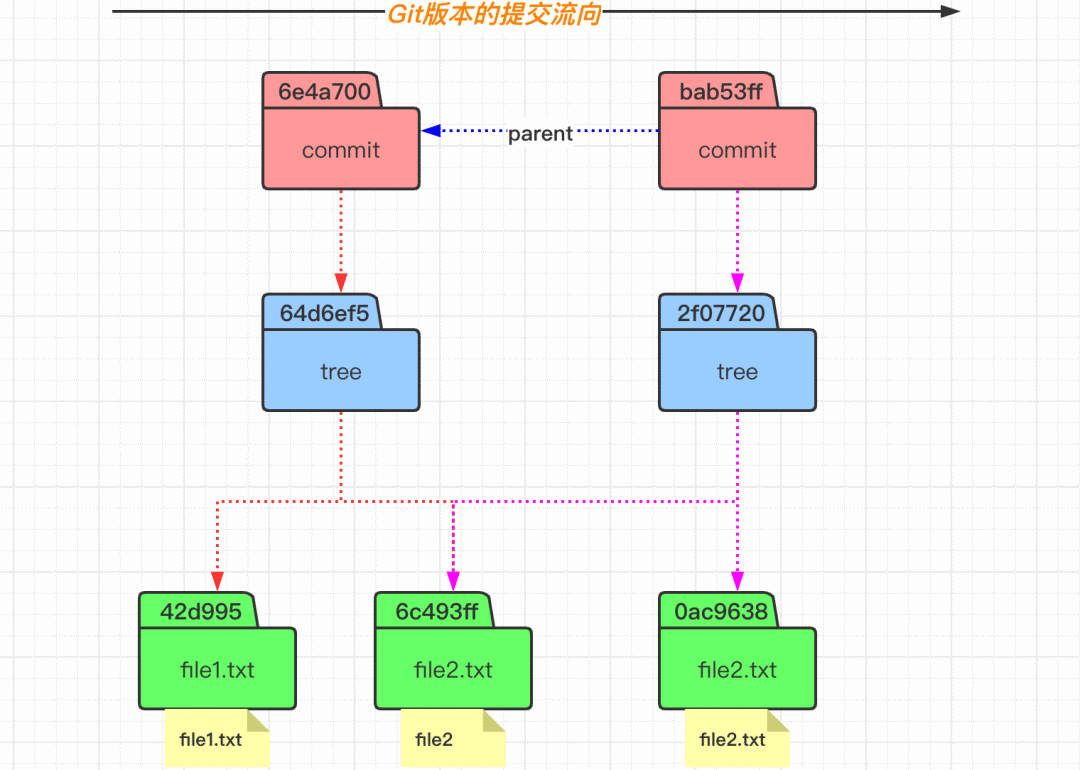
$?git?cat-file?-p?bab53ff
$?git?cat-file?-p?2f07720

#?右邊執(zhí)行
$?watch?-n?1?-d?tree?.git
#?左邊執(zhí)行
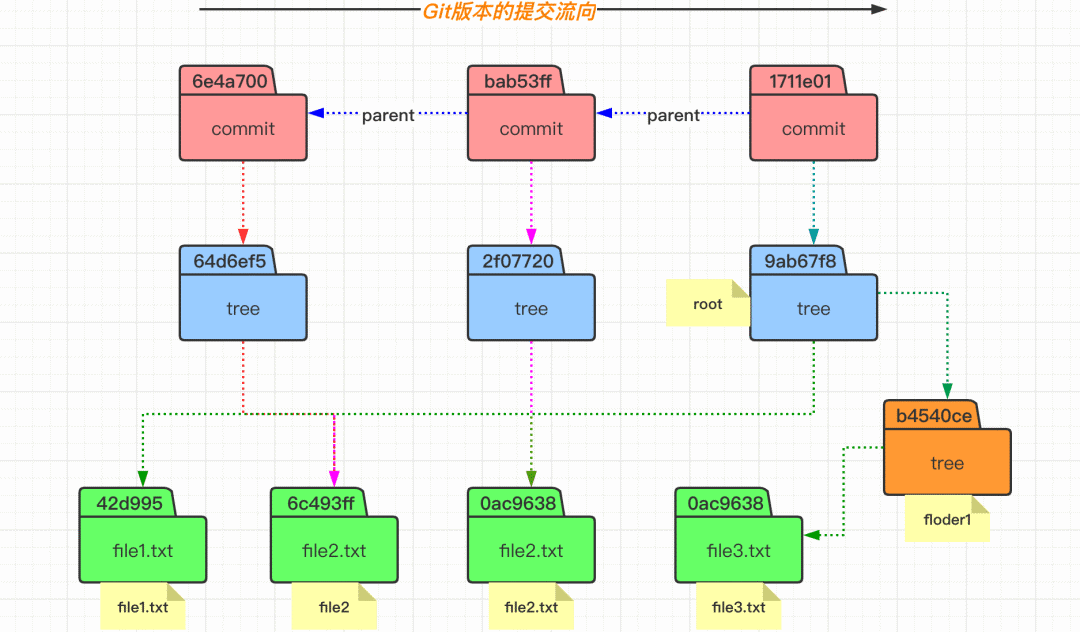
$?mkdir?floder1
$?echo?"file3"?>?floder1/file3.txt
$?git?add?floder1
$?git?ls-files?-s
$?git?commit?-m?"3rd?commit"
$?git?cat-file?-p?1711e01
$?git?cat-file?-p?9ab67f8

#?右邊執(zhí)行
$?watch?-n?1?-d?tree?.git
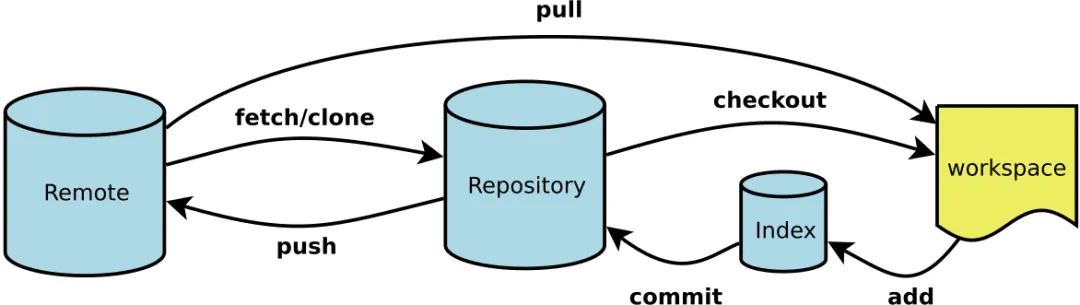
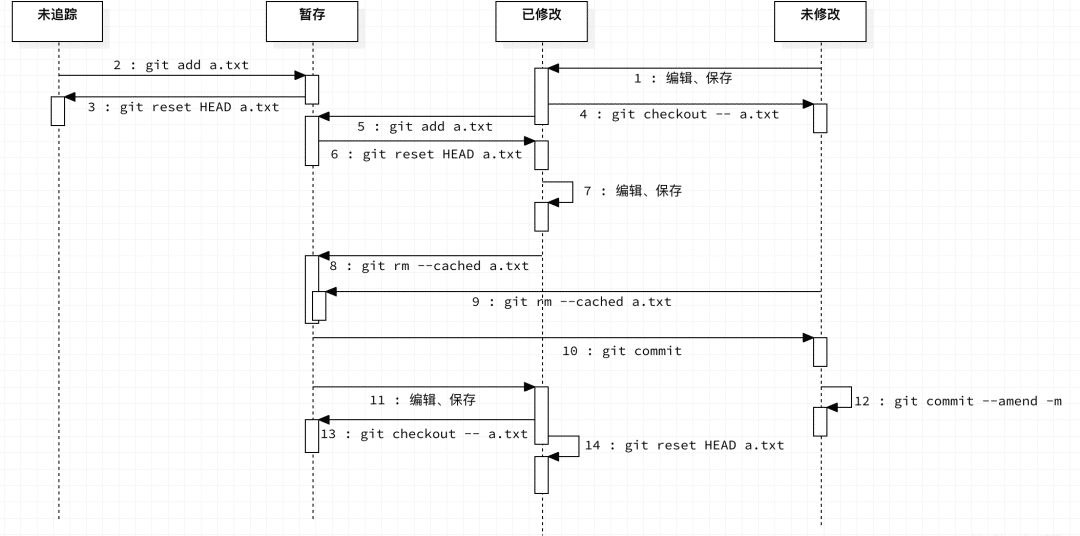
文件的生命周期狀態(tài)
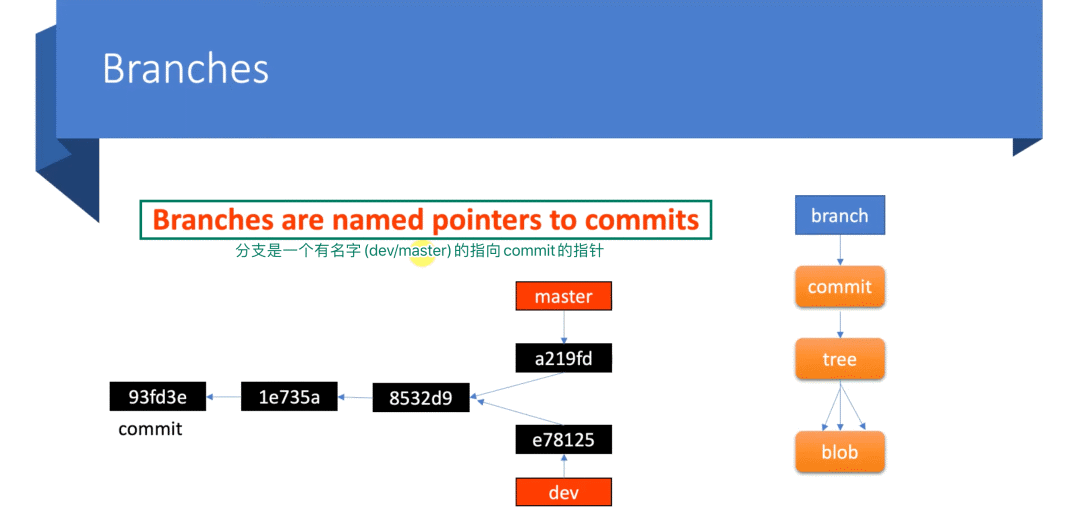
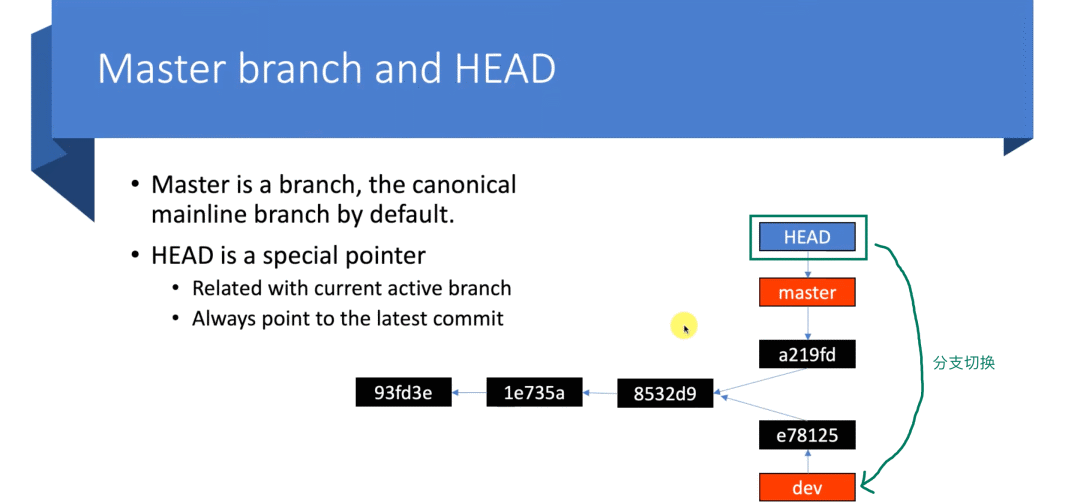
Branch 和 HEAD 的意義
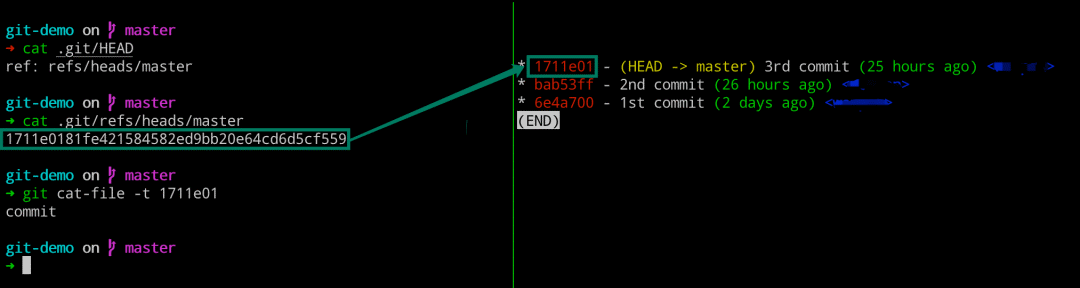
#?左邊執(zhí)行
$?cat?.git/HEAD
$?cat?.git/refs/heads/master
$?git?cat-file?-t?1711e01

#?右邊執(zhí)行
$?glo?=?git?log
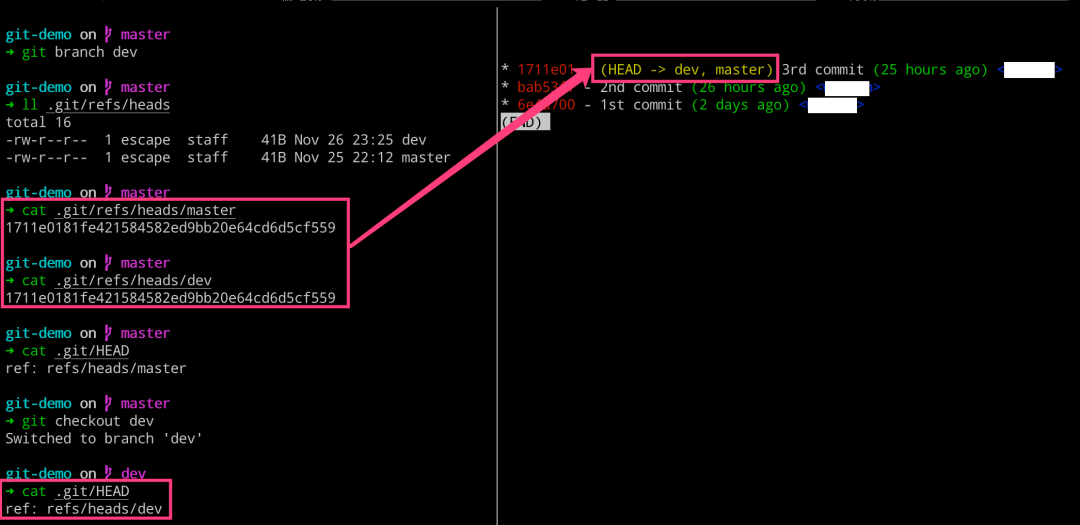
分支操作的背后邏輯
#?左邊執(zhí)行
$?git?branch
$?git?branch?dev
$?ll?.git/refs/heads
$?cat?.git/refs/heads/master
$?cat?.git/refs/heads/dev
$?cat?.git/HEAD
$?git?checkout?dev
$?cat?.git/HEAD

#?右邊執(zhí)行
$?glo?=?git?log
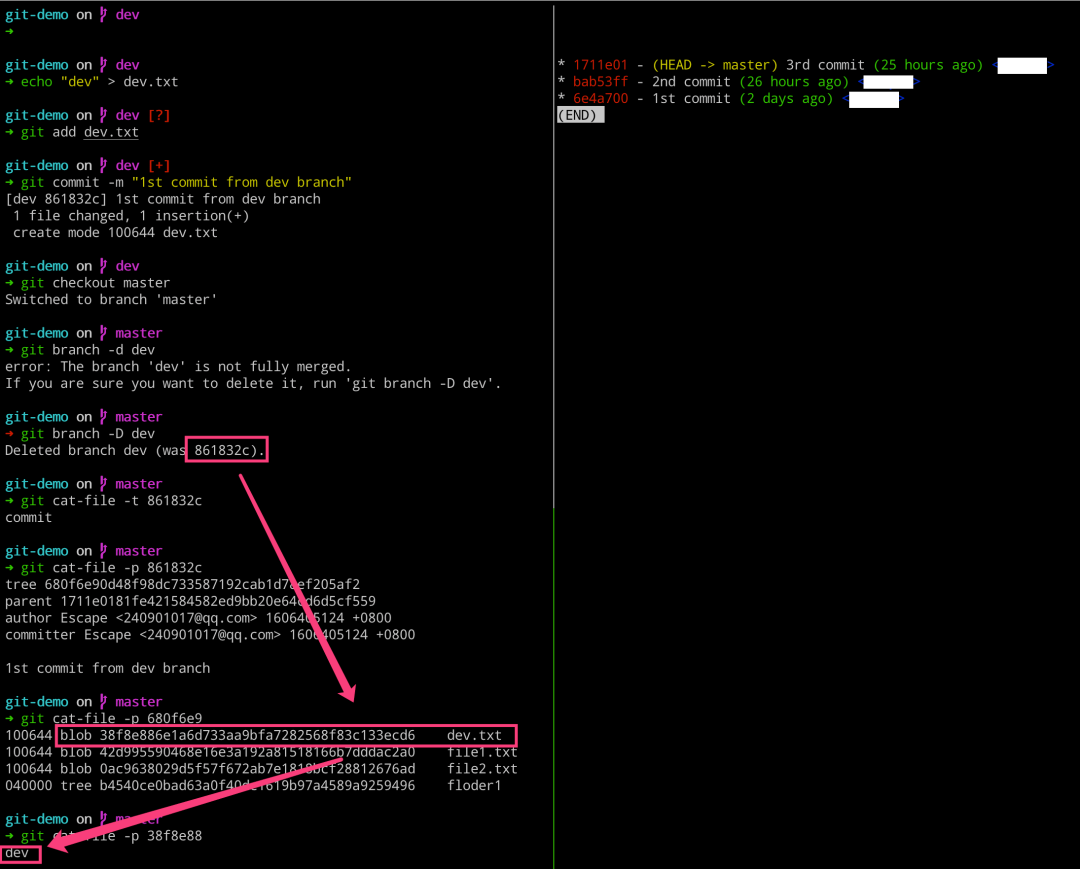
#?左邊執(zhí)行
$?echo?"dev"?>?dev.txt
$?git?add?dev.txt
$?git?commit?-m?"1st?commit?from?dev?branch"
$?git?checkout?master
$?git?branch?-d?dev
$?git?branch?-D?dev
$?git?cat-file?-t?861832c
$?git?cat-file?-p?861832c
$?git?cat-file?-p?680f6e9
$?git?cat-file?-p?38f8e88

#?右邊執(zhí)行
$?glo?=?git?log
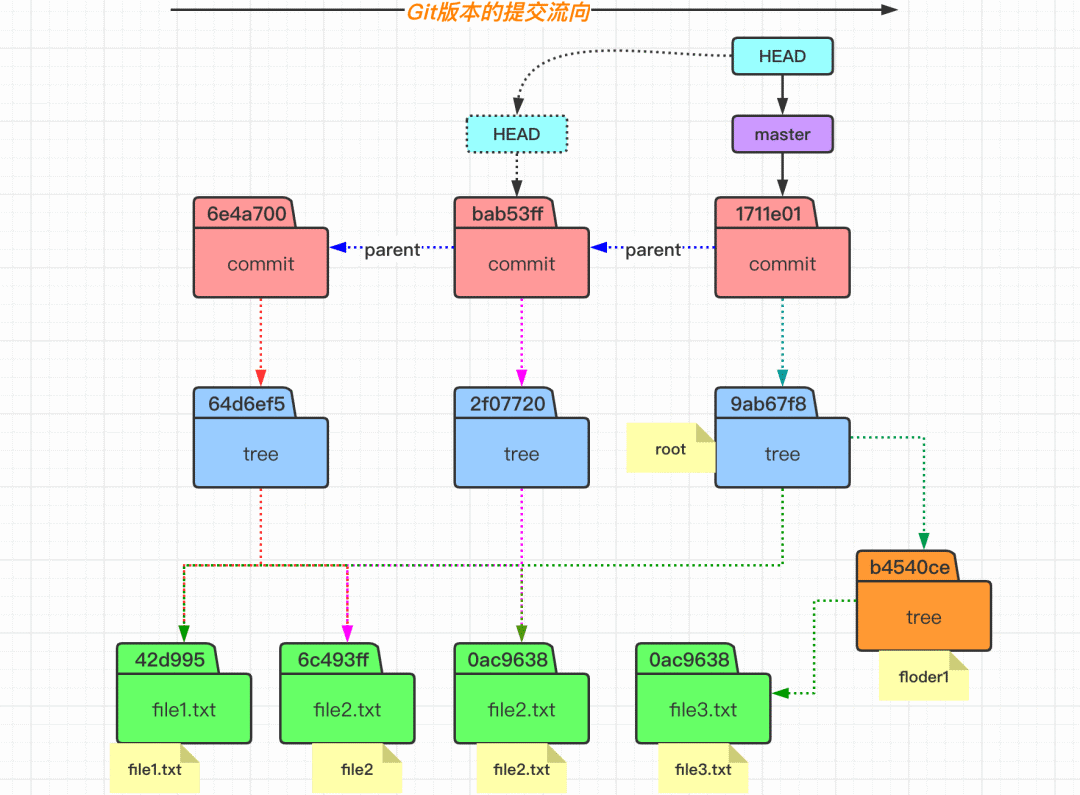
checkout 和 commit 操作
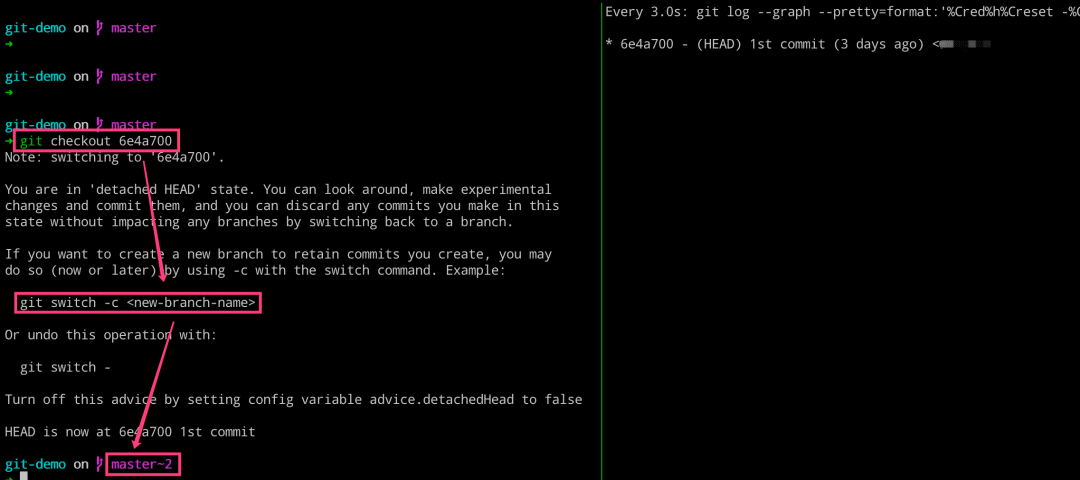
#?左邊執(zhí)行
$?git?checkout?6e4a700
$?git?log

#?右邊執(zhí)行
$?glo?=?git?log
$?git?checkout?-b?tmp
$?git?log
[費勁不太好,下下策]
在 objects 目錄下面,自己一個一個看,然后切換過去。
[推薦的操作方式]
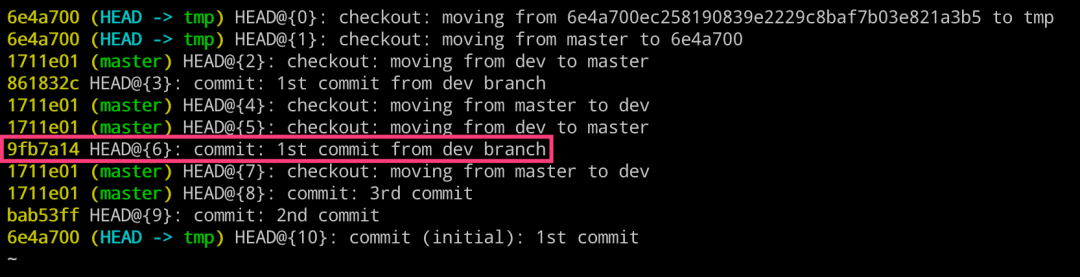
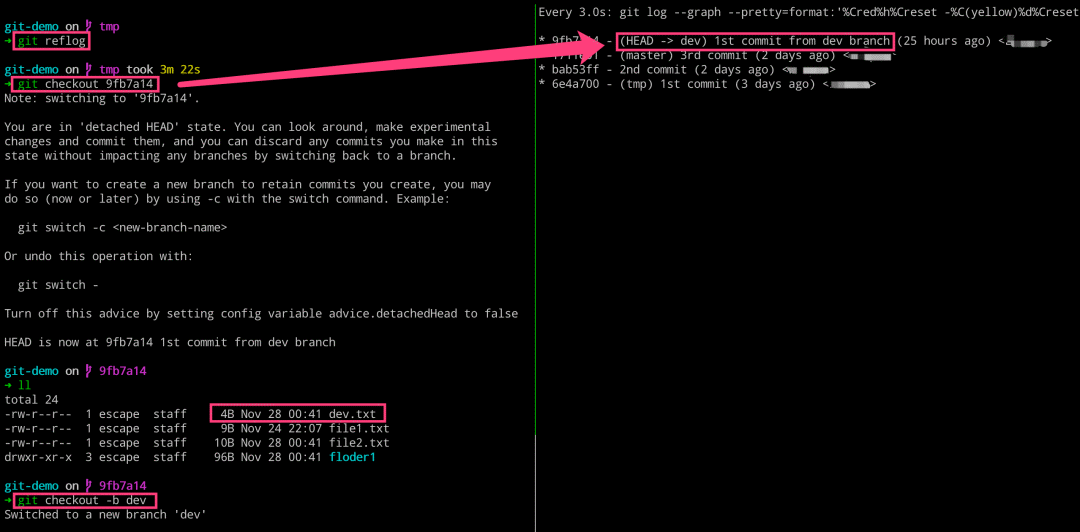
使用 Git 提供的 git reflog 專用命令來查找。
該命令的作用就是用于將我們之前的所有操作都記錄下來。
#?左邊執(zhí)行
$?git?reflog
$?git?checkout?9fb7a14
$?git?checkout?-b?dev

#?右邊執(zhí)行
$?glo?=?git?log
聊聊 diff 的執(zhí)行邏輯
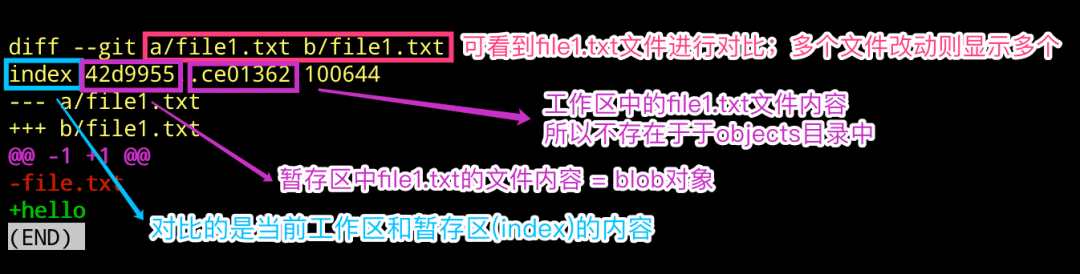
$?echo?"hello"?>?file1.txt
$?git?diff
$?git?cat-file?-p?42d9955
$?git?cat-file?-p?ce01362

#?下述命令原理也是一樣的
$?git?diff?--cached
$?git?diff?HEAD
Git 如何添加遠程倉庫
$?git?init
$?git?add?README.md
$?git?commit?-m?"first?commit"
#?關(guān)聯(lián)遠程倉庫
[email protected]:escapelife/git-demo.git
??cat?.git/config
[core]
????repositoryformatversion?=?0
????filemode?=?true
????bare?=?false
????logallrefupdates?=?true
????ignorecase?=?true
????precomposeunicode?=?true

[remote?"origin"]
[email protected]:escapelife/git-demo.git
????fetch?=?+refs/heads/*:refs/remotes/origin/*
#?推送本地分支
$?git?push?-u?origin?master
??tree?.git
├──?logs
│  ?├──?HEAD
│  ?└──?refs
│  ?????├──?heads
│  ?????│???├──?dev
│  ?????│???├──?master
│  ?????│???└──?tmp
│???????└──?remotes?????#?新增目錄
│  ?????????└──?origin??#?新增目錄
│  ?????????????└──?master??#?新增文件
└──?refs
????├──?heads
????│  ?├──?dev
????│  ?├──?master
????│  ?└──?tmp
????├──?remotes?????#?新增目錄
????│  ?└──?origin??#?新增目錄
????│  ?????└──?master??#?新增文件
????└──?tags
遠程倉庫存儲代碼