
python管理文件神器os.walk
原文:
https://blog.csdn.net/qq_35866846/article/details/107823636
作者:詭途
遵循 CC 4.0 BY-SA 版權(quán)協(xié)議
大家好,歡迎來(lái)到 Crossin的編程教室 !
有沒(méi)有想過(guò)用python寫(xiě)一個(gè)文件管理程序?聽(tīng)起來(lái)似乎沒(méi)思路?
其實(shí)并不難,因?yàn)閜ython已經(jīng)為你準(zhǔn)備好了神器 os.walk,它是一個(gè)簡(jiǎn)單易用的文件、目錄遍歷器,可以幫助我們高效的處理文件、目錄方面的事情。
本文將介紹 os.walk 模塊,最后使用 os.walk 模塊實(shí)現(xiàn)一個(gè)在指定日志整理文件的程序。
基本介紹
os.walk():掃描某個(gè)指定目錄下所包含的子目錄和文件,返回的是一個(gè)迭代器。
基本使用
假設(shè)文件夾data有如下的目錄結(jié)構(gòu)(cmd 命令:tree /f)
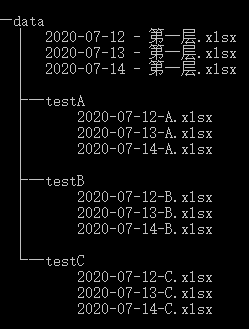
2.1 掃描所有文件
掃描內(nèi)容:
子文件夾和文件
子文件夾下的文件
輸出內(nèi)容:
文件夾名稱(chēng)/文件名稱(chēng)
掃描路徑:
自頂向下 topdown=True(默認(rèn))
自底向上 topdown=False
from os import walkpath="data"for curDir, dirs, files in walk(path):#for curDir, dirs, files in walk(path,topdown=False):print("現(xiàn)在的目錄:" ,curDir)print("該目錄下包含的子目錄:" , str(dirs))print("該目錄下包含的文件:",str(files))print("*"*20)
自頂向下掃描結(jié)果:
現(xiàn)在的目錄:data該目錄下包含的子目錄:['testA', 'testB', 'testC']該目錄下包含的文件:['2020-07-12 - 第一層.xlsx', '2020-07-13 - 第一層.xlsx', '2020-07-14 - 第一層.xlsx']********************現(xiàn)在的目錄:data\testA該目錄下包含的子目錄:[]該目錄下包含的文件:['2020-07-12-A.xlsx', '2020-07-13-A.xlsx', '2020-07-14-A.xlsx']********************現(xiàn)在的目錄:data\testB該目錄下包含的子目錄:[]該目錄下包含的文件:['2020-07-12-B.xlsx', '2020-07-13-B.xlsx', '2020-07-14-B.xlsx']********************現(xiàn)在的目錄:data\testC該目錄下包含的子目錄:[]該目錄下包含的文件:['2020-07-12-C.xlsx', '2020-07-13-C.xlsx', '2020-07-14-C.xlsx']********************
自底向上掃描結(jié)果:
現(xiàn)在的目錄:data\testA該目錄下包含的子目錄:[]該目錄下包含的文件:['2020-07-12-A.xlsx', '2020-07-13-A.xlsx', '2020-07-14-A.xlsx']********************現(xiàn)在的目錄:data\testB該目錄下包含的子目錄:[]該目錄下包含的文件:['2020-07-12-B.xlsx', '2020-07-13-B.xlsx', '2020-07-14-B.xlsx']********************現(xiàn)在的目錄:data\testC該目錄下包含的子目錄:[]該目錄下包含的文件:['2020-07-12-C.xlsx', '2020-07-13-C.xlsx', '2020-07-14-C.xlsx']********************現(xiàn)在的目錄:data該目錄下包含的子目錄:['testA', 'testB', 'testC']該目錄下包含的文件:['2020-07-12 - 第一層.xlsx', '2020-07-13 - 第一層.xlsx', '2020-07-14 - 第一層.xlsx']********************
2.2 掃描輸出所有文件的路徑
輸出所有文件:
import ospath="data"for curDir, dirs, files in os.walk(path):for file in files:print(os.path.join(curDir, file))
data\2020-07-12 - 第一層.xlsxdata\2020-07-13 - 第一層.xlsxdata\2020-07-14 - 第一層.xlsxdata\testA\2020-07-12-A.xlsxdata\testA\2020-07-13-A.xlsxdata\testA\2020-07-14-A.xlsxdata\testB\2020-07-12-B.xlsxdata\testB\2020-07-13-B.xlsxdata\testB\2020-07-14-B.xlsxdata\testC\2020-07-12-C.xlsxdata\testC\2020-07-13-C.xlsxdata\testC\2020-07-14-C.xlsx
輸出指定類(lèi)型文件
#endswith 截取文件后綴import ospath="data"for curDir, dirs, files in os.walk(path):[print(os.path.join(curDir, file)) for file in files if file.endswith(".xlsx")]
2.3 掃描輸出所有的子目錄(子文件夾)
# 使用os.walk輸出某個(gè)目錄下的所有文件import ospath="data"for curDir, dirs, files in os.walk(path):for _dir in dirs:print(os.path.join(curDir, _dir))
data\testAdata\testBdata\testC
案例代碼
綜合運(yùn)用 os.walk() ——文件指定日期整理程序
import pandas as pdimport numpy as npimport os,openpyxl#移動(dòng)符合條件文件,并刪除二級(jí)文件夾和多余文件def move_file(file_path,_new_path,date_xl_str):#本月文件移動(dòng)至對(duì)應(yīng)新建文件夾,非本月文件直接刪除for curDir, dirs, files in os.walk(file_path):for file in files:old_path = os.path.join(curDir, file)new_path = os.path.join(_new_path, file)file_date=file.split("_")[-1][:10]try:os.rename(old_path,new_path) if file_date in date_xl_str else os.remove(old_path)except:os.remove(old_path)#移除子文件夾for curDir, dirs, files in os.walk(file_path):for _dir in dirs:os.removedirs(os.path.join(curDir, _dir))os.mkdir("data")#文件去重-相同日期文件def qch_date(file_path):wj_names=os.listdir(file_path)wj_list=[]num=0for wj in wj_names:new_wj=wj[:-11]if new_wj not in wj_list:wj_list.append(new_wj)else:os.remove(file_path+"\\"+wj)num+=1return num#更新數(shù)據(jù)源def refresh_data(file_path,sheet_name,data):book=openpyxl.load_workbook(file_path)writer=pd.ExcelWriter(file_path,engine="openpyxl")#在ExcelWriter的源代碼中,它初始化空工作簿并刪除所有工作表,#writer.book = book將原來(lái)表里面的內(nèi)容保存到writer中writer.book=book#activate激活指定sheet工作表ws=book[sheet_name]#清空當(dāng)前活動(dòng)表數(shù)據(jù)for row in ws.iter_rows():for cell in row:cell.value=None#dataframe行列數(shù)idx_num,col_num=data.shape#新數(shù)據(jù)寫(xiě)入當(dāng)前活動(dòng)表-注意索引偏移for i in range(1,idx_num+1):for j in range(1,col_num+1):ws.cell(row=i,column=j).value=data.iloc[i-1,j-1]#保存關(guān)閉writerwriter.save()writer.close()return None#文件檢查def check_file(file_path,check_file="文件檢查.xlsx"):wj_names=os.listdir(file_path)data=pd.DataFrame([wj.split("_")[2:] for wj in wj_names],columns=["店鋪名稱(chēng)","日期"])data['日期']=data['日期'].str[:10]#標(biāo)題columns放到dataframe中nind=data.index.insert(0,'0')data1=data.reindex(index=nind)data1.loc['0']=data.columnsdata1.reset_index(drop=True,inplace=True)#刷新數(shù)據(jù)源refresh_data(check_file,"數(shù)據(jù)源",data1)return Nonefile_path="data"#日期格式:xxxx-xx eg:2020-07-01start_date=input("請(qǐng)輸入開(kāi)始日期:")end_date=input("請(qǐng)輸入開(kāi)始日期:")#生成日期區(qū)間-字符串類(lèi)型date_xl_str=[str(i)[:10] for i in pd.date_range(start_date,end_date,freq='D')]#創(chuàng)建指定文件夾new_path=start_date+"~"+end_datetry:os.mkdir(new_path)except:print("文件夾 【%s】 已存在"%new_path)#移動(dòng)符合條件文件,并刪除二級(jí)文件夾和多余文件move_file(file_path,new_path,date_xl_str)#文件去重num=qch_date(new_path)print("去除重復(fù)文件 %s 個(gè)"%num)#文件檢查check_file(new_path)
以上就是對(duì) os.walk 的基本介紹和演示。
如果文章對(duì)你有幫助,歡迎轉(zhuǎn)發(fā)/點(diǎn)贊/收藏~
_往期文章推薦_