
經(jīng)常會被問及的 Vue 面試題(下)

作者:東起 鏈接:https://zhuanlan.zhihu.com/p/103763164
上一篇文章我們分享了《經(jīng)常會被問及的 Vue 面試題(上)》,今天我們繼續(xù)分享剩余的部分。
11、怎么在vue中點(diǎn)擊別的區(qū)域輸入框不會失去焦點(diǎn)?
答:阻止事件的默認(rèn)行為
具體操作:監(jiān)聽你想點(diǎn)擊后不會丟失 input 焦點(diǎn)的那個元素的 mousedown 事件,回調(diào)里面調(diào)用 event.preventDefault(),會阻止使當(dāng)前焦點(diǎn)丟失這一默認(rèn)行為。
12、vue中data的屬性可以和methods中的方法同名嗎?為什么?
答:不可以
因?yàn)椋琕ue會把methods和data的東西,全部代理到Vue生成的對象中,會產(chǎn)生覆蓋所以最好不要同名
13、怎么給vue定義全局的方法?
Vue.prototype.方法名稱
14、Vue 2.0 不再支持在 v-html 中使用過濾器怎么辦?
解決方法:
①全局方法(推薦)
Vue.prototype.msg = function(msg){
  return msg.replace("\n","
")
 }
②computed方法
computed:{
 content:function(msg){
  return msg.replace("\n","
")
 }
}
{{content}}
③$options.filters(推薦)
filters:{
 msg:function(msg){
  return msg.replace(/\n/g,"
")
 }
},
data:{
 content:"XXXX"
}
15、怎么解決vue打包后靜態(tài)資源圖片失效的問題?
答:將靜態(tài)資源的存放位置放在src目錄下
16、怎么解決vue動態(tài)設(shè)置img的src不生效的問題?
data() {
  return {
    logo:require("./../assets/images/logo.png"),
  };
}
因?yàn)閯討B(tài)添加src被當(dāng)做靜態(tài)資源處理了,沒有進(jìn)行編譯,所以要加上require
17、跟keep-alive有關(guān)的生命周期是哪些?描述下這些生命周期
activated和deactivated兩個生命周期函數(shù)
1.activated:當(dāng)組件激活時,鉤子觸發(fā)的順序是created->mounted->activated
2.deactivated: 組件停用時會觸發(fā)deactivated,當(dāng)再次前進(jìn)或者后退的時候只觸發(fā)activated
18、你知道vue中key的原理嗎?說說你對它的理解
暫時沒弄明白,等會兒寫
19、vue中怎么重置data?
答:Object.assign()
Object.assign()方法用于將所有可枚舉屬性的值從一個或多個源對象復(fù)制到目標(biāo)對象。它將返回目標(biāo)對象。
var o1 = { a: 1 };
var o2 = { b: 2 };
var o3 = { c: 3 };
var obj = Object.assign(o1, o2, o3);
console.log(obj); // { a: 1, b: 2, c: 3 }
console.log(o1); // { a: 1, b: 2, c: 3 }, 注意目標(biāo)對象自身也會改變。
注意,具有相同屬性的對象,同名屬性,后邊的會覆蓋前邊的。
由于Object.assign()有上述特性,所以我們在Vue中可以這樣使用:
Vue組件可能會有這樣的需求:在某種情況下,需要重置Vue組件的data數(shù)據(jù)。此時,我們可以通過this.$data獲取當(dāng)前狀態(tài)下的data,通過this.$options.data()獲取該組件初始狀態(tài)下的data。
然后只要使用**Object.assign(this.options.data())**就可以將當(dāng)前狀態(tài)的data重置為初始狀態(tài)。
20、vue怎么實(shí)現(xiàn)強(qiáng)制刷新組件?
答:① v-if ② this.$forceUpdate
v-if
當(dāng)v-if的值發(fā)生變化時,組件都會被重新渲染一遍。因此,利用v-if指令的特性,可以達(dá)到強(qiáng)制
data() {
return {
update: true
}
},
methods: {
reload() {
// 移除組件
this.update = false
// 在組件移除后,重新渲染組件
// this.$nextTick可實(shí)現(xiàn)在DOM 狀態(tài)更新后,執(zhí)行傳入的方法。
this.$nextTick(() => {
this.update = true
})
}
}
this.$forceUpdate
methods: {
reload() {
this.$forceUpdate()
}
}
21、vue如何優(yōu)化首頁的加載速度?
① 第三方j(luò)s庫按CDN引入(一、cdn引入 二、去掉第三方庫引入的import 三、把第三方庫的js文件從打包文件里去掉)
② vue-router路由懶加載
③ 壓縮圖片資源
④ 靜態(tài)文件本地緩存
http緩存:推薦網(wǎng)站:https://www.cnblogs.com/chinajava/p/5705169.html
service worker離線緩存:,缺點(diǎn):需要在HTTPS站點(diǎn)下,推薦:http://lzw.me/a/pwa-service-worker.html
⑤ 服務(wù)器端SSR渲染
除了上面的方案以外,另一種方案也不容小視
我們先說說通常項(xiàng)目中是如何加載頁面數(shù)據(jù):Vue組件生命周期中請求異步接口,在mounted之前應(yīng)該都可以,據(jù)我了解絕大部分同學(xué)是在mounted的時候執(zhí)行異步請求。但是我們可以把頁面需要的請求放到Vue-Router的守衛(wèi)中執(zhí)行,意思是在路由beforeEnter之前就可以請求待加載頁面中所有組件需要的數(shù)據(jù),此時待加載頁面的Vue組件還沒開始渲染,而Vue組件開始渲染的時候我們就可以用Vuex里面的數(shù)據(jù)了。
以上方法的實(shí)現(xiàn)思路:
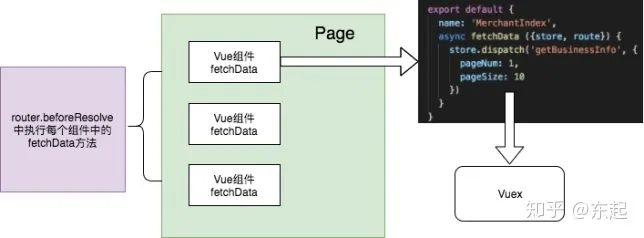
圖意:每個頁面(Page)中都會有很多個Vue組件,可以在Vue組件中添加自定義屬性fetchData,fetchData里面可以執(zhí)行異步請求(圖中執(zhí)行Vuex的Action),但是我們怎么獲取到所有組件的fetchData方法并執(zhí)行呢?如圖所示,在router.beforeResolve守衛(wèi)中,我們看看router.beforeResolve的定義,所有組件內(nèi)守衛(wèi)和異步路由組件被解析之后,解析守衛(wèi)就被調(diào)用,意思是即使頁面中有異步組件,它會等待異步組件解析之后執(zhí)行,并且解析守衛(wèi)在beforeEnter之前執(zhí)行。那我們怎么在解析守衛(wèi)中獲取到待加載頁面的所有組件呢?通過router.getMatchedComponents方法。
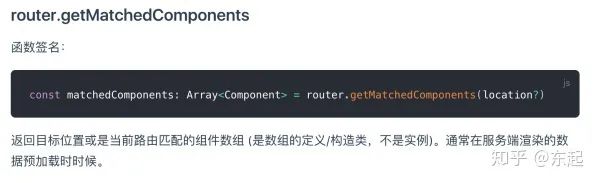
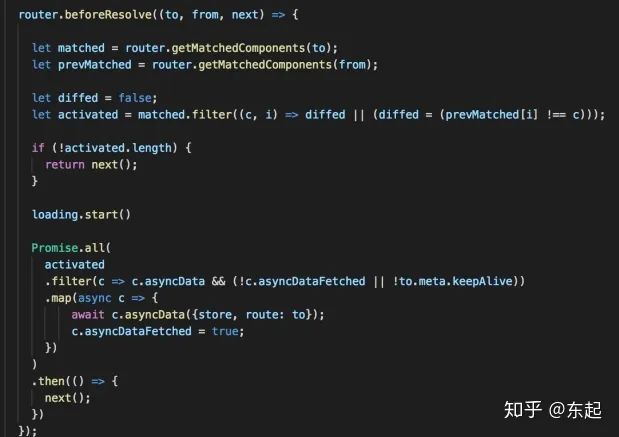
這樣我們就可以在解析守衛(wèi)中獲取到所有待加載組件的fetchData方法并執(zhí)行,這樣無疑會在組件開始渲染之后獲取到所有數(shù)據(jù),提高頁面加載速度。以上方法的實(shí)現(xiàn)思路:
很多人可能有個疑問,如果異步請求放在beforeCreate和created不是一樣嗎?答案是否定的,因?yàn)檫@種方式可以將異步請求放到beforeCreate之前!
22、你了解vue的diff算法嗎?
推薦網(wǎng)站:https://www.cnblogs.com/wind-lanyan/p/9061684.html
23、vue能監(jiān)聽到數(shù)組變化的方法有哪些?為什么這些方法能監(jiān)聽到呢?
Vue.js觀察數(shù)組變化主要通過以下7個方法(push、pop、shift、unshift、splice、sort、reverse)
大家知道,通過Object.defineProperty()劫持?jǐn)?shù)組為其設(shè)置getter和setter后,調(diào)用的數(shù)組的push、splice、pop等方法改變數(shù)組元素時并不會觸發(fā)數(shù)組的setter,繼而數(shù)組的數(shù)據(jù)變化并不是響應(yīng)式的,但是vue實(shí)際開發(fā)中卻是實(shí)時響應(yīng)的,是因?yàn)関ue重寫了數(shù)組的push、splice、pop等方法
從源碼中可以看出,ob.dep.notify()將當(dāng)前數(shù)組的變更通知給其訂閱者,這樣當(dāng)使用重寫后方法改變數(shù)組后,數(shù)組訂閱者會將這邊變化更新到頁面中
24、說說你對proxy的理解?
Proxy用于修改某些操作的默認(rèn)行為,也可以理解為在目標(biāo)對象之前架設(shè)一層攔截,外部所有的訪問都必須先通過這層攔截,因此提供了一種機(jī)制,可以對外部的訪問進(jìn)行過濾和修改。
var target = {
   name: 'zhangsan',
   age:20,
   sex:'男'
 }
var logHandler = {
  get(target, key) {
    console.log(`${key}被讀取`)
    return target[key]
   },
  set(target, key, value) {
    console.log(`${key}被設(shè)置為${value}`)
    target[key] = value
  }
}
var demo = new Proxy(target, logHandler)
demo.name  //name被讀取
var proxy = new Proxy(target, handler);
Proxy對象的所有用法,都是上面的這種形式。不同的只是handle參數(shù)的寫法。其中new Proxy用來生成Proxy實(shí)例,target是表示所要攔截的對象,handle是用來定制攔截行為的對象。
我們可以將Proxy對象,設(shè)置到object.proxy屬性,從而可以在object對象上調(diào)用。
var object = { proxy: new Proxy(target, handler) };
Proxy對象也可以作為其它對象的原型對象。
var proxy = new Proxy({}, {
  get: function(target, property) {
    return 35;
  }
});
let obj = Object.create(proxy);
obj.time // 35
上面代碼中,proxy對象是obj的原型對象,obj本身并沒有time屬性,所以根據(jù)原型鏈,會在proxy對象上讀取屬性,從而被攔截。
同一個攔截函數(shù),可以設(shè)置多個操作。
var handler = {
  get: function (target, name) {
    if (name === 'prototype') {
       return Object.prototype;
    }
    return 'Hello, ' + name;
  },

  apply: function (target, thisBinding, args) {
    return args[0];
  },

  construct: function (target, args) {
    return { value: args[1] };
  }
};

var fproxy = new Proxy(function (x, y) {
    return x + y;
}, handler);

fproxy(1, 2) // 1
new fproxy(1, 2) // {value: 2}
fproxy.prototype === Object.prototype // true
fproxy.foo === "Hello, foo" // true
25、怎么緩存當(dāng)前的組件?緩存后怎么更新?
{
  path: '',
  name: '',
  component: ,
  meta: {keepAlive: true} // 這個是需要keepalive的
},
{
  path: '',
  name: '',
  component: ,
  meta: {keepAlive: false} // 這是不會被keepalive的
}
如果緩存的組件想要清空數(shù)據(jù)或者執(zhí)行初始化方法,在加載組件的時候調(diào)用activated鉤子函數(shù),如下:
activated: function () {
    this.data = '';
}
26、axios怎么解決跨域的問題?
使用axios直接進(jìn)行跨域訪問不可行,我們需要配置代理
代理可以解決的原因:
因?yàn)榭蛻舳苏埱蠓?wù)端的數(shù)據(jù)是存在跨域問題的,而服務(wù)器和服務(wù)器之間可以相互請求數(shù)據(jù),是沒有跨域的概念(如果服務(wù)器沒有設(shè)置禁止跨域的權(quán)限問題),也就是說,我們可以配置一個代理的服務(wù)器可以請求另一個服務(wù)器中的數(shù)據(jù),然后把請求出來的數(shù)據(jù)返回到我們的代理服務(wù)器中,代理服務(wù)器再返回數(shù)據(jù)給我們的客戶端,這樣我們就可以實(shí)現(xiàn)跨域訪問數(shù)據(jù)
1.配置BaseUrl
import axios from 'axios'
Vue.prototype.$axios = axios
axios.defaults.baseURL = '/api'  //關(guān)鍵代碼
2.配置代理
在config文件夾下的index.js文件中的proxyTable字段中,作如下處理:
proxyTable: {
 '/api': {
   target:'http://api.douban.com/v2', // 你請求的第三方接口
   changeOrigin:true,
// 在本地會創(chuàng)建一個虛擬服務(wù)端,然后發(fā)送請求的數(shù)據(jù),并同時接收請求的數(shù)據(jù),
//這樣服務(wù)端和服務(wù)端進(jìn)行數(shù)據(jù)的交互就不會有跨域問題
   pathRewrite:{  // 路徑重寫,
    '^/api': ''
// 替換target中的請求地址,也就是說以后你在請求http://api.douban.com/v2/XXXXX
//這個地址的時候直接寫成/api即可。
   }
  }
}
1. 在具體使用axios的地方,修改url如下即可
axios.get("/movie/top250").then((res) => {
  res = res.data
  if (res.errno === ERR_OK) {
    this.themeList=res.data;
  }
 }).catch((error) => {
  console.warn(error)
})
原理:
因?yàn)槲覀兘ourl加上了前綴/api,我們訪問/movie/top250就當(dāng)于訪問了:localhost:8080/api/movie/top250(其中l(wèi)ocalhost:8080是默認(rèn)的IP和端口)。
在index.js中的proxyTable中攔截了/api,并把/api及其前面的所有替換成了target中的內(nèi)容,因此實(shí)際訪問Url是http://api.douban.com/v2/movie/top250。
至此,純前端配置代理解決axios跨域得到解決
27、怎么實(shí)現(xiàn)路由懶加載呢?
第一種(最常用):
const Foo = () => import('./Foo.vue')
const router = new VueRouter({
  routes: [
    { path: '/foo', component: Foo }
  ]
})
第二種:
const router = new Router({
  routes: [
   {
     path: '/index',
     component: (resolve) => {
        require(['../components/index'], resolve) // 這里是你的模塊 不用import去引入了
     }
    }
  ]
})
第三種(官方推薦):
// r就是resolve
const list = r => require.ensure([], () => r(require('../components/list/list')), 'list');
// 路由也是正常的寫法  這種是官方推薦的寫的 按模塊劃分懶加載
const router = new Router({
  routes: [
  {
    path: '/list/blog',
    component: list,
    name: 'blog'
  }
 ]
})
28、怎樣動態(tài)加載路由?
一、思路
① 在vue-router對象中首先初始化公共路由,比如(首頁,404,login)等
② 用戶登陸成功后,根據(jù)用戶的角色信息,獲取對應(yīng)權(quán)限菜單信息menuList,并將后臺返回的menuList轉(zhuǎn)換成我們需要的router數(shù)據(jù)結(jié)構(gòu)
③ 通過**router.addRouter(routes)**方法,同時我們可以將轉(zhuǎn)后的路由信息保存于vuex,這樣我們可以在我們的SideBar組件中獲取我們的全部路由信息,并且渲染我們的左側(cè)菜單欄,讓動態(tài)路由實(shí)現(xiàn)。
二、實(shí)現(xiàn)
① 初始化公共路由
//只顯示主要代碼
export const routes= [
 { path: '/login', component: () => import('@/views/login/index'), hidden: true },
 { path: '/404', component: () => import('@/views/404'), hidden: true }
]
export default new Router({
 scrollBehavior: () => ({ y: 0 }),
 routes: routes
})
② 登陸成功后,獲取菜單信息 menuList,并轉(zhuǎn)換成router數(shù)組的結(jié)構(gòu)
router.beforeEach((to, from, next) => {
 NProgress.start()//進(jìn)度條包 npm安裝
 if (getToken()) {
  /*有 token,已經(jīng)登錄成功*/
  if (to.path === '/login') {
   next({ path: '/' })
   NProgress.done()
  } else {
   if (store.getters.roles.length === 0) { // 判斷當(dāng)前用戶是否已拉取完user_info信息
    store.dispatch('GetInfo').then(res => { // 拉取user_info
     const roles = res.roles
     store.dispatch("GetMenu").then(data => {
      initMenu(router, data);
     });
     next()
    }).catch((err) => {
     store.dispatch('FedLogOut').then(() => {
      Message.error(err || 'Verification failed, please login again')
      next({ path: '/' })
     })
    })
   } else {
    next()
   }
  }
 } else {
  /* 無 token*/
  if (whiteList.indexOf(to.path) !== -1) { // 在免登錄白名單,直接進(jìn)入
   next()
  } else {
   next('/login') // 否則全部重定向到登錄頁
   NProgress.done()
  }
 }
})
router.afterEach(() => {
 NProgress.done()
})
③ 動態(tài)加載路由
import store from '../store'
export const initMenu = (router, menu) => {
 if (menu.length === 0) {
  return
 }
 let menus = formatRoutes(menu);

 let unfound = { path: '*', redirect: '/404', hidden: true }
 menus.push(unfound) //404組件最后添加
 router.addRoutes(menus)
 store.commit('ADD_ROUTERS',menus)
}
export const formatRoutes = (aMenu) => {
 const aRouter = []
 aMenu.forEach(oMenu => {
  const {
   path,
   component,
   name,
   icon,
   childrens
  } = oMenu
  if (!validatenull(component)) {
   let filePath;
   const oRouter = {
    path: path,
    component(resolve) {
     let componentPath = ''
     if (component === 'Layout') {
      require(['../views/layout/Layout'], resolve)
      return
     } else {
      componentPath = component
     }
     require([`../${componentPath}.vue`], resolve)
    },
    name: name,
    icon: icon,
    children: validatenull(childrens) ? [] : formatRoutes(childrens)
   }
   aRouter.push(oRouter)
  }
 })
 return aRouter
}
④ 渲染菜單
     mode="vertical"
   :show-timeout="200"
   :default-active="$route.path"
   :collapse="isCollapse"
   background-color="#304156"
   text-color="#bfcbd9"
   active-text-color="#409EFF"
  >
就這樣我們動態(tài)加載路由就是實(shí)現(xiàn)了,關(guān)鍵點(diǎn)就是router.addRoute方法
⑤ 防坑
點(diǎn)擊刷新的時候頁面空白 控制臺也不報錯?
點(diǎn)擊刷新,vue-router會重新初始化,那么我們之前的動態(tài)addRoute就不存在了,此時訪問一個不存在的頁面,所以我們的sidebar組件也就不會被訪問,那么也無法獲取菜單信息,就導(dǎo)致頁面空白。所以我們需要把加載菜單信息這一步放在router的全局守衛(wèi)beforeEach中就可以了。
export const initMenu = (router, menu) => {
 if (menu.length === 0) {
  return
 }
 let menus = formatRoutes(menu);
 // 最后添加
 let unfound = { path: '*', redirect: '/404', hidden: true }
 menus.push(unfound)
 router.addRoutes(menus)
 store.commit('ADD_ROUTERS',menus)
}
//404組件一定要放在動態(tài)路由組件的最后,不然你刷新動態(tài)加載的頁面,會跳轉(zhuǎn)到404頁面的
29、切換到新路由時,頁面要滾動到頂部或保持原先的滾動位置怎么做呢?
當(dāng)創(chuàng)建一個 Router 實(shí)例,可以提供一個?scrollBehavior?方法:
注意: 這個功能只在 HTML5 history 模式下可用。
const router = new VueRouter({
 routes: [...],
 scrollBehavior (to, from, savedPosition) {
  // return 期望滾動到哪個的位置
 }
})
scrollBehavior 方法接收 to 和 from 路由對象。第三個參數(shù) savedPosition 當(dāng)且僅當(dāng) popstate 導(dǎo)航 (通過瀏覽器的 前進(jìn)/后退 按鈕觸發(fā)) 時才可用。
scrollBehavior (to, from, savedPosition) {
 return { x: 0, y: 0 }
}
對于所有路由導(dǎo)航,簡單地讓頁面滾動到頂部。
返回 savedPosition,在按下 后退/前進(jìn) 按鈕時,在滾動條位置,就會像瀏覽器的原生表現(xiàn)那樣:
scrollBehavior (to, from, savedPosition) {
 if (savedPosition) {
  return savedPosition
 } else {
  return { x: 0, y: 0 }
 }
}
模擬『滾動到錨點(diǎn)』的行為
scrollBehavior (to, from, savedPosition) {
 if (to.hash) {
  return {
   selector: to.hash
  }
 }
}
還可以利用路由元信息更細(xì)顆粒度地控制滾動。
routes: [
 { path: '/', component: Home, meta: { scrollToTop: true }},
 { path: '/foo', component: Foo },
 { path: '/bar', component: Bar, meta: { scrollToTop: true }}
]
const scrollBehavior = (to, from, savedPosition) => {
 if (savedPosition) {
  return savedPosition
 } else {
  const position = {}
  if (to.hash) {
   position.selector = to.hash
  }
   if (to.matched.some(m => m.meta.scrollToTop)) {
   position.x = 0
   position.y = 0
  }
  return position
 }
}
還可以在main.js入口文件配合vue-router寫這個
router.afterEach((to,from,next) => {
  window.scrollTo(0,0);
});
30、vue-router如何響應(yīng)路由參數(shù)的變化?
當(dāng)使用路由參數(shù)時,比如:
{path:’/list/:id’component:Foo}
從 /list/aside導(dǎo)航到 /list/foo,原來的組件實(shí)例會被復(fù)用。
因?yàn)閮蓚€路由都渲染同個組件Foo,比起銷毀再創(chuàng)建,復(fù)用則更加高效。
不過,這也意味著組件的生命周期鉤子不會再被調(diào)用。
如果跳轉(zhuǎn)到相同的路由還會報以下錯誤

這個時候我們需要重寫push方法,在src/router/index.js 里面import VueRouter from 'vue-router'下面寫入下面方法即可
const routerPush = VueRouter.prototype.push
VueRouter.prototype.push = function push(location) {
  return routerPush.call(this, location).catch(error=> error)
}
如何響應(yīng)不同的數(shù)據(jù)呢?
① 復(fù)用組件時,想對路由參數(shù)的變化作出響應(yīng)的話,你可以簡單地?watch (監(jiān)測變化) $route 對象:
const User = {
  template: '...',
  watch: {
    '$route' (to, from) {
      // 對路由變化作出響應(yīng)...
    }
  }
}
② 使用beforeRouteUpdate
const User = {
  template: '...',
  beforeRouteUpdate (to, from, next) {
    // react to route changes...
    // don't forget to call next()
  }
}
注意:
(1)從同一個組件跳轉(zhuǎn)到同一個組件。
(2)生命周期鉤子created和mounted都不會調(diào)用。
31、vue模板中為什么以_、$開始的變量無法渲染?
名字以 _ 或?data._property 訪問它們。
32、vue中,如何監(jiān)聽一個對象內(nèi)部的變化?
方法①:對整個obj深層監(jiān)聽
watch:{
 obj:{
  handler(newValue,oldValue){
   console.log('obj changed')
  },
  deep: true,//深度遍歷
  immediate: true
//默認(rèn)第一次綁定的時候不會觸發(fā)watch監(jiān)聽,值為true時可以在最初綁定的時候執(zhí)行
 }
}
方法② :指定key
watch: {
    "dataobj.name": {
      handler(newValue, oldValue) {
        console.log("obj changed");
      }
    }
  }
方法③:computed
computed(){
 ar(){
  return this.obj.name
 }
}
33、v-for循環(huán)時為什么要加key?
key的作用主要是為了高效的更新虛擬DOM,是因?yàn)閂irtual DOM 使用Diff算法實(shí)現(xiàn)的原因。
當(dāng)某一層有很多相同的節(jié)點(diǎn)時,也就是列表節(jié)點(diǎn)時,Diff算法的更新過程默認(rèn)情況下也是遵循以上原則。
比如一下這個情況
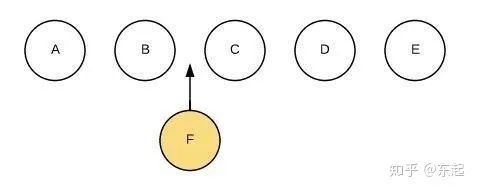
我們希望可以在B和C之間加一個F,Diff算法默認(rèn)執(zhí)行起來是這樣的:
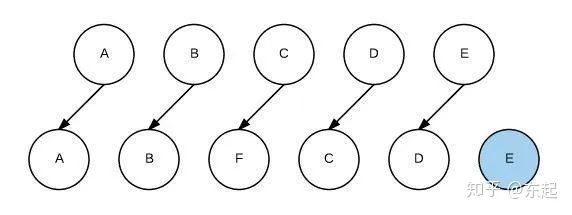
即把C更新成F,D更新成C,E更新成D,最后再插入E,是不是很沒有效率?
所以我們需要使用key來給每個節(jié)點(diǎn)做一個唯一標(biāo)識,Diff算法就可以正確的識別此節(jié)點(diǎn),找到正確的位置區(qū)插入新的節(jié)點(diǎn)。

34、$nextTick用過嗎,有什么作用?
在下次 DOM 更新循環(huán)結(jié)束之后執(zhí)行延遲回調(diào)。在修改數(shù)據(jù)之后立即使用這個方法,獲取更新后的 DOM。
解決的問題:有些時候在改變數(shù)據(jù)后立即要對dom進(jìn)行操作,此時獲取到的dom仍是獲取到的是數(shù)據(jù)刷新前的dom,無法滿足需要,這個時候就用到了$nextTick。
35、vue和react的區(qū)別是什么?
① React嚴(yán)格上只針對MVC的view層,Vue則是MVVM模式
② virtual DOM不一樣,vue會跟蹤每一個組件的依賴關(guān)系,不需要重新渲染整個組件樹.而對于React而言,每當(dāng)應(yīng)用的狀態(tài)被改變時,全部組件都會重新渲染,所以react中會需要shouldComponentUpdate這個生命周期函數(shù)方法來進(jìn)行控制
③ 組件寫法不一樣, React推薦的做法是 JSX + inline style, 也就是把HTML和CSS全都寫進(jìn)JavaScript了,即'all in js'; Vue推薦的做法是webpack+vue-loader的單文件組件格式,即html,css,jd寫在同一個文件;
④ 數(shù)據(jù)綁定: vue實(shí)現(xiàn)了數(shù)據(jù)的雙向綁定,react數(shù)據(jù)流動是單向的
⑤ state對象在react應(yīng)用中不可變的,需要使用setState方法更新狀態(tài);在vue中,state對象不是必須的,數(shù)據(jù)由data屬性在vue對象中管理