
FFmpeg代碼架構(gòu)
FFmpeg模塊分類
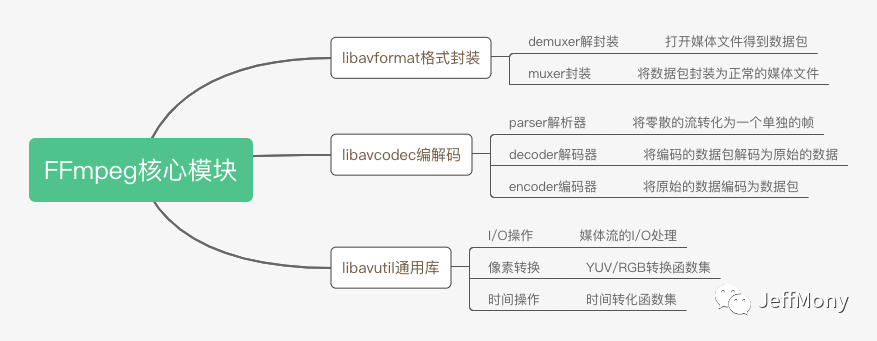
打開FFmpeg源碼,會發(fā)現(xiàn)有一系列l(wèi)ibavxxx的模塊,這些模塊很好地劃分了代碼的結(jié)構(gòu)和分工。
libavformat,format,格式封裝
libavcodec,codec,編碼、解碼
libavutil,util,通用音視頻工具,像素、IO、時間等工具
libavfilter,filter,過濾器,可以用作音視頻特效處理
libavdevice,device,設(shè)備(攝像頭、拾音器)
libswscale,scale,視頻圖像縮放,像素格式互換
libavresample,resample,重采樣
libswresample,也是重采樣,類似圖像縮放
libpostproc,后期處理
對于入門來說,最重要的是前面三個,也就是format、codec、util,這三個是最基本的庫,我們先理一下這三個庫的基本結(jié)構(gòu):
FFmpeg中的Context
如果你看過FFmpeg的代碼,就很容易發(fā)現(xiàn),F(xiàn)Fmpeg里有各式各樣的結(jié)構(gòu)體,有一類結(jié)構(gòu)體的命名規(guī)則比較類似,都是XxxxContext。
AVFormatContext
AVCodecContext
AVCodecParserContext
AVIOContext
AVFilterContext
當(dāng)然還有很多Context,上面只是列出比較典型的幾種,一看這種命名規(guī)則就和面向?qū)ο笾械拿茴愃啤?br style="box-sizing: border-box;">Context是持有的上下文,是數(shù)據(jù)鏈路傳遞過程中的持有數(shù)據(jù)的對象。
其實這是FFmpeg在運用面向?qū)ο蟮乃枷雭砭幊獭xxxContext可以看做是C語言“類”的實現(xiàn)。
C語言沒有類的語法特征,但可以用結(jié)構(gòu)體struct來描述一組元素的集合。如果把XxxxContext看做類,成員變量顯然可以用結(jié)構(gòu)體struct來模擬。
下面一個簡單的例子表示下:
struct AVFormatContext {
    iformat;
    oformat;
}
avformat_alloc_context();
avformat_free_context();
class AVFormatContext {
    private:
        iformat;
        oformat;

    public:
        AVFormatContext();
        ~AVFormatContext();
}
其實FFmpeg中的XxxxContext的寫法就是按照面向?qū)ο蟮恼Z法設(shè)計的。對面向?qū)ο蟊容^熟悉的同學(xué)其實看到這些命名應(yīng)該比較親切。
AVFormatContext
AVFormatContext是FFmpeg中打開文件必備的一個結(jié)構(gòu)體。
之前介紹過,格式Format是音視頻的一個核心概念,所以在FFmpeg里你需要經(jīng)常與AVFormatContext打交道。因為一般不是直接操作解封裝器Demuxer和封裝器Muxer,而是通過AVFormatContext來操作它們。
常用的 AVFormatContext 的操作,可以分為3類:
通用的函數(shù),例如創(chuàng)建和銷毀,等價于C++的構(gòu)造函數(shù)和析構(gòu)函數(shù)。
對輸入視頻流的讀操作,用于輸入處理,也就是使用解封裝器Demuxer對視頻流進行操作,是讀操作。
對輸出視頻流的寫操作,用于輸出處理,也就是使用封裝器Muxer對視頻流進行操作,是寫操作。
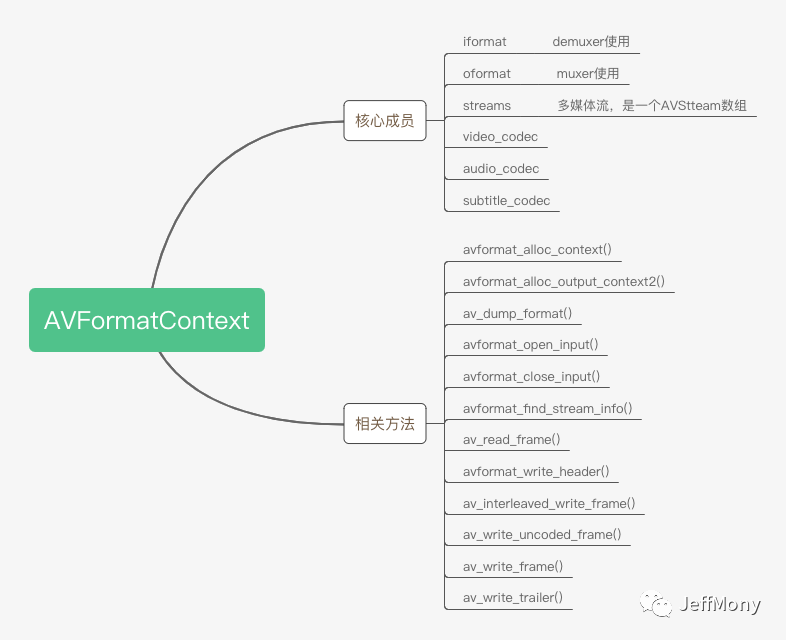
iformat對應(yīng)的是AVInputFormat,oformat對應(yīng)的是AVOutputFormat,正好說一下AVFormatContext和AVInputFormat/AVOutputFormat的區(qū)別。
AVFormatContext持有的是傳遞過程中的數(shù)據(jù),這些數(shù)據(jù)在整個傳遞路徑上都存在,或者都可以復(fù)用,AVInputFormat/AVOutputFormat中包含的是動作,包含著如何解析得到的這些數(shù)據(jù)。
AVStream **streams; 是媒體文件中包含的流數(shù)據(jù),幾條流,媒體流中分別是音頻、視頻、字幕等等。
avformat_alloc_context() 創(chuàng)建輸入媒體文件的AVFormatContext
avformat_alloc_output_context2() 創(chuàng)建輸出媒體文件的AVFormatContext
av_dump_format() 打印format詳情
avformat_open_input() 打開媒體文件,探知媒體文件的封裝格式。
avformat_close_input() 關(guān)閉媒體文件
avformat_find_stream_info() 探知媒體文件中的流信息,幾條流,每條流的基本信息。
av_read_frame() 讀取媒體文件中每一幀數(shù)據(jù),這是未解碼之前的幀
avformat_write_header() 寫入輸出文件的媒體頭部信息
av_interleaved_write_frame() 寫入輸出文件的幀信息,此幀信息已經(jīng)調(diào)整了幀與幀之間的關(guān)聯(lián)了。
av_write_uncoded_frame() 寫入輸出文件的未編碼的幀信息
av_write_frame() 寫入輸出文件的已編碼的幀信息
av_write_trailer() 寫入輸出文件的媒體尾部信息
對于AVFormatContext的使用,主要就是讀視頻和寫視頻,下面是基本的流程:
讀視頻流程:
1.創(chuàng)建avformat上下文
AVFormatContext *ifmt_ctx = avformat_alloc_context()2.打開視頻文件
avformat_open_input(&ifmt_ctx, in_filename, 0, 0)3.持續(xù)讀取視頻幀
while(...) {
av_read_frame(ifmt_ctx, &pkt)
}4.關(guān)閉avformat上下文
avformat_close_input(&ifmt_ctx)
寫視頻流程:
1.創(chuàng)建輸出上下文
avformat_alloc_output_context2(&ofmt_ctx, NULL, NULL, out_filename)2.寫格式頭部
avformat_write_header(ofmt_ctx, NULL)3.持續(xù)輸出幀
while(...) {
av_interleaved_write_frame(ofmt_ctx, &pkt)
}4.寫格式尾部
av_write_trailer(ofmt_ctx)5.關(guān)閉上下文
avformat_free_context(ofmt_ctx)
AVInputFormat
解封裝器Demuxer,正式的結(jié)構(gòu)體是AVInputFormat,其實是一個接口,功能是對封裝后的格式容器解開獲得編碼后的音視頻的工具。簡單說,就是拆包工具。
我們所知道的各種多媒體格式,例如MP4、MP3、FLV等格式的讀取,都有AVInputFormat的具體實現(xiàn)。
demuxer的種類很多,而且是可配置的,demuxer有多少,可以看一下demuxer_list.c文件,太多了,不一一列舉了,我們舉一個mp4 demuxer的例子。
下面是mp4視頻格式的解封裝器ff_mov_demuxer,在mov.c中:
AVInputFormat ff_mov_demuxer = {
    .name           = "mov,mp4,m4a,3gp,3g2,mj2",
    .long_name      = NULL_IF_CONFIG_SMALL("QuickTime / MOV"),
    .priv_class     = &mov_class,
    .priv_data_size = sizeof(MOVContext),
    .extensions     = "mov,mp4,m4a,3gp,3g2,mj2",
    .read_probe     = mov_probe,
    .read_header    = mov_read_header,
    .read_packet    = mov_read_packet,
    .read_close     = mov_read_close,
    .read_seek      = mov_read_seek,
    .flags          = AVFMT_NO_BYTE_SEEK | AVFMT_SEEK_TO_PTS,
};
看到了有幾個函數(shù)指針:
read_probe
探測一下什么封裝格式read_header
讀取格式頭部數(shù)據(jù)read_packet
讀取解封裝之后的數(shù)據(jù)包read_close
關(guān)閉對象read_seek
格式的seek讀取控制
你可以看到AVInputFormat提供的是類似接口一樣的功能,而ff_mov_demuxer是其的一個具體實現(xiàn)。FFmpeg其實本身的邏輯并不復(fù)雜,只是由于支持的格式特別豐富,所以代碼才如此多。如果我們先把大部分格式忽略掉,重點關(guān)注FFmpeg對其中幾個格式的實現(xiàn),可以更好理解FFmpeg。
AVOutputFormat
封裝器 Muxer,對應(yīng)的結(jié)構(gòu)體是AVOutputFormat,也是一個接口,功能是對編碼后的音視頻封裝進格式容器的工具。簡單說,就是打包工具。
跟解封裝器 Demuxer類似,也是MP4、MP3、FLV等格式的實現(xiàn),差別是封裝器 Muxer用于輸出。
與demuxer類似,muxer的種類很多,可以看一下muxer_list.c文件。
下面看一下mp3的muxer,在mp3enc.c中:
AVOutputFormat ff_mp3_muxer = {
    .name              = "mp3",
    .long_name         = NULL_IF_CONFIG_SMALL("MP3 (MPEG audio layer 3)"),
    .mime_type         = "audio/mpeg",
    .extensions        = "mp3",
    .priv_data_size    = sizeof(MP3Context),
    .audio_codec       = AV_CODEC_ID_MP3,
    .video_codec       = AV_CODEC_ID_PNG,
    .write_header      = mp3_write_header,
    .write_packet      = mp3_write_packet,
    .write_trailer     = mp3_write_trailer,
    .query_codec       = query_codec,
    .flags             = AVFMT_NOTIMESTAMPS,
    .priv_class        = &mp3_muxer_class,
};
上面也有對應(yīng)的指針函數(shù),是demuxer的反過程。
AVCodecContext
跟AVFormatContext類似,我們也是通過AVCodecContext對編碼器Encoder和解碼器Decoder操作,一般也不直接操作編解碼器。所以需要實現(xiàn)編解碼,一般都要跟AVCodecContext打交道。
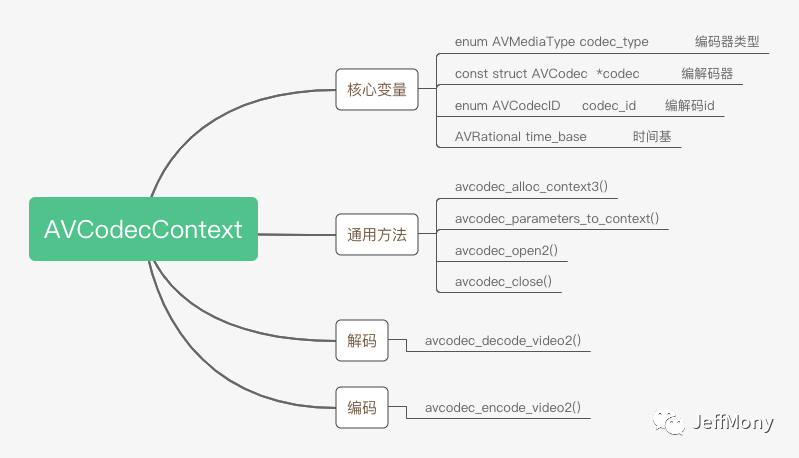
和demuxer與muxer一樣,codec也有decode和encode之分,具體可以參考codec_list.c文件:
查看ff_libx264_encoder,在libx264.c中:
AVCodec ff_libx264_encoder = {
    .name             = "libx264",
    .long_name        = NULL_IF_CONFIG_SMALL("libx264 H.264 / AVC / MPEG-4 AVC / MPEG-4 part 10"),
    .type             = AVMEDIA_TYPE_VIDEO,
    .id               = AV_CODEC_ID_H264,
    .priv_data_size   = sizeof(X264Context),
    .init             = X264_init,
    .encode2          = X264_frame,
    .close            = X264_close,
    .capabilities     = AV_CODEC_CAP_DELAY | AV_CODEC_CAP_AUTO_THREADS |
                        AV_CODEC_CAP_ENCODER_REORDERED_OPAQUE,
    .priv_class       = &x264_class,
    .defaults         = x264_defaults,
    .init_static_data = X264_init_static,
    .caps_internal    = FF_CODEC_CAP_INIT_CLEANUP,
    .wrapper_name     = "libx264",
};
其中核心的函數(shù)就是encode2,對應(yīng)X264_frame函數(shù)
FFmpeg中的Parser
解析器 Parser,將輸入流轉(zhuǎn)換為幀的數(shù)據(jù)包
由于解碼器的輸入是一個完整的幀數(shù)據(jù)包,而無論是網(wǎng)絡(luò)傳輸還是文件讀取,一般都是固定的buffer來讀取的,而不是安裝格式的幀大小來讀取,所以我們需要解析器Parser將流整理成一個一個的Frame數(shù)據(jù)包。
parser的全局聲明在parsers.c,具體的定義在list_parser.c
看一下h264_parser.c中的ff_h264_parser例子:
AVCodecParser ff_h264_parser = {
    .codec_ids      = { AV_CODEC_ID_H264 },
    .priv_data_size = sizeof(H264ParseContext),
    .parser_init    = init,
    .parser_parse   = h264_parse,
    .parser_close   = h264_close,
    .split          = h264_split,
};
H264ParseContext結(jié)構(gòu)中是H264格式的幀數(shù)據(jù)定義。
typedef struct H264ParseContext {
    ParseContext pc;
    H264ParamSets ps;
    H264DSPContext h264dsp;
    H264POCContext poc;
    H264SEIContext sei;
    int is_avc;
    int nal_length_size;
    int got_first;
    int picture_structure;
    uint8_t parse_history[6];
    int parse_history_count;
    int parse_last_mb;
    int64_t reference_dts;
    int last_frame_num, last_picture_structure;
} H264ParseContext;
這兒大家簡單看下,其中H264ParamSets很重要,H264關(guān)鍵的參數(shù)都在這兒定義:我們熟知的sps、pps都在這兒定義,有了這兩個定義,我們方便在宏塊中快速找到當(dāng)前幀的屬性。
typedef struct H264ParamSets {
    AVBufferRef *sps_list[MAX_SPS_COUNT];
    AVBufferRef *pps_list[MAX_PPS_COUNT];

    AVBufferRef *pps_ref;
    AVBufferRef *sps_ref;
    /* currently active parameters sets */
    const PPS *pps;
    const SPS *sps;
} H264ParamSets;
小結(jié)
FFmpeg的學(xué)習(xí)過程很難,梳理清楚結(jié)構(gòu),整體的代碼脈絡(luò)就比較清楚了,但是libavfilter等核心模塊本文沒有講。這個模塊非常龐大,而且可以自定義,后續(xù)會單獨講一下。
在實踐中學(xué)習(xí)FFmpeg進步會快一些。下面提供一些實踐的思路。
FFmpeg代碼結(jié)構(gòu)
FFmpeg交叉編譯
FFmpeg解封裝
FFmpeg重封裝
FFmpeg解碼
FFmpeg分離音視頻流

技術(shù)交流,歡迎加我微信:ezglumes ,拉你入技術(shù)交流群。
推薦閱讀:
開通專輯 | 細(xì)數(shù)那些年寫過的技術(shù)文章專輯
覺得不錯,點個在看唄~
