
如何在React應用中實現(xiàn)“使用GitHub登錄”
步驟1:在Github上創(chuàng)建OAuth應用
.env 文件,并設(shè)置這些變量:REACT_APP_CLIENT_ID=你的Client ID
REACT_APP_CLIENT_SECRET=你的Client Secret
REACT_APP_REDIRECT_URI=http://localhost:3000/login
步驟2:創(chuàng)建React應用
import React from 'react';
import ReactDOM from 'react-dom';
import App from './App';

ReactDOM.render(<App />, document.getElementById('root'));
另外,編輯App.js,確保它看起來像這樣:
import React, { createContext, useReducer } from 'react';
import { BrowserRouter as Router, Route, Switch } from "react-router-dom";
import Home from "./components/Home";
import Login from "./components/Login";
import { initialState, reducer } from "./store/reducer";


export const AuthContext = createContext();

function App() {
  const [state, dispatch] = useReducer(reducer, initialState);

  return (
    <AuthContext.Provider
      value={{
        state,
        dispatch
      }}
    >
    <Router>
      <Switch>
        <Route path="/login" component={Login}/>
        <Route path="/" component={Home}/>
      Switch>
    Router>
    AuthContext.Provider>
  );
}

export default App;
mkdir -p src/components && cd src/components && touch Home.js Login.js
mkdir -p src/store/reducer && cd src/store/reducer && touch index.js
Store中index.js文件的內(nèi)容應如下所示。
export const initialState = {
  isLoggedIn: JSON.parse(localStorage.getItem("isLoggedIn")) || false,
  user: JSON.parse(localStorage.getItem("user")) || null,
  client_id: process.env.REACT_APP_CLIENT_ID,
  redirect_uri: process.env.REACT_APP_REDIRECT_URI,
  client_secret: process.env.REACT_APP_CLIENT_SECRET,
  proxy_url: process.env.REACT_APP_PROXY_URL
};

export const reducer = (state, action) => {
  switch (action.type) {
    case "LOGIN": {
      localStorage.setItem("isLoggedIn", JSON.stringify(action.payload.isLoggedIn))
      localStorage.setItem("user", JSON.stringify(action.payload.user))
      console.log(action.payload.isLoggedIn)
      return {
        ...state,
        isLoggedIn: action.payload.isLoggedIn,
        user: action.payload.user
      };
    }
    case "LOGOUT": {
      localStorage.clear()
      return {
        ...state,
        isLoggedIn: false,
        user: null
      };
    }
    default:
      return state;
  }
};
import React, { useState, useEffect, useContext } from "react";
import { Redirect } from "react-router-dom";
import Styled from "styled-components";
import GithubIcon from "mdi-react/GithubIcon";
import { AuthContext } from "../App";


export default function Login() {
  const { state, dispatch } = useContext(AuthContext);
  const [data, setData] = useState({ errorMessage: "", isLoading: false });

  const { client_id, redirect_uri } = state;

  useEffect(() => {
    // After requesting Github access, Github redirects back to your app with a code parameter
    const url = window.location.href;
    const hasCode = url.includes("?code=");

    // If Github API returns the code parameter
    if (hasCode) {
      const newUrl = url.split("?code=");
      window.history.pushState({}, null, newUrl[0]);
      setData({ ...data, isLoading: true });

      const requestData = {
        client_id: state.client_id,
        redirect_uri: state.redirect_uri,
        client_secret: state.client_secret,
        code: newUrl[1]
      };

      const proxy_url = state.proxy_url;

      // Use code parameter and other parameters to make POST request to proxy_server
      fetch(proxy_url, {
        method: "POST",
        body: JSON.stringify(requestData)
      })
        .then(response => response.json())
        .then(data => {
          dispatch({
            type: "LOGIN",
            payload: { user: data, isLoggedIn: true }
          });
        })
        .catch(error => {
          setData({
            isLoading: false,
            errorMessage: "Sorry! Login failed"
          });
        });
    }
  }, [state, dispatch, data]);

  if (state.isLoggedIn) {
    return <Redirect to="/" />;
  }

  return (
    <Wrapper>
      <section className="container">
        <div>
          <h1>Welcomeh1>
          <span>Super amazing appspan>
          <span>{data.errorMessage}span>
          <div className="login-container">
            {data.isLoading ? (
              <div className="loader-container">
                <div className="loader">div>
              div>
            ) : (
              <>
                {
                  // Link to request GitHub access
                }
                <a
                  className="login-link"
                  href={`https://github.com/login/oauth/authorize?scope=user&client_id=${client_id}&redirect_uri=${redirect_uri}`}
                  onClick={() => {
                    setData({ ...data, errorMessage: "" });
                  }}
                >
                  <GithubIcon />
                  <span>Login with GitHubspan>
                a>

            )}
          div>
        div>
      section>
    </Wrapper>
  );
}

const Wrapper = Styled.section`
  .container {
    display: flex;
    justify-content: center;
    align-items: center;
    height: 100vh;
    font-family: Arial;

    > div:nth-child(1) {
      display: flex;
      flex-direction: column;
      justify-content: center;
      align-items: center;
      box-shadow: 0 1px 4px 0 rgba(0, 0, 0, 0.2);
      transition: 0.3s;
      width: 25%;
      height: 45%;
      > h1 {
        font-size: 2rem;
        margin-bottom: 20px;
      }
      > span:nth-child(2) {
        font-size: 1.1rem;
        color: #808080;
        margin-bottom: 70px;
      }
      > span:nth-child(3) {
        margin: 10px 0 20px;
        color: red;
      }
      .login-container {
        background-color: #000;
        width: 70%;
        border-radius: 3px;
        color: #fff;
        display: flex;
        align-items: center;
        justify-content: center;
        > .login-link {
          text-decoration: none;
          color: #fff;
          text-transform: uppercase;
          cursor: default;
          display: flex;
          align-items: center;
          height: 40px;
          > span:nth-child(2) {
            margin-left: 5px;
          }
        }
        .loader-container {
          display: flex;
          justify-content: center;
          align-items: center;
          height: 40px;
        }
        .loader {
          border: 4px solid #f3f3f3;
          border-top: 4px solid #3498db;
          border-radius: 50%;
          width: 12px;
          height: 12px;
          animation: spin 2s linear infinite;
        }
        @keyframes spin {
          0% {
            transform: rotate(0deg);
          }
          100% {
            transform: rotate(360deg);
          }
        }
      }
    }
  }
`;
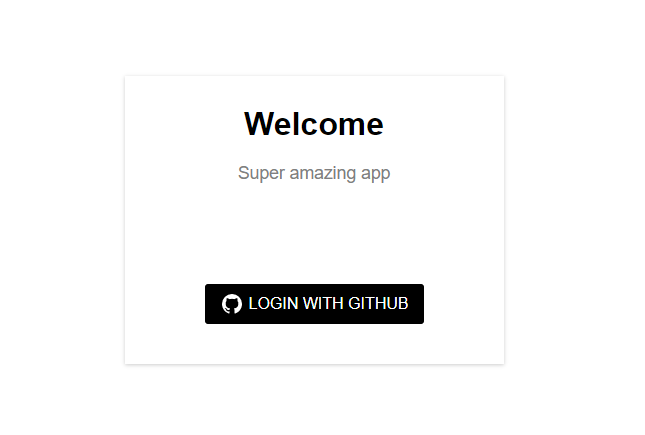
我們導入并利用AuthContext使Store中的全局狀態(tài)和操作可在此組件中使用。 當用戶點擊“用Github登錄”按鈕時,會向Github API提出請求,對我們的應用進行授權(quán)。如果成功的話,Github就會重定向回我們的應用(授權(quán)回調(diào)URL),并在URL中加入“code”。 我們利用useEffect hook偵聽此“code”何時可用。然后我們從url中收集它,使用code和其他數(shù)據(jù),如:client_id,redirect_uri,client_secret,繼續(xù)通過我們的proxy server[2](代理服務(wù)器)向Github APIs發(fā)出請求(一個簡單的快遞應用,幫助我們繞過CORS錯誤)。下一步,我將詳細討論代理服務(wù)器。 如果通過代理服務(wù)器的認證返回有效的響應,我們就會調(diào)度“LOGIN”事件,在我們的存儲中設(shè)置用戶數(shù)據(jù)和isLoggedIn有效載荷。
import React, { useContext } from "react";
import { Redirect } from "react-router-dom";
import Styled from "styled-components";
import { AuthContext } from "../App";


export default function Home() {
  const { state, dispatch } = useContext(AuthContext);

  if (!state.isLoggedIn) {
    return <Redirect to="/login" />;
  }

  const { avatar_url, name, public_repos, followers, following } = state.user

  const handleLogout = () => {
    dispatch({
      type: "LOGOUT"
    });
  }

  return (
    <Wrapper>
      <div className="container">
        <button onClick={()=> handleLogout()}>Logoutbutton>
        <div>
          <div className="content">
            <img src={avatar_url} alt="Avatar"/>
            <span>{name}span>
            <span>{public_repos} Reposspan>
            <span>{followers} Followersspan>
            <span>{following} Followingspan>
          div>
        div>
      div>
    Wrapper>
  );
}

const Wrapper = Styled.section`
.container{
  display: flex;
  flex-direction: column;
  height: 100vh;
  font-family: Arial;
  button{
    all: unset;
    width: 100px;
    height: 35px;
    margin: 10px 10px 0 0;
    align-self: flex-end;
    background-color: #0041C2;
    color: #fff;
    text-align: center;
    border-radius: 3px;
    border: 1px solid #0041C2;
    &:hover{
      background-color: #fff;
      color: #0041C2;
    }
  }
  >div{
    height: 100%;
    width: 100%;
    display: flex;
    font-size: 18px;
    justify-content: center;
    align-items: center;
    .content{
      display: flex;
      flex-direction: column;
      padding: 20px 100px;
      box-shadow: 0 1px 4px 0 rgba(0, 0, 0, 0.2);
      width: auto;

      img{
        height: 150px;
        width: 150px;
        border-radius: 50%;
      }

      >span:nth-child(2){
        margin-top: 20px;
        font-weight: bold;
      }

      >span:not(:nth-child(2)){
        margin-top: 8px;
        font-size: 14px;
      }

    }
  }
}
`;
步驟3:創(chuàng)建代理服務(wù)器
REACT_APP_PROXY_URL=http://localhost:5000/authenticate
SERVER_PORT=5000
const express = require("express");
const bodyParser = require("body-parser");
const FormData = require("form-data");
const fetch = require("node-fetch");
const { client_id, redirect_uri, client_secret } = require("./config");

const config = require("./config");

const app = express();

app.use(bodyParser.json());
app.use(bodyParser.json({ type: "text/*" }));
app.use(bodyParser.urlencoded({ extended: false }));

// Enabled Access-Control-Allow-Origin", "*" in the header so as to by-pass the CORS error.
app.use((req, res, next) => {
  res.header("Access-Control-Allow-Origin", "*");
  next();
});

app.post("/authenticate", (req, res) => {
  const { code } = req.body;

  const data = new FormData();
  data.append("client_id", client_id);
  data.append("client_secret", client_secret);
  data.append("code", code);
  data.append("redirect_uri", redirect_uri);

  // Request to exchange code for an access token
  fetch(`https://github.com/login/oauth/access_token`, {
    method: "POST",
    body: data,
  })
    .then((response) => response.text())
    .then((paramsString) => {
      let params = new URLSearchParams(paramsString);
      const access_token = params.get("access_token");

      // Request to return data of a user that has been authenticated
      return fetch(`https://api.github.com/user`, {
        headers: {
          Authorization: `token ${access_token}`,
        },
      });
    })
    .then((response) => response.json())
    .then((response) => {
      return res.status(200).json(response);
    })
    .catch((error) => {
      return res.status(400).json(error);
    });
});

const PORT = process.env.SERVER_PORT || 5000;
app.listen(PORT, () => console.log(`Listening on ${PORT}`));
源碼
來源:https://levelup.gitconnected.com/how-to-implement-login-with-github-in-a-react-app-bd3d704c64fc
作者:Princewill Iroka
粉絲福利
146期留言+在看幸運用戶:暫無。
臨走前留下,今天的福利
福利1:《教你玩轉(zhuǎn)手機攝影,隨手拍出好照片》獲取資源請在公眾號對話框中回復關(guān)鍵字:FL04,如果沒有關(guān)注請掃下面的二維碼 福利2:在看+留言,我隨機抽取一位認真留言的小伙伴,給他發(fā)一個紅包獎勵
最近文章
Vite使Vue CLI過時了嗎? MongoDB+Mongoose+Node.js后端開發(fā)最佳實踐 自動增長 的最干凈技巧 使用 GPU.js 改善JavaScript性能 初學者的技術(shù)寫作:技術(shù)博客基礎(chǔ)知識A-Z指南 create-react-app 4.0.0的新功能 壓箱底筆記:Promise和Async/await的理解和使用 Fetch API速查表:9個最常見的API請求 什么是AVIF?如何在你的網(wǎng)站上使用AV1圖像格式 將HTML表格轉(zhuǎn)換成精美的PDF的幾種方案比較 思維訓練:如何設(shè)計一個JavaScript插件系統(tǒng)?
-?END -
點贊 + 在看 + 留言,下一個幸運兒就是你!
走心的分享更容易被抽中~
開獎時間?下期文末

參考資料
此處: https://developer.github.com/apps/building-oauth-apps/creating-an-oauth-app/
[2]proxy server: https://github.com/PrincewillIroka/login-with-github/blob/master/server/index.js
評論
圖片
表情