
咦?什么是模塊聯(lián)邦?哦!有點(diǎn)意思!

特性
webpack 5引入聯(lián)邦模式是為了更好的共享代碼。在此之前,我們共享代碼一般用npm發(fā)包來(lái)解決。npm發(fā)包需要經(jīng)歷構(gòu)建,發(fā)布,引用三階段,而聯(lián)邦模塊可以直接引用其他應(yīng)用代碼,實(shí)現(xiàn)熱插拔效果。對(duì)比npm的方式更加簡(jiǎn)潔、快速、方便。
歡迎關(guān)注《前端陽(yáng)光》,加入技術(shù)交流群,加入內(nèi)推群
使用方法
1、引入遠(yuǎn)程js
2、webpack配置
3、模塊使用
引入遠(yuǎn)程JS
假設(shè)我們有app1,app2兩個(gè)應(yīng)用,端口分別為3001,3002。app1應(yīng)用要想引用app2里面的js,直接用script標(biāo)簽即可。
例如app1應(yīng)用里面index.html引入app2應(yīng)用remoteEntry.js
 <head>
    <script src="http://localhost:3002/remoteEntry.js"></script>
  </head>
webpack配置
app1的webpack配置:
const ModuleFederationPlugin = require("webpack/lib/container/ModuleFederationPlugin");

module.exports = {
  //....
  plugins: [
    new ModuleFederationPlugin({
      name: "app1",
      library: { type: "var", name: "app1" },
      remotes: {
        app2: "app2",
      },
      shared: ["react", "react-dom"],
    }),
  ],
};
對(duì)于app2的webpack配置如下
  plugins: [
    new ModuleFederationPlugin({
      name: "app2",
      library: { type: "var", name: "app2" },
      filename: "remoteEntry.js",
      exposes: {
        "./Button": "./src/Button",
      },
      shared: ["react", "react-dom"],
    })
  ],
可以看到app1和app2的配置基本相同,除了app2 多了filename和exposes以外。
參數(shù)解釋
name 應(yīng)用名,全局唯一,不可沖突。
library。UMD標(biāo)準(zhǔn)導(dǎo)出,和name保持一致即可。
remotes 聲明需要引用的遠(yuǎn)程應(yīng)用。如上圖app1配置了需要的遠(yuǎn)程應(yīng)用app2.
filename 遠(yuǎn)程應(yīng)用時(shí)被其他應(yīng)用引入的js文件名稱。對(duì)應(yīng)上面的remoteEntry.js
exposes 遠(yuǎn)程應(yīng)用暴露出的模塊名。
shared 依賴的包。
1、如果配置了這個(gè)屬性。webpack在加載的時(shí)候會(huì)先判斷本地應(yīng)用是否存在對(duì)應(yīng)的包,如果不存在,則加載遠(yuǎn)程應(yīng)用的依賴包。
2、以app2來(lái)說(shuō),因?yàn)樗且粋€(gè)遠(yuǎn)程應(yīng)用,配置了["react", "react-dom"] ,而它被app1所消費(fèi),所以webpack會(huì)先查找app1是否存在這兩個(gè)包,如果不存在就使用app2自帶包。app1里面同樣申明了這兩個(gè)參數(shù),因?yàn)閍pp1是本地應(yīng)用,所以會(huì)直接用app1的依賴。
模塊使用
對(duì)于app1/App.js代碼使用app2的組件,代碼如下:
import React from "react";

const RemoteButton = React.lazy(() => import("app2/Button"));

const App = () => (
  <div>
    <h1>Basic Host-Remote</h1>
    <h2>App 1</h2>
    <React.Suspense fallback="Loading Button">
      <RemoteButton />
    </React.Suspense>
  </div>
);

export default App;
具體這一行
const RemoteButton = React.lazy(() => import("app2/Button"));
使用方式為:import('遠(yuǎn)程應(yīng)用名/暴露的模塊名'),對(duì)應(yīng)webpack配置里面的name和expose。使用方式和引入一個(gè)普通異步組件無(wú)差別。
適用范圍
由于share這個(gè)屬性的存在,所以本地應(yīng)用和遠(yuǎn)程應(yīng)用的技術(shù)棧和版本必須兼容,統(tǒng)一用同一套。比如js用react,css用sass等。
聯(lián)邦模塊和微前端的關(guān)系:因?yàn)閑xpose這個(gè)屬性即可以暴露單個(gè)組件,也可以把整個(gè)應(yīng)用暴露出去。同時(shí)由于share屬性存在,技術(shù)棧必須一致。所以加上路由,可以用來(lái)實(shí)現(xiàn)single-spa這種模式的微前端。
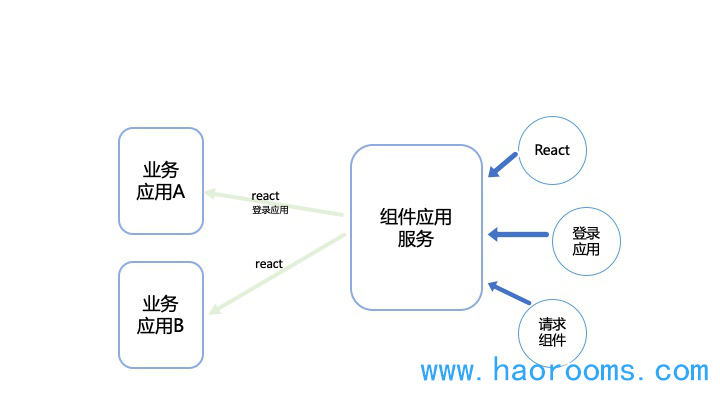
使用場(chǎng)景:新建專門的組件應(yīng)用服務(wù)來(lái)管理所有組件和應(yīng)用,其他業(yè)務(wù)層只需要根據(jù)自己業(yè)務(wù)所需載入對(duì)應(yīng)的組件和功能模塊即可。模塊管理統(tǒng)一管理,代碼質(zhì)量高,搭建速度快。特別適用矩陣app,或者可視化頁(yè)面搭建等場(chǎng)景。
應(yīng)用
1、next項(xiàng)目應(yīng)用 next項(xiàng)目1的next.config.js
webpack: (config, options) => {
    const { buildId, dev, isServer, defaultLoaders, webpack } = options;
    const mfConf = {
      mergeRuntime: true, //experimental
      name: "next1",
      library: { type: config.output.libraryTarget, name: "next1" },
      filename: "static/runtime/remoteEntry.js",
      exposes: {
        "./exposedTitle": "./components/exposedTitle",
      },
      remotes: {
        next2: isServer
          ? path.resolve(
              __dirname,
              "../next2/.next/server/static/runtime/remoteEntry.js"
            )
          : "next2",
      },
    };
    if (!isServer) {
      config.output.publicPath = "http://localhost:3000/_next/";
    }
    withModuleFederation(config, options, mfConf);
    return config;
  }
next項(xiàng)目2的next.config.js
webpack: (config, options) => {
    const { buildId, dev, isServer, defaultLoaders, webpack } = options;
    const mfConf = {
      mergeRuntime: true, //experimental
      name: "next2",
      library: { type: config.output.libraryTarget, name: "next2" },
      filename: "static/runtime/remoteEntry.js",
      remotes: {
        next1: isServer
          ? path.resolve(
              __dirname,
              "../next1/.next/server/static/runtime/remoteEntry.js"
            )
          : "next1",
      },
      exposes: {
        "./nav": "./components/nav",
      },
      shared: ["lodash"],
    };

    withModuleFederation(config, options, mfConf);

    if (!isServer) {
      config.output.publicPath = "http://localhost:3001/_next/";
    }

    return config;
  }
ps注意,還要配置
future: { webpack5: true },
vue3中應(yīng)用
案例1 home項(xiàng)目
new ModuleFederationPlugin({
  name: "home",
  filename: "remoteEntry.js",
  remotes: {
    home: "home@http://localhost:3002/remoteEntry.js",
  },
  exposes: {
    "./Content": "./src/components/Content",
    "./Button": "./src/components/Button",
  },
}),
案例2 layout項(xiàng)目
 new ModuleFederationPlugin({
      name: "layout",
      filename: "remoteEntry.js",
      remotes: {
        home: "home@http://localhost:3002/remoteEntry.js",
      },
      exposes: {},
    }),
layout中可以用home項(xiàng)目中的組件
import { createApp, defineAsyncComponent } from "vue";
import Layout from "./Layout.vue";

const Content = defineAsyncComponent(() => import("home/Content"));
const Button = defineAsyncComponent(() => import("home/Button"));

const app = createApp(Layout);

app.component("content-element", Content);
app.component("button-element", Button);
歡迎關(guān)注《前端陽(yáng)光》,加入技術(shù)交流群,加入內(nèi)推群
原文:https://www.haorooms.com/post/webpack5_new_featrue