
Python爬蟲:單線程、多線程和協(xié)程的爬蟲性能對比

專欄作者:小小明
非常擅長解決各類復雜數(shù)據(jù)處理的邏輯,各類結(jié)構(gòu)化與非結(jié)構(gòu)化數(shù)據(jù)互轉(zhuǎn),字符串解析匹配等等。
至今已經(jīng)幫助很多數(shù)據(jù)從業(yè)者解決工作中的實際問題,如果你在數(shù)據(jù)處理上遇到什么困難,歡迎評論區(qū)與我交流。
大家好,我是小小明。
今天我要給大家分享的是如何爬取豆瓣上深圳近期即將上映的電影影訊,并分別用普通的單線程、多線程和協(xié)程來爬取,從而對比單線程、多線程和協(xié)程在網(wǎng)絡(luò)爬蟲中的性能。
具體要爬的網(wǎng)址是:https://movie.douban.com/cinema/later/shenzhen/
除了要爬入口頁以外還需爬取每個電影的詳情頁,具體要爬取的結(jié)構(gòu)信息如下:

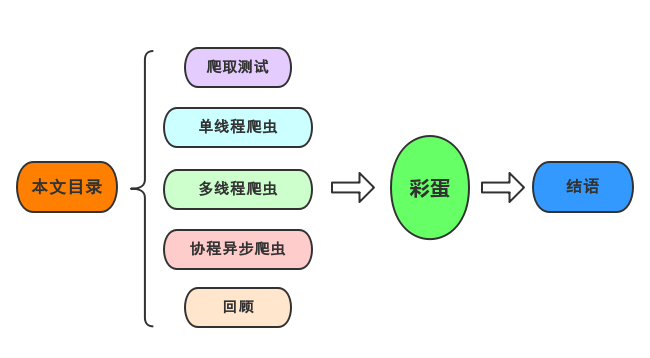
爬取測試
下面我演示使用xpath解析數(shù)據(jù)。
入口頁數(shù)據(jù)讀取:
import?requests
from?lxml?import?etree
import?pandas?as?pd
import?re

main_url?=?"https://movie.douban.com/cinema/later/shenzhen/"
headers?=?{
????"Accept-Encoding":?"Gzip",
????"User-Agent":?"Mozilla/5.0?(Windows?NT?6.1;?WOW64)?AppleWebKit/537.36?(KHTML,?like?Gecko)?Chrome/78.0.3904.108?Safari/537.36"
}
r?=?requests.get(main_url,?headers=headers)
r
結(jié)果:
檢查一下所需數(shù)據(jù)的xpath:
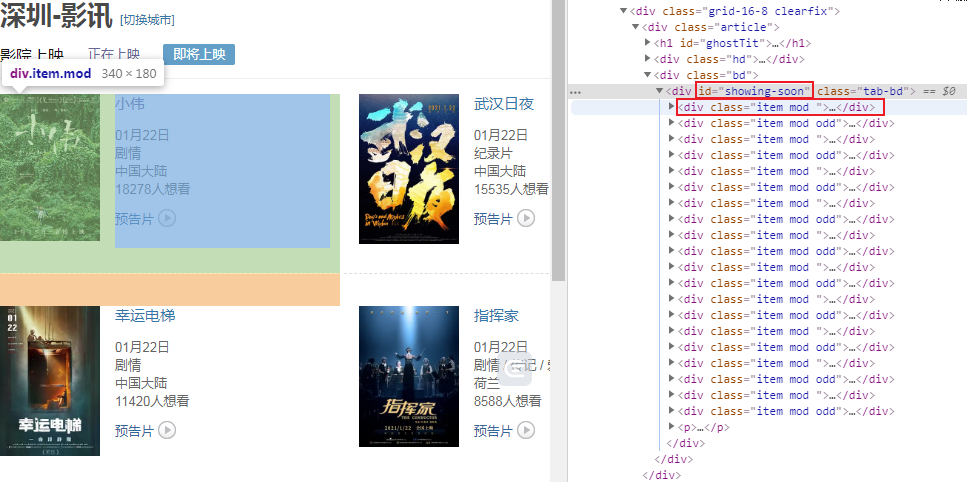
可以看到每個電影信息都位于id為showing-soon下面的div里面,再分別分析內(nèi)部的電影名稱、url和想看人數(shù)所處的位置,于是可以寫出如下代碼:
html?=?etree.HTML(r.text)
all_movies?=?html.xpath("http://div[@id='showing-soon']/div")
result?=?[]
for?e?in?all_movies:
????#??imgurl,?=?e.xpath(".//img/@src")
????name,?=?e.xpath(".//div[@class='intro']/h3/a/text()")
????url,?=?e.xpath(".//div[@class='intro']/h3/a/@href")
????#?date,?movie_type,?pos?=?e.xpath(".//div[@class='intro']/ul/li[@class='dt']/text()")
????like_num,?=?e.xpath(
????????".//div[@class='intro']/ul/li[@class='dt?last']/span/text()")
????result.append((name,?int(like_num[:like_num.find("人")]),?url))
main_df?=?pd.DataFrame(result,?columns=["影名",?"想看人數(shù)",?"url"])
main_df
結(jié)果:
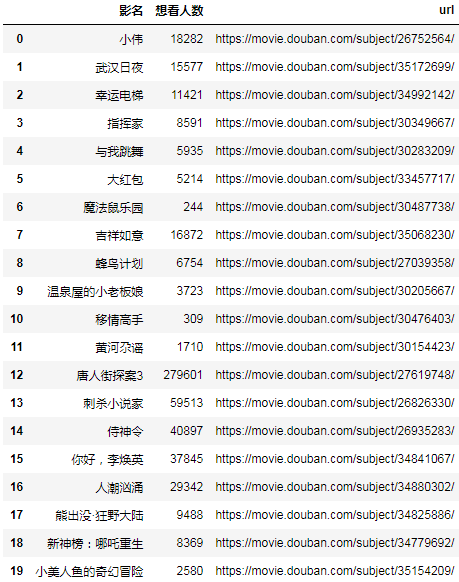
然后再選擇一個詳情頁的url進行測試,我選擇了熊出沒·狂野大陸這部電影,因為文本數(shù)據(jù)相對最復雜,也最具備代表性:
url?=?main_df.at[17,?"url"]
url
結(jié)果:
'https://movie.douban.com/subject/34825886/'
分析詳情頁結(jié)構(gòu):

文本信息都在這個位置中,下面我們直接提取這個div下面的所有文本節(jié)點:
r?=?requests.get(url,?headers=headers)
html?=?etree.HTML(r.text)
movie_infos?=?html.xpath("http://div[@id='info']//text()")
print(movie_infos)
結(jié)果:
['\n????????',?'導演',?':?',?'丁亮',?'\n????????',?'編劇',?':?',?'徐蕓',?'?/?',?'崔鐵志',?'?/?',?'張宇',?'\n????????',?'主演',?':?',?'張偉',?'?/?',?'張秉君',?'?/?',?'譚笑',?'\n????????',?'類型:',?'?',?'喜劇',?'?/?',?'科幻',?'?/?',?'動畫',?'\n????????\n????????',?'制片國家/地區(qū):',?'?中國大陸',?'\n????????',?'語言:',?'?漢語普通話',?'\n????????',?'上映日期:',?'?',?'2021-02-12(中國大陸)',?'?/?',?'2020-08-01(上海電影節(jié))',?'\n????????',?'片長:',?'?',?'100分鐘',?'\n????????',?'又名:',?'?熊出沒大電影7?/?熊出沒科幻大電影?/?Boonie?Bears:?The?Wild?Life',?'\n????????',?'IMDb鏈接:',?'?',?'tt11654032',?'\n\n']
為了閱讀方便,拼接一下:
movie_info_txt?=?"".join(movie_infos)
print(movie_info_txt)
結(jié)果:
????????導演:?丁亮
????????編劇:?徐蕓?/?崔鐵志?/?張宇
????????主演:?張偉?/?張秉君?/?譚笑
????????類型:?喜劇?/?科幻?/?動畫
????????
????????制片國家/地區(qū):?中國大陸
????????語言:?漢語普通話
????????上映日期:?2021-02-12(中國大陸)?/?2020-08-01(上海電影節(jié))
????????片長:?100分鐘
????????又名:?熊出沒大電影7?/?熊出沒科幻大電影?/?Boonie?Bears:?The?Wild?Life
????????IMDb鏈接:?tt11654032
接下來就簡單了:
row?=?{}
for?line?in?re.split("[\n?]*\n[\n?]*",?movie_info_txt):
????line?=?line.strip()
????arr?=?line.split(":?",?maxsplit=1)
????if?len(arr)?!=?2:
????????continue
????k,?v?=?arr
????row[k]?=?v
row
結(jié)果:
{'導演':?'丁亮',
?'編劇':?'徐蕓?/?崔鐵志?/?張宇',
?'主演':?'張偉?/?張秉君?/?譚笑',
?'類型':?'喜劇?/?科幻?/?動畫',
?'制片國家/地區(qū)':?'中國大陸',
?'語言':?'漢語普通話',
?'上映日期':?'2021-02-12(中國大陸)?/?2020-08-01(上海電影節(jié))',
?'片長':?'100分鐘',
?'又名':?'熊出沒大電影7?/?熊出沒科幻大電影?/?Boonie?Bears:?The?Wild?Life',
?'IMDb鏈接':?'tt11654032'}
可以看到成功的切割出了每一項。
下面根據(jù)上面的測試基礎(chǔ),我們完善整體的爬蟲代碼:
單線程爬蟲
import?requests
from?lxml?import?etree
import?pandas?as?pd
import?re

main_url?=?"https://movie.douban.com/cinema/later/shenzhen/"
headers?=?{
????"Accept-Encoding":?"Gzip",
????"User-Agent":?"Mozilla/5.0?(Windows?NT?6.1;?WOW64)?AppleWebKit/537.36?(KHTML,?like?Gecko)?Chrome/78.0.3904.108?Safari/537.36"
}
r?=?requests.get(main_url,?headers=headers)
html?=?etree.HTML(r.text)
all_movies?=?html.xpath("http://div[@id='showing-soon']/div")
result?=?[]
for?e?in?all_movies:
????imgurl,?=?e.xpath(".//img/@src")
????name,?=?e.xpath(".//div[@class='intro']/h3/a/text()")
????url,?=?e.xpath(".//div[@class='intro']/h3/a/@href")
????print(url)
#?????date,?movie_type,?pos?=?e.xpath(".//div[@class='intro']/ul/li[@class='dt']/text()")
????like_num,?=?e.xpath(
????????".//div[@class='intro']/ul/li[@class='dt?last']/span/text()")
????r?=?requests.get(url,?headers=headers)
????html?=?etree.HTML(r.text)
????row?=?{}
????row["電影名稱"]?=?name
????for?line?in?re.split("[\n?]*\n[\n?]*",?"".join(html.xpath("http://div[@id='info']//text()")).strip()):
????????line?=?line.strip()
????????arr?=?line.split(":?",?maxsplit=1)
????????if?len(arr)?!=?2:
????????????continue
????????k,?v?=?arr
????????row[k]?=?v
????row["想看人數(shù)"]?=?int(like_num[:like_num.find("人")])
#?????row["url"]?=?url
#?????row["圖片地址"]?=?imgurl
#?????print(row)
????result.append(row)
df?=?pd.DataFrame(result)
df.sort_values("想看人數(shù)",?ascending=False,?inplace=True)
df.to_csv("shenzhen_movie.csv",?index=False)
結(jié)果:
https://movie.douban.com/subject/26752564/
https://movie.douban.com/subject/35172699/
https://movie.douban.com/subject/34992142/
https://movie.douban.com/subject/30349667/
https://movie.douban.com/subject/30283209/
https://movie.douban.com/subject/33457717/
https://movie.douban.com/subject/30487738/
https://movie.douban.com/subject/35068230/
https://movie.douban.com/subject/27039358/
https://movie.douban.com/subject/30205667/
https://movie.douban.com/subject/30476403/
https://movie.douban.com/subject/30154423/
https://movie.douban.com/subject/27619748/
https://movie.douban.com/subject/26826330/
https://movie.douban.com/subject/26935283/
https://movie.douban.com/subject/34841067/
https://movie.douban.com/subject/34880302/
https://movie.douban.com/subject/34825886/
https://movie.douban.com/subject/34779692/
https://movie.douban.com/subject/35154209/
爬到的文件:
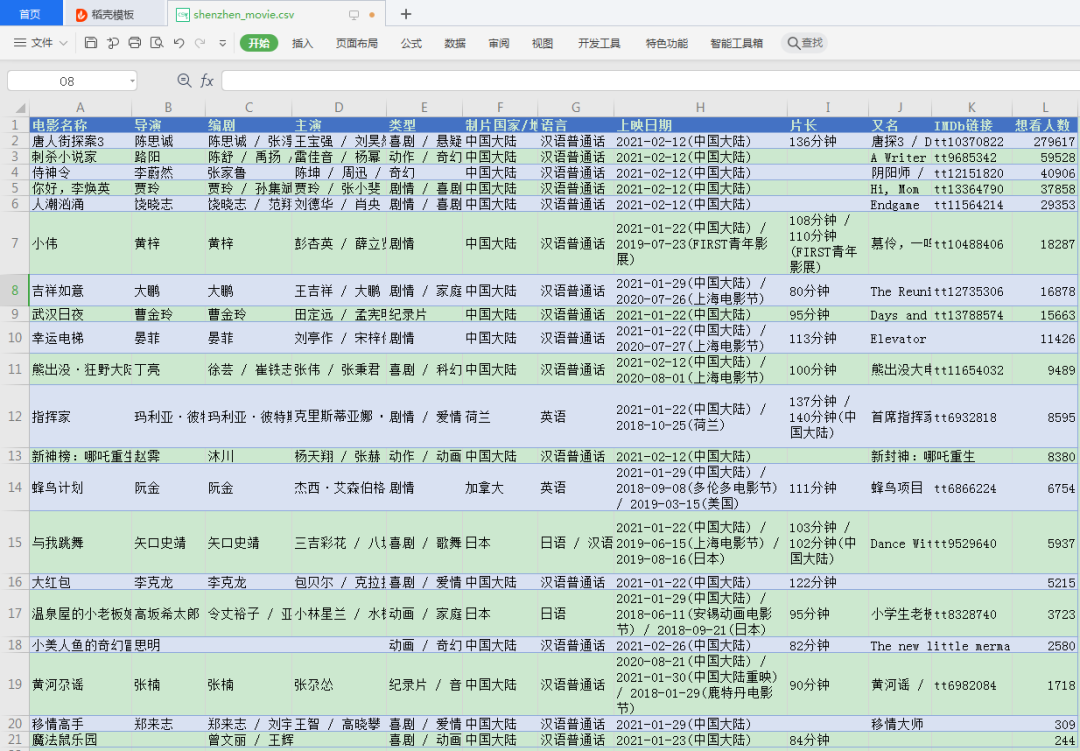
整體耗時:
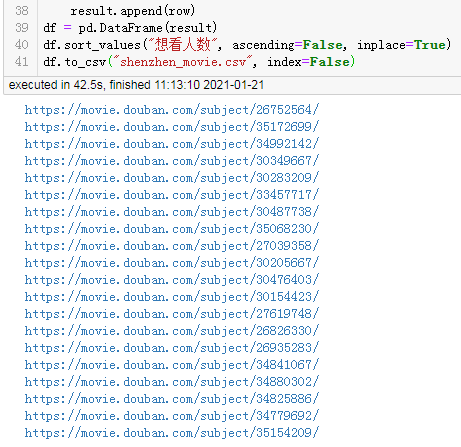
42.5秒。
多線程爬蟲
單線程的爬取耗時還是挺長的,下面看看使用多線程的爬取效率:
import?requests
from?lxml?import?etree
import?pandas?as?pd
import?re
from?concurrent.futures?import?ThreadPoolExecutor,?wait,?ALL_COMPLETED


def?fetch_content(url):
????print(url)
????headers?=?{
????????"Accept-Encoding":?"Gzip",??#?使用gzip壓縮傳輸數(shù)據(jù)讓訪問更快
????????"User-Agent":?"Mozilla/5.0?(Windows?NT?6.1;?WOW64)?AppleWebKit/537.36?(KHTML,?like?Gecko)?Chrome/78.0.3904.108?Safari/537.36"
????}
????r?=?requests.get(url,?headers=headers)
????return?r.text


url?=?"https://movie.douban.com/cinema/later/shenzhen/"
init_page?=?fetch_content(url)
html?=?etree.HTML(init_page)
all_movies?=?html.xpath("http://div[@id='showing-soon']/div")
result?=?[]
for?e?in?all_movies:
#?????imgurl,?=?e.xpath(".//img/@src")
????name,?=?e.xpath(".//div[@class='intro']/h3/a/text()")
????url,?=?e.xpath(".//div[@class='intro']/h3/a/@href")
#?????date,?movie_type,?pos?=?e.xpath(".//div[@class='intro']/ul/li[@class='dt']/text()")
????like_num,?=?e.xpath(
????????".//div[@class='intro']/ul/li[@class='dt?last']/span/text()")
????result.append((name,?int(like_num[:like_num.find("人")]),?url))
main_df?=?pd.DataFrame(result,?columns=["影名",?"想看人數(shù)",?"url"])

max_workers?=?main_df.shape[0]
with?ThreadPoolExecutor(max_workers=max_workers)?as?executor:
????future_tasks?=?[executor.submit(fetch_content,?url)?for?url?in?main_df.url]
????wait(future_tasks,?return_when=ALL_COMPLETED)
????pages?=?[future.result()?for?future?in?future_tasks]

result?=?[]
for?url,?html_text?in?zip(main_df.url,?pages):
????html?=?etree.HTML(html_text)
????row?=?{}
????for?line?in?re.split("[\n?]*\n[\n?]*",?"".join(html.xpath("http://div[@id='info']//text()")).strip()):
????????line?=?line.strip()
????????arr?=?line.split(":?",?maxsplit=1)
????????if?len(arr)?!=?2:
????????????continue
????????k,?v?=?arr
????????row[k]?=?v
????row["url"]?=?url
????result.append(row)
detail_df?=?pd.DataFrame(result)
df?=?main_df.merge(detail_df,?on="url")
df.drop(columns=["url"],?inplace=True)
df.sort_values("想看人數(shù)",?ascending=False,?inplace=True)
df.to_csv("shenzhen_movie2.csv",?index=False)
df
結(jié)果:
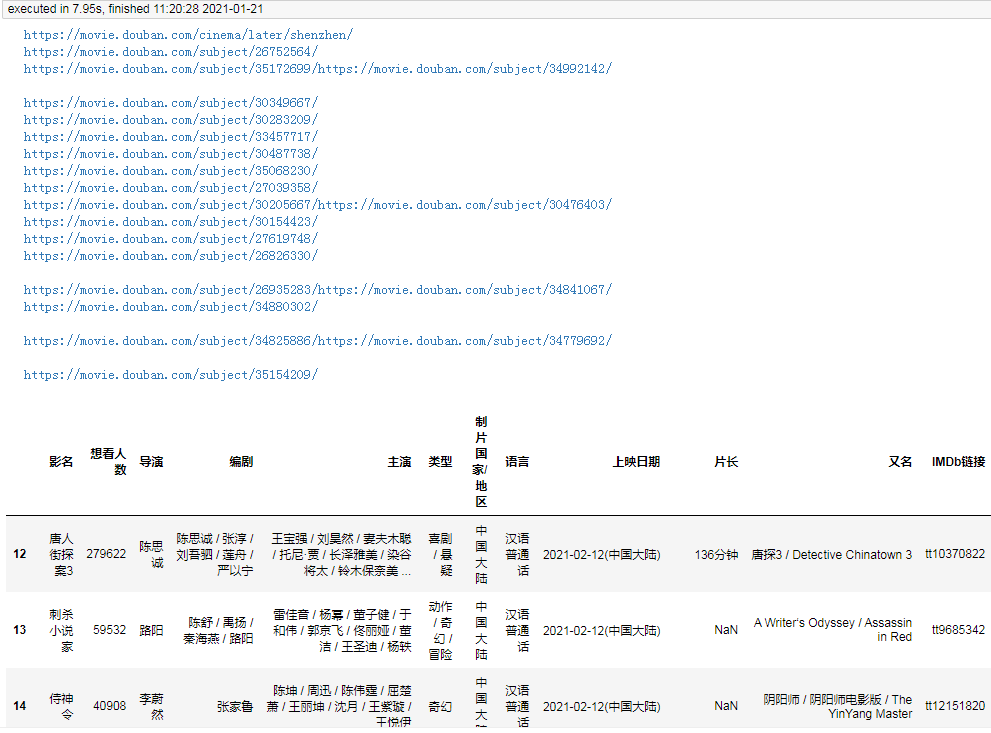
耗時8秒。
由于每個子頁面都是單獨的線程爬取,每個線程幾乎都是同時在工作,所以最終耗時僅取決于爬取最慢的子頁面。
協(xié)程異步爬蟲
由于我在jupyter中運行,為了使協(xié)程能夠直接在jupyter中直接運行,所以我在代碼中增加了下面兩行代碼,在普通編輯器里面可以去掉:
import?nest_asyncio
nest_asyncio.apply()
這個問題是因為jupyter所依賴的高版本Tornado存在bug,將Tornado退回到低版本也可以解決這個問題。
下面我使用協(xié)程來完成這個需求的爬取:
import?aiohttp
from?lxml?import?etree
import?pandas?as?pd
import?re
import?asyncio
import?nest_asyncio
nest_asyncio.apply()


async?def?fetch_content(url):
????print(url)
????header?=?{
????????"Accept-Encoding":?"Gzip",??#?使用gzip壓縮傳輸數(shù)據(jù)讓訪問更快
????????"User-Agent":?"Mozilla/5.0?(Windows?NT?6.1;?WOW64)?AppleWebKit/537.36?(KHTML,?like?Gecko)?Chrome/78.0.3904.108?Safari/537.36"
????}
????async?with?aiohttp.ClientSession(
????????headers=header,?connector=aiohttp.TCPConnector(ssl=False)
????)?as?session:
????????async?with?session.get(url)?as?response:
????????????return?await?response.text()


async?def?main():
????url?=?"https://movie.douban.com/cinema/later/shenzhen/"
????init_page?=?await?fetch_content(url)
????html?=?etree.HTML(init_page)
????all_movies?=?html.xpath("http://div[@id='showing-soon']/div")
????result?=?[]
????for?e?in?all_movies:
????????#?????????imgurl,?=?e.xpath(".//img/@src")
????????name,?=?e.xpath(".//div[@class='intro']/h3/a/text()")
????????url,?=?e.xpath(".//div[@class='intro']/h3/a/@href")
????#?????date,?movie_type,?pos?=?e.xpath(".//div[@class='intro']/ul/li[@class='dt']/text()")
????????like_num,?=?e.xpath(
????????????".//div[@class='intro']/ul/li[@class='dt?last']/span/text()")
????????result.append((name,?int(like_num[:like_num.find("人")]),?url))
????main_df?=?pd.DataFrame(result,?columns=["影名",?"想看人數(shù)",?"url"])

????tasks?=?[fetch_content(url)?for?url?in?main_df.url]
????pages?=?await?asyncio.gather(*tasks)

????result?=?[]
????for?url,?html_text?in?zip(main_df.url,?pages):
????????html?=?etree.HTML(html_text)
????????row?=?{}
????????for?line?in?re.split("[\n?]*\n[\n?]*",?"".join(html.xpath("http://div[@id='info']//text()")).strip()):
????????????line?=?line.strip()
????????????arr?=?line.split(":?",?maxsplit=1)
????????????if?len(arr)?!=?2:
????????????????continue
????????????k,?v?=?arr
????????????row[k]?=?v
????????row["url"]?=?url
????????result.append(row)
????detail_df?=?pd.DataFrame(result)
????df?=?main_df.merge(detail_df,?on="url")
????df.drop(columns=["url"],?inplace=True)
????df.sort_values("想看人數(shù)",?ascending=False,?inplace=True)
????return?df

df?=?asyncio.run(main())
df.to_csv("shenzhen_movie3.csv",?index=False)
df
結(jié)果:
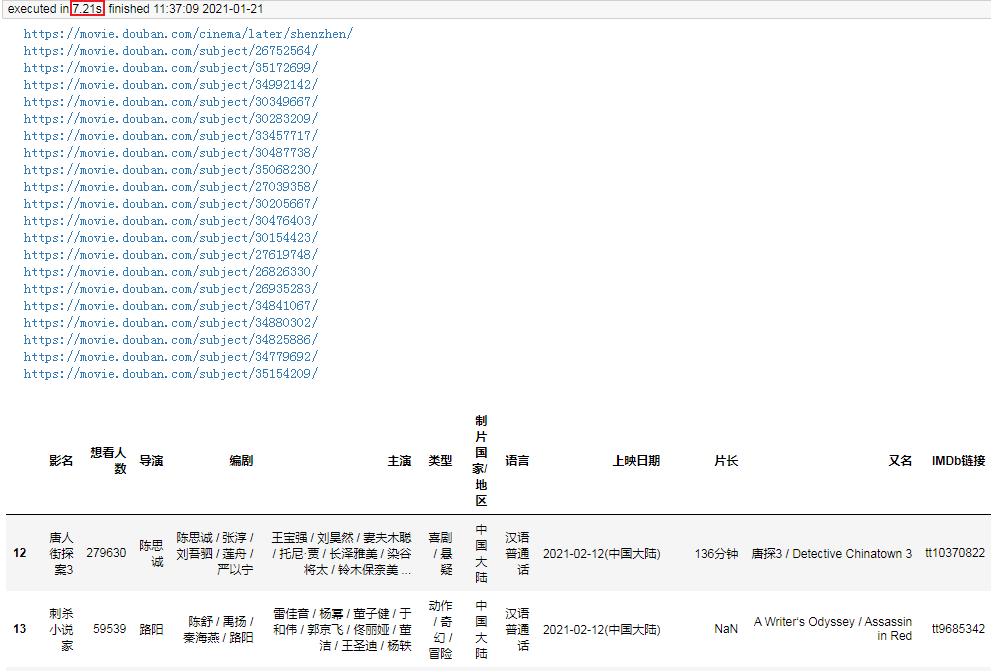
耗時僅7秒,相對比多線程更快一點。
由于request庫不支持協(xié)程,所以我使用了支持協(xié)程的aiohttp進行頁面抓取。當然實際爬取的耗時還取絕于當時的網(wǎng)絡(luò),但整體來說,協(xié)程爬取會比多線程爬蟲稍微快一些。
回顧
今天我向你演示了,單線程爬蟲、多線程爬蟲和協(xié)程爬蟲。可以看到一般情況下協(xié)程爬蟲速度最快,多線程爬蟲略慢一點,單線程爬蟲則必須上一個頁面爬取完成才能繼續(xù)爬取。
但協(xié)程爬蟲相對來說并不是那么好編寫,數(shù)據(jù)抓取無法使用request庫,只能使用aiohttp。所以在實際編寫爬蟲時,我們一般都會使用多線程爬蟲來提速,但必須注意的是網(wǎng)站都有ip訪問頻率限制,爬的過快可能會被封ip,所以一般我們在多線程提速的同時使用代理ip來并發(fā)的爬取數(shù)據(jù)。
彩蛋:xpath+pandas解析表格并提取url
我們在深圳影訊的底部能夠看到一個[查看全部即將上映的影片] (https://movie.douban.com/coming)的按鈕,點進去能夠看到一張完整近期上映電影的列表,發(fā)現(xiàn)這個列表是個table標簽的數(shù)據(jù):
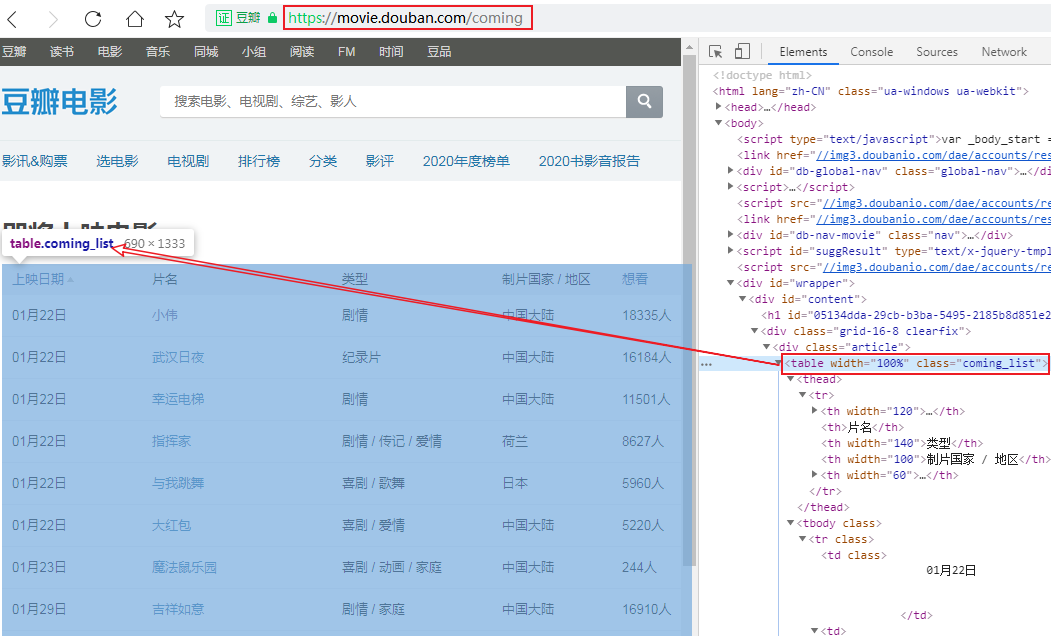
那就簡單了,解析table我們可能壓根就不需要用xpath,直接用pandas即可,但片名中包含的url地址還需解析,所以我采用xpath+pandas來解析這個網(wǎng)頁,看看我的代碼吧:
import?pandas?as?pd
import?requests
from?lxml?import?etree

headers?=?{
????"Accept-Encoding":?"Gzip",
????"User-Agent":?"Mozilla/5.0?(Windows?NT?6.1;?WOW64)?AppleWebKit/537.36?(KHTML,?like?Gecko)?Chrome/78.0.3904.108?Safari/537.36"
}
r?=?requests.get("https://movie.douban.com/coming",?headers=headers)
html?=?etree.HTML(r.text)
table_tag?=?html.xpath("http://table")[0]
df,?=?pd.read_html(etree.tostring(table_tag))
urls?=?table_tag.xpath(".//td[2]/a/@href")
df["url"]?=?urls
df
結(jié)果
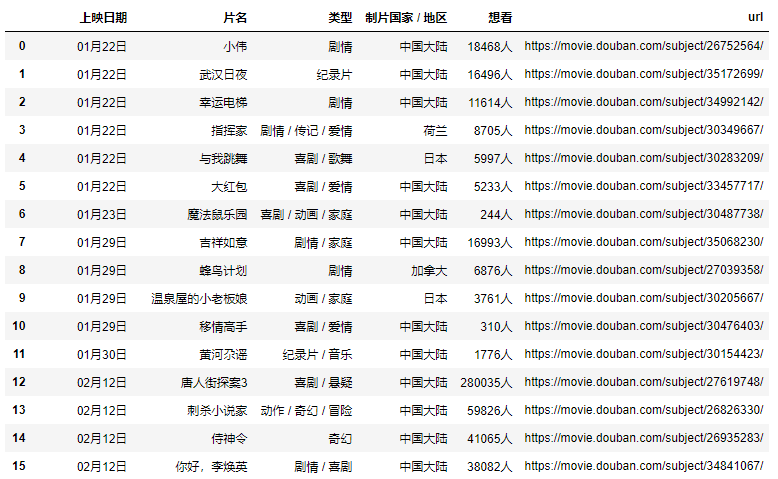 這樣就能到了主頁面的完整數(shù)據(jù),再簡單的處理一下即可。
結(jié)語
感謝各位讀者,有什么想法和收獲歡迎留言評論噢!
見面禮
掃碼加我微信備注「三劍客」送你上圖三本Python入門電子書?

推薦閱讀


