
調(diào)試 Python 代碼,建議不要再用 Print 了!

大家好,我是安果!
相信大部分人學(xué)習(xí) Python,肯定會用 print() 這個(gè)內(nèi)置函數(shù),來調(diào)試代碼的
那么在一個(gè)大型的項(xiàng)目中,如果你也是使用 print 來調(diào)試你的 Python 代碼,你就會發(fā)現(xiàn)你的終端有多個(gè)輸出
那么你便不得不去分辨,每一行的輸出是哪些代碼的運(yùn)行結(jié)果
舉個(gè)例子,運(yùn)行下面這個(gè)程序
num1?=?30
num2?=?40?

print(num1)
print(num2)
輸出結(jié)果
30
40
這些輸出中哪一個(gè)是 num1 ?哪一個(gè)又是 num2 呢?
找出兩個(gè)輸出可能不是很困難,但是如果有五個(gè)以上的不同輸出呢?嘗試查找與輸出相關(guān)的代碼可能會很耗時(shí)
當(dāng)然你可以在打印語句中添加文本,使其更容易理解:
num1?=?30
num2?=?40?

print("num1"?num1)
print("num2"?num1)
輸出結(jié)果
num1?30
num2?40
這個(gè)結(jié)果就很容易理解了,但是需要時(shí)間去寫相關(guān)的信息
這時(shí)就該「 Icecream 」上場了~
01. 什么是Icecream?
Icecream 是一個(gè) Python 第三方庫,可通過最少的代碼使打印調(diào)試更清晰明了
使用 pip 安裝?Icecream?庫
pip?install?icecream
下面,讓我們通過打印 Python 函數(shù)的輸出來進(jìn)行嘗試
from?icecream?import?ic?

def?plus_five(num):
????return?num?+?5

ic(plus_five(4))
ic(plus_five(5))
輸出結(jié)果如下
ic|?plus_five(4):?9
ic|?plus_five(5):?10
通過使用 icecream,我們不僅可以看到函數(shù)輸出,還可以看到函數(shù)及其參數(shù)!
02. 檢查執(zhí)行情況
如果你想要找到執(zhí)行代碼的位置,可以通過執(zhí)行如下所示的操作,來查找執(zhí)行了哪個(gè)語句
def?hello(user:bool):
????if?user:
????????print("I'm?user")
????else:
????????print("I'm?not?user")

hello(user=True)
輸出結(jié)果
I'm?user
使用 icecream 則無需多余的文本信息,就可以輕松地完成上述的操作
from?icecream?import?ic?

def?hello(user:bool):
????if?user:
????????ic()
????else:
????????ic()

hello(user=True)
輸出結(jié)果如下。
ic|?ice_1.py:5?in?hello()?at?02:34:41.391
從輸出結(jié)果看,函數(shù)?hello 中的第 5 行的代碼已被執(zhí)行,而第 7 行的代碼未執(zhí)行
03. 自定義前綴
如果您想在打印語句中插入自定義前綴(例如代碼執(zhí)行時(shí)間),icecream 也是能實(shí)現(xiàn)的
from?datetime?import?datetime
from?icecream?import?ic?
import?time
from?datetime?import?datetime

def?time_format():
????return?f'{datetime.now()}|>?'

ic.configureOutput(prefix=time_format)

for?_?in?range(3):
????time.sleep(1)
????ic('Hello')
輸出結(jié)果如下
2021-01-24?10:38:23.509304|>?'Hello'
2021-01-24?10:38:24.545628|>?'Hello'
2021-01-24?10:38:25.550777|>?'Hello'
可以看到代碼的執(zhí)行時(shí)間,就顯示在輸出的前面
04. 獲取更多的信息
除了知道和輸出相關(guān)的代碼之外,你可能還想知道代碼執(zhí)行的行和代碼文件。
在 ic.configureOutput() 中,設(shè)置?includeecontext 的參數(shù)值為 True?即可
from?icecream?import?ic?

def?plus_five(num):
????return?num?+?5

ic.configureOutput(includeContext=True)
ic(plus_five(4))
ic(plus_five(5))
輸出結(jié)果如下
ic|?ice_test.py:7?in?
-?plus_five(4):?9
ic|?ice_test.py:8?in?-?plus_five(5):?10
這里我們就知道了,第一個(gè)輸出是由函數(shù) plus_five 在文件 icecream_example.py 的第 7 行執(zhí)行的
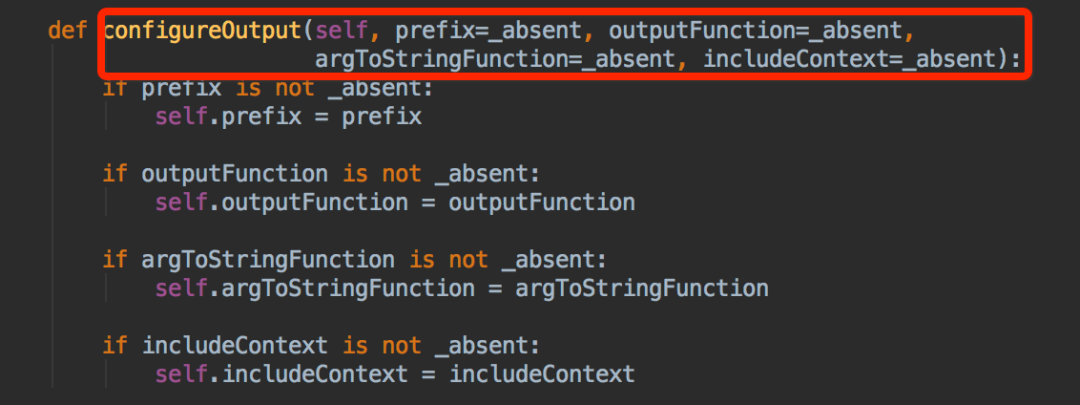
prefix,自定義輸出前綴
outputFunction,更改輸出函數(shù)
argToStringFunction,自定義參數(shù)序列化字符串
includeContext,顯示文件名、代碼行、函數(shù)信息
from?icecream?import?ic

def?plus_five(num):
????return?num?+?5

ic.configureOutput(includeContext=True)
ic(plus_five(4))
ic(plus_five(5))

for?i?in?range(10):
????print(f'******?Training?model?{i}?******')
輸出結(jié)果
ic|?ice_1.py:7?in?
-?plus_five(4):?9
ic|?ice_1.py:8?in?-?plus_five(5):?10
******?Training?model?0?******
******?Training?model?1?******
******?Training?model?2?******
******?Training?model?3?******
******?Training?model?4?******
******?Training?model?5?******
******?Training?model?6?******
******?Training?model?7?******
******?Training?model?8?******
******?Training?model?9?******
由于你可以區(qū)分調(diào)試打印和漂亮打印,因此搜索和刪除所有 ic 調(diào)試語句非常容易
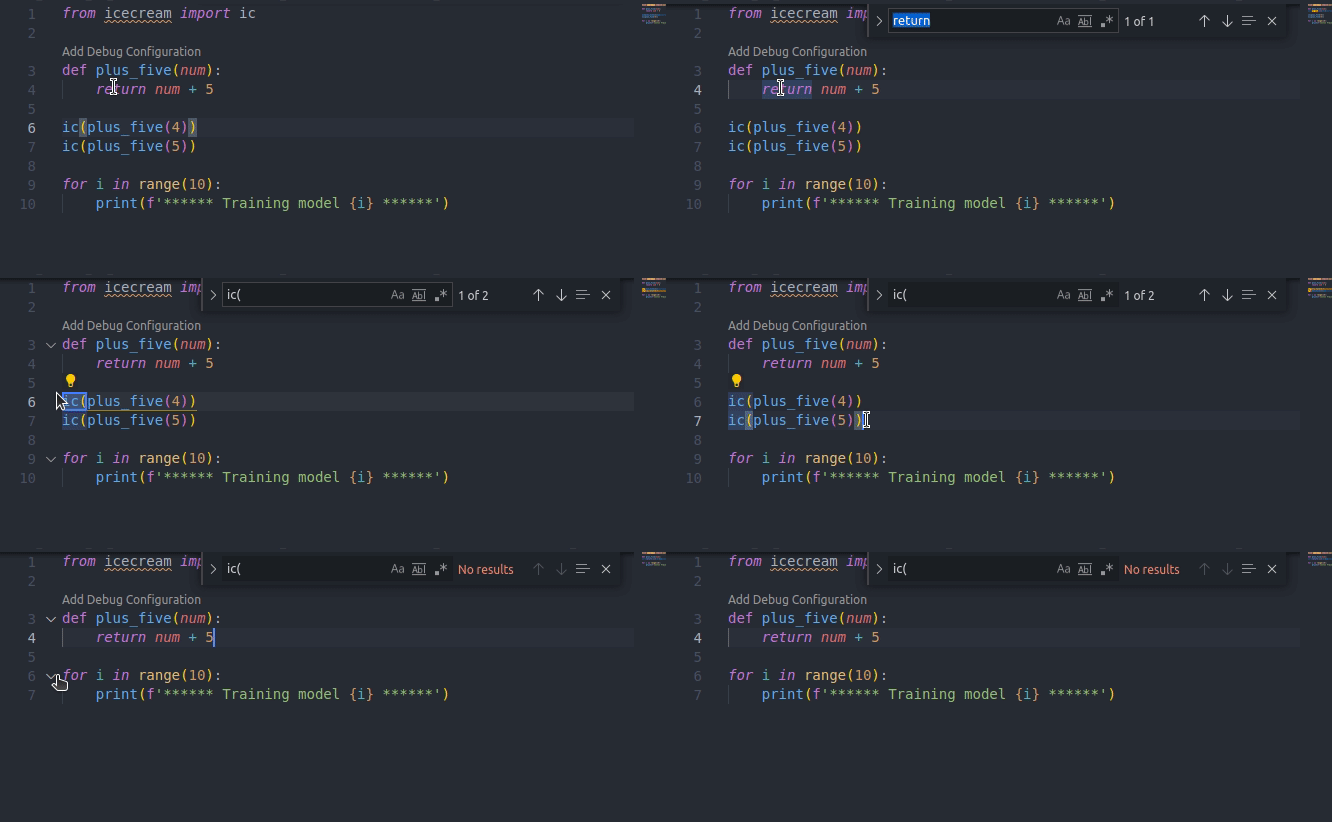
刪除所有調(diào)試代碼后,你的 Python 代碼就整潔了
總結(jié)
到此,你就應(yīng)該就學(xué)會了如何使用icecream去打印調(diào)試。
更多功能可以訪問源項(xiàng)目地址:
https://github.com/gruns/icecream
