
(五)C# Winform自定義控件-復(fù)選框

準(zhǔn)備工作
準(zhǔn)備4個圖片,分別對應(yīng)選中,沒選中,選中禁用,沒選中禁用
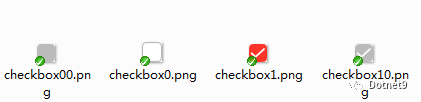
開始
新增一個用戶控件,命名UCCheckBox
屬性如下
[Description("選中改變事件"), Category("自定義")]
public event EventHandler CheckedChangeEvent;

[Description("字體"), Category("自定義")]
public override Font Font
{
    get
    {
        return base.Font;
    }
    set
    {
        base.Font = value;
        label1.Font = value;
    }
}

private Color _ForeColor = Color.FromArgb(62, 62, 62);
[Description("字體顏色"), Category("自定義")]
public new Color ForeColor
{
    get { return _ForeColor; }
    set
    {
        label1.ForeColor = value;
        _ForeColor = value;
    }
}
private string _Text = "復(fù)選框";
[Description("文本"), Category("自定義")]
public string TextValue
{
    get { return _Text; }
    set
    {
        label1.Text = value;
        _Text = value;
    }
}
private bool _checked = false;
[Description("是否選中"), Category("自定義")]
public bool Checked
{
    get
    {
        return _checked;
    }
    set
    {
        if (_checked != value)
        {
            _checked = value;
            if (base.Enabled)
            {
                if (_checked)
                {
                    panel1.BackgroundImage = Properties.Resources.checkbox1;
                }
                else
                {
                    panel1.BackgroundImage = Properties.Resources.checkbox0;
                }
            }
            else
            {
                if (_checked)
                {
                    panel1.BackgroundImage = Properties.Resources.checkbox10;
                }
                else
                {
                    panel1.BackgroundImage = Properties.Resources.checkbox00;
                }
            }

            if (CheckedChangeEvent != null)
            {
                CheckedChangeEvent(this, null);
            }
        }
    }
}

public new bool Enabled
{
    get
    {
        return base.Enabled;
    }
    set
    {
        base.Enabled = value;
        if (value)
        {
            if (_checked)
            {
                panel1.BackgroundImage = Properties.Resources.checkbox1;
            }
            else
            {
                panel1.BackgroundImage = Properties.Resources.checkbox0;
            }
        }
        else
        {
            if (_checked)
            {
                panel1.BackgroundImage = Properties.Resources.checkbox10;
            }
            else
            {
                panel1.BackgroundImage = Properties.Resources.checkbox00;
            }
        }
    }
}
再來一個改變選中狀態(tài)的事件
private void CheckBox_MouseDown(object sender, MouseEventArgs e)
{
    Checked = !Checked;
}
下面看下完整代碼
// 版權(quán)所有  黃正輝  交流群:568015492   QQ:623128629
// 文件名稱:UCCheckBox.cs
// 創(chuàng)建日期:2019-08-15 15:58:34
// 功能描述:CheckBox
// 項目地址:https://gitee.com/kwwwvagaa/net_winform_custom_control
using System;
using System.Collections.Generic;
using System.ComponentModel;
using System.Drawing;
using System.Data;
using System.Linq;
using System.Text;
using System.Windows.Forms;

namespace HZH_Controls.Controls
{
    [DefaultEvent("CheckedChangeEvent")]
    public partial class UCCheckBox : UserControl
    {
        [Description("選中改變事件"), Category("自定義")]
        public event EventHandler CheckedChangeEvent;

        [Description("字體"), Category("自定義")]
        public override Font Font
        {
            get
            {
                return base.Font;
            }
            set
            {
                base.Font = value;
                label1.Font = value;
            }
        }

        private Color _ForeColor = Color.FromArgb(62, 62, 62);
        [Description("字體顏色"), Category("自定義")]
        public new Color ForeColor
        {
            get { return _ForeColor; }
            set
            {
                label1.ForeColor = value;
                _ForeColor = value;
            }
        }
        private string _Text = "復(fù)選框";
        [Description("文本"), Category("自定義")]
        public string TextValue
        {
            get { return _Text; }
            set
            {
                label1.Text = value;
                _Text = value;
            }
        }
        private bool _checked = false;
        [Description("是否選中"), Category("自定義")]
        public bool Checked
        {
            get
            {
                return _checked;
            }
            set
            {
                if (_checked != value)
                {
                    _checked = value;
                    if (base.Enabled)
                    {
                        if (_checked)
                        {
                            panel1.BackgroundImage = Properties.Resources.checkbox1;
                        }
                        else
                        {
                            panel1.BackgroundImage = Properties.Resources.checkbox0;
                        }
                    }
                    else
                    {
                        if (_checked)
                        {
                            panel1.BackgroundImage = Properties.Resources.checkbox10;
                        }
                        else
                        {
                            panel1.BackgroundImage = Properties.Resources.checkbox00;
                        }
                    }

                    if (CheckedChangeEvent != null)
                    {
                        CheckedChangeEvent(this, null);
                    }
                }
            }
        }

        public new bool Enabled
        {
            get
            {
                return base.Enabled;
            }
            set
            {
                base.Enabled = value;
                if (value)
                {
                    if (_checked)
                    {
                        panel1.BackgroundImage = Properties.Resources.checkbox1;
                    }
                    else
                    {
                        panel1.BackgroundImage = Properties.Resources.checkbox0;
                    }
                }
                else
                {
                    if (_checked)
                    {
                        panel1.BackgroundImage = Properties.Resources.checkbox10;
                    }
                    else
                    {
                        panel1.BackgroundImage = Properties.Resources.checkbox00;
                    }
                }
            }
        }
        public UCCheckBox()
        {
            InitializeComponent();
        }

        private void CheckBox_MouseDown(object sender, MouseEventArgs e)
        {
            Checked = !Checked;
        }
    }
}
namespace HZH_Controls.Controls
{
partial class UCCheckBox
{
///
/// 必需的設(shè)計器變量。
///
private System.ComponentModel.IContainer components = null;
///
/// 清理所有正在使用的資源。
///
///
protected override void Dispose(bool disposing)
{
if (disposing && (components != null))
{
components.Dispose();
}
base.Dispose(disposing);
}
#region 組件設(shè)計器生成的代碼
///
/// 設(shè)計器支持所需的方法 - 不要
/// 使用代碼編輯器修改此方法的內(nèi)容。
///
private void InitializeComponent()
{
this.panel1 = new System.Windows.Forms.Panel();
this.label1 = new System.Windows.Forms.Label();
this.SuspendLayout();
//
// panel1
//
this.panel1.BackgroundImage = global::HZH_Controls.Properties.Resources.checkbox0;
this.panel1.BackgroundImageLayout = System.Windows.Forms.ImageLayout.Zoom;
this.panel1.Dock = System.Windows.Forms.DockStyle.Left;
this.panel1.Location = new System.Drawing.Point(1, 1);
this.panel1.Name = "panel1";
this.panel1.Size = new System.Drawing.Size(18, 28);
this.panel1.TabIndex = 0;
this.panel1.MouseDown += new System.Windows.Forms.MouseEventHandler(this.CheckBox_MouseDown);
//
// label1
//
this.label1.Dock = System.Windows.Forms.DockStyle.Fill;
this.label1.Font = new System.Drawing.Font("微軟雅黑", 12F);
this.label1.ForeColor = System.Drawing.Color.FromArgb(((int)(((byte)(62)))), ((int)(((byte)(62)))), ((int)(((byte)(62)))));
this.label1.Location = new System.Drawing.Point(19, 1);
this.label1.Name = "label1";
this.label1.Padding = new System.Windows.Forms.Padding(5, 0, 0, 0);
this.label1.Size = new System.Drawing.Size(213, 28);
this.label1.TabIndex = 1;
this.label1.Text = "復(fù)選框";
this.label1.TextAlign = System.Drawing.ContentAlignment.MiddleLeft;
this.label1.MouseDown += new System.Windows.Forms.MouseEventHandler(this.CheckBox_MouseDown);
//
// UCCheckBox
//
this.AutoScaleMode = System.Windows.Forms.AutoScaleMode.None;
this.BackColor = System.Drawing.Color.Transparent;
this.Controls.Add(this.label1);
this.Controls.Add(this.panel1);
this.Name = "UCCheckBox";
this.Padding = new System.Windows.Forms.Padding(1);
this.Size = new System.Drawing.Size(233, 30);
this.MouseDown += new System.Windows.Forms.MouseEventHandler(this.CheckBox_MouseDown);
this.ResumeLayout(false);
}
#endregion
private System.Windows.Forms.Panel panel1;
private System.Windows.Forms.Label label1;
}
}
用處及效果
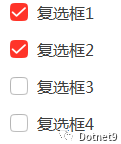
用途: 復(fù)選框
效果:
最后的話
如果你喜歡的話,請到 https://gitee.com/kwwwvagaa/net_winform_custom_control 點個星星吧,另本站轉(zhuǎn)載地址:https://dotnet9.com/5277.html。
-
作者:冰封一夏 -
出處:http://www.hzhcontrols.com/doc.html -
本文版權(quán)歸作者所有,歡迎轉(zhuǎn)載,但未經(jīng)作者同意必須保留此段聲明, 且在文章頁面明顯位置給出原文連接,否則保留追究法律責(zé)任的權(quán)利。 -
GitHub:https://github.com/kwwwvagaa/NetWinformControl -
碼云:https://gitee.com/kwwwvagaa/net_winform_custom_control.git
Dotnet9網(wǎng)站常駐編輯。
        長按關(guān)注我,
        歡迎技術(shù)交流!
 點擊閱讀原文,查看HZHControls站點更多博文。
評論
圖片
表情