
dotNet Core 3.1 使用 Aspose (部署 Docker)
在之前的文章《dotNET?Core中使用Aspose(部署Docker)》中介紹了在 dotNet Core2.1 中使用 Aspose ,并部署到 Docker 中,現(xiàn)在 dotNET Core 升級到了 3.1 ,Docker 鏡像發(fā)生了變化,一些依賴的安裝也有些變化。
在 dotNet Core 2.1 中構(gòu)建鏡像可以使用下面的 Dockerfile:
[root@localhost?core3.1_images_build]#?vi?Dockerfile
FROM?microsoft/dotnet:2.1-aspnetcore-runtime
RUN?apt-get?update;
RUN?apt-get?install?libfontconfig1?-y
RUN?apt-get?install?libgdiplus?-y
RUN?ln?-s?/usr/lib/libgdiplus.so?/lib/x86_64-linux-gnu/libgdiplus.so
RUN?apt-get?install?-y?libc6-dev

COPY?.?/app
COPY?simhei.ttf?/usr/share/fonts/
COPY?simsunb.ttf?/usr/share/fonts/
COPY?simsun.ttc?/usr/share/fonts/
COPY?BSONGSJ.TTF?/usr/share/fonts/
COPY?cybsongsj.ttf?/usr/share/fonts/
COPY?hyktjn.ttf?/usr/share/fonts/

COPY?./font/WINGDNG3.TTF?/usr/share/fonts/
COPY?./font/WINGDNG2.TTF?/usr/share/fonts/
COPY?./font/BSSYM7.TTF?/usr/share/fonts/
COPY?./font/symbol.ttf?/usr/share/fonts/
COPY?./font/wingding.ttf?/usr/share/fonts/
COPY?./font/webdings.ttf?/usr/share/fonts/
COPY?./font/segmdl2.ttf?/usr/share/fonts/

WORKDIR?/app

EXPOSE?80/tcp
本來升級到 3.1 應(yīng)該是很順利的,由于一個簡單的失誤,導(dǎo)致繞了一個大圈子。
在 dotNET Core 3.1 的官方鏡像中已經(jīng)安裝了 libgdiplus 和 libc6 ,所以只用安裝 libfontconfig1 就可以, Dockerfile 如下:
FROM?mcr.microsoft.com/dotnet/core/aspnet:3.1
RUN?apt-get?update;
RUN?apt-get?install?libfontconfig1?-y

COPY?.?/app
COPY?simhei.ttf?/usr/share/fonts/
COPY?simsunb.ttf?/usr/share/fonts/
COPY?simsun.ttc?/usr/share/fonts/
COPY?BSONGSJ.TTF?/usr/share/fonts/
COPY?cybsongsj.ttf?/usr/share/fonts/
COPY?hyktjn.ttf?/usr/share/fonts/

COPY?./font/WINGDNG3.TTF?/usr/share/fonts/
COPY?./font/WINGDNG2.TTF?/usr/share/fonts/
COPY?./font/BSSYM7.TTF?/usr/share/fonts/
COPY?./font/symbol.ttf?/usr/share/fonts/
COPY?./font/wingding.ttf?/usr/share/fonts/
COPY?./font/webdings.ttf?/usr/share/fonts/
COPY?./font/segmdl2.ttf?/usr/share/fonts/

WORKDIR?/app

EXPOSE?80/tcp
dotNet Core 框架升級到了 3.1,其他很多中間件也做了同步升級,包括 Aspose,但后來因為一些原因,Aspose 還是使用了原來的 18.7,對應(yīng)的 libSkiaSharp.so ?文件沒有降級,最后發(fā)現(xiàn),這個才是問題的所在。
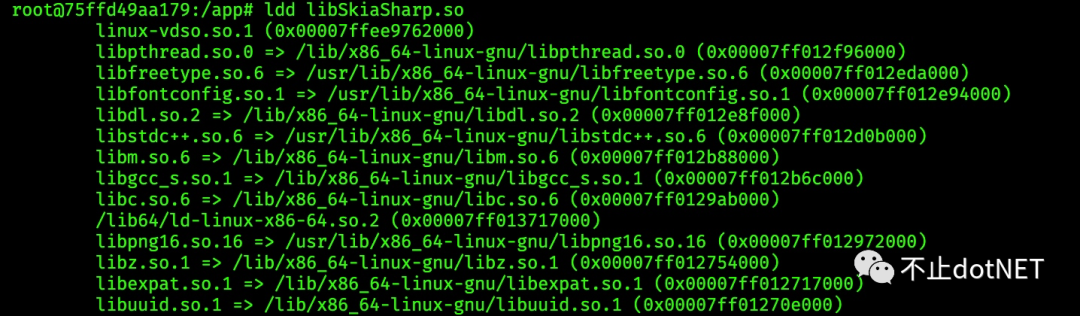
一開始,按照相同的方式在 3.1 的鏡像中安裝依賴,安裝完成創(chuàng)建容器后,進入容器,使用 ldd libSkiaSharp.so 可以看看依賴是否安裝完整,正常情況如下圖:
libSkiaSharp.so 文件可以在這個地址中找到:https://github.com/mono/SkiaSharp/releases/tag/v1.60.3
依賴是完整的,但示例程序部署到容器后,依然報錯,一開始沒想到是 libSkiaSharp.so 文件的問題,思考方向是 3.1 和 2.1 的容器是不是有什么不一樣,最終發(fā)現(xiàn) 3.1 使用的是 Debian GNU/Linux 10 發(fā)型版,而 2.1 是 9,嘗試在 2.1 的鏡像中安裝 3.1 的運行時,以失敗而告終。
另一個思路馬上浮現(xiàn)出來,就是拉取 centos7 的基礎(chǔ)鏡像,在里面安裝相關(guān)的依賴和運行時,先使用下面命令拉取基礎(chǔ)鏡像:
docker?pull?centos:7.4.1708
創(chuàng)建一個容器
docker?run?-itd?--privileged?-p?90:22?--name?centos?centos:7.4.1708?/usr/sbin/init
進入容器安裝運行時
rpm?-Uvh?https://packages.microsoft.com/config/centos/7/packages-microsoft-prod.rpm
yum?install?aspnetcore-runtime-3.1
安裝相關(guān)依賴
yum?-y?install?fontconfig
yum?-y?install?ttmkfdir
yum?install?libgdiplus-devel?
yum?install?glibc?-y
如果發(fā)現(xiàn)安裝時提示找不到組件包,可能需要切換源:
rpm?-ivh?https://dl.fedoraproject.org/pub/epel/epel-release-latest-7.noarch.rpm
重新構(gòu)建容器運行示例程序,發(fā)現(xiàn)問題依然存在,這時就感覺不是 Core 3.1 鏡像的原因了,然后找了一個干凈的 centos 7 的服務(wù)器進行驗證,裝好運行時和相關(guān)依賴,將示例程序直接運行在 centos 7 中,出現(xiàn)和容器中同樣的問題。基本可以排除是鏡像的問題了。
將新的程序和之前 2.1 的程序進行對比,最終發(fā)現(xiàn)是 libSkiaSharp.so 文件不一致,替換 libSkiaSharp.so 文件后,centos 7 中運行正常,容器中也運行正常。
參考:
https://stackoverflow.com/questions/59208166/skiasharp-skimageinfo-exception-in-aspose-word-v18-8-0
https://www.cnblogs.com/xiaoxiaoqiye/p/13355344.html
https://docs.microsoft.com/zh-cn/dotnet/core/install/linux-centos
https://github.com/mono/SkiaSharp/releases/tag/v1.60.3
https://q.cnblogs.com/q/109061/