Spring Boot 注解原理,自動裝配原理,圖文并茂,萬字長文!
首先,先看SpringBoot的主配置類:
@SpringBootApplication
public class StartEurekaApplication
{
    public static void main(String[] args)
    {
        SpringApplication.run(StartEurekaApplication.class, args);
    }
}
點進@SpringBootApplication來看,發(fā)現(xiàn)@SpringBootApplication是一個組合注解。
@Target(ElementType.TYPE)
@Retention(RetentionPolicy.RUNTIME)
@Documented
@Inherited
@SpringBootConfiguration
@EnableAutoConfiguration
@ComponentScan(excludeFilters = {
      @Filter(type = FilterType.CUSTOM, classes = TypeExcludeFilter.class),
      @Filter(type = FilterType.CUSTOM, classes = AutoConfigurationExcludeFilter.class) })
public @interface SpringBootApplication {

}
首先我們先來看 @SpringBootConfiguration:
@Target({ElementType.TYPE})
@Retention(RetentionPolicy.RUNTIME)
@Documented
@Configuration
public @interface SpringBootConfiguration {
}
可以看到這個注解除了元注解以外,就只有一個@Configuration,那也就是說這個注解相當于@Configuration,所以這兩個注解作用是一樣的,它讓我們能夠去注冊一些額外的Bean,并且導入一些額外的配置。
那@Configuration還有一個作用就是把該類變成一個配置類,不需要額外的XML進行配置。所以@SpringBootConfiguration就相當于@Configuration。進入@Configuration,發(fā)現(xiàn)@Configuration核心是@Component,說明Spring的配置類也是Spring的一個組件。
@Target({ElementType.TYPE})
@Retention(RetentionPolicy.RUNTIME)
@Documented
@Component
public @interface Configuration {
    @AliasFor(
        annotation = Component.class
    )
    String value() default "";
}
繼續(xù)來看下一個@EnableAutoConfiguration,這個注解是開啟自動配置的功能。
@Target({ElementType.TYPE})
@Retention(RetentionPolicy.RUNTIME)
@Documented
@Inherited
@AutoConfigurationPackage
@Import({AutoConfigurationImportSelector.class})
public @interface EnableAutoConfiguration {
    String ENABLED_OVERRIDE_PROPERTY = "spring.boot.enableautoconfiguration";

    Class<?>[] exclude() default {};

    String[] excludeName() default {};
}
可以看到它是由 @AutoConfigurationPackage,@Import(EnableAutoConfigurationImportSelector.class)這兩個而組成的,我們先說@AutoConfigurationPackage,他是說:讓包中的類以及子包中的類能夠被自動掃描到spring容器中。
@Target({ElementType.TYPE})
@Retention(RetentionPolicy.RUNTIME)
@Documented
@Inherited
@Import({Registrar.class})
public @interface AutoConfigurationPackage {
}
使用@Import來給Spring容器中導入一個組件 ,這里導入的是Registrar.class。來看下這個Registrar:
static class Registrar implements ImportBeanDefinitionRegistrar, DeterminableImports {
        Registrar() {
        }

        public void registerBeanDefinitions(AnnotationMetadata metadata, BeanDefinitionRegistry registry) {
            AutoConfigurationPackages.register(registry, (new AutoConfigurationPackages.PackageImport(metadata)).getPackageName());
        }

        public Set<Object> determineImports(AnnotationMetadata metadata) {
            return Collections.singleton(new AutoConfigurationPackages.PackageImport(metadata));
        }
    }
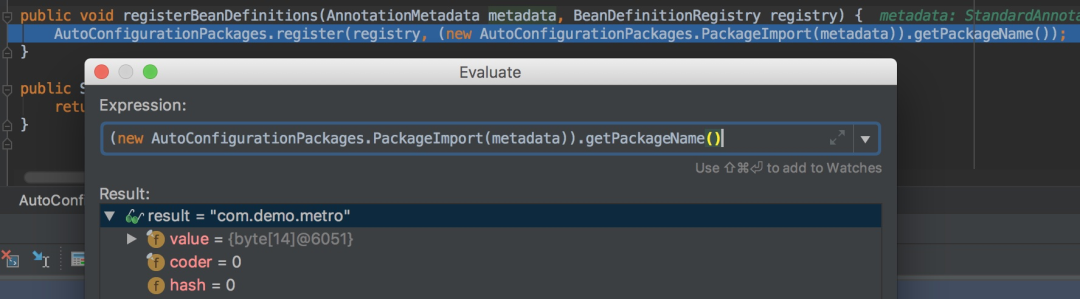
就是通過以上這個方法獲取掃描的包路徑,可以debug查看具體的值:
那metadata是什么呢,可以看到是標注在@SpringBootApplication注解上的DemosbApplication,也就是我們的主配置類Application:
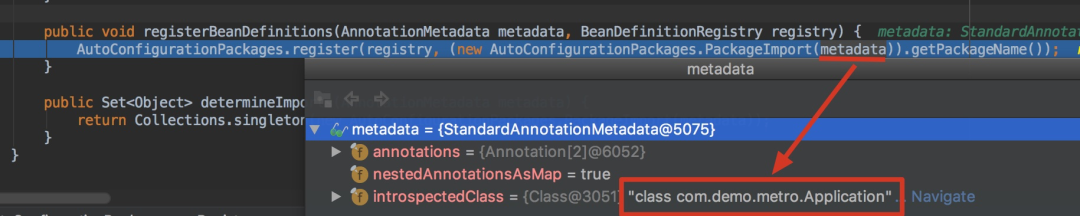
其實就是將主配置類(即@SpringBootApplication標注的類)的所在包及子包里面所有組件掃描加載到Spring容器。因此我們要把DemoApplication放在項目的最高級中(最外層目錄)。
看看注解@Import(AutoConfigurationImportSelector.class),@Import注解就是給Spring容器中導入一些組件,這里傳入了一個組件的選擇器:AutoConfigurationImportSelector。
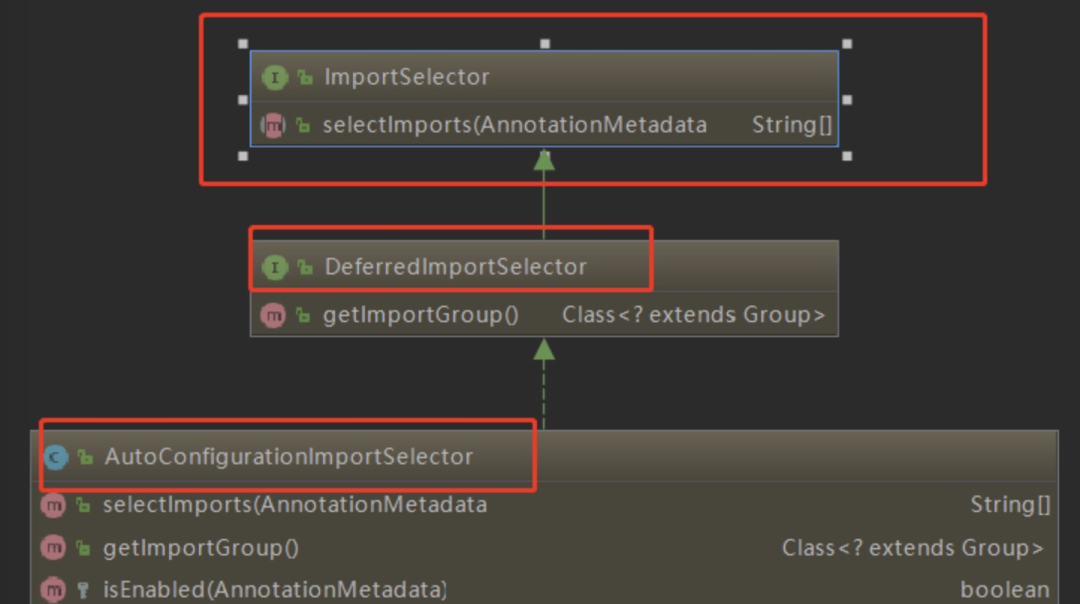
可以從圖中看出AutoConfigurationImportSelector 繼承了 DeferredImportSelector 繼承了 ImportSelector,ImportSelector有一個方法為:selectImports。將所有需要導入的組件以全類名的方式返回,這些組件就會被添加到容器中。
public String[] selectImports(AnnotationMetadata annotationMetadata) {
    if (!this.isEnabled(annotationMetadata)) {
        return NO_IMPORTS;
    } else {
        AutoConfigurationMetadata autoConfigurationMetadata = AutoConfigurationMetadataLoader.loadMetadata(this.beanClassLoader);
        AutoConfigurationImportSelector.AutoConfigurationEntry autoConfigurationEntry =
        this.getAutoConfigurationEntry(autoConfigurationMetadata, annotationMetadata);
        return StringUtils.toStringArray(autoConfigurationEntry.getConfigurations());
    }
}
會給容器中導入非常多的自動配置類(xxxAutoConfiguration);就是給容器中導入這個場景需要的所有組件,并配置好這些組件。
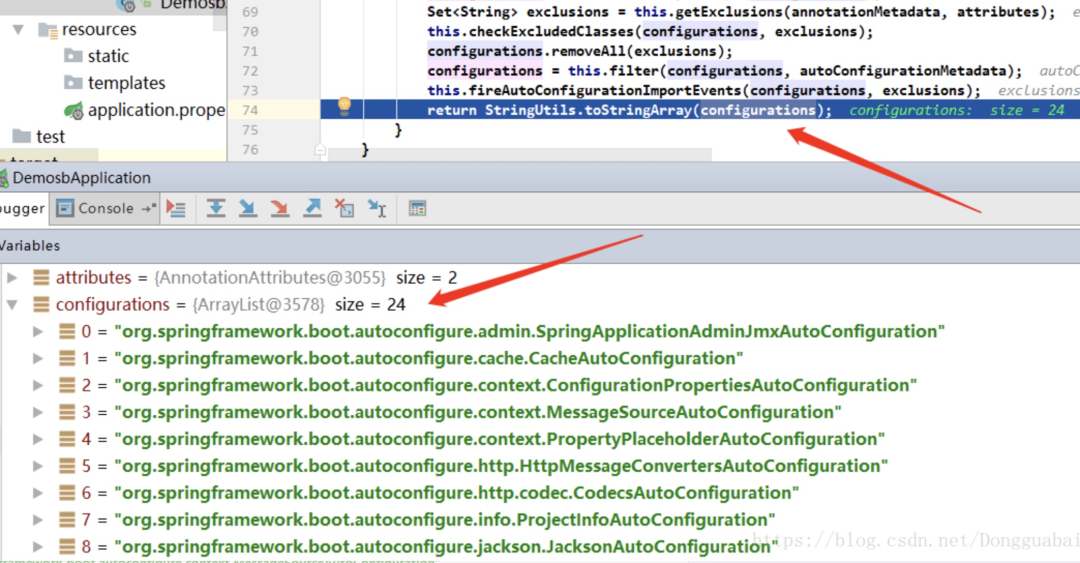
有了自動配置類,免去了我們手動編寫配置注入功能組件等的工作。那是如何獲取到這些配置類的呢,看看下面這個方法:
protected AutoConfigurationImportSelector.AutoConfigurationEntry
  getAutoConfigurationEntry(AutoConfigurationMetadata autoConfigurationMetadata, AnnotationMetadata annotationMetadata) {
    if (!this.isEnabled(annotationMetadata)) {
        return EMPTY_ENTRY;
    } else {
        AnnotationAttributes attributes = this.getAttributes(annotationMetadata);
        List<String> configurations = this.getCandidateConfigurations(annotationMetadata, attributes);
        configurations = this.removeDuplicates(configurations);
        Set<String> exclusions = this.getExclusions(annotationMetadata, attributes);
        this.checkExcludedClasses(configurations, exclusions);
        configurations.removeAll(exclusions);
        configurations = this.filter(configurations, autoConfigurationMetadata);
        this.fireAutoConfigurationImportEvents(configurations, exclusions);
        return new AutoConfigurationImportSelector.AutoConfigurationEntry(configurations, exclusions);
    }
}
我們可以看到getCandidateConfigurations()這個方法,他的作用就是引入系統(tǒng)已經(jīng)加載好的一些類,到底是那些類呢:
protected List<String> getCandidateConfigurations(AnnotationMetadata metadata, AnnotationAttributes attributes) {
    List<String> configurations = SpringFactoriesLoader.loadFactoryNames(this.getSpringFactoriesLoaderFactoryClass(), this.getBeanClassLoader());
    Assert.notEmpty(configurations,
    "No auto configuration classes found in META-INF/spring.factories. If you are using a custom packaging, make sure that file is correct.");
    return configurations;
}
public static List<String> loadFactoryNames(Class<?> factoryClass, @Nullable ClassLoader classLoader) {
    String factoryClassName = factoryClass.getName();
    return (List)loadSpringFactories(classLoader).getOrDefault(factoryClassName, Collections.emptyList());
}
會從META-INF/spring.factories中獲取資源,然后通過Properties加載資源:
private static Map<String, List<String>> loadSpringFactories(@Nullable ClassLoader classLoader) {
    MultiValueMap<String, String> result = (MultiValueMap)cache.get(classLoader);
    if (result != null) {
        return result;
    } else {
        try {
            Enumeration<URL> urls = classLoader !=
          null ? classLoader.getResources("META-INF/spring.factories") : ClassLoader.getSystemResources("META-INF/spring.factories");
            LinkedMultiValueMap result = new LinkedMultiValueMap();

            while(urls.hasMoreElements()) {
                URL url = (URL)urls.nextElement();
                UrlResource resource = new UrlResource(url);
                Properties properties = PropertiesLoaderUtils.loadProperties(resource);
                Iterator var6 = properties.entrySet().iterator();

                while(var6.hasNext()) {
                    Map.Entry<?, ?> entry = (Map.Entry)var6.next();
                    String factoryClassName = ((String)entry.getKey()).trim();
                    String[] var9 = StringUtils.commaDelimitedListToStringArray((String)entry.getValue());
                    int var10 = var9.length;

                    for(int var11 = 0; var11 < var10; ++var11) {
                        String factoryName = var9[var11];
                        result.add(factoryClassName, factoryName.trim());
                    }
                }
            }

            cache.put(classLoader, result);
            return result;
        } catch (IOException var13) {
            throw new IllegalArgumentException("Unable to load factories from location [META-INF/spring.factories]", var13);
        }
    }
}
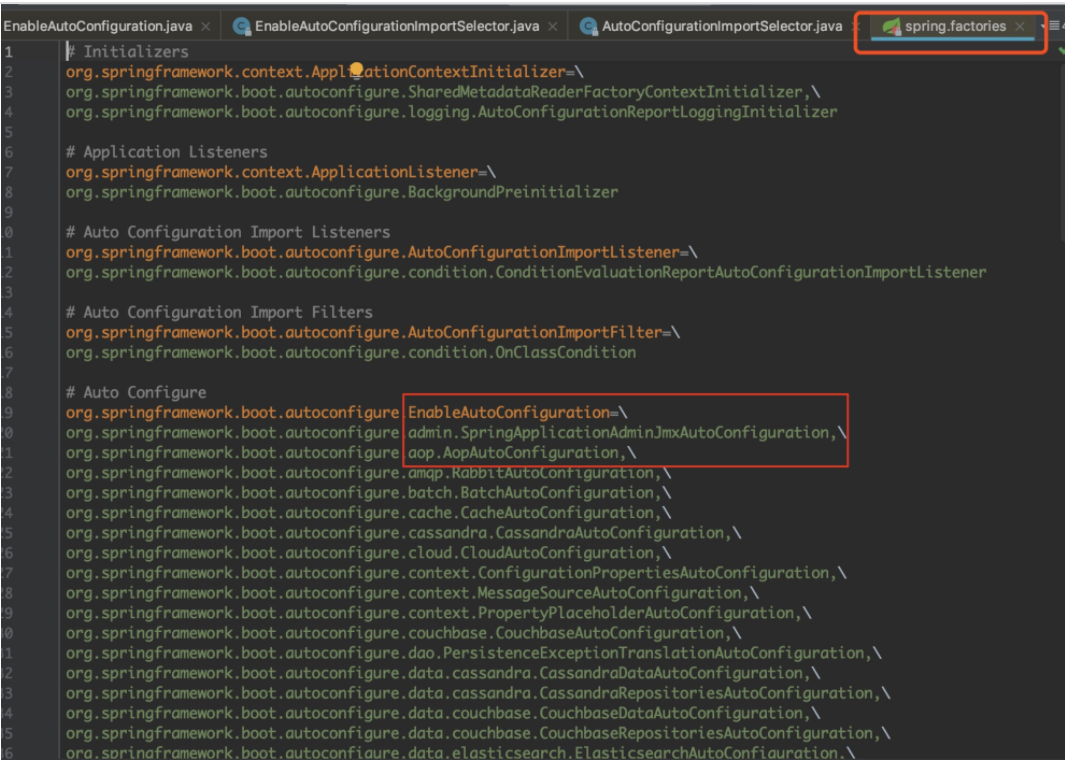
可以知道SpringBoot在啟動的時候從類路徑下的META-INF/spring.factories中獲取EnableAutoConfiguration指定的值,將這些值作為自動配置類導入到容器中,自動配置類就生效,幫我們進行自動配置工作。以前我們需要自己配置的東西,自動配置類都幫我們完成了。如下圖可以發(fā)現(xiàn)Spring常見的一些類已經(jīng)自動導入。
接下來看@ComponentScan注解,@ComponentScan(excludeFilters = { @Filter(type = FilterType.CUSTOM, classes = TypeExcludeFilter.class), @Filter(type = FilterType.CUSTOM, classes = AutoConfigurationExcludeFilter.class) }),這個注解就是掃描包,然后放入spring容器。
@ComponentScan(excludeFilters = {
  @Filter(type = FilterType.CUSTOM,classes = {TypeExcludeFilter.class}),
  @Filter(type = FilterType.CUSTOM,classes = {AutoConfigurationExcludeFilter.class})})
public @interface SpringBootApplication {}
總結下@SpringbootApplication:就是說,他已經(jīng)把很多東西準備好,具體是否使用取決于我們的程序或者說配置。
接下來繼續(xù)看run方法:
public static void main(String[] args) {
        SpringApplication.run(Application.class, args);
    }
來看下在執(zhí)行run方法到底有沒有用到哪些自動配置的東西,我們點進run:
public ConfigurableApplicationContext run(String... args) {
    //計時器
    StopWatch stopWatch = new StopWatch();
    stopWatch.start();
    ConfigurableApplicationContext context = null;
    Collection<SpringBootExceptionReporter> exceptionReporters = new ArrayList();
    this.configureHeadlessProperty();
    //監(jiān)聽器
    SpringApplicationRunListeners listeners = this.getRunListeners(args);
    listeners.starting();

    Collection exceptionReporters;
    try {
        ApplicationArguments applicationArguments = new DefaultApplicationArguments(args);
        ConfigurableEnvironment environment = this.prepareEnvironment(listeners, applicationArguments);
        this.configureIgnoreBeanInfo(environment);
        Banner printedBanner = this.printBanner(environment);
        //準備上下文
        context = this.createApplicationContext();
        exceptionReporters = this.getSpringFactoriesInstances(SpringBootExceptionReporter.class,                       new Class[]{ConfigurableApplicationContext.class}, context);
        //預刷新context
        this.prepareContext(context, environment, listeners, applicationArguments, printedBanner);
        //刷新context
        this.refreshContext(context);
        //刷新之后的context
        this.afterRefresh(context, applicationArguments);
        stopWatch.stop();
        if (this.logStartupInfo) {
            (new StartupInfoLogger(this.mainApplicationClass)).logStarted(this.getApplicationLog(), stopWatch);
        }

        listeners.started(context);
        this.callRunners(context, applicationArguments);
    } catch (Throwable var10) {
        this.handleRunFailure(context, var10, exceptionReporters, listeners);
        throw new IllegalStateException(var10);
    }

    try {
        listeners.running(context);
        return context;
    } catch (Throwable var9) {
        this.handleRunFailure(context, var9, exceptionReporters, (SpringApplicationRunListeners)null);
        throw new IllegalStateException(var9);
    }
}
那我們關注的就是 refreshContext(context); 刷新context,我們點進來看。
private void refreshContext(ConfigurableApplicationContext context) {
   refresh(context);
   if (this.registerShutdownHook) {
      try {
         context.registerShutdownHook();
      }
      catch (AccessControlException ex) {
         // Not allowed in some environments.
      }
   }
}
我們繼續(xù)點進refresh(context);
protected void refresh(ApplicationContext applicationContext) {
   Assert.isInstanceOf(AbstractApplicationContext.class, applicationContext);
   ((AbstractApplicationContext) applicationContext).refresh();
}
他會調用 ((AbstractApplicationContext) applicationContext).refresh();方法,我們點進來看:
public void refresh() throws BeansException, IllegalStateException {
   synchronized (this.startupShutdownMonitor) {
      // Prepare this context for refreshing.
      prepareRefresh();
      // Tell the subclass to refresh the internal bean factory.
      ConfigurableListableBeanFactory beanFactory = obtainFreshBeanFactory();
      // Prepare the bean factory for use in this context.
      prepareBeanFactory(beanFactory);

      try {
         // Allows post-processing of the bean factory in context subclasses.
         postProcessBeanFactory(beanFactory);
         // Invoke factory processors registered as beans in the context.
         invokeBeanFactoryPostProcessors(beanFactory);
         // Register bean processors that intercept bean creation.
         registerBeanPostProcessors(beanFactory);
         // Initialize message source for this context.
         initMessageSource();
         // Initialize event multicaster for this context.
         initApplicationEventMulticaster();
         // Initialize other special beans in specific context subclasses.
         onRefresh();
         // Check for listener beans and register them.
         registerListeners();
         // Instantiate all remaining (non-lazy-init) singletons.
         finishBeanFactoryInitialization(beanFactory);
         // Last step: publish corresponding event.
         finishRefresh();
      }catch (BeansException ex) {
         if (logger.isWarnEnabled()) {
            logger.warn("Exception encountered during context initialization - " +
                  "cancelling refresh attempt: " + ex);
         }
         // Destroy already created singletons to avoid dangling resources.
         destroyBeans();
         // Reset 'active' flag.
         cancelRefresh(ex);
         // Propagate exception to caller.
         throw ex;
      }finally {
         // Reset common introspection caches in Spring's core, since we
         // might not ever need metadata for singleton beans anymore...
         resetCommonCaches();
      }
   }
}
由此可知,就是一個spring的bean的加載過程。繼續(xù)來看一個方法叫做 onRefresh():
protected void onRefresh() throws BeansException {
   // For subclasses: do nothing by default.
}
他在這里并沒有直接實現(xiàn),但是我們找他的具體實現(xiàn):

比如Tomcat跟web有關,我們可以看到有個ServletWebServerApplicationContext:
@Override
protected void onRefresh() {
   super.onRefresh();
   try {
      createWebServer();
   }
   catch (Throwable ex) {
      throw new ApplicationContextException("Unable to start web server", ex);
   }
}
可以看到有一個createWebServer();方法他是創(chuàng)建web容器的,而Tomcat不就是web容器,那是如何創(chuàng)建的呢,我們繼續(xù)看:
private void createWebServer() {
   WebServer webServer = this.webServer;
   ServletContext servletContext = getServletContext();
   if (webServer == null && servletContext == null) {
      ServletWebServerFactory factory = getWebServerFactory();
      this.webServer = factory.getWebServer(getSelfInitializer());
   }
   else if (servletContext != null) {
      try {
         getSelfInitializer().onStartup(servletContext);
      }
      catch (ServletException ex) {
         throw new ApplicationContextException("Cannot initialize servlet context",
               ex);
      }
   }
   initPropertySources();
}
factory.getWebServer(getSelfInitializer());他是通過工廠的方式創(chuàng)建的。
public interface ServletWebServerFactory {
   WebServer getWebServer(ServletContextInitializer... initializers);
}
可以看到 它是一個接口,為什么會是接口。因為我們不止是Tomcat一種web容器。

我們看到還有Jetty,那我們來看TomcatServletWebServerFactory:
@Override
public WebServer getWebServer(ServletContextInitializer... initializers) {
   Tomcat tomcat = new Tomcat();
   File baseDir = (this.baseDirectory != null) ? this.baseDirectory
         : createTempDir("tomcat");
   tomcat.setBaseDir(baseDir.getAbsolutePath());
   Connector connector = new Connector(this.protocol);
   tomcat.getService().addConnector(connector);
   customizeConnector(connector);
   tomcat.setConnector(connector);
   tomcat.getHost().setAutoDeploy(false);
   configureEngine(tomcat.getEngine());
   for (Connector additionalConnector : this.additionalTomcatConnectors) {
      tomcat.getService().addConnector(additionalConnector);
   }
   prepareContext(tomcat.getHost(), initializers);
   return getTomcatWebServer(tomcat);
}
那這塊代碼,就是我們要尋找的內置Tomcat,在這個過程當中,我們可以看到創(chuàng)建Tomcat的一個流程。
如果不明白的話, 我們在用另一種方式來理解下,大家要應該都知道stater舉點例子。
<dependency>
    <groupId>org.springframework.boot</groupId>
    <artifactId>spring-boot-starter-data-redis</artifactId>
</dependency>
<dependency>
    <groupId>org.springframework.boot</groupId>
    <artifactId>spring-boot-starter-freemarker</artifactId>
</dependency>
首先自定義一個stater。
<parent>
    <groupId>org.springframework.boot</groupId>
    <artifactId>spring-boot-starter-parent</artifactId>
    <version>2.1.4.RELEASE</version>
    <relativePath/>
</parent>
<groupId>com.zgw</groupId>
<artifactId>gw-spring-boot-starter</artifactId>
<version>1.0-SNAPSHOT</version>

<dependencies>
    <dependency>
        <groupId>org.springframework.boot</groupId>
        <artifactId>spring-boot-autoconfigure</artifactId>
    </dependency>
</dependencies>
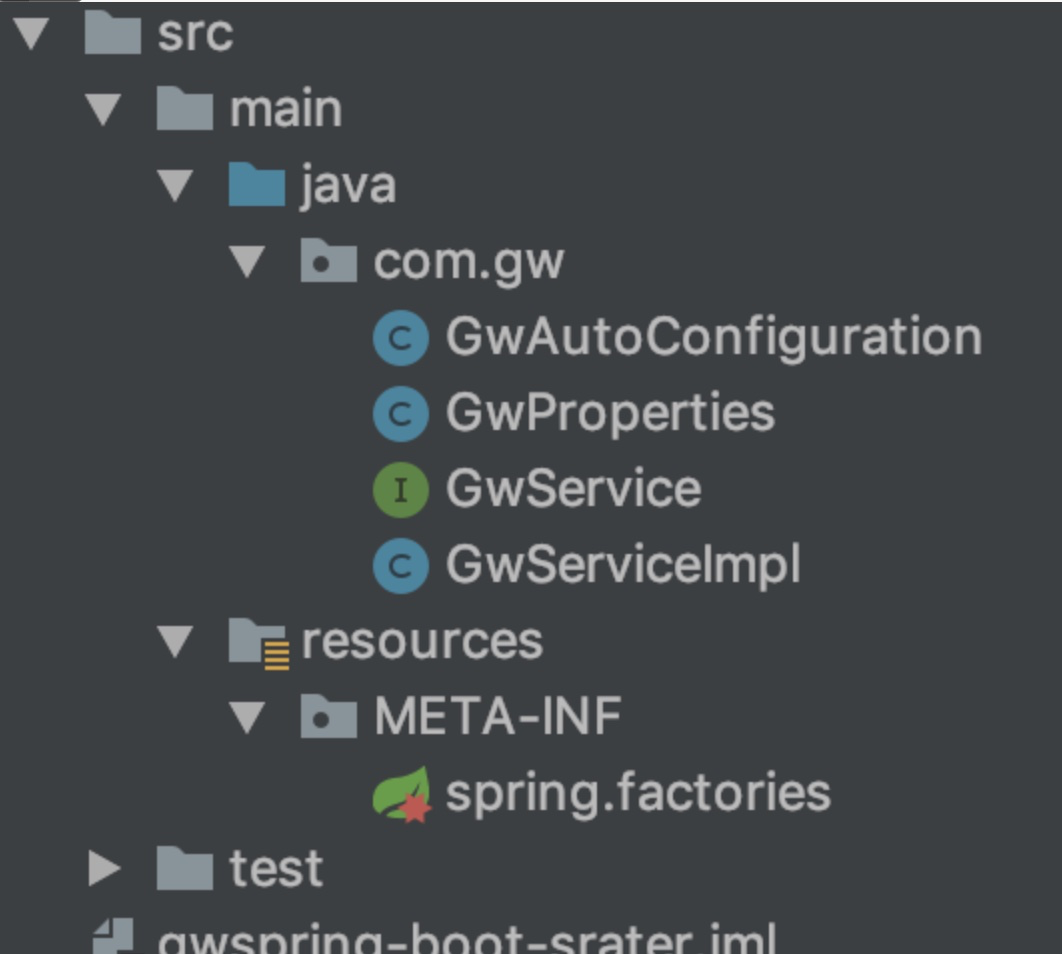
我們先來看maven配置寫入版本號,如果自定義一個stater的話必須依賴spring-boot-autoconfigure這個包,我們先看下項目目錄。
public class GwServiceImpl  implements GwService{
    @Autowired
    GwProperties properties;

    @Override
    public void Hello()
    {
        String name=properties.getName();
        System.out.println(name+"說:你們好啊");
    }
}
我們做的就是通過配置文件來定制name這個是具體實現(xiàn)。
@Component
@ConfigurationProperties(prefix = "spring.gwname")
public class GwProperties {

    String name="zgw";

    public String getName() {
        return name;
    }

    public void setName(String name) {
        this.name = name;
    }
}
這個類可以通過@ConfigurationProperties讀取配置文件。
@Configuration
@ConditionalOnClass(GwService.class)  //掃描類
@EnableConfigurationProperties(GwProperties.class) //讓配置類生效
public class GwAutoConfiguration {

    /**
    * 功能描述 托管給spring
    * @author zgw
    * @return
    */
    @Bean
    @ConditionalOnMissingBean
    public GwService gwService()
    {
        return new GwServiceImpl();
    }
}
這個為配置類,為什么這么寫因為,spring-boot的stater都是這么寫的,我們可以參照他仿寫stater,以達到自動配置的目的,然后我們在通過spring.factories也來進行配置。
org.springframework.boot.autoconfigure.EnableAutoConfiguration=com.gw.GwAutoConfiguration
然后這樣一個簡單的stater就完成了,然后可以進行maven的打包,在其他項目引入就可以使用。
來源:cnblogs.com/jing99/p/11504113.html
END
順便給大家推薦一個GitHub項目,這個 GitHub 整理了上千本常用技術PDF,絕大部分核心的技術書籍都可以在這里找到,
GitHub地址:https://github.com/javadevbooks/books
Gitee地址:https://gitee.com/javadevbooks/books
電子書已經(jīng)更新好了,你們需要的可以自行下載了,記得點一個star,持續(xù)更新中..