
馬上【520】教你用Java實(shí)現(xiàn)每天給對(duì)象發(fā)情話
來(lái)源:https://blog.csdn.net/qq_33758782
一、引言
最近看到一篇用js代碼實(shí)現(xiàn)表白的文章,深有感觸。
然后發(fā)現(xiàn)自己也可以用java代碼實(shí)現(xiàn),然后就開(kāi)始寫代碼了,發(fā)現(xiàn)還挺有意思的,話不多說(shuō)開(kāi)搞
實(shí)現(xiàn)思路:
使用HttpClient遠(yuǎn)程獲取彩虹屁生成器網(wǎng)站中的內(nèi)容 網(wǎng)站:https://chp.shadiao.app/
java Mail 實(shí)現(xiàn)發(fā)送郵件
SpringBoot 整合Scheduled 實(shí)現(xiàn)定時(shí)發(fā)送郵件
二、搭建項(xiàng)目
項(xiàng)目環(huán)境在SpringBoot框架基礎(chǔ)上,加入郵件發(fā)送mail、RPC遠(yuǎn)程調(diào)用httpclient、Scheduled 的一個(gè)Maven項(xiàng)目,依賴如下:
<parent><groupId>org.springframework.boot</groupId><artifactId>spring-boot-starter-parent</artifactId><version>2.3.2.RELEASE</version></parent><dependencies><dependency><groupId>org.springframework.boot</groupId><artifactId>spring-boot-starter-mail</artifactId></dependency><dependency><groupId>org.springframework</groupId><artifactId>spring-context-support</artifactId></dependency><!-- httpclient 依賴 --><dependency><groupId>org.apache.httpcomponents</groupId><artifactId>httpclient</artifactId><version>4.5.12</version></dependency></dependencies><!--打包插件--><build><plugins><plugin><groupId>org.springframework.boot</groupId><artifactId>spring-boot-maven-plugin</artifactId><configuration><fork>true</fork></configuration></plugin></plugins></build>
三、編寫配置
在編寫配置前需要,在瀏覽器登錄自己的郵箱在賬號(hào)安全中設(shè)置開(kāi)啟POP3/SMTP服務(wù)
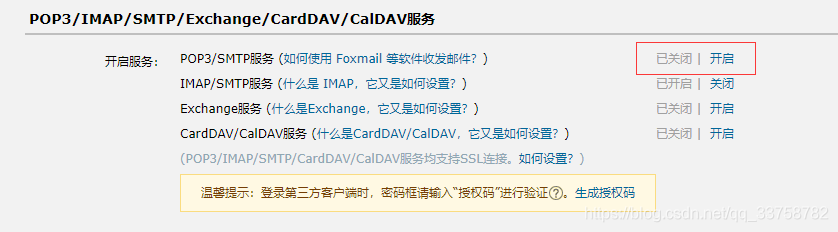
開(kāi)始開(kāi)啟POP3/SMTP服務(wù)需要輸入驗(yàn)證碼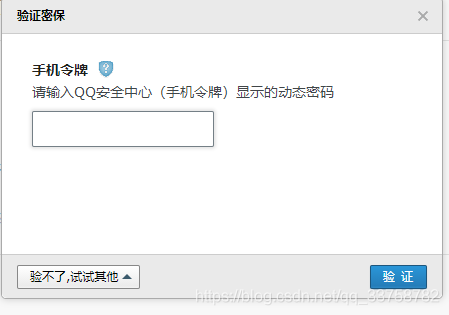
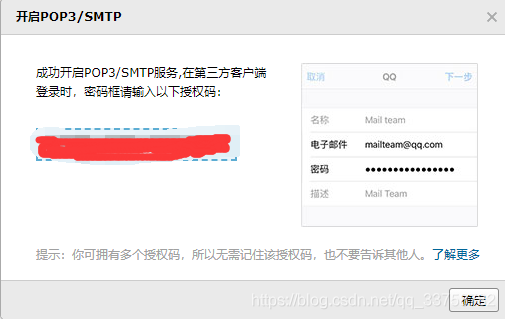
復(fù)制授權(quán)碼
勾選SMTP發(fā)信后保存到服務(wù)器,勾選這一項(xiàng)主要是可以看到自己發(fā)送了什么信息,不勾選此項(xiàng)。郵件消息發(fā)送成功后,郵箱內(nèi)看不到自己已發(fā)送的信息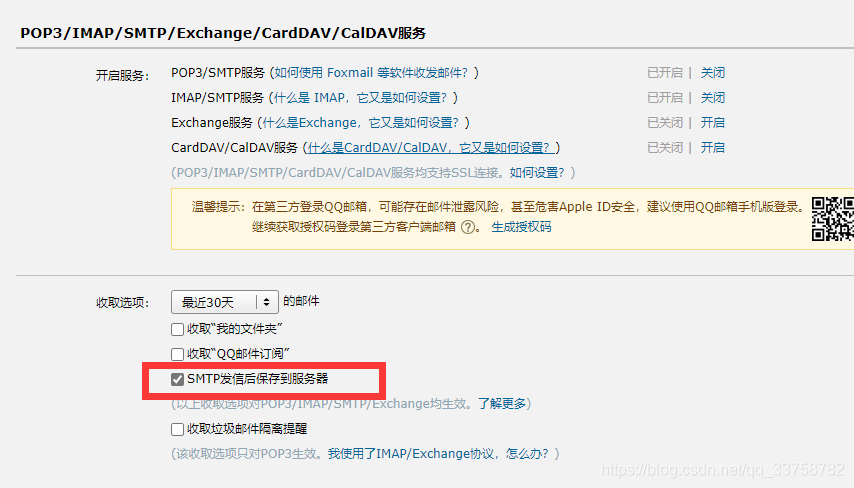
根據(jù)授權(quán)碼編寫配置
spring:mail:username: [email protected] # 自己郵箱地址password: xxxxxxx # SMTP|POP3|IMAP協(xié)議授權(quán)碼host: smtp.qq.com # 服務(wù)器地址。參考郵箱服務(wù)運(yùn)營(yíng)商提供的信息。properties:mail:smtp:auth: true # 開(kāi)啟smtp協(xié)議驗(yàn)證port: 587# 發(fā)給誰(shuí)的郵箱she:: [email protected]
四、編寫SpringBoot啟動(dòng)類
public class BiaoBaiApp {public static void main(String[] args) {SpringApplication.run(BiaoBaiApp.class,args);}
五、自動(dòng)生成發(fā)送內(nèi)容
public class SendMessage {private JavaMailSender mailSender;("${spring.mail.username}")private String from;("${she.mail}")private String[] sheMail;public void sendMessage(String subject,String message) {try {MimeMessage mimeMessage = mailSender.createMimeMessage();MimeMessageHelper helper = new MimeMessageHelper(mimeMessage);helper.setFrom(from);//發(fā)送者郵件郵箱helper.setTo(sheMail);//收郵件者郵箱helper.setSubject(subject);//發(fā)件主題helper.setText(message);//發(fā)件內(nèi)容mailSender.send(helper.getMimeMessage());//發(fā)送郵件} catch (MessagingException e) {e.printStackTrace();}}/**遠(yuǎn)程獲取要發(fā)送的信息*/public static String getOneS(){try {//創(chuàng)建客戶端對(duì)象HttpClient client = HttpClients.createDefault();/*創(chuàng)建地址 https://du.shadiao.app/api.php*/HttpGet get = new HttpGet("https://chp.shadiao.app/api.php");//發(fā)起請(qǐng)求,接收響應(yīng)對(duì)象HttpResponse response = client.execute(get);//獲取響應(yīng)體,響應(yīng)數(shù)據(jù)是一種基于HTTP協(xié)議標(biāo)準(zhǔn)字符串的對(duì)象//響應(yīng)體和響應(yīng)頭,都是封裝HTTP協(xié)議數(shù)據(jù)。直接使用可能出現(xiàn)亂碼或解析錯(cuò)誤HttpEntity entity = response.getEntity();//通過(guò)HTTP實(shí)體工具類,轉(zhuǎn)換響應(yīng)體數(shù)據(jù)String responseString = EntityUtils.toString(entity, "utf-8");return responseString;} catch (IOException e) {throw new RuntimeException("網(wǎng)站獲取句子失敗");}}}
六、編寫定時(shí)任務(wù)
public class MyScheduled {private SendMessage sendMessage;/*定時(shí)執(zhí)行任務(wù)方法 每天5點(diǎn)20執(zhí)行該任務(wù)*/(cron ="0 20 17 * * *")public void dsrw(){String message = sendMessage.getOneS();sendMessage.sendMessage("來(lái)自清茶淡粥的消息!?",message);}}
七、打包運(yùn)行
有條件的可以吧jar包放在運(yùn)服務(wù)器上,沒(méi)有條件的可以在本地win10系統(tǒng)上添加定時(shí)任務(wù),每天定時(shí)執(zhí)行jar包。
jar包放在服務(wù)器上需要放行端口:587 ,防火墻放行587端口
除了放行,還有放行 http 端口 和 https端口

然后在linux上后臺(tái)啟動(dòng)jar包
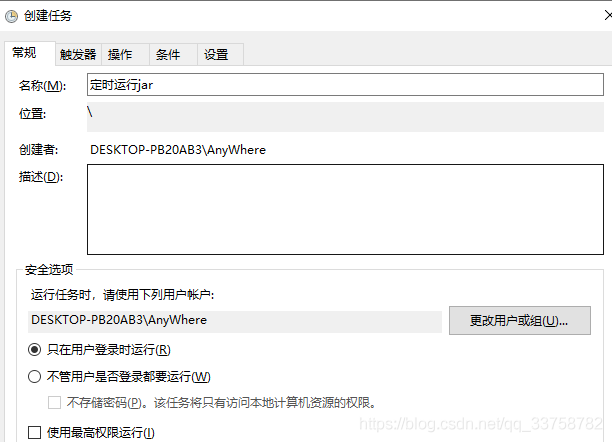
nohup java -jar jar包 >test.log &win10 定時(shí)運(yùn)jar 包 在任務(wù)計(jì)劃程序中創(chuàng)建任務(wù)
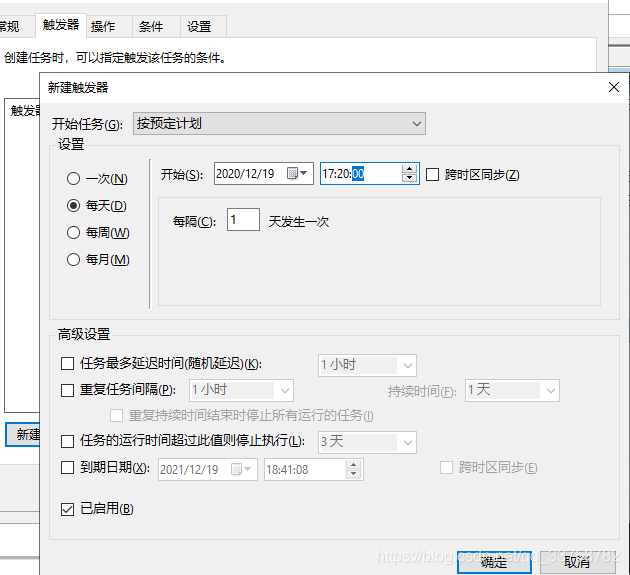
新建觸發(fā)器
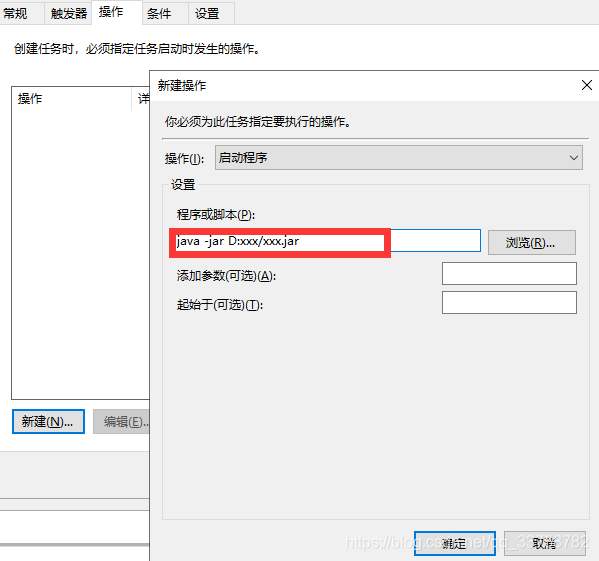
新建操作,在程序或腳本輸入執(zhí)行的jar命令,點(diǎn)擊確定
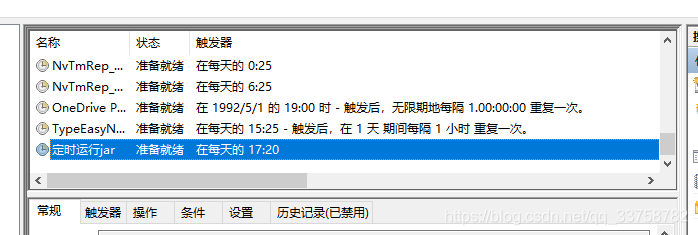
然后可以看見(jiàn),創(chuàng)建好的任務(wù)
八、總結(jié)
代碼還有很大的提升,也有很多不足之處。
由于時(shí)間原因,可優(yōu)化的地方還很多,比如:發(fā)送單純的文字內(nèi)容的郵件,不美觀,可以實(shí)現(xiàn)html方式發(fā)送郵件,使發(fā)送郵件內(nèi)容更加美觀。
public void sendHtmlMessage(String subject,String message){try {MimeMessage mimeMessage = mailSender.createMimeMessage();MimeMessageHelper helper = new MimeMessageHelper(mimeMessage);helper.setFrom(from);helper.setTo(sheMail);helper.setSubject(subject);helper.setText(message,true);//true 使用html 方式發(fā)送mailSender.send(helper.getMimeMessage());} catch (MessagingException e) {e.printStackTrace();}
最后附上我寫的源碼供大家參考:
百度云鏈接:
https://pan.baidu.com/s/19eHH9tBAj8sby8K7bR2yhg
密碼:mfiu