
Python編程神器Jupyter Notebook使用的28個秘訣
作者&編輯:李中梁
引言
最近做實驗一直是用Jupyter Notebook編程,有一種打草稿的便捷感,在dataquest上看到一篇博客總結(jié)了28種Jupyter Notebook的使用技巧。為了方便大家理解,對原文一個簡略的地方進(jìn)行了適當(dāng)?shù)慕忉尯蛿U(kuò)充。希望大家在用Jupyter Notebook編程時可以更加爽快。
Jupyter Notebook是什么
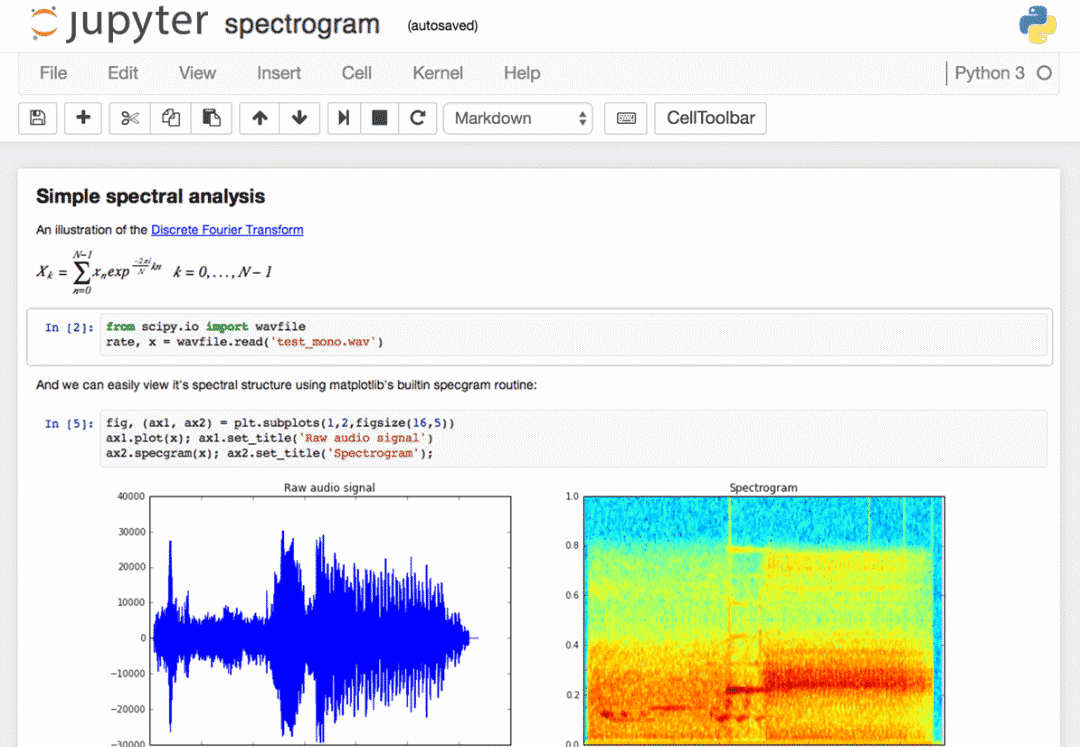
1.實用的快捷鍵
Jupyter Notebook有很多的快捷鍵,編程時使用這些快捷鍵將提高你的編程效率。想知道Jupyter Notebook有哪些快捷鍵,你可以在它的下拉菜單Help>Keyboard Shortcuts中找到。或者在command model中按下H查看。每次更新Jupyter的時候你都最好看看有哪些新的快捷鍵。
還有一個方法調(diào)用快捷鍵,那就是使用Ctrl + Shift + P 調(diào)出command palette。在這個對話框中你可以輸入快捷功能的名字來使用快捷鍵,比如你想重啟kernel,那就在對話框中輸入’restar’,command palette會自動顯示候選的功能。這個功能類似Mac上的Spotlight工具。
我的一些常用快捷鍵:
Esc進(jìn)入command mode在
command mode下:A/B可以在上/下方插入新的cell,M切換到Markdown模式下,Y切回編程模式,D+D刪除當(dāng)前cellEnter從command mode返回edit modeShift + Tab會顯示你剛才輸入對象的文檔Ctrl + Shift + -將會分割你的cellEsc + F查找替換代碼(不包含輸出部分)Esc + O隱藏cell的輸出你還可以選對多個cell進(jìn)行操作:
Shift + J或Shift + Down向下選擇,Shift + K或Shift + Up向上選擇,Shift + M合并多個cell
2.整齊的變量輸出
當(dāng)你的cell最后是一個變量名,那么你不需要用print就可以輸出了。特別是你要輸出Pandas DataFrames的時候,這很有用。
不過我要教你一個少有人知道的技巧,指定ast_note_interactivity參數(shù)為all來一次性輸出多個變量而不用print。
from IPython.core.interactiveshell import InteractiveShellInteractiveShell.ast_node_interactivity = "all"from pydataset import dataquakes = data('quakes')quakes.head()quakes.tail()# 輸出的效果是將head和tail都輸出,而不是只有tail輸出
如果你希望所有Jupyter 的cell都這樣輸出,創(chuàng)建一個文件~/.ipython/profile_default/ipython_config.py并輸入以下代碼:c = get_config()# Run all nodes interactivelyc.InteractiveShell.ast_node_interactivity = "all"
3.快速鏈接文檔
你可以在Help菜單中看到一些常用庫,如NumPy, Pandas, SciPy and Matplotlib的文檔。不過你還可以在方法前面加?來查看對應(yīng)的文檔。
# 執(zhí)行下面這行代碼在Jupyter Notebkook中?str.replace()# 將顯示文檔Docstring:S.replace(old, new[, count]) -> strReturn a copy of S with all occurrences of substringold replaced by new. If the optional argument count isgiven, only the first count occurrences are replaced.Type: method_descriptor
4.在notebooks中繪圖
常用的繪圖庫包括:matplotlib, Seaborn, mpld3, bokeh, plot.ly, Altair
5-15.魔法命令
由于Jupyter是基于IPython內(nèi)核的,所以Jupyter可以使用IPython內(nèi)核中的Magics命令。
可以使用%lsmagic查看所有的magic命令。
%env,設(shè)置環(huán)境變量
你可以管理notebook的環(huán)境變量,而無需重新啟動Jupyter服務(wù)器進(jìn)程。有些庫(比如theano)使用環(huán)境變量來控制行為,%env是最方便的方法。# Running %env without any arguments# lists all environment variables# The line below sets the environment# variable%env OMP_NUM_THREADS%env OMP_NUM_THREADS=4# outputenv: OMP_NUM_THREADS=4
%run,執(zhí)行python代碼
有時候你有一份已經(jīng)寫好的*.py文件,你可以在Jupyter中執(zhí)行它。# this will execute and show the output from# all code cells of the specified notebook%run ./two-histograms.ipynb
%load,導(dǎo)入外部腳本。
有時候你想運行一個外部腳本,但是想用Jupyter加一些代碼,那么你可以先把它load進(jìn)Jupyter。你有一個hello_world.py文件內(nèi)容是if __name__ == "__main__": print("Hello World!")在Jupyter中先用%load載入load ./hello_world.py# 運行%load ./hello_world.py命令后,在你的cell中就出現(xiàn)以下幾行代碼(你執(zhí)行的%run語句會顯示已經(jīng)注釋)%load ./hello_world.pyif __name__ == "__main__":print("Hello World!")
%store,在notebook之間傳遞變量。# 在notebook A 中data = 'this is the string I want to pass to different notebook'%store datadel data # This has deleted the variable# 在notebook B 中%store -r dataprint(data) # 顯示this is the string I want to pass to different notebook
%who,顯示所有的變量# 某個cell中有以下四行代碼one = "for the money"two = "for the show"three = "to get ready now go cat go"%who str# 輸出為one three two
%%time和%timeit%%time將提供代碼單次運行的信息,%%timeit將默認(rèn)運行你的代碼100,000次,提供最快運行三次的平均結(jié)果。%%writefile和pycat,導(dǎo)出單元格的內(nèi)容/顯示外部腳本的內(nèi)容%%writefile保存cell內(nèi)容到外部文件。%pycat正好相反。%prun,顯示程序中每個函數(shù)的調(diào)用信息%pdb,代碼調(diào)試
詳細(xì)的介紹在:https://docs.python.org/3.5/library/pdb.html#debugger-commands為視網(wǎng)膜(Retina)屏輸出高分辨率圖像
# 常規(guī)圖像x = range(1000)y = [i ** 2 for i in x]plt.plot(x,y)plt.show();# 視網(wǎng)膜(Retina)圖像%config InlineBackend.figure_format ='retina'plt.plot(x,y)plt.show();
16.在函數(shù)末尾加入分號可以抑制輸出
在函數(shù)末尾加分號可以抑制函數(shù)的輸出。
17.執(zhí)行shell命令
在shell命令前面加!
# 一些例子!ls *.csv!pip install numpy!pip list | grep pandas
18.在markdown cell 中書寫LaTeX時,它會被 MathJax 渲染成一個公式
19.在一個notebook中運行多種kernel的代碼
如果想要的話,你可以在一個notebook中運行多種kernel的代碼
在每個cell的開頭使用相關(guān)的魔法命令來聲明你想使用的 kernel。
# 支持:%%bash, %%HTML, %%python2, %%python3, %%ruby, %%perl%%bashfor i in {1..5}doecho "i is $i"done
20.為Jupyter安裝其他的kernel
Jupyter其實不止可以用于python編程,安裝一個R內(nèi)核它就可以用于R語言編程。
# 通過Anaconda安裝conda install -c r r-essentials# 手動安裝# 你需要先從https://cloud.r-project.org下載安裝R# 然后在R控制臺下運行以下代碼install.packages(c('repr', 'IRdisplay', 'crayon', 'pbdZMQ', 'devtools'))devtools::install_github('IRkernel/IRkernel')IRkernel::installspec() # to register the kernel in the current R installation
21.在同一個notebook中運行R和Python
你可以安裝rpy2用pip install rpy2
%load_ext rpy2.ipython%R require(ggplot2)array([1], dtype=int32)import pandas as pddf = pd.DataFrame({'Letter': ['a', 'a', 'a', 'b', 'b', 'b', 'c', 'c', 'c'],'X': [4, 3, 5, 2, 1, 7, 7, 5, 9],'Y': [0, 4, 3, 6, 7, 10, 11, 9, 13],'Z': [1, 2, 3, 1, 2, 3, 1, 2, 3]})%%R -i dfggplot(data = df) + geom_point(aes(x = X, y= Y, color = Letter, size = Z))
22.用其他語言來寫函數(shù)
有時numpy的速度不夠快,我需要寫一些快速的代碼。
原則上,可以在動態(tài)庫中編譯函數(shù)并編寫python包裝器…
但是把這個無聊的部分做完會更好,對吧?
您可以用cython或fortran編寫函數(shù),并直接從python代碼中使用這些函數(shù)。
首先你需要安裝cython:
!pip install cython fortran-magic%load_ext Cython%%cythondef myltiply_by_2(float x):return 2.0 * xmyltiply_by_2(23.)
就個人而言我建議使用fortran:
%load_ext fortranmagic%%fortransubroutine compute_fortran(x, y, z)real, intent(in) :: x(:), y(:)real, intent(out) :: z(size(x, 1))z = sin(x + y)end subroutine compute_fortrancompute_fortran([1, 2, 3], [4, 5, 6])
23.多行編輯模式
你可以在Jupyter中使用多行編輯模式,只需要按住Alt鍵。
24.在Jupyter上安裝插件
Jupyter-contrib extensions是一個插件庫,包含了很多實用的插件,包括jupyter spell-checker和code-formatter。
使用以下命令安裝Jupyter-contrib extensions
!pip install https://github.com/ipython-contrib/jupyter_contrib_nbextensions/tarball/master!pip install jupyter_nbextensions_configurator!jupyter contrib nbextension install --user!jupyter nbextensions_configurator enable --user
安裝成功后Jupyter-contrib extensions會以菜單欄的方式顯示在界面上。
25.從notebook中創(chuàng)建PPT
安裝RISE工具就可以從已有的notebook中創(chuàng)建powerpoint風(fēng)格的演示了。conda install -c damianavila82 rise或pip install RISE安裝RISE。
# 激活RISEjupyter-nbextension install rise --py --sys-prefixjupyter-nbextension enable rise --py --sys-prefix
26.Jupyter輸出系統(tǒng)
使用IPython.display這個庫可以將多媒體文件排列輸出。
27.大數(shù)據(jù)分析
推薦使用ipyparallel,pyspark工具以及%%sql魔法命令進(jìn)行大數(shù)據(jù)查詢,處理。
28.分享notebooks
通常分享*.ipynb文件是最簡單的方式。但是如果你要給不用Jupyter的人分享有以下幾種選擇:
使用
File-Download as-HTMLl菜單選項將筆記本轉(zhuǎn)換為html文件在
github或者gist.github.com上分享notebooks使用
jupyterhub搭建你自己的分享系統(tǒng)在
dropbox上存儲你的notebook并且將鏈接掛到https://nbviewer.jupyter.org上使用
File-Download as-PDF保存notebook為PDF
最后希望大家看完這篇“安利”后可以愉快地使用Jupyter Notebook~
參考資料
[28 Jupyter Notebook Tips, Tricks, and Shortcuts]
(https://www.dataquest.io/blog/jupyter-notebook-tips-tricks-shortcuts)
與我交流
github:?https://github.com/keloli

blog:? ? https://www.jianshu.com/u/d055ee434e59
往期回顧之作者李中梁
【1】【TPAMI重磅綜述】 SIFT與CNN的碰撞:萬字長文回顧圖像檢索任務(wù)十年探索歷程(上篇)
【2】【TPAMI重磅綜述】 SIFT與CNN的碰撞:萬字長文回顧圖像檢索任務(wù)十年探索歷程(下篇)
【5】Dropout VS BN: 別在你的網(wǎng)絡(luò)中使用Dropout
機(jī)器學(xué)習(xí)算法工程師
? ? ??? ? ? ? ? ? ? ? ? ? ? 一個用心的公眾號
長按,識別,加關(guān)注
進(jìn)群,學(xué)習(xí),得幫助
你的關(guān)注,我們的熱度,
我們一定給你學(xué)習(xí)最大的幫助