
如何提高Flutter應(yīng)用程序的性能

老孟導(dǎo)讀:首先 Flutter 是一個(gè)非常高性能的框架,因此大多時(shí)候不需要開發(fā)者做出特殊的處理,只需要避免常見的性能問題即可獲得高性能的應(yīng)用程序。
重建最小化原則
在調(diào)用 setState() 方法重建組件時(shí),一定要最小化重建組件,沒有變化的組件不要重建,看下面的Demo,這是一個(gè)設(shè)置頁面,
import?'package:flutter/material.dart';

class?SettingDemo?extends?StatefulWidget?{
??@override
??_SettingDemoState?createState()?=>?_SettingDemoState();
}

class?_SettingDemoState?extends?State<SettingDemo>?{

??Widget?_item(
??????{IconData?iconData,?Color?iconColor,?String?title,?Widget?suffix})?{
????return?Container(
??????height:?45,
??????child:?Row(
????????children:?[
??????????SizedBox(
????????????width:?30,
??????????),
??????????Icon(
????????????iconData,
????????????color:?iconColor,
??????????),
??????????SizedBox(
????????????width:?30,
??????????),
??????????Expanded(
????????????child:?Text('$title'),
??????????),
??????????suffix,
??????????SizedBox(
????????????width:?15,
??????????),
????????],
??????),
????);
??}

??bool?_switchValue?=?false;

??@override
??Widget?build(BuildContext?context)?{
????return?Column(
??????children:?[
????????_item(
??????????iconData:?Icons.notifications,
??????????iconColor:?Colors.blue,
??????????title:?'是否允許4G網(wǎng)絡(luò)下載',
??????????suffix:?Switch(
??????????????value:?_switchValue,
??????????????onChanged:?(value)?{
????????????????setState(()?{
??????????????????_switchValue?=?value;
????????????????});
??????????????}),
????????),
????????Divider(),
????????_item(
??????????iconData:?Icons.notifications,
??????????iconColor:?Colors.blue,
??????????title:?'消息中心',
??????????suffix:?Text(
????????????'12條',
????????????style:?TextStyle(color:?Colors.grey.withOpacity(.5)),
??????????),
????????),
????????Divider(),
????????_item(
??????????iconData:?Icons.thumb_up,
??????????iconColor:?Colors.green,
??????????title:?'我贊過的',
??????????suffix:?Text(
????????????'121篇',
????????????style:?TextStyle(color:?Colors.grey.withOpacity(.5)),
??????????),
????????),
????????Divider(),
????????_item(
??????????iconData:?Icons.grade,
??????????iconColor:?Colors.yellow,
??????????title:?'收藏集',
??????????suffix:?Text(
????????????'2個(gè)',
????????????style:?TextStyle(color:?Colors.grey.withOpacity(.5)),
??????????),
????????),
????????Divider(),
????????_item(
??????????iconData:?Icons.account_balance_wallet,
??????????iconColor:?Colors.blue,
??????????title:?'我的錢包',
??????????suffix:?Text(
????????????'10萬',
????????????style:?TextStyle(color:?Colors.grey.withOpacity(.5)),
??????????),
????????),
??????],
????);
??}
}
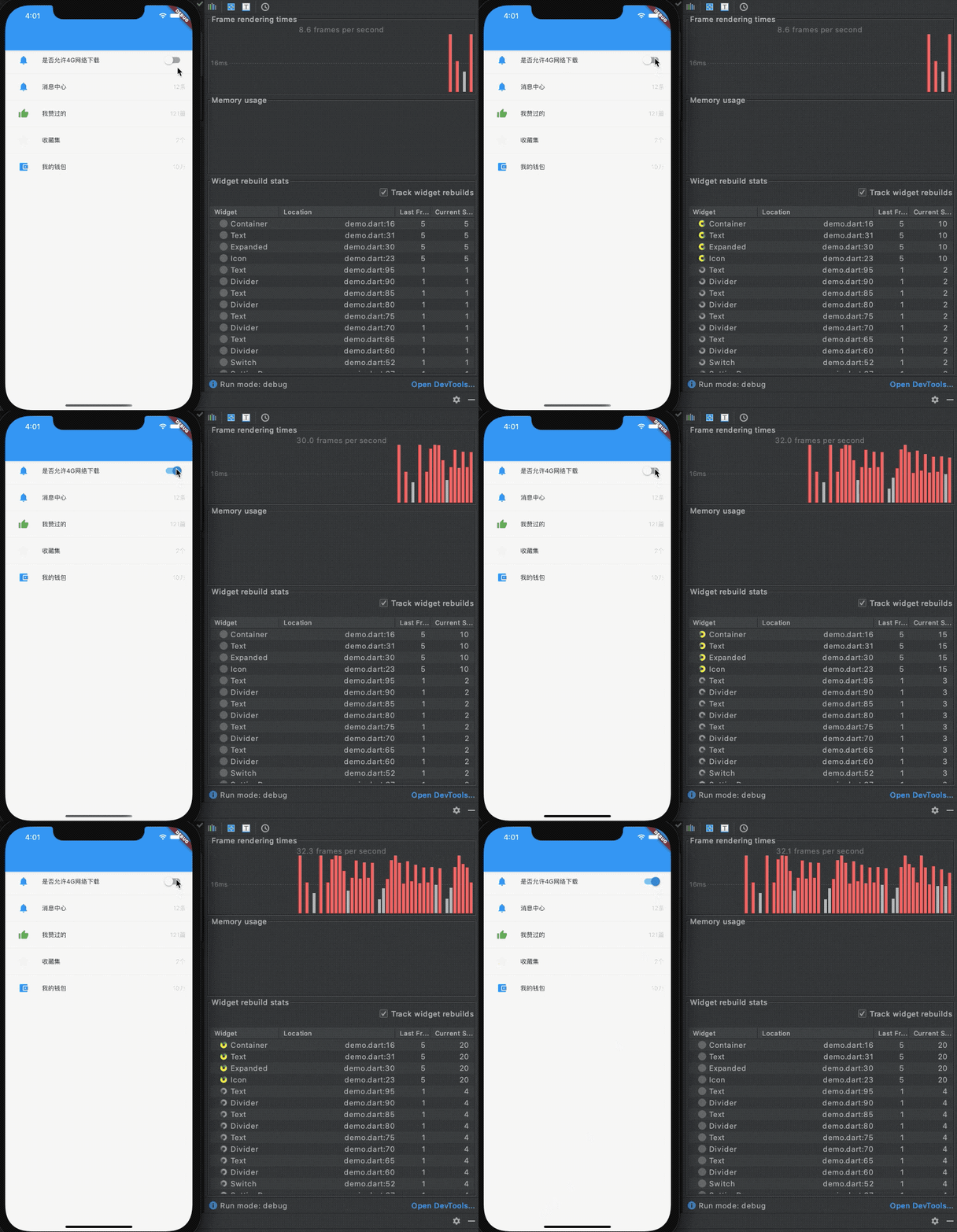
注意看上圖右邊下半部分,點(diǎn)擊切換開關(guān)的時(shí)候,所有的組件全部重建了,理想情況下,應(yīng)該只是 Switch 組件進(jìn)行切換,因此將 Switch 組件進(jìn)行封裝:
class?_SwitchWidget?extends?StatefulWidget?{
??final?bool?value;

??const?_SwitchWidget({Key?key,?this.value})?:?super(key:?key);

??@override
??__SwitchWidgetState?createState()?=>?__SwitchWidgetState();
}

class?__SwitchWidgetState?extends?State<_SwitchWidget>?{
??bool?_value;

??@override
??void?initState()?{
????_value?=?widget.value;
????super.initState();
??}

??@override
??Widget?build(BuildContext?context)?{
????return?Switch(
??????value:?_value,
??????onChanged:?(value)?{
????????setState(()?{
??????????_value?=?value;
????????});
??????},
????);
??}
}
使用:
_item(
??iconData:?Icons.notifications,
??iconColor:?Colors.blue,
??title:?'是否允許4G網(wǎng)絡(luò)下載',
??suffix:?_SwitchWidget(
????value:?false,
??),
)
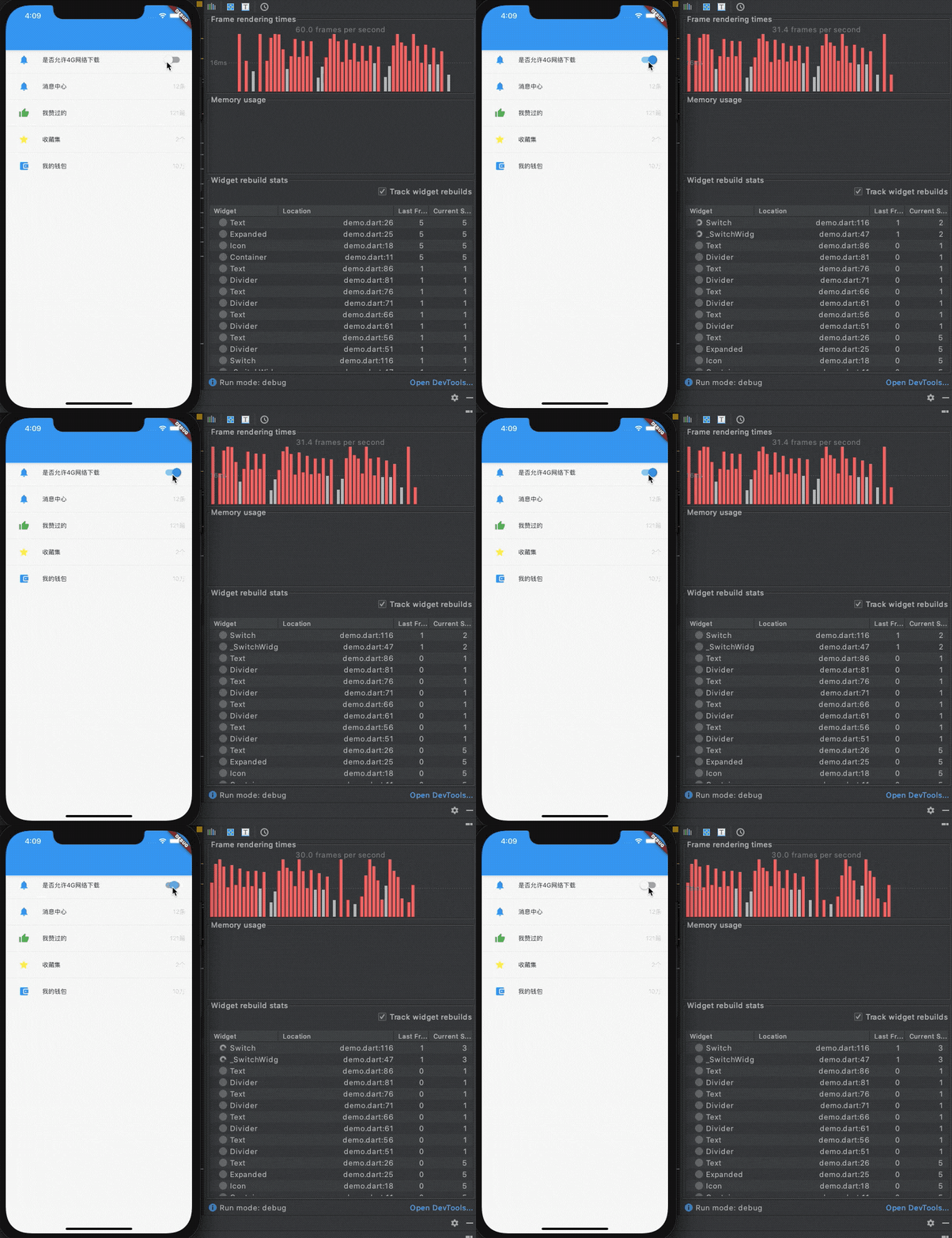
此時(shí)看到重建的組件只有 _SwitchWidget 和 Switch 組件,提高了性能。
如果 Switch 組件的狀態(tài)改變也會改變其它組件的狀態(tài),這是典型的組件間通信,這種情況下可以使用 InheritedWidget,但更建議使用狀態(tài)管理框架(比如 Provider 等),而不是將其父組件改變?yōu)镾tatefulWidget。
盡量不要將整個(gè)頁面定義為 StatefulWidget 組件,因?yàn)橐坏┲亟▽⒅亟ù隧撁嫦滤械慕M件,尤其是 Switch 、Radio等組件狀態(tài)的改變導(dǎo)致的重建,強(qiáng)烈建議對其進(jìn)行封裝。
這里有一個(gè)誤區(qū),有些人認(rèn)為,將組件拆分為方法可以減少重建,就比如上面的例子,將 _SwitchWidget 組件改變?yōu)榉椒ǎ摲椒ǚ祷?Switch 組件,這是錯(cuò)誤的,此種方式并不能減少重建, 但是將一個(gè)組件拆分為多個(gè)小組件是可以減少重建的,就像上面的例子,將需要重建的 Switch 封裝為一個(gè)單獨(dú)的 StatefulWidget 組件,避免了其他不必要的重建。
強(qiáng)烈建議:在組件前加上 const
在組件前加上 const ,相當(dāng)于對此組件進(jìn)行了緩存,下面是未加 const 的代碼:
class?ConstDemo?extends?StatefulWidget?{
??@override
??_ConstDemoState?createState()?=>?_ConstDemoState();
}

class?_ConstDemoState?extends?State<ConstDemo>?{
??@override
??Widget?build(BuildContext?context)?{
????return?Center(
??????child:?Column(
????????children:?[
??????????Text('老孟'),
??????????RaisedButton(onPressed:?(){
????????????setState(()?{

????????????});
??????????})
????????],
??????),
????);
??}
}
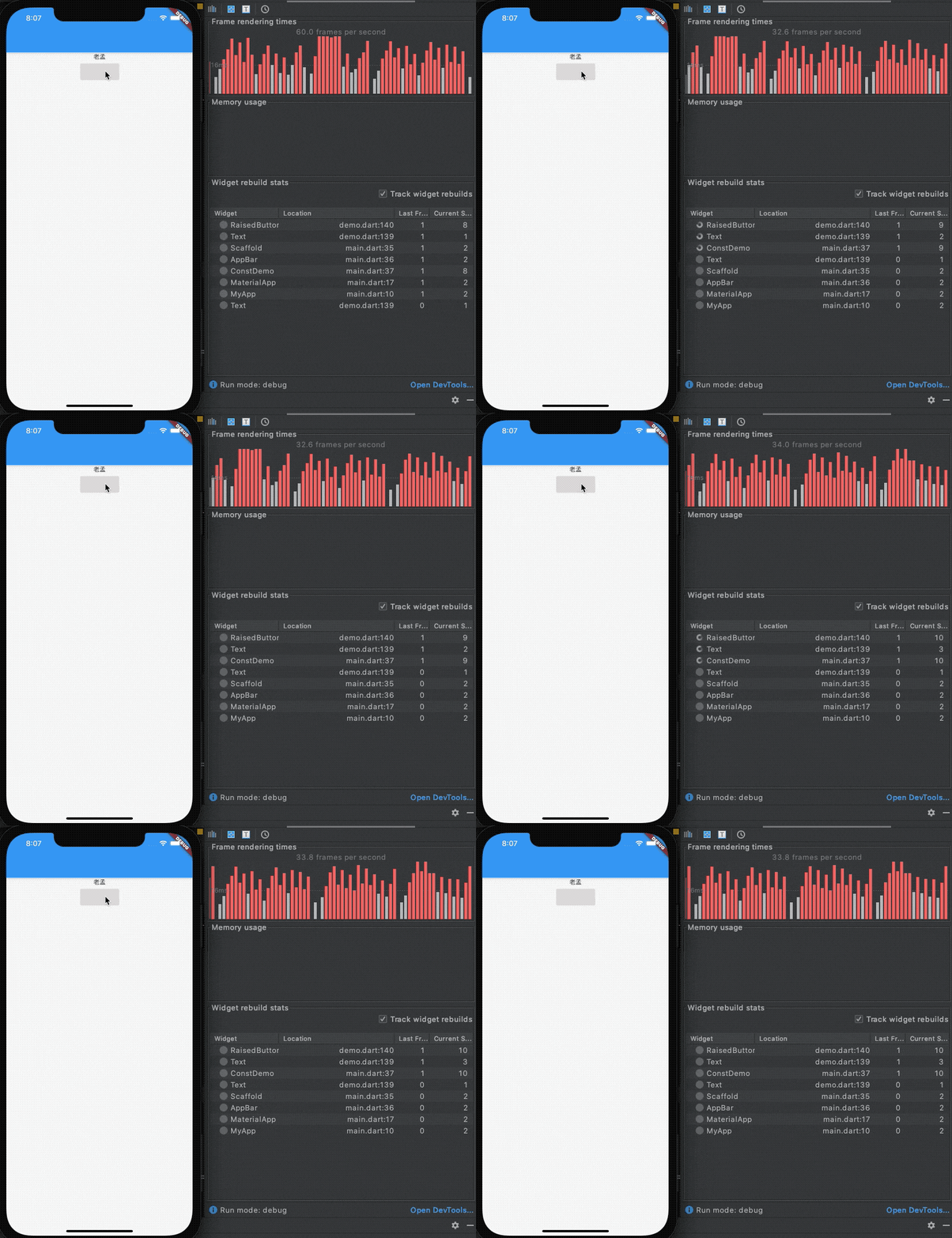
給 Text('老孟') 組件加上 const:
const?Text('老孟'),

對比兩次 Text 組件的重建情況,加上 const 后,未重建。
避免更改組件樹的結(jié)構(gòu)和組件的類型
有如下場景,有一個(gè) Text 組件有可見和不可見兩種狀態(tài),代碼如下:
bool?_visible?=?true;

@override
Widget?build(BuildContext?context)?{
??return?Center(
????child:?Column(
??????children:?[
????????if(_visible)
??????????Text('可見'),
????????Container(),
??????],
????),
??);
}
可見時(shí)的組件樹:

不可見時(shí)的組件樹:
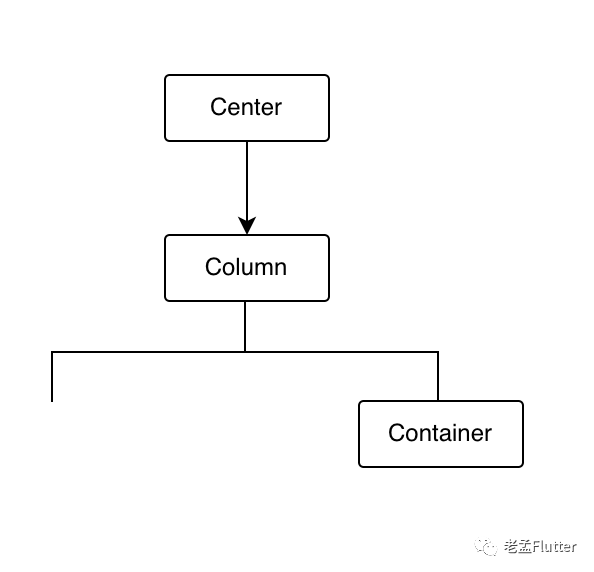
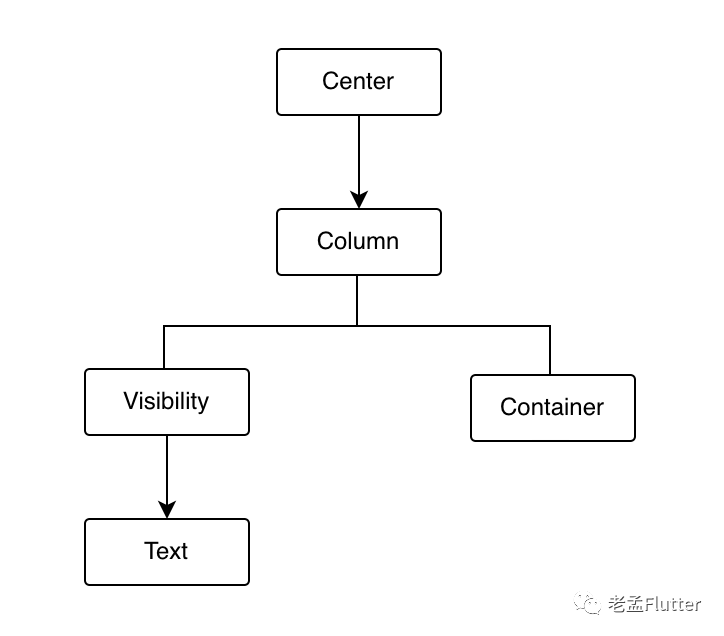
兩種狀態(tài)組件樹結(jié)構(gòu)發(fā)生變化,應(yīng)該避免發(fā)生此種情況,優(yōu)化如下:
Center(
??child:?Column(
????children:?[
??????Visibility(
????????visible:?_visible,
????????child:?Text('可見'),
??????),
??????Container(),
????],
??),
)
此時(shí)不管是可見還是不可見狀態(tài),組件樹都不會發(fā)生變化,如下:
還有一種情況是根據(jù)不同的條件構(gòu)建不同的組件,如下:
bool?_showButton?=?true;

@override
Widget?build(BuildContext?context)?{
??return?Center(
????child:?Column(
??????children:?[
????????_showButton???RaisedButton(onPressed:?null)?:?Text('不顯示'),
????????Container(),
??????],
????),
??);
}
設(shè)置為 true 時(shí)的組件樹結(jié)構(gòu):
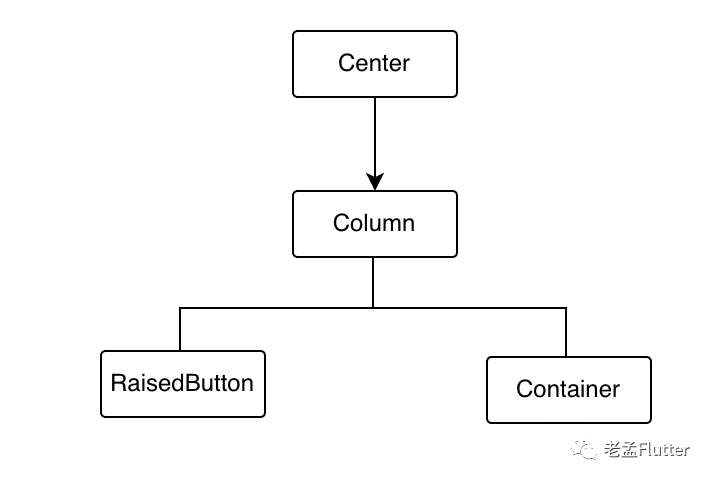
設(shè)置為 false 時(shí)的組件樹結(jié)構(gòu):
看到左側(cè)子節(jié)點(diǎn)由 RaisedButton 變?yōu)榱?Text。
上面的情況組件樹發(fā)生了更改,不管是類型發(fā)生更改,還是深度發(fā)生更改,如果無法避免,那么就將變化的組件樹封裝為一個(gè) StatefulWidget 組件,且設(shè)置 GlobalKey,如下:
封裝變化的部分:
class?ChildWidget?extends?StatefulWidget?{
??const?ChildWidget({Key?key})?:?super(key:?key);

??@override
??_ChildWidgetState?createState()?=>?_ChildWidgetState();
}

class?_ChildWidgetState?extends?State<ChildWidget>?{
??bool?_showButton?=?true;

??@override
??Widget?build(BuildContext?context)?{
????return?_showButton???RaisedButton(onPressed:?null)?:?Text('不顯示');
??}
}
構(gòu)建:
class?ConstDemo?extends?StatefulWidget?{
??@override
??_ConstDemoState?createState()?=>?_ConstDemoState();
}

class?_ConstDemoState?extends?State<ConstDemo>?{
??@override
??Widget?build(BuildContext?context)?{
????return?Center(
??????child:?Column(
????????children:?[
??????????ChildWidget(key:?GlobalKey(),),
??????????Container(),
????????],
??????),
????);
??}
}
雖然通過 GlobalKey 提高了上面案例的性能,但我們千萬不要亂用 GlobalKey,因?yàn)楣芾?GlobalKey 的成本很高,所以其他需要使用 Key 的地方建議考慮使用 Key, ValueKey, ObjectKey, 和 UniqueKey。
關(guān)于 GlobalKey 的相關(guān)說明參考:https://api.flutter.dev/flutter/widgets/GlobalKey-class.html
關(guān)于ListView 的優(yōu)化
ListView是我們最常用的組件之一,用于展示大量數(shù)據(jù)的列表。如果展示大量數(shù)據(jù)請使用 ListView.builder 或者 ListView.separated,千萬不要直接使用如下方式:
ListView(
??children:?[
????item,item1,item2,...
??],
)
這種方式一次加載所有的組件,沒有“懶加載”,消耗極大的性能。
ListView 中 itemExtent 屬性對動態(tài)滾動到性能提升非常大,比如,有2000條數(shù)據(jù)展示,點(diǎn)擊按鈕滾動到最后,代碼如下:
class?ListViewDemo?extends?StatefulWidget?{
??@override
??_ListViewDemoState?createState()?=>?_ListViewDemoState();
}

class?_ListViewDemoState?extends?State<ListViewDemo>?{
??ScrollController?_controller;

??@override
??void?initState()?{
????super.initState();
????_controller?=?ScrollController();
??}

??@override
??Widget?build(BuildContext?context)?{
????return?Stack(
??????children:?[
????????ListView.builder(
??????????controller:?_controller,
??????????itemBuilder:?(context,?index)?{
????????????return?Container(
??????????????height:?80,
??????????????alignment:?Alignment.center,
??????????????color:?Colors.primaries[index?%?Colors.primaries.length],
??????????????child:?Text('$index',style:?TextStyle(color:?Colors.white,fontSize:?20),),
????????????);
??????????},
??????????itemCount:?2000,
????????),
????????Positioned(
????????????child:?RaisedButton(
??????????child:?Text('滾動到最后'),
??????????onPressed:?()?{
????????????_controller.jumpTo(_controller.position.maxScrollExtent);
??????????},
????????))
??????],
????);
??}
}
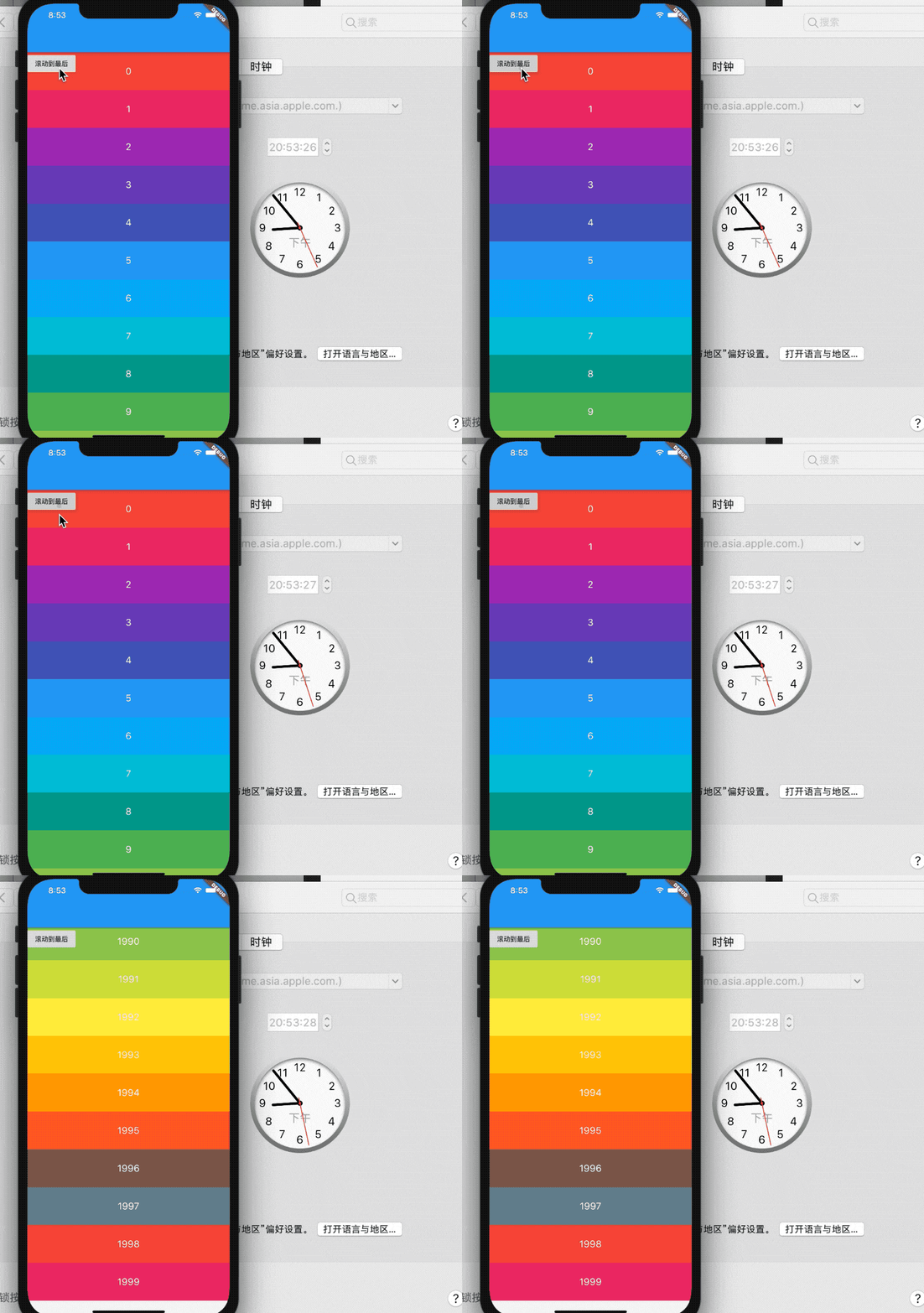
耗時(shí)在2秒左右,加上 itemExtent 屬性,修改如下:
ListView.builder(
??controller:?_controller,
??itemBuilder:?(context,?index)?{
????return?Container(
??????height:?80,
??????alignment:?Alignment.center,
??????color:?Colors.primaries[index?%?Colors.primaries.length],
??????child:?Text('$index',style:?TextStyle(color:?Colors.white,fontSize:?20),),
????);
??},
??itemExtent:?80,
??itemCount:?2000,
)
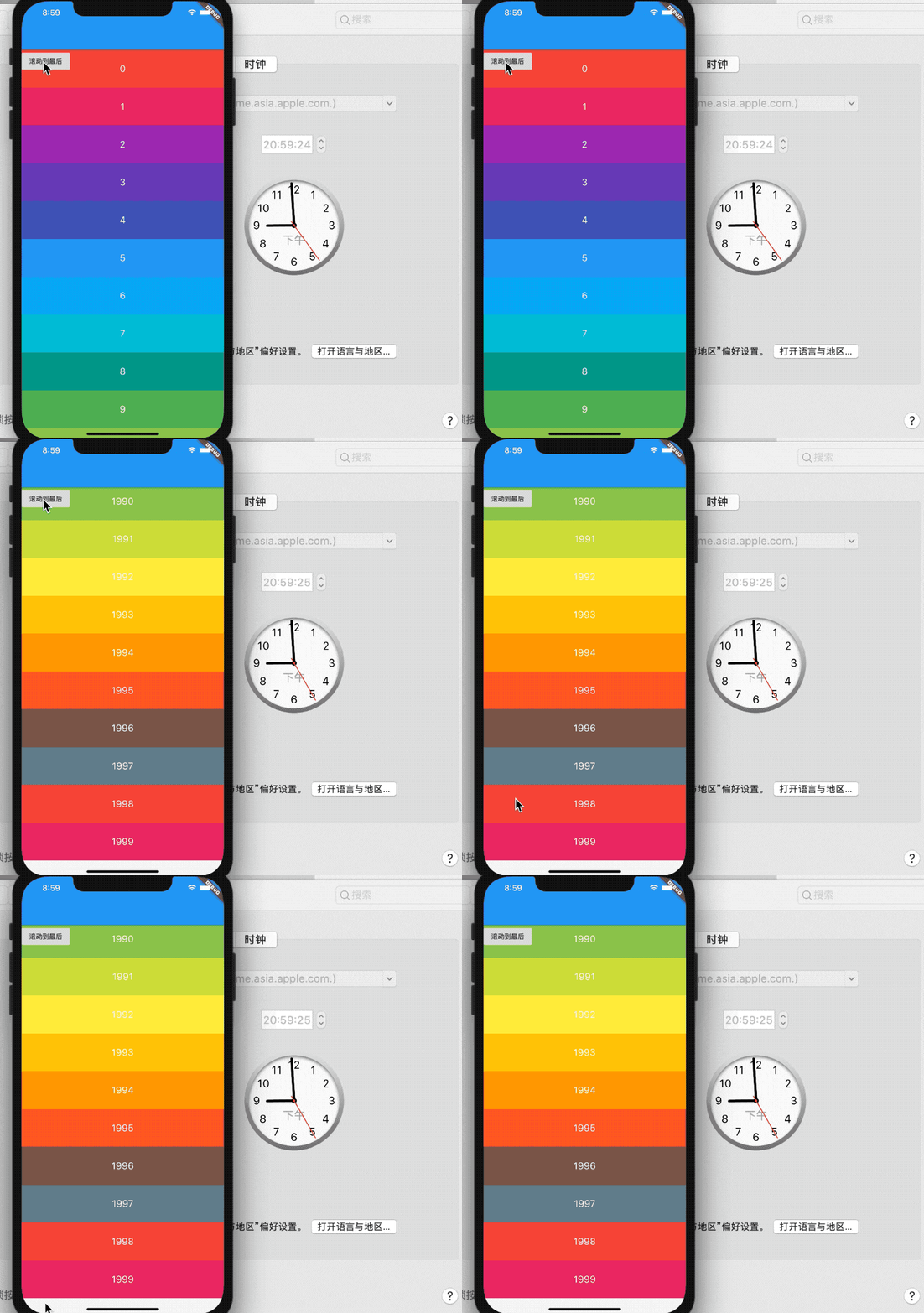
優(yōu)化后瞬間跳轉(zhuǎn)到底部。
這是因?yàn)椴辉O(shè)置 ?itemExtent 屬性,將會由子組件自己決定大小,大量的計(jì)算導(dǎo)致UI堵塞。
關(guān)于 AnimatedBuilder TweenAnimationBuilder 的優(yōu)化
這里說的是向AnimatedBuilder 、TweenAnimationBuilder 等一類的組件的問題,這些組件都有一個(gè)共同點(diǎn),帶有 builder 且其參數(shù)重有 child。
以 AnimatedBuilder 為例,如果 builder 中構(gòu)建的樹中包含與動畫無關(guān)的組件,將這些無關(guān)的組件當(dāng)作 child 傳遞到 builder 中比直接在 builder 中構(gòu)建更加有效。
比如下面的代碼,直接在 builder 中構(gòu)建子組件:
AnimatedBuilder(
????animation:?animation,
????builder:?(BuildContext?context,?Widget?child)?{
??????return?Transform.rotate(
????????angle:?animation.value,
????????child:?FlutterLogo(size:?60,),
??????);
????},
??)
優(yōu)化后的代碼:
AnimatedBuilder(
????animation:?animation,
????builder:?(BuildContext?context,?Widget?child)?{
??????return?Transform.rotate(
????????angle:?animation.value,
????????child:?child,
??????);
????},
????child:?FlutterLogo(size:?60,),
??)
謹(jǐn)慎的使用一些組件
部分組件一定要謹(jǐn)慎使用,因?yàn)檫@些組件包含一些昂貴的操作,比如 saveLayer() 方法。
調(diào)用saveLayer()會分配一個(gè)屏幕外緩沖區(qū)。將內(nèi)容繪制到屏幕外緩沖區(qū)中可能會觸發(fā)渲染目標(biāo)切換,這在較早的GPU中特別慢。
另外雖然下面這些組件比較消耗性能,但并不是禁止大家使用,而是謹(jǐn)慎使用,如果有替代方案,考慮使用替代方法。
尤其注意,如果這些組件頻繁重建(比如動畫的過程),要重點(diǎn)優(yōu)化。
Clip 類組件
Clip 類組件是常用的裁剪類組件,比如:ClipOval、ClipPath、ClipRRect、ClipRect、CustomClipper。這些組件中都有 clipBehavior 屬性,不同的值性能是不同的,
///??*?[hardEdge],?which?is?the?fastest?clipping,?but?with?lower?fidelity.
///??*?[antiAlias],?which?is?a?little?slower?than?[hardEdge],?but?with?smoothed?edges.
///??*?[antiAliasWithSaveLayer],?which?is?much?slower?than?[antiAlias],?and?should
///????rarely?be?used.
越往下,速度越慢。
一些簡單的圓角組件的設(shè)置可以使用 Container 實(shí)現(xiàn):
Container(
??????height:?200,
??????width:?200,
??????decoration:?BoxDecoration(
????????image:??DecorationImage(
??????????image:?NetworkImage(
??????????????'https://flutter.github.io/assets-for-api-docs/assets/widgets/owl-2.jpg'),
??????????fit:?BoxFit.cover,
????????),
????????border:?Border.all(
??????????color:?Colors.blue,
??????????width:?2,
????????),
????????borderRadius:?BorderRadius.circular(12),
??????),
????)

Opacity
Opacity 組件的功能是使子組件透明。此類將其子級繪制到中間緩沖區(qū)中,然后將子級混合回到部分透明的場景中。
對于除0.0和1.0之外的不透明度值,此類相對昂貴,因?yàn)樗枰獙⒆蛹壚L制到中間緩沖區(qū)中。對于值0.0,根本不繪制子級。對于值1.0,將立即繪制沒有中間緩沖區(qū)的子對象。
如果僅僅是對單個(gè) Image 或者 Color 增加透明度,直接使用比 Opacity 組件更快:
?Container(color:?Color.fromRGBO(255,?0,?0,?0.5))
比使用 Opacity 組件更快:
Opacity(opacity:?0.5,?child:?Container(color:?Colors.red))
如果對組件的透明度進(jìn)行動畫操作,建議使用 AnimatedOpacity。
還有一些組件也要慎重使用,比如:
ShaderMask ColorFilter BackdropFilter
文中如果有不完善或者不正確的地方歡迎提出意見,后面如果優(yōu)化的補(bǔ)充將會在我的博客(精彩文章目錄下)中進(jìn)行補(bǔ)充,地址:
http://laomengit.com/
參考鏈接:
https://flutter.dev/docs/perf/rendering/best-practices
https://api.flutter.dev/flutter/widgets/Opacity-class.html#transparent-image
https://api.flutter.dev/flutter/widgets/StatefulWidget-class.html#performance-considerations
