
Android實現(xiàn)年月選擇器功能
開發(fā)過程中,年月的選擇功能還是比較常見的,像這種功能點比較常見,要是每次都要自己手動去寫,這無疑會耗費比較多的時間與精力,今天給大家介紹一個第三方庫,使用該庫來完成年月選擇器功能。
一、效果圖
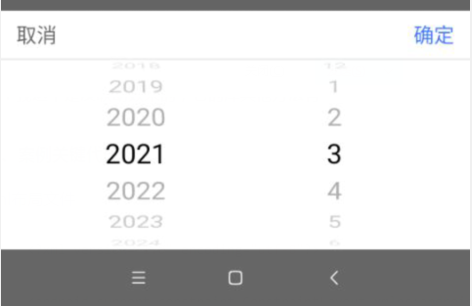
二、實現(xiàn)步驟:
1、依賴庫
implementation 'cn.aigestudio.wheelpicker:WheelPicker:1.1.3'2、xml布局文件
<?xml version="1.0" encoding="utf-8"?><android.support.constraint.ConstraintLayout xmlns:android="http://schemas.android.com/apk/res/android"xmlns:app="http://schemas.android.com/apk/res-auto"android:layout_width="match_parent"android:layout_height="200dp"android:background="#ffffff"><TextViewandroid:id="@+id/cancel"android:layout_width="60dp"android:layout_height="40dp"android:gravity="center"android:text="取消"android:textColor="#666666"android:textSize="17sp"app:layout_constraintLeft_toLeftOf="parent"app:layout_constraintTop_toTopOf="parent" /><TextViewandroid:id="@+id/ok"android:layout_width="60dp"android:layout_height="40dp"android:gravity="center"android:text="確定"android:textColor="#3C76FF"android:textSize="17sp"app:layout_constraintRight_toRightOf="parent"app:layout_constraintTop_toTopOf="parent" /><Viewandroid:id="@+id/view_line"android:layout_width="match_parent"android:layout_height="1dp"android:background="#e5e5e5"app:layout_constraintLeft_toLeftOf="parent"app:layout_constraintTop_toBottomOf="@id/cancel" /><com.aigestudio.wheelpicker.WheelPickerandroid:id="@+id/mWheelPicker_1"android:layout_width="0dp"android:layout_height="0dp"android:layout_marginLeft="30dp"app:layout_constraintBottom_toBottomOf="parent"app:layout_constraintLeft_toLeftOf="parent"app:layout_constraintRight_toLeftOf="@id/mWheelPicker_2"app:layout_constraintTop_toBottomOf="@id/view_line"app:wheel_atmospheric="true"app:wheel_curtain_color="#1886F7"app:wheel_curved="true"app:wheel_cyclic="true"app:wheel_indicator_color="#e5e5e5"app:wheel_item_text_color="#919191"app:wheel_item_text_size="23sp"app:wheel_selected_item_text_color="#000000" /><com.aigestudio.wheelpicker.WheelPickerandroid:id="@+id/mWheelPicker_2"android:layout_width="0dp"android:layout_height="0dp"android:layout_marginRight="30dp"app:layout_constraintBottom_toBottomOf="parent"app:layout_constraintLeft_toRightOf="@id/mWheelPicker_1"app:layout_constraintRight_toRightOf="parent"app:layout_constraintTop_toTopOf="@id/mWheelPicker_1"app:wheel_atmospheric="true"app:wheel_curtain_color="#1886F7"app:wheel_curved="true"app:wheel_cyclic="true"app:wheel_indicator_color="#e5e5e5"app:wheel_indicator_size="24sp"app:wheel_item_text_color="#919191"app:wheel_item_text_size="23sp"app:wheel_selected_item_text_color="#000000" /></android.support.constraint.ConstraintLayout>
3、添加數(shù)據(jù)
List<String> CEOYEAR = new ArrayList<>();List<String> CEOMONTH = new ArrayList<>();for (int i = 2000; i < 2051; i++) {CEOYEAR.add(i + "");}for (int i = 1; i < 13; i++) {CEOMONTH.add(i + "");}
4、設(shè)置選擇器彈出框
/*** @desc : 兩個滾動器**/private void showTwoWheelPicker(Context context, final List<String> data1, final List<String> data2, final TwoWheelListener mTwoWheelListener) {final Dialog dialog = getDialog(context);Window window = dialog.getWindow();window.setGravity(Gravity.BOTTOM);window.setLayout(ViewGroup.LayoutParams.MATCH_PARENT, ViewGroup.LayoutParams.WRAP_CONTENT);window.setContentView(R.layout.fragment_sami);final WheelPicker wv1 = window.findViewById(R.id.mWheelPicker_1);final WheelPicker wv2 = window.findViewById(R.id.mWheelPicker_2);wv1.setData(data1);wv2.setData(data2);//取消window.findViewById(R.id.cancel).setOnClickListener(new View.OnClickListener() {@Overridepublic void onClick(View v) {dialog.dismiss();}});//確定window.findViewById(R.id.ok).setOnClickListener(new View.OnClickListener() {@Overridepublic void onClick(View v) {dialog.dismiss();if (mTwoWheelListener != null) {mTwoWheelListener.onOk(data1.get(wv1.getCurrentItemPosition()), data2.get(wv2.getCurrentItemPosition()));}}});}private Dialog getDialog(Context context) {return new AlertDialog.Builder(context, R.style.RoundCornerDialog).setCancelable(false).show();}private TwoWheelListener mTwoWheelListener = null;public static interface TwoWheelListener {void onOk(String str1, String str2);}
5、設(shè)置彈出框dialog樣式
<!--圓角的dialog樣式--><style name="RoundCornerDialog" parent="@android:style/Theme.Dialog"><item name="android:windowFrame">@null</item><item name="android:windowIsFloating">true</item><item name="android:windowIsTranslucent">true</item><item name="android:windowNoTitle">true</item><item name="android:background">@android:color/transparent</item><item name="android:windowBackground">@android:color/transparent</item><item name="android:backgroundDimEnabled">true</item><item name="android:backgroundDimAmount">0.6</item></style>
6、設(shè)置點擊事件彈出
findViewById(R.id.btn).setOnClickListener(new View.OnClickListener() {@Overridepublic void onClick(View v) {showTwoWheelPicker(AppBarLayoutActivity.this, CEOYEAR, CEOMONTH, new TwoWheelListener() {@Overridepublic void onOk(String str1, String str2) {Toast.makeText(AppBarLayoutActivity.this, str1 + "年" + str2 + "日", Toast.LENGTH_SHORT).show();}});}});
四、總結(jié)
這個第三方庫我這里只是做了簡單的介紹,還有更多需求的還是去閱讀第三方庫。
第三方庫地址:
https://github.com/AigeStudio/WheelPicker
到這里就結(jié)束啦。
評論
圖片
表情