
Spring Boot 集成 WebSocket,輕松實(shí)現(xiàn)信息推送!
在一次項(xiàng)目開發(fā)中,使用到了Netty 網(wǎng)絡(luò)應(yīng)用框架,以及 MQTT 進(jìn)行消息數(shù)據(jù)的收發(fā),這其中需要后臺(tái)來將獲取到的消息主動(dòng)推送給前端,于是就使用到了MQTT,特此記錄一下。
一、什么是websocket?
WebSocket 協(xié)議是基于 TCP 的一種新的網(wǎng)絡(luò)協(xié)議。
它實(shí)現(xiàn)了客戶端與服務(wù)器之間的全雙工通信,學(xué)過計(jì)算機(jī)網(wǎng)絡(luò)都知道,既然是全雙工,就說明了服務(wù)器可以主動(dòng)發(fā)送信息給客戶端。
這與我們的推送技術(shù)或者是多人在線聊天的功能不謀而合。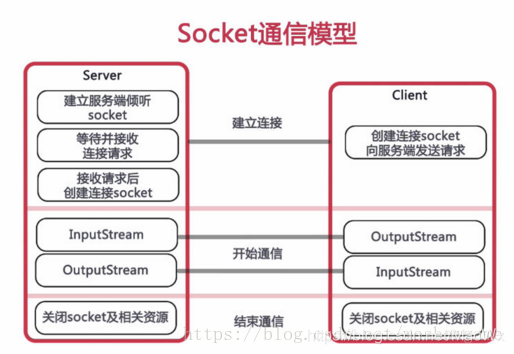
為什么不使用 HTTP 協(xié)議呢?
這是因?yàn)镠TTP是單工通信,通信只能由客戶端發(fā)起,客戶端請求一下,服務(wù)器處理一下,這就太麻煩了。
于是 websocket 應(yīng)運(yùn)而生。
下面我們就直接開始使用 Spring Boot 開始整合。以下案例都在我自己的電腦上測試成功,你可以根據(jù)自己的功能進(jìn)行修改即可。
我的項(xiàng)目結(jié)構(gòu)如下:

二、使用步驟
1.添加依賴
Maven 依賴:
<dependency>
    <groupId>org.springframework.boot</groupId>
    <artifactId>spring-boot-starter-websocket</artifactId>
</dependency>
2.啟用Springboot對WebSocket的支持
啟用 WebSocket 的支持也是很簡單,幾句代碼搞定。Spring Boot 最新教程推薦看這個(gè):https://github.com/javastacks/spring-boot-best-practice
import org.springframework.context.annotation.Bean;
import org.springframework.context.annotation.Configuration;
import org.springframework.web.socket.server.standard.ServerEndpointExporter;
/**
 * @ Auther: 馬超偉
 * @ Date: 2020/06/16/14:35
 * @ Description: 開啟WebSocket支持
 */
@Configuration
public class WebSocketConfig {
    @Bean
    public ServerEndpointExporter serverEndpointExporter() {
        return new ServerEndpointExporter();
    }
}
3.核心配置:WebSocketServer
package cc.mrbird.febs.external.webScoket;

import com.baomidou.mybatisplus.core.conditions.query.QueryWrapper;
import com.baomidou.mybatisplus.core.conditions.update.UpdateWrapper;
import lombok.extern.slf4j.Slf4j;
import org.springframework.stereotype.Component;
import org.springframework.stereotype.Service;

import javax.websocket.*;
import javax.websocket.server.PathParam;
import javax.websocket.server.ServerEndpoint;
import java.io.IOException;
import java.time.LocalDateTime;
import java.util.List;
import java.util.concurrent.CopyOnWriteArraySet;

/**
 * Created with IntelliJ IDEA.
 * @ Auther: 馬超偉
 * @ Date: 2020/06/16/14:35
 * @ Description:
 * @ ServerEndpoint 注解是一個(gè)類層次的注解,它的功能主要是將目前的類定義成一個(gè)websocket服務(wù)器端,
 * 注解的值將被用于監(jiān)聽用戶連接的終端訪問URL地址,客戶端可以通過這個(gè)URL來連接到WebSocket服務(wù)器端
 */
@Component
@Slf4j
@Service
@ServerEndpoint("/api/websocket/{sid}")
public class WebSocketServer {
    //當(dāng)前在線連接數(shù)
    private static int onlineCount = 0;
    //存放每個(gè)客戶端對應(yīng)的MyWebSocket對象
    private static CopyOnWriteArraySet<WebSocketServer> webSocketSet = new CopyOnWriteArraySet<WebSocketServer>();

    private Session session;

    //接收sid
    private String sid = "";

    /**
     * 連接建立成功調(diào)用的方法
     */
    @OnOpen
    public void onOpen(Session session, @PathParam("sid") String sid) {
        this.session = session;
        webSocketSet.add(this);     //加入set中
        this.sid = sid;
        addOnlineCount();           //在線數(shù)加1
        try {
            sendMessage("conn_success");
            log.info("有新窗口開始監(jiān)聽:" + sid + ",當(dāng)前在線人數(shù)為:" + getOnlineCount());
        } catch (IOException e) {
            log.error("websocket IO Exception");
        }
    }

    /**
     * 連接關(guān)閉調(diào)用的方法
     */
    @OnClose
    public void onClose() {
        webSocketSet.remove(this);  //從set中刪除
        subOnlineCount();           //在線數(shù)減1

        log.info("釋放的sid為:"+sid);

        log.info("有一連接關(guān)閉!當(dāng)前在線人數(shù)為" + getOnlineCount());

    }

    /**
     * 收到客戶端消息后調(diào)用的方法
     * @ Param message 客戶端發(fā)送過來的消息
     */
    @OnMessage
    public void onMessage(String message, Session session) {
        log.info("收到來自窗口" + sid + "的信息:" + message);
        //群發(fā)消息
        for (WebSocketServer item : webSocketSet) {
            try {
                item.sendMessage(message);
            } catch (IOException e) {
                e.printStackTrace();
            }
        }
    }

    /**
     * @ Param session
     * @ Param error
     */
    @OnError
    public void onError(Session session, Throwable error) {
        log.error("發(fā)生錯(cuò)誤");
        error.printStackTrace();
    }

    /**
     * 實(shí)現(xiàn)服務(wù)器主動(dòng)推送
     */
    public void sendMessage(String message) throws IOException {
        this.session.getBasicRemote().sendText(message);
    }

    /**
     * 群發(fā)自定義消息
     */
    public static void sendInfo(String message, @PathParam("sid") String sid) throws IOException {
        log.info("推送消息到窗口" + sid + ",推送內(nèi)容:" + message);

        for (WebSocketServer item : webSocketSet) {
            try {
                //為null則全部推送
                if (sid == null) {
//                    item.sendMessage(message);
                } else if (item.sid.equals(sid)) {
                    item.sendMessage(message);
                }
            } catch (IOException e) {
                continue;
            }
        }
    }

    public static synchronized int getOnlineCount() {
        return onlineCount;
    }

    public static synchronized void addOnlineCount() {
        WebSocketServer.onlineCount++;
    }

    public static synchronized void subOnlineCount() {
        WebSocketServer.onlineCount--;
    }

    public static CopyOnWriteArraySet<WebSocketServer> getWebSocketSet() {
        return webSocketSet;
    }
}
4.測試Controller
import org.springframework.stereotype.Controller;
import org.springframework.web.bind.annotation.GetMapping;
import org.springframework.web.bind.annotation.PathVariable;
import org.springframework.web.bind.annotation.RequestMapping;
import org.springframework.web.bind.annotation.ResponseBody;
import org.springframework.web.servlet.ModelAndView;

import java.io.IOException;
import java.util.HashMap;
import java.util.Map;

/**
 * Created with IntelliJ IDEA.
 *
 * @ Auther: 馬超偉
 * @ Date: 2020/06/16/14:38
 * @ Description:
 */
@Controller("web_Scoket_system")
@RequestMapping("/api/socket")
public class SystemController {
    //頁面請求
    @GetMapping("/index/{userId}")
    public ModelAndView socket(@PathVariable String userId) {
        ModelAndView mav = new ModelAndView("/socket1");
        mav.addObject("userId", userId);
        return mav;
    }

    //推送數(shù)據(jù)接口
    @ResponseBody
    @RequestMapping("/socket/push/{cid}")
    public Map pushToWeb(@PathVariable String cid, String message) {
        Map<String,Object> result = new HashMap<>();
        try {
            WebSocketServer.sendInfo(message, cid);
            result.put("code", cid);
            result.put("msg", message);
        } catch (IOException e) {
            e.printStackTrace();
        }
        return result;
    }
}
5.測試頁面index.html
<!DOCTYPE html>
<html>
<head>
<meta charset="utf-8">
<title>Java 后端 WebSocket 的 Tomcat 實(shí)現(xiàn)</title>
<script type="text/javascript" src="js/jquery.min.js"></script>
</head>
<body>
<div id="main" style="width: 1200px;height:800px;"></div>
Welcome<br/><input id="text" type="text" />
<button onclick="send()">發(fā)送消息</button>
<hr/>
<button onclick="closeWebSocket()">關(guān)閉WebSocket連接</button>
<hr/>
<div id="message"></div>
</body>
<script type="text/javascript">
var websocket = null;
//判斷當(dāng)前瀏覽器是否支持WebSocket
if('WebSocket' in window) {
websocket = new WebSocket("ws://192.168.100.196:8082/api/websocket/100");
} else {
alert('當(dāng)前瀏覽器 Not support websocket')
}
//連接發(fā)生錯(cuò)誤回調(diào)方法
websocket.onerror = function() {
setMessageInnerHTML("WebSocket連接發(fā)生錯(cuò)誤");
};
//連接成功建立回調(diào)方法
websocket.onopen = function() {
setMessageInnerHTML("WebSocket連接成功");
}
var U01data, Uidata, Usdata
//接收消息回調(diào)方法
websocket.onmessage = function(event) {
console.log(event);
setMessageInnerHTML(event);
setechart()
}
//連接關(guān)閉回調(diào)方法
websocket.onclose = function() {
setMessageInnerHTML("WebSocket連接關(guān)閉");
}
//監(jiān)聽窗口關(guān)閉事件
window.onbeforeunload = function() {
closeWebSocket();
}
//將消息顯示在網(wǎng)頁上
function setMessageInnerHTML(innerHTML) {
document.getElementById('message').innerHTML += innerHTML + '<br/>';
}
//關(guān)閉WebSocket連接
function closeWebSocket() {
websocket.close();
}
//發(fā)送消息
function send() {
var message = document.getElementById('text').value;
websocket.send('{"msg":"' + message + '"}');
setMessageInnerHTML(message + " ");
}
</script>
</html>
6.結(jié)果展示

前臺(tái)顯示:
總結(jié)
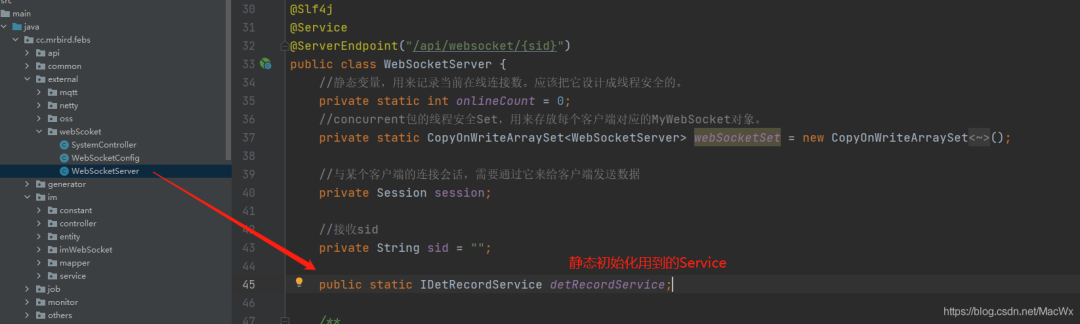
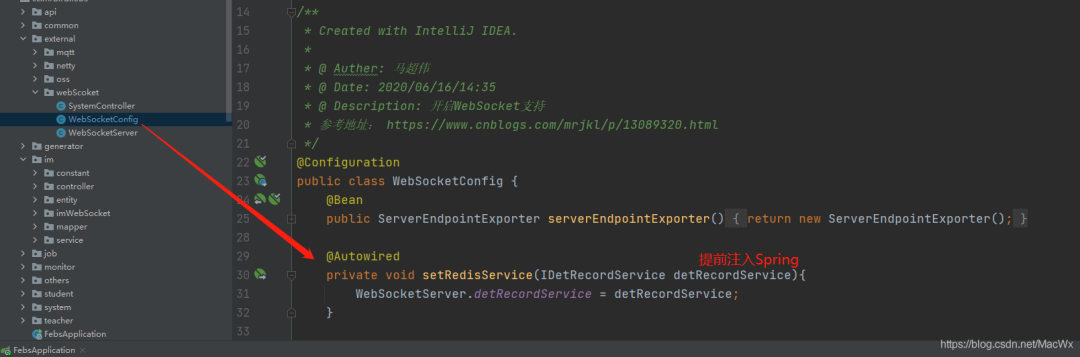
這中間我遇到一個(gè)問題,就是說 WebSocket 啟動(dòng)的時(shí)候優(yōu)先于 spring 容器,從而導(dǎo)致在 WebSocketServer 中調(diào)用業(yè)務(wù)Service會(huì)報(bào)空指針異常。
所以需要在 WebSocketServer 中將所需要用到的 service 給靜態(tài)初始化一下:
如圖所示:
還需要做如下配置:
原文:blog.csdn.net/MacWx/article/details/111319558
正文結(jié)束
1.不認(rèn)命,從10年流水線工人,到谷歌上班的程序媛,一位湖南妹子的勵(lì)志故事
3.從零開始搭建創(chuàng)業(yè)公司后臺(tái)技術(shù)棧
5.37歲程序員被裁,120天沒找到工作,無奈去小公司,結(jié)果懵了...
一個(gè)人學(xué)習(xí)、工作很迷茫?
點(diǎn)擊「閱讀原文」加入我們的小圈子!
