
Node.js + typescript 寫(xiě)一個(gè)命令批處理輔助工具
(給前端大學(xué)加星標(biāo),提升前端技能.)
作者:用戶(hù)名還沒(méi)想好
https://juejin.cn/post/6930565860348461063
1.背景
工作中遇到這樣一些場(chǎng)景:在php混合html的老項(xiàng)目中寫(xiě)css,但是css寫(xiě)著不太好用,然后就想使用預(yù)編譯語(yǔ)言來(lái)處理,或者寫(xiě)上ts。然后問(wèn)題來(lái)了: 每次寫(xiě)完以后都要手動(dòng)執(zhí)行一次命令行把文件編譯成css文件,然后又要再輸入一行命令把css壓縮添加前綴;或者把ts編譯成js,然后js壓縮混淆。
那么有沒(méi)有辦法不用手動(dòng)輸入命令行呢?如果只是為了不手動(dòng)輸入的話(huà),那么可以在vscode上安裝compile hero插件,或者在webstorm上開(kāi)啟file watch功能。可惜的是這些工具或功能只能對(duì)當(dāng)前文件做處理,處理編譯后的文件又要手動(dòng)去執(zhí)行命令,不能連續(xù)監(jiān)聽(tīng)或監(jiān)聽(tīng)一次執(zhí)行多個(gè)命令,比如webstorm的file watch監(jiān)聽(tīng)了sass文件變化, 那么它不能再監(jiān)聽(tīng)css變化去壓縮代碼,否則會(huì)無(wú)限編譯下去。
那么為什么不使用webpack或者rollup之類(lèi)的打包工具呢?首先是這些打包工具太重了不夠靈活,畢竟原項(xiàng)目沒(méi)到重構(gòu)的時(shí)候, 要想使用新一點(diǎn)的技術(shù),那么只能寫(xiě)一點(diǎn)手動(dòng)編譯一點(diǎn)了。
好在這些預(yù)編譯語(yǔ)言都提供cli工具可在控制臺(tái)輸入命令行編譯,那么完全可以把它們的命令關(guān)聯(lián)起來(lái),做一個(gè)批量執(zhí)行的工具。其實(shí)shell腳本也可以完成這些功能, 但是其一:shell在windows上的話(huà)只能在git bash里運(yùn)行,在cmd控制臺(tái)上不能運(yùn)行,需要專(zhuān)門(mén)打開(kāi)一個(gè)git bash,少了一點(diǎn)便利性;其二:在windows上不能監(jiān)聽(tīng)文件變化。那么既然nodejs能夠勝任,那么用前端熟悉的js做那是再好不過(guò)了。
2.目標(biāo)
基礎(chǔ)功能 通過(guò)控制臺(tái)輸入指令啟動(dòng):獲取控制臺(tái)輸入的命令 運(yùn)行命令 運(yùn)行多個(gè)命令 通過(guò)指定配置文件執(zhí)行 進(jìn)階功能 前后生命周期 遍歷文件夾查找匹配運(yùn)行 - url模板替換 - 執(zhí)行配置中的命令 - 執(zhí)行配置中的js 監(jiān)聽(tīng)文件改動(dòng) 可通過(guò)指令顯示隱藏log 可通過(guò)指令顯示隱藏運(yùn)行時(shí)間 npm全局一次安裝,隨處執(zhí)行 額外功能 搜索文件或文件夾 - 忽略大小寫(xiě) - 忽略文件夾 幫助功能 打開(kāi)文件 - 直接運(yùn)行文件 - 在打開(kāi)資源管理器并選中目標(biāo)文件 - 在cmd控制臺(tái)打開(kāi)對(duì)應(yīng)的路徑 配置 依次執(zhí)行多個(gè)命令; 生命周期回調(diào) 忽略文件夾 匹配規(guī)則 - 匹配成功 - 執(zhí)行相應(yīng)命令;- 執(zhí)行相應(yīng)js;
ok,那么接下來(lái)進(jìn)入正文吧(源碼見(jiàn)底部github鏈接)。
3.基本功能
1.獲取控制臺(tái)輸入的命令
首先是獲取到控制臺(tái)輸入的命令,這里抽取出來(lái)做為一個(gè)工具函數(shù)。格式為以"="隔開(kāi)的鍵值對(duì),鍵名以"-"開(kāi)頭,值為空時(shí)設(shè)置該值為true,變量之間用空格隔開(kāi)。
// util.ts
/**
 * 獲取命令行的參數(shù)
 * @param prefix 前綴
 */
export function getParams(prefix = "-"): { [k: string]: string | true } {
    return process.argv.slice(2).reduce((obj, it) => {
        const sp = it.split("=");
        const key = sp[0].replace(prefix, "");
        obj[key] = sp[1] || true;
        return obj;
    }, {} as ReturnType<typeof getParams>);
}
調(diào)用
console.log(getParams());
運(yùn)行結(jié)果

2.運(yùn)行單個(gè)命令
能獲取到命令行參數(shù)那就好辦了,接下來(lái)實(shí)現(xiàn)執(zhí)行命令功能。
先實(shí)現(xiàn)一個(gè)簡(jiǎn)單的執(zhí)行命令函數(shù),這要用到child_process模塊里的exec函數(shù)。
const util = require("util");
const childProcess = require('child_process');
const exec = util.promisify(childProcess.exec); // 這里把exec promisify
需要知道執(zhí)行狀態(tài),所以把它封裝一下,不能try catch,出錯(cuò)就直接reject掉,避免后面的命令繼續(xù)執(zhí)行。
async function execute(cmd: string): Promise<string> {
    console.log('執(zhí)行"' + cmd + '"命令...');
    const {stdout} = await exec(cmd);
    console.log('success!');
    console.log(stdout);
    return stdout;
}
設(shè)定命令參數(shù)為-command,且必須用”” ““包起來(lái),多個(gè)則用“,”隔開(kāi)
在工具中通過(guò)-command/-cmd=啟用
調(diào)用
const args = getParams();
execute(args.command as string);
運(yùn)行

3.運(yùn)行多個(gè)命令
現(xiàn)在運(yùn)行單個(gè)命令是沒(méi)問(wèn)題的,但是運(yùn)行多個(gè)命令呢?
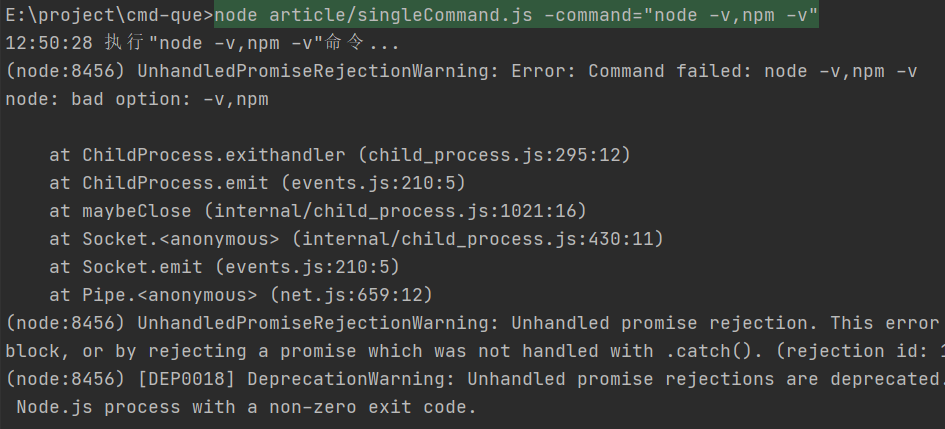
看結(jié)果可以發(fā)現(xiàn):結(jié)果馬上就報(bào)錯(cuò)了,把它改成順序執(zhí)行
async function mulExec(command: string[]) {
    for (const cmd of command) {
        await execute(cmd);
    }
}
運(yùn)行
mulExec((args.command as string).split(","));
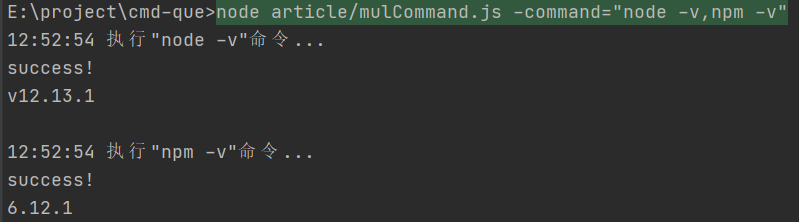
4.通過(guò)指定配置文件運(yùn)行命令
在工具中通過(guò)-config/-c=設(shè)置配置的路徑
這樣通過(guò)命令行命令,執(zhí)行相應(yīng)的功能就完成了,但是可能會(huì)有情況下是要運(yùn)行很多條命令的,每次都輸入一長(zhǎng)串命令就不那么好了,所以要添加一個(gè)通過(guò)配置文件執(zhí)行的功能。
首先是定義配置文件格式。先來(lái)個(gè)最簡(jiǎn)單的
export interface ExecCmdConfig{
    command: string[]; // 直接執(zhí)行命令列表
}
定義一下命令行配置文件變量名為-config
-config= 配置的路徑
例如:cmd-que -config="test/cmd.config.js"
配置文件 test/cmd.config.js
module.exports = {
    command: [
        "stylus E:\\project\\cmd-que\\test\\test.styl",
        "stylus test/test1.styl",
    ]
};
加載配置文件
const Path = require("path");
const configPath = Path.resolve(process.cwd(), args.config);
try {
    const config = require(configPath);
    mulExec(config.command);
} catch (e) {
    console.error("加載配置文件出錯(cuò)", process.cwd(), configPath);
}
運(yùn)行
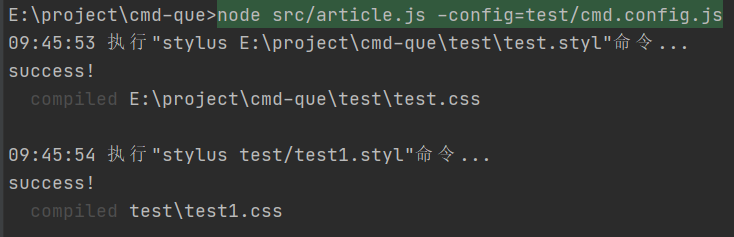
搞定
4.進(jìn)階功能
到這里,一個(gè)簡(jiǎn)單的命令批量執(zhí)行工具代碼就已經(jīng)基本完成了。但是需求總是會(huì)變的。
1.前后生命周期
為什么要添加生命周期?因?yàn)榫幾gpug文件總是需要在編譯完js、css之后,不可能總是需要手動(dòng)給pug編譯命令加上debounce,所以加上結(jié)束的回調(diào)就很有必要了。
生命周期回調(diào)函數(shù)類(lèi)型:
type execFn = (command: string) => Promise<string>;
export interface Config {
    beforeStart: (exec: execFn) => Promise<unknown> | unknown;
    beforeEnd: (exec: execFn) => Promise<unknown> | unknown;
}
代碼
const Path = require("path");
const configPath = Path.resolve(process.cwd(), args.config);
try {
    const config = require(configPath);
    // beforeStart調(diào)用
    if (config.beforeStart) await config.beforeStart(execute);
    await mulExec(config.command);
    // beforeEnd調(diào)用
    config.beforeEnd && config.beforeEnd(execute);
} catch (e) {
    console.error("加載配置文件出錯(cuò)", process.cwd(), configPath);
}
配置文件
cmd.config.js
module.exports = {
    beforeStart() {
        console.time("time");
        return new Promise((resolve, reject) => {
            setTimeout(() => {
                console.log("start");
                resolve();
            }, 1000);
        });
    },
    beforeEnd() {
        console.log("end");
        console.timeEnd("time");
    },
    command: [
        // "stylus D:\\project\\cmd-que\\test\\test.styl",
        "stylus E:\\project\\cmd-que\\test\\test.styl",
        "stylus test/test1.styl",
    ]
};
運(yùn)行
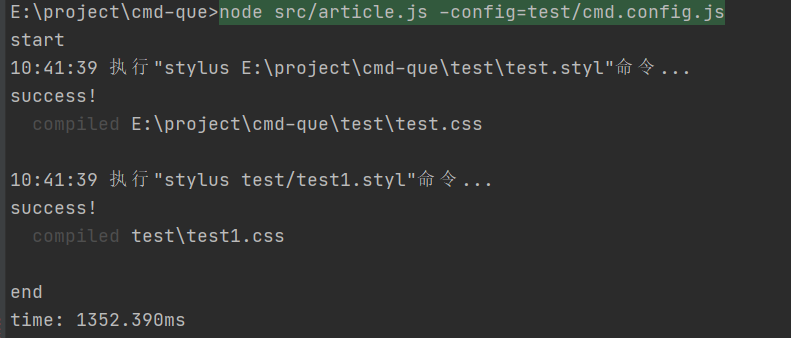
2. 遍歷文件夾查找匹配運(yùn)行
到現(xiàn)在,如果只是執(zhí)行確定的命令,那么已經(jīng)完全沒(méi)問(wèn)題了,但是有時(shí)候需要編譯的文件會(huì)有很多,像stylus、pug這些可以直接編譯整個(gè)文件夾的還好, 像ts的話(huà)就只能一個(gè)文件寫(xiě)一條命令,那也太麻煩了。
所以得增加一個(gè)需求:遍歷文件夾查找目標(biāo)文件, 然后執(zhí)行命令的功能。
寫(xiě)一個(gè)遍歷文件夾的函數(shù):
// util.ts
const fs = require("fs");
const Path = require("path");

/**
 * 遍歷文件夾
 * @param path
 * @param exclude
 * @param cb
 * @param showLog
 */
export async function forEachDir(
    path: string,
    exclude: RegExp[] = [],
    cb?: (path: string, basename: string, isDir: boolean) => true | void | Promise<true | unknown>,
    showLog = false,
) {
    showLog && console.log("遍歷", path);
    try {
        const stats = fs.statSync(path);
        const isDir = stats.isDirectory();
        const basename = Path.basename(path);

        const isExclude = () => {
            const raw = String.raw`${path}`;
            return exclude.some((item) => item.test(raw));
        };
        if (isDir && isExclude()) return;


        const callback = cb || ((path, isDir) => undefined);
        const isStop = await callback(path, basename, isDir);

        if (!isDir || isStop === true) {
            return;
        }

        const dir = fs.readdirSync(path);
        for (const d of dir) {
            const p = Path.resolve(path, d);
            await forEachDir(p, exclude, cb, showLog);
        }
    } catch (e) {
        showLog && console.log("forEachDir error", path, e);
        // 不能拋出異常,否則遍歷到System Volume Information文件夾報(bào)錯(cuò)會(huì)中斷遍歷
        // return Promise.reject(e);
    }
}
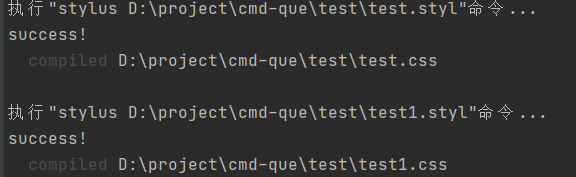
然后正則驗(yàn)證文件名,如果符合就執(zhí)行命令
forEachDir("../test", [], (path, basename, isDir) => {
    if (isDir) return;
    const test = /\.styl$/;
    if (!test.test(basename)) return;
    return execute("stylus " + path);
});
運(yùn)行
3.通過(guò)配置遍歷文件夾
url模板替換
看上面的執(zhí)行情況可以看出,執(zhí)行的每一條命令路徑都是具體的,但是如果我們要遍歷文件夾執(zhí)行命令的話(huà)那么這樣就不夠用了。因?yàn)槊疃际亲址问降臒o(wú)法根據(jù)情況改變,那么有兩種方法解決這樣的情況:
1.使用字符串模板替換掉對(duì)應(yīng)的字符
2.使用js執(zhí)行,根據(jù)傳回的字符來(lái)替換掉對(duì)應(yīng)的字符,再執(zhí)行命令
現(xiàn)在實(shí)現(xiàn)一個(gè)模板替換的功能(模板來(lái)源于webstorm上的file watcher功能,有所增減)
export function executeTemplate(command: string, path = "") {
    const cwd = process.cwd();
    path = path || cwd;
    const basename = Path.basename(path);

    const map: { [k: string]: string } = {
        "\\$FilePath\\$": path, // 文件完整路徑
        "\\$FileName\\$": basename, // 文件名
        "\\$FileNameWithoutExtension\\$": basename.split(".").slice(0, -1).join("."), // 不含文件后綴的路徑
        "\\$FileNameWithoutAllExtensions\\$": basename.split(".")[0], // 不含任何文件后綴的路徑
        "\\$FileDir\\$": Path.dirname(path), // 不含文件名的路徑
        "\\$Cwd\\$": cwd, // 啟動(dòng)命令所在路徑
        "\\$SourceFileDir\\$": __dirname, // 代碼所在路徑
    };
    const mapKeys = Object.keys(map);
    command = mapKeys.reduce((c, k) => c.replace(new RegExp(k, "g"), map[k]), String.raw`${command}`);
    return execute(command);
}
配置文件格式最終版如下:
type execFn = (command: string) => Promise<string>;

/**
 * @param eventName watch模式下觸發(fā)的事件名
 * @param path 觸發(fā)改動(dòng)事件的路徑
 * @param ext 觸發(fā)改動(dòng)事件的文件后綴
 * @param exec 執(zhí)行命令函數(shù)
 */
type onFn = (eventName: string, path: string, ext: string, exec: execFn) => Promise<void>


type Rule = {
   test: RegExp,
   on: onFn,
   command: string[];
};

export type RuleOn = Omit<Rule, "command">;
type RuleCmd = Omit<Rule, "on">;
export type Rules = Array<RuleOn | RuleCmd>;

export interface Config {
   beforeStart: (exec: execFn) => Promise<unknown> | unknown;
   beforeEnd: (exec: execFn) => Promise<unknown> | unknown;
}

export interface ExecCmdConfig extends Config {
   command: string[]; // 直接執(zhí)行命令列表 占位符會(huì)被替換
}


export interface WatchConfig extends Config {
   exclude?: RegExp[]; // 遍歷時(shí)忽略的文件夾
   include?: string[] | string; // 要遍歷/監(jiān)聽(tīng)的文件夾路徑 // 默認(rèn)為當(dāng)前文件夾
   rules: Rules
}

export function isRuleOn(rule: RuleOn | RuleCmd): rule is RuleOn {
   return (rule as RuleOn).on !== undefined;
}
實(shí)現(xiàn)
import {getParams, mulExec, forEachDir, executeTemplate} from "../src/utils";
import {isRuleOn, Rules} from "../src/configFileTypes";


(async function () {

    // 獲取命令行參數(shù)
    const args = getParams();


    // 匹配正則
    async function test(eventName: string, path: string, basename: string, rules: Rules = []) {
        for (const rule of rules) {
            if (!rule.test.test(basename)) continue;
            if (isRuleOn(rule)) {
                await rule.on(
                    eventName,
                    path,
                    Path.extname(path).substr(1),
                    (cmd: string) => executeTemplate(cmd, path),
                );
            } else {
                await mulExec(rule.command, path);
            }
        }
    }

    // 遍歷文件夾
    function foreach(
        path: string,
        exclude: RegExp[] = [],
        cb: (path: string, basename: string, isDir: boolean) => true | void | Promise<true | void>,
    ) {
        return forEachDir(path, exclude, (path: string, basename: string, isDir: boolean) => {
            return cb(path, basename, isDir);
        });
    }

    const Path = require("path");
    const configPath = Path.resolve(process.cwd(), args.config);
    try {
        const config = require(configPath);
        // beforeStart調(diào)用
        if (config.beforeStart) await config.beforeStart(executeTemplate);
        const include = config.include;
        // 設(shè)置默認(rèn)路徑為命令啟動(dòng)所在路徑
        const includes = include ? (Array.isArray(include) ? include : [include]) : ["./"];
        const rules = config.rules;
        for (const path of includes) {
            await foreach(path, config.exclude, (path, basename) => {
                return test("", path, basename, rules);
            });
        }
        // beforeEnd調(diào)用
        config.beforeEnd && config.beforeEnd(executeTemplate);
    } catch (e) {
        console.error("加載配置文件出錯(cuò)", process.cwd(), configPath);
    }
})();
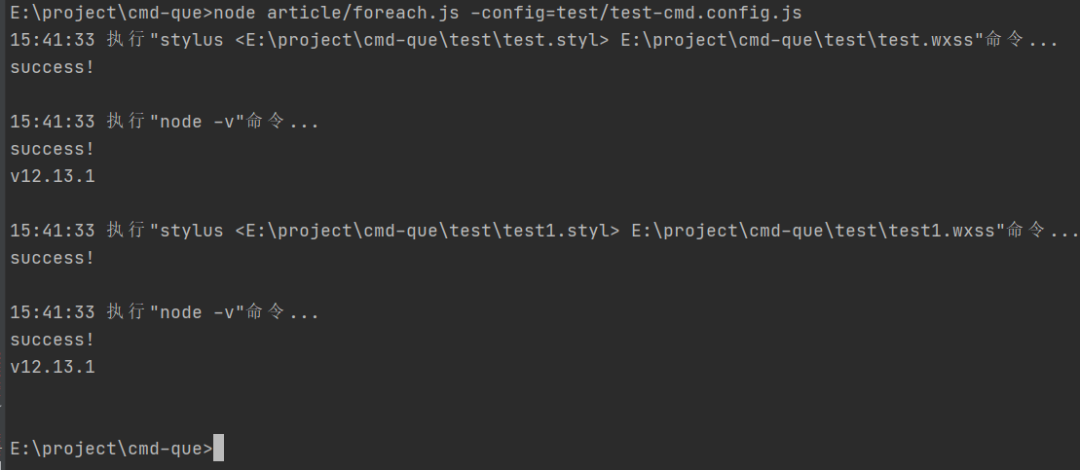
執(zhí)行配置中的命令
配置文件如下:
// test-cmd.config.js
module.exports = {
    exclude: [
        /node_modules/,
        /\.git/,
        /\.idea/,
    ],
    rules: [
        {
            test: /\.styl$/,
            command: [
                "stylus <$FilePath$> $FileDir$\\$FileNameWithoutAllExtensions$.wxss",
                "node -v"
            ]
        }
    ]
};
運(yùn)行結(jié)果
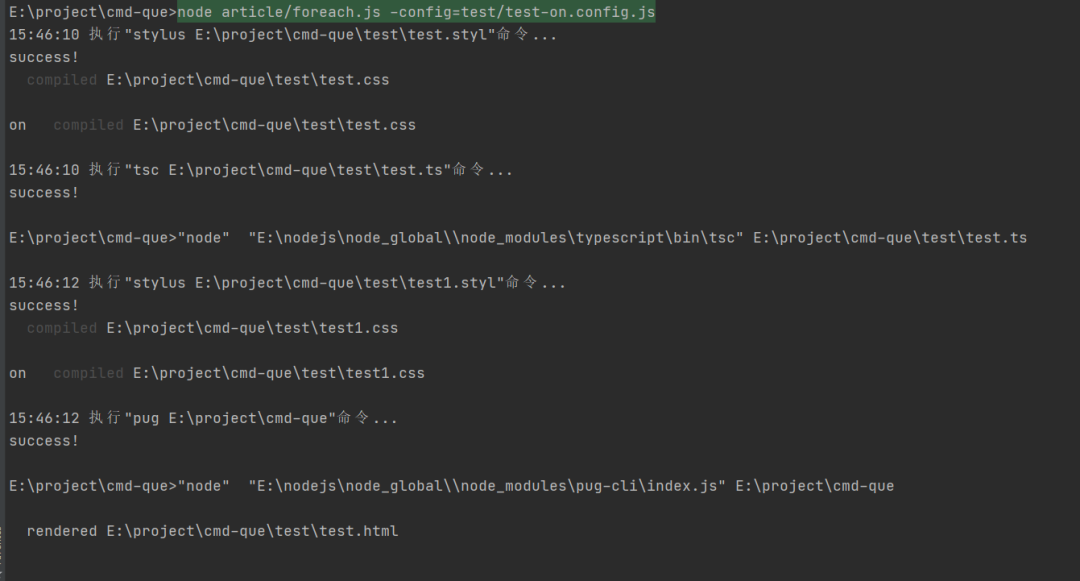
執(zhí)行配置中的js
module.exports = {
    beforeEnd(exec) {
        return exec("pug $Cwd$")
    },
    exclude: [
        /node_modules/,
        /\.git/,
        /\.idea/,
        /src/,
        /bin/,
    ],
    include: ["./test"],
    rules: [
        {
            test: /\.styl$/,
            on: async (eventName, path, ext, exec) => {
                if (eventName === "delete") return;
                const result = await exec("stylus $FilePath$");
                console.log("on", result);
            }
        },
        {
            test: /\.ts$/,
            on: (eventName, path, ext, exec) => {
                if (eventName === "delete") return;
                return exec("tsc $FilePath$");
            }
        },
    ]
};
運(yùn)行結(jié)果
4.監(jiān)聽(tīng)文件變動(dòng)
在工具中通過(guò)-watch/-w開(kāi)啟 需要與-config搭配使用
監(jiān)聽(tīng)文件變動(dòng)nodejs提供了兩個(gè)函數(shù)可供調(diào)用:
fs.watch(filename[, options][, listener])
filename <string> | <Buffer> | <URL> options <string> | <Object> - persistent <boolean> 指示如果文件已正被監(jiān)視,進(jìn)程是否應(yīng)繼續(xù)運(yùn)行。默認(rèn)值: true。- recursive <boolean> 指示應(yīng)該監(jiān)視所有子目錄,還是僅監(jiān)視當(dāng)前目錄。這適用于監(jiān)視目錄時(shí),并且僅適用于受支持的平臺(tái)(參見(jiàn)注意事項(xiàng))。默認(rèn)值: false。- encoding <string> 指定用于傳給監(jiān)聽(tīng)器的文件名的字符編碼。默認(rèn)值: 'utf8'。 listener <Function> | <undefined> 默認(rèn)值: undefined。- eventType <string> - filename <string> | <Buffer> 返回: <fs.FSWatcher>
監(jiān)視 filename 的更改,其中 filename 是文件或目錄。
2. fs.watchFile(filename[, options], listener)
filename <string> | <Buffer> | <URL> options <Object>
bigint <boolean> 默認(rèn)值: false。 persistent <boolean> 默認(rèn)值: true。 interval <integer> 默認(rèn)值: 5007。 listener <Function>
current <fs.Stats> previous <fs.Stats> Returns: <fs.StatWatcher>
監(jiān)視 filename 的更改。每當(dāng)訪(fǎng)問(wèn)文件時(shí)都會(huì)調(diào)用 listener 回調(diào)。
因?yàn)閣atchFile必須監(jiān)聽(tīng)每個(gè)文件,所以選watch函數(shù)
文檔顯示options的recursive參數(shù)為true時(shí) 監(jiān)視所有子目錄
但是文檔又說(shuō)
僅在 macOS 和 Windows 上支持 recursive 選項(xiàng)。當(dāng)在不支持該選項(xiàng)的平臺(tái)上使用該選項(xiàng)時(shí),則會(huì)拋出 ERR_FEATURE_UNAVAILABLE_ON_PLATFORM 異常。
在 Windows 上,如果監(jiān)視的目錄被移動(dòng)或重命名,則不會(huì)觸發(fā)任何事件。當(dāng)監(jiān)視的目錄被刪除時(shí),則報(bào)告 EPERM 錯(cuò)誤。
所以我這里在判斷子文件是否文件夾后,需要手動(dòng)添加監(jiān)聽(tīng)子文件夾
import {getParams, mulExec, forEachDir, executeTemplate, debouncePromise} from "../src/utils";
import {isRuleOn, RuleOn, Rules, WatchConfig} from "../src/configFileTypes";


(async function () {

    // 獲取命令行參數(shù)
    const args = getParams();


    /**
     * @param config 配置
     * @param watchedList watch列表用于遍歷文件夾時(shí)判斷是否已經(jīng)watch過(guò)的文件夾
     */
    async function watch(config: WatchConfig, watchedList: string[]) {
        if (!config.rules) throw new TypeError("rules required");
        // 編輯器修改保存時(shí)會(huì)觸發(fā)多次change事件
        config.rules.forEach(item => {
            // 可能會(huì)有機(jī)器會(huì)慢一點(diǎn) 如果有再把間隔調(diào)大一點(diǎn)
            (item as RuleOn).on = debouncePromise(isRuleOn(item) ? item.on : (e, p) => {
                return mulExec(item.command, p);
            }, 1);
        });

        const FS = require("fs");
        const HandleForeach = (path: string) => {
            if (watchedList.indexOf(path) > -1) return;

            console.log("對(duì)" + path + "文件夾添加監(jiān)聽(tīng)\n");

            const watchCB = async (eventType: string, filename: string) => {
                if (!filename) throw new Error("文件名未提供");
                const filePath = Path.resolve(path, filename);
                console.log(eventType, filePath);
                // 判斷是否需要監(jiān)聽(tīng)的文件類(lèi)型
                try {
                    const exist = FS.existsSync(filePath);
                    await test(exist ? eventType : "delete", filePath, filename);
                    if (!exist) {
                        console.log(filePath, "已刪除!");
                        // 刪除過(guò)的需要在watchArr里面去掉,否則重新建一個(gè)相同名稱(chēng)的目錄不會(huì)添加監(jiān)聽(tīng)
                        const index = watchedList.indexOf(filePath);
                        if (index > -1) {
                            watchedList.splice(index, 1);
                        }
                        return;
                    }
                    // 如果是新增的目錄,必須添加監(jiān)聽(tīng)否則不能監(jiān)聽(tīng)到該目錄的文件變化
                    const stat = FS.statSync(filePath);
                    if (stat.isDirectory()) {
                        foreach(filePath, config.exclude, HandleForeach);
                    }
                } catch (e) {
                    console.log("watch try catch", e, filePath);
                }

            };

            const watcher = FS.watch(path, null, watchCB);

            watchedList.push(path); // 記錄已watch的

            watcher.addListener("error", function (e: any) {
                console.log("addListener error", e);
            });
        };

        const include = config.include;

        const includes = include ? (Array.isArray(include) ? include : [include]) : ["./"];

        for (const path of includes) {
            await foreach(path, config.exclude, (path, basename, isDir) => {
                if (isDir) HandleForeach(path);
            });
        }
    }


    // 匹配正則
    async function test(eventName: string, path: string, basename: string, rules: Rules = []) {
        for (const rule of rules) {
            if (!rule.test.test(basename)) continue;
            if (isRuleOn(rule)) {
                await rule.on(
                    eventName,
                    path,
                    Path.extname(path).substr(1),
                    (cmd: string) => executeTemplate(cmd, path),
                );
            } else {
                await mulExec(rule.command, path);
            }
        }
    }

    // 遍歷文件夾
    function foreach(
        path: string,
        exclude: RegExp[] = [],
        cb: (path: string, basename: string, isDir: boolean) => true | void | Promise<true | void>,
    ) {
        return forEachDir(path, exclude, (path: string, basename: string, isDir: boolean) => {
            return cb(path, basename, isDir);
        });
    }

    const Path = require("path");
    const configPath = Path.resolve(process.cwd(), args.config);
    try {
        const config = require(configPath);
        // beforeStart調(diào)用
        if (config.beforeStart) await config.beforeStart(executeTemplate);
        await watch(config, []);
        // beforeEnd調(diào)用
        config.beforeEnd && config.beforeEnd(executeTemplate);
    } catch (e) {
        console.error("加載配置文件出錯(cuò)", process.cwd(), configPath);
    }
})();
配置文件
// watch-cmd.config.js
module.exports = {
    beforeEnd() {
        console.log("end")
    },
    rules: [
        {
            test: /\.styl$/,
            command: [
                "stylus $FilePath$",
                "node -v"
            ]
        },
    ],
    exclude: [
        /node_modules/,
        /\.git/,
        /\.idea/,
        /src/,
        /bin/,
    ],
    include: ["./test"],
};
運(yùn)行

當(dāng)我改動(dòng)文件時(shí)
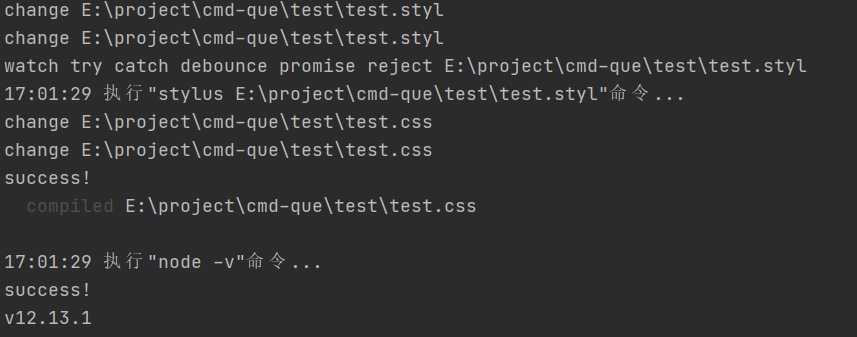
從結(jié)果可以看出,文件watch回調(diào)觸發(fā)了多次。其實(shí)我們不用編輯器改動(dòng)文件的話(huà),回調(diào)只會(huì)觸發(fā)一次,這是編輯器的問(wèn)題。
那么細(xì)心的讀者可能會(huì)想到為什么命令不會(huì)執(zhí)行多次呢?
是因?yàn)槲矣胐ebouncePromise把rule.on包裹了一層。
普通的防抖函數(shù)是這樣的
export function debounce<CB extends (...args: any[]) => void>(callback: CB, delay: number): CB {
    let timer: any = null;
    return function (...args: any[]) {
        if (timer) {
            clearTimeout(timer);
            timer = null;
        }
        timer = setTimeout(() => {
            timer = null;
            callback.apply(this, args);
        }, delay);
    } as CB;
}
但是這種沒(méi)辦法處理原函數(shù)返回promise的情況,也沒(méi)辦法await
所以要改造一下,讓它可以處理promise:每次在間隔內(nèi)執(zhí)行的時(shí)候,都把上一次的promise reject掉
export function debouncePromise<T, CB extends (...args: any[]) => Promise<T>>(callback: CB, delay: number): CB {
    let timer: any = null;
    let rej: Function;

    return function (this: unknown, ...args: any[]) {
        return new Promise<T>((resolve, reject) => {
            if (timer) {
                clearTimeout(timer);
                timer = null;
                rej("debounce promise reject");
            }
            rej = reject;
            timer = setTimeout(async () => {
                timer = null;
                const result = await callback.apply(this, args);
                resolve(result);
            }, delay);
        });
    } as CB;
}
加到邏輯上
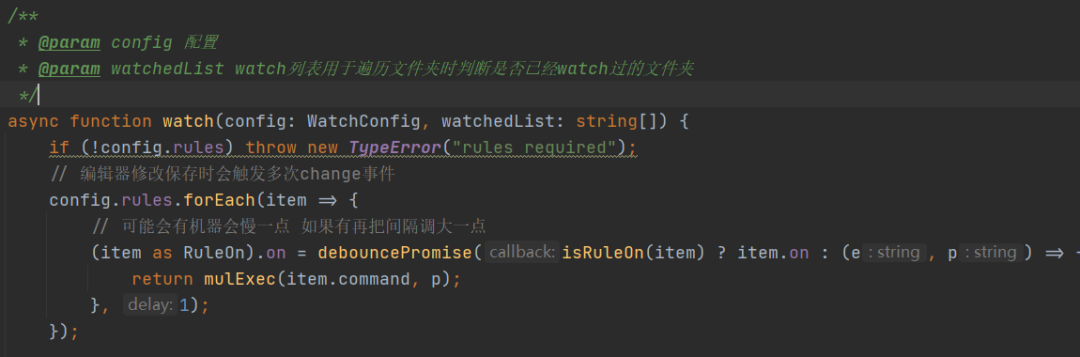
為什么不加到watch的回調(diào)上,則是因?yàn)椴糠譃g覽器最后保存的是目標(biāo)文件的副本,如果加到watch回調(diào)上的話(huà),那就會(huì)漏掉目標(biāo)文件變動(dòng)了
這樣就雖然還是會(huì)觸發(fā)多次監(jiān)聽(tīng)回調(diào),但只執(zhí)行最后一次回調(diào)。
5.額外功能
1.幫助功能
在工具中通過(guò)-help/-h啟動(dòng)
console.log(`
    -config/-c=             配置的路徑
    -help/-h                幫助
    -search/-s=             搜索文件或文件夾
    -search-flag/-sf=       搜索文件或文件夾 /\\w+/flag
    -search-exclude/-se=    搜索文件或文件夾 忽略文件夾 多個(gè)用逗號(hào)(,)隔開(kāi)
    -open/-o=               打開(kāi)資源管理器并選中文件或文件夾
    -open-type/-ot=         打開(kāi)資源管理器并選中文件或文件夾
    -watch/-w               監(jiān)聽(tīng)文件改變 與-config搭配使用
    -log                    遍歷文件夾時(shí)是否顯示遍歷log
    -time/t                 顯示執(zhí)行代碼所花費(fèi)的時(shí)間
    -command/-cmd=          通過(guò)命令行執(zhí)行命令 多個(gè)則用逗號(hào)(,)隔開(kāi) 必須要用引號(hào)引起來(lái)
`);
2.搜索文件或文件夾
在工具中通過(guò)-search/-s啟動(dòng)
其實(shí)這功能和我這工具相關(guān)性不大,為什么會(huì)加上這樣的功能呢?是因?yàn)閣indows上搜索文件,經(jīng)常目標(biāo)文件存在都搜索不到,而且這工具遍歷文件夾已經(jīng)很方便了,所以就把搜索文件功能集成到這個(gè)工具上了
實(shí)現(xiàn)
import {getParams, forEachDir} from "../src/utils";

const args = getParams()
const search = args.search;

const flag = args["search-flag"];
const se = args["search-exclude"];
if (search === true || search === undefined || flag === true || se === true) {
    throw new TypeError();
}
const reg = new RegExp(search, flag);
console.log("search", reg);
const exclude = se?.split(",").filter(i => i).map(i => new RegExp(i));
forEachDir("./", exclude, (path, basename) => {
    if (reg.test(basename)) console.log("result ", path);
});
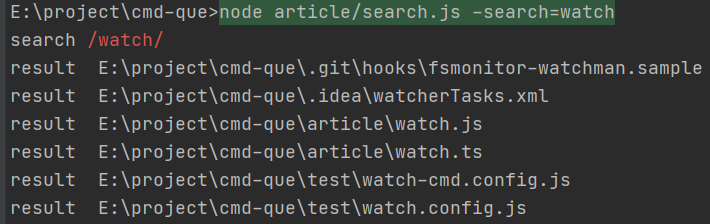
忽略大小寫(xiě)
在工具中-search-flag/-sf=
未忽略大小寫(xiě)

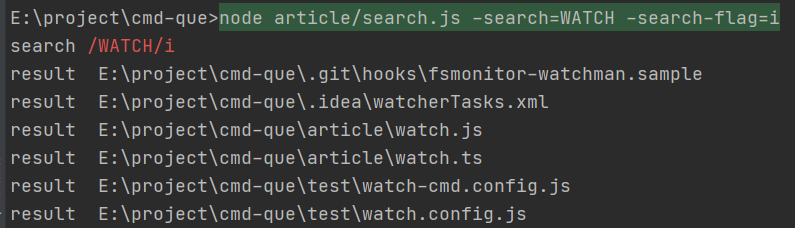
忽略大小寫(xiě)
忽略文件夾
在工具中-search-exclude/-se=

3.打開(kāi)文件功能
搜索到文件之后,自然是要打開(kāi)文件了(只支持windows)
工具中通過(guò)-open/o=打開(kāi)對(duì)應(yīng)的文件
代碼
import {getParams} from "../src/utils";
const Path = require("path")

enum OpenTypes {
    select = "select",
    cmd = "cmd",
    run = "run",
}

type ExecParams = [string, string[]];

const args = getParams();

const open = args.open;
const path = Path.resolve(process.cwd(), open === true ? "./" : open);
const stat = require("fs").statSync(path);
const isDir = stat.isDirectory();
const ot = args["open-type"];

const type: string = !ot || ot === true ? OpenTypes.select : ot;
const spawnSync = require('child_process').spawnSync;
const match: { [k in OpenTypes]: ExecParams } = {
    // 運(yùn)行一次就會(huì)打開(kāi)一個(gè)資源管理器,不能只打開(kāi)一個(gè)相同的
    [OpenTypes.select]: ["explorer", [`/select,"${path}"`]],
    [OpenTypes.run]: ['start', [path]],
    [OpenTypes.cmd]: ["start", ["cmd", "/k", `"cd ${isDir ? path : Path.dirname(path)}"`]],
};
const exec = ([command, path]: ExecParams) => spawnSync(command, path, {shell: true});
console.log(path);
exec(match[type as OpenTypes] || match[OpenTypes.select]);
打開(kāi)資源管理器并且選中文件
命令

結(jié)果
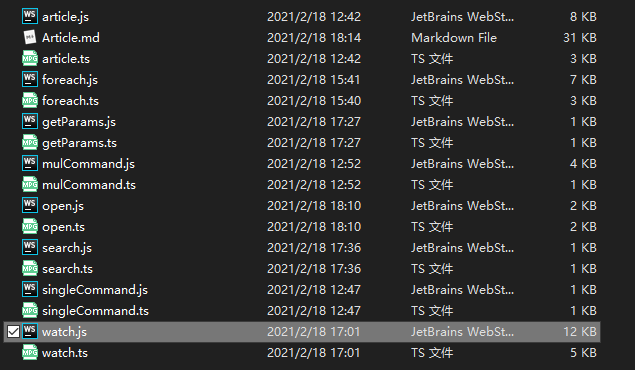
在cmd中打開(kāi)
命令

結(jié)果
用默認(rèn)app打開(kāi)
命令

結(jié)果
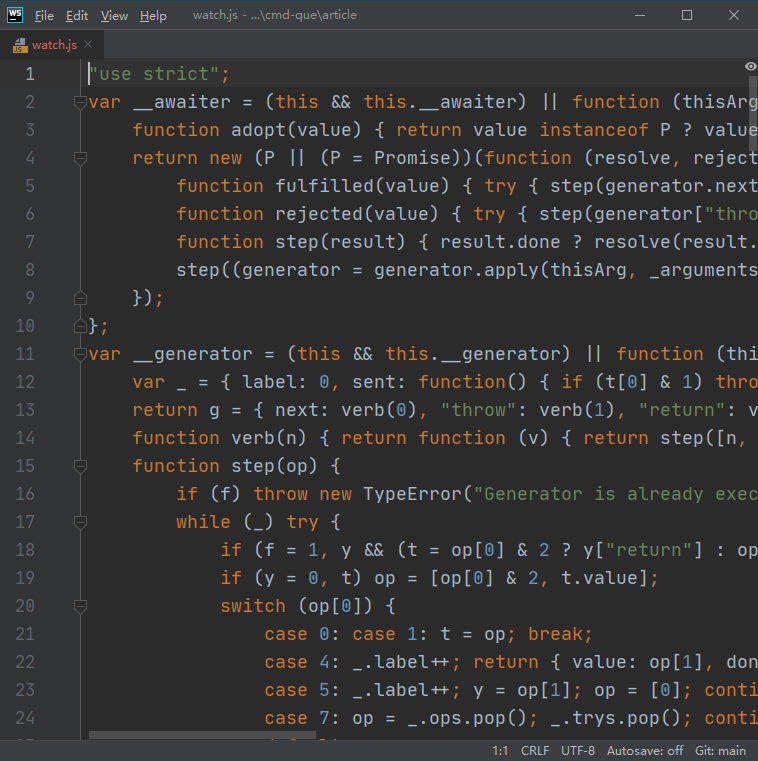
上傳到npm
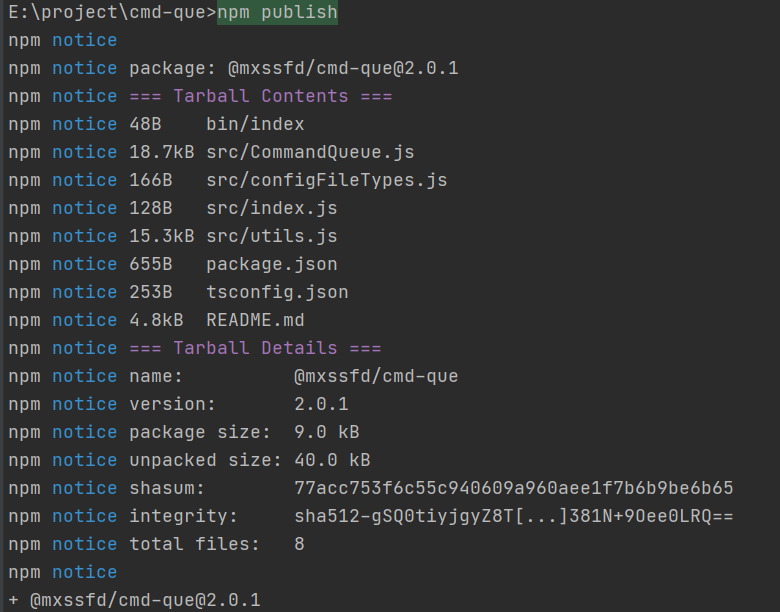
接下來(lái)就把它發(fā)布到npm上,到時(shí)候全局安裝后就可以在任意路徑上運(yùn)行了
發(fā)布
安裝
npm i -g @mxssfd/cmd-que
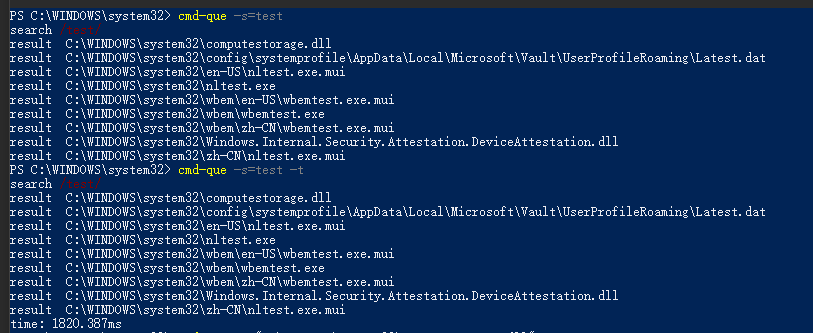
測(cè)試
配合webstorm file watcher自動(dòng)編譯less并postcss編譯
首先安裝cmd-que
開(kāi)啟file watcher
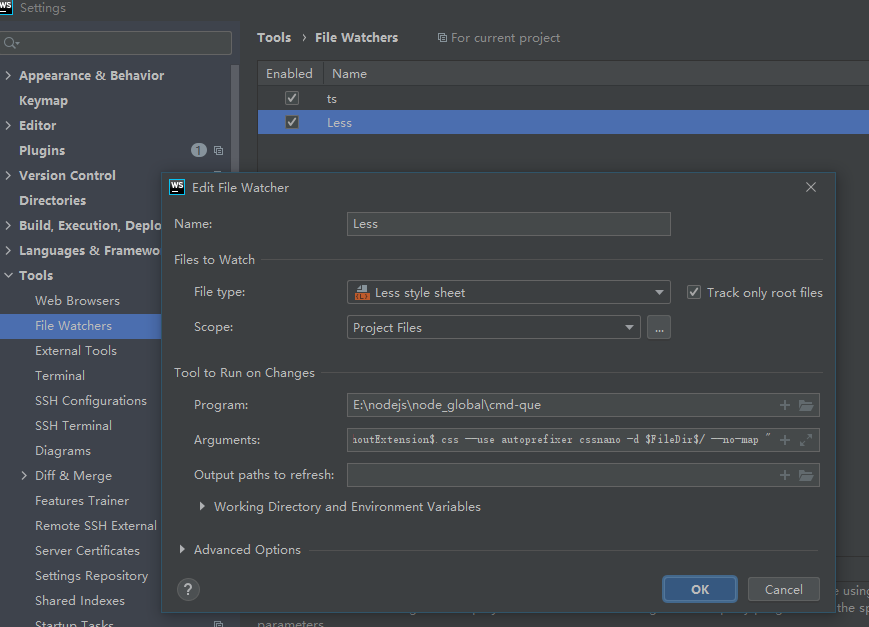
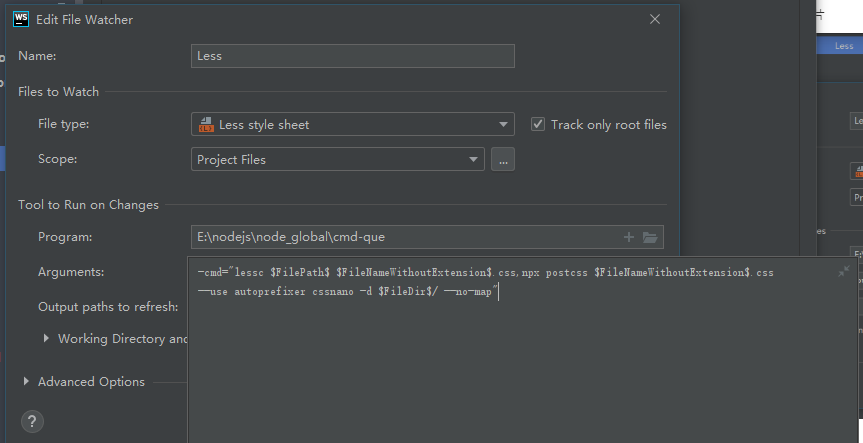
新建less文件

修改less文件
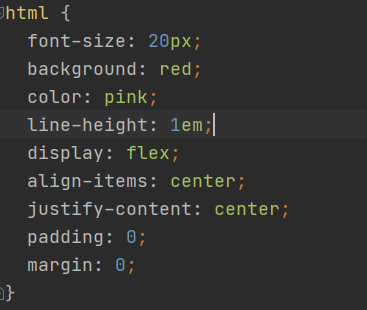
結(jié)果

這樣配置好以后,每次修改文件就不用手動(dòng)開(kāi)啟命令而是會(huì)自動(dòng)執(zhí)行編譯命令了
最后
寫(xiě)到這里,功能總算完成了,其實(shí)再叫做命令隊(duì)列執(zhí)行工具已經(jīng)有點(diǎn)超綱了,不過(guò)常用功能還是用于執(zhí)行命令的
git地址
https://github.com/mengxinssfd/cmd-que
點(diǎn)贊和在看就是最大的支持??