
【保姆級解析】我是如何從工作的視角看 Koa 源碼的?
1 原生實現(xiàn)
1.1 啟動一個服務(wù)
node起一個服務(wù)有多簡單,相信只要會上網(wǎng),都能搜到類似下面的代碼快速啟動一個服務(wù)。
const http = require('http')
const handler = ((req, res) => {
  res.end('Hello World!')
})
http
  .createServer(handler)
  .listen(
    8888,
    () => {
      console.log('listening 127.0.0.1:8888')
    }
  )
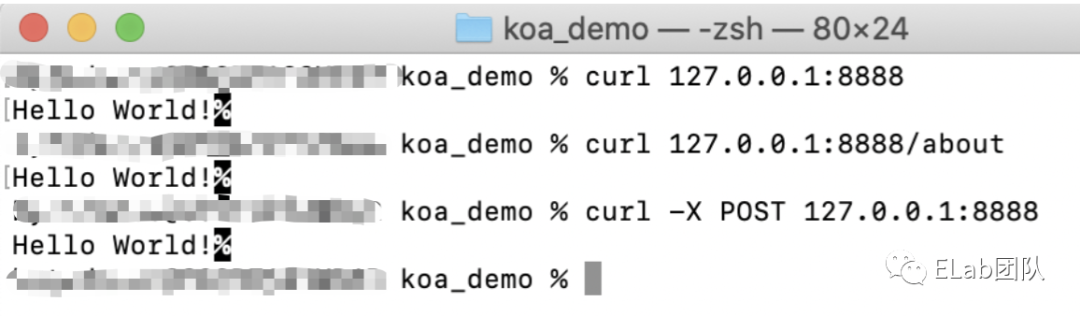
訪問127.0.0.1:8888就可以看到頁面上出現(xiàn)了'hello world!。隨后就會發(fā)現(xiàn)修改路由還是請求方式,都只能拿到這樣一個字符串。
curl 127.0.0.1:8888
curl curl -X POST http://127.0.0.1:8888
curl 127.0.0.1:8888/about
這個時候肯定就會去找相關(guān)文檔[1],然后發(fā)現(xiàn)剛剛回調(diào)函數(shù)的 req 居然內(nèi)有乾坤。我們可以使用 method 屬性和 url 屬性針對不同的方法和路由返回不同的結(jié)果。于是很容易就想到類似下面的寫法:
const http = require('http')
const handler = ((req, res) => {
  let resData = '404 NOT FOUND!'
  const { method, path } = req
  switch (path) {
    case '/':
      if (method === 'get') {
        resData = 'Hello World!'
      } else if (method === 'post') {
        resData = 'Post Method!'
      }
      break
    case '/about':
      resData = 'Hello About!'
  }
  res.end = resData
})
http
  .createServer(handler)
  .listen(
    8888,
    () => {
      console.log('listening 127.0.0.1:8888')
    }
  )
但是一個服務(wù)不可能只有這么幾個接口跟方法啊,總不能每加一個就增加一個分支吧,這樣 handler 得變得多長多冗余,于是又很容易想到抽離 handler ,將 path 和 method 解耦。
1.2 策略模式解耦
如何解耦呢?從在新手村的代碼中可以發(fā)現(xiàn)策略模式[2]剛好可以拿來解決這個問題:
const http = require('http')
class Application {
  constructor () {
    // 收集route和method對應(yīng)的回調(diào)函數(shù)
    this.$handlers = new Map()
  }
  // 注冊handler
  register (method, path, handler) {
    let pathInfo = null
    if (this.$handlers.has(path)) {
      pathInfo = this.$handlers.get(path)
    } else {
      pathInfo = new Map()
      this.$handlers.set(path, pathInfo)
    }
    // 注冊回調(diào)函數(shù)
    pathInfo.set(method, handler)
  }
  use () {
    return (request, response) => {
      const { url: path, method } = request
      this.$handlers.has(path) && this.$handlers.get(path).has(method)
        ? this.$handlers.get(path).get(method)(request, response)
        : response.end('404 NOT FOUND!')
    }
  }
}
const app = new Application()
app.register('GET', '/', (req, res) => {
  res.end('Hello World!')
})
app.register('GET', '/about', (req, res) => {
  res.end('Hello About!')
})
app.register('POST', '/', (req, res) => {
  res.end('Post Method!')
})
http
  .createServer(app.use())
  .listen(
    8888,
    () => {
      console.log('listening 127.0.0.1:8888')
    }
  )
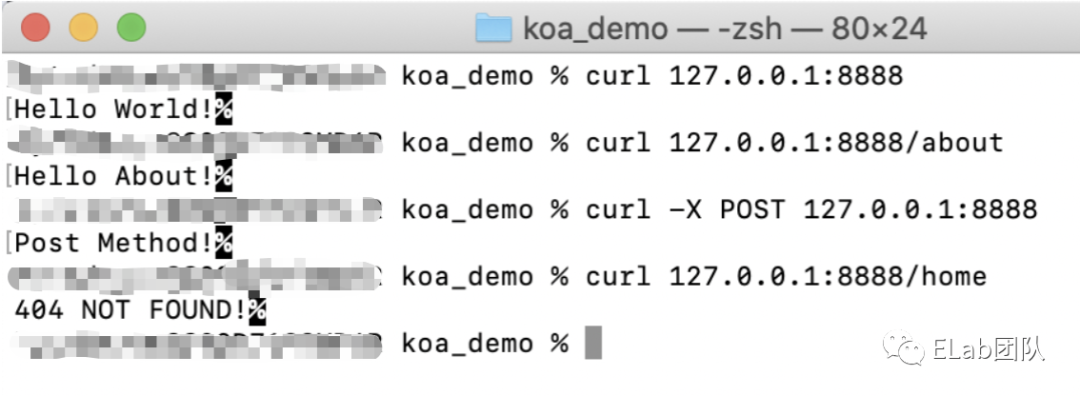
1.3 符合DRY原則
但是這個時候就會發(fā)現(xiàn):
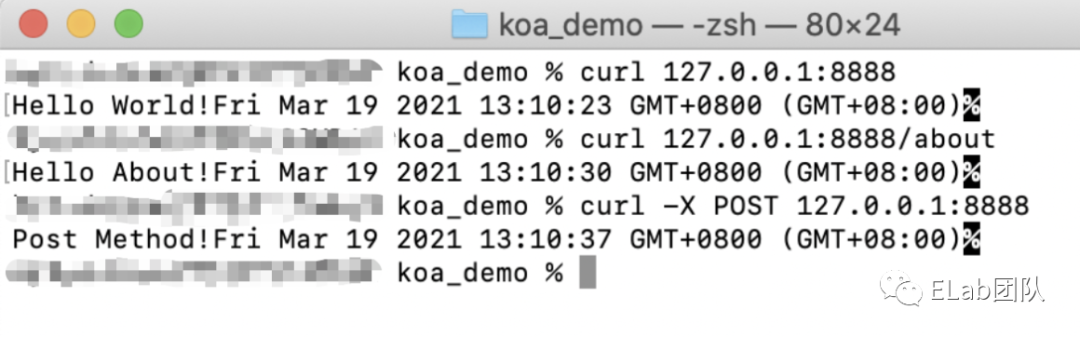
如果手抖把 method方法寫成了小寫,因為Http.Request.method都是大寫,無法匹配到正確的handler,于是返回'404 NOT FOUND'。如果我想在響應(yīng)數(shù)據(jù)前增加一些操作,比如為每個請求增加一個時間戳,表示請求的時間,就必須修改每個 register中的handler函數(shù),不符合DRY原則
此時再修改一下上面的代碼,利用 Promise 實現(xiàn)按順序執(zhí)行 handler。
const http = require('http')
class Application {
  constructor() {
    // 收集route和method對應(yīng)的回調(diào)函數(shù)
    this.$handlers = new Map()
    // 暴露get和post方法
    this.get = this.register.bind(this, 'GET')
    this.post = this.register.bind(this, 'POST')
  }
  // 注冊handler
  register(method, path, ...handlers) {
    let pathInfo = null
    if (this.$handlers.has(path)) {
      pathInfo = this.$handlers.get(path)
    } else {
      pathInfo = new Map()
      this.$handlers.set(path, pathInfo)
    }
    // 注冊回調(diào)函數(shù)
    pathInfo.set(method, handlers)
  }
  use() {
    return (request, response) => {
      const { url: path, method } = request
      if (
        this.$handlers.has(path) &&
        this.$handlers.get(path).has(method)
      ) {
        const _handlers = this.$handlers.get(path).get(method)
        _handlers.reduce((pre, _handler) => {
          return pre.then(() => {
            return new Promise((resolve, reject) => {
              _handler.call({}, request, response, () => {
                resolve()
              })
            })
          })
        }, Promise.resolve())
      } else {
        response.end('404 NOT FOUND!')
      }
    }
  }
}
const app = new Application()
const addTimestamp = (req, res, next) => {
  setTimeout(() => {
    this.timestamp = Date.now()
    next()
  }, 3000)
}
app.get('/', addTimestamp, (req, res) => {
  res.end('Hello World!' + this.timestamp)
})
app.get('/about', addTimestamp, (req, res) => {
  res.end('Hello About!' + this.timestamp)
})
app.post('/', addTimestamp, (req, res) => {
  res.end('Post Method!' + this.timestamp)
})
http
  .createServer(app.use())
  .listen(
    8888,
    () => {
      console.log('listening 127.0.0.1:8888')
    }
  )
1.4 降低用戶心智
但是這樣依舊有點小瑕疵,用戶總是在重復(fù)創(chuàng)建 Promise,用戶可能更希望無腦一點,那我們給用戶暴露一個 next 方法,無論在哪里執(zhí)行 next 就會進入下一個 handler,豈不美哉!!!
class Application {
// ...
  use() {
    return (request, response) => {
      const { url: path, method } = request
      if (
        this.$handlers.has(path) &&
        this.$handlers.get(path).has(method)
      ) {
        const _handlers = this.$handlers.get(path).get(method)
        _handlers.reduce((pre, _handler) => {
          return pre.then(() => {
            return new Promise(resolve => {
             // 向外暴露next方法,由用戶決定什么時候進入下一個handler
              _handler.call({}, request, response, () => {
                resolve()
              })
            })
          })
        }, Promise.resolve())
      } else {
        response.end('404 NOT FOUND!')
      }
    }
  }
}
// ...
const addTimestamp = (req, res, next) => {
  setTimeout(() => {
    this.timestamp = new Date()
    next()
  }, 3000)
}
2 Koa核心源碼解析
上面的代碼一路下來,基本上已經(jīng)實現(xiàn)了一個簡單中間件框架,用戶可以在自定義中間件,然后在業(yè)務(wù)邏輯中通過 next() 進入下一個 handler,使得整合業(yè)務(wù)流程更加清晰。但是它只能推進中間件的執(zhí)行,沒有辦法跳出中間件優(yōu)先執(zhí)行其他中間件。比如在koa中,一個中間件是類似這樣的:
const Koa = require('koa');
let app = new Koa();
const middleware1 = async (ctx, next) => {
  console.log(1);
  await next();
  console.log(2);
}
const middleware2 = async (ctx, next) => {
  console.log(3);
  await next();
  console.log(4);
}
const middleware3 = async (ctx, next) => {
  console.log(5);
  await next();
  console.log(6);
}
app.use(middleware1);
app.use(middleware2);
app.use(middleware3);
app.use(async(ctx, next) => {
  ctx.body = 'hello world'
})
app.listen(8888)
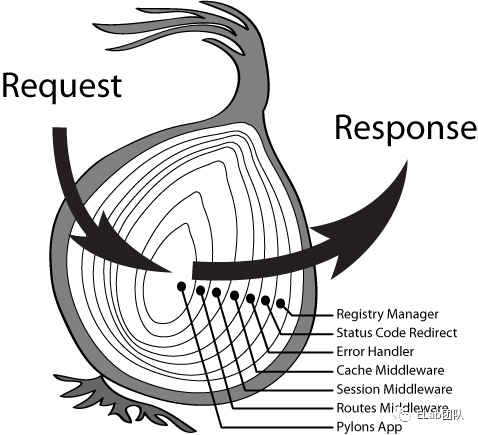
可以看到控制臺輸出的順序是1, 3, 5, 6, 4, 2,這就是koa經(jīng)典的洋蔥模型。
接下來我們一步步解析koa的源碼[3],可以看到總共只有4個文件,如果去掉注釋,合起來代碼也就1000多行。
| 文件 | 功能 |
|---|---|
| applicaiton.js | koa程序的入口,管理和調(diào)用中間件,處理http.createServer的回調(diào),將請求的request和response代理至context上 |
| request.js | 對http.createServer回調(diào)函數(shù)中的request的封裝,各種getter、setter以及額外屬性 |
| response.js | 對http.createServer回調(diào)函數(shù)中的response的封裝,各種getter、setter以及額外屬性 |
| context.js | 代理request和response,并向外暴露一些功能 |
創(chuàng)建Koa實例的時候,Koa做的事情其實并不多,設(shè)置實例的一些配置,初始化中間件的隊列,使用 Object.create 繼承 context、request 和 response。
2.1 constructor
constructor(options) {
super();
// 實例的各種配置,不用太關(guān)注
  options = options || {};
  this.proxy = options.proxy || false;
  this.subdomainOffset = options.subdomainOffset || 2;
  this.proxyIpHeader = options.proxyIpHeader || 'X-Forwarded-For';
  this.maxIpsCount = options.maxIpsCount || 0;
  this.env = options.env || process.env.NODE_ENV || 'development';
  if (options.keys) this.keys = options.keys;
// 最重要的實例屬性,用于存放中間
  this.middleware = [];
// 繼承其他三個文件中的對象
  this.context = Object.create(context);
  this.request = Object.create(request);
  this.response = Object.create(response);
}
因為Koa僅用于中間件的整合以及請求響應(yīng)的監(jiān)聽,所以我們最關(guān)注的Koa的兩個實例方法就是 use 和 listen。一個用來注冊中間件,一個用來啟動服務(wù)并監(jiān)聽端口。
2.2 use
功能非常簡單,注冊中間件,往實例屬性middleware列表中推入中間件。
use(fn) {
  if (typeof fn !== 'function') throw new TypeError('middleware must be a function!');
// 利用co庫轉(zhuǎn)換generator函數(shù),v3版本會移除,直接使用promise以及async...await
  if (isGeneratorFunction(fn)) {
    deprecate('Support for generators will be removed in v3. ' +
              'See the documentation for examples of how to convert old middleware ' +
              'https://github.com/koajs/koa/blob/master/docs/migration.md');
    fn = convert(fn);
  }
  debug('use %s', fn._name || fn.name || '-');
  this.middleware.push(fn);
// 用于鏈式注冊中間件 app.use(xxx).use(xxx)...
  return this;
}
2.3 listen
它的實現(xiàn)非常簡單,就是直接調(diào)用 http.createServer 創(chuàng)建服務(wù),并直接執(zhí)行server.listen[4]的一些操作。稍微特殊一點地方是 createServer 傳入的參數(shù)是調(diào)用實例方法 callback 的返回值。
listen(...args) {
  debug('listen');
// 創(chuàng)建服務(wù)
  const server = http.createServer(this.callback());
// 透傳參數(shù),執(zhí)行http模塊的server.listen
  return server.listen(...args);
}
2.4 callback
調(diào)用 compose方法,將所有中間件轉(zhuǎn)換成Promise執(zhí)行,并返回一個執(zhí)行函數(shù)。調(diào)用父類 Emitter中的listenerCount方法判斷是否注冊了error事件的監(jiān)聽器,若沒有則為error事件注冊onerror方法。定義傳入 createServer中的處理函數(shù),這個處理函數(shù)有2個入?yún)ⅲ謩e是request和response,通過調(diào)用createContext方法把request和response封裝成ctx對象,然后把ctx和第一步的執(zhí)行函數(shù)fn傳入handleRequest方法中。
callback() {
// 后面會講解koa-compose,洋蔥模型的核心,轉(zhuǎn)換中間件的執(zhí)行時機。
  const fn = compose(this.middleware);
// 繼承自Emitter,如果沒有error事件的監(jiān)聽器,為error事件注冊默認的事件監(jiān)聽方法onerror
  if (!this.listenerCount('error')) this.on('error', this.onerror);
//
  const handleRequest = (req, res) => {
// 調(diào)用createContext方法把req和res封裝成ctx對象
    const ctx = this.createContext(req, res);
    return this.handleRequest(ctx, fn);
  };
  return handleRequest;
}
2.5 createContext
createContext 的作用是將前面講到的 context ,request,response 三個文件暴露出來的對象封裝在一起,并額外增加app、req、res等,方便在ctx中獲取各類信息。
createContext(req, res) {
  const context = Object.create(this.context);
  const request = context.request = Object.create(this.request);
  const response = context.response = Object.create(this.response);
  context.app = request.app = response.app = this;
  context.req = request.req = response.req = req;
  context.res = request.res = response.res = res;
  request.ctx = response.ctx = context;
  request.response = response;
  response.request = request;
  context.originalUrl = request.originalUrl = req.url;
  context.state = {};
  return context;
}
2.6 handleRequest
獲得res,將狀態(tài)默認置為404 定義失敗的回調(diào)函數(shù)和中間件執(zhí)行成功的回調(diào)函數(shù),其中失敗回調(diào)函數(shù)調(diào)用 context中的onerror函數(shù),不過最終還是觸發(fā)app中注冊的onerror函數(shù);成功回調(diào)函數(shù)調(diào)用respond方法,讀取ctx信息,把數(shù)據(jù)寫入res中并響應(yīng)請求。使用 on-finished模塊確保一個流在關(guān)閉、完成和報錯時都會執(zhí)行相應(yīng)的回調(diào)函數(shù)。執(zhí)行中間件函數(shù) fnMiddleware,類似于Promise.all,當全部中間件處理成功后,執(zhí)行handleResponse,否則捕獲異常。
handleRequest(ctx, fnMiddleware) {
  const res = ctx.res;
  res.statusCode = 404;
  const onerror = err => ctx.onerror(err);
  const handleResponse = () => respond(ctx);
  onFinished(res, onerror);
  return fnMiddleware(ctx).then(handleResponse).catch(onerror);
}
3 Koa-compose
koa-compose源碼[5]非常簡略:
首先校驗一下入?yún)⒌暮戏ㄐ裕罱K返回一個函數(shù)。 該函數(shù)內(nèi)部使用 index作為標識記錄當前執(zhí)行的中間,并返回從第一個中間件執(zhí)行dispatch的結(jié)果。如果一個中間件內(nèi)部多次執(zhí)行next()方法,就會出現(xiàn)i的值等于index,于是會報錯reject掉。根據(jù) index取出中間件列表中的中間件,將context和dispatch(i + 1)中間件的入?yún)?ctx和next傳入,當中間件執(zhí)行next()方法時,就會按順序執(zhí)行下一個中間件,且將當前中間件放入執(zhí)行棧中,最后當i等于中間件數(shù)組長度時候,即沒有其他中間件了,就將入?yún)?next(在Koa源碼里是undefined)賦值給fn,此時fn未定義,于是返回空的resolved狀態(tài)的promise。當最核心的中間件執(zhí)行完成后,自然會觸發(fā) await向下執(zhí)行,開始執(zhí)行上一個中間件,最終就形成了從外向里,再從里向外的洋蔥模型。
// 入?yún)⑹且粋€中間件列表,返回值是一個函數(shù)
function compose (middleware) {
// 檢查中間的合法性
  if (!Array.isArray(middleware)) throw new TypeError('Middleware stack must be an array!')
  for (const fn of middleware) {
    if (typeof fn !== 'function') throw new TypeError('Middleware must be composed of functions!')
  }
// 核心
  return function (context, next) {
// 設(shè)置初始索引值
    let index = -1
// 立即執(zhí)行dispatch,傳入0,并返回結(jié)果
    return dispatch(0)
    function dispatch (i) {
// 防止在一個中間件中多次調(diào)用next
      if (i <= index) return Promise.reject(new Error('next() called multiple times'))
      index = i
// 拿出中間件列表中的第i個中間件,賦值給fn
      let fn = middleware[i]
// 中間件全部執(zhí)行完成,將next賦值給fn,不過針對Koa源碼而言,next一直為undefined(其他地方不一定)
      if (i === middleware.length) fn = next
// 沒有可執(zhí)行的中間件,之間resolve掉promise
      if (!fn) return Promise.resolve()
      try {
// 相當于實現(xiàn)Promise.all,通過對外暴露next回調(diào)函數(shù)遞歸執(zhí)行promise,保證中間件執(zhí)行的順序滿足棧的特性
        return Promise.resolve(fn(context, dispatch.bind(null, i + 1)));
      } catch (err) {
        return Promise.reject(err)
      }
    }
  }
}
4 Koa-router
上面解決了中間件的執(zhí)行順序問題,但是路由這一塊就比較尷尬,因為我們可能使用帶有參數(shù)的路由,比如 app.get('/:userName', (res, req) => {/* xxxx */}) ,原先處理路由的方法就不適用了,此時可以引入koa-router中間件,像下面一樣使用。
const Koa = require('koa')
const Router = require('koa-router')
const app = new Koa()
const router = new Router()
router.get('/', async ctx => {
  ctx.body = 'Hello World!'
})
router.get('/:userName', async ctx => {
  ctx.body = `Hello ${ctx.params.userName}!`
})
app
  .use(router.routes())
  .use(router.allowedMethods())
  .listen(8888)
koa-router源碼[6]都放在lib文件夾下面,就兩個文件:
| 文件 | 功能 |
|---|---|
| layer.js | 內(nèi)部使用各種正則表達式從入?yún)斨蝎@取相應(yīng)數(shù)據(jù),存放請求的路由、method、路由對應(yīng)的正則匹配、路由中的參數(shù)、路由對應(yīng)的中間件等 |
| router.js | Router的具體實現(xiàn),提供對外暴露的注冊方法get、post等,處理路由的中間件等 |
// 注冊路由,綁定中間件
Router.prototype.register = function (path, methods, middleware, opts) {
  opts = opts || {};
  const router = this;
  const stack = this.stack;
// 支持多個path綁定中間件
  if (Array.isArray(path)) {
    for (let i = 0; i < path.length; i++) {
      const curPath = path[i];
      router.register.call(router, curPath, methods, middleware, opts);
    }
    return this;
  }
// 創(chuàng)建路由
  const route = new Layer(path, methods, middleware, {
    end: opts.end === false ? opts.end : true,
    name: opts.name,
    sensitive: opts.sensitive || this.opts.sensitive || false,
    strict: opts.strict || this.opts.strict || false,
    prefix: opts.prefix || this.opts.prefix || "",
    ignoreCaptures: opts.ignoreCaptures
  });
  if (this.opts.prefix) {
    route.setPrefix(this.opts.prefix);
  }
// 增加中間件參數(shù)
  for (let i = 0; i < Object.keys(this.params).length; i++) {
    const param = Object.keys(this.params)[i];
    route.param(param, this.params[param]);
  }
  stack.push(route);
  debug('defined route %s %s', route.methods, route.path);
  return route;
};
// 對外暴露get、post等方法
for (let i = 0; i < methods.length; i++) {
  function setMethodVerb(method) {
    Router.prototype[method] = function(name, path, middleware) {
      if (typeof path === "string" || path instanceof RegExp) {
        middleware = Array.prototype.slice.call(arguments, 2);
      } else {
        middleware = Array.prototype.slice.call(arguments, 1);
        path = name;
        name = null;
      }
      this.register(path, [method], middleware, {
        name: name
      });
      return this;
    };
  }
  setMethodVerb(methods[i]);
}
5 相關(guān)文檔
koa onion model[7] https://en.wikipedia.org/wiki/Strategy_pattern[8] https://robdodson.me/posts/javascript-design-patterns-strategy/[9]
參考資料
相關(guān)文檔: https://nodejs.org/api/http.html
[2]策略模式: https://en.wikipedia.org/wiki/Strategy_pattern
[3]koa的源碼: https://github.com/koajs/koa
[4]server.listen: http://nodejs.cn/api/net.html#net_class_net_server
[5]koa-compose源碼: https://github.com/koajs/compose/blob/master/index.js
[6]koa-router源碼: https://github.com/koajs/router
[7]koa onion model: https://programmer.group/koa-onion-model.html
[8]https://en.wikipedia.org/wiki/Strategy_pattern: https://en.wikipedia.org/wiki/Strategy_pattern
[9]https://robdodson.me/posts/javascript-design-patterns-strategy/: https://robdodson.me/posts/javascript-design-patterns-strategy/