
「React進(jìn)階」只用兩個(gè)自定義 Hooks 就能替代 React-Redux ?
前言
之前有朋友問(wèn)我,React Hooks 能否解決 React 項(xiàng)目狀態(tài)管理的問(wèn)題。這個(gè)問(wèn)題讓我思索了很久,最后得出的結(jié)論是:能,不過(guò)需要兩個(gè)自定義 hooks 去實(shí)現(xiàn)。那么具體如何實(shí)現(xiàn)的呢?那就是今天要講的內(nèi)容了。
通過(guò)本文,你能夠?qū)W習(xí)以下內(nèi)容:
useContext ,useRef ,useMemo,useEffect 的基本用法。 如何將不同組件的自定義 hooks 建立通信,共享狀態(tài)。 合理編寫(xiě)自定義 hooks , 分析 hooks 之間的依賴關(guān)系。 自定義 hooks 編寫(xiě)過(guò)程中一些細(xì)節(jié)問(wèn)題。
帶著如上的知識(shí)點(diǎn),開(kāi)啟閱讀之旅吧~
一 設(shè)計(jì)思路
首先,看一下要實(shí)現(xiàn)的兩個(gè)自定義 hooks 具體功能。
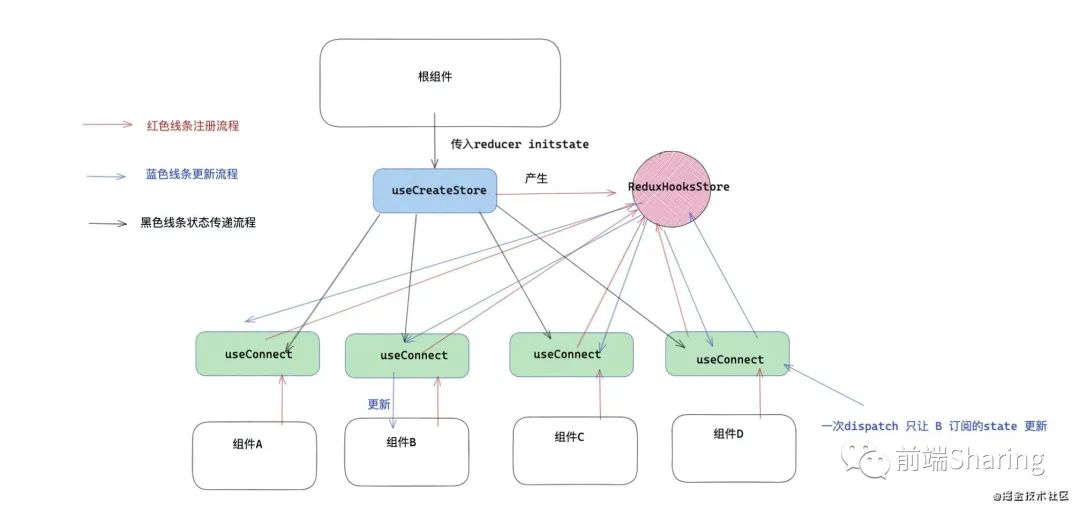
useCreateStore用于產(chǎn)生一個(gè)狀態(tài) Store ,通過(guò) context 上下文傳遞 ,為了讓每一個(gè)自定義 hooksuseConnect都能獲取 context 里面的狀態(tài)屬性。useConnect使用這個(gè)自定義 hooks 的組件,可以獲取改變狀態(tài)的 dispatch 方法,還可以訂閱 state ,被訂閱的 state 發(fā)生變化,組件更新。
如何讓不同組件的自定義 hooks 共享狀態(tài)并實(shí)現(xiàn)通信呢?
首先不同組件的自定義 hooks ,可以通過(guò) useContext 獲得共有狀態(tài),而且還需要實(shí)現(xiàn)狀態(tài)管理和組件通信,那么就需要一個(gè)狀態(tài)調(diào)度中心來(lái)統(tǒng)一做這些事,可以稱之為 ReduxHooksStore ,它具體做的事情如下:
全局管理 state, state 變化,通知對(duì)應(yīng)組件更新。 收集使用 useConnect組件的信息。組件銷毀還要清除這些信息。維護(hù)并傳遞負(fù)責(zé)更新的 dispatch方法。一些重要 api 要暴露給 context 上下文,傳遞給每一個(gè) useConnect。
1 useCreateStore 設(shè)計(jì)
首先 useCreateStore 是在靠近根部組件的位置的, 而且全局只需要一個(gè),目的就是創(chuàng)建一個(gè) Store ,并通過(guò) Provider 傳遞下去。
使用:
const store = useCreateStore( reducer , initState )
參數(shù):
reducer:全局 reducer,純函數(shù),傳入 state 和 action ,返回新的 state 。initState:初始化 state 。
返回值:為 store 暴露的主要功能函數(shù)。
2 Store設(shè)計(jì)
Store 為上述所說(shuō)的調(diào)度中心,接收全局 reducer ,內(nèi)部維護(hù)狀態(tài) state ,負(fù)責(zé)通知更新 ,收集用 useConnect 的組件。
const Store = new ReduxHooksStore(reducer,initState).exportStore()
參數(shù):接收兩個(gè)參數(shù),透?jìng)?useCreateStore 的參數(shù)。
3 useConnect設(shè)計(jì)
使用 useConnect 的組件,將獲得 dispatch 函數(shù),用于更新 state ,還可以通過(guò)第一個(gè)參數(shù)訂閱 state ,被訂閱的 state 改變 ,會(huì)讓組件更新。
// 訂閱 state 中的 number
const mapStoreToState = (state)=>({ number: state.number  })
const [ state , dispatch ] = useConnect(mapStoreToState)
參數(shù):
mapStoreToState:將 Store 中 state ,映射到組件的 state 中,可以做視圖渲染使用。如果沒(méi)有第一個(gè)參數(shù),那么只提供 dispatch函數(shù),不會(huì)訂閱 state 變化帶來(lái)的更新。
返回值:返回值是一個(gè)數(shù)組。
數(shù)組第一項(xiàng):為映射的 state 的值。 數(shù)組第二項(xiàng):為改變 state 的 dispatch函數(shù)。
4 原理圖
二 useCreateStore
export const ReduxContext = React.createContext(null)
/* 用于產(chǎn)生 reduxHooks 的 store */
export function useCreateStore(reducer,initState){
   const store = React.useRef(null)
   /* 如果存在——不需要重新實(shí)例化 Store */
   if(!store.current){
       store.current  = new ReduxHooksStore(reducer,initState).exportStore()
   }
   return store.current
}
useCreateStore 主要做的是:
接收
reducer和initState,通過(guò) ReduxHooksStore 產(chǎn)生一個(gè) store ,不期望把 store 全部暴露給使用者,只需要暴露核心的方法,所以調(diào)用實(shí)例下的exportStore抽離出核心方法。使用一個(gè)
useRef保存核心方法,傳遞給Provider。
三 狀態(tài)管理者 —— ReduxHooksStore
接下來(lái)看一下核心狀態(tài) ReduxHooksStore 。
import { unstable_batchedUpdates } from 'react-dom'
class ReduxHooksStore {
    constructor(reducer,initState){
       this.name = '__ReduxHooksStore__'
       this.id = 0
       this.reducer = reducer
       this.state = initState
       this.mapConnects = {}
    }
    /* 需要對(duì)外傳遞的接口 */
    exportStore=()=>{
        return {
            dispatch:this.dispatch.bind(this),
            subscribe:this.subscribe.bind(this),
            unSubscribe:this.unSubscribe.bind(this),
            getInitState:this.getInitState.bind(this)
        }
    }
    /* 獲取初始化 state */
    getInitState=(mapStoreToState)=>{
        return mapStoreToState(this.state)
    }
    /* 更新需要更新的組件 */
    publicRender=()=>{
        unstable_batchedUpdates(()=>{ /* 批量更新 */
            Object.keys(this.mapConnects).forEach(name=>{
                const { update } = this.mapConnects[name]
                update(this.state)
            })
        })
    }
    /* 更新 state  */
    dispatch=(action)=>{
       this.state = this.reducer(this.state,action)
       // 批量更新
       this.publicRender()
    }
    /* 注冊(cè)每個(gè) connect  */
    subscribe=(connectCurrent)=>{
        const connectName = this.name + (++this.id)
        this.mapConnects[connectName] =  connectCurrent
        return connectName
    }
    /* 解除綁定 */
    unSubscribe=(connectName)=>{
        delete this.mapConnects[connectName]
    }
}
狀態(tài)
reducer:這個(gè) reducer 為全局的 reducer ,由 useCreateStore 傳入。state:全局保存的狀態(tài) state ,每次執(zhí)行 reducer 會(huì)得到新的 state 。mapConnects:里面保存每一個(gè) useConnect 組件的更新函數(shù)。用于派發(fā) state 改變帶來(lái)的更新。
方法
負(fù)責(zé)初始化:
getInitState:這個(gè)方法給自定義 hooks 的 useConnect 使用,用于獲取初始化的 state 。exportStore:這個(gè)方法用于把 ReduxHooksStore 提供的核心方法傳遞給每一個(gè) useConnect 。
負(fù)責(zé)綁定|解綁:
subscribe:綁定每一個(gè)自定義 hooks useConnect 。unSubscribe:解除綁定每一個(gè) hooks 。
負(fù)責(zé)更新:
dispatch:這個(gè)方法提供給業(yè)務(wù)組件層,每一個(gè)使用 useConnect 的組件可以通過(guò) dispatch 方法改變 state ,內(nèi)部原理是通過(guò)調(diào)用 reducer 產(chǎn)生一個(gè)新的 state 。publicRender:當(dāng) state 改變需要通知每一個(gè)使用 useConnect 的組件,這個(gè)方法就是通知更新,至于組件需不需要更新,那是 useConnect 內(nèi)部需要處理的事情,這里還有一個(gè)細(xì)節(jié),就是考慮到 dispatch 的觸發(fā)場(chǎng)景可以是異步狀態(tài)下,所以用 React-DOM 中 unstable_batchedUpdates 開(kāi)啟批量更新原則。
四 useConnect
useConnect 是整個(gè)功能的核心部分,它要做的事情是獲取最新的 state ,然后通過(guò)訂閱函數(shù) mapStoreToState 得到訂閱的 state ,判斷訂閱的 state 是否發(fā)生變化。如果發(fā)生變化渲染最新的 state 。
export function useConnect(mapStoreToState=()=>{}){
    /* 獲取 Store 內(nèi)部的重要函數(shù) */
   const contextValue = React.useContext(ReduxContext)
   const { getInitState , subscribe ,unSubscribe , dispatch } = contextValue
   /* 用于傳遞給業(yè)務(wù)組件的 state  */
   const stateValue = React.useRef(getInitState(mapStoreToState))

   /* 渲染函數(shù) */
   const [ , forceUpdate ] = React.useState()
   /* 產(chǎn)生 */
   const connectValue = React.useMemo(()=>{
       const state =  {
           /* 用于比較一次 dispatch 中,新的 state 和 之前的state 是否發(fā)生變化  */
           cacheState: stateValue.current,
           /* 更新函數(shù) */
           update:function (newState) {
               /* 獲取訂閱的 state */
               const selectState = mapStoreToState(newState)
               /* 淺比較 state 是否發(fā)生變化,如果發(fā)生變化, */
               const isEqual = shallowEqual(state.cacheState,selectState)
               state.cacheState = selectState
               stateValue.current  = selectState
               if(!isEqual){
                   /* 更新 */
                   forceUpdate({})
               }
           }
       }
       return state
   },[ contextValue ]) // 將 contextValue 作為依賴項(xiàng)。

   React.useEffect(()=>{
       /* 組件掛載——注冊(cè) connect */
       const name =  subscribe(connectValue)
       return function (){
            /* 組件卸載 —— 解綁 connect */
           unSubscribe(name)
       }
   },[ connectValue ]) /* 將 connectValue 作為 useEffect 的依賴項(xiàng) */

   return [ stateValue.current , dispatch ]
}
初始化
用 useContext 獲取上下文中, ReduxHooksStore 提供的核心函數(shù)。 用 useRef 來(lái)保存得到的最新的 state 。 用 useState 產(chǎn)生一個(gè)更新函數(shù) forceUpdate,這個(gè)函數(shù)只是更新組件。
注冊(cè)|解綁流程
注冊(cè):通過(guò)
useEffect來(lái)向 ReduxHooksStore 中注冊(cè)當(dāng)前 useConnect 產(chǎn)生的 connectValue ,connectValue 是什么馬上會(huì)講到。subscribe 用于注冊(cè),會(huì)返回當(dāng)前 connectValue 的唯一標(biāo)識(shí) name 。解綁:在 useEffect 的銷毀函數(shù)中,可以用調(diào)用 unSubscribe 傳入 name 來(lái)解綁當(dāng)前的 connectValue
connectValue是否更新組件
connectValue :真正地向 ReduxHooksStore 注冊(cè)的狀態(tài),首先用
useMemo來(lái)對(duì) connectValue 做緩存,connectValue 為一個(gè)對(duì)象,里面的 cacheState 保留了上一次的 mapStoreToState 產(chǎn)生的 state ,還有一個(gè)負(fù)責(zé)更新的 update 函數(shù)。更新流程 :當(dāng)觸發(fā)
dispatch在 ReduxHooksStore 中,會(huì)讓每一個(gè) connectValue 的 update 都執(zhí)行, update 會(huì)觸發(fā)映射函數(shù)mapStoreToState來(lái)得到當(dāng)前組件想要的 state 內(nèi)容。然后通過(guò)shallowEqual淺比較新老 state 是否發(fā)生變化,如果發(fā)生變化,那么更新組件。完成整個(gè)流程。shallowEqual :這個(gè)淺比較就是 React 里面的淺比較,在第 11 章已經(jīng)講了其流程,這里就不講了。
分清依賴關(guān)系
首先自定義 hooks useConnect 的依賴關(guān)系是上下文 contextValue 改變,那么說(shuō)明 store 發(fā)生變化,所以重新通過(guò) useMemo 產(chǎn)生新的 connectValue 。所以 useMemo 依賴 contextValue。
connectValue 改變,那么需要解除原來(lái)的綁定關(guān)系,重新綁定。useEffect 依賴 connectValue。
局限性
整個(gè) useConnect 有一些局限性,比如:
沒(méi)有考慮 mapStoreToState 可變性,無(wú)法動(dòng)態(tài)傳入 mapStoreToState 。 淺比較,不能深層次比較引用數(shù)據(jù)類型。
五 使用與驗(yàn)證效果
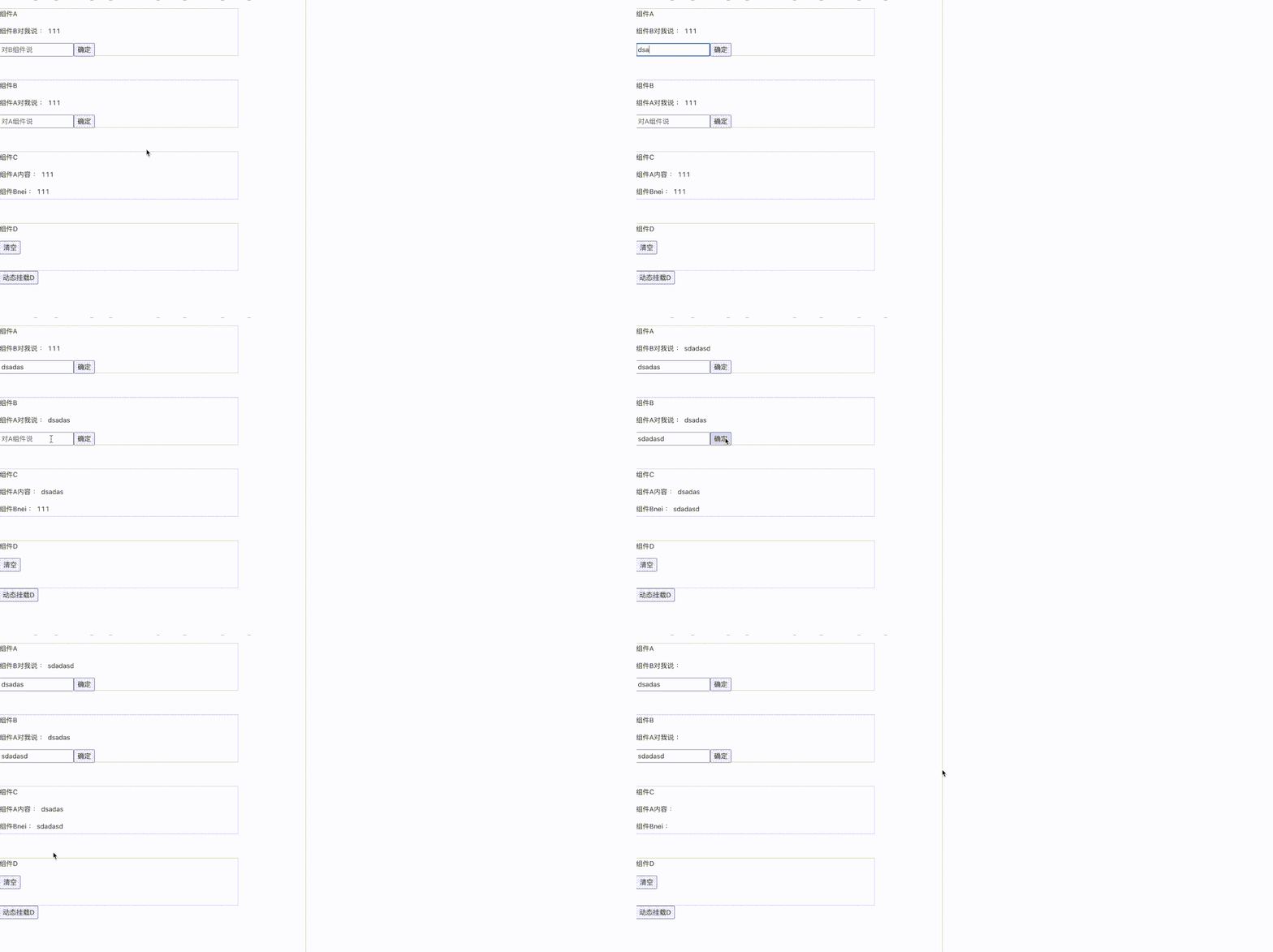
接下來(lái)就是驗(yàn)證效果環(huán)節(jié),我模擬了組件通信的場(chǎng)景。
根部組件注入 Store
import { ReduxContext , useConnect , useCreateStore } from './hooks/useRedux'
function  Index(){
    const [ isShow , setShow ] =  React.useState(true)
    console.log('index 渲染')
    return <div>
        <CompA />
        <CompB />
        <CompC />
        {isShow &&  <CompD />}
        <button onClick={() => setShow(!isShow)} >點(diǎn)擊</button>
    </div>
}

function Root(){
    const store = useCreateStore(function(state,action){
        const { type , payload } =action
        if(type === 'setA' ){
            return {
                ...state,
                mesA:payload
            }
        }else if(type === 'setB'){
            return {
                ...state,
                mesB:payload
            }
        }else if(type === 'clear'){ //清空
            return  { mesA:'',mesB:'' }
        }
        else{
            return state
        }
    },
    { mesA:'111',mesB:'111' })
    return <div>
        <ReduxContext.Provider value={store} >
            <Index/>
        </ReduxContext.Provider>
    </div>
}
Root根組件
通過(guò) useCreateStore 創(chuàng)建一個(gè) store ,傳入 reducer 和 初始化的值 { mesA:'111',mesB:'111' }用 Provider 傳遞 store。
Index組件
有四個(gè)子組件 CompA , CompB ,CompC ,CompD 。其中 CompD 是 動(dòng)態(tài)掛載的。
業(yè)務(wù)組件使用
function CompA(){
    const [ value ,setValue ] = useState('')
    const [state ,dispatch ] = useConnect((state)=> ({ mesB : state.mesB }) )
    return <div className="component_box" >
        <p> 組件A</p>
        <p>組件B對(duì)我說(shuō) : {state.mesB} </p>
        <input onChange={(e)=>setValue(e.target.value)}
            placeholder="對(duì)B組件說(shuō)"
        />
        <button onClick={()=> dispatch({ type:'setA' ,payload:value })} >確定</button>
    </div>
}

function CompB(){
    const [ value ,setValue ] = useState('')
    const [state ,dispatch ] = useConnect((state)=> ({ mesA : state.mesA }) )
    return <div className="component_box" >
        <p> 組件B</p>
        <p>組件A對(duì)我說(shuō) : {state.mesA} </p>
        <input onChange={(e)=>setValue(e.target.value)}
            placeholder="對(duì)A組件說(shuō)"
        />
        <button onClick={()=> dispatch({ type:'setB' ,payload:value })} >確定</button>
    </div>
}

function CompC(){
    const [state  ] = useConnect((state)=> ({ mes1 : state.mesA,mes2 : state.mesB }) )
    return <div className="component_box" >
        <p>組件A : {state.mes1} </p>
        <p>組件B : {state.mes2} </p>
    </div>
}

function CompD(){
    const [ ,dispatch  ] = useConnect( )
    console.log('D 組件更新')
    return <div className="component_box" >
        <button onClick={()=> dispatch({ type:'clear' })} > 清空 </button>
    </div>
}
CompA 和 CompB 模擬組件雙向通信。 CompC 組件接收 CompA 和 CompB 通信內(nèi)容,并映射到 mes1 ,mes2屬性上。CompD 沒(méi)有 mapStoreToState ,沒(méi)有訂閱 state ,state 變化組件不會(huì)更新,只是用 dispatch 清空狀態(tài)。
效果
六 總結(jié)
本文通過(guò)兩個(gè)自定義 hooks 實(shí)現(xiàn)了 React-Redux 的基本功能,這個(gè)模式在真實(shí)項(xiàng)目中可以使用嗎?我覺(jué)得如果是小型項(xiàng)目,是完全可以使用的,對(duì)于大型項(xiàng)目還是用 React Redux 或者其他成熟的狀態(tài)管理工具。
以上便是本次分享的全部?jī)?nèi)容,希望對(duì)你有所幫助^_^
喜歡的話別忘了 分享、點(diǎn)贊、收藏 三連哦~。
歡迎關(guān)注公眾號(hào) 前端Sharing 持續(xù)分享高質(zhì)量文章~