
lowcode-cms開源社區(qū)源碼設(shè)計分享
開源背景
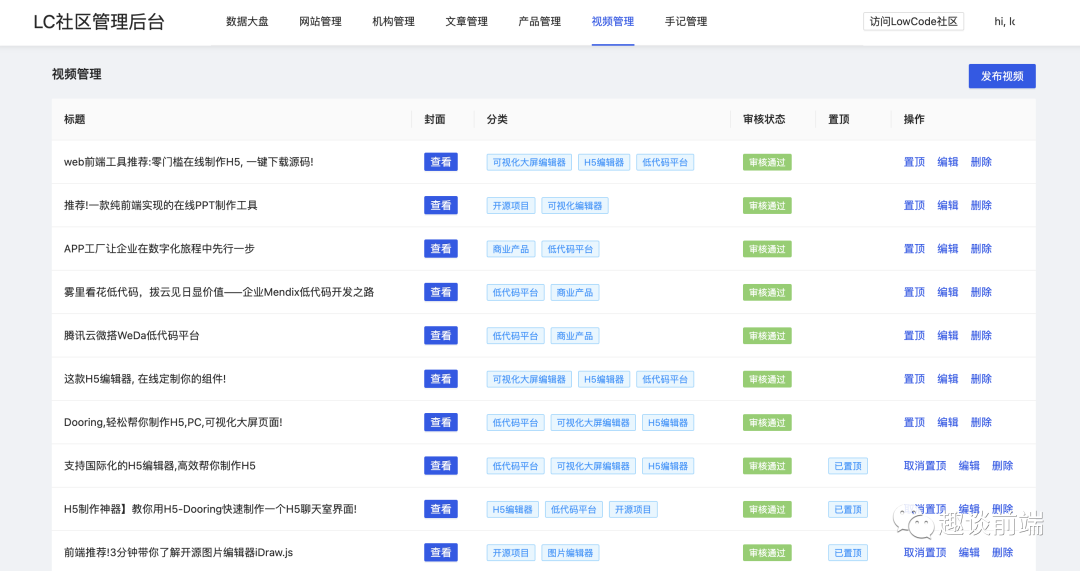
lowcode可視化社區(qū) 是我之前在設(shè)計研發(fā) Dooring低代碼 平臺時開發(fā)的一個面向低代碼內(nèi)容分享的知識社區(qū), 內(nèi)容端采用 SSR 技術(shù)來渲染頁面, 對 SEO 更加友好, 同時后端服務(wù)采用 Nodejs 來實現(xiàn), 內(nèi)容端和服務(wù)端同端, 也就是傳說中的內(nèi)容服務(wù)“同構(gòu)”. 管理端采用前端最最流行的 React hooks 來實現(xiàn), 無論是技術(shù)人員還是非技術(shù)人員, 通過簡單的操作就可以輕松部署一套專屬自己的 CMS 系統(tǒng).
本著滿滿的開源精神, 我對這套 CMS 系統(tǒng)進(jìn)行了開源, 讓更多技術(shù)小白或者非技術(shù)人員, 可以輕松部署自己的網(wǎng)站.
lowcode-cms 系統(tǒng)的技術(shù)實現(xiàn), 以及如何本地運(yùn)行 + 部署這套開箱即用的 CMS 系統(tǒng).
系統(tǒng)設(shè)計架構(gòu)
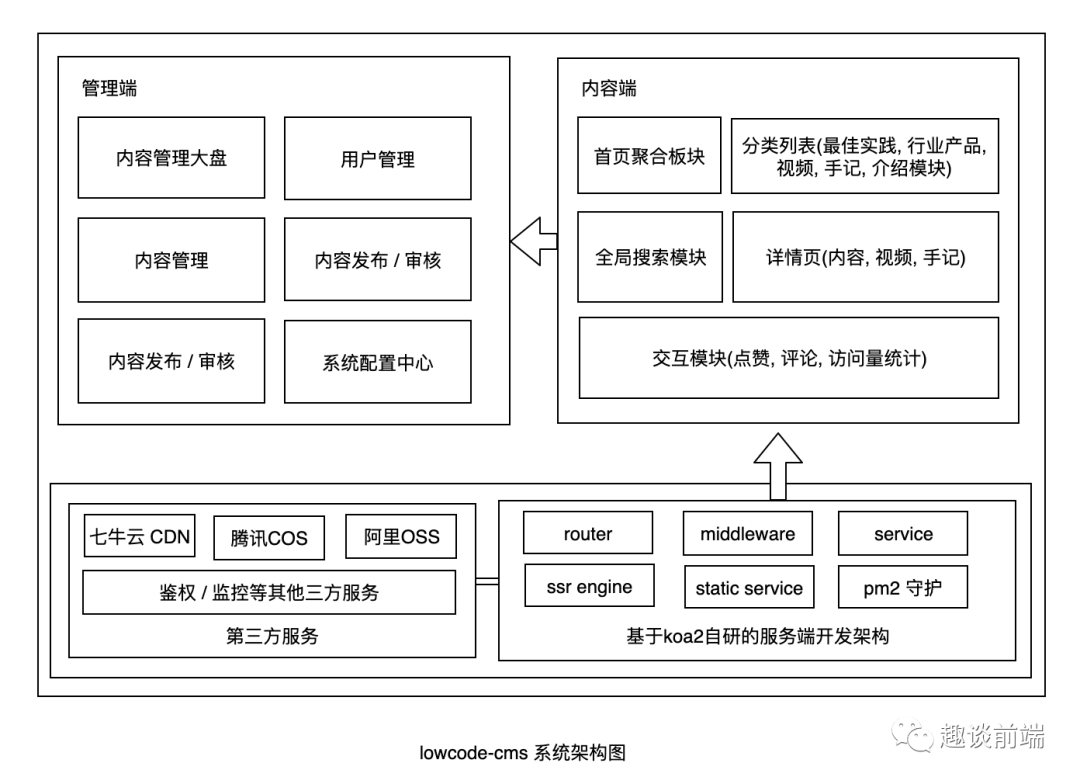
接下來我會具體和大家介紹一下管理端, 內(nèi)容端, 服務(wù)端的技術(shù)架構(gòu).
內(nèi)容端架構(gòu)設(shè)計
內(nèi)容端主要用來展現(xiàn)個人或者企業(yè)的內(nèi)容信息, 相當(dāng)于一個門戶站, 這里為了更好的 SEO, 我采用了模版引擎來渲染 html, 也就是koa-views + pug 模式, 具體界面如下:
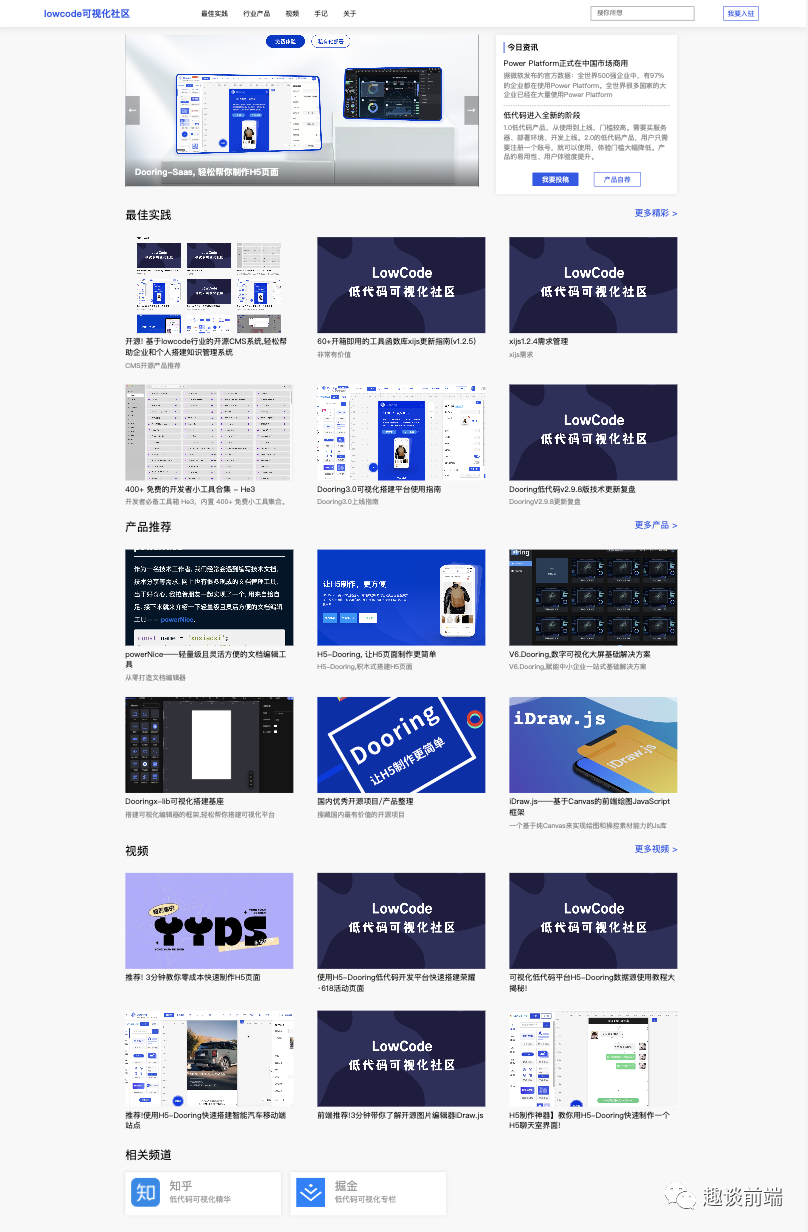
當(dāng)然這只是首頁模塊, 還有諸如行業(yè)產(chǎn)品, 最佳實踐, 視頻, 手記等, 這里就不一一介紹了, 大家如果會編程的話, 也可以自定義自己的模塊頁面. 我們接下來看看具體的技術(shù)實現(xiàn).
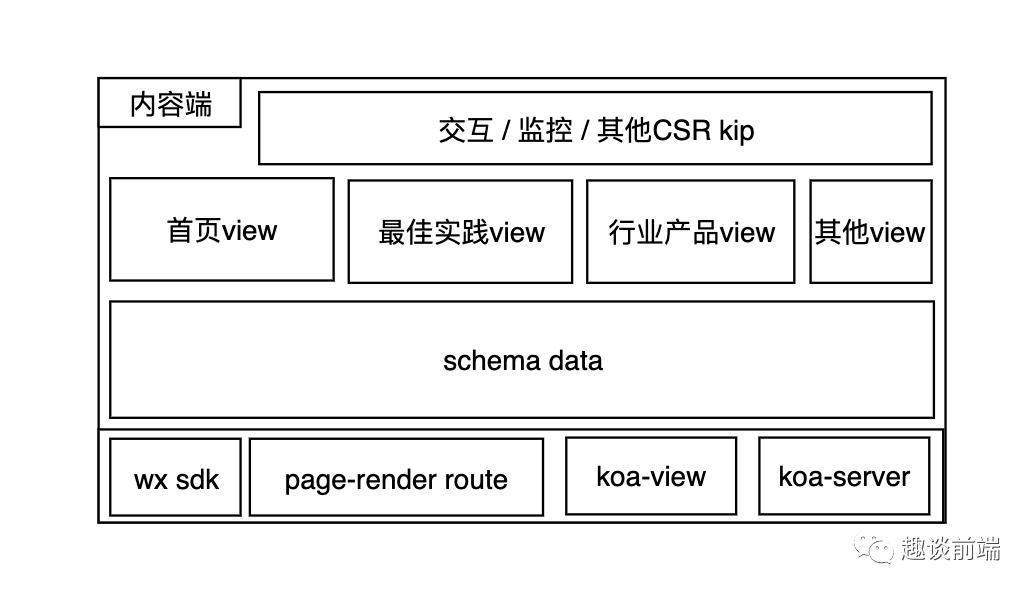
大家可以在github中server的views目錄下看到每個渲染層的具體實現(xiàn), 這里和大家分享一下 lowcode-cms 搭建的ssr模式.
1. 配置pug支持
import koa from "koa";
import views from "koa-views";

// ... (此處省略服務(wù)端自治的部分代碼)

// 掛載路由
glob.sync(`${config.routerPath}/*.js`).forEach((item) => {
  require(item).default(router, config.API_VERSION_PATH);
});

//使用模版引擎
app.use(views(resolve(__dirname, "./views"), { extension: "pug" }));

app.use(router.routes()).use(router.allowedMethods());
2. ssr路由數(shù)據(jù)直出
這塊主要是基于用戶發(fā)起的請求, 在服務(wù)端格式化好數(shù)據(jù)供 pug 消費:
/**
 * 文章路由
 * @param {*} router
 * @param {*} apiPath
 */
const pageRenderRouter = (router) => {
  // api路徑
  const api = {
    // 渲染首頁
    index: "/",
    // 最佳實踐列表
    bestPractice: "/best-practice",
    product: "/product",
    video: "/video",
    note: "/note",
    login: "/login",
    // 其他渲染路由...
  };
  // 內(nèi)容端導(dǎo)航配置
  const nav = [
    {
      id: "0",
      title: "最佳實踐",
      link: "/best-practice"
    },
    {
      id: "1",
      title: "行業(yè)產(chǎn)品",
      link: "/product"
    },
    {
      id: "3",
      title: "視頻",
      link: "/video"
    },
    {
      id: "4",
      title: "手記",
      link: "/note"
    },
    {
      id: "5",
      title: "關(guān)于",
      link: "/about"
    },
  ]

  const copyright = "版權(quán)所有 @lowcode可視化社區(qū)"

  // 登錄
  router.get(api.login, async (ctx) => {
    await ctx.render("login", {
      url: api.login,
      title: "登錄",
      description: "新用戶?",
      href: "去注冊",
      firstInput: "郵箱",
      twoInput: "密碼",
      btnText: "登錄",
      logoText: "Dooring低代碼社區(qū)",
    });
  });

  // 渲染首頁
  router.get(api.index, async (ctx) => {
    const filePath = `${config.publicPath}/db/homeConfig.json`;
    const articlesPath = `${config.publicPath}/db/article_index.json`;
    const productsPath = `${config.publicPath}/db/product_index.json`;
    const videosPath = `${config.publicPath}/db/video_index.json`;
    const homeConfig = RF(filePath);
    const articles = RF(articlesPath);
    const products = RF(productsPath);
    const videos = RF(videosPath);
    await ctx.render("index", {
      nav,
      articles: articles.filter(v => v.review === 1).slice(0, 6),
      products: products.filter(v => v.review === 1).slice(0, 6),
      videos: videos.filter(v => v.review === 1).slice(0, 6),
      copyright,
      ...homeConfig
    });

    // 統(tǒng)計訪問量
    const viewPath = `${config.publicPath}/db/views.json`;
    const views = RF(viewPath);
    WF(viewPath, {...views, home: views.home + 1});
  });

  // 渲染文章詳情頁
  router.get(api.articleDetail, async (ctx) => {
    const id = ctx.query.fid;
    const articlePath = `${config.publicPath}/db/articles/${id}.json`;
    const commentPath = `${config.publicPath}/db/comments/${id}.json`;
    const article = RF(articlePath) || {};
    const comments = RF(commentPath) || {};
    comments.views = comments.views + 1;
    await ctx.render("article_detail", {
      nav,
      viewTitle: article.title,
      topImg: article.img,
      authorInfo: { name: article.author, date: formatTime(article.ct, "-") },
      cate: article.cate,
      val:  article.type ? marked(article.val) : article.val,
      commentInfoList: comments.comments || [],
      flover: comments.flover,
      views: comments.views || 0,
      copyright,
    });
    WF(commentPath, comments);
  });

  // 其他頁面渲染服務(wù)邏輯...
  });
};

export default pageRenderRouter;
3. 模版消費
這里給大家參考一個我寫的 pug 頁面的例子:
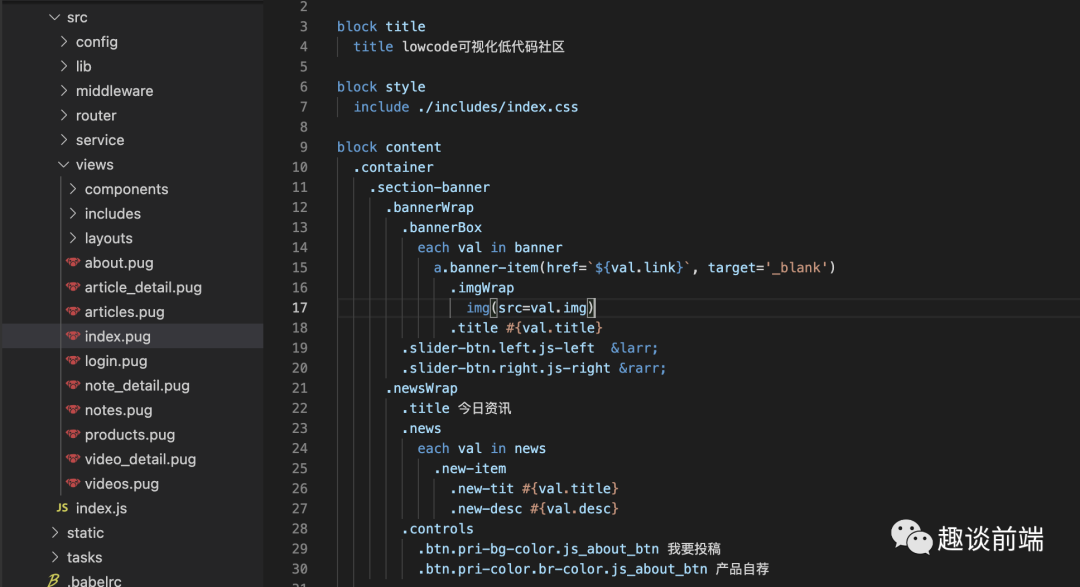
大家感興趣的可以參考一下具體的實現(xiàn):
https://github.com/MrXujiang/lowcode-cms
服務(wù)端架構(gòu)設(shè)計
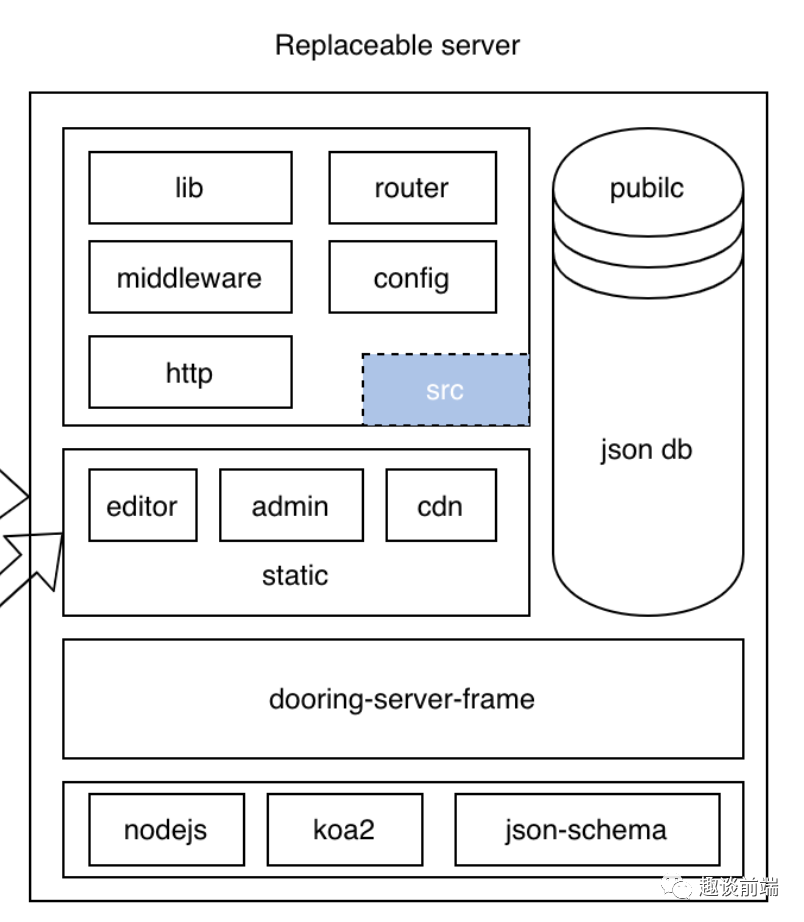
服務(wù)端本質(zhì)上主要實現(xiàn)兩塊能力:
-
內(nèi)容端頁面渲染(SSR) -
后臺API和三方接口服務(wù)對接
服務(wù)端我參考了通用后端服務(wù)的 MVC 模式, 基于 koa2 搭建了一個簡易的服務(wù)端 MVC 模型, 如下是一個服務(wù)端的代碼目錄:
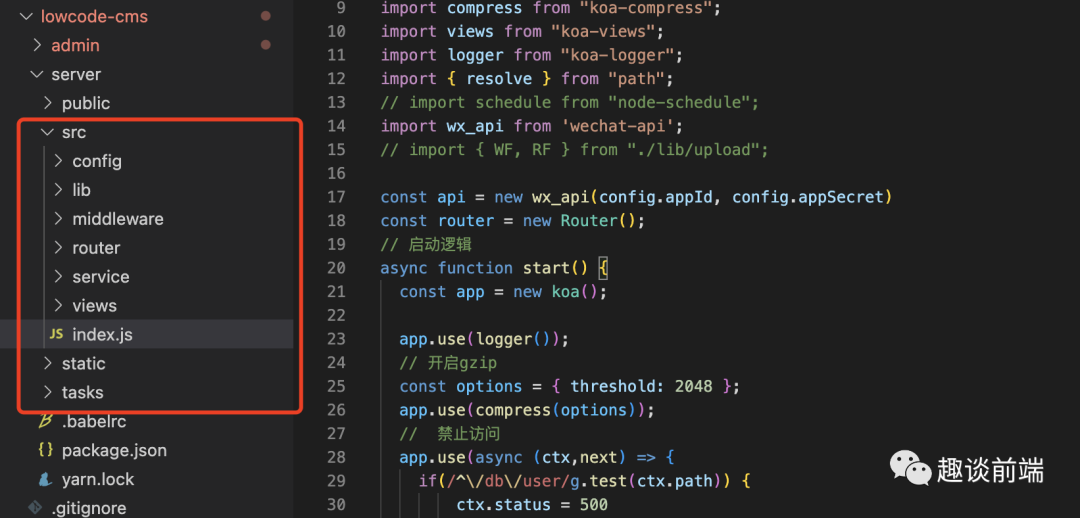
主要實現(xiàn)的核心模塊有:
-
靜態(tài)資源服務(wù)器 -
微信分享, CDN上傳等第三方服務(wù)模塊 -
api路由 -
中間件模塊 -
資源上傳模塊 -
用戶權(quán)限模塊 -
ssr服務(wù)模塊
如果搭建感興趣可以參考 github 中具體的實現(xiàn)代碼:
https://github.com/MrXujiang/lowcode-cms
管理端系統(tǒng)架構(gòu)設(shè)計
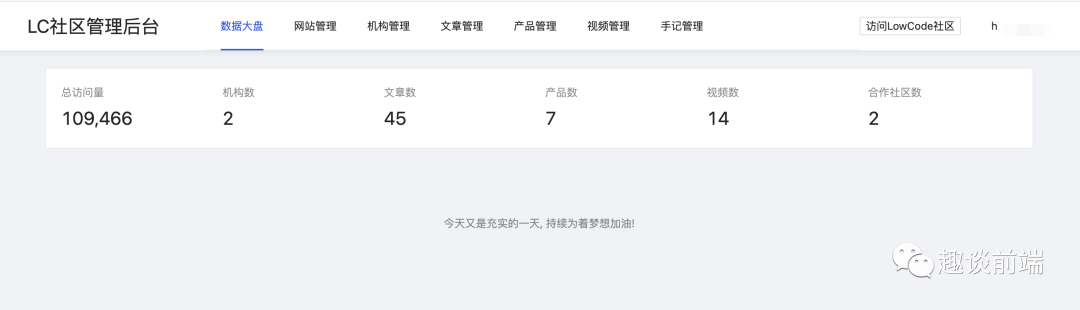
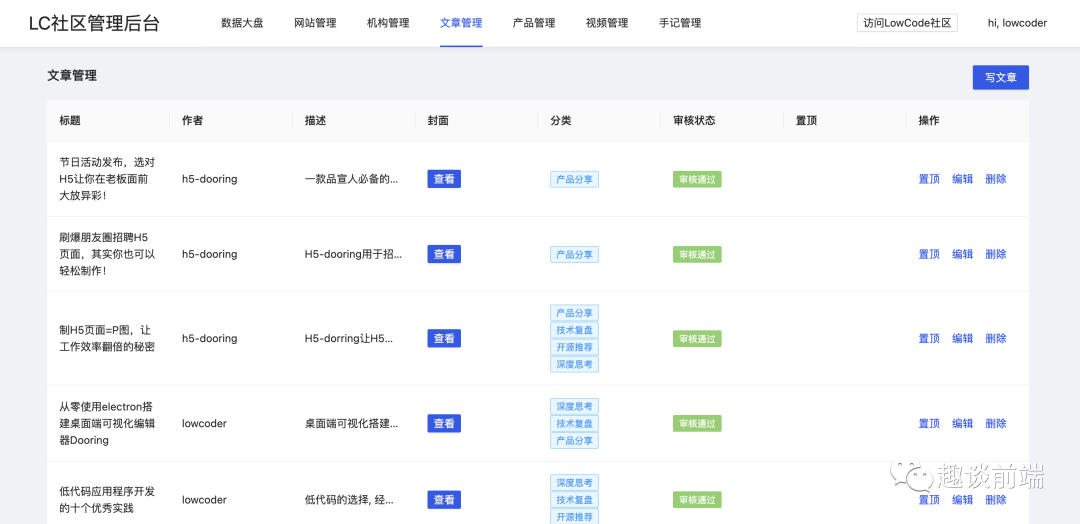
管理端采用的是 umi + react + antd4.0 實現(xiàn)的, 當(dāng)然封裝了很多成熟的插件模塊, 比如說 富文本編輯器, md編輯器, 文件上傳模塊等, 大家可以在學(xué)習(xí)源碼的過程中受益非淺.
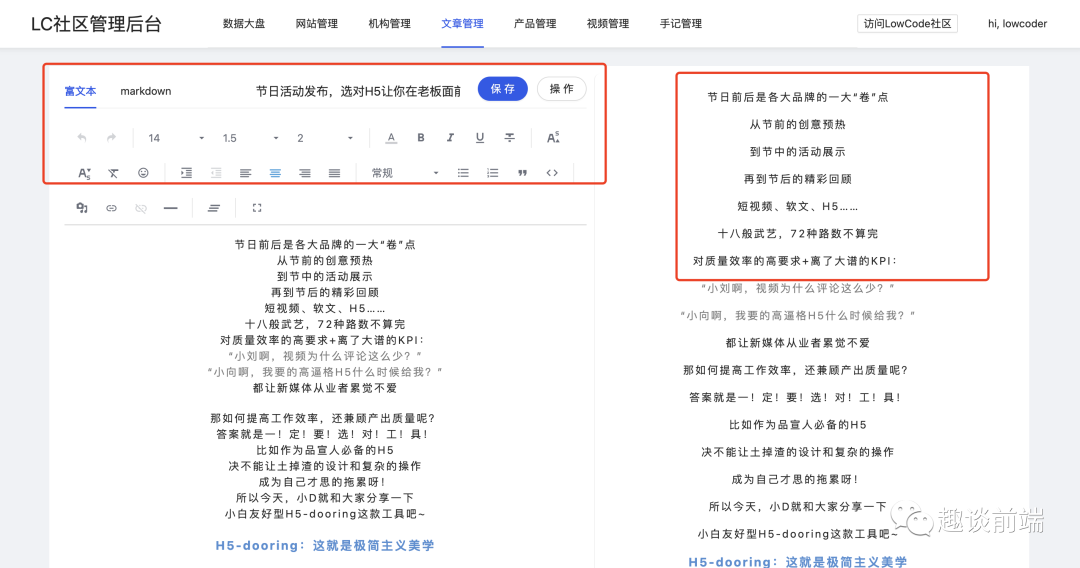
上圖就是編輯模塊, 我封裝了實時預(yù)覽 md 和富文本的模塊, 大家可以拿來即用.
本地運(yùn)行
1. 目錄介紹
-
server 基于nodejs的服務(wù)端, 啟動后可直接訪問 3000端口, 也就是內(nèi)容SSR端 -
admin CMS的管理后臺, 集成了用戶管理, 內(nèi)容審核, 內(nèi)容發(fā)布, 數(shù)據(jù)統(tǒng)計等模塊
開箱即用~~
2. 本地啟動
-
server端
# 進(jìn)入server目錄
cd server
# 安裝依賴
yarn
# 服務(wù)端啟動
yarn start
注: 如果是window系統(tǒng), 可以執(zhí)行 yarn start:win
-
管理端
# 進(jìn)入admin目錄
cd admin
# 安裝依賴
yarn
# 啟動
yarn start
初始化賬號: super_123, 密碼: zxzk_123
-
內(nèi)容端
訪問3000端口即可.
部署發(fā)布
推薦使用 pm2 來管理 Node 服務(wù)進(jìn)程, 只需要把 server 端上傳到服務(wù)器, 安裝對應(yīng)依賴, 用 pm2 啟動即可:
pm2 start server/dist
有關(guān) pm2 相關(guān)問題可以在我往期的文章中學(xué)習(xí)參考.
如何參與貢獻(xiàn)和問題反饋
如果大家有好的建議或者想法, 可以在 github 上提 pr 或者 issue 來共建, 或者在《趣談前端》公眾號中和我反饋.
github: https://github.com/MrXujiang/lowcode-cms