
nicy?? a nice and icy zsh and bash prompt in Nim
A nice and icy zsh and bash prompt in Nim

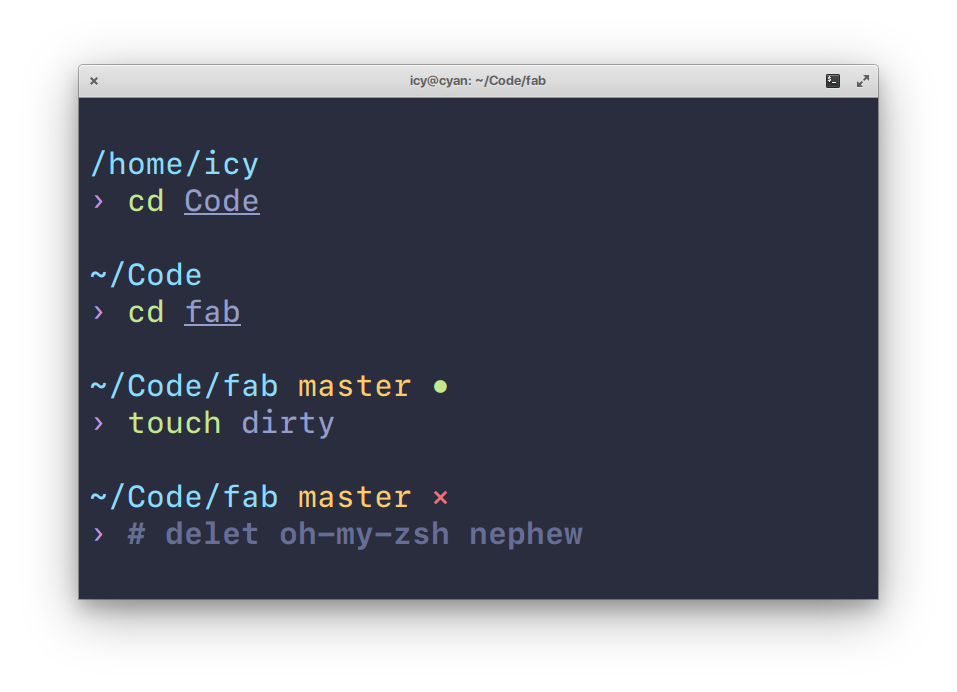
Why?
I’ve always wanted to minimize my reliance on frameworks like oh-my-zsh, so I figured, why not write my own ZSH prompt in my new favourite language? Turned out to be a really fun exercise.
Highlights
- Written in Nim
?? - Fast (in theory, since Nim compiles to C)
- Pretty defaults.
- Plugin-like system for prompt customization, in case you didn’t like the pretty defaults.
- Support both zsh and bash.
- Fun, I guess.
Installation
Note: It’s probably a good idea to uninstall oh-my-zsh, or any other plugin framework you’re using altogether. It may cause conflicts.
$ nimble install nicy
Don’t know what that is? New to Nim? Check out the Nim docs. nimble is packaged with Nim by default.
Quick start
Add this to your ~/.zshrc. If you installed via nimble, set PROMPT to $(~/.nimble/bin/nicy).
autoload -Uz add-zsh-hook
_nicy_prompt() {
	PROMPT=$("/path/to/nicy")
}
add-zsh-hook precmd _nicy_prompt
Make sure you disable all other themes.
Nicy supports BASH also, and you could simply add it to your ~/.bashrc or ~/.bash_profile:
function nicy_prompt_command {
    PS1=$(/path/to/nicy)
}
PROMPT_COMMAND="nicy_prompt_command"
Configuration
If you want to configure nicy as it is, you’ll have to edit the src/nicy.nim file and recompile. Messy, I know.
Build your own prompt
Alternatively, you can just as easily write your own prompt in Nim using nicy’s built-in API. Refer to the Examples section for some insight.
Once you’re done, compile it and add a similar function to your .zshrc as above, replacing PROMPT with the path to your own binary.
Examples
# ‘user@host $’ prompt

import nicy, strformat

let
  user = color(user(), green)
  host = color(host(), red)
  prompt = color("$ ", cyan)
  at = color("@", yellow)

echo fmt"{user}{at}{host} {prompt}"
# fish’s default prompt '~>'

import nicy, strformat

let
  prompt = color("> ", green)
  tilde = tilde(getCwd())

echo fmt"{tilde}{prompt}"
# pure by @sindresorhus (kinda)

import nicy, strformat

let
  prompt = color("? ", magenta)
  tilde = color(tilde(getCwd()), cyan)
  git = color(gitBranch() & gitStatus("*", ""), red)
  nl = "\n"

echo fmt"{tilde}{git}{nl}{prompt}"
# switching by return code

import nicy, strformat

let
  prompt = returnCondition(ok = "??", ng = "??") & " "
  tilde = color(tilde(getCwd()), cyan)
  git = color(gitBranch() & gitStatus("*", ""), red)
  nl = "\n"

echo fmt"{tilde}{git}{nl}{prompt}"
# ~ master
# ??
If you like to know more details about git status, you may want to try the following powerful example which is including the number of untracked, modified, staged, conflicted and the number of commits your local branch is ahead, behind, etc:
nim c -d:release examples/power.nim
API
zeroWidth(s: string): string
Returns the given string wrapped in zsh zero-width codes. Useful for prompt alignment and cursor positioning.
All procs below return strings wrapped by this.
foreground(s: string, color: Color): string
Returns the given string, colorized.
Possible colors are black, red, green, blue, cyan, yellow, magenta, white.
background(s, color: string): string
Returns the given string with its background colorized.
Same possible colors as above.
bold(s: string): string
Makes the given string bold.
underline(s: string): string
Adds an underline to the given string.
italics(s: string): string
Italicizes the given text. May not work in some terminal emulators!
reverse(s: string): string
Swaps the foreground/background colors for the given string.
reset(s: string): string
Resets all attributes. Useful for disabling all styling.
color*(s: string, fg, bg = Color.none, b, u, r = false): string
Convenience proc that sets all attributes to a given string.
fg: foreground, bg: background, b: bold, u: underline, r: reverse
horizontalRule(c: char): string
Returns a string of characters c, having the length of the current terminal width. Useful for positioning right-side prompts.
tilde(path: string): string
If path starts with /home/user, it is replaced by a ~/.
getCwd(): string
Returns the full path of the current working directory, or returns the string [not found] if current path doesn’t exist. (eg: rm -rf ../curpath)
virtualenv(): string
Returns the current virtualenv name if in one.
gitBranch(): string
Returns the current git branch, if in a git directory.
gitStatus(dirty, clean: string): string
Returns either dirty or clean if in a git repository. For example, return ? if clean and × if dirty.
user(): string
Returns the current username.
host(): string
Returns the current hostname.
returnCondition*(ok: string, ng: string, delimiter = "."): string
If the return code is 0 then returns ok string, otherwise ng.
returnCondition*(ok: proc(): string, ng: proc(): string, delimiter = "."): string
Returns result of ok proc or ng proc. If the return code is 0 then this proc calls ok proc, otherwise calls ng proc.
shellName*: string Contains the name of shell in which your prompt progoram is running. Currently it may be zsh or bash. You can specify it during compilation using the switch -d:zsh or -d:bash, or you can let the program detect it automatically, which may slow it down by a few milliseconds.
GitStats API
newGitStats*(): GitStats
Returns a GitStats object which contains the name of the local branch, the name of remote reference, number of commits your local branch is ahead or behind remote ref, number of untracked, modified, staged, conflicted, and the number of stashed changes.
branch*(gs: GitStats, detachedPrefix = "", postfix = " "): string
Returns the current git branch name.
status*(gs: GitStats, ahead, behind, untracked, changed, staged, conflicted, stash: string, separator, postfix = " "): string
Returns the git status string.
dirty*(gs: GitStats): bool
Returns whether the current directory has been changed.
Contributing
Bad code? New feature in mind? Open an issue. Better still, learn Nim and shoot a PR
License
MIT ? Anirudh Oppiliappan