
latexdrawA vector drawing editor for LaTeX (JavaFX).



latexdraw
A vector drawing editor for LaTeX.
Documentation and installation requirements (in particular regarding LaTeX): https://github.com/arnobl/latexdraw/wiki/Manual
Binaries and installation files to download on Sourceforge: http://sourceforge.net/projects/latexdraw/
How to run
You downloaded the binaries of a 4.x version and you want to run the app. Go in the bin folder and launch the latexdraw-run file (or latexdraw-run.bat on Windows).
On Windows, the system may tell you Windows has protected your computer. To overcome this issue, right-click on this file, click on the properties menu, and activate the unlock checkbox.
On MacOSX, you may have the message damaged and can't be opened. You should eject the disk image" after installing the app. Look here: https://secure.clcbio.com/helpspot/index.php?pg=kb.page&id=323 and here: https://osxdaily.com/2019/02/13/fix-app-damaged-cant-be-opened-trash-error-mac/
You do not need Java for running the app. For rendering LaTeX instructions, you need an up-to-date LaTeX installation.
Support
You can support this software by making a donation: http://sourceforge.net/donate/index.php?group_id=156523
How to report a bug
Before reporting a bug, please check the following elements:
-
Make sure you use the latest LaTeXDraw version.
-
Make sure your LaTeX installation is up to date (in particular for export / compilation issues). In particular with MikTeX, run the update utilities to check that. We already faced errors solved by updating MikTeX.
-
Do you have LaTeX and some required packages installed? The required packages are:
pstricks,pstricks-add,pst-grad,pst-plot,geometry,pst-tools. To render text thumbnails the app use either GhostScript (gs) orpdftoppm(provided bypoppler-utilsand Texlive on Linux ). -
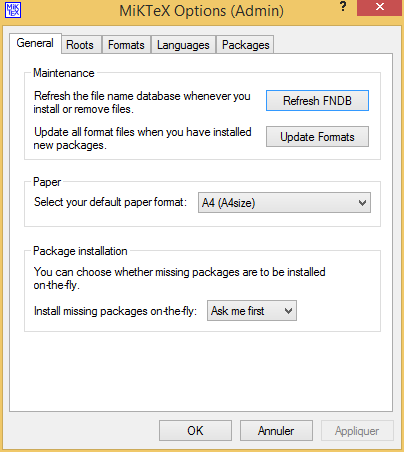
With MikTeX, check the auto-install of missing packages is enable. MikTeX can install on-demand (during the compilation of a document) the missing packages. Go in the MikTeX preferences to check that this feature is enable (either 'yes' or 'ask me first'), as depicted by the following screenshot:
-
Did you look at "the current issues" section and the reported issues (https://github.com/latexdraw/latexdraw/issues)?
-
Does the problem still occur using the latest development version? (See the links in the next section).
If you still have a problem, please do the following steps while reporting the bug:
-
Copy/paste in a bug report or on the forum the information provided in the "system" tab you can find here: "Help" menu -> "About LateXDraw" menu item -> "system" tab.
-
Provide either a scenario that I can execute to reproduce the problem, or an SVG document plus some instructions regarding the problem.
-
Be nice. You did not pay for the software and I develop it on my free time since more than one decade.
-
Report your bug on Github (https://github.com/latexdraw/latexdraw/issues).
Latest development version
You can test the next 4.x development version using the following binaries and installation files:
- for Linux (Fedora): https://ci.inria.fr/malai/job/latexdraw4/lastSuccessfulBuild/artifact/target/
- for Linux (Debian/Ubuntu): https://ci.inria.fr/malai/job/latexdraw4deb/lastSuccessfulBuild/artifact/target/
- for Windows: https://ci.inria.fr/malai/job/latexdraw4win/lastSuccessfulBuild/artifact/target/
- MacOsX: https://ci.inria.fr/malai/job/latexdraw4mac/lastSuccessfulBuild/artifact/target/
Linux packaging

Build LaTeXDraw
To compile you need JDK14 and Maven: https://adoptopenjdk.net
The default Maven profile is for Linux and does not work for Windows and MacOSX If you want to compile the project on MacOSX use the mac profile. On Windows, use the win profile. To do so, you have to add the option -P mac or -P win in the following Maven commands.
If you just want to compile the app: mvn clean compile
If you want to build the app (and produce platform-specific installer files): mvn clean package
If you run the tests, you need LaTeX to be installed (and PSTricks packages). If you want to skip the tests: mvn -DskipTests=true clean package
If you want to skip the tests and the linters: mvn clean package -DskipTests -Dcheckstyle.skip -Dspotbugs.skip
The packaging step is specific for each OS (Fedora, Debian, Windows, MacOSX, etc.): it uses tools these OS' provide to build installation files. These tools are:
- On Fedora, you need
rpmbuild:dnf install rpm-build - On Debian/Ubuntu, you need
fakeroot:apt install fakeroot - On Windows, you need
WIX toolset(https://wixtoolset.org) - On MacOSX, it seems to work without any supplementary installation
If you do not want to go through this step, you can ask Maven to ignore these steps: mvn clean package -Dexec.skip -Dassembly.skipAssembly
LaTeXDraw 3.x serie
We do not maintain the 3.x serie anymore. You can find the 3.x help page here: https://github.com/latexdraw/latexdraw/wiki/Manual-for-Versions-3.x