
Spring Boot 對接微信支付!(附源碼)
點擊上方[全棧開發(fā)者社區(qū)]→右上角[...]→[設(shè)為星標(biāo)?]
點擊領(lǐng)取全棧資料:全棧資料

有小伙伴問還有沒有springboot接入微信的案例。
今天這篇文章安排了。
1,引入微信SDK:
<dependency><groupId>com.github.wxpay</groupId><artifactId>wxpay-sdk</artifactId><version>0.0.3</version></dependency>
2、微信支付基本配置類:
public static final String APP_ID = "你的appid";public static final String KEY = "你的api秘鑰,不是appSecret";public static final String MCH_ID = "你的商戶id";String certPath = ClassUtils.getDefaultClassLoader().getResource("").getPath()+"/weixin/apiclient_cert.p12";//從微信商戶平臺下載的安全證書存放的路徑。
3,編寫配置類:
package com.foochane.awpay.test.config;import com.github.binarywang.wxpay.config.WxPayConfig;import com.github.binarywang.wxpay.service.WxPayService;import com.github.binarywang.wxpay.service.impl.WxPayServiceImpl;import org.springframework.boot.autoconfigure.condition.ConditionalOnClass;import org.springframework.boot.autoconfigure.condition.ConditionalOnMissingBean;import org.springframework.context.annotation.Bean;import org.springframework.context.annotation.Configuration;/*** Created by 公眾號:springmeng*/@Configuration@ConditionalOnClass(WxPayService.class)public class MyWxPayConfig {@Bean@ConditionalOnMissingBeanpublic WxPayService wxService() {WxPayConfig payConfig = new WxPayConfig();payConfig.setAppId("xxxxxx");payConfig.setMchId("xxxxx");payConfig.setMchKey("xxxxxxxxxx");payConfig.setKeyPath("D:\\xx\\xx\\xxxx\\apiclient_cert.p12");payConfig.setUseSandboxEnv(false); //不使用沙箱環(huán)境WxPayService wxPayService = new WxPayServiceImpl();wxPayService.setConfig(payConfig);return wxPayService;}}
4,支付代碼:
package com.foochane.awpay.test.controller;import com.github.binarywang.wxpay.bean.notify.WxPayNotifyResponse;import com.github.binarywang.wxpay.bean.notify.WxPayOrderNotifyResult;import com.github.binarywang.wxpay.bean.request.WxPayRefundRequest;import com.github.binarywang.wxpay.bean.request.WxPayUnifiedOrderRequest;import com.github.binarywang.wxpay.bean.result.*;import com.github.binarywang.wxpay.exception.WxPayException;import com.github.binarywang.wxpay.service.WxPayService;import org.springframework.beans.factory.annotation.Autowired;import org.springframework.web.bind.annotation.*;/*** Created by 公眾號:springmeng*/public class WxPayController {private WxPayService wxPayService;/*** 添加支付訂單* @param request 請求參數(shù)* 至少要包含如下參數(shù),請求示例(掃描支付):* {* "tradeType": "NATIVE",* "body": "商品購買",* "outTradeNo": "P22321112130097578901",* "productId": "12342424242323233",* "totalFee": 1,* "spbillCreateIp": "12.3.44.4",* "notifyUrl":"http://www.xxxx.com:/wx/order/notify"* }* @return 返回支付信息* @throws WxPayException*/public WxPayUnifiedOrderResult unifiedOrder( WxPayUnifiedOrderRequest request) throws WxPayException {return this.wxPayService.unifiedOrder(request);}/*** 支付回調(diào)通知處理* @param xmlData* @return* @throws WxPayException*/public String parseOrderNotifyResult( String xmlData) throws WxPayException {final WxPayOrderNotifyResult notifyResult = this.wxPayService.parseOrderNotifyResult(xmlData);// TODO 根據(jù)自己業(yè)務(wù)場景需要構(gòu)造返回對象return WxPayNotifyResponse.success("成功");}/*** 查詢訂單* @param transactionId 微信訂單號* @param outTradeNo 商戶系統(tǒng)內(nèi)部的訂單號,當(dāng)沒提供transactionId時需要傳這個,兩個參數(shù)二選一即可*/public WxPayOrderQueryResult queryOrder( String transactionId,String outTradeNo)throws WxPayException {return this.wxPayService.queryOrder(transactionId, outTradeNo);}/*** 申請退款* @param request 請求對象* 請求示例(至少包含如下參數(shù)):* {* "outRefundNo": "rxx34343121",* "outTradeNo": "p22321213009757890",* "refundAccount": "REFUND_SOURCE_UNSETTLED_FUNDS",* "refundDesc": "退款",* "refundFee": 1,* "totalFee": 1,* "notifyUrl": "http://www.xxxx.com/wx/notify* }* @return 退款操作結(jié)果*/public WxPayRefundResult refund( WxPayRefundRequest request) throws WxPayException {return this.wxPayService.refund(request);}/*** 微信支付-查詢退款* 以下四個參數(shù)四選一** @param transactionId 微信訂單號* @param outTradeNo 商戶訂單號* @param outRefundNo 商戶退款單號* @param refundId 微信退款單號* @return 退款信息*/public WxPayRefundQueryResult refundQuery( String transactionId,String outTradeNo,String outRefundNo,String refundId)throws WxPayException {return this.wxPayService.refundQuery(transactionId, outTradeNo, outRefundNo, refundId);}/*** 關(guān)閉訂單* @param outTradeNo 商戶系統(tǒng)內(nèi)部的訂單號*/public WxPayOrderCloseResult closeOrder( String outTradeNo) throws WxPayException {return this.wxPayService.closeOrder(outTradeNo);}}
4,支付實現(xiàn):
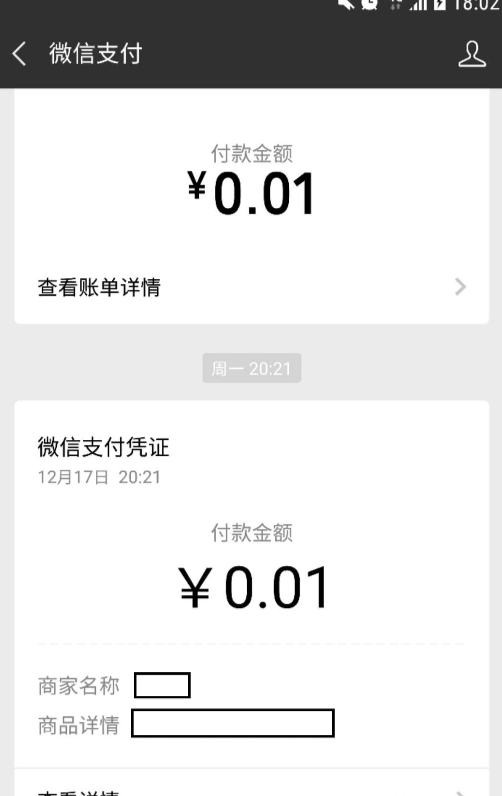
超簡單支付過程,只需要修改配置文件中你自己的appid等信息就可以使用了。文中沒有java后臺的業(yè)務(wù)邏輯,可以自己添加,這里主要實現(xiàn)支付功能。(為了隱私,截圖中屏蔽了主體信息。)
參考地址:
1,http://www.manongjc.com/article/28970.html
2,https://blog.csdn.net/u014754541/article/details/105964063
為了幫助大家更好的測試,整理了兩份完整的springboot接入微信支付代碼,本號后臺回復(fù):微信支付
覺得本文對你有幫助?請分享給更多人
關(guān)注「全棧開發(fā)者社區(qū)」加星標(biāo),提升全棧技能
本公眾號會不定期給大家發(fā)福利,包括送書、學(xué)習(xí)資源等,敬請期待吧!
如果感覺推送內(nèi)容不錯,不妨右下角點個在看轉(zhuǎn)發(fā)朋友圈或收藏,感謝支持。
好文章,留言、點贊、在看和分享一條龍吧??
評論
圖片
表情