一款自動(dòng)生成單元測(cè)試的 IDEA 插件,開(kāi)發(fā)效率提升 70% 以上!
點(diǎn)擊關(guān)注公眾號(hào),Java干貨及時(shí)送達(dá)
今天來(lái)介紹一款工具Squaretest,它是一款自動(dòng)生成單元測(cè)試的插件,為什么會(huì)用到它?
主要因?yàn)樽罱旧狭舜a質(zhì)量管控的指標(biāo),會(huì)考評(píng)各個(gè)項(xiàng)目的單元測(cè)試覆蓋率,以及sonar掃描出來(lái)的各種問(wèn)題,很多老項(xiàng)目老代碼,或者著急交付的項(xiàng)目,單元測(cè)試嚴(yán)重缺失,覆蓋率只有5%不到。
所以幾個(gè)小伙伴這幾天就在瘋狂的堆單元測(cè)試,3個(gè)人堆了2天才堆到30%,于是我也來(lái)上手幫忙寫(xiě)了兩個(gè),寫(xiě)到第二個(gè)的時(shí)候就發(fā)現(xiàn),這個(gè)活不應(yīng)該是人干的,要去看原來(lái)的代碼,然后根據(jù)邏輯寫(xiě)各種Mock,感覺(jué)是有跡可循的東西,所以就查了下,發(fā)現(xiàn)果然有插件幫我們來(lái)干這個(gè)事情,那么解下來(lái)就來(lái)看看。
我使用的是idea,我們先來(lái)下載一下插件,File——>Settings——>Plugins,搜索Squaretest,然后install就好了,插件安裝完成后需要重啟一下。另外,更多 IDEA 好用的插件全部整理好了,微信搜索Java技術(shù)棧,在后臺(tái)發(fā)送:工具,可以在線閱讀。
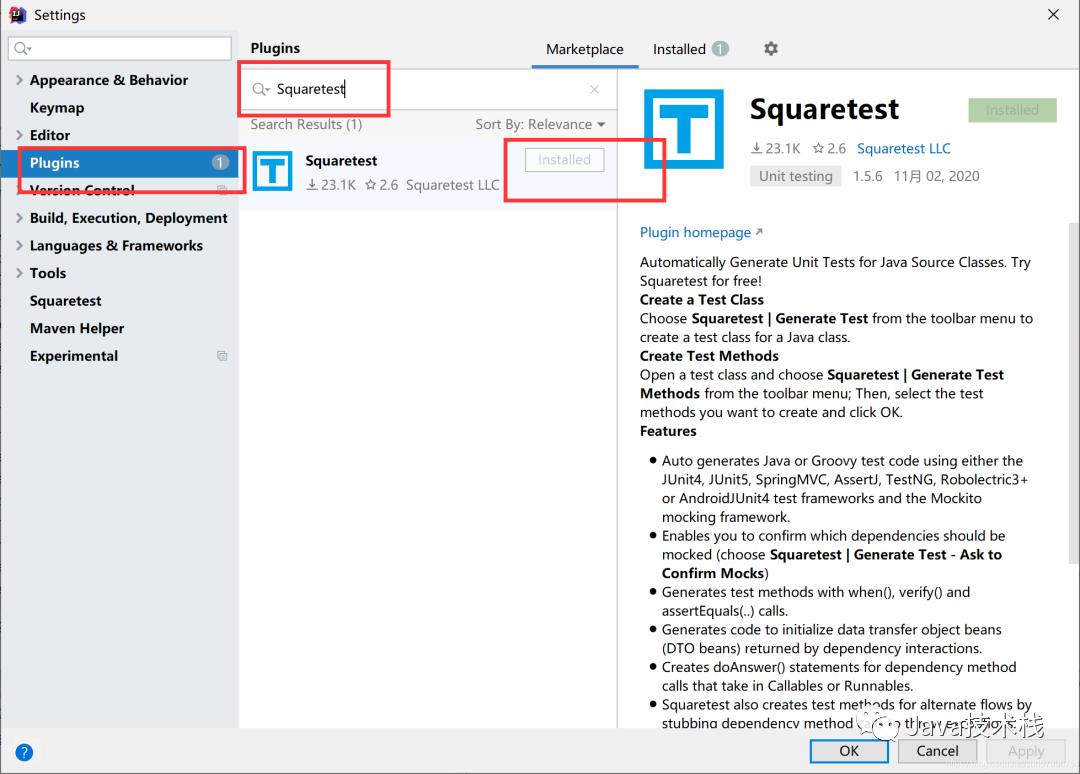
重啟之后,菜單欄就多了一項(xiàng)Squaretest,下面我們來(lái)講下怎么用,大家也可以通過(guò)看這個(gè)菜單的最后一項(xiàng):Generate Test Methods(Help)來(lái)看它的一個(gè)演示,但演示不太全,我下面截圖給大家看下我怎么用的,以及一些使用心得。

首先我們打開(kāi)一個(gè)類(lèi),這個(gè)類(lèi)就是我們即將要作為實(shí)驗(yàn)的類(lèi),這個(gè)類(lèi)有7個(gè)public方法,因?yàn)?code style="font-size: 14px;padding: 2px 4px;border-radius: 4px;margin-right: 2px;margin-left: 2px;background-color: rgba(27, 31, 35, 0.05);font-family: "Operator Mono", Consolas, Monaco, Menlo, monospace;word-break: break-all;color: rgb(53, 179, 120);">Squaretest生成的單元測(cè)試方法都是只能生成public的,當(dāng)然這也是合理的嘛!畢竟private的肯定被public調(diào)用了。
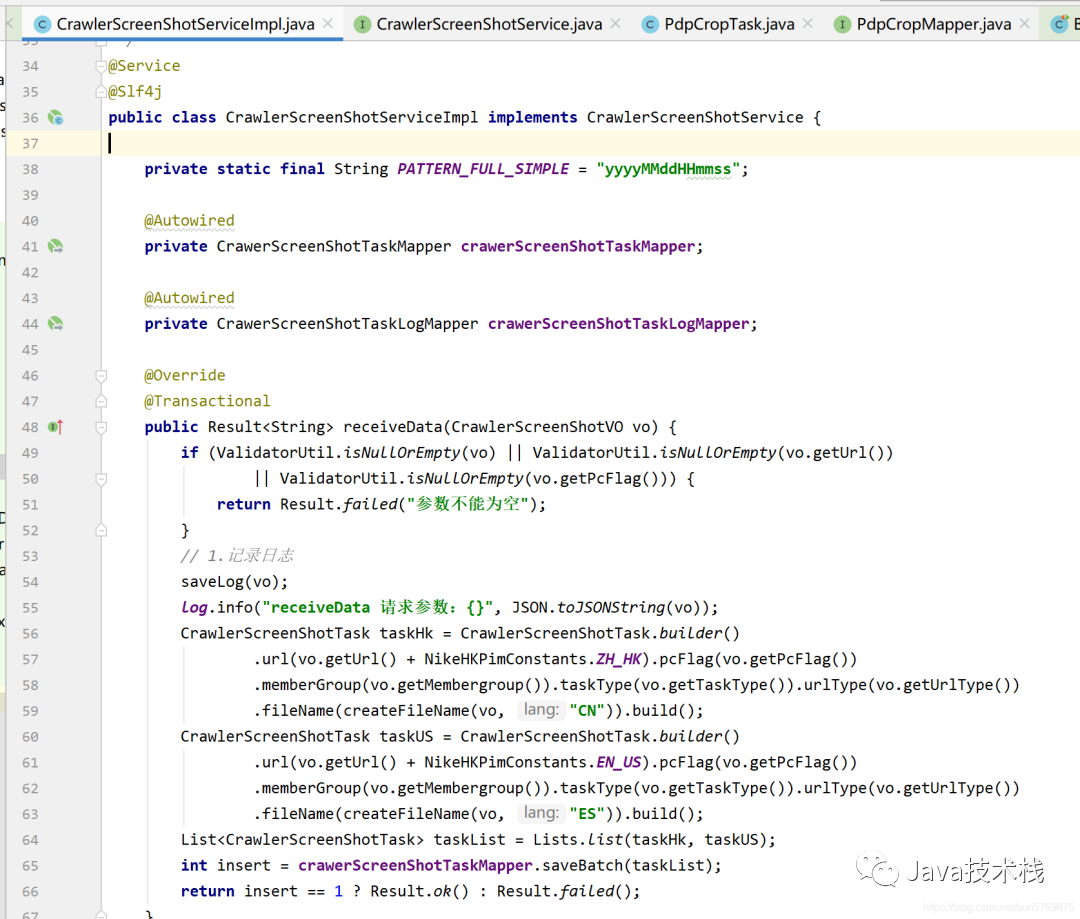
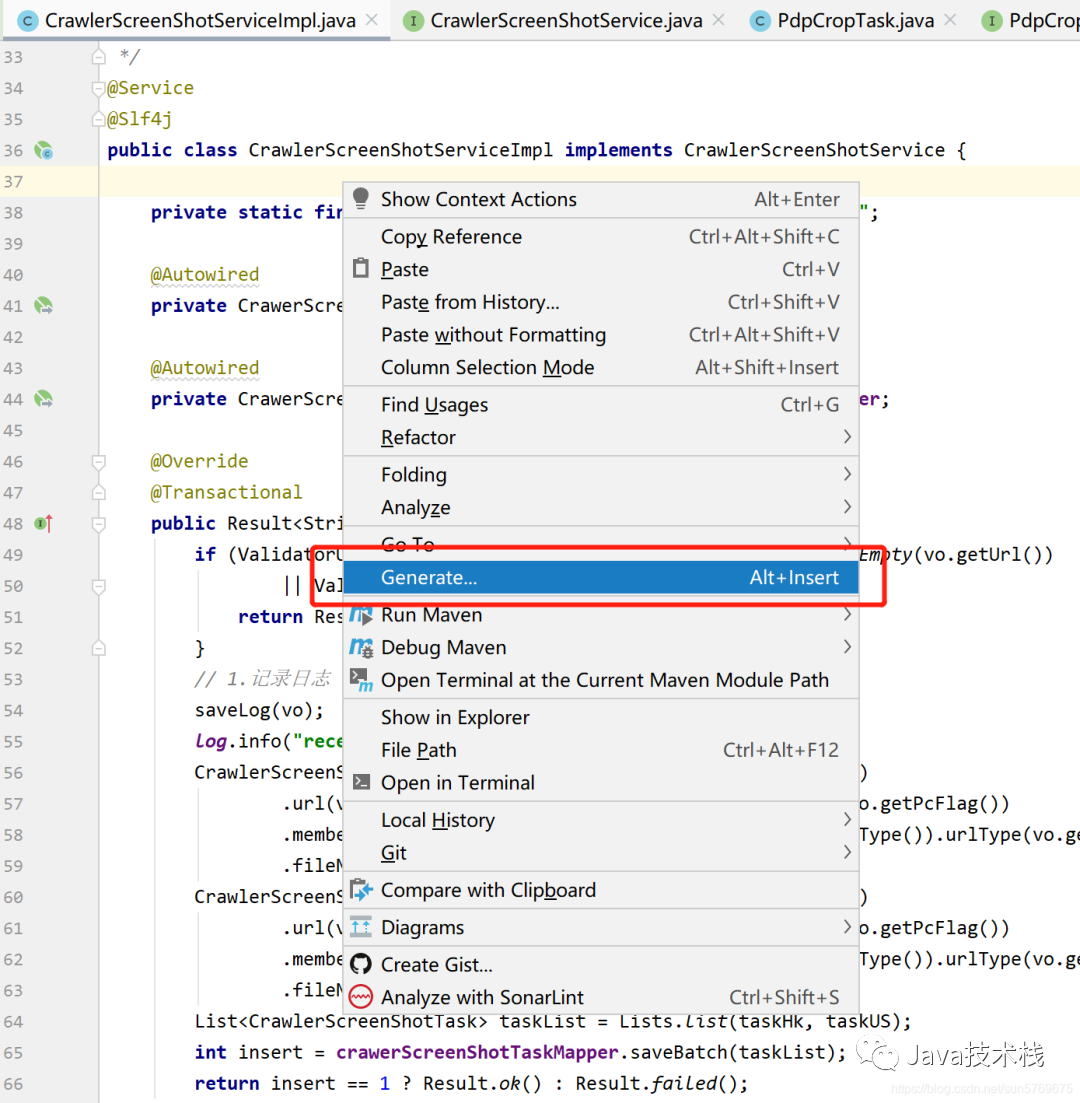
如果我們來(lái)手寫(xiě)這個(gè)類(lèi)的單元測(cè)試,光看都要一會(huì),下面看我操作,打開(kāi)你的類(lèi),光標(biāo)定位到代碼里,右擊鼠標(biāo)選擇Generate…
然后你就會(huì)看到這里有兩個(gè)熟悉的圖標(biāo),第一次的話選擇第二個(gè)選項(xiàng),它會(huì)讓你選擇你一下單元測(cè)試的模板,因?yàn)槲乙呀?jīng)選擇過(guò)了,所以我現(xiàn)在演示不回再?gòu)棾觯竺嫖視?huì)告訴你怎么更改模板。
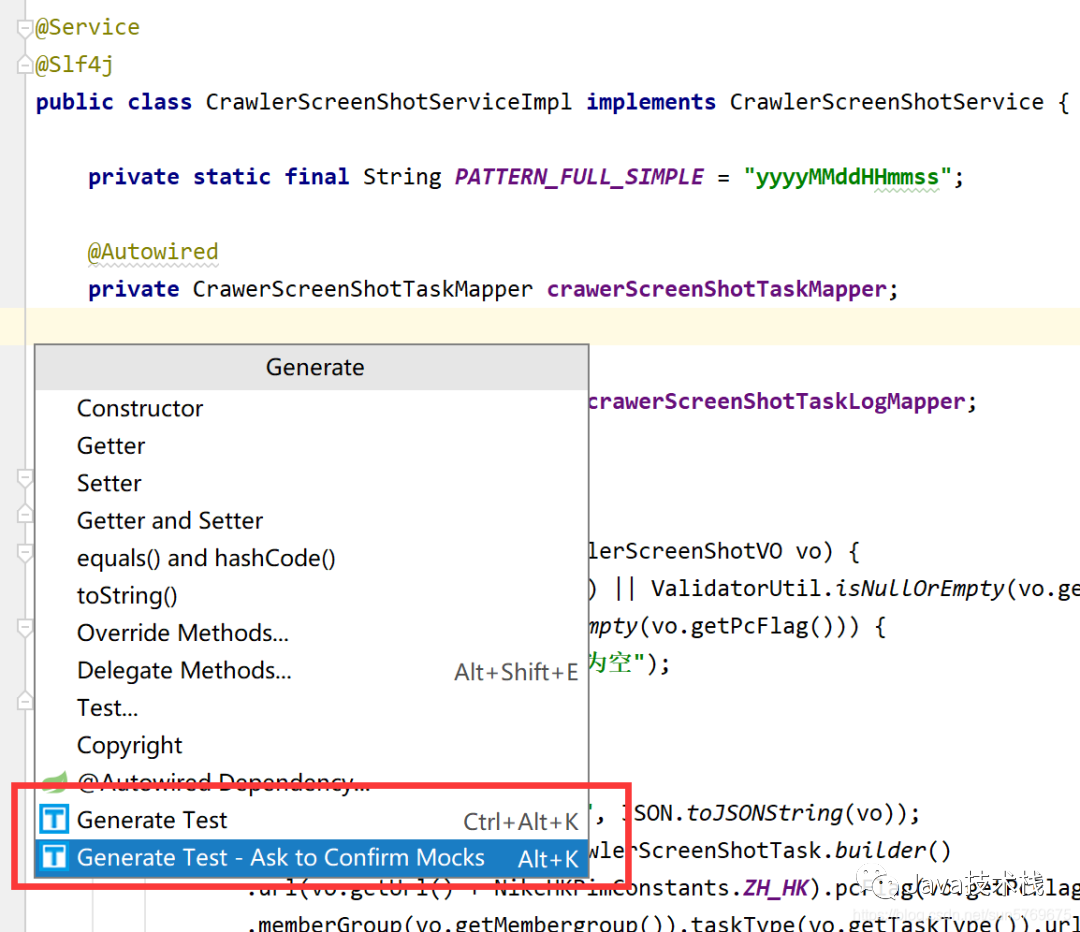
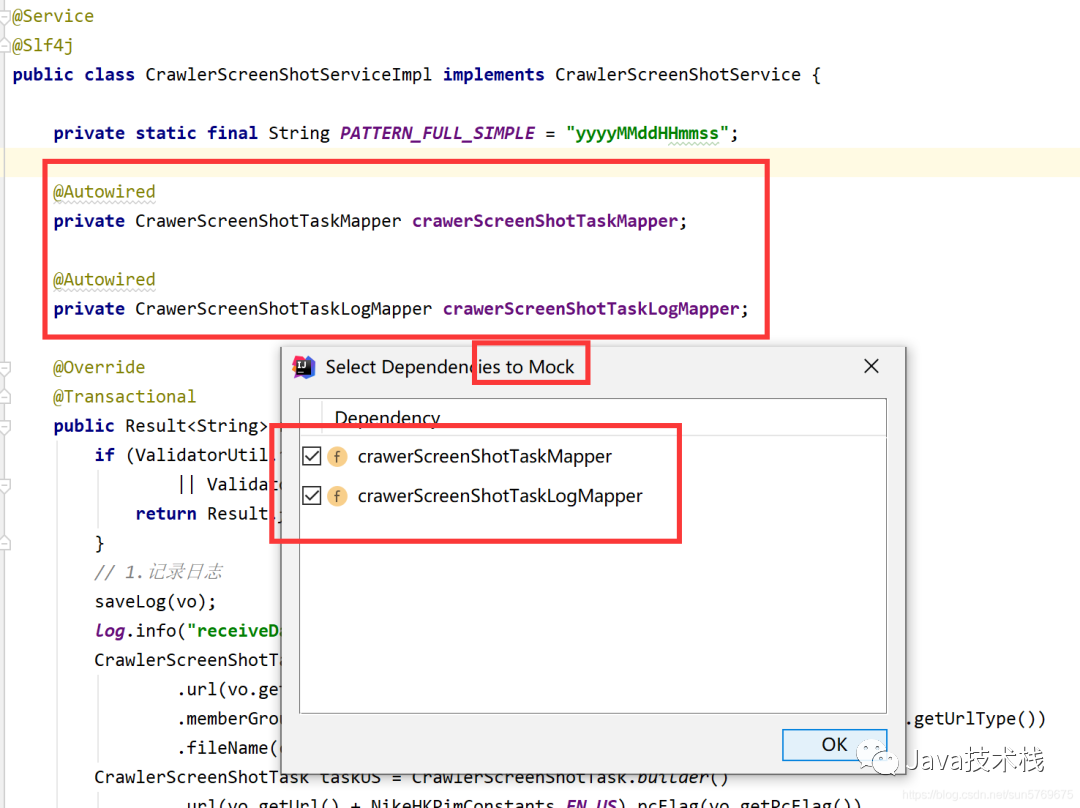
選擇第二項(xiàng)后就會(huì)彈出一個(gè)框看下面這里它自動(dòng)會(huì)識(shí)別出當(dāng)前類(lèi)需要Mock的成員變量,直接點(diǎn)ok
點(diǎn)擊關(guān)注公眾號(hào),Java干貨及時(shí)送達(dá)
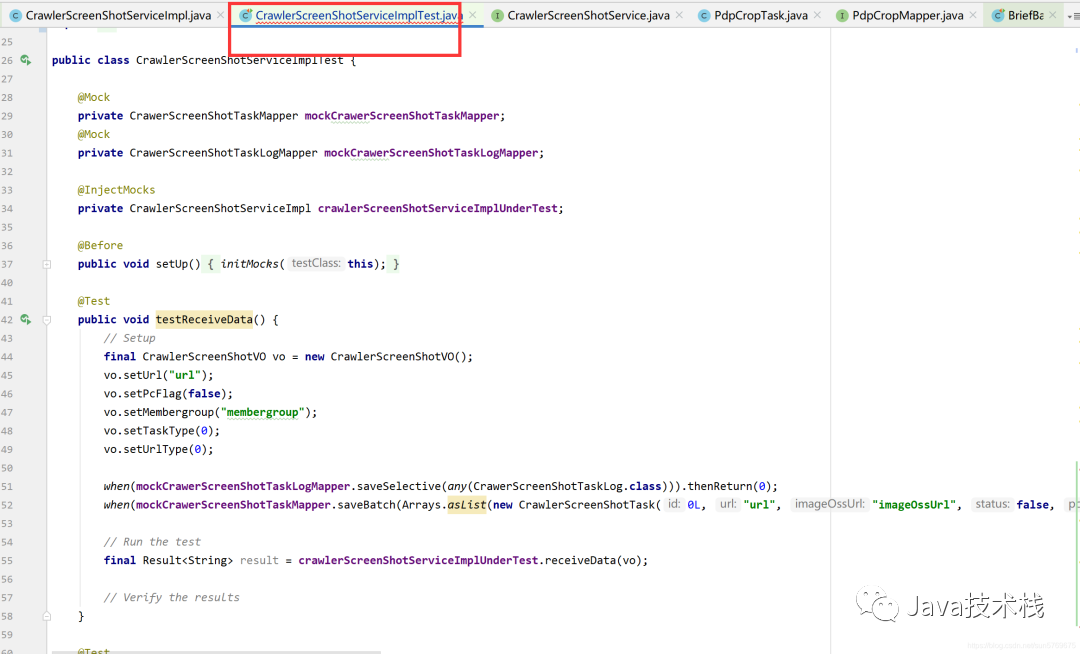
自動(dòng)會(huì)使用類(lèi)的真實(shí)目錄層次在test文件夾中創(chuàng)建出來(lái)一個(gè)單元測(cè)試類(lèi),類(lèi)名就是原類(lèi)名后加Test
最新面試題整理好了,大家可以在Java面試庫(kù)小程序在線刷題。
我把代碼貼出來(lái)給大家看看它生成出來(lái)的是什么樣的,看看嚇不嚇人,牛逼牛逼,7個(gè)單元測(cè)試方法,秒秒鐘就出來(lái)了,各位看官你們自己寫(xiě)要多久能寫(xiě)出來(lái),畢竟時(shí)間就是金錢(qián)啊!然后我們執(zhí)行一把試試!
public class CrawlerScreenShotServiceImplTest {

    @Mock
    private CrawerScreenShotTaskMapper mockCrawerScreenShotTaskMapper;
    @Mock
    private CrawerScreenShotTaskLogMapper mockCrawerScreenShotTaskLogMapper;

    @InjectMocks
    private CrawlerScreenShotServiceImpl crawlerScreenShotServiceImplUnderTest;

    @Before
    public void setUp() {
        initMocks(this);
    }

    @Test
    public void testReceiveData() {
        // Setup
        final CrawlerScreenShotVO vo = new CrawlerScreenShotVO();
        vo.setUrl("url");
        vo.setPcFlag(false);
        vo.setMembergroup("membergroup");
        vo.setTaskType(0);
        vo.setUrlType(0);

        when(mockCrawerScreenShotTaskLogMapper.saveSelective(any(CrawerScreenShotTaskLog.class))).thenReturn(0);
        when(mockCrawerScreenShotTaskMapper.saveBatch(Arrays.asList(new CrawlerScreenShotTask(0L, "url", "imageOssUrl", false, false, "memberGroup", 0, 0, "fileName", new GregorianCalendar(2019, Calendar.JANUARY, 1).getTime(), new GregorianCalendar(2019, Calendar.JANUARY, 1).getTime(), false, "skuCode", "state", "operater")))).thenReturn(0);

        // Run the test
        final Result<String> result = crawlerScreenShotServiceImplUnderTest.receiveData(vo);

        // Verify the results
    }

    @Test
    public void testListJobScreenShotTask() {
        // Setup

        // Configure CrawerScreenShotTaskMapper.listJobScreenShotTask(...).
        final CrawlerScreenShotTaskDto crawlerScreenShotTaskDto = new CrawlerScreenShotTaskDto();
        crawlerScreenShotTaskDto.setId(0L);
        crawlerScreenShotTaskDto.setUrl("url");
        crawlerScreenShotTaskDto.setSkuCode("skuCode");
        crawlerScreenShotTaskDto.setPcFlag(false);
        crawlerScreenShotTaskDto.setMemberGroup("memberGroup");
        crawlerScreenShotTaskDto.setUrlType(0);
        crawlerScreenShotTaskDto.setFileName("fileName");
        crawlerScreenShotTaskDto.setTaskType(0);
        crawlerScreenShotTaskDto.setState("state");
        final List<CrawlerScreenShotTaskDto> crawlerScreenShotTaskDtos = Arrays.asList(crawlerScreenShotTaskDto);
        when(mockCrawerScreenShotTaskMapper.listJobScreenShotTask(new GregorianCalendar(2019, Calendar.JANUARY, 1).getTime())).thenReturn(crawlerScreenShotTaskDtos);

        // Run the test
        final List<CrawlerScreenShotTaskDto> result = crawlerScreenShotServiceImplUnderTest.listJobScreenShotTask();

        // Verify the results
    }

    @Test
    public void testQuery() {
        // Setup
        final NikeScreenShotListRequestVo requestVo = new NikeScreenShotListRequestVo();
        requestVo.setUrl("url");
        requestVo.setUrlType(0);
        requestVo.setStartTime(new GregorianCalendar(2019, Calendar.JANUARY, 1).getTime());
        requestVo.setEndTime(new GregorianCalendar(2019, Calendar.JANUARY, 1).getTime());
        requestVo.setStatus(0);
        requestVo.setPcFlag(0);
        requestVo.setPageNum(0);
        requestVo.setPageSize(0);

        // Configure CrawerScreenShotTaskMapper.query(...).
        final PimScreenShotVo pimScreenShotVo = new PimScreenShotVo();
        pimScreenShotVo.setId(0L);
        pimScreenShotVo.setUrl("url");
        pimScreenShotVo.setImageOssUrl("imageOssUrl");
        pimScreenShotVo.setStatus(0);
        pimScreenShotVo.setPcFlag(false);
        pimScreenShotVo.setCreateTime(new GregorianCalendar(2019, Calendar.JANUARY, 1).getTime());
        pimScreenShotVo.setUrlType(0);
        pimScreenShotVo.setMsg("msg");
        final List<PimScreenShotVo> pimScreenShotVos = Arrays.asList(pimScreenShotVo);
        when(mockCrawerScreenShotTaskMapper.query(any(NikeScreenShotListRequestVo.class))).thenReturn(pimScreenShotVos);

        // Run the test
        final PageInfo<PimScreenShotVo> result = crawlerScreenShotServiceImplUnderTest.query(requestVo);

        // Verify the results
    }

    @Test
    public void testQuerySelectBoxData() {
        // Setup

        // Configure CrawerScreenShotTaskMapper.query(...).
        final PimScreenShotVo pimScreenShotVo = new PimScreenShotVo();
        pimScreenShotVo.setId(0L);
        pimScreenShotVo.setUrl("url");
        pimScreenShotVo.setImageOssUrl("imageOssUrl");
        pimScreenShotVo.setStatus(0);
        pimScreenShotVo.setPcFlag(false);
        pimScreenShotVo.setCreateTime(new GregorianCalendar(2019, Calendar.JANUARY, 1).getTime());
        pimScreenShotVo.setUrlType(0);
        pimScreenShotVo.setMsg("msg");
        final List<PimScreenShotVo> pimScreenShotVos = Arrays.asList(pimScreenShotVo);
        when(mockCrawerScreenShotTaskMapper.query(any(NikeScreenShotListRequestVo.class))).thenReturn(pimScreenShotVos);

        // Run the test
        final PimScreenShotTaskParamsDto result = crawlerScreenShotServiceImplUnderTest.querySelectBoxData();

        // Verify the results
    }

    @Test
    public void testFindExecutionScreenShotTaskCount() {
        // Setup
        when(mockCrawerScreenShotTaskMapper.findExecutionScreenShotTaskCount()).thenReturn(0);

        // Run the test
        final Integer result = crawlerScreenShotServiceImplUnderTest.findExecutionScreenShotTaskCount();

        // Verify the results
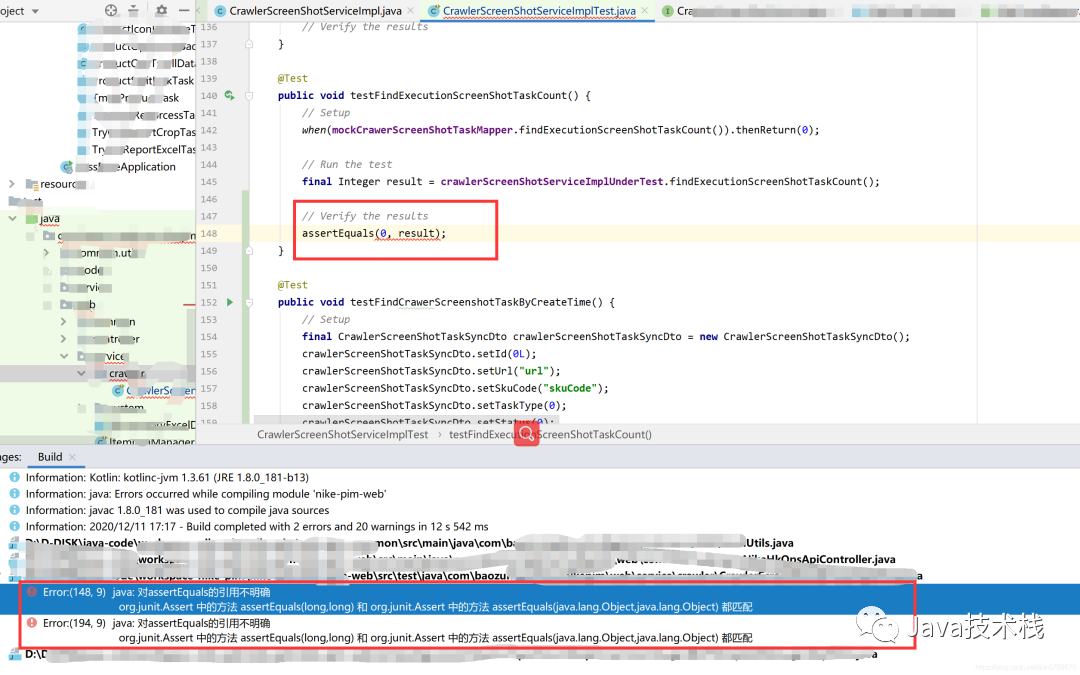
        assertEquals(0, result);
    }

    @Test
    public void testFindCrawerScreenshotTaskByCreateTime() {
        // Setup
        final CrawlerScreenShotTaskSyncDto crawlerScreenShotTaskSyncDto = new CrawlerScreenShotTaskSyncDto();
        crawlerScreenShotTaskSyncDto.setId(0L);
        crawlerScreenShotTaskSyncDto.setUrl("url");
        crawlerScreenShotTaskSyncDto.setSkuCode("skuCode");
        crawlerScreenShotTaskSyncDto.setTaskType(0);
        crawlerScreenShotTaskSyncDto.setStatus(0);
        crawlerScreenShotTaskSyncDto.setLastModifyTime(new GregorianCalendar(2019, Calendar.JANUARY, 1).getTime());
        crawlerScreenShotTaskSyncDto.setOperater("operater");
        crawlerScreenShotTaskSyncDto.setMsg("msg");
        final List<CrawlerScreenShotTaskSyncDto> expectedResult = Arrays.asList(crawlerScreenShotTaskSyncDto);

        // Configure CrawerScreenShotTaskMapper.findCrawerScreenshotTaskByCreateTime(...).
        final CrawlerScreenShotTaskSyncDto crawlerScreenShotTaskSyncDto1 = new CrawlerScreenShotTaskSyncDto();
        crawlerScreenShotTaskSyncDto1.setId(0L);
        crawlerScreenShotTaskSyncDto1.setUrl("url");
        crawlerScreenShotTaskSyncDto1.setSkuCode("skuCode");
        crawlerScreenShotTaskSyncDto1.setTaskType(0);
        crawlerScreenShotTaskSyncDto1.setStatus(0);
        crawlerScreenShotTaskSyncDto1.setLastModifyTime(new GregorianCalendar(2019, Calendar.JANUARY, 1).getTime());
        crawlerScreenShotTaskSyncDto1.setOperater("operater");
        crawlerScreenShotTaskSyncDto1.setMsg("msg");
        final List<CrawlerScreenShotTaskSyncDto> crawlerScreenShotTaskSyncDtos = Arrays.asList(crawlerScreenShotTaskSyncDto1);
        when(mockCrawerScreenShotTaskMapper.findCrawerScreenshotTaskByCreateTime(new GregorianCalendar(2019, Calendar.JANUARY, 1).getTime())).thenReturn(crawlerScreenShotTaskSyncDtos);

        // Run the test
        final List<CrawlerScreenShotTaskSyncDto> result = crawlerScreenShotServiceImplUnderTest.findCrawerScreenshotTaskByCreateTime(new GregorianCalendar(2019, Calendar.JANUARY, 1).getTime());

        // Verify the results
        assertEquals(expectedResult, result);
    }

    @Test
    public void testQueryCrawlerDashboard() {
        // Setup
        when(mockCrawerScreenShotTaskMapper.queryCrawlerDashboard(0, 0, 0, new GregorianCalendar(2019, Calendar.JANUARY, 1).getTime(), new GregorianCalendar(2019, Calendar.JANUARY, 1).getTime())).thenReturn(0);

        // Run the test
        final Integer result = crawlerScreenShotServiceImplUnderTest.queryCrawlerDashboard(0, 0, 0, new GregorianCalendar(2019, Calendar.JANUARY, 1).getTime(), new GregorianCalendar(2019, Calendar.JANUARY, 1).getTime());

        // Verify the results
        assertEquals(0, result);
    }
}
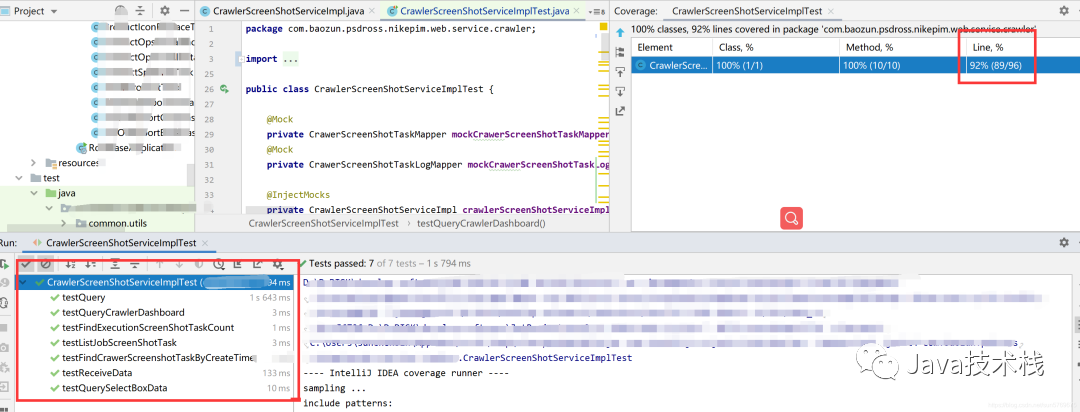
怎么樣!刺不刺激,爽不爽,秒秒鐘90多行的代碼覆蓋率就到了90%以上.
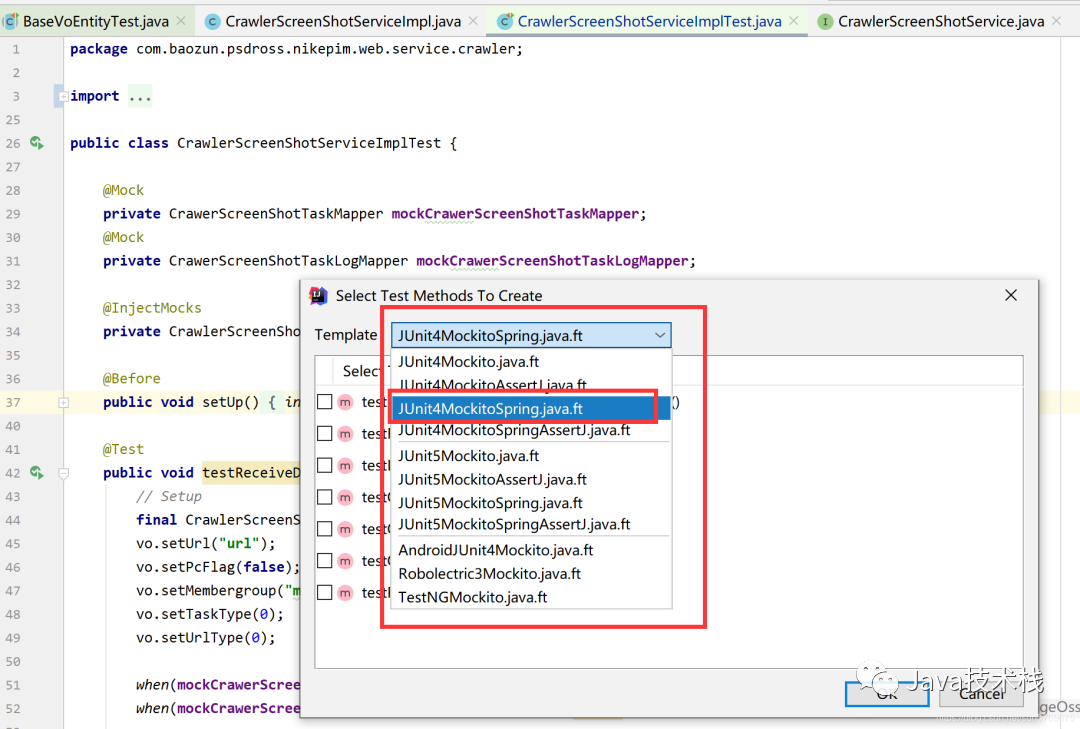
上面說(shuō)過(guò)第一次進(jìn)來(lái)會(huì)讓你選擇單元測(cè)試的模板,如果你要切換的話可以在單元測(cè)試類(lèi)中按快捷鍵,Alt+M,或者通過(guò)Squaretest的菜單倒數(shù)第二個(gè),下面這個(gè)就是按快捷鍵的效果,我選擇的是這個(gè)模板,你們也可以借鑒。
OK,以上Squaretest部分就結(jié)束了,最新面試題整理好了,大家可以在Java面試庫(kù)小程序在線刷題。當(dāng)然拉也不能高興的太早,這個(gè)類(lèi)算是比較成功的情況,很多時(shí)候還是要你自己小修小改的,畢竟它生成出來(lái)的測(cè)試數(shù)據(jù)可能完全匹配不上你的if else數(shù)據(jù)對(duì)吧,但這都很好改啊,這樣就從自己分析if else變成了,debug程序了呀,哪里報(bào)錯(cuò),debug過(guò)去,看看是不是生成的數(shù)據(jù)有問(wèn)題,改個(gè)數(shù)據(jù),就通過(guò)了,反正本人用的是很舒暢的,妥妥的節(jié)省70%的工作量。
解決了上面一個(gè)問(wèn)題之后,又發(fā)現(xiàn)另一個(gè)問(wèn)題,這個(gè)工具VO,DTO,Entity,Command,Model這種實(shí)體類(lèi)來(lái)講,一般這種實(shí)體類(lèi)我們都用lombok的注解get,set,還有constract構(gòu)造器等注解,但是這個(gè)工具只能生成這些實(shí)體類(lèi)的構(gòu)造器的單元測(cè)試,無(wú)法生成get set方法的單元測(cè)試,所以寫(xiě)了個(gè)base方法,實(shí)體類(lèi)繼承一下,簡(jiǎn)單的寫(xiě)兩行帶就好了,看下面代碼:
@SpringBootTest
@RunWith(MockitoJUnitRunner.class)
public abstract class BaseVoEntityTest<T> {
    protected abstract T getT();

    private void testGetAndSet() throws IllegalAccessException, InstantiationException, IntrospectionException,
            InvocationTargetException {
        T t = getT();
        Class modelClass = t.getClass();
        Object obj = modelClass.newInstance();
        Field[] fields = modelClass.getDeclaredFields();
        for (Field f : fields) {
            boolean isStatic = Modifier.isStatic(f.getModifiers());
            // 過(guò)濾字段
            if (f.getName().equals("isSerialVersionUID") || f.getName().equals("serialVersionUID") || isStatic || f.getGenericType().toString().equals("boolean")
                    || f.isSynthetic()) {
                continue;
            }
            PropertyDescriptor pd = new PropertyDescriptor(f.getName(), modelClass);
            Method get = pd.getReadMethod();
            Method set = pd.getWriteMethod();
            set.invoke(obj, get.invoke(obj));
        }
    }

    @Test
    public void getAndSetTest() throws InvocationTargetException, IntrospectionException,
            InstantiationException, IllegalAccessException {
        this.testGetAndSet();
    }

}
同樣的方式我們?cè)趯?shí)體類(lèi)上通過(guò)Squaretest生成單元測(cè)試,然后繼承我上面寫(xiě)的那個(gè)base類(lèi),vo的單元測(cè)試代碼稍加改動(dòng),如下
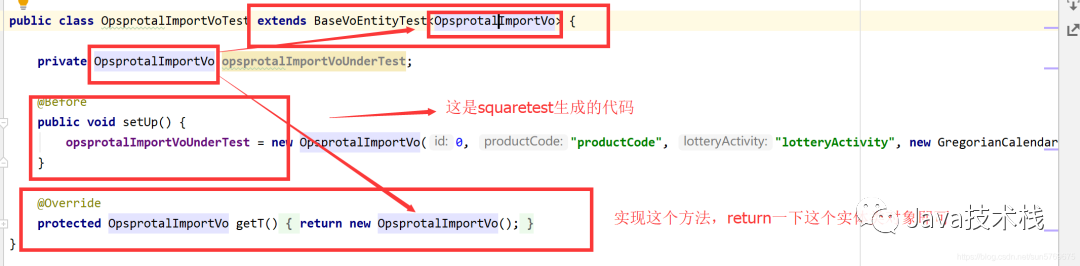
看run完之后,覆蓋率100%,妥妥的,通過(guò)這兩個(gè)解決方案,一天之內(nèi)我們就把覆蓋率搞到了60%以上,不要太刺激,大家可以用用試試哦,當(dāng)然這個(gè)也不是純?yōu)榱藨?yīng)付差事寫(xiě)的單元測(cè)試,我們后續(xù)開(kāi)發(fā)的時(shí)候,也可以用這個(gè)工具來(lái)生成,然后自測(cè)自己的代碼,這樣也是提升工作效率的嘛!

另外,更多 IDEA 好用的插件全部整理好了,微信搜索Java技術(shù)棧,在后臺(tái)發(fā)送:工具,可以在線閱讀。覺(jué)得不錯(cuò)就用起來(lái)吧!
版權(quán)聲明:本文為CSDN博主「孫琛斌(浮生)」的原創(chuàng)文章,遵循CC 4.0 BY-SA版權(quán)協(xié)議,轉(zhuǎn)載請(qǐng)附上原文出處鏈接及本聲明。原文鏈接:https://blog.csdn.net/sun5769675/article/details/111043213


關(guān)注Java技術(shù)棧看更多干貨