用Python爬取芒果TV、騰訊視頻、B站、愛奇藝、知乎、微博這幾大平臺的彈幕、評論,看這一篇就夠了!
??????關注我,和老表一起學Python、云服務器


本文爬取一共六個平臺,十個爬蟲案例,如果只對個別案例感興趣的可以根據(jù):芒果TV、騰訊視頻、B站、愛奇藝、知乎、微博這一順序進行拉取觀看。完整的實戰(zhàn)源碼已在文中,我們廢話不多說,下面開始操作!
芒果TV
本文以爬取電影《懸崖之上》為例,講解如何爬取芒果TV視頻的彈幕和評論!
網(wǎng)頁地址:
https://www.mgtv.com/b/335313/12281642.html?fpa=15800&fpos=8&lastp=ch_movie
彈幕
??分析網(wǎng)頁
彈幕數(shù)據(jù)所在的文件是動態(tài)加載的,需要進入瀏覽器的開發(fā)者工具進行抓包,得到彈幕數(shù)據(jù)所在的真實url。當視頻播放一分鐘它就會更新一個json數(shù)據(jù)包,里面包含我們需要的彈幕數(shù)據(jù)。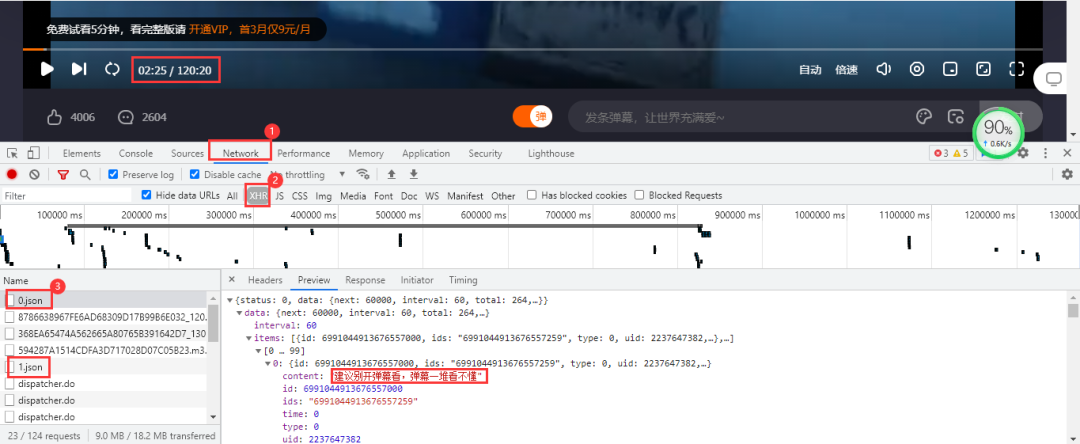 得到的真實url:
https://bullet-ali.hitv.com/bullet/2021/08/14/005323/12281642/0.json
https://bullet-ali.hitv.com/bullet/2021/08/14/005323/12281642/1.json
可以發(fā)現(xiàn),每條url的差別在于后面的數(shù)字,首條url為0,后面的逐步遞增。視頻一共120:20分鐘,向上取整,也就是121條數(shù)據(jù)包。
??實戰(zhàn)代碼
import?requests
import?pandas?as?pd

headers?=?{
????'user-agent':?'Mozilla/5.0?(Windows?NT?10.0;?Win64;?x64)?AppleWebKit/537.36?(KHTML,?like?Gecko)?Chrome/91.0.4472.124?Safari/537.36'
}
df?=?pd.DataFrame()
for?e?in?range(0,?121):
????print(f'正在爬取第{e}頁')
????resposen?=?requests.get(f'https://bullet-ali.hitv.com/bullet/2021/08/3/004902/12281642/{e}.json',?headers=headers)
????#?直接用json提取數(shù)據(jù)
????for?i?in?resposen.json()['data']['items']:
????????ids?=?i['ids']??#?用戶id
????????content?=?i['content']??#?彈幕內(nèi)容
????????time?=?i['time']??#?彈幕發(fā)生時間
????????#?有些文件中不存在點贊數(shù)
????????try:??
????????????v2_up_count?=?i['v2_up_count']
????????except:
????????????v2_up_count?=?''
????????text?=?pd.DataFrame({'ids':?[ids],?'彈幕':?[content],?'發(fā)生時間':?[time]})
????????df?=?pd.concat([df,?text])
df.to_csv('懸崖之上.csv',?encoding='utf-8',?index=False)
結(jié)果展示: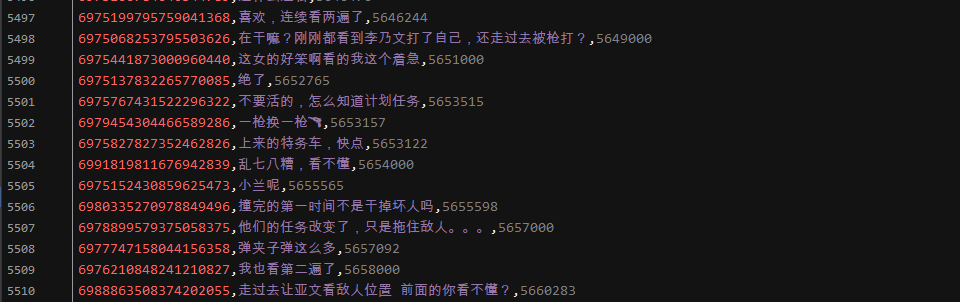
評論
??分析網(wǎng)頁
芒果TV視頻的評論需要拉取到網(wǎng)頁下面進行查看。評論數(shù)據(jù)所在的文件依然是動態(tài)加載的,進入開發(fā)者工具,按下列步驟進行抓包:Network→js,最后點擊查看更多評論。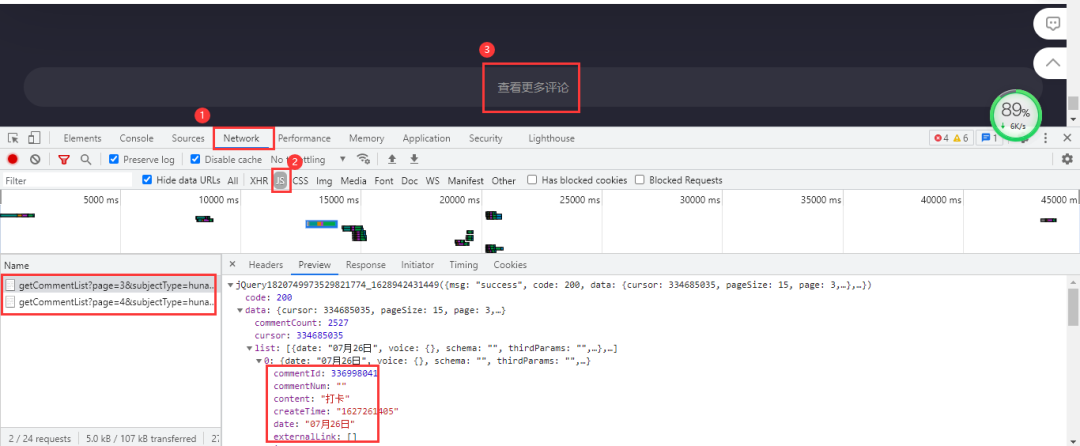 加載出來的依然是js文件,里面包含評論數(shù)據(jù)。得到的真實url:
https://comment.mgtv.com/v4/comment/getCommentList?page=1&subjectType=hunantv2014&subjectId=12281642&callback=jQuery1820749973529821774_1628942431449&_support=10000000&_=1628943290494
https://comment.mgtv.com/v4/comment/getCommentList?page=2&subjectType=hunantv2014&subjectId=12281642&callback=jQuery1820749973529821774_1628942431449&_support=10000000&_=1628943296653
其中有差別的參數(shù)有page和_,page是頁數(shù),_是時間戳;url中的時間戳刪除后不影響數(shù)據(jù)完整性,但里面的callback參數(shù)會干擾數(shù)據(jù)解析,所以進行刪除。最后得到url:
https://comment.mgtv.com/v4/comment/getCommentList?page=1&subjectType=hunantv2014&subjectId=12281642&_support=10000000
數(shù)據(jù)包中每頁包含15條評論數(shù)據(jù),評論總數(shù)是2527,得到最大頁為169。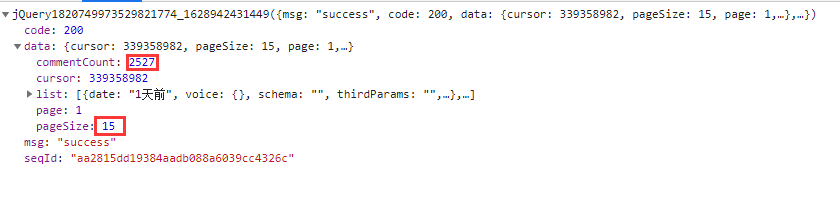
??實戰(zhàn)代碼
import?requests
import?pandas?as?pd

headers?=?{
????'user-agent':?'Mozilla/5.0?(Windows?NT?10.0;?Win64;?x64)?AppleWebKit/537.36?(KHTML,?like?Gecko)?Chrome/91.0.4472.124?Safari/537.36'
}
df?=?pd.DataFrame()
for?o?in?range(1,?170):
????url?=?f'https://comment.mgtv.com/v4/comment/getCommentList?page={o}&subjectType=hunantv2014&subjectId=12281642&_support=10000000'
????res?=?requests.get(url,?headers=headers).json()
????for?i?in?res['data']['list']:
????????nickName?=?i['user']['nickName']??#?用戶昵稱
????????praiseNum?=?i['praiseNum']??#?被點贊數(shù)
????????date?=?i['date']??#?發(fā)送日期
????????content?=?i['content']??#?評論內(nèi)容
????????text?=?pd.DataFrame({'nickName':?[nickName],?'praiseNum':?[praiseNum],?'date':?[date],?'content':?[content]})
????????df?=?pd.concat([df,?text])
df.to_csv('懸崖之上.csv',?encoding='utf-8',?index=False)
結(jié)果展示: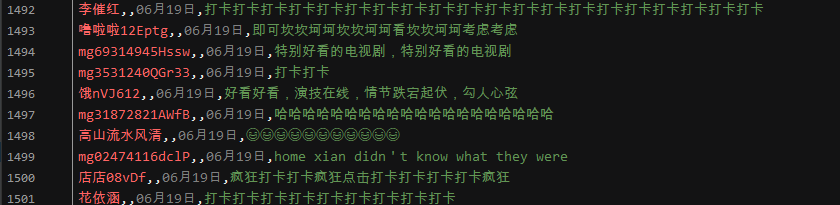
騰訊視頻
本文以爬取電影《革命者》為例,講解如何爬取騰訊視頻的彈幕和評論!
網(wǎng)頁地址:
https://v.qq.com/x/cover/mzc00200m72fcup.html
彈幕
??分析網(wǎng)頁
依然進入瀏覽器的開發(fā)者工具進行抓包,當視頻播放30秒它就會更新一個json數(shù)據(jù)包,里面包含我們需要的彈幕數(shù)據(jù)。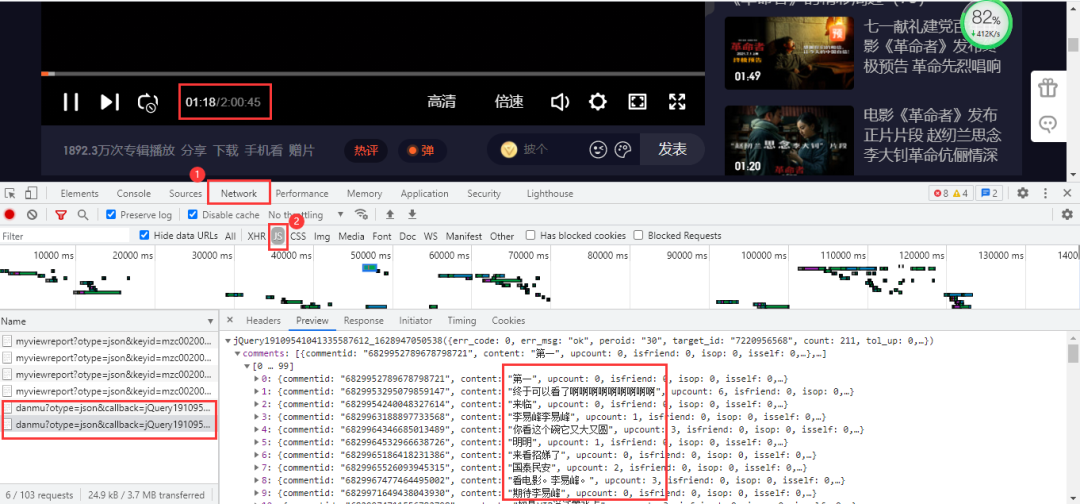 得到真實url:
https://mfm.video.qq.com/danmu?otype=json&callback=jQuery19109541041335587612_1628947050538&target_id=7220956568%26vid%3Dt0040z3o3la&session_key=0%2C32%2C1628947057×tamp=15&_=1628947050569
https://mfm.video.qq.com/danmu?otype=json&callback=jQuery19109541041335587612_1628947050538&target_id=7220956568%26vid%3Dt0040z3o3la&session_key=0%2C32%2C1628947057×tamp=45&_=1628947050572
其中有差別的參數(shù)有timestamp和_。_是時間戳。timestamp是頁數(shù),首條url為15,后面以公差為30遞增,公差是以數(shù)據(jù)包更新時長為基準,而最大頁數(shù)為視頻時長7245秒。依然刪除不必要參數(shù),得到url:
https://mfm.video.qq.com/danmu?otype=json&target_id=7220956568%26vid%3Dt0040z3o3la&session_key=0%2C18%2C1628418094×tamp=15&_=1628418086509
??實戰(zhàn)代碼
import?pandas?as?pd
import?time
import?requests

headers?=?{
????'User-Agent':?'Googlebot'
}
#?初始為15,7245?為視頻秒長,鏈接以三十秒遞增
df?=?pd.DataFrame()
for?i?in?range(15,?7245,?30):
????url?=?"https://mfm.video.qq.com/danmu?otype=json&target_id=7220956568%26vid%3Dt0040z3o3la&session_key=0%2C18%2C1628418094×tamp={}&_=1628418086509".format(i)
????html?=?requests.get(url,?headers=headers).json()
????time.sleep(1)
????for?i?in?html['comments']:
????????content?=?i['content']
????????print(content)
????????text?=?pd.DataFrame({'彈幕':?[content]})
????????df?=?pd.concat([df,?text])
df.to_csv('革命者_彈幕.csv',?encoding='utf-8',?index=False)
結(jié)果展示:
評論
??分析網(wǎng)頁
騰訊視頻評論數(shù)據(jù)在網(wǎng)頁底部,依然是動態(tài)加載的,需要按下列步驟進入開發(fā)者工具進行抓包: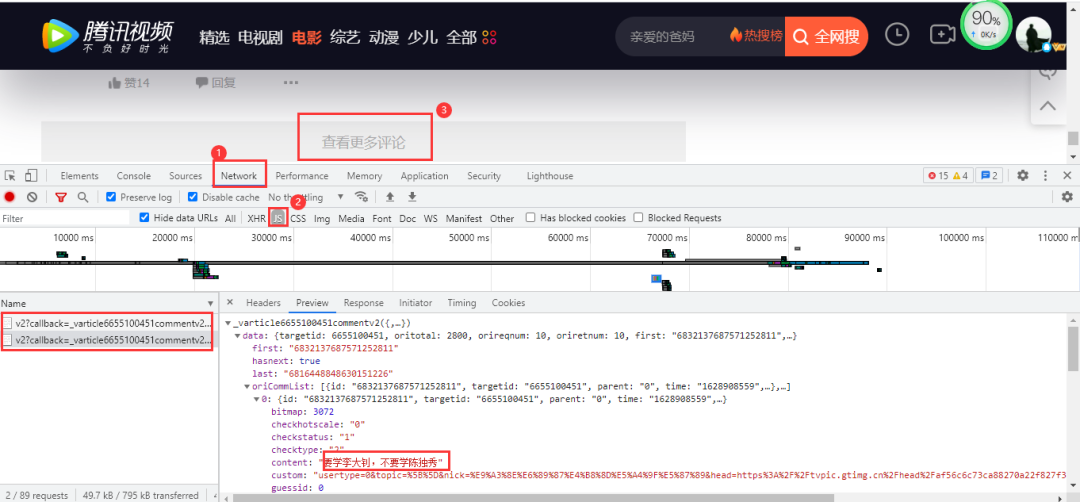 點擊查看更多評論后,得到的數(shù)據(jù)包含有我們需要的評論數(shù)據(jù),得到的真實url:
https://video.coral.qq.com/varticle/6655100451/comment/v2?callback=_varticle6655100451commentv2&orinum=10&oriorder=o&pageflag=1&cursor=0&scorecursor=0&orirepnum=2&reporder=o&reppageflag=1&source=132&_=1628948867522
https://video.coral.qq.com/varticle/6655100451/comment/v2?callback=_varticle6655100451commentv2&orinum=10&oriorder=o&pageflag=1&cursor=6786869637356389636&scorecursor=0&orirepnum=2&reporder=o&reppageflag=1&source=132&_=1628948867523
url中的參數(shù)callback以及_刪除即可。重要的是參數(shù)cursor,第一條url參數(shù)cursor是等于0的,第二條url才出現(xiàn),所以要查找cursor參數(shù)是怎么出現(xiàn)的。經(jīng)過我的觀察,cursor參數(shù)其實是上一條url的last參數(shù):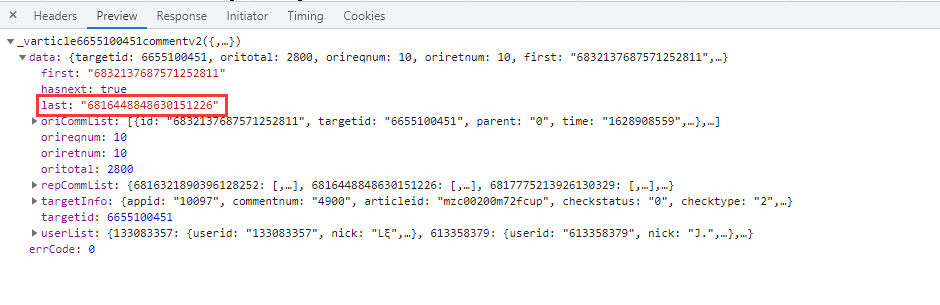
??實戰(zhàn)代碼
import?requests
import?pandas?as?pd
import?time
import?random

headers?=?{
????'User-Agent':?'Mozilla/5.0?(Windows?NT?10.0;?Win64;?x64)?AppleWebKit/537.36?(KHTML,?like?Gecko)?Chrome/91.0.4472.124?Safari/537.36'
}
df?=?pd.DataFrame()
a?=?1
#?此處必須設定循環(huán)次數(shù),否則會無限重復爬取
# 281為參照數(shù)據(jù)包中的oritotal,數(shù)據(jù)包中一共10條數(shù)據(jù),循環(huán)280次得到2800條數(shù)據(jù),但不包括底下回復的評論
#?數(shù)據(jù)包中的commentnum,是包括回復的評論數(shù)據(jù)的總數(shù),而數(shù)據(jù)包都包含10條評論數(shù)據(jù)和底下的回復的評論數(shù)據(jù),所以只需要把2800除以10取整數(shù)+1即可!
while?a?281:
????if?a?==?1:
????????url?=?'https://video.coral.qq.com/varticle/6655100451/comment/v2?orinum=10&oriorder=o&pageflag=1&cursor=0&scorecursor=0&orirepnum=2&reporder=o&reppageflag=1&source=132'
????else:
????????url?=?f'https://video.coral.qq.com/varticle/6655100451/comment/v2?orinum=10&oriorder=o&pageflag=1&cursor={cursor}&scorecursor=0&orirepnum=2&reporder=o&reppageflag=1&source=132'
????res?=?requests.get(url,?headers=headers).json()
????cursor?=?res['data']['last']
????for?i?in?res['data']['oriCommList']:
????????ids?=?i['id']
????????times?=?i['time']
????????up?=?i['up']
????????content?=?i['content'].replace('\n',?'')
????????text?=?pd.DataFrame({'ids':?[ids],?'times':?[times],?'up':?[up],?'content':?[content]})
????????df?=?pd.concat([df,?text])
????a?+=?1
????time.sleep(random.uniform(2,?3))
????df.to_csv('革命者_評論.csv',?encoding='utf-8',?index=False)
效果展示: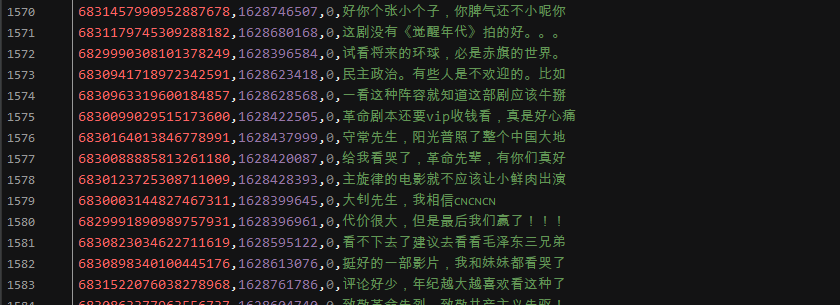
B站
本文以爬取視頻《“ 這是我見過最拽的一屆中國隊奧運冠軍”》為例,講解如何爬取B站視頻的彈幕和評論!
網(wǎng)頁地址:
https://www.bilibili.com/video/BV1wq4y1Q7dp
彈幕
??分析網(wǎng)頁
B站視頻的彈幕不像騰訊視頻那樣,播放視頻就會觸發(fā)彈幕數(shù)據(jù)包,他需要點擊網(wǎng)頁右側(cè)的彈幕列表行的展開,然后點擊查看歷史彈幕獲得視頻彈幕開始日到截至日鏈接: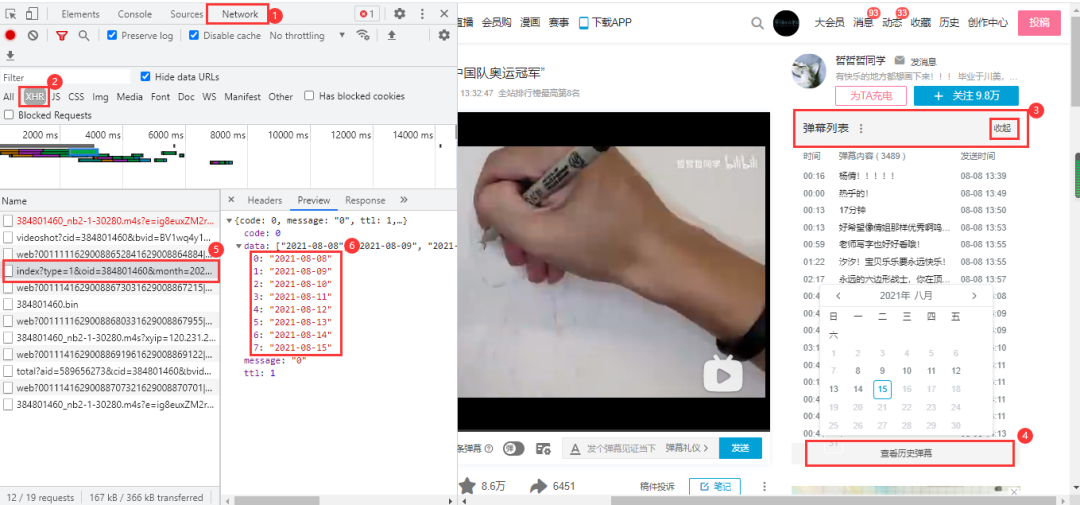 鏈接末尾以oid以及開始日期來構(gòu)成彈幕日期url:
https://api.bilibili.com/x/v2/dm/history/index?type=1&oid=384801460&month=2021-08
在上面的的基礎之上,點擊任一有效日期即可獲得這一日期的彈幕數(shù)據(jù)包,里面的內(nèi)容目前是看不懂的,之所以確定它為彈幕數(shù)據(jù)包,是因為點擊了日期他才加載出來,且鏈接與前面的鏈接具有相關性: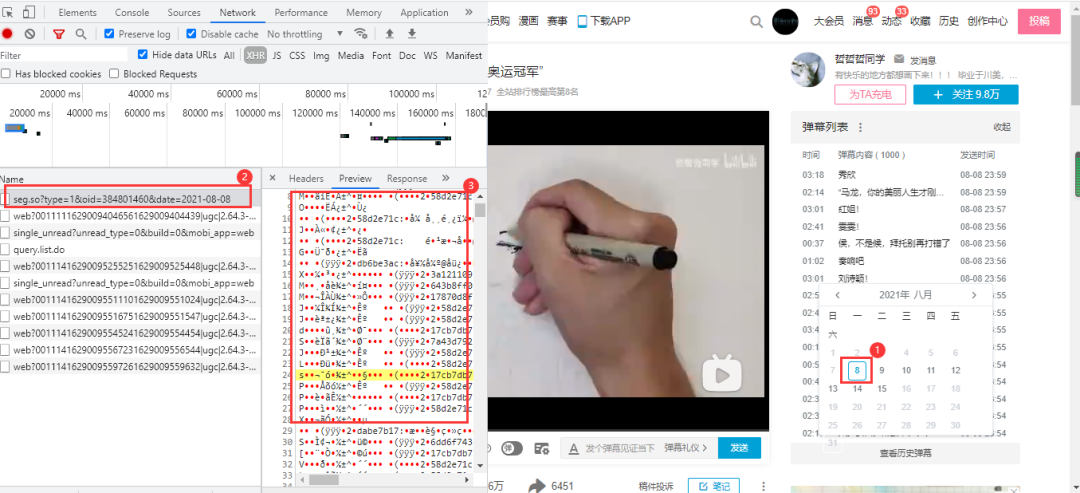 得到的url:
https://api.bilibili.com/x/v2/dm/web/history/seg.so?type=1&oid=384801460&date=2021-08-08
url中的oid為視頻彈幕鏈接的id值;data參數(shù)為剛才的的日期,而獲得該視頻全部彈幕內(nèi)容,只需要更改data參數(shù)即可。而data參數(shù)可以從上面的彈幕日期url獲得,也可以自行構(gòu)造;網(wǎng)頁數(shù)據(jù)格式為json格式
??實戰(zhàn)代碼
import?requests
import?pandas?as?pd
import?re

def?data_resposen(url):
????headers?=?{
????????"cookie":?"你的cookie",
????????"user-agent":?"Mozilla/5.0?(Windows?NT?10.0;?Win64;?x64)?AppleWebKit/537.36?(KHTML,?like?Gecko)?Chrome/88.0.4324.104?Safari/537.36"
????}
????resposen?=?requests.get(url,?headers=headers)
????return?resposen

def?main(oid,?month):
????df?=?pd.DataFrame()
????url?=?f'https://api.bilibili.com/x/v2/dm/history/index?type=1&oid={oid}&month={month}'
????list_data?=?data_resposen(url).json()['data']??#?拿到所有日期
????print(list_data)
????for?data?in?list_data:
????????urls?=?f'https://api.bilibili.com/x/v2/dm/web/history/seg.so?type=1&oid={oid}&date={data}'
????????text?=?re.findall(".*?([\u4E00-\u9FA5]+).*?",?data_resposen(urls).text)
????????for?e?in?text:
????????????print(e)
????????????data?=?pd.DataFrame({'彈幕':?[e]})
????????????df?=?pd.concat([df,?data])
????df.to_csv('彈幕.csv',?encoding='utf-8',?index=False,?mode='a+')

if?__name__?==?'__main__':
????oid?=?'384801460'??#?視頻彈幕鏈接的id值
????month?=?'2021-08'??#?開始日期
????main(oid,?month)
結(jié)果展示:
評論
??分析網(wǎng)頁
B站視頻的評論內(nèi)容在網(wǎng)頁下方,進入瀏覽器的開發(fā)者工具后,只需要向下拉取即可加載出數(shù)據(jù)包: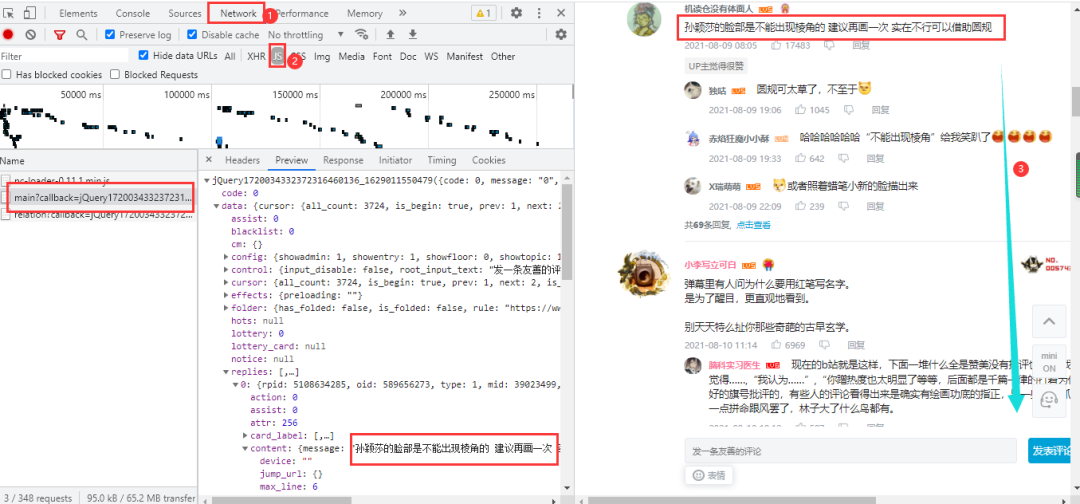 得到真實url:
https://api.bilibili.com/x/v2/reply/main?callback=jQuery1720034332372316460136_1629011550479&jsonp=jsonp&next=0&type=1&oid=589656273&mode=3&plat=1&_=1629012090500
https://api.bilibili.com/x/v2/reply/main?callback=jQuery1720034332372316460136_1629011550483&jsonp=jsonp&next=2&type=1&oid=589656273&mode=3&plat=1&_=1629012513080
https://api.bilibili.com/x/v2/reply/main?callback=jQuery1720034332372316460136_1629011550484&jsonp=jsonp&next=3&type=1&oid=589656273&mode=3&plat=1&_=1629012803039
兩條urlnext參數(shù),以及_和callback參數(shù)。_和callback一個是時間戳,一個是干擾參數(shù),刪除即可。next參數(shù)第一條為0,第二條為2,第三條為3,所以第一條next參數(shù)固定為0,第二條開始遞增;網(wǎng)頁數(shù)據(jù)格式為json格式。
??實戰(zhàn)代碼
import?requests
import?pandas?as?pd

df?=?pd.DataFrame()
headers?=?{
????'user-agent':?'Mozilla/5.0?(Windows?NT?10.0;?Win64;?x64)?AppleWebKit/537.36?(KHTML,?like?Gecko)?Chrome/86.0.4240.111?Safari/537.36'}
try:
????a?=?1
????while?True:
????????if?a?==?1:
?????????#?刪除不必要參數(shù)得到的第一條url
????????????url?=?f'https://api.bilibili.com/x/v2/reply/main?&jsonp=jsonp&next=0&type=1&oid=589656273&mode=3&plat=1'
????????else:
????????????url?=?f'https://api.bilibili.com/x/v2/reply/main?&jsonp=jsonp&next={a}&type=1&oid=589656273&mode=3&plat=1'
????????print(url)
????????html?=?requests.get(url,?headers=headers).json()
????????for?i?in?html['data']['replies']:
????????????uname?=?i['member']['uname']??#?用戶名稱
????????????sex?=?i['member']['sex']??#?用戶性別
????????????mid?=?i['mid']??#?用戶id
????????????current_level?=?i['member']['level_info']['current_level']??#?vip等級
????????????message?=?i['content']['message'].replace('\n',?'')??#?用戶評論
????????????like?=?i['like']??#?評論點贊次數(shù)
????????????ctime?=?i['ctime']??#?評論時間
????????????data?=?pd.DataFrame({'用戶名稱':?[uname],?'用戶性別':?[sex],?'用戶id':?[mid],
?????????????????????????????????'vip等級':?[current_level],?'用戶評論':?[message],?'評論點贊次數(shù)':?[like],
?????????????????????????????????'評論時間':?[ctime]})
????????????df?=?pd.concat([df,?data])
????????a?+=?1
except?Exception?as?e:
????print(e)
df.to_csv('奧運會.csv',?encoding='utf-8')
print(df.shape)
結(jié)果展示,獲取的內(nèi)容不包括二級評論,如果需要,可自行爬取,操作步驟差不多: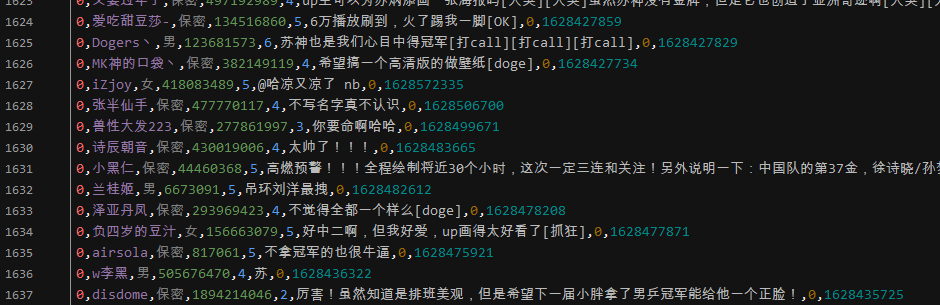
愛奇藝
本文以爬取電影《哥斯拉大戰(zhàn)金剛》為例,講解如何爬愛奇藝視頻的彈幕和評論!
網(wǎng)頁地址:
https://www.iqiyi.com/v_19rr0m845o.html
彈幕
??分析網(wǎng)頁
愛奇藝視頻的彈幕依然是要進入開發(fā)者工具進行抓包,得到一個br壓縮文件,點擊可以直接下載,里面的內(nèi)容是二進制數(shù)據(jù),視頻每播放一分鐘,就加載一條數(shù)據(jù)包: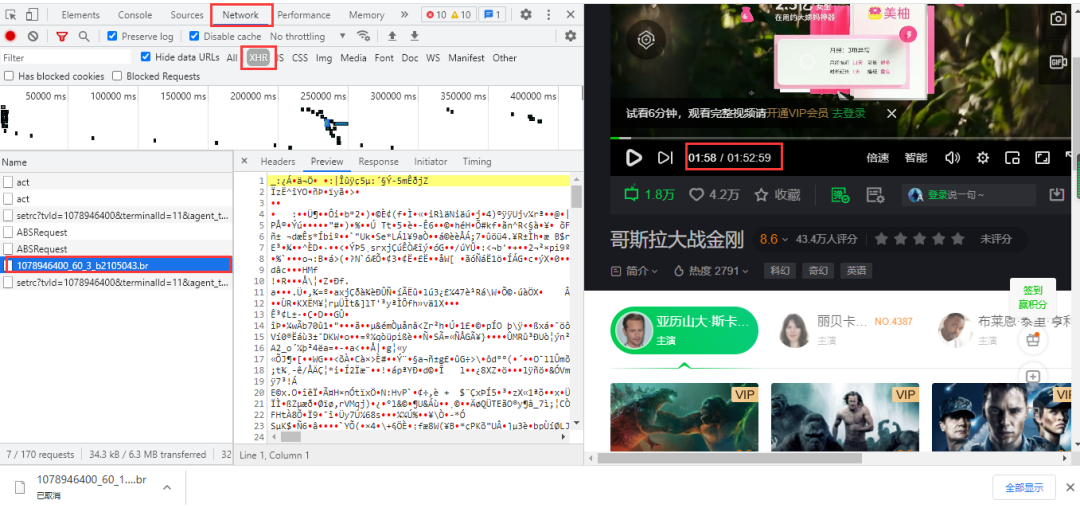 得到url,兩條url差別在于遞增的數(shù)字,60為視頻每60秒更新一次數(shù)據(jù)包:
https://cmts.iqiyi.com/bullet/64/00/1078946400_60_1_b2105043.br
https://cmts.iqiyi.com/bullet/64/00/1078946400_60_2_b2105043.br
br文件可以用brotli庫進行解壓,但實際操作起來很難,特別是編碼等問題,難以解決;在直接使用utf-8進行解碼時,會報以下錯誤:
UnicodeDecodeError:?'utf-8'?codec?can't?decode?byte?0x91?in?position?52:?invalid?start?byte
在解碼中加入ignore,中文不會亂碼,但html格式出現(xiàn)亂碼,數(shù)據(jù)提取依然很難:
decode("utf-8",?"ignore")
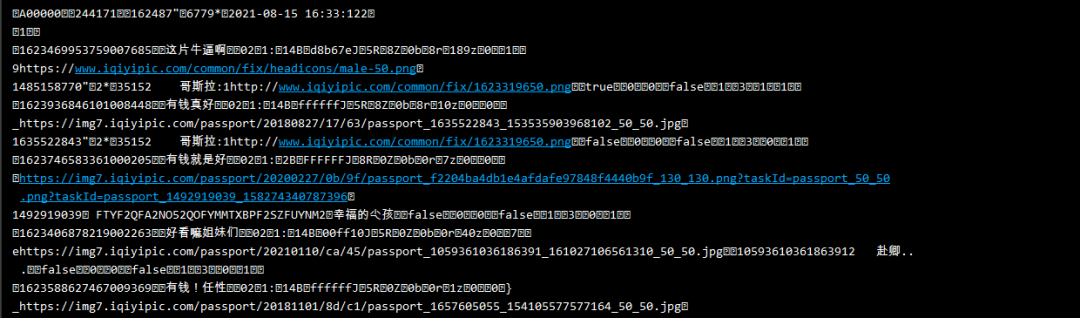 小刀被編碼弄到頭疼,如果有興趣的小伙伴可以對上面的內(nèi)容繼續(xù)研究,本文就不在進行深入。所以本文采用另一個方法,對得到url進行修改成以下鏈接而獲得.z壓縮文件:
https://cmts.iqiyi.com/bullet/64/00/1078946400_300_1.z
之所以如此更改,是因為這是愛奇藝以前的彈幕接口鏈接,他還未刪除或修改,目前還可以使用。該接口鏈接中1078946400是視頻id;300是以前愛奇藝的彈幕每5分鐘會加載出新的彈幕數(shù)據(jù)包,5分鐘就是300秒,《哥斯拉大戰(zhàn)金剛》時長112.59分鐘,除以5向上取整就是23;1是頁數(shù);64為id值的第7為和第8為數(shù)。
??實戰(zhàn)代碼
import?requests
import?pandas?as?pd
from?lxml?import?etree
from?zlib?import?decompress??#?解壓

df?=?pd.DataFrame()
for?i?in?range(1,?23):
????url?=?f'https://cmts.iqiyi.com/bullet/64/00/1078946400_300_{i}.z'
????bulletold?=?requests.get(url).content??#?得到二進制數(shù)據(jù)
????decode?=?decompress(bulletold).decode('utf-8')??#?解壓解碼
????with?open(f'{i}.html',?'a+',?encoding='utf-8')?as?f:??#?保存為靜態(tài)的html文件
????????f.write(decode)

????html?=?open(f'./{i}.html',?'rb').read()??#?讀取html文件
????html?=?etree.HTML(html)??#?用xpath語法進行解析網(wǎng)頁
????ul?=?html.xpath('/html/body/danmu/data/entry/list/bulletinfo')
????for?i?in?ul:
????????contentid?=?''.join(i.xpath('./contentid/text()'))
????????content?=?''.join(i.xpath('./content/text()'))
????????likeCount?=?''.join(i.xpath('./likecount/text()'))
????????print(contentid,?content,?likeCount)
????????text?=?pd.DataFrame({'contentid':?[contentid],?'content':?[content],?'likeCount':?[likeCount]})
????????df?=?pd.concat([df,?text])
df.to_csv('哥斯拉大戰(zhàn)金剛.csv',?encoding='utf-8',?index=False)
結(jié)果展示: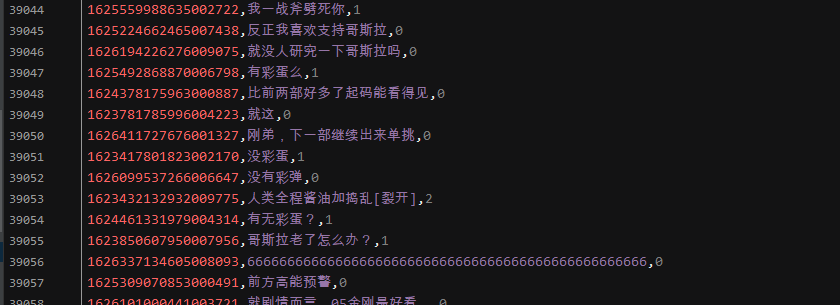
評論
??分析網(wǎng)頁
愛奇藝視頻的評論在網(wǎng)頁下方,依然是動態(tài)加載的內(nèi)容,需要進入瀏覽器的開發(fā)者工具進行抓包,當網(wǎng)頁下拉取時,會加載一條數(shù)據(jù)包,里面包含評論數(shù)據(jù):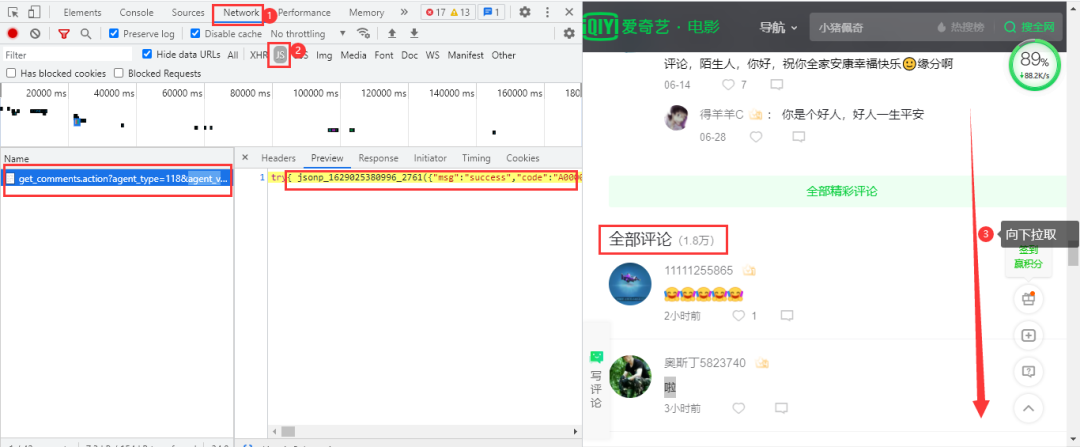 得到的真實url:
https://sns-comment.iqiyi.com/v3/comment/get_comments.action?agent_type=118&agent_version=9.11.5&authcookie=null&business_type=17&channel_id=1&content_id=1078946400&hot_size=10&last_id=&page=&page_size=10&types=hot,time&callback=jsonp_1629025964363_15405
https://sns-comment.iqiyi.com/v3/comment/get_comments.action?agent_type=118&agent_version=9.11.5&authcookie=null&business_type=17&channel_id=1&content_id=1078946400&hot_size=0&last_id=7963601726142521&page=&page_size=20&types=time&callback=jsonp_1629026041287_28685
https://sns-comment.iqiyi.com/v3/comment/get_comments.action?agent_type=118&agent_version=9.11.5&authcookie=null&business_type=17&channel_id=1&content_id=1078946400&hot_size=0&last_id=4933019153543021&page=&page_size=20&types=time&callback=jsonp_1629026394325_81937
第一條url加載的是精彩評論的內(nèi)容,第二條url開始加載的是全部評論的內(nèi)容。經(jīng)過刪減不必要參數(shù)得到以下url:
https://sns-comment.iqiyi.com/v3/comment/get_comments.action?agent_type=118&agent_version=9.11.5&business_type=17&content_id=1078946400&last_id=&page_size=10
https://sns-comment.iqiyi.com/v3/comment/get_comments.action?agent_type=118&agent_version=9.11.5&business_type=17&content_id=1078946400&last_id=7963601726142521&page_size=20
https://sns-comment.iqiyi.com/v3/comment/get_comments.action?agent_type=118&agent_version=9.11.5&business_type=17&content_id=1078946400&last_id=4933019153543021&page_size=20
區(qū)別在于參數(shù)last_id和page_size。page_size在第一條url中的值為10,從第二條url開始固定為20。last_id在首條url中值為空,從第二條開始會不斷發(fā)生變化,經(jīng)過我的研究,last_id的值就是從前一條url中的最后一條評論內(nèi)容的用戶id(應該是用戶id);網(wǎng)頁數(shù)據(jù)格式為json格式。
??實戰(zhàn)代碼
import?requests
import?pandas?as?pd
import?time
import?random


headers?=?{
????'User-Agent':?'Mozilla/5.0?(Windows?NT?10.0;?Win64;?x64)?AppleWebKit/537.36?(KHTML,?like?Gecko)?Chrome/91.0.4472.124?Safari/537.36'
}
df?=?pd.DataFrame()
try:
????a?=?0
????while?True:
????????if?a?==?0:
????????????url?=?'https://sns-comment.iqiyi.com/v3/comment/get_comments.action?agent_type=118&agent_version=9.11.5&business_type=17&content_id=1078946400&page_size=10'
????????else:
????????????#?從id_list中得到上一條頁內(nèi)容中的最后一個id值
????????????url?=?f'https://sns-comment.iqiyi.com/v3/comment/get_comments.action?agent_type=118&agent_version=9.11.5&business_type=17&content_id=1078946400&last_id={id_list[-1]}&page_size=20'
????????print(url)
????????res?=?requests.get(url,?headers=headers).json()
????????id_list?=?[]??#?建立一個列表保存id值
????????for?i?in?res['data']['comments']:
????????????ids?=?i['id']
????????????id_list.append(ids)
????????????uname?=?i['userInfo']['uname']
????????????addTime?=?i['addTime']
????????????content?=?i.get('content',?'不存在')??#?用get提取是為了防止鍵值不存在而發(fā)生報錯,第一個參數(shù)為匹配的key值,第二個為缺少時輸出
????????????text?=?pd.DataFrame({'ids':?[ids],?'uname':?[uname],?'addTime':?[addTime],?'content':?[content]})
????????????df?=?pd.concat([df,?text])
????????a?+=?1
????????time.sleep(random.uniform(2,?3))
except?Exception?as?e:
????print(e)
df.to_csv('哥斯拉大戰(zhàn)金剛_評論.csv',?mode='a+',?encoding='utf-8',?index=False)
結(jié)果展示:
知乎
本文以爬取知乎熱點話題《如何看待網(wǎng)傳騰訊實習生向騰訊高層提出建議頒布拒絕陪酒相關條令?》為例,講解如爬取知乎回答!
網(wǎng)頁地址:
https://www.zhihu.com/question/478781972
??分析網(wǎng)頁
經(jīng)過查看網(wǎng)頁源代碼等方式,確定該網(wǎng)頁回答內(nèi)容為動態(tài)加載的,需要進入瀏覽器的開發(fā)者工具進行抓包。進入Noetwork→XHR,用鼠標在網(wǎng)頁向下拉取,得到我們需要的數(shù)據(jù)包: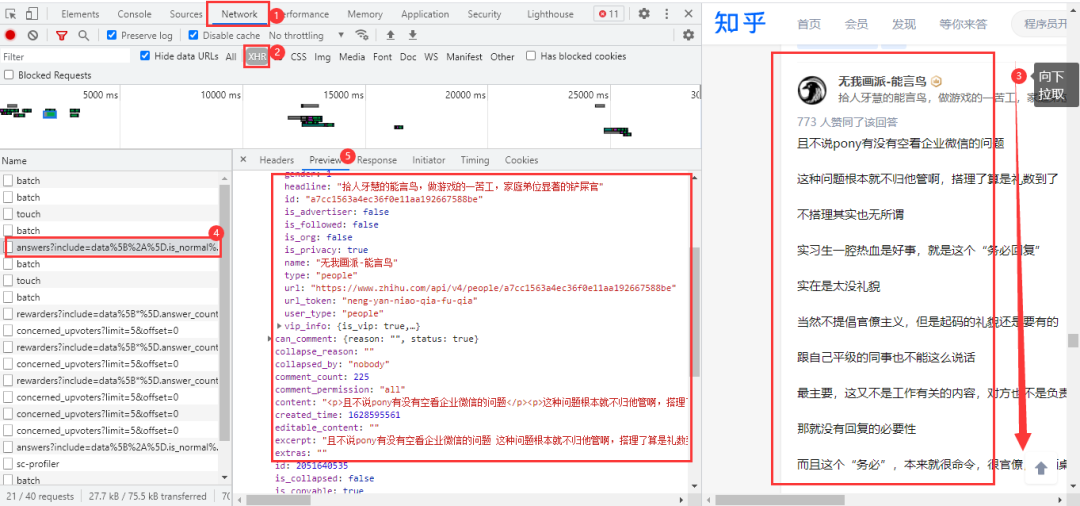 得到的真實url:
https://www.zhihu.com/api/v4/questions/478781972/answers?include=data%5B%2A%5D.is_normal%2Cadmin_closed_comment%2Creward_info%2Cis_collapsed%2Cannotation_action%2Cannotation_detail%2Ccollapse_reason%2Cis_sticky%2Ccollapsed_by%2Csuggest_edit%2Ccomment_count%2Ccan_comment%2Ccontent%2Ceditable_content%2Cattachment%2Cvoteup_count%2Creshipment_settings%2Ccomment_permission%2Ccreated_time%2Cupdated_time%2Creview_info%2Crelevant_info%2Cquestion%2Cexcerpt%2Cis_labeled%2Cpaid_info%2Cpaid_info_content%2Crelationship.is_authorized%2Cis_author%2Cvoting%2Cis_thanked%2Cis_nothelp%2Cis_recognized%3Bdata%5B%2A%5D.mark_infos%5B%2A%5D.url%3Bdata%5B%2A%5D.author.follower_count%2Cvip_info%2Cbadge%5B%2A%5D.topics%3Bdata%5B%2A%5D.settings.table_of_content.enabled&limit=5&offset=0&platform=desktop&sort_by=default
https://www.zhihu.com/api/v4/questions/478781972/answers?include=data%5B%2A%5D.is_normal%2Cadmin_closed_comment%2Creward_info%2Cis_collapsed%2Cannotation_action%2Cannotation_detail%2Ccollapse_reason%2Cis_sticky%2Ccollapsed_by%2Csuggest_edit%2Ccomment_count%2Ccan_comment%2Ccontent%2Ceditable_content%2Cattachment%2Cvoteup_count%2Creshipment_settings%2Ccomment_permission%2Ccreated_time%2Cupdated_time%2Creview_info%2Crelevant_info%2Cquestion%2Cexcerpt%2Cis_labeled%2Cpaid_info%2Cpaid_info_content%2Crelationship.is_authorized%2Cis_author%2Cvoting%2Cis_thanked%2Cis_nothelp%2Cis_recognized%3Bdata%5B%2A%5D.mark_infos%5B%2A%5D.url%3Bdata%5B%2A%5D.author.follower_count%2Cvip_info%2Cbadge%5B%2A%5D.topics%3Bdata%5B%2A%5D.settings.table_of_content.enabled&limit=5&offset=5&platform=desktop&sort_by=default
url有很多不必要的參數(shù),大家可以在瀏覽器中自行刪減。兩條url的區(qū)別在于后面的offset參數(shù),首條url的offset參數(shù)為0,第二條為5,offset是以公差為5遞增;網(wǎng)頁數(shù)據(jù)格式為json格式。
??實戰(zhàn)代碼
import?requests
import?pandas?as?pd
import?re
import?time
import?random

df?=?pd.DataFrame()
headers?=?{
????'user-agent':?'Mozilla/5.0?(Windows?NT?10.0;?Win64;?x64)?AppleWebKit/537.36?(KHTML,?like?Gecko)?Chrome/81.0.4044.138?Safari/537.36'
}
for?page?in?range(0,?1360,?5):
????url?=?f'https://www.zhihu.com/api/v4/questions/478781972/answers?include=data%5B%2A%5D.is_normal%2Cadmin_closed_comment%2Creward_info%2Cis_collapsed%2Cannotation_action%2Cannotation_detail%2Ccollapse_reason%2Cis_sticky%2Ccollapsed_by%2Csuggest_edit%2Ccomment_count%2Ccan_comment%2Ccontent%2Ceditable_content%2Cattachment%2Cvoteup_count%2Creshipment_settings%2Ccomment_permission%2Ccreated_time%2Cupdated_time%2Creview_info%2Crelevant_info%2Cquestion%2Cexcerpt%2Cis_labeled%2Cpaid_info%2Cpaid_info_content%2Crelationship.is_authorized%2Cis_author%2Cvoting%2Cis_thanked%2Cis_nothelp%2Cis_recognized%3Bdata%5B%2A%5D.mark_infos%5B%2A%5D.url%3Bdata%5B%2A%5D.author.follower_count%2Cvip_info%2Cbadge%5B%2A%5D.topics%3Bdata%5B%2A%5D.settings.table_of_content.enabled&limit=5&offset={page}&platform=desktop&sort_by=default'
????response?=?requests.get(url=url,?headers=headers).json()
????data?=?response['data']
????for?list_?in?data:
????????name?=?list_['author']['name']??#?知乎作者
????????id_?=?list_['author']['id']??#?作者id
????????created_time?=?time.strftime("%Y-%m-%d?%H:%M:%S",?time.localtime(list_['created_time']?))?#?回答時間
????????voteup_count?=?list_['voteup_count']??#?贊同數(shù)
????????comment_count?=?list_['comment_count']??#?底下評論數(shù)
????????content?=?list_['content']??#?回答內(nèi)容
????????content?=?''.join(re.findall("[\u3002\uff1b\uff0c\uff1a\u201c\u201d\uff08\uff09\u3001\uff1f\u300a\u300b\u4e00-\u9fa5]",?content))??#?正則表達式提取
????????print(name,?id_,?created_time,?comment_count,?content,?sep='|')
????????dataFrame?=?pd.DataFrame(
????????????{'知乎作者':?[name],?'作者id':?[id_],?'回答時間':?[created_time],?'贊同數(shù)':?[voteup_count],?'底下評論數(shù)':?[comment_count],
?????????????'回答內(nèi)容':?[content]})
????????df?=?pd.concat([df,?dataFrame])
????time.sleep(random.uniform(2,?3))
df.to_csv('知乎回答.csv',?encoding='utf-8',?index=False)
print(df.shape)
結(jié)果展示: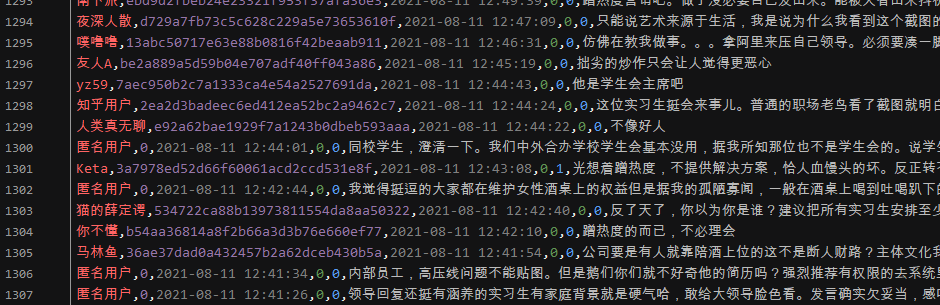
微博
本文以爬取微博熱搜《霍尊手寫道歉信》為例,講解如何爬取微博評論!
網(wǎng)頁地址:
https://m.weibo.cn/detail/4669040301182509
??分析網(wǎng)頁
微博評論是動態(tài)加載的,進入瀏覽器的開發(fā)者工具后,在網(wǎng)頁上向下拉取會得到我們需要的數(shù)據(jù)包: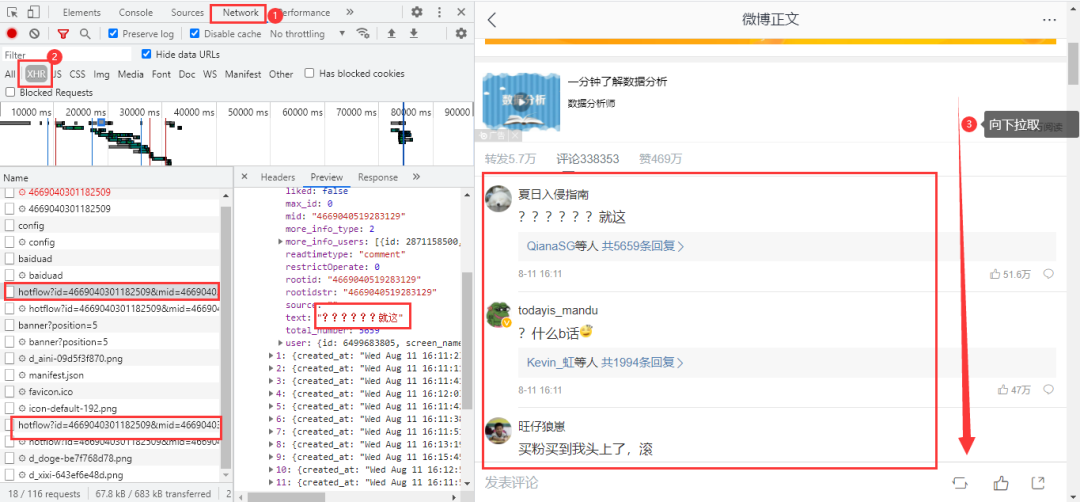 得到真實url:
https://m.weibo.cn/comments/hotflow?id=4669040301182509&mid=4669040301182509&max_id_type=0
https://m.weibo.cn/comments/hotflow?id=4669040301182509&mid=4669040301182509&max_id=3698934781006193&max_id_type=0
兩條url區(qū)別很明顯,首條url是沒有參數(shù)max_id的,第二條開始max_id才出現(xiàn),而max_id其實是前一條數(shù)據(jù)包中的max_id: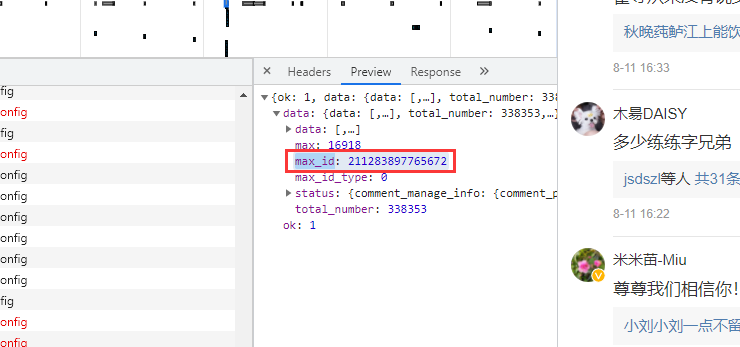 但有個需要注意的是參數(shù)
max_id_type,它其實也是會變化的,所以我們需要從數(shù)據(jù)包中獲取max_id_type: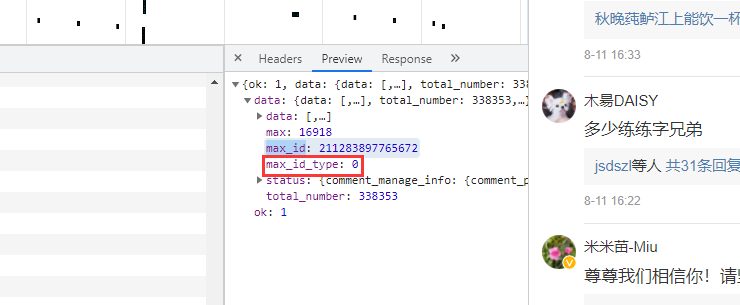
??實戰(zhàn)代碼
import?re
import?requests
import?pandas?as?pd
import?time
import?random

df?=?pd.DataFrame()
try:
????a?=?1
????while?True:
????????header?=?{
????????????'User-Agent':?'Mozilla/5.0?(Windows?NT?6.1;?WOW64)?AppleWebKit/537.36?(KHTML,?like?Gecko)?Chrome/38.0.2125.122?UBrowser/4.0.3214.0?Safari/537.36'
????????}
????????resposen?=?requests.get('https://m.weibo.cn/detail/4669040301182509',?headers=header)
????????#?微博爬取大概幾十頁會封賬號的,而通過不斷的更新cookies,會讓爬蟲更持久點...
????????cookie?=?[cookie.value?for?cookie?in?resposen.cookies]??#?用列表推導式生成cookies部件
????????headers?=?{
?????????#?登錄后的cookie,?SUB用登錄后的
????????????'cookie':?f'WEIBOCN_FROM={cookie[3]};?SUB=;?_T_WM={cookie[4]};?MLOGIN={cookie[1]};?M_WEIBOCN_PARAMS={cookie[2]};?XSRF-TOKEN={cookie[0]}',
????????????'referer':?'https://m.weibo.cn/detail/4669040301182509',
????????????'User-Agent':?'Mozilla/5.0?(Windows?NT?6.1;?WOW64)?AppleWebKit/537.36?(KHTML,?like?Gecko)?Chrome/38.0.2125.122?UBrowser/4.0.3214.0?Safari/537.36'
????????}
????????if?a?==?1:
????????????url?=?'https://m.weibo.cn/comments/hotflow?id=4669040301182509&mid=4669040301182509&max_id_type=0'
????????else:
????????????url?=?f'https://m.weibo.cn/comments/hotflow?id=4669040301182509&mid=4669040301182509&max_id={max_id}&max_id_type={max_id_type}'

????????html?=?requests.get(url=url,?headers=headers).json()
????????data?=?html['data']
????????max_id?=?data['max_id']??#?獲取max_id和max_id_type返回給下一條url
????????max_id_type?=?data['max_id_type']
????????for?i?in?data['data']:
????????????screen_name?=?i['user']['screen_name']
????????????i_d?=?i['user']['id']
????????????like_count?=?i['like_count']??#?點贊數(shù)
????????????created_at?=?i['created_at']??#?時間
????????????text?=?re.sub(r'<[^>]*>',?'',?i['text'])??#?評論
????????????print(text)
????????????data_json?=?pd.DataFrame({'screen_name':?[screen_name],?'i_d':?[i_d],?'like_count':?[like_count],?'created_at':?[created_at],'text':?[text]})
????????????df?=?pd.concat([df,?data_json])
????????time.sleep(random.uniform(2,?7))
????????a?+=?1
except?Exception?as?e:
????print(e)

df.to_csv('微博.csv',?encoding='utf-8',?mode='a+',?index=False)
print(df.shape)
結(jié)果展示: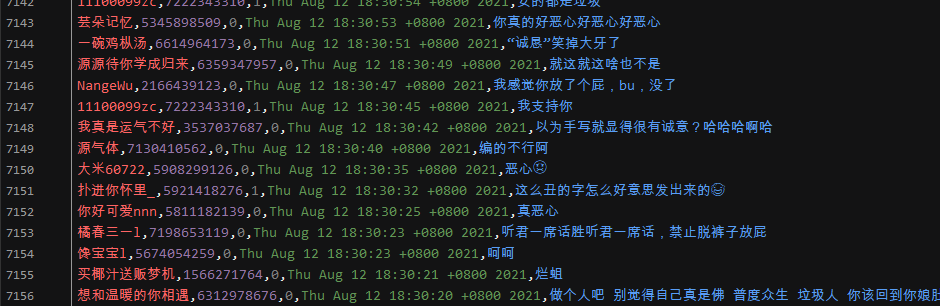
近期優(yōu)質(zhì)文章:
學習更多: 整理了我開始分享學習筆記到現(xiàn)在超過250篇優(yōu)質(zhì)文章,涵蓋數(shù)據(jù)分析、爬蟲、機器學習等方面,別再說不知道該從哪開始,實戰(zhàn)哪里找了 “點贊”就是對博主最大的支持?