
以『贅婿』為實(shí)戰(zhàn)案例,手把手教會你用python爬取『愛奇藝』視頻彈幕
↑ 關(guān)注 + 星標(biāo) ,每天學(xué)Python新技能
↑ 關(guān)注 + 星標(biāo) ,每天學(xué)Python新技能
后臺回復(fù)【大禮包】送你Python自學(xué)大禮包
后臺回復(fù)【大禮包】送你Python自學(xué)大禮包
1
前言
最近愛奇藝獨(dú)播熱劇『贅婿』特別火,號主我也在一直追,借助手中的技術(shù),想爬取彈幕分析該劇的具體情況以及網(wǎng)友的評論!
由于為了讓小白徹底學(xué)會使用python爬取愛奇藝彈幕的技術(shù),因此本文詳細(xì)介紹如何進(jìn)行爬取,下文再進(jìn)行分析數(shù)據(jù)!
2
分析數(shù)據(jù)包
1.查找數(shù)據(jù)包
在瀏覽器里面按F12
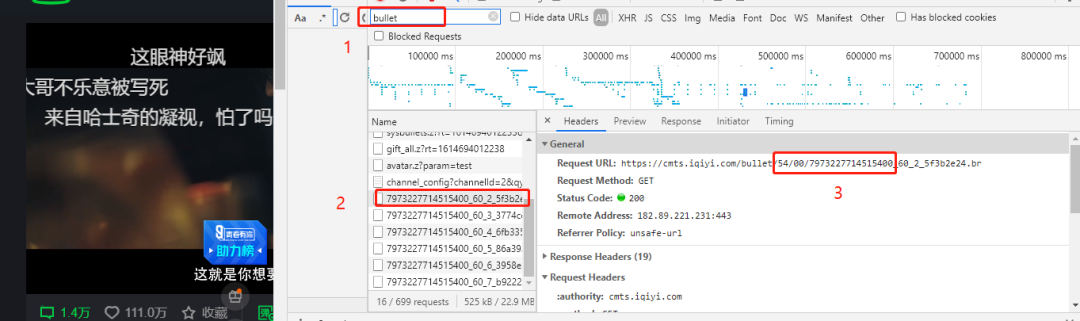
找到這類url
https://cmts.iqiyi.com/bullet/54/00/7973227714515400_60_2_5f3b2e24.br2.分析彈幕鏈接
其中的/54/00/7973227714515400,才是有用的!!!!
愛奇藝的彈幕獲取地址如下:
https://cmts.iqiyi.com/bullet/參數(shù)1_300_參數(shù)2.z
參數(shù)1是:/54/00/7973227714515400
參數(shù)2是:數(shù)字1、2、3.....
愛奇藝每5分鐘會加載新的彈幕,每一集約是46分鐘,46除以5向上取整就是10
因此彈幕的鏈接如下:
https://cmts.iqiyi.com/bullet/54/00/7973227714515400_300_1.zhttps://cmts.iqiyi.com/bullet/54/00/7973227714515400_300_2.zhttps://cmts.iqiyi.com/bullet/54/00/7973227714515400_300_3.z......https://cmts.iqiyi.com/bullet/54/00/7973227714515400_300_10.z
3.解碼二進(jìn)制數(shù)據(jù)包
通過彈幕鏈接下載的彈幕包是以z為后綴格式的文件,需要進(jìn)行解碼!
def zipdecode(bulletold):'對zip壓縮的二進(jìn)制內(nèi)容解碼成文本'decode = zlib.decompress(bytearray(bulletold), 15 + 32).decode('utf-8')return decode
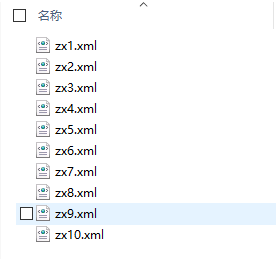
解碼之后將數(shù)據(jù)保存成xml格式
# 把編碼好的文件分別寫入個(gè)xml文件中(類似于txt文件),方便后邊取數(shù)據(jù)with open('./lyc/zx' + str(x) + '.xml', 'a+', encoding='utf-8') as f:f.write(xml)
3
解析xml
1.提取數(shù)據(jù)
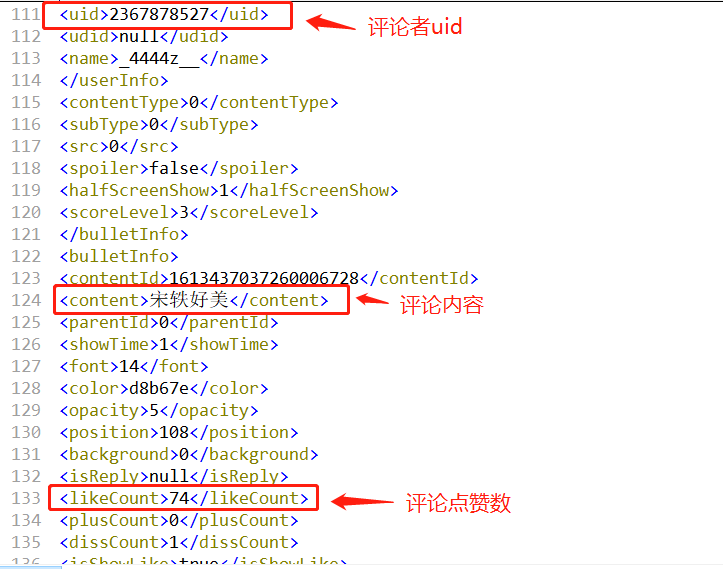
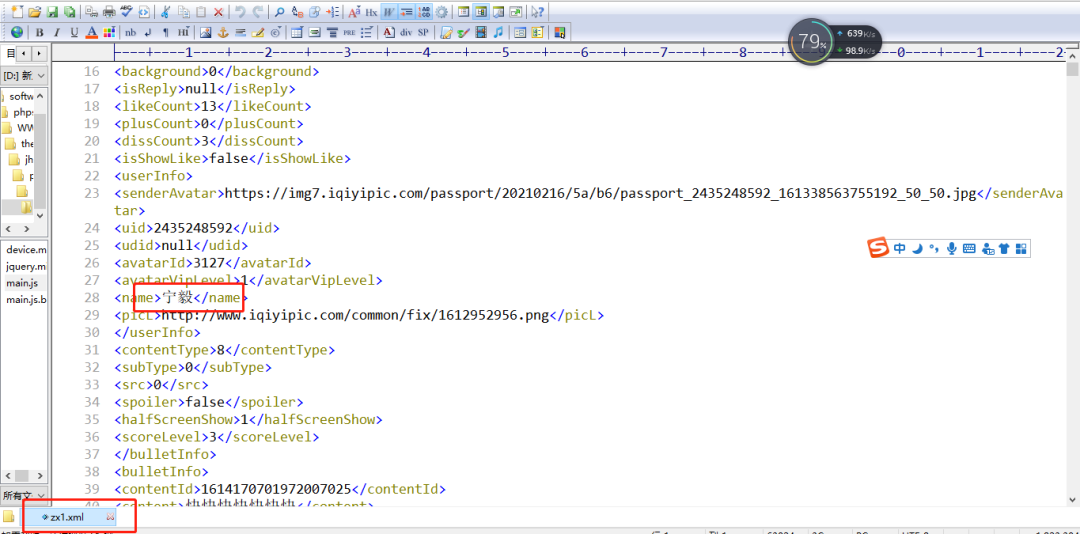
通過查看xml文件,我們需要提取的內(nèi)容有1.用戶id(uid)、2.評論內(nèi)容(content)、3.評論點(diǎn)贊數(shù)(likeCount)。
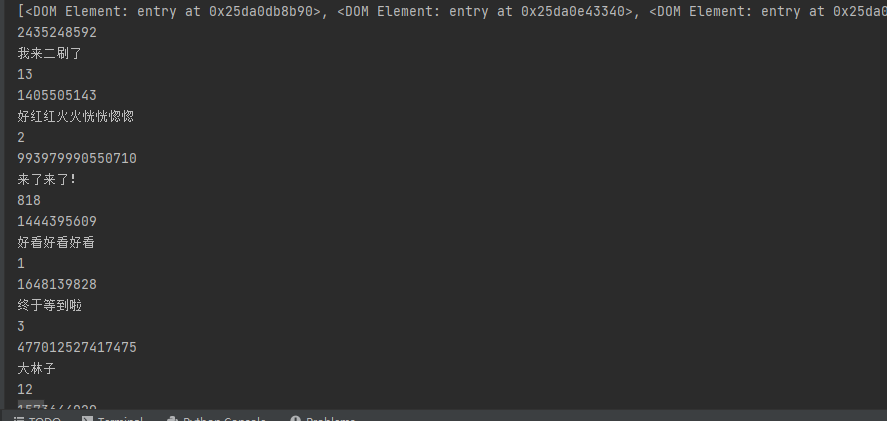
#讀取xml文件中的彈幕數(shù)據(jù)數(shù)據(jù)from xml.dom.minidom import parseimport xml.dom.minidomdef xml_parse(file_name):DOMTree = xml.dom.minidom.parse(file_name)collection = DOMTree.documentElement# 在集合中獲取所有entry數(shù)據(jù)entrys = collection.getElementsByTagName("entry")print(entrys)result = []for entry in entrys:uid = entry.getElementsByTagName('uid')[0]content = entry.getElementsByTagName('content')[0]likeCount = entry.getElementsByTagName('likeCount')[0]print(uid.childNodes[0].data)print(content.childNodes[0].data)print(likeCount.childNodes[0].data)
4
保存數(shù)據(jù)
1.保存前工作
import xlwt# 創(chuàng)建一個(gè)workbook 設(shè)置編碼workbook = xlwt.Workbook(encoding = 'utf-8')# 創(chuàng)建一個(gè)worksheetworksheet = workbook.add_sheet('sheet1')# 寫入excel# 參數(shù)對應(yīng) 行, 列, 值worksheet.write(0,0, label='uid')worksheet.write(0,1, label='content')worksheet.write(0,2, label='likeCount')
導(dǎo)入xlwt庫(寫入csv),并定義好標(biāo)題(uid、content、likeCount)
2.寫入數(shù)據(jù)
for entry in entrys:uid = entry.getElementsByTagName('uid')[0]content = entry.getElementsByTagName('content')[0]likeCount = entry.getElementsByTagName('likeCount')[0]print(uid.childNodes[0].data)print(content.childNodes[0].data)print(likeCount.childNodes[0].data)# 寫入excel# 參數(shù)對應(yīng) 行, 列, 值worksheet.write(count, 0, label=str(uid.childNodes[0].data))worksheet.write(count, 1, label=str(content.childNodes[0].data))worksheet.write(count, 2, label=str(likeCount.childNodes[0].data))count=count+1
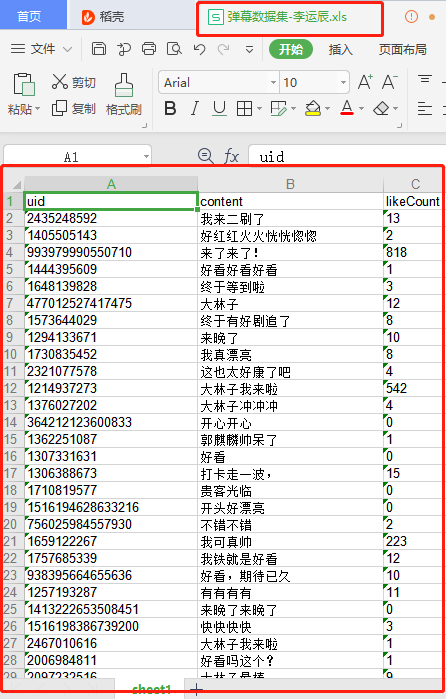
最后保存成彈幕數(shù)據(jù)集-李運(yùn)辰.xls
for x in range(1,11):l = xml_parse("./lyc/zx" + str(x) + ".xml")workbook.save('彈幕數(shù)據(jù)集-李運(yùn)辰.xls')
5
總結(jié)


1.通過實(shí)戰(zhàn)案例『贅婿』,手把手實(shí)現(xiàn)python爬取愛奇藝彈幕。
2.python解析xml格式數(shù)據(jù)。
3.將數(shù)據(jù)寫入excel。
如果想學(xué)習(xí)本文代碼
點(diǎn)擊上方公眾號名片,回復(fù)「愛奇藝彈幕」獲取完整代碼。

送大家一份Python學(xué)習(xí)大禮包,從Python基礎(chǔ),爬蟲,數(shù)據(jù)分析Web開發(fā)等全套資料,吃透資料,
這些資料都是視頻,新人學(xué)起來非常友好。掃碼加微信后備注「Python新手」方便我給你發(fā)送資料
推薦閱讀
掃碼回復(fù)「大禮包」后獲取大禮