
【Python】用Python制作可視化GUI界面,一鍵實現(xiàn)自動分類管理文件!
可視化GUI界面,通過輸入路徑一鍵點擊實現(xiàn)文件分門別類的歸檔。不同的文件后綴歸類為不同的類別
我們先羅列一下大致有幾類文件,根據(jù)文件的后綴來設定,大致如下
SUBDIR?=?{
????"DOCUMENTS":?[".pdf",?".docx",?".txt",?".html"],
????"AUDIO":?[".m4a",?".m4b",?".mp3",?".mp4"],
????"IMAGES":?[".jpg",?".jpeg",?".png",?".gif"],
????"DataFile":?[".csv",?".xlsx"]
}
def?pickDir(value):
????for?category,?ekstensi?in?SUBDIR.items():
????????for?suffix?in?ekstensi:
????????????if?suffix?==?value:
????????????????return?category
.pdf返回的則是DOCUMENTS這個類。我們還需要再自定義一個函數(shù),遍歷當前目錄下的所有文件,獲取眾多文件的后綴,將這些不同后綴的文件分別移入不同類別的文件夾,代碼如下def?organizeDir(path_val):
????for?item?in?os.scandir(path_val):
????????if?item.is_dir():
????????????continue
????????filePath?=?Path(item)
????????file_suffix?=?filePath.suffix.lower()
????????directory?=?pickDir(file_suffix)
????????directoryPath?=?Path(directory)
????????#?新建文件夾,要是該文件夾不存在的話
????????if?directoryPath.is_dir()?!=?True:
????????????directoryPath.mkdir()
????????filePath.rename(directoryPath.joinpath(filePath))
output

我們再次基礎之上,再封裝一下做成Python的可視化GUI界面,代碼如下
class?FileOrgnizer(QWidget):
????def?__init__(self):
????????super().__init__()
????????self.lb?=?QLabel(self)
????????self.lb.setGeometry(70,?25,?80,?40)
????????self.lb.setText('文件夾整理助手:')
????????self.textbox?=?QLineEdit(self)
????????self.textbox.setGeometry(170,?30,?130,?30)
????????self.findButton?=?QPushButton('整理',?self)
????????self.findButton.setGeometry(60,?85,?100,?40)
????????self.quitButton?=?QPushButton('退出',?self)
????????self.quitButton.clicked.connect(self.closeEvent)
????????self.findButton.clicked.connect(self.organizeDir)
????????self.quitButton.setGeometry(190,?85,?100,?40)
????????self.setGeometry(500,?500,?350,?150)
????????self.setWindowTitle('Icon')
????????self.setWindowIcon(QIcon('../751.png'))
????????self.show()

????def?pickDir(self,?value):
????????for?category,?ekstensi?in?SUBDIR.items():
????????????for?suffix?in?ekstensi:
????????????????if?suffix?==?value:
????????????????????return?category

????def?organizeDir(self,?event):

????????path_val?=?self.textbox.text()
????????print("路徑為:?"?+?path_val)
????????for?item?in?os.scandir(path_val):
????????????if?item.is_dir():
????????????????continue

????????????filePath?=?Path(item)
????????????fileType?=?filePath.suffix.lower()
????????????directory?=?self.pickDir(fileType)
????????????if?directory?==?None:
????????????????continue

????????????directoryPath?=?Path(directory)
????????????if?directoryPath.is_dir()?!=?True:
????????????????directoryPath.mkdir()
????????????filePath.rename(directoryPath.joinpath(filePath))
????????reply?=?QMessageBox.information(self,?"完成",?"任務完成,請問是否要退出?",?QMessageBox.Yes?|?QMessageBox.No,?QMessageBox.No)
????????if?reply?==?QMessageBox.Yes:
????????????event.accept()
????????else:
????????????event.ignore()

????def?closeEvent(self,?event):
????????reply?=?QMessageBox.question(self,?'退出',
?????????????????????????????????????"確定退出?",?QMessageBox.Yes?|
?????????????????????????????????????QMessageBox.No,?QMessageBox.No)
????????if?reply?==?QMessageBox.Yes:
????????????event.accept()
????????else:
????????????event.ignore()
效果如下圖所示
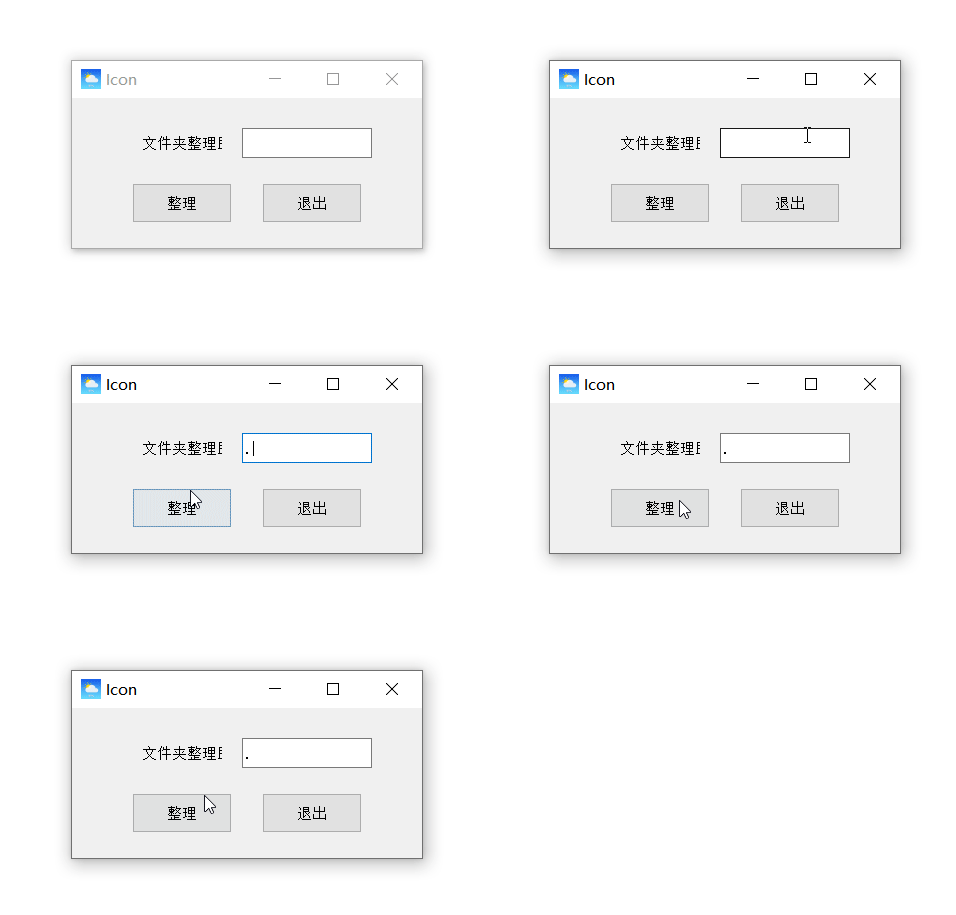
pyinstaller模塊來將Python代碼打包成可執(zhí)行文件,操作指令如下pyinstaller?-F?-w?文件名.py
部分參數(shù)含義如下:
-F:表示生成單個可執(zhí)行文件-w:表示去掉控制臺窗口,這在GUI界面時時非常有用的-i:表示可執(zhí)行文件的圖標
往期精彩回顧
適合初學者入門人工智能的路線及資料下載 (圖文+視頻)機器學習入門系列下載 中國大學慕課《機器學習》(黃海廣主講) 機器學習及深度學習筆記等資料打印 《統(tǒng)計學習方法》的代碼復現(xiàn)專輯 機器學習交流qq群955171419,加入微信群請掃碼: