
不敢相信,居然用Java寫了個(gè)“天天酷跑”!

作者 |?MyHuey
首先,寫一個(gè)需求文檔:
一、項(xiàng)目名稱:《天天酷跑》(RunDay)
二、功能介紹:?闖關(guān)類游戲,玩家登錄后,選擇進(jìn)入游戲,通過鍵盤控制玩家的上下左右移動,來躲避 障礙物和吃金幣,玩家躲避的障礙物越多跑酷距離越遠(yuǎn),玩家吃的金幣越多,得分越高。
三、功能模塊:?
1、登錄界面?
用戶名(輸入框,明文) 密碼(輸入框,密文) 登錄、取消按鈕?
2、菜單選擇界面?
開始游戲按鈕(圖片按鈕) 幫助按鈕 退出按鈕?
3、緩沖加載界面?
自動加載進(jìn)度條,加載完畢之后,跳轉(zhuǎn)到下一界面?
4、游戲主界面?
移動的背景圖片、動態(tài)的玩家、五種障礙物持續(xù)出現(xiàn)、玩家和障礙物的碰撞、 暫停、繼續(xù)功能、玩家的移動功能?
5、結(jié)束界面?
獲取玩家的得分、跑酷距離。繼續(xù)游戲、返回主菜單的功能。
四、開發(fā)者:Huey
五、版本號:1.0
六、開發(fā)時(shí)間:2020.11.16
開發(fā)模式:MVC模式
M:Model(數(shù)據(jù)層),存儲的是實(shí)體類。
V:View(顯示層),存儲的是關(guān)于界面的類。
C:Controller(控制層),存儲的是相關(guān)的邏輯層代碼。
企業(yè)級項(xiàng)目命名規(guī)范:
cn.sqc.runday.view
(一):登錄界面
界面功能需求圖如下:
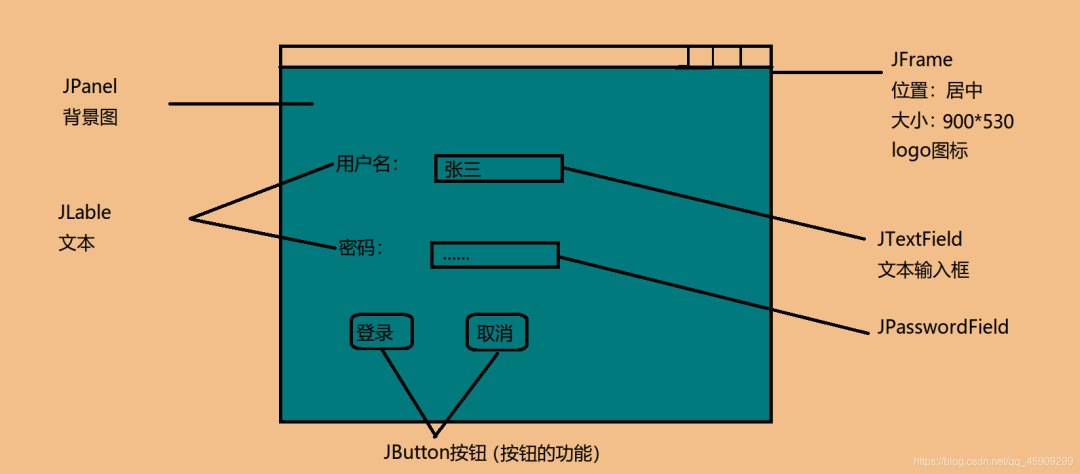 接下來我們再做一些準(zhǔn)備工作:導(dǎo)入相關(guān)圖片素材。
將天天酷跑的圖片(Image)資源解壓到桌面后,(Image文件如下圖所示:)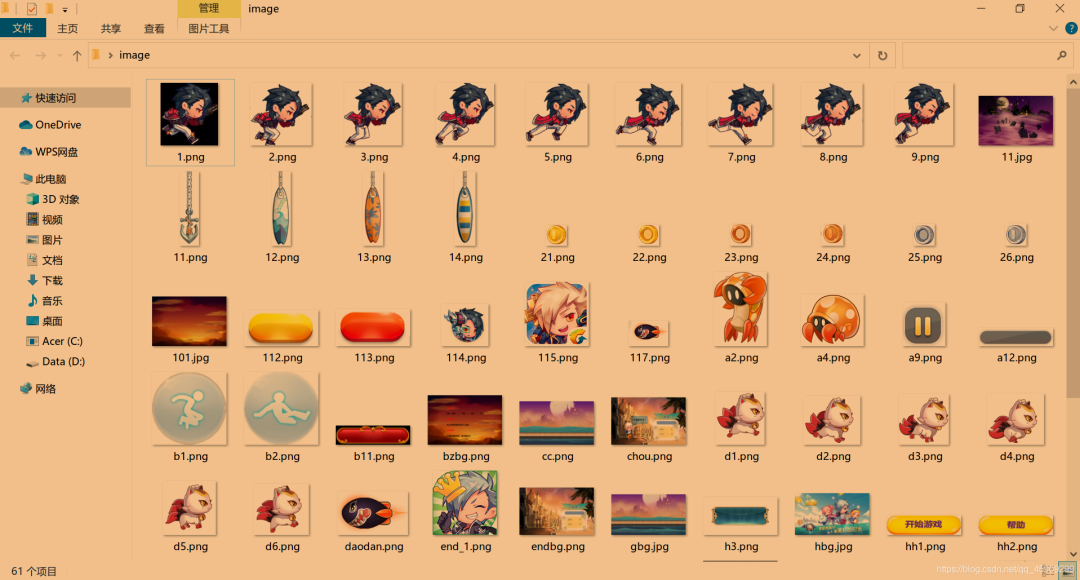 復(fù)制到Eclipse中,單擊src,直接Ctrl+V。
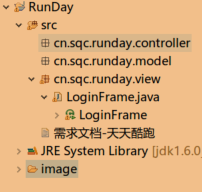 本文將實(shí)現(xiàn)cn.sqc.runday.view這一界面內(nèi)容。
相關(guān)代碼如下:
package?cn.sqc.runday.view;

import?java.awt.Font;
import?java.awt.Graphics;
import?java.awt.Image;
import?java.awt.event.ActionEvent;
import?java.awt.event.ActionListener;
import?java.io.File;
import?java.io.IOException;

import?javax.imageio.ImageIO;
import?javax.swing.BorderFactory;
import?javax.swing.ImageIcon;
import?javax.swing.JButton;
import?javax.swing.JFrame;
import?javax.swing.JLabel;
import?javax.swing.JOptionPane;
import?javax.swing.JPanel;
import?javax.swing.JPasswordField;
import?javax.swing.JTextField;

/**
?*?
?*?@author?Huey
?*?@date?2020-11-16
?*?登錄界面:用戶名輸入框??密碼輸入框??登錄取消按鈕?功能
?*
?*/
public?class?LoginFrame?extends?JFrame{
?//用戶名變量(文本)
?JLabel?userLabel;
?//用戶名輸入框(文本輸入框)
?JTextField?userField;
?//密碼變量(文本)
?JLabel?userLabel2;
?//密碼輸入框(文本輸入框)
?JPasswordField?userField2;
?//登錄按鈕、取消按鈕(按鈕)
?JButton?Login,Cancel;

?public?LoginFrame()?{//直接?alt?/?(無參構(gòu)造)?
??userLabel?=?new?JLabel("用戶名");?
??//設(shè)置字體
??userLabel.setFont(new?Font("微軟雅黑",Font.BOLD,18));????
??userLabel2?=?new?JLabel("密??碼");
??userLabel2.setFont(new?Font("微軟雅黑",Font.BOLD,18));
???
??//布局方式:絕對布局
??userLabel.setBounds(20,?220,?100,?30);//x位置,y位置,所占顯示空間的大小
??this.add(userLabel);//將用戶名這三個(gè)字添加到登錄界面上,以下同理
??userLabel2.setBounds(20,?280,?100,?30);
??this.add(userLabel2);

??//用戶名輸入框
??userField?=?new?JTextField();
??userField.setBounds(80,?220,?100,?30);
??//設(shè)置輸入框凹陷效果
??userField.setBorder(BorderFactory.createLoweredBevelBorder());
??//設(shè)置輸入框背景透明
??userField.setOpaque(false);
??this.add(userField);
??
??userField2?=?new?JPasswordField();
??userField2.setBounds(80,?280,?100,?30);
??userField2.setBorder(BorderFactory.createLoweredBevelBorder());
??userField2.setOpaque(false);
??this.add(userField2);
??
??
??
//登錄按鈕
??Login?=?new?JButton("登錄");
??Login.setBounds(45,350,60,36);
??//Login.setBackground(new?Color(44,22,44));//背景色
??//Login.setForeground(Color.BLUE);//前景色??
??//綁定登錄按鈕的事件監(jiān)聽
??Login.addActionListener(new?ActionListener()?{//ActionListener?alt?/
???
???@Override
???public?void?actionPerformed(ActionEvent?e)?{
????//System.out.println("點(diǎn)擊登錄按鈕");
????//獲取用戶名輸入框的內(nèi)容
????String?userName?=?userField.getText();
????String?passWord?=?userField2.getText();//橫杠原因:方法太老了,不推薦用
????if("Huey".equals(userName)?&&?"123".equals(passWord)){
?????//登錄成功
?????JOptionPane.showMessageDialog(null,?"歡迎"+userName+"來到天天酷跑游戲");
?????//跳轉(zhuǎn)到下一界面
?????
?????//關(guān)閉當(dāng)前界面
?????dispose();
????}else?if("".equals(userName)?||?"".equals(passWord)){
?????//不能為空
?????JOptionPane.showMessageDialog(null,?"用戶名?/?密碼不能為空,請重新輸入!");
????}else{
?????JOptionPane.showMessageDialog(null,?"用戶名?/?密碼輸入錯誤,請重新輸入!");
????}
????
???}
??});
??this.add(Login);
??
//取消按鈕
??Cancel?=?new?JButton("取消");
??Cancel.setBounds(135,350,60,36);
??this.add(Cancel);
??Cancel.addActionListener(new?ActionListener()?{
???
???@Override
???public?void?actionPerformed(ActionEvent?e)?{
????//?TODO?Auto-generated?method?stub
????dispose();
???}
??});
??

??
??//創(chuàng)建背景面板,并添加到窗體上去
??LoginPanel?panel?=?new?LoginPanel();
??this.add(panel);?
??
??//設(shè)置登錄界面的基本屬性
??this.setSize(900,530);
??this.setLocationRelativeTo(null);//位置居中
??this.setDefaultCloseOperation(JFrame.EXIT_ON_CLOSE);
??this.setUndecorated(true);
??
??//設(shè)置窗體的Logo圖標(biāo)
??this.setIconImage(new?ImageIcon("Image/115.png").getImage());//存儲圖片
??this.setVisible(true);
?}
?
?
?
?//測試用的main方法???????main?+?Alt?/
?public?static?void?main(String[]?args)?{
??new?LoginFrame();
?}
?class?LoginPanel?extends?JPanel{//畫板
??//背景圖片變量
??Image?background;//------ctr?shift?+?o?導(dǎo)包
??public?LoginPanel()?{//-----alt?/?回車?構(gòu)造方法??在{后雙擊,顯示作用域
???//讀取圖片文件,賦值給background變量
???try?{//-----雖然不大可能,但也做好吃飯噎死的準(zhǔn)備
????background?=?ImageIO.read(new?File("Image/login.jpg"));//----read參數(shù)為File類型
???}?catch?(IOException?e)?{//-------捕獲異常信息
????//?打印異常日志信息
????e.printStackTrace();
???}
??}
??//繪制方法
??@Override
??public?void?paint(Graphics?g)?{
???super.paint(g);
???//繪制背景圖片
???g.drawImage(background,?0,?0,900,530,?null);//900,530為寬高
??}
?}
?
}
//throws ......拋異常,將下面的異常向上拋,交給上級:不建議???
為了更清楚地看出代碼結(jié)構(gòu),這里給出部分代碼的作用域。
LoginFrame作用域一直到最后一個(gè)}
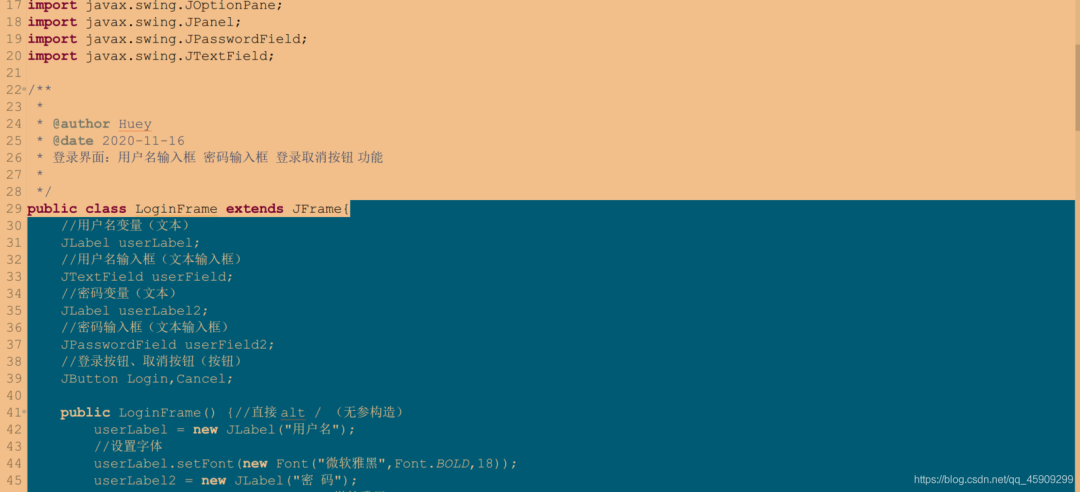
LoginPanel的代碼塊: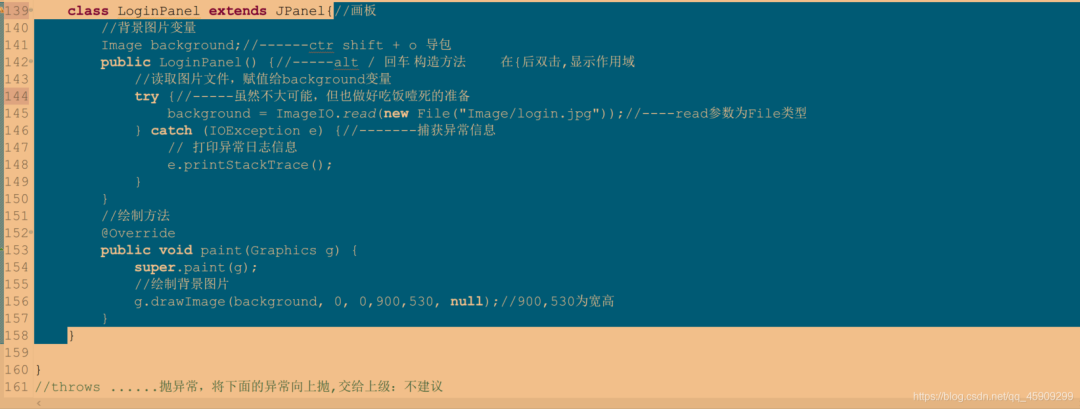
運(yùn)行結(jié)果截圖:
1.界面
2.登錄
2.1、用戶名及密碼輸入為空的情況:
 2.2、用戶名或密碼輸入錯誤的情況:

2.3、用戶名及密碼輸入正確的情況:
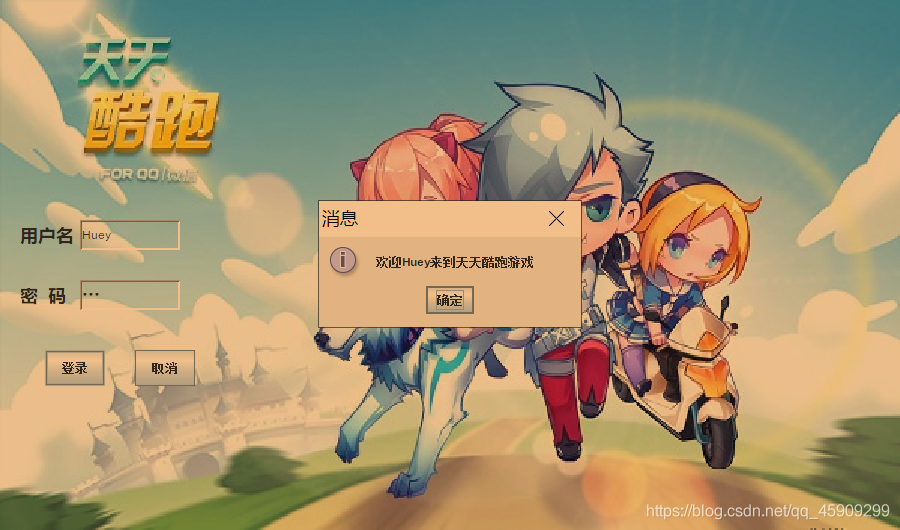 單擊彈窗中的“確定”,直接退出。
3.退出
點(diǎn)“取消”即可
(二):開始游戲界面
前文,我們完成了登錄界面的搭建。本文將完成開始游戲界面的搭建,并建立起登錄界面與開始游戲界面的橋梁。?實(shí)現(xiàn)在輸對用戶名和密碼后即可進(jìn)入開始游戲界面的功能。
界面功能需求圖:
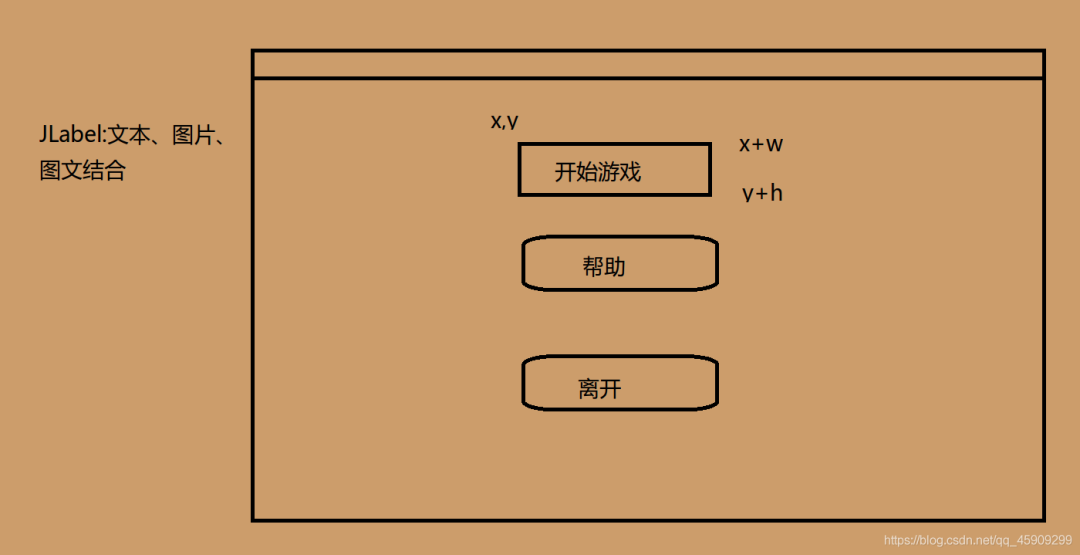
具體要求:
當(dāng)鼠標(biāo)移入開始游戲按鈕后,按鈕將由暗變亮,鼠標(biāo)移開后,按鈕又由亮變暗。
幫助、離開按鈕同理。
另外,當(dāng)點(diǎn)擊離開時(shí),需要實(shí)現(xiàn)關(guān)閉當(dāng)前界面的效果。
上代碼:
package?cn.sqc.runday.view;

import?java.awt.Graphics;
import?java.awt.Image;
import?java.awt.event.MouseEvent;
import?java.awt.event.MouseListener;
import?java.io.File;
import?java.io.IOException;

import?javax.imageio.ImageIO;
import?javax.swing.ImageIcon;
import?javax.swing.JFrame;
import?javax.swing.JLabel;
import?javax.swing.JOptionPane;
import?javax.swing.JPanel;

import?cn.sqc.runday.controller.WindowFrame;

public?class?MainFrame?extends?JFrame?implements?MouseListener?{
?//設(shè)置窗體的基本屬性?大小
?/**
??*??1.1、設(shè)置窗體基本屬性大小?居中?邊框隱藏?默認(rèn)關(guān)閉按鈕?logo圖標(biāo)
??1.2、創(chuàng)建背景面板MainPanel,實(shí)現(xiàn)背景圖片功能
??
??2.圖片按鈕功能
??*/
?//2.1創(chuàng)建開始按鈕?幫助按鈕?離開按鈕?組件
?JLabel?start,help,exit;
?
?JPanel?MainPanel;
?
?public?MainFrame()?{//無參構(gòu)造,創(chuàng)建對象。并在main函數(shù)中調(diào)用
??//2.2
??start?=?new?JLabel(new?ImageIcon("Image/hh1.png"));//ImageIcon:圖標(biāo)
??start.setBounds(350,320,150,40);
??start.setEnabled(false);//false按鈕為灰色??
??start.addMouseListener(this);
??this.add(start);
??
??help?=?new?JLabel(new?ImageIcon("Image/hh2.png"));
??help.setBounds(350,420,150,40);
??help.setEnabled(false);
??help.addMouseListener(this);
??this.add(help);
??
??exit?=?new?JLabel(new?ImageIcon("Image/hh3.png"));
??exit.setBounds(350,?520,?150,?40);
??exit.setEnabled(false);
??exit.addMouseListener(this);
??this.add(exit);
???
??
??/**1.實(shí)現(xiàn)背景圖片及窗體屬性*/
??MainPanel?panel?=?new?MainPanel();
??this.add(panel);
??
??//設(shè)置窗體基本屬性大小?居中?邊框隱藏?默認(rèn)關(guān)閉按鈕?logo圖標(biāo)
??this.setSize(1200,730);//大小
??this.setLocationRelativeTo(null);//居中
??this.setUndecorated(true);//邊框隱藏
??this.setDefaultCloseOperation(JFrame.EXIT_ON_CLOSE);//默認(rèn)關(guān)閉
??this.setIconImage(new?ImageIcon("Image/115.png").getImage());//logo
??this.setVisible(true);???
?}
?
?public?static?void?main(String[]?args)?{
??new?MainFrame();
?}
?
?//2、創(chuàng)建背景面板MainPanel,實(shí)現(xiàn)背景圖片功能
?class?MainPanel?extends?JPanel{//創(chuàng)建的MainPanel類,在MainFrame中調(diào)用
?Image?background;??
?public?MainPanel()?{
??try?{
???background?=?ImageIO.read(new?File("Image/main.png"));
??}?catch?(IOException?e)?{
???e.printStackTrace();
??}
?}
?@Override
?public?void?paint(Graphics?g)?{
??super.paint(g);
??g.drawImage(background,?0,?0,1200,730,?null);
??}
?}
?
?

//以下五個(gè)方法均為添加?implements?MouseListener?后,快捷出來的
?@Override
?public?void?mouseClicked(MouseEvent?e)?{
??//鼠標(biāo)點(diǎn)擊
??if(e.getSource().equals(start)){
???//跳轉(zhuǎn)到下一界面
???new?WindowFrame().Start();
???//關(guān)閉當(dāng)前界面
????//dispose();
??}else?if(e.getSource().equals(exit)){
???dispose();
??}else?if(e.getSource().equals(help)){
???JOptionPane.showMessageDialog(null,?"有疑問請聯(lián)系開發(fā)者:Huey");
??}
??
?}


?@Override
?public?void?mousePressed(MouseEvent?e)?{
??//?TODO?Auto-generated?method?stub
??
?}


?@Override
?public?void?mouseReleased(MouseEvent?e)?{
??//?TODO?Auto-generated?method?stub
??
?}


?@Override
?public?void?mouseEntered(MouseEvent?e)?{
??//?鼠標(biāo)移入
??if(e.getSource().equals(start)){//e指一個(gè)事件。e.getSource()獲取事件
???//如果鼠標(biāo)移入到(start)組件(圖片按鈕)
???start.setEnabled(true);
??}else?if(e.getSource().equals(help)){
???help.setEnabled(true);
??}else?if(e.getSource().equals(exit)){
???exit.setEnabled(true);
??}
?}


?@Override
?public?void?mouseExited(MouseEvent?e)?{
??//鼠標(biāo)移出
???if(e.getSource().equals(start)){
????start.setEnabled(false);
??}else?if(e.getSource().equals(help)){
???help.setEnabled(false);
??}else?if(e.getSource().equals(exit)){
???exit.setEnabled(false);
??}
?}
}
測試:
先填補(bǔ)上文的缺憾,加上new MainFrame();語句。調(diào)用我們剛剛寫好的開始游戲界面。
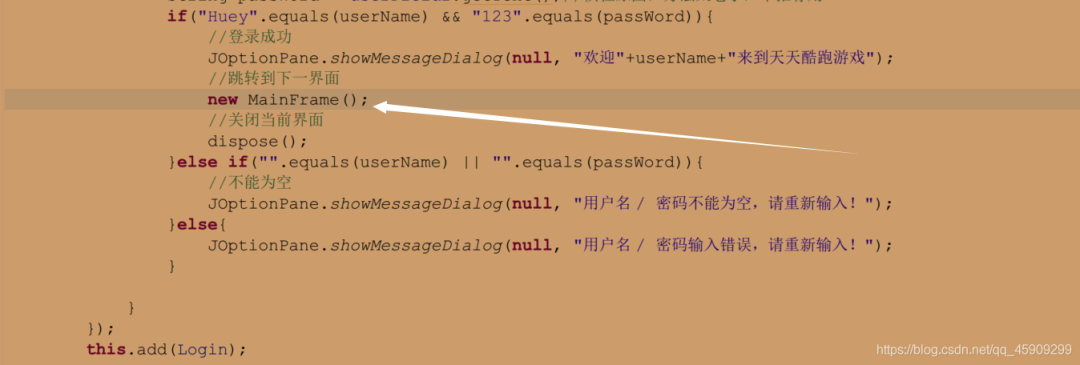 登錄界面:
登錄界面: 單擊確定
單擊確定

完美進(jìn)入我們寫好的登錄游戲界面: 現(xiàn)在看開始游戲按鈕:
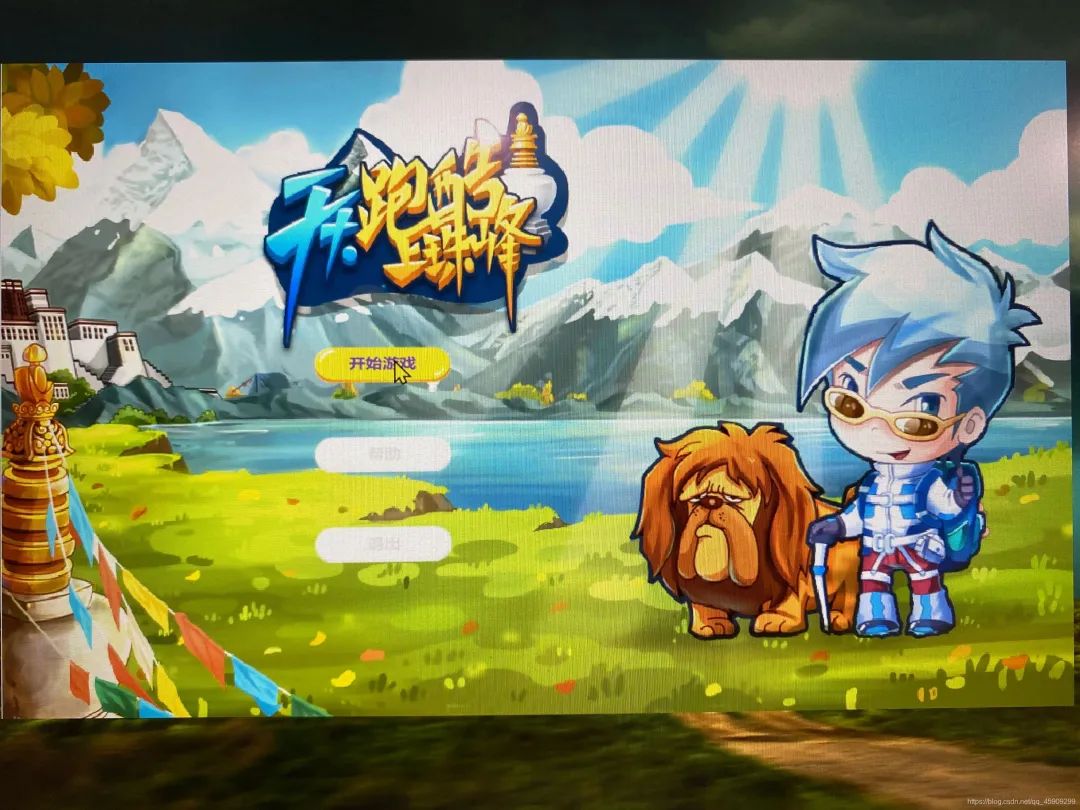 幫助按鈕:
幫助按鈕: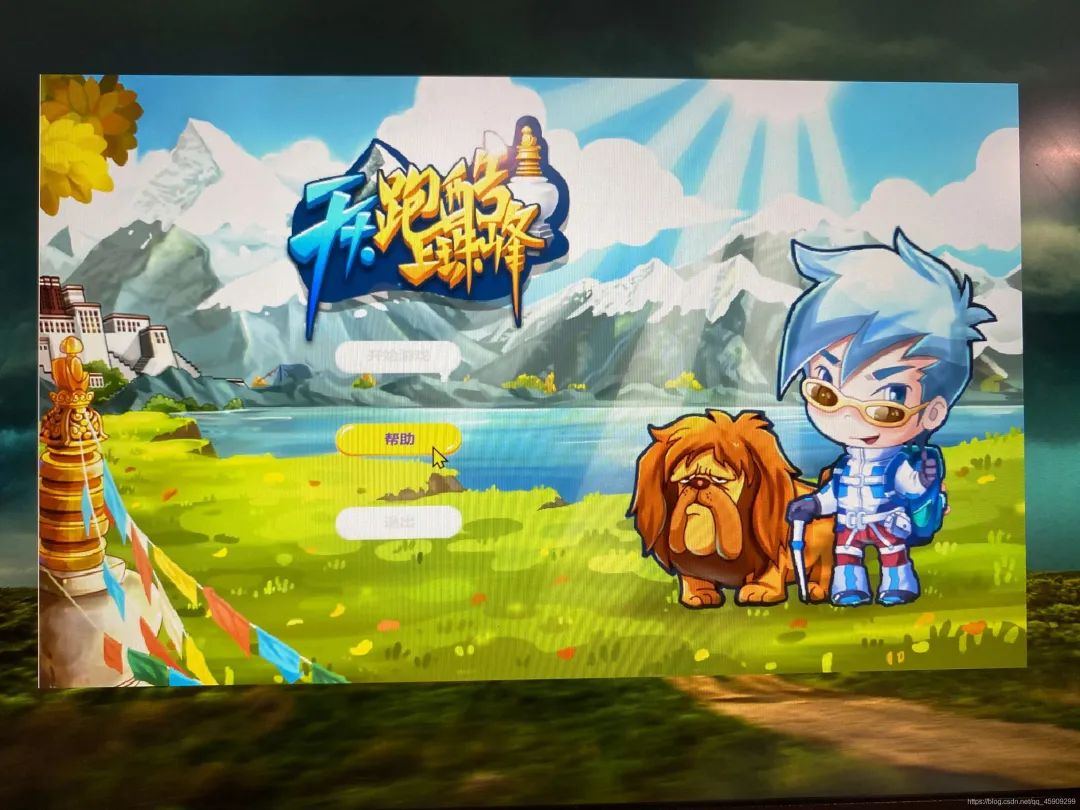 點(diǎn)擊幫助按鈕:

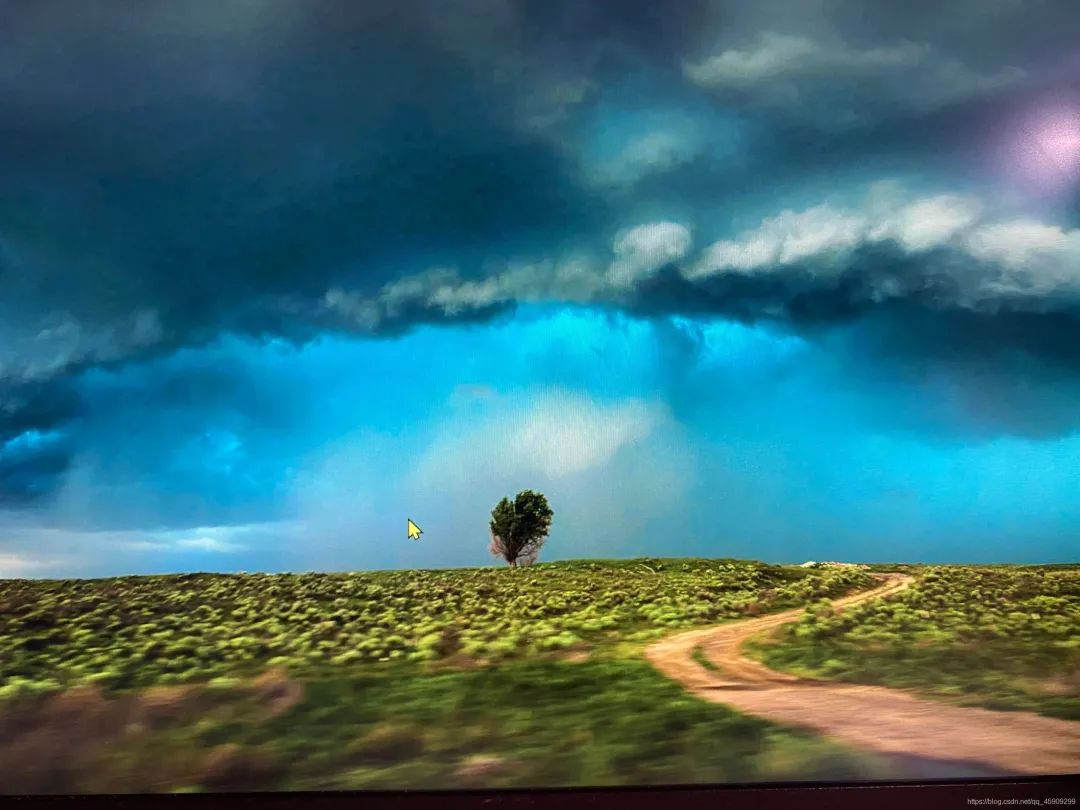
退出按鈕: 點(diǎn)擊:
 大功告成!
大功告成!
(三):緩沖加載游戲界面
前文,我們完成了開始游戲界面的搭建。本文將實(shí)現(xiàn)緩沖加載界面的搭建。并搭建與前面?zhèn)z界面間的橋梁。?實(shí)現(xiàn)輸入正確用戶名密碼后,進(jìn)入開始游戲界面,點(diǎn)擊開始游戲按鈕后,進(jìn)入緩沖加載界面的功能。
界面示意圖:

具體要求:
緩存加載界面:背景圖片、進(jìn)度條 動態(tài)加載過程。(線程)
我們想要實(shí)現(xiàn)動態(tài)的緩沖加載過程,讓進(jìn)度條動起來,就需要引入線程的概念了。
線程:
Thread類中這樣定義:
線程是程序中執(zhí)行的線程,Java虛擬機(jī)允許程序同時(shí)運(yùn)行多個(gè)執(zhí)行線程。
舉個(gè)例子,你用百度網(wǎng)盤下載一部電影,這就是一個(gè)線程。而如果你同時(shí)下載多部電影,這就是多線程了。
1.線程有6種狀態(tài):新建,運(yùn)行,阻塞,等待,計(jì)時(shí)等待和終止。
新建:當(dāng)使用new操作符創(chuàng)建新線程時(shí),線程處于“新建”狀態(tài)。?運(yùn)行(可運(yùn)行):調(diào)用start()方法。
阻塞:當(dāng)線程需要獲得對象的內(nèi)置鎖,而該鎖正在被其他線程擁有。?等待:當(dāng)線程等待其他線程通知調(diào)度表可以運(yùn)行時(shí)。?計(jì)時(shí)等待:對于一些含有時(shí)間參數(shù)的方法,如Thread類的sleep() 。?終止:當(dāng)run()方法運(yùn)行完畢或出現(xiàn)異常時(shí)。
2.創(chuàng)建線程的兩種方式:
1、實(shí)現(xiàn)Runnable 2、實(shí)現(xiàn)Thread類
直接上代碼:
package?cn.sqc.runday.controller;

import?java.awt.BorderLayout;
import?java.awt.Color;

import?javax.swing.ImageIcon;
import?javax.swing.JFrame;
import?javax.swing.JLabel;
import?javax.swing.JProgressBar;

/**
?*?
?*?@author?Huey
?*?@date?2020-11-18
?*?緩存加載界面:背景圖片、進(jìn)度條
?*?動態(tài)加載過程。(線程)
?*?
?*/
public?class?WindowFrame?extends?JFrame?implements?Runnable{
?JLabel?background;
?//進(jìn)度條
?JProgressBar?jdt;
?
?//創(chuàng)建一個(gè)線程并啟動
?public?void?Start(){
??WindowFrame?frame?=?new?WindowFrame();
??Thread?t?=?new?Thread(frame);//t代表線程
??//啟動線程
??t.start();
??dispose();
?}
?
?
?public?WindowFrame()?{
??background?=?new?JLabel(new?ImageIcon("Image/hbg.jpg"));
??this.add(BorderLayout.NORTH,background);//放在窗口上面
??
??jdt?=?new?JProgressBar();
??jdt.setStringPainted(true);//加載以字符串形式呈現(xiàn)出來。0%
??jdt.setBackground(Color.ORANGE);
??this.add(BorderLayout.SOUTH,jdt);
??
??//大小?568?*?340
??this.setSize(568,340);
??this.setLocationRelativeTo(null);
??this.setDefaultCloseOperation(3);
??this.setUndecorated(true);
??this.setIconImage(new?ImageIcon("Image/115.png").getImage());?
??this.setVisible(true);?
?}
?
?
?public?static?void?main(String[]?args)?{
??new?WindowFrame().Start();
?}
?

?@Override
?public?void?run()?{
??//啟動線程后,線程具體執(zhí)行的內(nèi)容
??int?[]?values?=?{0,1,3,10,23,32,40,47,55,66,76,86,89,95,99,99,99,100};
??for(int?i=0;?i//循環(huán)遍歷賦值
???jdt.setValue(values[i]);
???//線程休眠
???try?{
????Thread.sleep(200);
???}?catch?(InterruptedException?e)?{
????//?TODO?Auto-generated?catch?block
????e.printStackTrace();
???}//200毫秒
??}
?}
?
}
加載界面代碼敲完,現(xiàn)在開始造橋。 現(xiàn)在,我們從第一個(gè)登錄界面開始測試。
 點(diǎn)擊開始游戲:非靜止畫面……

 成功實(shí)現(xiàn)!
(四):游戲主界面
接上文,本文將實(shí)現(xiàn)游戲主界面,功能如下:
移動的背景圖片、動態(tài)的玩家、玩家的移動功能、 五種障礙物持續(xù)出現(xiàn)、玩家和障礙物的碰撞、 暫停、繼續(xù)功能。
首先,看一下整體效果:
動圖實(shí)在太大,幾秒鐘的 Gif 就十幾兆了。無奈,圖片展示效果。
跳躍、得分、下落、障礙物: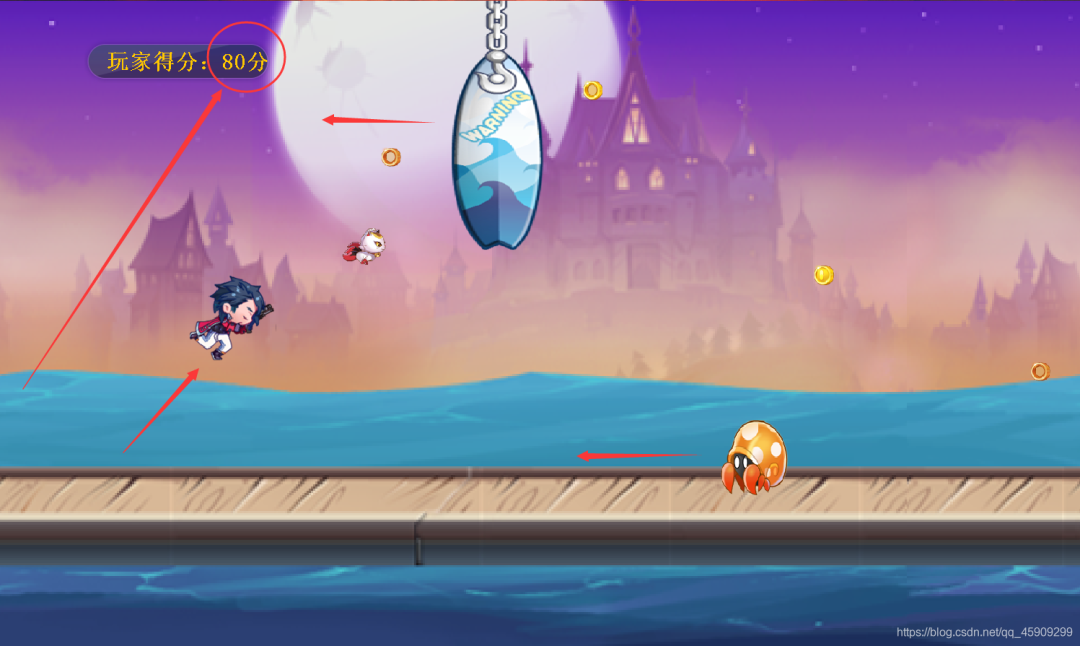 碰到障礙物后,玩家被推著走。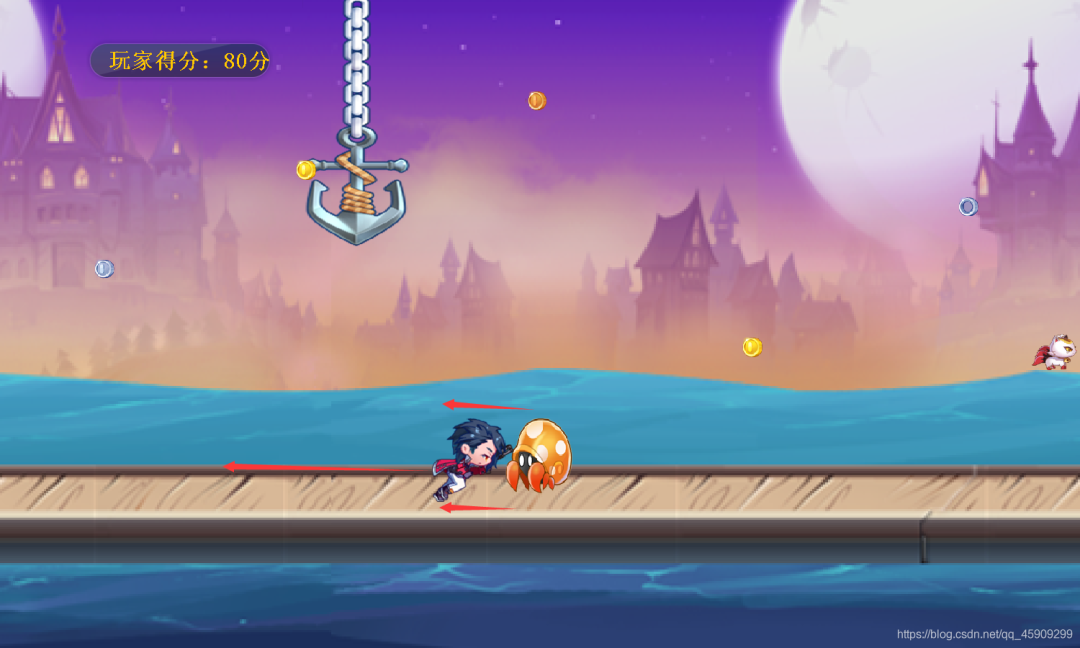
下面,分別解釋一下每個(gè)功能的邏輯:
一、創(chuàng)建一個(gè)顯示窗體,承載游戲的主面板類。
GameFrame.java
package?cn.sqc.runday.view;

import?javax.swing.ImageIcon;
import?javax.swing.JFrame;

import?cn.sqc.runday.controller.GamePanel;

/**
?*?@author?Huey
?*2020-11-27??下午12:40:22
?*?游戲主界面:顯示窗體,承載游戲的主面板類
?*/

public?class?GameFrame?extends?JFrame?{
?//設(shè)置窗體寬高屬性
?public?static?final?int?WIDTH=1500;
?public?static?final?int?HEIGHT=900;
?public?GameFrame()?{
??//2.4創(chuàng)建游戲面板對象,并添加到窗體上去
??GamePanel?panel?=?new?GamePanel();
??panel.action();//程序啟動的方法
??this.addKeyListener(panel);//誰實(shí)現(xiàn)就監(jiān)聽誰
??this.add(panel);
??
??/**1.設(shè)置窗體基本屬性*/
??this.setSize(WIDTH,HEIGHT);
??this.setLocationRelativeTo(null);
??this.setDefaultCloseOperation(JFrame.EXIT_ON_CLOSE);
??this.setIconImage(new?ImageIcon("Image/115.png").getImage());
??this.setUndecorated(true);
??this.setVisible(true);?
?}
?
?public?static?void?main(String[]?args)?{
??new?GameFrame();
?}
}
二、游戲主面板類(核心邏輯類):
1、背景圖片滾動效果
使用兩張背景圖片,實(shí)現(xiàn)背景圖片滾動效果的邏輯如下: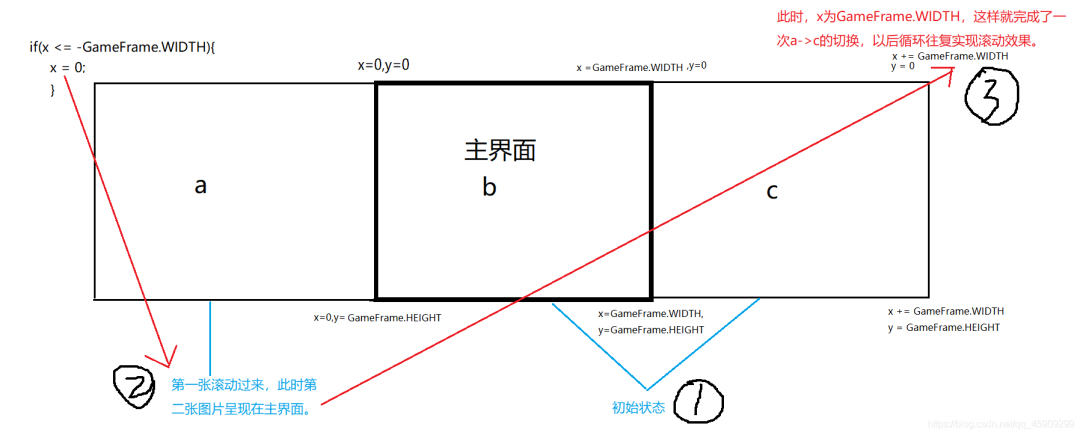 下面用動圖演示一下:
2、玩家動態(tài)效果
我國早期很有名的一部動畫片《大鬧天宮》,由于當(dāng)時(shí)沒有電腦,所以需要一幀一幀的畫,隨后快速播放圖片,形成動態(tài)的畫面(我愿稱之:真·動畫),并為之配音,短短10分鐘的動畫卻要畫7000到10000張?jiān)嫞?/p>
而此處,我們的玩家的奔跑姿態(tài),同理是由九張圖片構(gòu)成。 下面動圖演示:
 下面是實(shí)現(xiàn)玩家的(生成、移動、繪制)的基本代碼,后面的障礙物的實(shí)現(xiàn),也都遵循這一編寫邏輯。
為更方便讀懂代碼,已盡力注釋,若仍有不清楚的地方,歡迎留言交流。
Person.java
package?cn.sqc.runday.model;

import?java.awt.Graphics;
import?java.awt.Image;
import?java.io.File;
import?java.io.IOException;

import?javax.imageio.ImageIO;

import?cn.sqc.runday.view.GameFrame;

/**
?*?@author?Huey
?*?@date?2020-11-23
?*?玩家的實(shí)體類
?*/
public?class?Person?{//1.聲明屬性
?private?Image?image;//1.1?玩家當(dāng)前顯示圖片
?private?Image[]?images;//1.2?玩家所有圖片
?
?public?static?final?int?WIDTH?=?120;//1.3玩家寬高
?public?static?final?int?HEIGHT?=?120;
?
?//1.4玩家初始位置坐標(biāo)
?private?int?x,y;
?int?index;//下面用作切換圖片
?//玩家得分
?private?int?score;
?//玩家跑酷距離
?private?int?distance;
?
?public?Person()?{//2.賦值
??//給圖片數(shù)組images賦值
??init();//2.1 先寫,會提示要不要實(shí)現(xiàn)!自動生成方法
??//默認(rèn)當(dāng)前顯示圖片位第一張圖片?2.6
??image?=?images[0];
??
??x?=?90;//2.7
??y?=?580;//腳踩地板
??index?=?0;
??score?=?0;
??distance?=?0;
?}
?//玩家自由下落方法5.1
?public?void?drop()?{
??y?+=?5;
??if(y>=580){//?下落歸下落,也得溫柔點(diǎn),不能讓小人兒踩破了地板
???y?=?580;
??}
?}
?//玩家移動的方法
?public?void?step(){
??//玩家圖片的切換
??image?=?images[index?++?/3%images.length];
??//玩家坐標(biāo)改變(玩家坐標(biāo)通過鍵盤控制,此次不做處理)
?}
?//繪制玩家的方法
?public?void?paintPerson(Graphics?g){
??g.drawImage(image,?x,?y,?WIDTH,?HEIGHT,?null);
?}

?//判斷玩家是否越界的方法
?public?boolean?outOfBounds(){
??return?this.x?>=?GameFrame.WIDTH?||?this.x?<=?-WIDTH;
?}
?private?void?init()?{//2.2
??images?=?new?Image[9];
??for(int?i?=?0;?i//2.3
???try?{//2.5
????images[i]?=?ImageIO.read(new?File("Image/"+(i+1)?+?".png"));//2.4
???}?catch?(IOException?e)?{//2.5
????//?TODO?Auto-generated?catch?block
????e.printStackTrace();
???}
??}
?}
//2.8??右鍵,Source,GGAS
?public?Image?getImage()?{
??return?image;
?}

?public?void?setImage(Image?image)?{
??this.image?=?image;
?}

?public?Image[]?getImages()?{
??return?images;
?}

?public?void?setImages(Image[]?images)?{
??this.images?=?images;
?}

?public?int?getX()?{
??return?x;
?}

?public?void?setX(int?x)?{
??this.x?=?x;
?}

?public?int?getY()?{
??return?y;
?}

?public?void?setY(int?y)?{
??this.y?=?y;
?}

?public?static?int?getWidth()?{
??return?WIDTH;
?}

?public?static?int?getHeight()?{
??return?HEIGHT;
?}
?public?int?getIndex()?{
??return?index;
?}
?public?void?setIndex(int?index)?{
??this.index?=?index;
?}
?public?int?getScore()?{
??return?score;
?}
?public?void?setScore(int?score)?{
??this.score?=?score;
?}
?public?int?getDistance()?{
??return?distance;
?}
?public?void?setDistance(int?distance)?{
??this.distance?=?distance;
?}
?
}
3、幾種障礙物的出現(xiàn)
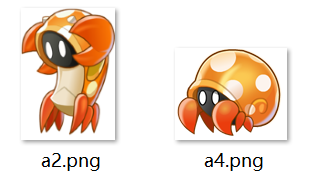
障礙物一:螃蟹
package?cn.sqc.runday.model;

import?java.awt.Graphics;
import?java.awt.Image;
import?java.awt.Paint;
import?java.io.File;

import?javax.imageio.ImageIO;

import?cn.sqc.runday.view.GameFrame;

public?class?Barrs_1?{
?private?Image?image;
?private?Image?[]?images;
?public?static?final?int?WIDTH=100;
?public?static?final?int?HEIGHT=110;
?private?int?x,y;
?int??index;
?private?int?speed;
?
?public?Barrs_1()?{//??螃蟹!
??images?=?new?Image[2];
??try?{
???images[0]=ImageIO.read(new?File("image/a2.png"));
???images[1]=ImageIO.read(new?File("image/a4.png"));??
??}?catch?(Exception?e)?{
???//?TODO:?handle?exception
??}??
??image?=?images[0];
??x=GameFrame.WIDTH+100;
??y=580;
??speed?=30;
??index?=?0;
?}
?
?public??void?step()?{//切換圖片
??image?=images[index++/5%images.length];
??x-=speed;//切換圖片實(shí)現(xiàn)螃蟹爪子張合的動態(tài)效果的同時(shí),使其向左移動
?}
??public?void?paintBarrs(Graphics?g)?{
?g.drawImage(image,?x,y,WIDTH,HEIGHT,?null);
}
??public?boolean?outofBounds(){
??return?this.x?<=-WIDTH;
?}
public?Image?getImage()?{
?return?image;
}
public?void?setImage(Image?image)?{
?this.image?=?image;
}
public?Image[]?getImages()?{
?return?images;
}
public?void?setImages(Image[]?images)?{
?this.images?=?images;
}
public?int?getX()?{
?return?x;
}
public?void?setX(int?x)?{
?this.x?=?x;
}
public?int?getY()?{
?return?y;
}
public?void?setY(int?y)?{
?this.y?=?y;
}
public?int?getIndex()?{
?return?index;
}
public?void?setIndex(int?index)?{
?this.index?=?index;
}
public?int?getSpeed()?{
?return?speed;
}
public?void?setSpeed(int?speed)?{
?this.speed?=?speed;
}
public?static?int?getWidth()?{
?return?WIDTH;
}
public?static?int?getHeight()?{
?return?HEIGHT;
}
??
}
需要注意的是,在創(chuàng)建后,記得添加set、get方法。以便在面板類中對其障礙物進(jìn)行操作。
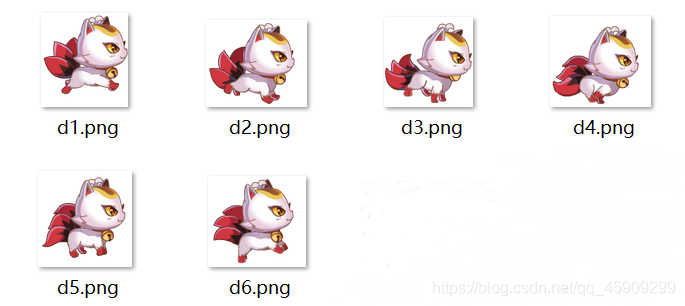
障礙物二:寵物
與其稱之障礙物,不如說它是個(gè)跟著玩家的小跟班。

package?cn.sqc.runday.model;

import?java.awt.Graphics;
import?java.awt.Image;
import?java.awt.event.KeyListener;
import?java.io.File;
import?java.io.IOException;

import?javax.imageio.ImageIO;

import?cn.sqc.runday.view.GameFrame;

public?class?Barrs_2{??//??寵物!
?private?Image?image;
?private?Image?images?[]?;
?public?static?final?int?WIDTH=?70;
?public?static?final?int?HEIGHT?=?60;
?private?int?x,y;
?int?index;
?public?Barrs_2()?{
??init();
??image?=?images[0];
??x=300;
??y=460;
?}
?public?void?drop()?{
??y?++;
??if(y>=460){
???y?=?460;
??}
?}
?public?void?step(){
??image?=?images[index++/2%images.length];
?}
??public?void?paintBarrs(Graphics?g)?{
???g.drawImage(image,?x,y,WIDTH,HEIGHT,?null);
??}
?public?boolean?outofBounds()?{
??return?this.x<=-WIDTH;
?}
public?void?init(){
?images?=?new?Image[6];
?for(?int?i=0;i<6;i++){
??try?{
???images[i]=ImageIO.read(new?File?("Image/"+"d"+(i+1)+".png"));
??}?catch?(IOException?e)?{
???//?TODO?Auto-generated?catch?block
???e.printStackTrace();
??}
?}
}
public?Image?getImage()?{
?return?image;
}
public?void?setImage(Image?image)?{
?this.image?=?image;
}
public?Image[]?getImages()?{
?return?images;
}
public?void?setImages(Image[]?images)?{
?this.images?=?images;
}
public?int?getX()?{
?return?x;
}
public?void?setX(int?x)?{
?this.x?=?x;
}
public?int?getY()?{
?return?y;
}
public?void?setY(int?y)?{
?this.y?=?y;
}
public?int?getIndex()?{
?return?index;
}
public?void?setIndex(int?index)?{
?this.index?=?index;
}
public?static?int?getWidht()?{
?return?WIDTH;
}
public?static?int?getHeight()?{
?return?HEIGHT;
}

}
障礙物三、導(dǎo)彈

package?cn.sqc.runday.model;

import?java.awt.Graphics;
import?java.awt.Image;
import?java.io.File;

import?javax.imageio.ImageIO;

import?cn.sqc.runday.view.GameFrame;

public?class?Barrs_3?{//???導(dǎo)彈!
?private?Image?image;
?private?int?x,y;
?public?static?final?int?WIDTH?=?150;
?public?static?final?int?HEIGHT=70;
?private?int?speed;
?public?Barrs_3()?{
??try?{
???image?=?ImageIO.read(new?File("image/daodan.png"));
??}?catch?(Exception?e)?{
???//?TODO:?handle?exception
??}
??x=GameFrame.WIDTH+1000;
??y=450;
??speed?=?25?;
?}
?public?void?step(){
??x-=speed;
?}
?public?void?paintBarrs(Graphics?g)?{
??g.drawImage(image,?x,?y,?WIDTH,?HEIGHT,?null);

?}
?public?boolean?outofBounds(){
??return?this.x<=-WIDTH;
?}
?public?Image?getImage()?{
??return?image;
?}
?public?void?setImage(Image?image)?{
??this.image?=?image;
?}
?public?int?getX()?{
??return?x;
?}
?public?void?setX(int?x)?{
??this.x?=?x;
?}
?public?int?getY()?{
??return?y;
?}
?public?void?setY(int?y)?{
??this.y?=?y;
?}
?public?int?getSpeed()?{
??return?speed;
?}
?public?void?setSpeed(int?speed)?{
??this.speed?=?speed;
?}
?public?static?int?getWidth()?{
??return?WIDTH;
?}
?public?static?int?getHeight()?{
??return?HEIGHT;
?}
?

}
障礙物四:魚叉等障礙物

package?cn.sqc.runday.model;

import?java.awt.Graphics;
import?java.awt.Image;
import?java.io.File;
import?java.util.Random;

import?javax.imageio.ImageIO;

import?cn.sqc.runday.view.GameFrame;

public?class?Barrs_4?{//??魚叉障礙物!
?private?Image?image;
?private?Image?images[];
?public?static?final?int?WIDTH?=150;
?public?static?final?int?HEIGHT?=350;
?private?int?x,y;
?
?public?Barrs_4()?{//構(gòu)造方法
??Random?random?=?new?Random();
??images?=?new?Image[4]?;
?try?{
??images[0]?=?ImageIO.read(new?File("image/11.png"));
??images[1]=?ImageIO.read(new?File("image/12.png"));
??images[2]=?ImageIO.read(new?File("image/13.png"));
??images[3]=?ImageIO.read(new?File("image/14.png"));
?}?catch?(Exception?e)?{
??//?TODO:?handle?exception
?}
??image=?images[random.nextInt(4)];
??x=GameFrame.WIDTH+1500;
??y=0;
?}
?public?void?step(){
??x-=20;
?}
?public?void?paintBarrs(Graphics?g){
??g.drawImage(image,?x,?y,?WIDTH,?HEIGHT,?null);
?}
?public?boolean?outofBounds(){
??return?this.x<=-WIDTH;
?}
?public?Image?getImage()?{
??return?image;
?}
?public?void?setImage(Image?image)?{
??this.image?=?image;
?}
?public?Image[]?getImages()?{
??return?images;
?}
?public?void?setImages(Image[]?images)?{
??this.images?=?images;
?}
?public?int?getX()?{
??return?x;
?}
?public?void?setX(int?x)?{
??this.x?=?x;
?}
?public?int?getY()?{
??return?y;
?}
?public?void?setY(int?y)?{
??this.y?=?y;
?}
?public?static?int?getWidth()?{
??return?WIDTH;
?}
?public?static?int?getHeight()?{
??return?HEIGHT;
?}
?
}
?
障礙物五、金幣
 在此,暫且先不寫金幣的動態(tài)效果。
package?cn.sqc.runday.model;

import?java.awt.Graphics;
import?java.awt.Image;
import?java.io.File;
import?java.io.IOException;
import?java.util.Random;

import?javax.imageio.ImageIO;

import?cn.sqc.runday.view.GameFrame;

/**
?*?@author?Huey
?*2020-11-30??下午03:44:51
?*金幣障礙物類
?*?
?*/
public?class?Barrs_5?{
??private?Image?image;//當(dāng)前顯示圖片
??public?static?final?int?WIDTH?=?30;
??public?static?final?int?HEIGHT?=?30;
??private?int?x,y;
??private?int?speed;
??Random?random?=?new?Random();
??public?Barrs_5()?{
???try?{
????image?=?ImageIO.read(new?File("Image/"+(random.nextInt(6)?+?21)?+?".png"));
???}?catch?(IOException?e)?{
????//?TODO?Auto-generated?catch?block
????e.printStackTrace();
???}
???x?=?GameFrame.WIDTH?+?10;
???y?=?random.nextInt(600);
???speed?=?20;
??}
??
??public?void?step(){
???x?-=?speed;
??}
??
??public?void?paintBarrs(Graphics?g){
???g.drawImage(image,?x,?y,?WIDTH,?HEIGHT,?null);
??}
??public?boolean?outofBounds()?{
???return?this.x<=-WIDTH;
??}

??public?Image?getImage()?{
???return?image;
??}

??public?void?setImage(Image?image)?{
???this.image?=?image;
??}

??public?int?getX()?{
???return?x;
??}

??public?void?setX(int?x)?{
???this.x?=?x;
??}

??public?int?getY()?{
???return?y;
??}

??public?void?setY(int?y)?{
???this.y?=?y;
??}

??public?int?getSpeed()?{
???return?speed;
??}

??public?void?setSpeed(int?speed)?{
???this.speed?=?speed;
??}

??public?Random?getRandom()?{
???return?random;
??}

??public?void?setRandom(Random?random)?{
???this.random?=?random;
??}

??public?static?int?getWidth()?{
???return?WIDTH;
??}

??public?static?int?getHeight()?{
???return?HEIGHT;
??}

}
4、玩家和障礙物的碰撞邏輯
以玩家與導(dǎo)彈的碰撞舉例:
for(int?i?=?0;i??if(person.getX()?+?Person.WIDTH?>=?barrs3[i].getX()?&&
??person.getX()?<=?barrs3[i].getX()??+?Barrs_3.WIDTH??&&
??person?.getY()?+Person.getHeight()?>=?barrs3[i].getY()?&&
??person.getY()?<=?barrs3[i].getY?()?+?Barrs_3.HEIGHT){
???if(person.getX()?+?Person.WIDTH?<=?barrs3[i].getX()?+?Barrs_3.WIDTH){//玩家的寬度(120px)是比障礙物小的
????//左碰撞
????person.setX(barrs3[i].getX()??-?Barrs_3.WIDTH);
???}else{
????//右碰撞
????person.setX(barrs3[i].getX()+?Barrs_3.WIDTH?);
???}?
??}
?}
以下動圖演示了玩家從右邊與障礙物b發(fā)生碰撞和從左邊碰撞的邏輯,上下碰撞同理。
上下左右碰撞的邏輯代碼,在動圖下方: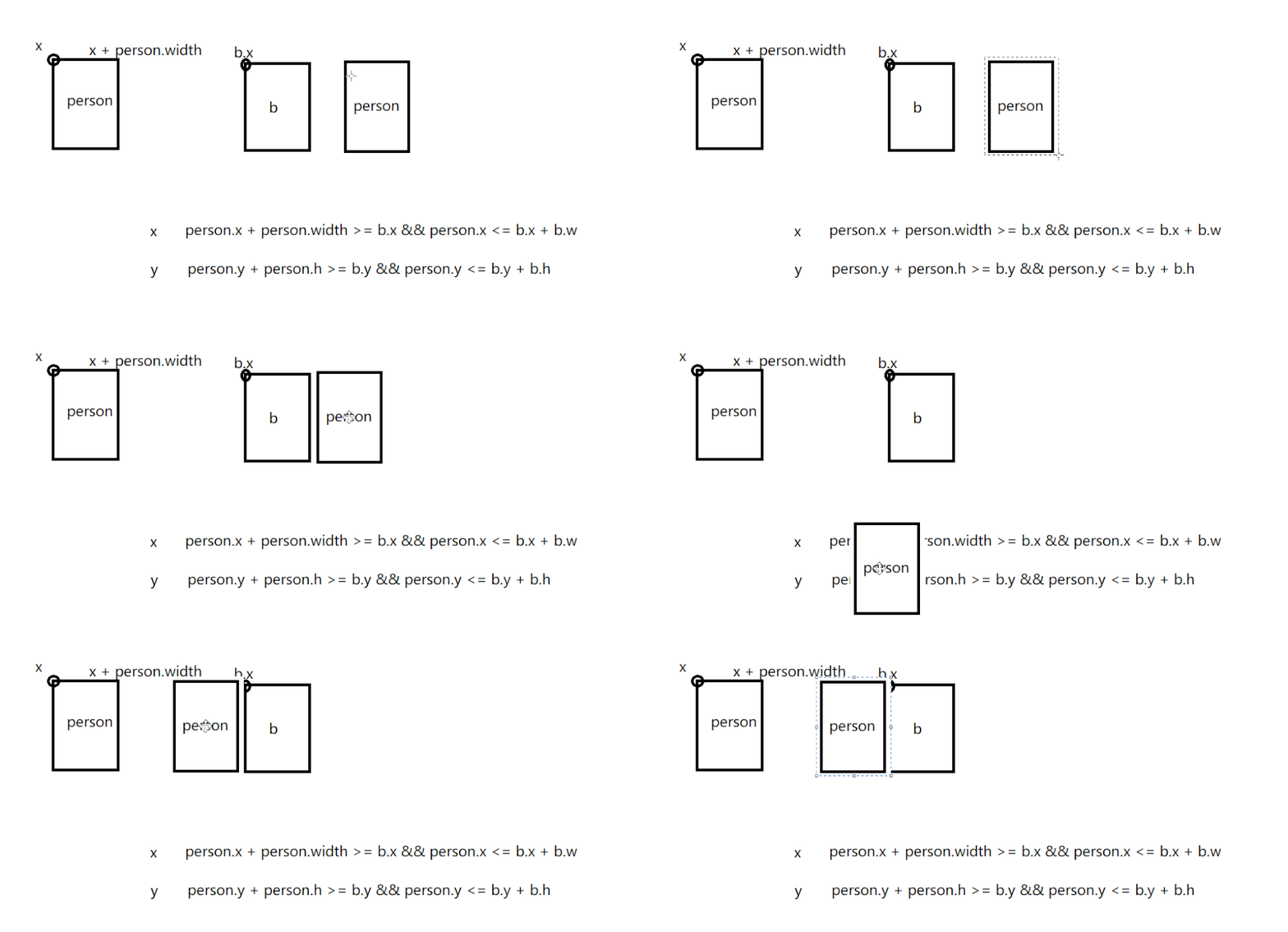
5、暫停、繼續(xù)邏輯
在監(jiān)聽鍵盤按鍵的方法中。 代碼如下:
代碼如下: 此處的?flag?來源于上面程序啟動的方法中,不難看出只要按了空格鍵,就能實(shí)現(xiàn)生成、移動、繪制方法的暫停,也就相當(dāng)于畫面的靜止、游戲的暫停!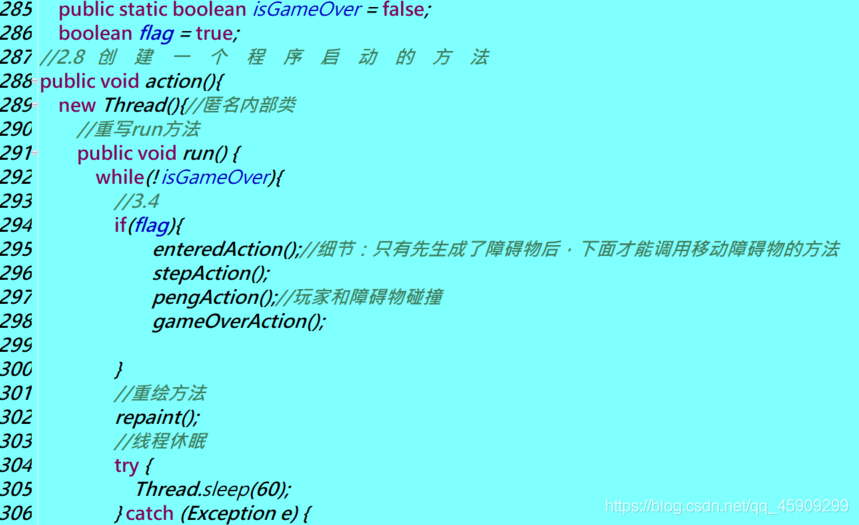
6、結(jié)束邏輯
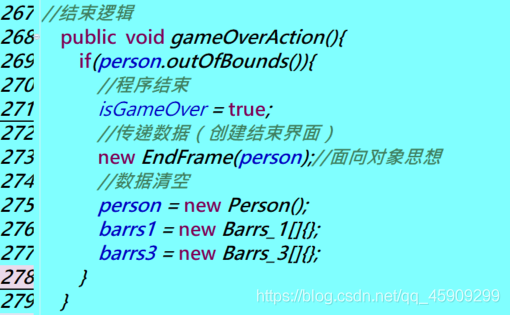
游戲主界面代碼如下:
package?cn.sqc.runday.controller;

import?java.awt.Color;
import?java.awt.Font;
import?java.awt.Graphics;
import?java.awt.Image;
import?java.awt.event.KeyEvent;
import?java.awt.event.KeyListener;
import?java.io.File;
import?java.io.IOException;
import?java.util.Arrays;

import?javax.imageio.ImageIO;
import?javax.swing.JPanel;

import?cn.sqc.runday.model.Barrs_1;
import?cn.sqc.runday.model.Barrs_2;
import?cn.sqc.runday.model.Barrs_3;
import?cn.sqc.runday.model.Barrs_4;
import?cn.sqc.runday.model.Barrs_5;
import?cn.sqc.runday.model.Person;
import?cn.sqc.runday.view.EndFrame;
import?cn.sqc.runday.view.GameFrame;

/**
?*?@author?Huey
?*2020-11-27??下午12:28:44
?*?游戲主面板類,核心邏輯類
?*???????????1、背景圖片滾動效果
?*???????????2、玩家動態(tài)效果
?*???????????3、五種障礙物的出現(xiàn)
?*???????????4、玩家和障礙物的碰撞邏輯
?*???????????5、暫停、繼續(xù)邏輯
?*???????????6、結(jié)束邏輯
?*/

public?class?GamePanel?extends?JPanel?implements?KeyListener{
?/**2、生成動態(tài)的背景圖片***/
?//2.1聲明背景圖片對象
?Image?background;
?Image?score;
?Image?pause;//暫停
?Image??proceed;//繼續(xù).
?
?
?/***3.實(shí)現(xiàn)玩家的動態(tài)效果和移動功能***/
?//3.1創(chuàng)建玩家對象(類的實(shí)例化)
?Person?person;
?Barrs_2?barrs_2;//寵物
?Barrs_4?barrs_4;//魚鉤等障礙物
?Barrs_5?barrs_5;//金幣
?/**4.實(shí)現(xiàn)螃蟹障礙物*/
?//4.1
?Barrs_1[]barrs1?=?{};//存儲螃蟹數(shù)組(沒有元素,可以擴(kuò)容)
?Barrs_3[]barrs3?={};//導(dǎo)彈
?Barrs_4[]barrs4={};//魚鉤
?Barrs_5[]barrs5?=?{};//金幣
?
?public?GamePanel()?{
??//3.2
??person?=?new?Person();//調(diào)用Person類的構(gòu)造方法,創(chuàng)建對象并賦值
??barrs_2?=?new?Barrs_2();
??//2.2讀取圖片文件
??try{
???background?=ImageIO.read(new?File("Image/cc.png"));//跑酷背景
???score?=ImageIO.read(new?File("Image/a12.png"));//得分背景
???pause?=?ImageIO.read(new?File("Image/b2.png"));
???proceed?=?ImageIO.read(new?File("Image/b1.png"));
??}catch(IOException?e){
???e.printStackTrace();
??}
?}
?//2.5
?int?x=0;//背景圖片初始位置
@Override
public?void?paint(Graphics?g)?{?
?super.paint(g);
?//2.7
?if(flag){
??x-=20;//圖片滾動的速度
?}
??//2.3繪制背景圖片(動態(tài)切換很流暢)
??g.drawImage(background,?x,?0,?GameFrame.WIDTH,?GameFrame.HEIGHT,?null);
??g.drawImage(background,?x+GameFrame.WIDTH,?0,?GameFrame.WIDTH,?GameFrame.HEIGHT,null);
??if(x<=-GameFrame.WIDTH){//實(shí)現(xiàn)兩張圖片之間的切換
???x?=?0;
??}
?
?//3.3繪制?玩家
?person.paintPerson(g);
?//繪制螃蟹
?for(int?i?=0;i??barrs1[i].paintBarrs(g);
?}
?//繪制寵物
?barrs_2.paintBarrs(g);
?//繪制導(dǎo)彈
?for(int?i?=0;i??barrs3[i].paintBarrs(g);
?}
?//隨機(jī)繪制魚鉤障礙物
?for(int?i?=0;i??barrs4[i].paintBarrs(g);
?}
?//隨機(jī)繪制金幣
?for(int?i?=?0;i??barrs5[i].paintBarrs(g);
?}
?
?
//位置越往下,圖層越往上
?//繪制玩家分?jǐn)?shù)
?g.drawImage(score,?120,?50,null);
?g.setColor(Color.ORANGE);
?g.setFont(new?Font("宋體",Font.BOLD,30?));
?g.drawString("玩家得分:"+person.getScore()+"分",?133,?95);
?
?//繪制暫停、繼續(xù)標(biāo)識圖片
?if(flag){
?????g.drawImage(proceed,?200,?800,?90,90,null);
?}else{
????g.drawImage(pause,?200,?800,?90,?90,?null);
?}
?
}

//生??成?障?礙?物?的?方?法
int?index?=0;
public?void?enteredAction(){//實(shí)現(xiàn)源源?不?斷?生成障礙物的效果
?index++;
?//生成螃蟹障礙物
?if(index%100==0){
??//生成一個(gè)螃蟹
??Barrs_1?b1?=?new?Barrs_1();
??Barrs_3?b3?=?new?Barrs_3();
??Barrs_4?b4?=?new?Barrs_4();
??
??barrs1?=Arrays.copyOf(barrs1,barrs1.length+1);//數(shù)組擴(kuò)容
??barrs1[barrs1.length-1]=?b1;//放到數(shù)組最后一個(gè)元素的位置
??//System.out.println("測試"+barrs1.length);??
??barrs3?=Arrays.copyOf(barrs3,barrs3.length+1);
??barrs3[barrs3.length-1]=?b3;
??barrs4?=Arrays.copyOf(barrs4,barrs4.length+1);
??barrs4[barrs4.length-1]=?b4;
?}
?if(index%15==0){
??Barrs_5?b5?=?new?Barrs_5();
??barrs5?=?Arrays.copyOf(barrs5,?barrs5.length?+1);
??barrs5[barrs5.length-1]?=?b5;
?}
}


//移??動?方?法
public?void?stepAction(){
?//3..4
??person.step();//切換玩家的圖片—>動起來
??person.drop();//不斷下墜
??barrs_2.drop();
??//螃蟹障礙物移動
?for(int?i?=0;i??barrs1[i].step();
??//判斷當(dāng)前障礙物是否?越界,并做越界處理
??if(barrs1[i].outofBounds()){
???//刪除越界的螃蟹障礙物
???barrs1[i]?=?barrs1[barrs1.length?-?1];//將螃蟹數(shù)組最后一個(gè)元素,賦給越界的螃蟹,覆蓋了,相當(dāng)于間接刪除了。
???barrs1=?Arrays.copyOf(barrs1,?barrs1.length?-?1);//數(shù)組縮容
??}
?}
?
?barrs_2.step();
?
?for(int?i?=0;i???barrs3[i].step();
??//刪除越界的導(dǎo)彈障礙物
??if(barrs3[i].outofBounds()){
???barrs3[i]?=?barrs3[barrs3.length?-?1];
???barrs3?=?Arrays.copyOf(barrs3,?barrs3.length?-?1);
??}
?}
?
?for(int?i?=0;i??barrs4[i].step();
??//刪除越界的魚叉障礙物
??if(barrs4[i].outofBounds()){
??barrs4[i]?=?barrs4[barrs4.length?-?1?];
??barrs4?=?Arrays.copyOf(barrs4,?barrs4.length?-?1);
??}
?}
?for(int?i?=?0;i??barrs5[i].step();
??if(barrs5[i].outofBounds()){
???//刪除越界的金幣
???barrs5[i]?=?barrs5[barrs5.length?-?1];
???barrs5?=?Arrays.copyOf(barrs5,?barrs5.length?-?1);
??}
?}
}

//玩家和障礙物碰撞的處理方法
public?void?pengAction(){
?//判斷玩家是否和螃蟹障礙物進(jìn)行碰撞
?for(int?i?=?0;i//上下左右都寫了,下是用不到的
??if(person.getX()?+?Person.WIDTH?>=?barrs1[i].getX()?&&
??person.getX()?<=?barrs1[i].getX()??+?Barrs_1.WIDTH??&&
??person?.getY()?+Person.getHeight()?>=?barrs1[i].getY()?&&
??person.getY()?<=?barrs1[i].getY?()?+?Barrs_1.HEIGHT){
???//碰撞后的處理(遮擋類障礙物)
???if(person.getX()?+?Person.WIDTH?<=?barrs1[i].getX()?+?Barrs_1.WIDTH){//防止人在右邊,碰撞后可以穿過障礙物
????//左碰撞
????person.setX(barrs1[i].getX()??-?Barrs_1.WIDTH);
???}else{
????//右碰撞
????person.setX(barrs1[i].getX()+?Barrs_1.WIDTH?);
???}??????
??}
?}
?//判斷玩家是否和導(dǎo)彈障礙物進(jìn)行碰撞
?for(int?i?=?0;i??if(person.getX()?+?Person.WIDTH?>=?barrs3[i].getX()?&&
??person.getX()?<=?barrs3[i].getX()??+?Barrs_3.WIDTH??&&
??person?.getY()?+Person.getHeight()?>=?barrs3[i].getY()?&&
??person.getY()?<=?barrs3[i].getY?()?+?Barrs_3.HEIGHT){
???if(person.getX()?+?Person.WIDTH?<=?barrs3[i].getX()?+?Barrs_3.WIDTH){//玩家的寬度(120px)是比障礙物小的
????//左碰撞
????person.setX(barrs3[i].getX()??-?Barrs_3.WIDTH);
???}else{
????//右碰撞
????person.setX(barrs3[i].getX()+?Barrs_3.WIDTH?);
???}?
??}
?}
?//判斷玩家是否和魚叉障礙物進(jìn)行碰撞
?for(int?i?=?0;i<=barrs4.length?-1;i++){//小心數(shù)組越界!
??if(person.getX()?+?Person.WIDTH?>=?barrs4[i].getX()?&&
??person.getX()?<=?barrs4[i].getX()?+?Barrs_4.WIDTH?&&
??person.getY()?+?Person.HEIGHT?>=?barrs4[i].getY()?&&
??person.getY()?<=?barrs4[i].getY()?+?Barrs_4.HEIGHT?){
???if(person.getX()?+?Person.WIDTH?<=?barrs4[i].getX()?+?Barrs_4.WIDTH?){
????//左碰撞
????person.setX(barrs4[i].getX()?-?Barrs_4.WIDTH);
???}else{
????//右碰撞
????person.setX(barrs4[i].getX()+?Barrs_4.WIDTH?);
???}?
??}
?}
?//玩家和金幣的碰撞
?for(int?i?=?0;i??if(person.getX()?+?Person.WIDTH?>=?barrs5[i].getX()?&&
??person.getX()?<=?barrs5[i].getX()??+?Barrs_5.WIDTH??&&
??person?.getY()?+Person.getHeight()?>=?barrs5[i].getY()?&&
??person.getY()?<=?barrs5[i].getY?()?+?Barrs_5.HEIGHT){//判斷玩家與金幣的碰撞
???if(person.getX()?+?Person.WIDTH?<=?barrs5[i].getX()?+?Barrs_5.WIDTH){
????//刪除當(dāng)前金幣
????barrs5[i]?=?barrs5[barrs5.length?-?1];
????barrs5?=?Arrays.copyOf(barrs5,?barrs5.length?-?1);
????
????//玩家加分
????int?score?=?person.getScore();
????person.setScore(score?+?10);
?????}
??}
?}
??
}
//結(jié)束邏輯
?public??void?gameOverAction(){
??if(person.outOfBounds()){
???//程序結(jié)束
???isGameOver?=?true;
???//傳遞數(shù)據(jù)(創(chuàng)建結(jié)束界面)
???new?EndFrame(person);//面向?qū)ο笏枷?/span>
???//數(shù)據(jù)清空
???person?=?new?Person();
???barrs1?=?new?Barrs_1[]{};
???barrs3?=?new?Barrs_3[]{};
??}
??
?}
?public?static?boolean?isGameOver?=?false;
?boolean?flag?=?true;?
//2.8?創(chuàng)?建?一?個(gè)?程?序?啟?動?的??方?法
public?void?action(){
?new?Thread(){//匿名內(nèi)部類
??//重寫run方法
??public?void?run()?{
???while(!isGameOver){
????//3.4
????if(flag){
??????enteredAction();//細(xì)節(jié):只有先生成了障礙物后,下面才能調(diào)用移動障礙物的方法
??????stepAction();
??????pengAction();//玩家和障礙物碰撞
??????gameOverAction();
?????
????}
????//重繪方法
????repaint();
????//線程休眠
????try?{
?????Thread.sleep(60);
????}?catch?(Exception?e)?{
?????//?TODO:?handle?exception
?????e.printStackTrace();
????}
???}
???
??};
?}.start();//創(chuàng)建一個(gè)線程并啟動

?}

@Override
public?void?keyTyped(KeyEvent?e)?{
?//?TODO?Auto-generated?method?stub
?
}

@Override
public?void?keyPressed(KeyEvent?e)?{
?//獲取玩家當(dāng)前位置坐標(biāo)
??int?x?=?person.getX();
??int?y?=?person.getY();
??int?x1?=?barrs_2.getX();
??int?y1?=?barrs_2.getY();

?//上
??if(e.getKeyCode()?==?KeyEvent.VK_UP?&&??y?>?10?&&??y1?>?10){
???person.setY(y-25);
???barrs_2.setY(y-25);
??}
???//下
??if(e.getKeyCode()==?KeyEvent.VK_DOWN?&&??y<=560??&&??y1<560){
???person.setY(y+30);
???barrs_2.setY(y-30);
??}
??//左
??if(e.getKeyCode()==KeyEvent.VK_LEFT??&&??x>=0?){
???person.setX(x-30);
???barrs_2.setX(x1-30);
???
??}
??//右
??if(e.getKeyCode()==KeyEvent.VK_RIGHT){
???person.setX(x+22);
???barrs_2.setX(x1+22);
???if(x>=GameFrame.WIDTH-Person.WIDTH){//如果人物到了右邊界
????person.setX(GameFrame.WIDTH-Person.WIDTH);
???}
???if(x1>=GameFrame.WIDTH-barrs_2.WIDTH){//如果寵物到了右邊界
????barrs_2.setX(GameFrame.WIDTH?-?barrs_2.WIDTH);
???}
??}
??//暫停?繼續(xù)功能
??if(e.getKeyCode()?==?KeyEvent.VK_SPACE){
????flag?=?!flag;
??}
??
?}

@Override
public?void?keyReleased(KeyEvent?e)?{
?//?TODO?Auto-generated?method?stub
}
}
(五):結(jié)束界面
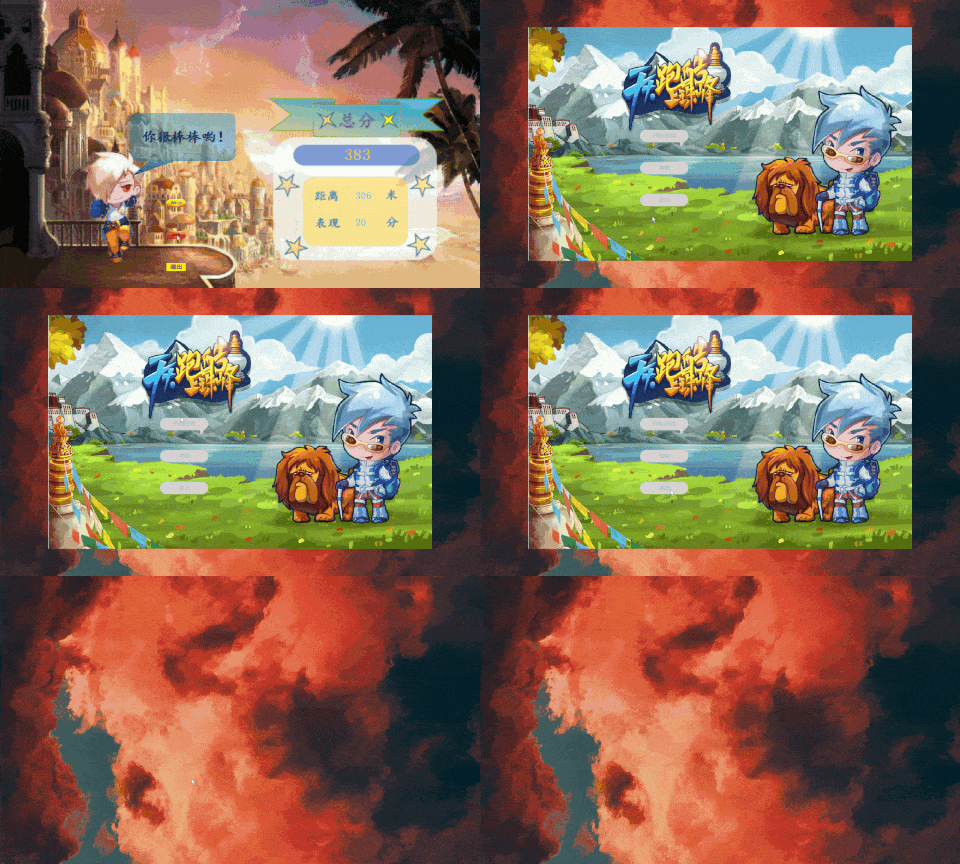
接上文,本文將實(shí)現(xiàn)天天酷跑游戲的結(jié)束界面,功能如下:
跑酷距離、獲取玩家的得分。?再來一次、返回主菜單、直接退出。
具體啥樣子,先睹為快!
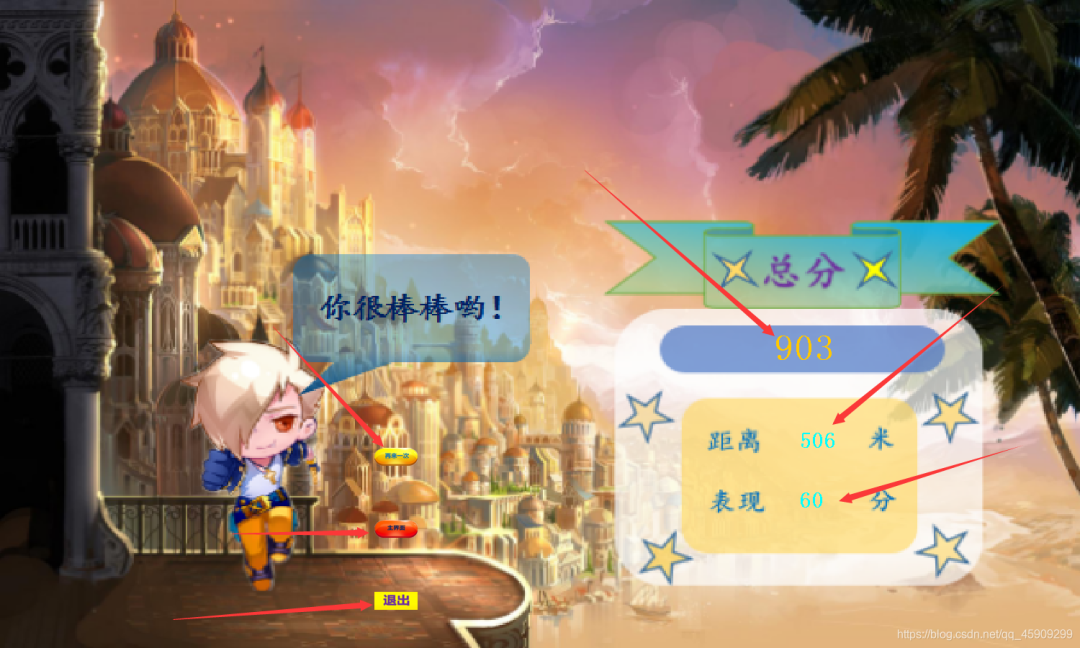
點(diǎn)擊再來一次按鈕,進(jìn)入加載狀態(tài),加載結(jié)束,直接進(jìn)入游戲。

點(diǎn)擊主菜單按鈕,進(jìn)入主菜單界面:
一、跑酷距離
我是在Person類的玩家移動方法中,添加了一個(gè)自增的diatance,只要玩家的圖片還在切換,也就是游戲還沒有結(jié)束,這個(gè)distance都在自增,也算是一種間接的實(shí)現(xiàn)計(jì)算跑酷距離的方法。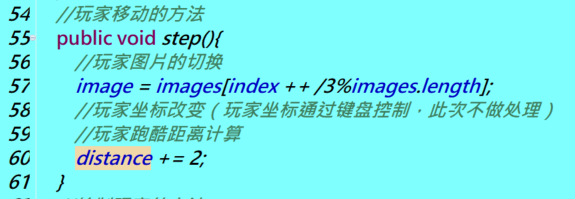 通過在Person類中添加get、set方法,獲取數(shù)據(jù)。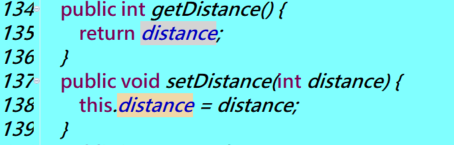
二、獲取玩家的得分
玩家與金幣碰撞的得分即為圖中的表現(xiàn)分,在GamePanel 獲取。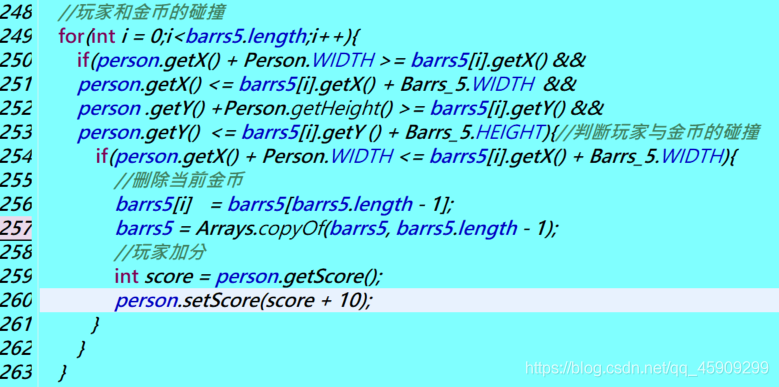 而總分,我在Person類中,設(shè)定了一個(gè)簡單的計(jì)分規(guī)則:
三、再來一次
在鼠標(biāo)點(diǎn)擊事件內(nèi),new一個(gè)新的加載界面,加載完成后自動進(jìn)入游戲。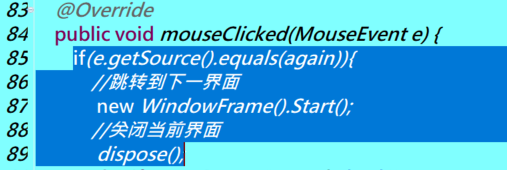
四、返回主界面
同理。
五、直接退出
同理。
上代碼
EndFrame.java
package?cn.sqc.runday.view;

import?java.awt.Color;
import?java.awt.Font;
import?java.awt.Graphics;
import?java.awt.Image;
import?java.awt.event.MouseEvent;
import?java.awt.event.MouseListener;
import?java.io.File;
import?java.io.IOException;
import?javax.imageio.ImageIO;
import?javax.swing.ImageIcon;
import?javax.swing.JButton;
import?javax.swing.JFrame;
import?javax.swing.JLabel;
import?javax.swing.JPanel;

import?cn.sqc.runday.controller.GamePanel;
import?cn.sqc.runday.model.Person;


public?class?EndFrame?extends?JFrame?implements?MouseListener?{
?//創(chuàng)建繼續(xù)游戲按鈕、返回主菜單按鈕、退出按鈕?組件
??JLabel?again,back,exit;
??
?public?EndFrame(Person?person)?{?
??again?=?new?JLabel(new?ImageIcon("Image/hh5.png"));
??again.setBounds(520,?622,?60,?25);
??again.addMouseListener(this);
??this.add(again);?
??back?=?new?JLabel(new?ImageIcon("Image/hh6.png"));
??back.setBounds(520,?722,?60,?25);
??back.addMouseListener(this);
??this.add(back);
??exit?=?new?JLabel(new?ImageIcon("Image/hh3.png"));
??exit.setBounds(520,?822,?60,?25);
??exit.addMouseListener(this);
??this.add(exit);
??
??EndPanel?end?=?new?EndPanel(person);
??this.add(end);//將結(jié)束面板組件添加到結(jié)束窗口上
??
??this.setSize(1500,?900);
??this.setLocationRelativeTo(null);
??this.setUndecorated(true);
??this.setDefaultCloseOperation(JFrame.EXIT_ON_CLOSE);
??this.setIconImage(new?ImageIcon("Image/115.png").getImage());
??this.setVisible(true);
?}
?
?public?static?void?main(String[]?args)?{?
??//new?EndFrame();
?}
?class?EndPanel?extends?JPanel{
??Image?background;
??Person?p;
??public?EndPanel(Person?person)?{//類比int?a
???this.p?=?person;//創(chuàng)建對象、傳值
???try?{
????background?=?ImageIO.read(new?File("Image/chou.png"));
???}?catch?(IOException?e)?{
????//?TODO?Auto-generated?catch?block
????e.printStackTrace();
???}
??}
??@Override
??public?void?paint(Graphics?g)?{
???//?TODO?Auto-generated?method?stub
???super.paint(g);
???g.drawImage(background,?0,?0,1500,900?,null);
???g.setColor(Color.CYAN);
???g.setFont(new?Font("宋體",Font.BOLD,30));
???g.drawString(p.getScore()+"",1110,705);//?+?”?“?屬實(shí)妙
???g.drawString(p.getDistance()?+?"?",?1110,?622);
???
???g.setFont(new?Font("宋體",Font.BOLD,50));
???g.setColor(Color.ORANGE);
???g.drawString(p.getTotalScore()?+?"",?1075,?500);
??}
?}
?@Override
?public?void?mouseClicked(MouseEvent?e)?{
??if(e.getSource().equals(again)){
???//跳轉(zhuǎn)到下一界面?
????new?WindowFrame().Start();
???//關(guān)閉當(dāng)前界面
????dispose();
??}?else?if(e.getSource().equals(back)){
???new?MainFrame();
???dispose();
??}else?if(e.getSource().equals(exit)){
???System.exit(0);
??}
?}

?@Override
?public?void?mousePressed(MouseEvent?e)?{
??//?TODO?Auto-generated?method?stub
??
?}

?@Override
?public?void?mouseReleased(MouseEvent?e)?{
??//?TODO?Auto-generated?method?stub
??
?}

?@Override
?public?void?mouseEntered(MouseEvent?e)?{
??//?TODO?Auto-generated?method?stub
??
?}

?@Override
?public?void?mouseExited(MouseEvent?e)?{
??//?TODO?Auto-generated?method?stub
??
?}
?
}
PS:如果覺得我的分享不錯,歡迎大家隨手點(diǎn)贊、在看。
源碼地址獲取:?
掃描下方公眾號回復(fù)?127
關(guān)注公眾號:【JAVA技術(shù)】
回復(fù)關(guān)鍵字:127
即可獲取源碼鏈接