
Mysql8.0新特性【詳細(xì)版本】

作者 | cao-lei
來(lái)源 | urlify.cn/VVzIZn
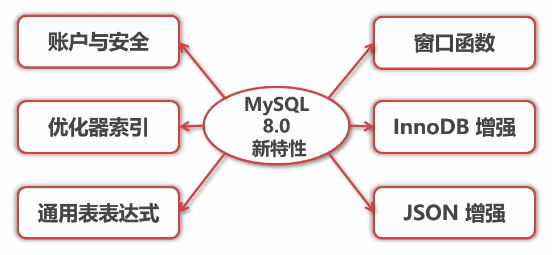
1. 賬戶與安全
用戶創(chuàng)建與授權(quán)
之前:創(chuàng)建用戶并授權(quán)
1 grant all privileges on *.* to 'myuser'@'%' identified by '3edc#EDC';
2 select user, host form mysql.user;
之后:創(chuàng)建用戶和授權(quán)必須分開(kāi)
1 create user 'myuser'@'%' identified by '3edc#EDC';
2 grant all privileges on *.* to 'myuser'@'%';
3 select user, host form mysql.user;
認(rèn)證插件更新
1 show variables like 'default_authentication%';
2 select user, host, plugin from mysql.user;
之前:mysql_native_password
之后:caching_sha2_password
1 #修改為之前的認(rèn)證插件
2 #方法一 修改配置文件
3 default-authentication-plugin=mysql_native_password
4 #方法二 修改用戶密碼指定認(rèn)證插件
5 alter user 'myuser'@'%' identified with mysql_native_password by '3edc#EDC';
密碼管理
【新增】允許限制使用之前的密碼。
password_history=3 #不能和最近3天的密碼相同
password_reuse_interval=90 #不能同90天內(nèi)使用過(guò)得密碼相同
password_require_current=on #修改密碼時(shí)需要輸入當(dāng)前密碼
show variables like 'password%';

#修改全局密碼策略-按天設(shè)置
#password_history 與 password_reuse_interval設(shè)置方法相同
#方法一 添加配置文件
password_history=3

#方法二 持久化參數(shù)設(shè)置
set persist password_history=3;

#方法三 通過(guò)用戶設(shè)置
alter user 'myuser'@'%' password history 5;
select user, hostm password_reuse_histtory from mysql.user;

#修改全局密碼策略-輸入密碼設(shè)置
#只針對(duì)普通用戶有效,針對(duì)root等具有修改mysql.user表權(quán)限的用戶無(wú)效
set persist password_require_current=on;
alert user user() identified by 'newpassword' replace 'oldpassword';
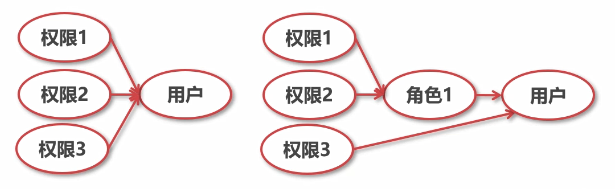
角色管理
【新增】根據(jù)角色設(shè)置用戶權(quán)限
#創(chuàng)建角色
creaye role 'role_1_wirte';
#角色即用戶
select user, host, authentication_string from mysql.user;
#給角色授權(quán)
grant insert, update, delete on test_db.* to 'role_1_wirte';
#給用戶賦予角色
grant 'role_1_wirte' on 'myuser';
#查詢用戶權(quán)限
show grant for 'myuser';
show grant for 'myuser' using 'role_1_wirte';
#用戶啟用角色(普通用戶登錄)
set role 'role_1_wirte';
#設(shè)置默認(rèn)角色(root用戶)
set default role all to 'myuser';
select * from mysql.default_roles;
select * from mysql.role_edges;
#撤銷角色
revoke insert, update, delete, select on test_db from 'role_1_wirte';
show grant for 'role_1_wirte';
show grant for 'myuser' using 'role_1_wirte';
2. 優(yōu)化器索引
隱藏索引(invisible index)
【新增】不會(huì)被優(yōu)化器使用,但仍然需要維護(hù)。
應(yīng)用場(chǎng)景:軟刪除,灰度發(fā)布。
#創(chuàng)建數(shù)據(jù)庫(kù)、表
create database test_db;
use test_db;
create table test1 (id int(11), parent_id int(11));
#創(chuàng)建普通索引和隱藏索引
create index id_idx on test1(id);
create index parent_id_idx on test1(parent_id) invisible;
#查看索引
show index from test1\G
#查詢優(yōu)化器
explain select * from test1 where id = 1;
explain select * from test1 where parent_id = 1;
#當(dāng)前會(huì)話測(cè)試隱藏索引
set session optimizer_switch="use_incisible_indexes=on";
select @@optimizer_switch\G
explain select * from test1 where parent_id = 1;
#設(shè)置隱藏索引可見(jiàn)于隱藏
alter table test1 alter index parent_id visible;
alter table test1 alter index parent_id invisible;
#注意:主鍵不能設(shè)置隱藏索引
降序索引(descending index)
之前:雖然可指定降序索引,實(shí)為升序索引。
之后:支持降序索引。
進(jìn)InnoDB存儲(chǔ)引擎支持降序索引,并且只支持BTree降序索引。
group by不在對(duì)結(jié)果隱式排序,需要使用order by進(jìn)行排序。
#Mysql5.7創(chuàng)建降序索引
create table test2 (read_num int(5), wirte_num int(5), index read_wirte_idx(read_num asc, wirte_num desc));
show create table test2\G
#Mysql8.0創(chuàng)建降序索引
create table test2 (read_num int(5), wirte_num int(5), index read_wirte_idx(read_num asc, wirte_num desc));
show create table test2\G
insert into test2 values(100, 2),(200, 4),(300, 6);
#Mysql5.7和Mysql8.0上分別測(cè)試
explain select * from test2 order by read_num, wirte_num desc;
explain select * from test2 order by read_num desc, wirte_num;
#Mysql5.7和Mysql8.0上分別測(cè)試group by
select count(*) as cnt, wirte_num from test2 group by wirte_num;
select count(*) as cnt, wirte_num from test2 group by wirte_num order by wirte_num;
函數(shù)索引
之前:虛擬列創(chuàng)建索引。
之后:支持索引中使用函數(shù)的值;支持降序索引;支持JSON數(shù)據(jù)索引;
原理:基于虛擬列功能實(shí)現(xiàn)。
#創(chuàng)建表和索引
create table test3 ( id varchar(10), login_code varchar(20));
create index login_code_func_idx on test3((upper(login_code)));
show create table test3\G
#測(cè)試函數(shù)索引
explain select * from test3 where upper(id);
explain select * from test3 where upper(login_code);
#JSON索引
create table test4 ( result_data json, index((cast(result_data->>'$.code' as char(3)))));
show create table test4\G
explain select * from test4 where cast(result_data->>'$.code' as char(3)) = '200';
#Mysql5.7虛擬列實(shí)現(xiàn)
create table test5 ( id varchar(10), login_code varchar(20));
alter table test5 add column username varchar(20) generated always as (upper(login_code));
insert into test5(id, login_code) values ('A001', 'alan');
create index login_code_idx on test3((upper(login_code)));
create index username_idx on test5(username);
explain select * from test5 where upper(login_code) = 'ALAN';
3. 通用表表達(dá)式
非遞歸
【新增】支持通用表達(dá)式,及WITH子句。
1 #派生語(yǔ)句
2 select a.* from (select 1) as a;
3 #通用表達(dá)式
4 with b as (select 1) select b.* from b;
遞歸
【新增】遞歸查詢使用recursive關(guān)鍵字。
#遞歸查詢組織上級(jí)組織機(jī)構(gòu)
create table org (id int(5), parent_id int(5), org_name varchar(20));
insert into org values (0, null, '總公司'),(1, 0, '研發(fā)部'),(2, 1, '開(kāi)發(fā)部');
with recursive org_paths(id, parent_id, org_name, paths) as (
select id, parent_id, org_name, cast(id as char(5)) as path from org where parent_id is null
union all
select o.id, o.parent_id, o.org_name, concat(op.paths, '/', o.id) from org o join org_paths op on op.id = o.parent_id
) select * from org_paths where org_name = '開(kāi)發(fā)部';
遞歸限制
【新增】遞歸查詢必須指定終止條件。
#Mysql8.0提供兩個(gè)參數(shù)避免用戶未指定終止條件
#① cte_max_recursion_depth
#默認(rèn)1000
show variables like 'cte_max%';
#測(cè)試-死循環(huán)
with recursive cte(n) as (select 1 union all select (n+1) as n from cte) select * from cte;
#當(dāng)前會(huì)話/持久化設(shè)置cte_max_recursion_depth
set session cte_max_recursion_depth=10;
set persist cte_max_recursion_depth=10;
#② max_execution_time
#默認(rèn)無(wú)限制,單位毫秒
show variables like 'max_execution_time%';
#當(dāng)前會(huì)話/持久化設(shè)置max_execution_time為1秒
set session max_execution_time=1000;
set persist max_execution_time=1000;
#使用遞歸生成100以內(nèi)的斐波那切數(shù)列
with recursive cte (a, b) as ( select 0, 1 union all select b, a + b from cte where b < 100 ) select a from cte;
4. 窗口函數(shù)
基本概念
【新增】窗口函數(shù)(window function),也成為分析函數(shù)。窗口函數(shù)和分組
聚合函數(shù)類似,但是每一行數(shù)據(jù)都會(huì)生成一個(gè)結(jié)果。
聚合窗口函數(shù):sum、avg、count、max、min......
create table sales (id int(5), item_type varchar(20), brand varchar(20), sale_value int(10));
insert into sales values (1, '手機(jī)', '華為', 3999),(2, '手機(jī)', '小米', 2999),(3, '手機(jī)', 'OPPO', 1999),(4, '電腦', '聯(lián)想', 7999),(5, '電腦', '戴爾', 5499),(6, '電腦', '華碩', 6899),(7, '耳機(jī)', '索尼', 120),(7, '耳機(jī)', '三星', 70);
#聚合函數(shù)-按商品分類統(tǒng)計(jì)總銷售額
select item_type, sum(sale_value) as total_value from sales group by item_type order by total_value desc;
#分析函數(shù)-按商品分類統(tǒng)計(jì)總銷售額
select id, item_type, brand, sum(sale_value) over (partition by item_type) as total_value from sales order by total_value desc;
專用窗口函數(shù)
create table test6(id int(2));
insert into test6 values (1),(3),(4),(4),(1),(6),(2),(7),(7),(8),(9),(0),(1
#增加序號(hào)列
select row_number() over (order by id) as row_num, id from test6;
#返回排序后的第一名
select id, first_value(id) over (order by id) as first_val from test6;
#返回排序后的最后一名
select id, last_value(id) over (order by id) as last_val from test6;
#返回每一行的后n名數(shù)據(jù)
select id, lead(id, 1) over (order by id) as lead_1 from test6;
select id, lead(id, 2) over (order by id) as lead_2 from test6;
#返回每一行的前n名數(shù)據(jù)
select id, lag(id, 1) over (order by id) as lag_1 from test6;
select id, lag(id, 2) over (order by id) as lag_2 from test6;
#查詢排序后每一行數(shù)據(jù)占據(jù)總排行榜的百分位(若為4,則為四個(gè)扇區(qū))
select id, ntile(3) over (order by id) as ntile_4 from test6;
窗口定義
【新增】定義:
window_function(expr) over (

     partition by xxx       #分組,類似于group by

     order by xxx           #排序

     frame_clause xxx   #限制窗口函數(shù),只在當(dāng)前分組有效

   )
#動(dòng)態(tài)統(tǒng)計(jì)分組內(nèi)的總和
select id, item_type, brand, sale_value, sum(sale_value) over (partition by item_type order by sale_value rows unbounded preceding) as dynamic_sum from sales order by item_type, sale_value;
#動(dòng)態(tài)統(tǒng)計(jì)分組內(nèi)的前一行和后一行和自己的平均值
select id, item_type, brand, sale_value, avg(sale_value) over (partition by item_type order by sale_value rows between 1 preceding and 1 following) as dynamic_sum from sales order by item_type, sale_value;
#動(dòng)態(tài)統(tǒng)計(jì)第一名和最后一名,簡(jiǎn)化窗口函數(shù)定義
select id, item_type, brand, sale_value, first_value(sale_value) over w as first_val, last_value(sale_value) over w as last_val from sales window w as (partition by item_type order by sale_value rows unbounded preceding) order by item_type, sale_value;
5. InnoDB增強(qiáng)
集成數(shù)據(jù)字典
【優(yōu)化】簡(jiǎn)化information_schema表,提高訪問(wèn)性能。
提供了序列化字典信息(SDI)以及ibd2sdi工具。
#執(zhí)行Shell
cd /var/lib/mysql
cd test_db/
ls
ibd2sdi test1.ibd > test1.sdi
#查看.sdi文件
cat test.sdi
innodb_read_only影響所有存儲(chǔ)引擎;
show global variables like 'innodb_read_only%';
原子DDL操作
【新增】支持原子DDL操作。
注意:與表相關(guān)的原子DDL只支持InnoDB存儲(chǔ)引擎。
一個(gè)原子DDL操作包括:更新數(shù)據(jù)字典表、存儲(chǔ)引擎層操作、在binlog(二進(jìn)制日志)中記錄DDL操作。
支持表相關(guān)的DDL:數(shù)據(jù)庫(kù)、表空間、表、索引的create、alter、drop,以及truncate table(刪除表中所有記錄);
支持其他的DDL:存儲(chǔ)過(guò)程、觸發(fā)器、視圖、UDF(自定義函數(shù))的create、alter、drop;
支持管理賬戶相關(guān)的DDL:用戶角色的create、alter、drop,以及適用的rename(重命名),還有g(shù)rant(授權(quán))和revoke(撤銷授權(quán))語(yǔ)句。
create table test7 (id int(5));
#Mysql5.7
drop table test7, test77;
show tables;
#Mysql8.0
drop table test7, test77;
show tables;
drop table if exists test7, test77;
show tables;
自增列持久化
之前:自增列計(jì)數(shù)器(auto_increment)的值只存儲(chǔ)在內(nèi)存中。
之后:自增列計(jì)數(shù)器的最大值寫入redo log,同時(shí)每次檢查點(diǎn)將其寫入引擎私有的系統(tǒng)表,從而解決了自增列字段值重復(fù)的bug。
create table test8(id int auto_increment primary key, val varchar(5));
insert into test8(val) values ('a'),('b'),('c');
delete from test8 where id = 3;
select * from test8;
#重啟Mysql,# systemstl restart mysqld
insert into test8(val) values ('d');
update test8 set id = 5 where val = 'a';
insert into test8(val) values ('e');

#查詢Mysql自增列設(shè)置
show variables like 'innodb_autoinc%';
Mysql8.0之前使用innodb_autoinc_lock_mode模式為1,及每次查詢都會(huì)加鎖,同時(shí)執(zhí)行2個(gè)insert語(yǔ)句每個(gè)10條,會(huì)保證每次插入數(shù)據(jù)的自增列的連續(xù)性,
Mysql8.0之后使用的模式為2,及使用交叉鎖,執(zhí)行相同的insert語(yǔ)句,不能保證自增列的連續(xù)性,但可以并發(fā)保存。
死鎖檢查控制
【新增】增量變量innodb_deadlock_detect,用于控制系統(tǒng)是否執(zhí)行InnoDB死鎖檢查。
高并發(fā)系統(tǒng)禁止死鎖檢查可能會(huì)提高性能。
show variables like 'innodb_deadlock_detect';
#關(guān)閉死鎖檢查
set global innodb_deadlock_detect=off;
#設(shè)置死鎖默認(rèn)等待時(shí)長(zhǎng),單位為秒,默認(rèn)50
show variables like 'innodb_lock_wait%';
set global innodb_lock_wait_timeout=5;
#模擬死鎖
create table test9(id int);
insert into test9 values(1);
#窗口1
#開(kāi)始事務(wù)
start transaction;
#開(kāi)啟共享鎖
select * from test9 where id = 1 for share;
#窗口2
#開(kāi)始事務(wù)
start transaction;
delete from test9 where id = 1;
#窗口1
delete from test9 where id = 1;
鎖定語(yǔ)句選項(xiàng)
【新增】針對(duì)于select * from t for share和select * from t for update增加nowait和skip locked行級(jí)鎖的限制。nowait表示不等待鎖,若想獲取被鎖住的數(shù)據(jù),則立即返回不可訪問(wèn)異常;skip locked表示跳過(guò)等待鎖,若想獲取被鎖住的數(shù)據(jù),則不返回該數(shù)據(jù)。
#窗口1
#開(kāi)啟是我
start transaction;
update test9 set id = 0 where id = 1;
#窗口2
#開(kāi)啟事務(wù)
start transaction;
select * from test9 where id = 1 for update;
#不等待鎖
select * from test9 where id = 1 for update nowait;
#跳過(guò)鎖
select * from test9 for update skip locked;
其他
刪除了之前版本的元數(shù)據(jù)文件,例如:.frm、.opt等;
默認(rèn)字符集由latin1變?yōu)閡tf8mb4;
將系統(tǒng)表(mysql數(shù)據(jù)庫(kù))和數(shù)據(jù)字典由之前的MyISAM存儲(chǔ)引擎改為InnoDB存儲(chǔ)引擎。支持快速DDL,alter table ... algorithm =instant;
InnoDB臨時(shí)表使用共享的臨時(shí)表空間ibtmp1;
新增靜態(tài)變量innodb_dedicated_server,會(huì)自動(dòng)配置InnoDB內(nèi)存參數(shù):innodb_buffer_pool_size、innodb_log_file_size大小。
新增表information_schema.innodb_cache_indexes顯示每個(gè)索引緩存在InnoDB緩沖池中的索引頁(yè)數(shù)。
新增視圖information_schema.innodb_tablespace_brief,為InnoDB表空間提供相關(guān)元數(shù)據(jù)信息。
支持alter tablespace ... rename to... ,重命名通用表空間。
默認(rèn)創(chuàng)建2個(gè)undo表空間,不在使用系統(tǒng)表空間。
支持innod_directories選項(xiàng)在服務(wù)器停止時(shí)將表空間文件移動(dòng)到新的位置。
InnoDB表空間加密特性支持重做日志和撤銷日志。
redo & undo 日志加密,增加以下兩個(gè)參數(shù)(innodb_undo_log_encrypt、innodb_undo_log_truncate),用于控制redo、undo日志的加密。innodb_undo_log_truncate參數(shù)在8.0.2版本默認(rèn)值由OFF變?yōu)镺N,默認(rèn)開(kāi)啟undo日志表空間自動(dòng)回收。innodb_undo_tablespaces參數(shù)在8.0.2版本默認(rèn)為2,當(dāng)一個(gè)undo表空間被回收時(shí),還有另外一個(gè)提供正常服務(wù)。innodb_max_undo_log_size參數(shù)定義了undo表空間回收的最大值,當(dāng)undo表空間超過(guò)這個(gè)值,該表空間被標(biāo)記為可回收。
在sql語(yǔ)法中增加SET_VAR語(yǔ)法,動(dòng)態(tài)調(diào)整部分參數(shù),有利于提升語(yǔ)句性能。
1 select /*+ set_var(sort_buffer_size = 16M) */ id  from test8 order by id;
2 insert /*+ set_var(foreign_key_checks=OFF) */ into test8 (id) values(1);
6. JSON增強(qiáng)
內(nèi)聯(lián)路徑操作符
之前:json_unquote(column -> path) 或json_unquote(json_extract(column, path))
之后:column ->> path
with cte(data) as (select json_object('id','01','name','zhangsan')) select json_unquote(data -> '$.name') from cte;
with cte(data) as (select json_object('id','01','name','zhangsan')) select json_unquote(json_extract(data, '$.name')) from cte;
#使用內(nèi)聯(lián)路徑操作符
with cte(data) as (select json_object('id','01','name','zhangsan')) select data ->> '$.name' from cte;
#區(qū)間查詢-查詢下標(biāo)為1的值
select json_extract('["a", "b", "c", "d", "e", "f"]', '$[1]');
#區(qū)間查詢-查詢下標(biāo)從0到3的值
select json_extract('["a", "b", "c", "d", "e", "f"]', '$[0 to 3]');
#區(qū)間查詢-查詢下標(biāo)從最后3位到最后一個(gè)位的值
select json_extract('["a", "b", "c", "d", "e", "f"]', '$[last - 2 to last]');
JSON聚合函數(shù)
【新增】Mysql8.0(Mysql5.7.22)增加了2個(gè)聚合函數(shù):json_arrayagg()用于生產(chǎn)json數(shù)組,json_objectagg()用于生產(chǎn)json對(duì)象。
create table goods(id int(5), attribute varchar(10), data_value varchar(10));
insert into goods values (1, 'color', 'red'),(1, 'size', '10'),(2, 'color', 'green'),(2, 'size', '12');
#生成json數(shù)組
select id, json_arrayagg(attribute) as attribute_json from goods group by id;
#生產(chǎn)json對(duì)象
select id, json_objectagg(attribute, data_value) as attribute_json from goods group by id;
#對(duì)重復(fù)值處理
insert into goods values (2, 'color', 'white');
select id, json_objectagg(attribute, data_value) as attribute_json from goods group by id;
JSON實(shí)用函數(shù)
【新增】Mysql8.0(Mysql5.7.22)增加了json_pretty()用于格式化json,增加了json_storage_size()用于查詢json占用空間大小;
【新增】json_storage_free()用于查詢更新列后釋放的存儲(chǔ)空間。
create table test10 (jdata json);
insert into test10 values ('{"id" : 1, "name" : "zhangsan", "age" : 18}');
#格式化json
select json_pretty(jdata) from test10;
#查詢json字段占用大小
select json_storage_size(jdata) from test10;
#更新json
update test10 set jdata=json_set(jdata, "$.id", 2, "$.name", "lisi", "$.age", 4);
select json_storage_size(jdata) from test10;
#查詢json字段更新后釋放的大小
select json_storage_free(jdata) from test10;
JSON合并函數(shù)
【新增】Mysql8.0(Mysql5.7.22)增加了json_merge_patch()和json_merge_preserve(),用于合并json數(shù)據(jù),區(qū)別在于前者重復(fù)屬性會(huì)使用最新的屬性值,后者會(huì)保留所有的屬性值。并且廢棄了json_merge()函數(shù)。
#會(huì)覆蓋舊值
select json_merge_patch('{"a" : 1 , "b" : 2}', '{"a" : 3, "c" : 4}');
#會(huì)保留所有值
select json_merge_preserve('{"a" : 1 , "b" : 2}', '{"a" : 3, "c" : 4}');
#json_merge()
select json_merge('{"a" : 1 , "b" : 2}', '{"a" : 3, "c" : 4}');
#查看警告
show warnings\G
JSON表函數(shù)
【新增】json_table()格式化json為關(guān)系表。
select
    *
from
    json_table (
        '[{"id" : "001"}, {"id" : "002"}, {"name" : "zhangsan"}, {"id" : "003"}, {"id" : [1, 2]}]',
        "$[*]" columns (
            row_num for ordinality,
            uid varchar (20) path "$.id" default '999' on error default '111' on empty,
            user_details json path "$.name" default '{}' on empty,
            is_exists_name int exists path "$.name"
        )
    ) as t;