
Android實(shí)現(xiàn)文字從右到左消除的效果
先看效果圖:
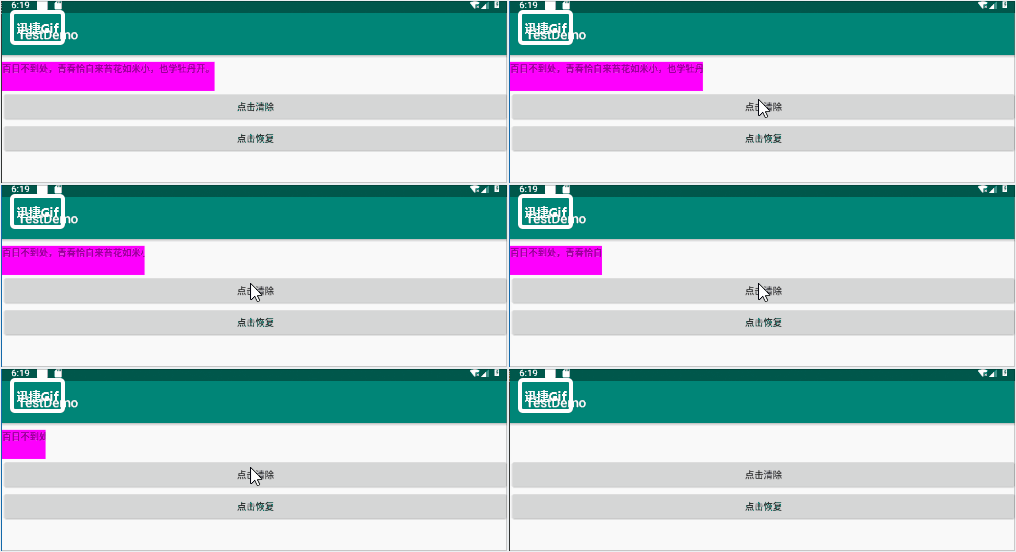
由于項(xiàng)目和語音識(shí)別相關(guān),有時(shí)候人在不經(jīng)意間交流的無效音頻會(huì)被識(shí)別出來,并展示于界面,為了美觀,客戶要求我們將這些無效的識(shí)別文本用一個(gè)從右到左的動(dòng)畫給清除,于是便有了下述的技術(shù)實(shí)現(xiàn)。
嗯,效果做完后發(fā)現(xiàn)原理及其簡(jiǎn)單,僅此記錄一下。
1、layout文件先在這兒貼一下
<LinearLayout xmlns:android="http://schemas.android.com/apk/res/android"android:layout_width="match_parent"android:layout_height="match_parent"android:orientation="vertical"><TextViewandroid:layout_width="wrap_content"android:layout_height="44dp"android:text="百日不到處,青春恰自來。苔花如米小,也學(xué)牡丹開。"android:ellipsize="none"android:singleLine="true"android:background="#ff00ff"android:layout_marginTop="10dp"android:id="@+id/tv_text"/><Buttonandroid:layout_width="match_parent"android:layout_height="wrap_content"android:id="@+id/btn_click"android:text="點(diǎn)擊清除"/><Buttonandroid:layout_width="match_parent"android:layout_height="wrap_content"android:id="@+id/btn_click1"android:text="點(diǎn)擊恢復(fù)"/></LinearLayout>
btn_click1是為了演示方便而設(shè)計(jì)的,可不計(jì)考慮。注意TextView中需要:
android:ellipsize="none"android:singleLine="true"
兩個(gè)屬性,該效果只針對(duì)一行的文本。
2、貼一下java代碼
public class MainActivity extends AppCompatActivity {private TextView textView;private Button btn_click;private Button btn_click1;private Handler mHandler;protected void onCreate(Bundle savedInstanceState) {super.onCreate(savedInstanceState);setContentView(R.layout.activity_main);mHandler = new Handler();textView = findViewById(R.id.tv_text);btn_click = findViewById(R.id.btn_click);btn_click1 = findViewById(R.id.btn_click1);btn_click.setOnClickListener(new View.OnClickListener() {public void onClick(View v) {showAsrAnim();}});btn_click1.setOnClickListener(new View.OnClickListener() {public void onClick(View v) {textView.setVisibility(View.VISIBLE);textView.setText("百日不到處,青春恰自來" +"苔花如米小,也學(xué)牡丹開。");}});}private void showAsrAnim() {mHandler.post(new Runnable() {public void run() {//在這里我們利用ValueAnimator.ofInt創(chuàng)建了一個(gè)值從textView的寬度到2的動(dòng)畫,動(dòng)畫時(shí)長(zhǎng)是400ms,然后讓動(dòng)畫開始//第一步:創(chuàng)建ValueAnimator實(shí)例ValueAnimator animator = ValueAnimator.ofInt(textView.getWidth(), 2);animator.setInterpolator(new LinearInterpolator());animator.setDuration(4000);//第二步:添加監(jiān)聽animator.addUpdateListener(new ValueAnimator.AnimatorUpdateListener() {public void onAnimationUpdate(ValueAnimator animation) {//獲取ValueAnimator在運(yùn)動(dòng)時(shí),當(dāng)前運(yùn)動(dòng)點(diǎn)的值int width = (int) animation.getAnimatedValue();changeLayout(width);if (width == 2) {textView.setText("");textView.setVisibility(View.INVISIBLE);ViewGroup.LayoutParams params = textView.getLayoutParams();params.width = ViewGroup.LayoutParams.WRAP_CONTENT;textView.setLayoutParams(params);}}});animator.start();}});}private void changeLayout(int width) {ViewGroup.LayoutParams params = textView.getLayoutParams();params.width = width;textView.setLayoutParams(params);}}}
代碼中已經(jīng)有了注釋,創(chuàng)建一個(gè)ValueAnimator實(shí)例,添加監(jiān)聽,通過運(yùn)動(dòng)改變TextView的寬度,當(dāng)達(dá)到最小寬度2dp時(shí)將文本設(shè)置為空且不可見,從而實(shí)現(xiàn)該功能。
評(píng)論
圖片
表情