
Vue這些修飾符幫我節(jié)省20%的開發(fā)時間
為了方便大家寫代碼,vue.js給大家提供了很多方便的修飾符,比如我們經(jīng)常用到的取消冒泡,阻止默認事件等等~
目錄
表單修飾符 事件修飾符 鼠標按鍵修飾符 鍵值修飾符 v-bind修飾符(實在不知道叫啥名字)
表單修飾符
.lazy
<div> ???<input type="text"?v-model="value"> ???<p>{{value}}p> div>
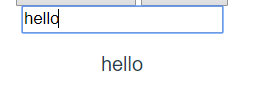
<div> ???<input type="text"?v-model.lazy="value"> ???<p>{{value}}p> div>
.trim
<input type="text"?v-model.trim="value">

.number


如果你先輸入字符串,那它就相當于沒有加.number
事件修飾符
<div @click="shout(2)"> ??<button @click="shout(1)">okbutton> div> //js shout(e){ ??console.log(e) } //1 //2
<div @click="shout(2)"> ??<button @click.stop="shout(1)">okbutton> div> //只輸出1
.prevent
<form v-on:submit.prevent="onSubmit">form>
.self
<div?class="blue"?@click.self="shout(2)"> ??<button @click="shout(1)">okbutton> div>

.once
//鍵盤按壞都只能shout一次 <button @click.once="shout(1)">okbutton>
.capture
默認的呢,是事件觸發(fā)是從目標開始往上冒泡。
當我們加了這個.capture以后呢,我們就反過來了,事件觸發(fā)從包含這個元素的頂層開始往下觸發(fā)。
<div @click.capture="shout(1)"> ??????obj1 ??????<div @click.capture="shout(2)"> ????????obj2 ????????<div @click="shout(3)"> ??????????obj3 ??????????<div @click="shout(4)"> ????????????obj4 ??????????div> ????????div> ??????div> ????div> ????// 1 2 4 3
.passive
<div v-on:scroll.passive="onScroll">...div>
.native
<My-component @click="shout(3)">My-component>
注意:使用.native修飾符來操作普通HTML標簽是會令事件失效的
鼠標按鈕修飾符
.left 左鍵點擊 .right 右鍵點擊 .middle 中鍵點擊
<button @click.right="shout(1)">okbutton>
鍵值修飾符
比如onkeyup,onkeydown啊
.keyCode
<input type="text"?@keyup.keyCode="shout(4)">
//普通鍵 .enter .tab .delete?//(捕獲“刪除”和“退格”鍵) .space .esc .up .down .left .right //系統(tǒng)修飾鍵 .ctrl .alt .meta .shift
// 可以使用 `v-on:keyup.f1` Vue.config.keyCodes.f1?=?112
當我們寫如下代碼的時候,我們會發(fā)現(xiàn)如果僅僅使用系統(tǒng)修飾鍵是無法觸發(fā)keyup事件的。
<input type="text"?@keyup.ctrl="shout(4)">
<input type="text"?@keyup.ctrl.67="shout(4)">
另,如果是鼠標事件,那就可以單獨使用系統(tǒng)修飾符。
<button @mouseover.ctrl="shout(1)">okbutton> ?<button @mousedown.ctrl="shout(1)">okbutton> ?<button @click.ctrl.67="shout(1)">okbutton>
.exact?(2.5新增)
<button type="text"?@click.ctrl.exact="shout(4)">okbutton>
<input type="text"?@keydown.enter.exact="shout('我被觸發(fā)了')">
v-bind修飾符
.sync(2.3.0+ 新增)
//父親組件 <comp?:myMessage="bar"?@update:myMessage="func">comp> //js func(e){ ?this.bar?=?e; } //子組件js func2(){ ??this.$emit('update:myMessage',params); }
//父組件 <comp?:myMessage.sync="bar">comp> //子組件 this.$emit('update:myMessage',params);
.prop
Property:節(jié)點對象在內(nèi)存中存儲的屬性,可以訪問和設(shè)置。 Attribute:節(jié)點對象的其中一個屬性(?property?),值是一個對象。 可以通過點訪問法 document.getElementById('xx').attributes 或者 document.getElementById('xx').getAttributes('xx')?讀取,通過 document.getElementById('xx').setAttribute('xx',value)?新增和修改。 在標簽里定義的所有屬性包括 HTML 屬性和自定義屬性都會在 attributes 對象里以鍵值對的方式存在。
//這里的id,value,style都屬于property //index屬于attribute //id、title等既是屬性,也是特性。修改屬性,其對應的特性會發(fā)生改變;修改特性,屬性也會改變 <input id="uid"?title="title1"?value="1"?:index="index"> //input.index === undefined //input.attributes.index === this.index
為了
通過自定義屬性存儲變量,避免暴露數(shù)據(jù) 防止污染 HTML 結(jié)構(gòu)
<input id="uid"?title="title1"?value="1"?:index.prop="index"> //input.index === this.index //input.attributes.index === undefined
.camel
<svg?:viewBox="viewBox">svg>
<svg viewbox="viewBox">svg>
如果我們使用.camel修飾符,那它就會被渲染為駝峰名。
另,如果你使用字符串模版,則沒有這些限制。
new?Vue({ ??template:?'' })
最后
相關(guān)文章
last
轉(zhuǎn)發(fā)文章并關(guān)注公眾號:前端開發(fā)博客,回復 1024,領(lǐng)取前端進階資料
回復「Vue」獲取 Vue 精選文章 回復「面試」獲取 面試 精選文章 回復「JS」獲取 JavaScript 精選文章 回復「CSS」獲取 CSS 精選文章
—————END—————
喜歡本文的朋友,歡迎關(guān)注公眾號?程序員哆啦A夢,收看更多精彩內(nèi)容
點個[在看],是對小達最大的支持!

如果覺得這篇文章還不錯,來個【分享、點贊、在看】三連吧,讓更多的人也看到~

評論
圖片
表情